Need image numbers for left pane Control Panel & 3D pop-up backgrounds

optical10

New member
Local time
2:13 PM
Messages
6
Need image numbers for left pane Control Panel & 3D pop-up backgrounds

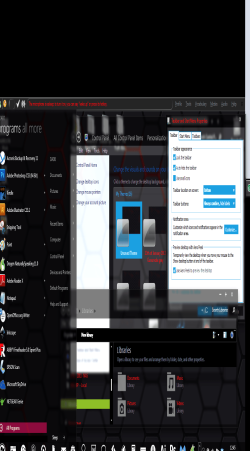
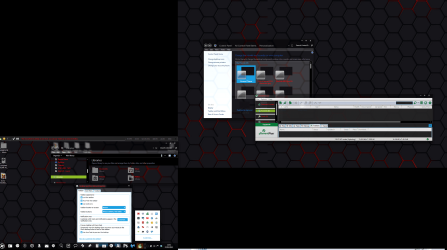
I'm cutting my teeth on my first mod of a aero.msstyles dark theme, WP7 vs Mango by deviant art user ~oliver182 who no longer supports it , which as you can see is 95% finished on my Windows 7 64-bit screen grab below.
I just need help identifying image numbers which I cannot see listed in Wikipedia, namely the ones in my thread title which you can see have a white background with dark fonts text which I obviously need to invert to match them with the rest of the dark background/lighter font text theme.

Can anybody point me to a resource or URL that lists/can help me identify every aero.msstyles image number?

I'm currently using the trial version of "Restorator 2007" but apart from opening every single image in the image and stream folder I can't see how I can pinpoint the correct image for the incorrect white background/dark fonts for the "left pane Control Panel & 3D pop-up backgrounds and fonts etc"?

Any help much appreciated
 

Attachments
  • WP7 vs Mango 3D properties id screen grab 20 percent reduced.png
    WP7 vs Mango 3D properties id screen grab 20 percent reduced.png
    333.7 KB · Views: 14
  • WP7 vs Mango 3D properties id screen grab.png
    WP7 vs Mango 3D properties id screen grab.png
    212 KB · Views: 9

My Computer My Computer

At a glance

windows 7 64bit
OS
windows 7 64bit
I'm cutting my teeth on my first mod of a aero.msstyles dark theme, WP7 vs Mango by deviant art user ~oliver182 who no longer supports it , which as you can see is 95% finished on my Windows 7 64-bit screen grab below.
I just need help identifying image numbers which I cannot see listed in Wikipedia, namely the ones in my thread title which you can see have a white background with dark fonts text which I obviously need to invert to match them with the rest of the dark background/lighter font text theme.

Can anybody point me to a resource or URL that lists/can help me identify every aero.msstyles image number?

I'm currently using the trial version of "Restorator 2007" but apart from opening every single image in the image and stream folder I can't see how I can pinpoint the correct image for the incorrect white background/dark fonts for the "left pane Control Panel & 3D pop-up backgrounds and fonts etc"?

Any help much appreciated

The left Control panel image is bitmap #s 632 and 633 in shell32.dll in both C:\Windows\System32 and C:\Windows\SysWOW64.

Post a link to the theme and I can look at it and give you the image #s for the popup on the taskbar.

Most custom theme on deviant art and other places are made with Ave's Windows7 Style Builder and it changes the image #s so it's hard to have a list of #s, the only way I know how to change test color is with Windows Style Builder.

Jerry
 

My Computer My Computer

At a glance

Win 7 Pro x64 / Win 10 ProIntel(R) Core(TM) i7-3630QM CPU @ 2.40GHz12 GB(1) Intel(R) HD Graphics 4000 (2) NVIDIA GeFo...
Computer type
Laptop
Computer Manufacturer/Model Number
Sager NP9170
OS
Win 7 Pro x64 / Win 10 Pro
CPU
Intel(R) Core(TM) i7-3630QM CPU @ 2.40GHz
Motherboard
CLEVO P170EM
Memory
12 GB
Graphics Card(s)
(1) Intel(R) HD Graphics 4000 (2) NVIDIA GeForce GTX 675M
Sound Card
(1) Realtek High Definition Audio (2) Intel(R) Display Aud
Monitor(s) Displays
17.3
Screen Resolution
1920x1080
Hard Drives
(1) Samsung 860 EVO 500GB(OS) (1) Samsung 860 EVO 500GB(Data)
Keyboard
Backlite
Antivirus
MSE, Malwarebytes Pro
Browser
Firefox
Other Info
DESKTOP: Custom-built.
OS: Win 10 Pro x64.
CASE: Rosewill R5.
CPU: Intel I5 4670K CPU @ 3.40GHz.
CPU COOLER: Cool Master Hyper 212 EVO.
MOTHERBOARD: Asus Z87-A.
MEMORY: Kingston HyperX 2x4 GB.
GPU: Nvidia Geforce 650 TI.
PSU: Corsair TX750.
DRIVES: (1) Samsung 840 120 GB SSD (2) Western Digital blue 500 GB 7200 RPM.
I'm cutting my teeth on my first mod of a aero.msstyles dark theme, WP7 vs Mango by deviant art user ~oliver182 who no longer supports it , which as you can see is 95% finished on my Windows 7 64-bit screen grab below.
I just need help identifying image numbers which I cannot see listed in Wikipedia, namely the ones in my thread title which you can see have a white background with dark fonts text which I obviously need to invert to match them with the rest of the dark background/lighter font text theme.

Can anybody point me to a resource or URL that lists/can help me identify every aero.msstyles image number?

I'm currently using the trial version of "Restorator 2007" but apart from opening every single image in the image and stream folder I can't see how I can pinpoint the correct image for the incorrect white background/dark fonts for the "left pane Control Panel & 3D pop-up backgrounds and fonts etc"?

Any help much appreciated


The left Control panel image is bitmap #s 632 and 633 in shell32.dll in both C:\Windows\System32 and C:\Windows\SysWOW64.

Post a link to the theme and I can look at it and give you the image #s for the popup on the taskbar.

Most custom theme on deviant art and other places are made with Ave's Windows7 Style Builder and it changes the image #s so it's hard to have a list of #s, the only way I know how to change test color is with Windows Style Builder.

Jerry

thanks Jerry, here is the URL link: WP7 Mango update by ~oliver182 on deviantART

I'm all over the Windows style builder URL as we speak
 

My Computer My Computer

At a glance

windows 7 64bit
OS
windows 7 64bit
Popup
1192, 1230 these only do the bottom of the popups


properties
899, 900

Properties Tabs
891, 892, 893, 894, 895, 896, 897, 898

All the other is fill colors and need Windows Styles Builder to change.

Jerry
 

My Computer My Computer

At a glance

Win 7 Pro x64 / Win 10 ProIntel(R) Core(TM) i7-3630QM CPU @ 2.40GHz12 GB(1) Intel(R) HD Graphics 4000 (2) NVIDIA GeFo...
Computer type
Laptop
Computer Manufacturer/Model Number
Sager NP9170
OS
Win 7 Pro x64 / Win 10 Pro
CPU
Intel(R) Core(TM) i7-3630QM CPU @ 2.40GHz
Motherboard
CLEVO P170EM
Memory
12 GB
Graphics Card(s)
(1) Intel(R) HD Graphics 4000 (2) NVIDIA GeForce GTX 675M
Sound Card
(1) Realtek High Definition Audio (2) Intel(R) Display Aud
Monitor(s) Displays
17.3
Screen Resolution
1920x1080
Hard Drives
(1) Samsung 860 EVO 500GB(OS) (1) Samsung 860 EVO 500GB(Data)
Keyboard
Backlite
Antivirus
MSE, Malwarebytes Pro
Browser
Firefox
Other Info
DESKTOP: Custom-built.
OS: Win 10 Pro x64.
CASE: Rosewill R5.
CPU: Intel I5 4670K CPU @ 3.40GHz.
CPU COOLER: Cool Master Hyper 212 EVO.
MOTHERBOARD: Asus Z87-A.
MEMORY: Kingston HyperX 2x4 GB.
GPU: Nvidia Geforce 650 TI.
PSU: Corsair TX750.
DRIVES: (1) Samsung 840 120 GB SSD (2) Western Digital blue 500 GB 7200 RPM.
Popup
1192, 1230 these only do the bottom of the popups


properties
899, 900

Properties Tabs
891, 892, 893, 894, 895, 896, 897, 898

All the other is fill colors and need Windows Styles Builder to change.

Jerry

Many thanks, I'm so grateful :D

I've found some dark image files 200 x 551 for the control panel left pane images, 632 633, from your help to replace my current shell32.dll. Just wondering if I use Restorator 2007 to replace and save can I replace those two files live whilst STILL using the shell32.dll in System32 & sysWOW64?
 

My Computer My Computer

At a glance

windows 7 64bit
OS
windows 7 64bit
I've found some dark image files 200 x 551 for the control panel left pane images, 632 633, from your help to replace my current shell32.dll. Just wondering if I use Restorator 2007 to replace and save can I replace those two files live whilst STILL using the shell32.dll in System32 & sysWOW64?

Make a http://www.sevenforums.com/tutorials/697-system-restore-point-create.html first.

Yes use Restorator to do it, get copies of the .dlls and put the in folders(don't mix them up) on your desktop to edit.

To properly change a system file you need to take ownership give yourself permission and rename the old file and then copy in the new ones, look at Post #6 of this thread will tell you how to do it http://www.sevenforums.com/customization/179502-basic-networking-information.html#post1525656
Then restart the PC.
Jerry
 

My Computer My Computer

At a glance

Win 7 Pro x64 / Win 10 ProIntel(R) Core(TM) i7-3630QM CPU @ 2.40GHz12 GB(1) Intel(R) HD Graphics 4000 (2) NVIDIA GeFo...
Computer type
Laptop
Computer Manufacturer/Model Number
Sager NP9170
OS
Win 7 Pro x64 / Win 10 Pro
CPU
Intel(R) Core(TM) i7-3630QM CPU @ 2.40GHz
Motherboard
CLEVO P170EM
Memory
12 GB
Graphics Card(s)
(1) Intel(R) HD Graphics 4000 (2) NVIDIA GeForce GTX 675M
Sound Card
(1) Realtek High Definition Audio (2) Intel(R) Display Aud
Monitor(s) Displays
17.3
Screen Resolution
1920x1080
Hard Drives
(1) Samsung 860 EVO 500GB(OS) (1) Samsung 860 EVO 500GB(Data)
Keyboard
Backlite
Antivirus
MSE, Malwarebytes Pro
Browser
Firefox
Other Info
DESKTOP: Custom-built.
OS: Win 10 Pro x64.
CASE: Rosewill R5.
CPU: Intel I5 4670K CPU @ 3.40GHz.
CPU COOLER: Cool Master Hyper 212 EVO.
MOTHERBOARD: Asus Z87-A.
MEMORY: Kingston HyperX 2x4 GB.
GPU: Nvidia Geforce 650 TI.
PSU: Corsair TX750.
DRIVES: (1) Samsung 840 120 GB SSD (2) Western Digital blue 500 GB 7200 RPM.
Back
Top