firefox 19.0 wrecks youtube watching??

msongs

New member
Member
VIP
Local time
12:54 AM
Messages
184
Location
riverside california USA
installed the latest FF and now its seems all the vids on youtube have freeze problems. anyone else have this happening? I have superfast internet, lots of memory, clear caches etc. maybe I should go back to the previous ff version.
 

My Computer My Computer

At a glance

windows 7 64bitintel i7 9206gb ddr3ge force 9400
Computer Manufacturer/Model Number
build it myself
OS
windows 7 64bit
CPU
intel i7 920
Motherboard
gigabyte ex58 ds4
Memory
6gb ddr3
Graphics Card(s)
ge force 9400
Sound Card
onboard hd
Monitor(s) Displays
samsung 215tw
Screen Resolution
1680 x 1050
Hard Drives
wd caviar black 1 TB/620GB wd caviar blue
PSU
enermax 625 w modu82
Case
antec 182
Cooling
cooler master v8, 3 case fans
Keyboard
cheapo ps/2
Mouse
cheapo usb
Internet Speed
5 MB
installed the latest FF and now its seems all the vids on youtube have freeze problems. anyone else have this happening? I have superfast internet, lots of memory, clear caches etc. maybe I should go back to the previous ff version.

You can try a previous version of Flash too. Or, various previous versions. I have Firefox 19, but I'm still using 11.1.102.63 because newer versions give me one problem or another. I even hate the newer versions that work just fine for me because of certain things that they changed that would take a couple of paragraphs to try and explain.

Someone might say something to me like, "you should upgrade because older versions of flash are not secure anymore". To that, I have just one thing to say: I don't have any problems whatsoever. I'll keep using 11.1.102.63 until I am forced to upgrade due to sites like YouTube having minimum requirements that exclude this older version of Flash. This is because all Flash-related elements work flawless for me, so I don't want to fix what isn't broken.
 

My Computer My Computer

Computer type
PC/Desktop
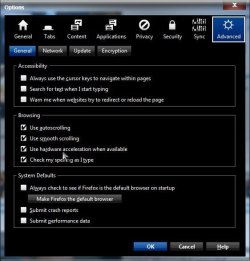
As a test, you might try disabling hardware acceleration if it is on to see if it helps.

Open FF> Tools> Options> General> Advanced> Untick Use hardware acceleration when available> OK

Hardware.jpg

A Guy
 

My Computer My Computer

At a glance

Windows 10 Home x64INTEL Core i5-750 Quad-Core 3.37GHzHyperX Fury Black Series 8GB (2 x 4GB) 1866MhzEVGA GeForce GTX 750 Superclocked 1GB 128-Bit...
Computer type
PC/Desktop
OS
Windows 10 Home x64
CPU
INTEL Core i5-750 Quad-Core 3.37GHz
Motherboard
ASUS P7P55D
Memory
HyperX Fury Black Series 8GB (2 x 4GB) 1866Mhz
Graphics Card(s)
EVGA GeForce GTX 750 Superclocked 1GB 128-Bit GDDR5
Monitor(s) Displays
LG 32MA68HY 32" IPS
Screen Resolution
1920 x 1080
Hard Drives
Samsung 840 Evo 120GB, SEAGATE 500GB Barracuda® 7200.12, SATA 3 Gb/s, 7200 RPM, 16MB cache
PSU
ANTEC TruePower New TP-550, 80 PLUS, 550W
Case
ANTEC Three Hundred Illusion
Cooling
COOLER MASTER Hyper 212 Plus, 4 x 120mm 1 x 140mm Noctua's
Internet Speed
85 + Mbps
Antivirus
Avast
Browser
Vivaldi
tried chrome and same issue....

so must not be FF after all. I check my flash and it is version 10.3.

However it seems this problem has just started today. freeze was rare and now today it is too common!

I will try your solutions and see if that makes any changes though.
 

My Computer My Computer

At a glance

windows 7 64bitintel i7 9206gb ddr3ge force 9400
Computer Manufacturer/Model Number
build it myself
OS
windows 7 64bit
CPU
intel i7 920
Motherboard
gigabyte ex58 ds4
Memory
6gb ddr3
Graphics Card(s)
ge force 9400
Sound Card
onboard hd
Monitor(s) Displays
samsung 215tw
Screen Resolution
1680 x 1050
Hard Drives
wd caviar black 1 TB/620GB wd caviar blue
PSU
enermax 625 w modu82
Case
antec 182
Cooling
cooler master v8, 3 case fans
Keyboard
cheapo ps/2
Mouse
cheapo usb
Internet Speed
5 MB
so must not be FF after all. I check my flash and it is version 10.3.

However it seems this problem has just started today. freeze was rare and now today it is too common!

I will try your solutions and see if that makes any changes though.

Oh, then maybe a newer version of Flash is the answer.
 

My Computer My Computer

Computer type
PC/Desktop
i'd like to tag in here because I'd like a stable firefox - nightly x64 has become too buggy of late, and I realize that is 'norm' for the program but it spoiled me in the past.

at any rate... is there a chance there are two plugins at work? I'm thinking of the common issue with chrome on a system that also has IE-dujour - chrome will activate/enable both flash players, resulting in halty/jerky etc bad vid.

it would be fun to manifest the problem you are having: stop the vid and immediately run a speedtest in another tab.
 

My Computer My Computer

At a glance

Windows XP Pro SP3, Windows 7 Pro 32-bit, Win...Pentium 4 3.2GHz, Pentium 4 3.4GHz 64bit, Atom,4GB matched, 1GB, 2.5GB, 4.0 GBGeforce 8400 GS and others
Computer Manufacturer/Model Number
HP DC7600, HP DC7600[2], HP DC7100, Samsung NC10
OS
Windows XP Pro SP3, Windows 7 Pro 32-bit, Windows 7 Ultimate 64bit, Windows XP Home SP3
CPU
Pentium 4 3.2GHz, Pentium 4 3.4GHz 64bit, Atom,
Motherboard
Dunno
Memory
4GB matched, 1GB, 2.5GB, 4.0 GB
Graphics Card(s)
Geforce 8400 GS and others
Sound Card
RealteK ALC260 and others
Monitor(s) Displays
Asus HD
Screen Resolution
1920x1080
Hard Drives
WD Caviar 640gb SATA
Cooling
We Be Cool
Back
Top