
Solved "Unidentified network" - No internet access (LAN)

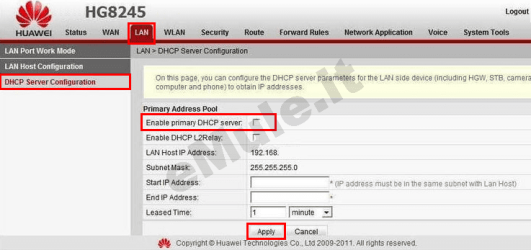
here is an image of the dhcp
 

Attachments

  • huaweiHG8245_DHCP.png
    huaweiHG8245_DHCP.png
    55.9 KB · Views: 14

My Computer My Computer

Computer type
PC/Desktop
Computer Manufacturer/Model Number
Dell / Lenovo g550
OS
Windows 7 Ultimate 64-bit
CPU
Intel Core 2 Duo E6550 @2.33GHz
Motherboard
foxconn g33m02
Memory
4GB DDR"
Graphics Card(s)
NVIDIA GeForce 8600 GS
Hard Drives
HDD 1 = 150GB
HDD 2 = 1.5TB
PSU
450W
Cooling
Stock fan
Internet Speed
12Mb
Antivirus
AVG Internet Security
When I try that, it says "Network" instead of "Unidentified network", but still, there's no internet access...

Edit: Hmm, I don't seem to have those options, only "LAN host configuration".
 

My Computer My Computer

Computer type
PC/Desktop
OS
Windows 7 Ultimate x64
when you put in them configurations does the montior on the botton right is there a triangle there?
 

My Computer My Computer

Computer type
PC/Desktop
Computer Manufacturer/Model Number
Dell / Lenovo g550
OS
Windows 7 Ultimate 64-bit
CPU
Intel Core 2 Duo E6550 @2.33GHz
Motherboard
foxconn g33m02
Memory
4GB DDR"
Graphics Card(s)
NVIDIA GeForce 8600 GS
Hard Drives
HDD 1 = 150GB
HDD 2 = 1.5TB
PSU
450W
Cooling
Stock fan
Internet Speed
12Mb
Antivirus
AVG Internet Security
everything seems fine there. Try to connect manually when wired.

First: Right click the monitor on the bottom right and open network and sharing center
2nd: click on the change adapter settings
3rd: Right click local area connection and go to properties
4th: look for ipv4 and click on it and go down to properties and open it
5th: then click the use the following ip address:
ip = 192.168.100.5
subnet = 255.255.255.0
default gateway = 192.168.100.1
see if this works
The OP claims to have done this - albeit with a typo of 191... and 100.4
Maybe the OP typo'd when setting the static IP too :-)

...I tried manually setting the IP (191.168.100.4 - as specified in the router for "Workstation"), subnet mask (255.255.255.0 or 255.255.0.0) and the default gateway (the address I use to connect to the router in the web browser), but it doesn't work, and I get an error.....
 

My Computer My Computer

Computer type
Laptop
Computer Manufacturer/Model Number
Employer provided Dell Latitude
OS
W7 Pro SP1 64bit
CPU
i7
Memory
8GB
Graphics Card(s)
Intel HD Graphics
Hard Drives
crappy SSD
Antivirus
Employer mandated Symantec Endpoint Protection
Browser
Pale Moon 64bit, IE11 64bit & Chrome 64bit
when you put in them configurations does the montior on the botton right is there a triangle there?

Yes.

Edit: I entered exactly as benjy206 posted. :)
 

My Computer My Computer

Computer type
PC/Desktop
OS
Windows 7 Ultimate x64
Yes he tried a 191. In my opinion it maybe just a configuration error in the router or on the adapters.

HelloThere could you post a screen shot of the adapter settings window
 

My Computer My Computer

Computer type
PC/Desktop
Computer Manufacturer/Model Number
Dell / Lenovo g550
OS
Windows 7 Ultimate 64-bit
CPU
Intel Core 2 Duo E6550 @2.33GHz
Motherboard
foxconn g33m02
Memory
4GB DDR"
Graphics Card(s)
NVIDIA GeForce 8600 GS
Hard Drives
HDD 1 = 150GB
HDD 2 = 1.5TB
PSU
450W
Cooling
Stock fan
Internet Speed
12Mb
Antivirus
AVG Internet Security
...Edit: Hmm, I don't seem to have those options, only "LAN host configuration".

This seems really important that you don't have or are not allowed to see those options. Might be time to call the ISP.


I need some rest. You have plenty of helpers.

later...
 

My Computer My Computer

Computer type
Laptop
Computer Manufacturer/Model Number
Employer provided Dell Latitude
OS
W7 Pro SP1 64bit
CPU
i7
Memory
8GB
Graphics Card(s)
Intel HD Graphics
Hard Drives
crappy SSD
Antivirus
Employer mandated Symantec Endpoint Protection
Browser
Pale Moon 64bit, IE11 64bit & Chrome 64bit
First what Lan port is the desktop connected 1, 2, 3 or 4 on the huawei?
 

My Computer My Computer

Computer Manufacturer/Model Number
HP Compaq 6715B
OS
Windows 7 Ultimate x64
CPU
AMD turion 64x2 TL-64 2.2Ghz
Motherboard
HC030
Memory
Sodimm DDR2 4GB
Graphics Card(s)
ATI Radeon 1250 128MB IGP
Hard Drives
Fujitsu Siemens 500GB sata 3.0 Gb/s
Yes he tried a 191. In my opinion it maybe just a configuration error in the router or on the adapters.

HelloThere could you post a screen shot of the adapter settings window
This?:
70843819.png

It's currently on automatic settings.

...Edit: Hmm, I don't seem to have those options, only "LAN host configuration".

This seems really important that you don't have or are not allowed to see those options. Might be time to call the ISP.


I need some rest. You have plenty of helpers.

later...
Thanks for taking your time to help, I really appreciate it. :D

First what Lan port is the desktop connected 1, 2, 3 or 4 on the huawei?
It's currently in LAN2. The cable in LAN1 goes out to a connection in the wall.
 

My Computer My Computer

Computer type
PC/Desktop
OS
Windows 7 Ultimate x64
Yes it seems a bit strange that you dont have some configuration in your router and that its not working when wired also. Just to make sure do one more test if you could (ping 192.168.100.1) if this replys then you will have to talk to isp. If that does not reply get back to me
 

My Computer My Computer

Computer type
PC/Desktop
Computer Manufacturer/Model Number
Dell / Lenovo g550
OS
Windows 7 Ultimate 64-bit
CPU
Intel Core 2 Duo E6550 @2.33GHz
Motherboard
foxconn g33m02
Memory
4GB DDR"
Graphics Card(s)
NVIDIA GeForce 8600 GS
Hard Drives
HDD 1 = 150GB
HDD 2 = 1.5TB
PSU
450W
Cooling
Stock fan
Internet Speed
12Mb
Antivirus
AVG Internet Security
Ok that doesnt seem to bad so it looks like a cable problem? That's if it was hard wired. Its not even getting to your router so it looks like a cable problem thats all. I could be wrong.
 

My Computer My Computer

Computer type
PC/Desktop
Computer Manufacturer/Model Number
Dell / Lenovo g550
OS
Windows 7 Ultimate 64-bit
CPU
Intel Core 2 Duo E6550 @2.33GHz
Motherboard
foxconn g33m02
Memory
4GB DDR"
Graphics Card(s)
NVIDIA GeForce 8600 GS
Hard Drives
HDD 1 = 150GB
HDD 2 = 1.5TB
PSU
450W
Cooling
Stock fan
Internet Speed
12Mb
Antivirus
AVG Internet Security
1. Navigate to the ip address of the huawei login with credentials.

2. Go to Lan

3. Click on Lan work port mode place a checkmark against against Lan2 this will put the Lan port in gateway mode not bridge mode click apply.

4. Click on Lan host configuration enter 192.168.100.1 for the ip address and 255.255.255.0 for subnet mask click apply.

5. Click on DHCP server configuration:

Enable primary DHCP server place a checkmark against it.
Enable DHCP relay no checkmark.
Lan host IP address: 192.168.100.1
Subnet mask: 255.255.255.0
Start IP address: 192.168.100.2
End IP address: 192.168.100. 50

Lease time: Set to 1 day or 3 days default.

Remove checkmark from secondary DHCP server click apply.

Re-boot ONT router and computer.

Check for internet connectivity.
 

My Computer My Computer

Computer Manufacturer/Model Number
HP Compaq 6715B
OS
Windows 7 Ultimate x64
CPU
AMD turion 64x2 TL-64 2.2Ghz
Motherboard
HC030
Memory
Sodimm DDR2 4GB
Graphics Card(s)
ATI Radeon 1250 128MB IGP
Hard Drives
Fujitsu Siemens 500GB sata 3.0 Gb/s
1. Navigate to the ip address of the huawei login with credentials.

2. Go to Lan

3. Click on Lan work port mode place a checkmark against against Lan2 this will put the Lan port in gateway mode not bridge mode click apply.

4. Click on Lan host configuration enter 192.168.100.1 for the ip address and 255.255.255.0 for subnet mask click apply.

5. Click on DHCP server configuration:

Enable primary DHCP server place a checkmark against it.
Enable DHCP relay no checkmark.
Lan host IP address: 192.168.100.1
Subnet mask: 255.255.255.0
Start IP address: 192.168.100.2
End IP address: 192.168.100. 50

Lease time: Set to 1 day or 3 days default.

Remove checkmark from secondary DHCP server click apply.

Re-boot ONT router and computer.

Check for internet connectivity.

The thing is he doesn't have these settings for whatever reason. So he can't check these. I'm finished work now so won't be replying for a while so hopefully it's only a cable and he can get it sorted. The reason I don't think it's the DHCP is because he can connect wireless anyways goodluck with it :)

Sorry I couldn't of been more help I will check on this post later.
 

My Computer My Computer

Computer type
PC/Desktop
Computer Manufacturer/Model Number
Dell / Lenovo g550
OS
Windows 7 Ultimate 64-bit
CPU
Intel Core 2 Duo E6550 @2.33GHz
Motherboard
foxconn g33m02
Memory
4GB DDR"
Graphics Card(s)
NVIDIA GeForce 8600 GS
Hard Drives
HDD 1 = 150GB
HDD 2 = 1.5TB
PSU
450W
Cooling
Stock fan
Internet Speed
12Mb
Antivirus
AVG Internet Security
I just changed cable again, and it magically started working. lolwat? I rebooted, and it works still.

I thank you all for your time, it means a lot that people are out there to help! Will rep you all!

@TheCyberMan: I will try your suggestion if it decides to stop working again. :)
 

My Computer My Computer

Computer type
PC/Desktop
OS
Windows 7 Ultimate x64
The thing is he doesn't have these settings for whatever reason. So he can't check these. I'm finished work now so won't be replying for a while so hopefully it's only a cable and he can get it sorted. The reason I don't think it's the DHCP is because he can connect wireless anyways goodluck with it

Yes i noticed that but just want to check that anyway, it may be the Lan port mode if no checkmark against the Lan port it will be in bridge mode which is the wrong mode i believe it should be in gateway mode.

Understand about the settings if custom firmware has been installed that maybe a reason why those settings are not showing.

@TheCyberMan: I will try your suggestion if it decides to stop working again.

No problem that is fine.
 

My Computer My Computer

Computer Manufacturer/Model Number
HP Compaq 6715B
OS
Windows 7 Ultimate x64
CPU
AMD turion 64x2 TL-64 2.2Ghz
Motherboard
HC030
Memory
Sodimm DDR2 4GB
Graphics Card(s)
ATI Radeon 1250 128MB IGP
Hard Drives
Fujitsu Siemens 500GB sata 3.0 Gb/s
No bother at all good we could all help.

Yes CyberMan, true you never really know when you can't see all the settings yourself. You just have to try one thing at a time. I would Rep you but you seem to be the last person i gave rep to so i can't sorry.

EDIT: Could you just marked this as solved please :)
 

My Computer My Computer

Computer type
PC/Desktop
Computer Manufacturer/Model Number
Dell / Lenovo g550
OS
Windows 7 Ultimate 64-bit
CPU
Intel Core 2 Duo E6550 @2.33GHz
Motherboard
foxconn g33m02
Memory
4GB DDR"
Graphics Card(s)
NVIDIA GeForce 8600 GS
Hard Drives
HDD 1 = 150GB
HDD 2 = 1.5TB
PSU
450W
Cooling
Stock fan
Internet Speed
12Mb
Antivirus
AVG Internet Security
Yes CyberMan, true you never really know when you can't see all the settings yourself. You just have to try one thing at a time. I would Rep you but you seem to be the last person i gave rep to so i can't sorry.

No worries.
 

My Computer My Computer

Computer Manufacturer/Model Number
HP Compaq 6715B
OS
Windows 7 Ultimate x64
CPU
AMD turion 64x2 TL-64 2.2Ghz
Motherboard
HC030
Memory
Sodimm DDR2 4GB
Graphics Card(s)
ATI Radeon 1250 128MB IGP
Hard Drives
Fujitsu Siemens 500GB sata 3.0 Gb/s
Solved

after an hour of reading forums, I found the problem by myself.
my router had 7 computers limitation, I extend it to 10 and it solved !!!
hope I helped someone.
 

My Computer My Computer

Computer type
PC/Desktop
Computer Manufacturer/Model Number
unknown
OS
Windows 10 64 bit
CPU
unknown
Motherboard
unknown
Memory
unknown
Graphics Card(s)
unknown
Hard Drives
unknown
Antivirus
defender
Browser
Edge
Back
Top