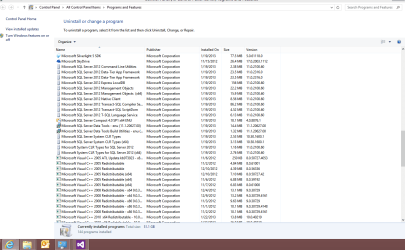
I've read that I can't just uninstall all these stupid (microsoft visual c++)s without braking something. Is there ANY way to get them out of my programs and features list? or at lest someone at microsoft I can strangle until I can get them to make an update that moves this junk to the windows updates list.
Different software that you've installed on your computer (or that was installed by the computer manufacturer) uses different versions of Visual C++ to run correctly. So you are correct when you say that removing a version could cause something to not work any more. And you're not alone in your thoughts that Microsoft should be able to do something to consolidate all of these versions into one download or a service pack. This Microsoft forum thread has a few comments from users who feel the way you do.
I have 14 versions on my computer. The largest is 5.28MB. All of them together add up to 17.628MB. Personally speaking, I really can't get overly concerned or obsess over the fact that these C++ versions are hogging space or otherwise cluttering up my computer's Programs and Features list. But if you really want to vent to Microsoft, you could apply to join the Windows Feedback Program
I'm more obsessing over the fact that these C++ versions are hogging space in my programs and features list. Why can't it be only listed one time and all the different versions be listed under windows updates.
Likely because they weren't installed though windows update, they weren't updates. They were installed though program installs and thus show up there instead. The install and uninstall process is likely different to.
My Computer
At a glance
Windows 10 Education 64 bitAMD Phenom II X4 980 Black Edition Deneb 3.7GHz8GB 4GBx2 Kingston PC10600 DDR3 1333 MemoryZotac NVIDIA Geforce GT640 2 Gig DDR3 PCIe
Computer type
PC/Desktop
Computer Manufacturer/Model Number
Home Built
OS
Windows 10 Education 64 bit
CPU
AMD Phenom II X4 980 Black Edition Deneb 3.7GHz
Motherboard
Asus M4N68T-M V2 µATX Motherboard
Memory
8GB 4GBx2 Kingston PC10600 DDR3 1333 Memory
Graphics Card(s)
Zotac NVIDIA Geforce GT640 2 Gig DDR3 PCIe
Sound Card
VIA VT1708s High Definition Audio 8-channel Onboard
I feel your pain, I just ignore it. I remember the first day I installed windows 8. It was so clean not a single entry. Now I have something like 130 programs installed that show up in programs and features list.
Attachments
page1.PNG
34 KB
· Views: 26
My Computer
At a glance
Windows 8 64 bit PROAMD Phenom X4 9100e2GB X2 DDR2Sapphire HD 6850
Computer type
PC/Desktop
Computer Manufacturer/Model Number
Gateway / Slight Modifications
OS
Windows 8 64 bit PRO
CPU
AMD Phenom X4 9100e
Motherboard
Gateway RS780
Memory
2GB X2 DDR2
Graphics Card(s)
Sapphire HD 6850
Sound Card
Integrated
Monitor(s) Displays
Gateway 19" + Dell 19"
Screen Resolution
1440X900 sometimes 2880 by 900
Hard Drives
WD 80GB
WD 640GB
WD 1,000GB
PSU
Antec BP 550watts
Case
Antec 300
Cooling
Stock Cooling
Keyboard
Saitek Eclipse II
Mouse
Gigabyte GM-M6800
Internet Speed
D: 30Mbps U:4Mbps
Antivirus
Avast version 8
Browser
Internet Explorer ver 10 64 bit
Other Info
This is my work computer.
I have another laptop running Windows 7 64 bit.
Another PC running Windows 8 64 bit pro.
Total of 3
If you want to gripe at somebody, direct your gripe at the software manufacturer. They're the ones that need the old run-time libraries. If their software was up to date, you wouldn't need all the versions.
My Computer
At a glance
Windows 7 Pro-x64i7-2600 3.4GHz - 3.8GHz Turbo8Gb - 2x4GB, Muskin 991770 PC3-1333Integrated Intel HD 2000
Computer type
PC/Desktop
Computer Manufacturer/Model Number
Built 2/11/2011
OS
Windows 7 Pro-x64
CPU
i7-2600 3.4GHz - 3.8GHz Turbo
Motherboard
Intel DH67BL-B3
Memory
8Gb - 2x4GB, Muskin 991770 PC3-1333
Graphics Card(s)
Integrated Intel HD 2000
Sound Card
Integrated Intel 10.1 HD, RealTek ALC892
Monitor(s) Displays
Asus LCD VH222H, Haier HL24XSL2a
Screen Resolution
1920x1080, 1920x1080
Hard Drives
Crucial SSD C300-128Gb,
Western Digital WD5002AALX - 500Gb,
Western Digital WD7501AALS - 750Gb
PSU
Seasonic 650W 80+ Gold Modular
Case
Rosewill Defender
Cooling
Stock CPU, Four 120mm case fans, PCH fan added
Keyboard
Logitech EX100 Y-RBH94 Wireless
Mouse
Logitech EX100 M-RCE95 Wireless
Internet Speed
3.0/1.5 Mbs
Antivirus
Microsoft Security Essentials
Browser
Microsoft Internet Explorer 11
Other Info
Antec Veris Premier-Multimedia IR Station,
Cyber Accoustics-3602 Speakers,
AFT XM-5U Card Reader,
Hauppauge TV-HVR-2250,
Sony LX300 USB Turntable
If you want to gripe at somebody, direct your gripe at the software manufacturer. They're the ones that need the old run-time libraries. If their software was up to date, you wouldn't need all the versions.
I think you could just use CCleaner to delete the item from your programs list without actually removing the program itself..? Haven't tried before but I know it's an option to delete entries from the list...
If you want to gripe at somebody, direct your gripe at the software manufacturer. They're the ones that need the old run-time libraries. If their software was up to date, you wouldn't need all the versions.