Can't extend my W7 Partition(I Looked at the tutorial)

Status
Not open for further replies.
Thanks, i allmost got it to work :/

First, succesfully backed up the D:, then i moved it next to C, now i could Resize E:. So, i selected move/resize, selected all the unallocated space, then hitted apply, but it said that programs on E: is currently in use, close them or reboot computer and let wizard finish resizing. I selected reboot, but when it started loading partition wizard, it loaded it succesfully, but somekind of light blue screen flashes, and then it continues loading windows. :mad: Argh. It didn't do anything, still unresized. Now, i first closed all programs that were on E: partition from task manager (i looked up every one of the programs folder), but still it said same error message.

What now? :cry:

Regards, gheeD.

Since you are modifying all three partitions, you have to restart it and run it in boot-time mode.

As for the light-blue screen, that might be a BSOD, although I don't know if you can get a BSOD at boot-time.
 

My Computer My Computer

At a glance

Windows 7 Home Premium x64Intel(R) Core(TM)2 Duo CPU T5450 @ 1.66GHz4 GB Texas Instruments PCIxx12 Integrated Fla...Mobile Intel(R) 965 Express Chipset Family
Computer Manufacturer/Model Number
Toshiba Satellite M205-S4806
OS
Windows 7 Home Premium x64
CPU
Intel(R) Core(TM)2 Duo CPU T5450 @ 1.66GHz
Memory
4 GB Texas Instruments PCIxx12 Integrated FlashMedia Control
Graphics Card(s)
Mobile Intel(R) 965 Express Chipset Family
Sound Card
Realtek HD Audio
Monitor(s) Displays
Laptop Monitor
Screen Resolution
1280x800
Hard Drives
200 GB Hitachi HTS542520K9SA00 ATA Device
Keyboard
Laptop Keyboard
Mouse
Synaptics Touchpad
Internet Speed
Broadband, up to 1.2 MB/s
Ill post a pic of what it says: Sry for late reply.

I havent tried running partition wizard on D: partition yet, gonna do that tomorrow.

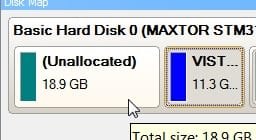
I can see this one but, the small window is covering most of the hard drive information.
But, Looks like there is nothing left to do!

The first 1.00 MB of unallocated space is so small I wouldn't even worry about it. If it's really buggin you expand your first 100 MB partition into the 1 MB unallocated space.

What's the first partition (100 MB)? Diagnostics?

From what I can see from this partially viewable attachment and info you've posted in this thread, I will write what I think you have on your Hard Drive 1:

1.00 MB Unallocated space, this is not being used by anything, it's too small to worry about.

100 MB Hidden partition, likely Diagnostics.

C: Win 7, 50 GB total, 9.32 GB free space (9.32 GB free space in C: drive just not used yet) I wouldn't make this any smaller or you'll start having OS problems.

D: XP, 49 GB total, 2.85 GB free space (2.85 GB free space in D: drive just not used yet) I wouldn't make this any smaller or you'll start having OS problems. It already has a small amount of free space.

E: Games, 368 GB total, 194 GB free space (194 GB free space in E: drive just not used yet)

There is no 180 GB of "Unallocated" space. "Free" space is un-used space in the partition.

In the 'Partition Wizard' attachment, the outline in pink is the total partition (or Drive), the yellow shaded area is the part of the partition that is being used (OS, Programs, Files and Folders), the white shaded part is that partitions "Free" space, not being used at this time, 'available for use'.

From what I can see of your first attachment (it's very small and when I click on it I can only see the header, no information) the "unallocated" space has been moved to the E: drive.

So, looks like your good to go!

If you have any other questions or want to try something else on you Disk1, just reply to this thread.

Glad you got it set the way you wanted it.

Dave
 

My Computer My Computer

At a glance

Windows 7 Ult x64 - SP1/ Windows 8 Pro x64Intel Core i5-3570K 4.6GHz8GB (2X4GB) DDR3 1600 Corsair Vengeance CL8 1.5vSapphire HD 7770 Vapor-X OC 1GB DDR5
Computer type
PC/Desktop
Computer Manufacturer/Model Number
76~2.0
OS
Windows 7 Ult x64 - SP1/ Windows 8 Pro x64
CPU
Intel Core i5-3570K 4.6GHz
Motherboard
Gigabyte GA-Z77X UD3H, f18
Memory
8GB (2X4GB) DDR3 1600 Corsair Vengeance CL8 1.5v
Graphics Card(s)
Sapphire HD 7770 Vapor-X OC 1GB DDR5
Sound Card
Onboard VIA VT2021
Monitor(s) Displays
22" LCD Dell
Screen Resolution
1680x1050
Hard Drives
Samsung 840Pro 128GB SSD,
Seagate Barracuda 500GB SATA2 7200rpm 32MB cache, Seagate Barracuda 1TB SATA2 7200rpm 32MB cache,
PSU
Corsair HX650W
Case
Cooler Master Storm Scout
Cooling
Corsair H80 2x12cm Noctua NF P12 , 2x14cm case fans
Keyboard
Logitech Wave
Mouse
CM Sentinel
Internet Speed
Dismal
Antivirus
Avast
Browser
Opera Next
Other Info
Haswell laptop: HP Envy 17t-j, i7-4700MQ, GeForce 740M 2GB DDR3, 17.3" Full HD 1920x1080, 16GB RAM, Samsung 840 Pro 128GB, 1TB Hitachi 7200 HDD,
Desktop: eSATA ports,
External eSATA Seagate 500GB SATA2 7200rpm,
External WD USB 500GB
That screen might be confusing. Partition wizard shows what the hard drive looks like after partition, so actually 186gb of that 190gb is unallocated space, that i am trying to apply, as the screen shows. the 100mb was somesort of Win 7 recovery etc. space, that it had to make when installing windows (dunno why, but it asked to do so, i didn't deny)

Heres another pic, after loading partition wizard up, no changes made. Gonna try starting Partition wizard from D: now.

Edit: Installing Partition wizard on D: didnt help. Same error.
 

Attachments

  • argh_partition2.png
    argh_partition2.png
    67 KB · Views: 140
Last edited:

My Computer My Computer

At a glance

Windows XP 32-bit, Windows 7 64-bit
OS
Windows XP 32-bit, Windows 7 64-bit
That screen might be confusing. Partition wizard shows what the hard drive looks like after partition, so actually 186gb of that 190gb is unallocated space, that i am trying to apply, as the screen shows. the 100mb was somesort of Win 7 recovery etc. space, that it had to make when installing windows (dunno why, but it asked to do so, i didn't deny)

Heres another pic, after loading partition wizard up, no changes made. Gonna try starting Partition wizard from D: now.

Edit: Installing Partition wizard on D: didnt help. Same error.

Try it from D: drive. Looks like what you setup in the previous screen shot should have worked. If your doing multiple partition changes try an extra re-boot after each change, make sure it's not doing anything, be patient wait for 5-10 minutes after re-boot to ensure it's not actually completing the requested partition changes.
Drag E: drive left into the unallocated space, or use the adjustment boxes, be sure all programs are closed then click 'apply', wait untill the window appears and select 'close programs and re-start'. If it seems to hang ot not be doing anything, wait for 5-10 minutes, just to be sure.

Let me know if it works or doesen't.

Dave
 

My Computer My Computer

At a glance

Windows 7 Ult x64 - SP1/ Windows 8 Pro x64Intel Core i5-3570K 4.6GHz8GB (2X4GB) DDR3 1600 Corsair Vengeance CL8 1.5vSapphire HD 7770 Vapor-X OC 1GB DDR5
Computer type
PC/Desktop
Computer Manufacturer/Model Number
76~2.0
OS
Windows 7 Ult x64 - SP1/ Windows 8 Pro x64
CPU
Intel Core i5-3570K 4.6GHz
Motherboard
Gigabyte GA-Z77X UD3H, f18
Memory
8GB (2X4GB) DDR3 1600 Corsair Vengeance CL8 1.5v
Graphics Card(s)
Sapphire HD 7770 Vapor-X OC 1GB DDR5
Sound Card
Onboard VIA VT2021
Monitor(s) Displays
22" LCD Dell
Screen Resolution
1680x1050
Hard Drives
Samsung 840Pro 128GB SSD,
Seagate Barracuda 500GB SATA2 7200rpm 32MB cache, Seagate Barracuda 1TB SATA2 7200rpm 32MB cache,
PSU
Corsair HX650W
Case
Cooler Master Storm Scout
Cooling
Corsair H80 2x12cm Noctua NF P12 , 2x14cm case fans
Keyboard
Logitech Wave
Mouse
CM Sentinel
Internet Speed
Dismal
Antivirus
Avast
Browser
Opera Next
Other Info
Haswell laptop: HP Envy 17t-j, i7-4700MQ, GeForce 740M 2GB DDR3, 17.3" Full HD 1920x1080, 16GB RAM, Samsung 840 Pro 128GB, 1TB Hitachi 7200 HDD,
Desktop: eSATA ports,
External eSATA Seagate 500GB SATA2 7200rpm,
External WD USB 500GB
Wierd. It worked now! I dunno why last time it didnt work when i tried on D:. But, thanks for your advice and support, i couldn't have done it without you. I actually didnt even have to reboot for it to do the resize, now it just started working after pressing apply, without giving error message about the E: being in use. Well, i finally got it to work, so no more problems.

Thanks, Gheed.
 

My Computer My Computer

At a glance

Windows XP 32-bit, Windows 7 64-bit
OS
Windows XP 32-bit, Windows 7 64-bit
Wierd. It worked now! I dunno why last time it didnt work when i tried on D:. But, thanks for your advice and support, i couldn't have done it without you. I actually didnt even have to reboot for it to do the resize, now it just started working after pressing apply, without giving error message about the E: being in use. Well, i finally got it to work, so no more problems.

Thanks, Gheed.

Your welcome,
Glad you got everything the way you wanted it!

Dave
 

My Computer My Computer

At a glance

Windows 7 Ult x64 - SP1/ Windows 8 Pro x64Intel Core i5-3570K 4.6GHz8GB (2X4GB) DDR3 1600 Corsair Vengeance CL8 1.5vSapphire HD 7770 Vapor-X OC 1GB DDR5
Computer type
PC/Desktop
Computer Manufacturer/Model Number
76~2.0
OS
Windows 7 Ult x64 - SP1/ Windows 8 Pro x64
CPU
Intel Core i5-3570K 4.6GHz
Motherboard
Gigabyte GA-Z77X UD3H, f18
Memory
8GB (2X4GB) DDR3 1600 Corsair Vengeance CL8 1.5v
Graphics Card(s)
Sapphire HD 7770 Vapor-X OC 1GB DDR5
Sound Card
Onboard VIA VT2021
Monitor(s) Displays
22" LCD Dell
Screen Resolution
1680x1050
Hard Drives
Samsung 840Pro 128GB SSD,
Seagate Barracuda 500GB SATA2 7200rpm 32MB cache, Seagate Barracuda 1TB SATA2 7200rpm 32MB cache,
PSU
Corsair HX650W
Case
Cooler Master Storm Scout
Cooling
Corsair H80 2x12cm Noctua NF P12 , 2x14cm case fans
Keyboard
Logitech Wave
Mouse
CM Sentinel
Internet Speed
Dismal
Antivirus
Avast
Browser
Opera Next
Other Info
Haswell laptop: HP Envy 17t-j, i7-4700MQ, GeForce 740M 2GB DDR3, 17.3" Full HD 1920x1080, 16GB RAM, Samsung 840 Pro 128GB, 1TB Hitachi 7200 HDD,
Desktop: eSATA ports,
External eSATA Seagate 500GB SATA2 7200rpm,
External WD USB 500GB
I was having almost the exact same problem above, but with the heads up about partition wizard and all the people here it's now exactly how I wanted it. just wanted to let you know you're helping someone else, Thanks to ALL of you. derekimo
 

My Computer My Computer

At a glance

Win 10 Pro x64Intel I5-2500K @3.3GHz16GB G.Skill Ripjaws X (4x4GB)EVGA GeForce 750 Ti SC 2GB
Computer type
PC/Desktop
Computer Manufacturer/Model Number
Self Built
OS
Win 10 Pro x64
CPU
Intel I5-2500K @3.3GHz
Motherboard
Asrock P67 Extreme4
Memory
16GB G.Skill Ripjaws X (4x4GB)
Graphics Card(s)
EVGA GeForce 750 Ti SC 2GB
Sound Card
ASUS Xonar DG 5.1 Channels 24-bit 96KHz PCI Interface Sound
Monitor(s) Displays
auria eq2367
Screen Resolution
1920 x 1080
Hard Drives
250GB Samsung 850 EVO SSD
1TB WD Blue
1TB Hitachi
PSU
SeaSonic X 650W 80 Plus Gold
Case
Corsair Obsidian 750D
Cooling
Corsair H60, Three 140mm case fans
Keyboard
Logitech Wireless Keyboard K520
Mouse
Logitech Wireless Mouse M310
Internet Speed
Wave Broadband ~ 100 dn 5 up
Antivirus
Windows Defender, Malwarebytes Premium
Browser
Edge, IE11, Chrome
Other Info
Laptop specs: HP g7-1365dx /
CPU: AMD A6-3420M APU with Radeon(tm) HD Graphics /
RAM: Crucial 8Gb (2x4Gb) /
SSD: Crucial M4-CT128M4SSD2 ATA Device/ FW 000F /
GFX: AMD Radeon HD 6520G /
OS: Windows 10 Pro x64
Hello to all,
So I have 30Gigs on my W7 Partition, which was fine for a while, but I want to use W7 more extensively now so I wanted to extend my partition. I have looked at the tutorial posted in the tutorials, and its as simple as right-clicking the partition and clicking 'Extend Volume'. Well the problem is that no matter what I try, this option is always grayed out. Whenever I right-click any of my partitions, all of the options are available except for 'Extend Volume'. Am I missing a step here, or am I not doing something right?

View attachment 3362

Thanks
I use Acronis Disk Suite. It works PERFECT in Win 7 x86. I do not use x64.
but with Acronis you can move extend, shrink any partition that has a Name / letter attached.
Acronis also have a very well written tutorial attached.
I use all the time and never a problem never an ERROR.
 
I agree with snuffy. I always use it as well
 

My Computer My Computer

At a glance

Win 8 Release candidate 8400[email protected]4 gigsNvidia 9600M
Computer Manufacturer/Model Number
HP Pavillion dv-7 1005 Tx
OS
Win 8 Release candidate 8400
CPU
[email protected]
Memory
4 gigs
Graphics Card(s)
Nvidia 9600M
Sound Card
HD built-in
Monitor(s) Displays
17" Wxga
Screen Resolution
1440x900
Cooling
none
Internet Speed
45Mb down 5Mb up
The initial problem was that you had no unallocated space in that drive to extend your partition into, that's why it was greyed out.
You would have needed to consolidate any free space in one of the adjoining partitions and then "Shrink" that partition to get space to extend your Win7 partition into. You can't get unused space from formatted partitions for extending another partition using the Windows tools...you have to have some available (unallocated) first.

Sorry about your probs with Paragon...I am kinda cautious about Paragon too after an issue I had with it in Vista.

I have Paragon Partition Pro 10 here and it will not let me move free space to the other side of an active partitition. I use Easeus Partition Manager for that, although you do need to be prepared to lose your data if it involves moving an OS at all.

Just the other night, I shrank my C: XP partition then tried to move the free space to the right of the D: Win7 partition to make an E: Recovery Image partition. In the process of doing this I lost my boot, even though XP holds the boot and wasn't moved at all. I ran Startup Repair off my Win7 disk but it still wouldn't start, so I used the old fallback command line bootrec.exe /fixmbr and then /fixboot which saved the day. Now I just leave the Recovery Image partition in the middle (why not?)...
 
Great tool for moving system files blocking shrinkage

There is a great tool (free 30 day trial) to move system files that are way over to the right on Disk Defrag map (I use Auslogics), thus blocking safest shrinkage through Disk Management. Use PerfectDisk10 trial, right click on drive, and choose System files to consolidate all system files. This should free up the extra space to allow shrinkage.

This operation has always worked for me, whereas using any shrinking utility besides the built-in DIsk Management is risky at best.
 
I was having almost the exact same problem above, but with the heads up about partition wizard and all the people here it's now exactly how I wanted it. just wanted to let you know you're helping someone else, Thanks to ALL of you. derekimo

Glad to hear you got some use from the information.

Your welcome :)
 
Last edited:

My Computer My Computer

At a glance

Windows 7 Ult x64 - SP1/ Windows 8 Pro x64Intel Core i5-3570K 4.6GHz8GB (2X4GB) DDR3 1600 Corsair Vengeance CL8 1.5vSapphire HD 7770 Vapor-X OC 1GB DDR5
Computer type
PC/Desktop
Computer Manufacturer/Model Number
76~2.0
OS
Windows 7 Ult x64 - SP1/ Windows 8 Pro x64
CPU
Intel Core i5-3570K 4.6GHz
Motherboard
Gigabyte GA-Z77X UD3H, f18
Memory
8GB (2X4GB) DDR3 1600 Corsair Vengeance CL8 1.5v
Graphics Card(s)
Sapphire HD 7770 Vapor-X OC 1GB DDR5
Sound Card
Onboard VIA VT2021
Monitor(s) Displays
22" LCD Dell
Screen Resolution
1680x1050
Hard Drives
Samsung 840Pro 128GB SSD,
Seagate Barracuda 500GB SATA2 7200rpm 32MB cache, Seagate Barracuda 1TB SATA2 7200rpm 32MB cache,
PSU
Corsair HX650W
Case
Cooler Master Storm Scout
Cooling
Corsair H80 2x12cm Noctua NF P12 , 2x14cm case fans
Keyboard
Logitech Wave
Mouse
CM Sentinel
Internet Speed
Dismal
Antivirus
Avast
Browser
Opera Next
Other Info
Haswell laptop: HP Envy 17t-j, i7-4700MQ, GeForce 740M 2GB DDR3, 17.3" Full HD 1920x1080, 16GB RAM, Samsung 840 Pro 128GB, 1TB Hitachi 7200 HDD,
Desktop: eSATA ports,
External eSATA Seagate 500GB SATA2 7200rpm,
External WD USB 500GB
did anybody try to use Acronis Disk Directory 10 in W7 x64?
 

My Computer My Computer

At a glance

Windows 7 x64Intel(R) Core(TM)2 Duo CPU T7100 @ 1.80GHz (2...3GB 667MhzATI MOBILITY RADEON HD 2600
Computer Manufacturer/Model Number
Toshiba
OS
Windows 7 x64
CPU
Intel(R) Core(TM)2 Duo CPU T7100 @ 1.80GHz (2 CPUs)
Motherboard
Toshiba A200
Memory
3GB 667Mhz
Graphics Card(s)
ATI MOBILITY RADEON HD 2600
Sound Card
Realtek HD Audio output
Monitor(s) Displays
LG Philips LP154WX4-TLD2
Hard Drives
WD Scorpio Black 320 GB 7200rpm
did anybody try to use Acronis Disk Directory 10 in W7 x64?

There are a number of posts where people have tried.

If you want a free one , you might look at MT Partition Wizard.


I have Paragon Partition Pro 10 here and it will not let me move free space to the other side of an active partitition...

:confused:

I have no trouble moving anything with it.

TO move Unallocated space to the lower address spaces with Paragon:

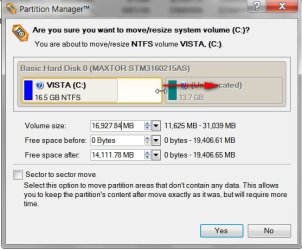
1. Extend the partition to include unallocated space on the right - ( drag it to the right)- click Yes and leave it in the virtual queue.

PARAGON-MOVE-1-2009-09-20_061211.jpg

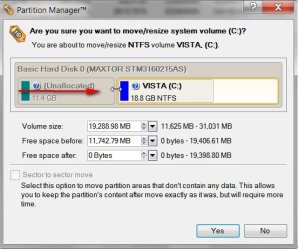
2. Shrink it from the left (drag it from the left) - click Yes, Click Apply.

PARAGON-MOVE-2-2009-09-20_061351.jpg

Result the Unallocated space is on the left of the system partition:

PARAGON-MOVE -3-2009-09-20_061449.jpg
 

My Computers My Computers

  • At a glance

    7 X64i5 84002x8gb 3200mhz
    Computer type
    PC/Desktop
    OS
    7 X64
    CPU
    i5 8400
    Motherboard
    gigabyte b365m ds3h
    Memory
    2x8gb 3200mhz
    Hard Drives
    various
    PSU
    pure power 11 400w cm
    Case
    Coolermaster
    Cooling
    cryorig m9i
  • At a glance

    7x64g54008gb ddr4 2400
    Computer type
    PC/Desktop
    OS
    7x64
    CPU
    g5400
    Motherboard
    ga b365m ds3h
    Memory
    8gb ddr4 2400
    PSU
    xfx pro 450w
Here's what I used on mine, since I also use linux. I used Diskpart from my ubuntu 9.04 disc. worked wonders. Of course when you reboot, it'll want to check your hard disk for consistency.
 

My Computer My Computer

At a glance

Ubuntu 10.10 64bit, Windows 7 Ultimate 64bitAMD Phenom II X6 1090TOCZ 4GBGTX 275 OC
OS
Ubuntu 10.10 64bit, Windows 7 Ultimate 64bit
CPU
AMD Phenom II X6 1090T
Motherboard
ASUS M3A79-T Deluxe
Memory
OCZ 4GB
Graphics Card(s)
GTX 275 OC
Sound Card
SoundMax
Monitor(s) Displays
Asus 23"
PSU
CM RS-650
Case
CM Storm Scout
Cooling
CM GeminII S
Status
Not open for further replies.
Back
Top