
Windows7 cant install on GTP partition & Device Driver install missing

mfrowen

New member
Member
Local time
2:18 AM
Messages
34
Windows7 cant install on GTP partition & Device Driver install missing

Hi,

I recently have posted aboutan issue with recovering from a partition whichwent fine.

So I went through to do a clean re-install of windows 7 with a boot USB to get rid of factory bloatware and when I do. it gets to the option to write to a partition it sayscan't write to a GPT partition. Which is not really a big issue as plenty of tuts to.change to MBR which I have read.

But also if it dont make it to the option to write to a partition I get an error where windows says cannot find the device drivers installation. I have spent a day trying to find a way to get drivers on there.And I dont want to convert to MBR and still get the same driver error.

I have wrote the bo0t USB using different programs and still get either of those errors.

Windows 7 DVD - USB does not work either so pretty stuck atm

Computer Specs:
Asus X401A
As X401A - 1AWX/USB3.0
Intel Celeron B820 dual core processor 1.7ghz
HDD 320GB 5400R SATA
4gb ddr3 1333 of ram
No optical drive...
 

My Computer My Computer

Computer type
PC/Desktop
Computer Manufacturer/Model Number
Custom Build
OS
Windows 7
CPU
AMD Vishera FX 4.2Ghz OC to 4.5Ghz Stock Cooler
Motherboard
ASUS M5A97 AM3+, DDR3, ATX
Memory
8Gb Dual Channel DDR3 1333Mhz
Graphics Card(s)
2Gb AMD Radeon 7850 PCI-e 3.0 VGA Card
Monitor(s) Displays
24Inch SAMSUNG SyncMaster S24B150
Screen Resolution
1920x1080
Hard Drives
1Tb Seagate Barracuda 7200Rpm SATA3
320Gb Western Digital 5200Rpm SATA 3
PSU
XFX 550W P1-550S 80+ Bronze
Case
AvP Cobra Mid Tower ATX Case
Cooling
x2 120mm Aero Cool Shark Case Cooling Fans
It is UEFI firmware.

And yes not long found that post. Am doing the steps right now.

This is me being paranoid but... My windows image back-up is on a partitioned back up drive? I am scared that if the setup comes with an error. My recovery partition and windows image back up will be gone and no way of recovering. As I dont have a big enough external drive to fit a back-up on there?
 

My Computer My Computer

Computer type
PC/Desktop
Computer Manufacturer/Model Number
Custom Build
OS
Windows 7
CPU
AMD Vishera FX 4.2Ghz OC to 4.5Ghz Stock Cooler
Motherboard
ASUS M5A97 AM3+, DDR3, ATX
Memory
8Gb Dual Channel DDR3 1333Mhz
Graphics Card(s)
2Gb AMD Radeon 7850 PCI-e 3.0 VGA Card
Monitor(s) Displays
24Inch SAMSUNG SyncMaster S24B150
Screen Resolution
1920x1080
Hard Drives
1Tb Seagate Barracuda 7200Rpm SATA3
320Gb Western Digital 5200Rpm SATA 3
PSU
XFX 550W P1-550S 80+ Bronze
Case
AvP Cobra Mid Tower ATX Case
Cooling
x2 120mm Aero Cool Shark Case Cooling Fans
After going through the tuts and loading up set-up. It is STILL saying no drivers etc found....

Is there a way I can make a directory in the usb for my drivers?
 

My Computer My Computer

Computer type
PC/Desktop
Computer Manufacturer/Model Number
Custom Build
OS
Windows 7
CPU
AMD Vishera FX 4.2Ghz OC to 4.5Ghz Stock Cooler
Motherboard
ASUS M5A97 AM3+, DDR3, ATX
Memory
8Gb Dual Channel DDR3 1333Mhz
Graphics Card(s)
2Gb AMD Radeon 7850 PCI-e 3.0 VGA Card
Monitor(s) Displays
24Inch SAMSUNG SyncMaster S24B150
Screen Resolution
1920x1080
Hard Drives
1Tb Seagate Barracuda 7200Rpm SATA3
320Gb Western Digital 5200Rpm SATA 3
PSU
XFX 550W P1-550S 80+ Bronze
Case
AvP Cobra Mid Tower ATX Case
Cooling
x2 120mm Aero Cool Shark Case Cooling Fans
Hi mrfrowen

Are you using the USB drive on the 2.0 USB port or the 3.0 USB port ?

To add the 3.0 USB drivers to your installation you would need to use DISM which comes with Windows AIK . To download WINDOWS AIK click on the " DOWNLOAD " button below and install it.


Download


run these commands

Code:
 dism /mount-wim /wimfile:boot.wim /index:2 /mountdir:mount

 dism /image:mount /add-driver /driver:usb3\iusb3hub.inf 

 dism /image:mount /add-driver /driver:usb3\iusb3xhc.inf

  dism /unmount-wim /mountdir:mount /commit
 

My Computer My Computer

Computer Manufacturer/Model Number
Custom Built
OS
Windows 7 Ultimate 32-Bit & Windows 7 Ultimate 64-Bit
CPU
Intel Core i7 CPU 950 @ 3.07GHz
Motherboard
ASUS P6T DELUXE V2
Memory
OCZ 6GB (3 x 2GB) 240-Pin DDR3 SDRAM DDR3 1600 OCZ3X1600R2
Graphics Card(s)
ATI Radeon HD 5700 Series
Sound Card
OnBoard
Hard Drives
WD6400AACS-00M3B0 (640GB SATA )
PSU
CORSAIR 850w
Case
NZXT LEXA
Cooling
Intel Stock Heatsink Fan
Keyboard
Microsoft Wireless Laser Keyboard 7000
Mouse
Microsoft Wireless Laser Mouse 7000
I have botg USB3.0 and USB2.0 ports on my laptop. I just tryed both ports and it still comes up with the same error.

In the UEFI boot menu (bios) I have enabled Launch PXE OpROM which controlls the execution of UEFI and legacy . I have changed SATA drive from AHCI to IDE and still come up with same issue. I have also cleaned with diskpart and out iso back on and still nothing....
 

My Computer My Computer

Computer type
PC/Desktop
Computer Manufacturer/Model Number
Custom Build
OS
Windows 7
CPU
AMD Vishera FX 4.2Ghz OC to 4.5Ghz Stock Cooler
Motherboard
ASUS M5A97 AM3+, DDR3, ATX
Memory
8Gb Dual Channel DDR3 1333Mhz
Graphics Card(s)
2Gb AMD Radeon 7850 PCI-e 3.0 VGA Card
Monitor(s) Displays
24Inch SAMSUNG SyncMaster S24B150
Screen Resolution
1920x1080
Hard Drives
1Tb Seagate Barracuda 7200Rpm SATA3
320Gb Western Digital 5200Rpm SATA 3
PSU
XFX 550W P1-550S 80+ Bronze
Case
AvP Cobra Mid Tower ATX Case
Cooling
x2 120mm Aero Cool Shark Case Cooling Fans
Hello!

If the hard disk is connected to a SATA port on a RAID controller (doesn't matter if the drive is single) you may need to download the SATA/RAID drivers from manufacturer. They could also be included in the motherboard CD-ROM. Use another computer to download and copy the drivers to a USB Flash drive. Then put it to the computer you are trying to install Windows 7 and start the setup. At the point it complains no drives found, go to the advanced options and browse for the drivers at the USB Flash disk. For it to work, use a USB 2.0 port, not a USB 3.0 one. After Windows Setup loads the SATA drivers it should recognize the hard disk and you can proceed with the installation. As for the complete system backup, I recommend doing it in a separate disk, (not just a partition on the same disk) and the size you need is about the size of your data.
 

My Computer My Computer

Computer type
PC/Desktop
Computer Manufacturer/Model Number
custom
OS
Windows 7 Ultimate 64-bit (now 11 24H2)
CPU
Intel Core-i3 3770 3.5GHz
Motherboard
Asus P8H61
Memory
16GB DDR3 1600Mhz
Graphics Card(s)
nVidia Geforce RTX 3050
Sound Card
Realtek HD audio
Monitor(s) Displays
Sony 19" LCD TV via VGA
Screen Resolution
1440x900
Hard Drives
WD 1TB SATA III SSD
PSU
unknown
Case
unknown
Cooling
Intel's provided with CPU
Antivirus
Windows Defender (Windows 11)
Browser
Microsoft Edge
Other Info
Previously Windows 7 Ultimate, now Windows 11 24H2
I have botg USB3.0 and USB2.0 ports on my laptop. I just tryed both ports and it still comes up with the same error.

In the UEFI boot menu (bios) I have enabled Launch PXE OpROM which controlls the execution of UEFI and legacy . I have changed SATA drive from AHCI to IDE and still come up with same issue. I have also cleaned with diskpart and out iso back on and still nothing....

For you to install Windows 7 while the USB is plugged into a 3.0 USB port you will need to have the USB 3.0 drivers sliptstreamed to the installation files.
 

My Computer My Computer

Computer Manufacturer/Model Number
Custom Built
OS
Windows 7 Ultimate 32-Bit & Windows 7 Ultimate 64-Bit
CPU
Intel Core i7 CPU 950 @ 3.07GHz
Motherboard
ASUS P6T DELUXE V2
Memory
OCZ 6GB (3 x 2GB) 240-Pin DDR3 SDRAM DDR3 1600 OCZ3X1600R2
Graphics Card(s)
ATI Radeon HD 5700 Series
Sound Card
OnBoard
Hard Drives
WD6400AACS-00M3B0 (640GB SATA )
PSU
CORSAIR 850w
Case
NZXT LEXA
Cooling
Intel Stock Heatsink Fan
Keyboard
Microsoft Wireless Laser Keyboard 7000
Mouse
Microsoft Wireless Laser Mouse 7000
Well because my laptop does not have a Optical drive. I did not get a Disc. The laptop come with OEM Windows Home Edtition x64. I can download the driver from my computer as the computer I am installing on is the one I am using now

And as for being on a raid controller I do not know.
 

My Computer My Computer

Computer type
PC/Desktop
Computer Manufacturer/Model Number
Custom Build
OS
Windows 7
CPU
AMD Vishera FX 4.2Ghz OC to 4.5Ghz Stock Cooler
Motherboard
ASUS M5A97 AM3+, DDR3, ATX
Memory
8Gb Dual Channel DDR3 1333Mhz
Graphics Card(s)
2Gb AMD Radeon 7850 PCI-e 3.0 VGA Card
Monitor(s) Displays
24Inch SAMSUNG SyncMaster S24B150
Screen Resolution
1920x1080
Hard Drives
1Tb Seagate Barracuda 7200Rpm SATA3
320Gb Western Digital 5200Rpm SATA 3
PSU
XFX 550W P1-550S 80+ Bronze
Case
AvP Cobra Mid Tower ATX Case
Cooling
x2 120mm Aero Cool Shark Case Cooling Fans
What tool did you use to create the USB installation ? If you used the tutorial that theog mentioned regarding step 11 it should work. If you get an error message stating " CD/DVD Driver is required and can't be found " Click Cancel and remove the USB and put it back in. ( Make sure you are in the USB 2.0 )
 

My Computer My Computer

Computer Manufacturer/Model Number
Custom Built
OS
Windows 7 Ultimate 32-Bit & Windows 7 Ultimate 64-Bit
CPU
Intel Core i7 CPU 950 @ 3.07GHz
Motherboard
ASUS P6T DELUXE V2
Memory
OCZ 6GB (3 x 2GB) 240-Pin DDR3 SDRAM DDR3 1600 OCZ3X1600R2
Graphics Card(s)
ATI Radeon HD 5700 Series
Sound Card
OnBoard
Hard Drives
WD6400AACS-00M3B0 (640GB SATA )
PSU
CORSAIR 850w
Case
NZXT LEXA
Cooling
Intel Stock Heatsink Fan
Keyboard
Microsoft Wireless Laser Keyboard 7000
Mouse
Microsoft Wireless Laser Mouse 7000
What tool did you use to create the USB installation ? If you used the tutorial that theog mentioned regarding step 11 it should work. If you get an error message stating " CD/DVD Driver is required and can't be found " Click Cancel and remove the USB and put it back in. ( Make sure you are in the USB 2.0 )

I am using the USB2.0 port and at first I used WIndows 7 DVD/CD but didnt work and only does NTFS not fat32. I then tryed WinUSB and didnt work. I they tryed RT7 but it got stuck on loading.

After each try without succsess I re-diskpart the usb again.

Latest I used was 7z to extract to usb which was given in a earlier comment in this post.

I followed step 11 to the letter as I am creating a 64bit Windows7 UEFI USB...
 

My Computer My Computer

Computer type
PC/Desktop
Computer Manufacturer/Model Number
Custom Build
OS
Windows 7
CPU
AMD Vishera FX 4.2Ghz OC to 4.5Ghz Stock Cooler
Motherboard
ASUS M5A97 AM3+, DDR3, ATX
Memory
8Gb Dual Channel DDR3 1333Mhz
Graphics Card(s)
2Gb AMD Radeon 7850 PCI-e 3.0 VGA Card
Monitor(s) Displays
24Inch SAMSUNG SyncMaster S24B150
Screen Resolution
1920x1080
Hard Drives
1Tb Seagate Barracuda 7200Rpm SATA3
320Gb Western Digital 5200Rpm SATA 3
PSU
XFX 550W P1-550S 80+ Bronze
Case
AvP Cobra Mid Tower ATX Case
Cooling
x2 120mm Aero Cool Shark Case Cooling Fans
Duplicate post of above
 
Last edited:

My Computer My Computer

Computer type
PC/Desktop
Computer Manufacturer/Model Number
Custom Build
OS
Windows 7
CPU
AMD Vishera FX 4.2Ghz OC to 4.5Ghz Stock Cooler
Motherboard
ASUS M5A97 AM3+, DDR3, ATX
Memory
8Gb Dual Channel DDR3 1333Mhz
Graphics Card(s)
2Gb AMD Radeon 7850 PCI-e 3.0 VGA Card
Monitor(s) Displays
24Inch SAMSUNG SyncMaster S24B150
Screen Resolution
1920x1080
Hard Drives
1Tb Seagate Barracuda 7200Rpm SATA3
320Gb Western Digital 5200Rpm SATA 3
PSU
XFX 550W P1-550S 80+ Bronze
Case
AvP Cobra Mid Tower ATX Case
Cooling
x2 120mm Aero Cool Shark Case Cooling Fans
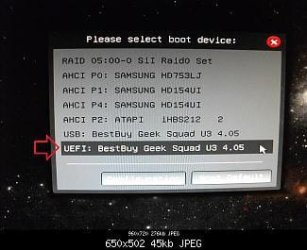
Are you booting USB drive in UEFI mode?

UEFI_USB_Boot_Menu.jpg
 

My Computer My Computer

OS
ME/XP/Vista/Win7
If you get an error message stating " CD/DVD Driver is required and can't be found " Click Cancel and remove the USB and put it back in. ( Make sure you are in the USB 2.0 )

Just tried that on my USB2.0 and it still comes up with the same error message.
 

My Computer My Computer

Computer type
PC/Desktop
Computer Manufacturer/Model Number
Custom Build
OS
Windows 7
CPU
AMD Vishera FX 4.2Ghz OC to 4.5Ghz Stock Cooler
Motherboard
ASUS M5A97 AM3+, DDR3, ATX
Memory
8Gb Dual Channel DDR3 1333Mhz
Graphics Card(s)
2Gb AMD Radeon 7850 PCI-e 3.0 VGA Card
Monitor(s) Displays
24Inch SAMSUNG SyncMaster S24B150
Screen Resolution
1920x1080
Hard Drives
1Tb Seagate Barracuda 7200Rpm SATA3
320Gb Western Digital 5200Rpm SATA 3
PSU
XFX 550W P1-550S 80+ Bronze
Case
AvP Cobra Mid Tower ATX Case
Cooling
x2 120mm Aero Cool Shark Case Cooling Fans
My Computer My Computer

Computer type
PC/Desktop
Computer Manufacturer/Model Number
Custom Build
OS
Windows 7
CPU
AMD Vishera FX 4.2Ghz OC to 4.5Ghz Stock Cooler
Motherboard
ASUS M5A97 AM3+, DDR3, ATX
Memory
8Gb Dual Channel DDR3 1333Mhz
Graphics Card(s)
2Gb AMD Radeon 7850 PCI-e 3.0 VGA Card
Monitor(s) Displays
24Inch SAMSUNG SyncMaster S24B150
Screen Resolution
1920x1080
Hard Drives
1Tb Seagate Barracuda 7200Rpm SATA3
320Gb Western Digital 5200Rpm SATA 3
PSU
XFX 550W P1-550S 80+ Bronze
Case
AvP Cobra Mid Tower ATX Case
Cooling
x2 120mm Aero Cool Shark Case Cooling Fans
When you did the diskpart . Did you use " format fs=fat32 quick " ( without quotes )
 

My Computer My Computer

Computer Manufacturer/Model Number
Custom Built
OS
Windows 7 Ultimate 32-Bit & Windows 7 Ultimate 64-Bit
CPU
Intel Core i7 CPU 950 @ 3.07GHz
Motherboard
ASUS P6T DELUXE V2
Memory
OCZ 6GB (3 x 2GB) 240-Pin DDR3 SDRAM DDR3 1600 OCZ3X1600R2
Graphics Card(s)
ATI Radeon HD 5700 Series
Sound Card
OnBoard
Hard Drives
WD6400AACS-00M3B0 (640GB SATA )
PSU
CORSAIR 850w
Case
NZXT LEXA
Cooling
Intel Stock Heatsink Fan
Keyboard
Microsoft Wireless Laser Keyboard 7000
Mouse
Microsoft Wireless Laser Mouse 7000
When you did the diskpart . Did you use " format fs=fat32 quick " ( without quotes )


Yes I did. I followed the Diskpart instuctions to the letter
 

My Computer My Computer

Computer type
PC/Desktop
Computer Manufacturer/Model Number
Custom Build
OS
Windows 7
CPU
AMD Vishera FX 4.2Ghz OC to 4.5Ghz Stock Cooler
Motherboard
ASUS M5A97 AM3+, DDR3, ATX
Memory
8Gb Dual Channel DDR3 1333Mhz
Graphics Card(s)
2Gb AMD Radeon 7850 PCI-e 3.0 VGA Card
Monitor(s) Displays
24Inch SAMSUNG SyncMaster S24B150
Screen Resolution
1920x1080
Hard Drives
1Tb Seagate Barracuda 7200Rpm SATA3
320Gb Western Digital 5200Rpm SATA 3
PSU
XFX 550W P1-550S 80+ Bronze
Case
AvP Cobra Mid Tower ATX Case
Cooling
x2 120mm Aero Cool Shark Case Cooling Fans
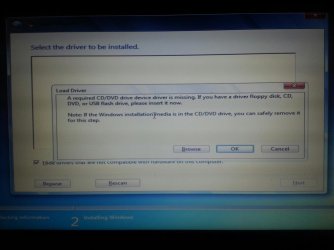
May I get an image of the actual error message you're getting please ?
 

My Computer My Computer

Computer Manufacturer/Model Number
Custom Built
OS
Windows 7 Ultimate 32-Bit & Windows 7 Ultimate 64-Bit
CPU
Intel Core i7 CPU 950 @ 3.07GHz
Motherboard
ASUS P6T DELUXE V2
Memory
OCZ 6GB (3 x 2GB) 240-Pin DDR3 SDRAM DDR3 1600 OCZ3X1600R2
Graphics Card(s)
ATI Radeon HD 5700 Series
Sound Card
OnBoard
Hard Drives
WD6400AACS-00M3B0 (640GB SATA )
PSU
CORSAIR 850w
Case
NZXT LEXA
Cooling
Intel Stock Heatsink Fan
Keyboard
Microsoft Wireless Laser Keyboard 7000
Mouse
Microsoft Wireless Laser Mouse 7000
May I get an image of the actual error message you're getting please ?

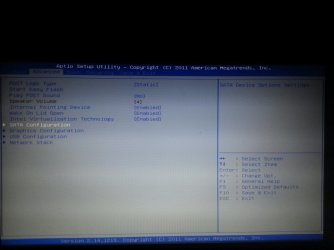
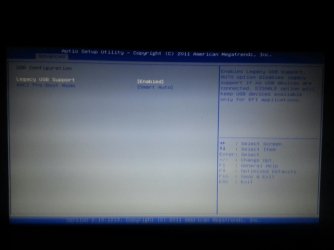
Yes of course. Will take 10minutes as will have to take image on phone. I will take other images kf bios for you too.
 

My Computer My Computer

Computer type
PC/Desktop
Computer Manufacturer/Model Number
Custom Build
OS
Windows 7
CPU
AMD Vishera FX 4.2Ghz OC to 4.5Ghz Stock Cooler
Motherboard
ASUS M5A97 AM3+, DDR3, ATX
Memory
8Gb Dual Channel DDR3 1333Mhz
Graphics Card(s)
2Gb AMD Radeon 7850 PCI-e 3.0 VGA Card
Monitor(s) Displays
24Inch SAMSUNG SyncMaster S24B150
Screen Resolution
1920x1080
Hard Drives
1Tb Seagate Barracuda 7200Rpm SATA3
320Gb Western Digital 5200Rpm SATA 3
PSU
XFX 550W P1-550S 80+ Bronze
Case
AvP Cobra Mid Tower ATX Case
Cooling
x2 120mm Aero Cool Shark Case Cooling Fans
When looking at BIOS Pic 3.Should I disable Legacy USB support? (Wait that would be silly I think lol)
 

Attachments

  • Driver Error.jpg
    Driver Error.jpg
    97.5 KB · Views: 14
  • Bios Pic 1.jpg
    Bios Pic 1.jpg
    107.4 KB · Views: 4
  • Bios pic 2.jpg
    Bios pic 2.jpg
    111.8 KB · Views: 4
  • Bios pic 3.jpg
    Bios pic 3.jpg
    85.9 KB · Views: 5
Last edited:

My Computer My Computer

Computer type
PC/Desktop
Computer Manufacturer/Model Number
Custom Build
OS
Windows 7
CPU
AMD Vishera FX 4.2Ghz OC to 4.5Ghz Stock Cooler
Motherboard
ASUS M5A97 AM3+, DDR3, ATX
Memory
8Gb Dual Channel DDR3 1333Mhz
Graphics Card(s)
2Gb AMD Radeon 7850 PCI-e 3.0 VGA Card
Monitor(s) Displays
24Inch SAMSUNG SyncMaster S24B150
Screen Resolution
1920x1080
Hard Drives
1Tb Seagate Barracuda 7200Rpm SATA3
320Gb Western Digital 5200Rpm SATA 3
PSU
XFX 550W P1-550S 80+ Bronze
Case
AvP Cobra Mid Tower ATX Case
Cooling
x2 120mm Aero Cool Shark Case Cooling Fans
Back
Top