Acronis True Image 10. How does it Work?

OH DEAR NOT TRUE AT ALL.


If you put a new hard disk into your computer you can restore an acronis True Image to it without ANY problems -- I've done this zillions of times on laptops for example where I've replaced the crappy 80 / 100 GB installed hard disk with a nice fast 320 GB version.

The only problem you *might* encounter is that the program might not recogniize a hard disk at all if its never been formatted -- in this case just insert a Windows install disk , create a partition and cancel the install or use GPARTED to create an initial partition.

Acronis will then allow you to restore your old image from your backup -- Create the Stand alone bootable recovery program on to an external USB device / CD / DVD.

When restoring you can change the size of the partition too.

Note if you Multi-boot or have a "hidden" small partition restore that as well and make it ACTIVE. Make the rest PRIMARY.

If you don't have a hidden small system partition then make the one you are restoring ACTIVE if its an OS partition or PRIMARY if its just a data partition.

Cheers
jimbo

Jimbo,

I am with you on this issue. Acronis may not be the greatest partition manager, but as an image backup/restore manager it has worked fine for me many times with many configurations.

With the newer hardware and OSes I would NOT revert to using anything prior to ATI v11 though (I have used ATI since v7).

Also, and I have mentioned this many times, new ATI users should IMMEDIATELY register their product with ATI support and download and install any available updates (Install/Repair option).

I believe that the numerouse partition management, boot image management and the options available in a multi-OS boot-loader configuration lead to a number of people declaring that some particular tool (does not matter which vendor) "destroyed their system".

"Experience is directly proportional to damaged equipment."
 

My Computer My Computer

OS
XP Pro & Vista Home Premium (x86); Windows Ultimate 7600 x64 Retail
Hi Muad,

I just did a little test of "free" disk image apps.

I used Vista SP2 x64 - because I had tried them on various builds of 7 , and one of them had issues - the others worked flawlessly. It wouldn't be fair to draw too many conclusions on Beta o/s - I decided to use Vista - they should all sail thru that.

All were installed on Vista SP2 x64 partition and the same source and target partitions used each time.

1. Macrium reflect free edition. A true native 64 bit app. performs disk/partition imaging and allows scheduling - a big plus point. It is very small at 25 mb installed , with a 6.5mb boot disc.

This is always available free at their website.

Set at medium compression and highest priority. The program opens and enumerates the drives extremely quickly.

To create image:

Time taken 6m 30s. Max CPU usage 22%. Image size 5.28gb.

Rt click the image and it mounts almost instantaneously.

2. Paragon Hard Disk Manager 9.5 special edition. One of the free promo's they often do - not available on the website - googling may come up with something. They do free "Express" versions always available on the site, but with basic functionality.

It is not small at 134 mb, tho. includes a large array of partitioning functions, a 60mb boot disc with lots of options , e.g. File Transfer Wizard and Boot Corrector.

It also performs a full range of Backup functions including file/folder, partitions /drives, incremental/differential, scheduling and various include/exclude options.

Set at medium compression - it doesn't allow for high priorty setting.

To create Image:

Time taken 13mins. Max CPU usage 11%. Image size 5.4gb.

Altho slower - taking into account the CPU usage and compression - similarly efficient.

3. Acronis ATI 11 - the free version from Seagate. You are supposed to have a Seagate or Maxtor drive for this to work - so not available to everyone.

This is large at 210 mb. It does include cloning functions, but not the partitioning of the Paragon, or the scheduling of the Macrium and Paragon.

It took a long time to analyze the drives and start up.

Set at medium compression and high priority.

To create image:

Time taken 7 m 30s. Max Cpu 29%. Image size 5.7 gb.

Not as efficient as the others, but you can't complain as it's free.

Rt clicking the Image to mount caused it to Analyze the drives again - this time it froze - a bit of a concern - but it worked after shutting it down and trying again. A big plus is the ability to access the image via Windows Explorer.

4. Easeus Todo - a new freebie - couldn't be included in the "test" as it declared there wasn't enough space on the target ( only 11gb free- seems sensible enough - but the other apps. didn't complain at the same space constraint).

It is quite small at 58mb , including 28mb boot disc.

It does drive/partition imaging and has a cloning function , but no scheduling or partitioning.

Testing it with a different source and target doesn't allow accurate comparison with the others, but showed that it works fine - with good compression level but not particularly fast.

It mounted the image without issue.

The GUI is very simply laid out and easy to follow - good for your average user.

It worked fine on 7x 64 also.

Free Backup Software for Hard Drive System Backup and Restore. Backup freeware for data backup and disaster recovery in Windows and Linux - EASEUS
 

My Computers My Computers

System One System Two

  • Computer type
    PC/Desktop
    OS
    7 X64
    CPU
    i5 8400
    Motherboard
    gigabyte b365m ds3h
    Memory
    2x8gb 3200mhz
    Hard Drives
    various
    PSU
    pure power 11 400w cm
    Case
    Coolermaster
    Cooling
    cryorig m9i
  • Computer type
    PC/Desktop
    OS
    7x64
    CPU
    g5400
    Motherboard
    ga b365m ds3h
    Memory
    8gb ddr4 2400
    PSU
    xfx pro 450w
Tried a burn in compatibility mode and that won't boot either...
 

My Computer My Computer

Computer Manufacturer/Model Number
Dell E520
OS
7600x64 RTM
CPU
Intel® Q6700, 2.66 GHz stock clock (upgraded)
Motherboard
Dell
Memory
4g (upgraded)
Graphics Card(s)
Sapphire Radeon Toxic HD 3870 512MB GDDR4 (upgraded)
Sound Card
HT Omega Claro Plus (upgraded)
Monitor(s) Displays
22' , 40"
Screen Resolution
1050, 1080p
Hard Drives
1.5tb (upgraded)
PSU
Zalman 600w (upgraded)
Case
Dell
Cooling
stock Dell
Keyboard
dell
Mouse
dell
Internet Speed
100m Fiber optical
Other Info
Bought the Dell secondhand for cheap and upgraded cpu, vga, ram, soundcard, psu and HDD's.
Have you tried them on another pc - to see if they are bootable at all?

You may have a very rare incompatibility issue.

There is a WinPE2 boot disc - you shouldn't have any trouble booting that - sadly , it only comes with the paid version.

You might browse the Support site and see if that throws any light on the issue.

Macrium Support Forum - Rescue CD

Alternatively, you could try Todo and check the boot disc works first. It is only a 35mb download. It didn't appear quite as efficient as Macrium , but I wasn't able to do a direct comparison - others say it is very fast.
 
Last edited:

My Computers My Computers

System One System Two

  • Computer type
    PC/Desktop
    OS
    7 X64
    CPU
    i5 8400
    Motherboard
    gigabyte b365m ds3h
    Memory
    2x8gb 3200mhz
    Hard Drives
    various
    PSU
    pure power 11 400w cm
    Case
    Coolermaster
    Cooling
    cryorig m9i
  • Computer type
    PC/Desktop
    OS
    7x64
    CPU
    g5400
    Motherboard
    ga b365m ds3h
    Memory
    8gb ddr4 2400
    PSU
    xfx pro 450w
SIW2,

Nice work! (I mistyped it in the Rep I gave you! :o)

Now that I am getting my retail Ultimate install with all apps straightened out I am going to look at Macrium (Free) more closely. I have already recommended it to several people, based a brief test and on your positive comments, as a free image backup option.

The comparison with the "free" ATI that comes with HDDs is OK but I do not recommend the "free" ATI to anyone. It is just too feature restricted to suit my tastes.

As you can tell I have a history with ATI and get a little peeved when I sense that some have posted a "does no work with Win7" when there is ample evidence it does. But backup/restore operations in a multi-boot environment have several areas where a mistake can be made by the novice regardless of the app being used.

At any rate I have been in need of a free image backup tool to install and use on my client systems. One that I can leave installed on their system when they pick it up. It is a nice "value added" benefit of my system recovery service. I can't do that with ATI (retail) but my first impression is that Macrium will fit the bill. So Macrium will get the free PR and not ATI and my clients will have a recovery plan. :D

I have a system coming in tomorrow night. Good time to give Macrium a test run. I do like the performance times.

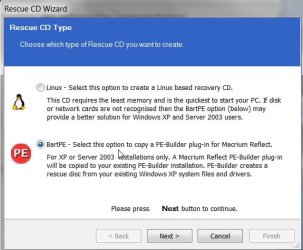
One question, does Macrium have a UBCD4WIN (BARTPE) plugin?
 

My Computer My Computer

OS
XP Pro & Vista Home Premium (x86); Windows Ultimate 7600 x64 Retail

My Computers My Computers

System One System Two

  • Computer type
    PC/Desktop
    OS
    7 X64
    CPU
    i5 8400
    Motherboard
    gigabyte b365m ds3h
    Memory
    2x8gb 3200mhz
    Hard Drives
    various
    PSU
    pure power 11 400w cm
    Case
    Coolermaster
    Cooling
    cryorig m9i
  • Computer type
    PC/Desktop
    OS
    7x64
    CPU
    g5400
    Motherboard
    ga b365m ds3h
    Memory
    8gb ddr4 2400
    PSU
    xfx pro 450w
Spliff,

If your pc has trouble booting Linux cd's - you might look at the BartPE option - you need legacy o/s for that tho.

You may have the same trouble with TODO as that uses a Linux based boot cd.

Otherwise, you could try the Paragon products - the cd's are Linux/DOS based , so you have another option there.

They are not as fast as the Macrium as they work at a lower priority level - but they equally efficient when you take that into account. Compression levels are equally good also.
 

My Computers My Computers

System One System Two

  • Computer type
    PC/Desktop
    OS
    7 X64
    CPU
    i5 8400
    Motherboard
    gigabyte b365m ds3h
    Memory
    2x8gb 3200mhz
    Hard Drives
    various
    PSU
    pure power 11 400w cm
    Case
    Coolermaster
    Cooling
    cryorig m9i
  • Computer type
    PC/Desktop
    OS
    7x64
    CPU
    g5400
    Motherboard
    ga b365m ds3h
    Memory
    8gb ddr4 2400
    PSU
    xfx pro 450w
noyb

Acronis 12.0.x does the same. Backs up fine, but restore is another story.

Ken

Hey Ken, ATI 12 Build 9.788 restoring just fine for me. Maybe you have an older build. :confused:

Working with triple boot also.
 

My Computer My Computer

Computer Manufacturer/Model Number
MasterB/Custom
OS
Windows 7 Professional x64
CPU
QuadCore AMD Phenom II X4 Black Edition 955 3.2 GHz
Motherboard
Asus M4A785TD-V Evo
Memory
8 GB Crucial DDR3
Graphics Card(s)
SAPPHIRE Radeon HD 4890 1GB HDMI New Edition
Sound Card
VIA VT1708S HD Audio 7.1 onboard/ ATI HDMI video card
Monitor(s) Displays
Acer H233H 23'' LCD HDMI
Screen Resolution
1920x1080
Hard Drives
1x 500GB and 1x 1TB 7200RPM 32MB Cache WD Caviar Black
PSU
CORSAIR CMPSU-620HX 620W
Case
COOLER MASTER Storm Scout SGC-2000
Cooling
2x 140mm and 1x 120mm case fans, Stock CPU fan
Keyboard
Logitech MX 3200
Mouse
Logitech MX 3200
Internet Speed
15 Mbps
Other Info
My first build!
noyb

Acronis 12.0.x does the same. Backs up fine, but restore is another story.

Ken

Hmmm.. I restored a Vista HP 32 bit install over an old Win7 x64 v7232 partitions on a different hard drive yesterday in preparation for a new HDD coming today.

Had to change the boot option description using Easy BCD. Otherwise, no problems.

So what is the error that occurs when the restore does not work?
 

My Computer My Computer

OS
XP Pro & Vista Home Premium (x86); Windows Ultimate 7600 x64 Retail
If I can get it to restore by removing my 3rd data partition .. It will not Boot.
Repair 1 from the W7 DVD fixes some W7 files.
Repair 2 from the W7 DVD fixes the Boot.

I'm thinking the confusion is the extra partition that W7 installs in front of the C partition.
Sure wish I knew how to get rid of it.
The new Acronis is in Beta testing right now .. I almost signed up to be a tester.
But decided to wait instead ... I'm in no real hurry to move to W7
 

My Computer My Computer

Computer Manufacturer/Model Number
HP d4996t (upgraded)
OS
XP MCE .... XP Pro 64 .... W7 U x64
CPU
E6750, 2.67GHz C2D
Memory
4GB, PC2 6400
Graphics Card(s)
GeForce 9400GT
Monitor(s) Displays
Twin Samsung 2443BWT
Screen Resolution
1920x1200
Hard Drives
Many .. 3 Installed
PSU
460W
Internet Speed
Cable
If I can get it to restore by removing my 3rd data partition .. It will not Boot.
Repair 1 from the W7 DVD fixes some W7 files.
Repair 2 from the W7 DVD fixes the Boot.

I'm thinking the confusion is the extra partition that W7 installs in front of the C partition.
Sure wish I knew how to get rid of it.
The new Acronis is in Beta testing right now .. I almost signed up to be a tester.
But decided to wait instead ... I'm in no real hurry to move to W7

I have installed Win7 as a second OS on the second partition of an HDD (overwriting an existing Vista OS) with XP Pro already installed on the first partition.

I have installed Win7 as the only OS on the first partition of another HDD.

I have backed-up and restored all 3 OSes at one point or another. Sometimes needing to repair the boot-loader using Win7 Installation DVD as the bootcd and selecting the Repair Option.

I have yet to have an "extra" partition be created by the Win7 DVD "in front of the C:\ partition".

It is not that I don't believe those who report it, I just cannot replicate under what circumstances it gets created. I assume Win7 is placing the bootloader there, correct? What are its properties (volume label, drive letter, format)?

a) What other OSes are in the multi-boot configuration? XP, Vista, Linux?

b) How are the partitions formatted? FAT, FAT32, NTFS....

c) How many physical drives are available?

d) Is the configuration cross-booting - bootloader on the "primary" drive is booting an OS installed on a partition on a second physical drive? I do not care for this configuration, I want each physical drive to have its own bootloader (personnal quirk :)).
 

My Computer My Computer

OS
XP Pro & Vista Home Premium (x86); Windows Ultimate 7600 x64 Retail
Hey Ken, ATI 12 Build 9.788 restoring just fine for me. Maybe you have an older build. :confused:

Working with triple boot also.

Mauh dib, masterB

It was more my fault than Acronis'. It was a long time ago so Im not sure what it was but I still use acronis all the time

Ken
 

My Computer My Computer

Computer Manufacturer/Model Number
HP Pavillion dv-7 1005 Tx
OS
Win 8 Release candidate 8400
CPU
[email protected]
Memory
4 gigs
Graphics Card(s)
Nvidia 9600M
Sound Card
HD built-in
Monitor(s) Displays
17" Wxga
Screen Resolution
1440x900
Cooling
none
Internet Speed
45Mb down 5Mb up
a) What other OSes are in the multi-boot configuration? XP, Vista, Linux?
b) How are the partitions formatted? FAT, FAT32, NTFS....
c) How many physical drives are available
d) Is the configuration cross-booting

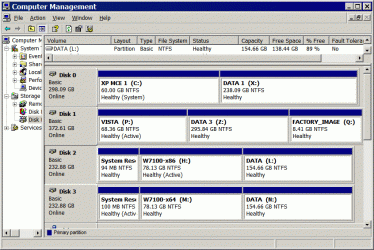
The only Drives I have acronis problems with .. is W7
Clip.gif
I've Updated to the M$ rtm versions from TechNet since this picture.
 

My Computer My Computer

Computer Manufacturer/Model Number
HP d4996t (upgraded)
OS
XP MCE .... XP Pro 64 .... W7 U x64
CPU
E6750, 2.67GHz C2D
Memory
4GB, PC2 6400
Graphics Card(s)
GeForce 9400GT
Monitor(s) Displays
Twin Samsung 2443BWT
Screen Resolution
1920x1200
Hard Drives
Many .. 3 Installed
PSU
460W
Internet Speed
Cable
The only Drives I have acronis problems with .. is W7
View attachment 24296
I've Updated to the M$ rtm versions from TechNet since this picture.

Does your system's BIOS provide an option to specify the HDD boot PRIORITY? In other words to specify not just to boot from the HDD first but WHICH HDD it should try to boot from first, Disk 0 to Disk 3?
 

My Computer My Computer

OS
XP Pro & Vista Home Premium (x86); Windows Ultimate 7600 x64 Retail
Does your system's BIOS provide an option to specify the HDD boot PRIORITY?
YES .. In my HP's .. I can tap the esc key at bootup and a boot menu will appear where I can choose which HD to boot from.
Otherwise it defaults to the first boot device.

However ... I install a System or any Acronis Recovery ... With only one HD connected so all drives are standalones.

I never put my personal Data in my OS ... (can be up to ~200gig worth) ...
And I like to be able to replace/repair just my System Partition.
Having my Data in a third Partition is killing an Acronis recovery.

I know ... This makes no sense ??
 

My Computer My Computer

Computer Manufacturer/Model Number
HP d4996t (upgraded)
OS
XP MCE .... XP Pro 64 .... W7 U x64
CPU
E6750, 2.67GHz C2D
Memory
4GB, PC2 6400
Graphics Card(s)
GeForce 9400GT
Monitor(s) Displays
Twin Samsung 2443BWT
Screen Resolution
1920x1200
Hard Drives
Many .. 3 Installed
PSU
460W
Internet Speed
Cable
YES .. In my HP's .. I can tap the esc key at bootup and a boot menu will appear where I can choose which HD to boot from.
Otherwise it defaults to the first boot device.

However ... I install a System or any Acronis Recovery ... With only one HD connected so all drives are standalones.

I never put my personal Data in my OS ... (can be up to ~200gig worth) ...
And I like to be able to replace/repair just my System Partition.
Having my Data in a third Partition is killing an Acronis recovery.

I know ... This makes no sense ??

Well, I keep all my personal data in other partition besides the OS as well. I would not say it "kills" an ATI recovery, just that it takes longer to backup and restore 100-200 GB.

What I would do in this situation is (assume DISK 3 is the HDD with the extra "System Reserved" partition).

1) Create and TEST and ATI Emergency Boot CD, just in case.... :)

2) Do an image backup of the entire DISK 3 drive with all partitions to another drive's partition for safekeeping.

3) Boot to the Vista OS.

4) Using Windows Disk Management, delete the first 2 partitions on DISK 3.

5) Using Windows Disk Management, create a new primary partition on DISK 3 for the Windows 7 OS using the space created in step 4. Quick format it to NTFS.

6) Restore the Win7 OS partition image backup created in step 2 to the partiton created in step 5. Make the partition ACTIVE if not already set as such.

7) Shutdown. Unplug power cord. Crack open the case and unplug ALL HDDS except DISK 3.

8) Power back up and set the BIOS to boot from the CD/DVD drive.

9) Insert a Windows 7 Installation DVD. Boot to the DVD. Run the Repair option to "fix" the boot loader (probably twice - ?)

10) Reset the BIOS to boot from HDD DISK 3.

Hopefully you will be able to boot now with DISK 3 as a stand-alone HDD to Windows 7 with no "System Reserved" or "extra" partition.

Did any of that make sense? :D ;)
 

My Computer My Computer

OS
XP Pro & Vista Home Premium (x86); Windows Ultimate 7600 x64 Retail
Here’s my Acronis recovery attempts scenario.

Attempt to rewrite just the first 2 partitions and the MBR with an Acronis recovery.
(I’ve tried several variations of recovering the first two partitions and the MBR)
No Good .. Will not boot .. The Bios never finishes loading.
If I remove the first two partitions .. The Bios never finishes loading.
I can NOT boot from the Acronis Boot CD .. or the W7 DVD .. Everything is dead.
This can cause a heart attack the first time it happens to you … I did recover OK, finally.

If I erase all the partitions on the HDD …
I can recover the w7 partitions and the MBR .. from an Acronis backup image …
But it takes two repairs with the W7 DVD before it’ll boot properly.

But .. I can clone the entire HDD to another without any problem.
But when cloning .. I cannot specify the partition sizes .. They will be proportionally sized to the size of the new HDD.
And there’s no reason why I should have to wait ages to replace my Huge Data partition when there was nothing wrong with it.

Not being able to operate on a HDD without removing my Huge Data Partition is a show stopper for me.

I don’t want to occupy this thread with these Problems …
But it seems that there is potential problems at this point in time depending on how you use ATI
I’m going to wait on the next Version of ATI.

Darn .. I never did think to try a master Power Down reset ???
Thanks for the tips ... But let's move on.
 

My Computer My Computer

Computer Manufacturer/Model Number
HP d4996t (upgraded)
OS
XP MCE .... XP Pro 64 .... W7 U x64
CPU
E6750, 2.67GHz C2D
Memory
4GB, PC2 6400
Graphics Card(s)
GeForce 9400GT
Monitor(s) Displays
Twin Samsung 2443BWT
Screen Resolution
1920x1200
Hard Drives
Many .. 3 Installed
PSU
460W
Internet Speed
Cable
....
If I erase all the partitions on the HDD …
I can recover the w7 partitions and the MBR .. from an Acronis backup image …
But it takes two repairs with the W7 DVD before it’ll boot properly.

But .. I can clone the entire HDD to another without any problem.
But when cloning .. I cannot specify the partition sizes .. They will be proportionally sized to the size of the new HDD.
And there’s no reason why I should have to wait ages to replace my Huge Data partition when there was nothing wrong with it.

Not being able to operate on a HDD without removing my Huge Data Partition is a show stopper for me.

You don't have to remove the Huge Data partition to get rid of the "extra" partition. That was the initial problem, no? The first paragraph says as much. So the repair operation has to be run twice. That take 3 minutes.
 

My Computer My Computer

OS
XP Pro & Vista Home Premium (x86); Windows Ultimate 7600 x64 Retail
Once I perform Acroins surgery on either (or all) of the first two partitions ...
I'm totally dead as long as my 3rd Data partition is still there.
The only fix is to remove all Partitions.

Two possibilities ???
Something unique about my HP BIOS compounded by W7 ..
Something in the Root of the drive (MBR) and W7 is confusing my system.

The common element is W7 ... I'm wondering if Acronis can fix this.
 

My Computer My Computer

Computer Manufacturer/Model Number
HP d4996t (upgraded)
OS
XP MCE .... XP Pro 64 .... W7 U x64
CPU
E6750, 2.67GHz C2D
Memory
4GB, PC2 6400
Graphics Card(s)
GeForce 9400GT
Monitor(s) Displays
Twin Samsung 2443BWT
Screen Resolution
1920x1200
Hard Drives
Many .. 3 Installed
PSU
460W
Internet Speed
Cable
Once I perform Acroins surgery on either (or all) of the first two partitions ...
I'm totally dead as long as my 3rd Data partition is still there.
The only fix is to remove all Partitions.

Two possibilities ???
Something unique about my HP BIOS compounded by W7 ..
Something in the Root of the drive (MBR) and W7 is confusing my system.

The common element is W7 ... I'm wondering if Acronis can fix this.

Weird for sure.

Then I would modify my suggestions to:

1) Delete ALL partitions on the problem HDD.
2) Create a new primary partion for the Win7 OS.
3) Create a second partition for the DATA.
4) Restore the Win 7 OS.
5) Restore the DATA partition.
6) Run the Win7 BootCD repair (twice).
 

My Computer My Computer

OS
XP Pro & Vista Home Premium (x86); Windows Ultimate 7600 x64 Retail
Back
Top