Burning DVD. How to make the files in half

testrun

New member
Local time
9:20 AM
Messages
15
Hi guys. Im just a beginner in burning dvd's. Well I just want to ask how can I burn a dvd if the size of the file is 5.7gb and my dvd is just 4.7gb? and its just a single file! Well please dont answer buy a bigger gb of dvd. I am doing some business and selling stuffs i just want that to become 2 dvd. thanks
 

My Computer My Computer

At a glance

Windows 7 Pro 64bit
OS
Windows 7 Pro 64bit
Some burning programs, such as Nero, will split large files that exceed the capacity of a disc into two (or multiple) discs.

Nero Multimedia Software | Nero
 

My Computer My Computer

At a glance

Windows 10 64 bitIntel i7 6700K16GB Corsair DominatorIntel CPU Graphics
Computer type
PC/Desktop
Computer Manufacturer/Model Number
My Own Build
OS
Windows 10 64 bit
CPU
Intel i7 6700K
Motherboard
ASUS ROG Maximus VIII Hero
Memory
16GB Corsair Dominator
Graphics Card(s)
Intel CPU Graphics
Sound Card
RealTek
Monitor(s) Displays
27" Dell S2719dgf
Screen Resolution
2560X1440
Hard Drives
1 TB Samsung 850 EVO SSD for Win 10 Pro
500GB Samsung 850 EVO SSD for Win 10 Insider
2 TB drive for backup
PSU
EVGA Supernova 750G2
Case
BeQuiet Silent Base 600
Cooling
Deepcool Captain 120EX
Keyboard
Microsoft Wireless 2000
Mouse
Microsoft wireless
Internet Speed
100 MB/sec (Cable)
Antivirus
Microsoft Defender and Malwarebytes
Browser
Edge/Firefox
Other Info
Cakewalk (Sonar) by BandLab and Studio One 4.1 Pro recording studio software. MOTU 896Mk3 Hybrid recording interface, Frontier Tranzport wireless control unit, Behringer X-Touch Control Surface.
Five USB connected optical drives for CD Audio production using Nero BurningROM
Some burning programs, such as Nero, will split large files that exceed the capacity of a disc into two (or multiple) discs.

Nero Multimedia Software | Nero

Thanks for answering but what I am burning is an ISO file 5.7gb. Will nero still split it to 2? I got nero vison 10 and smart start 10 but where among these 2 will i use? Thanks!
 

My Computer My Computer

At a glance

Windows 7 Pro 64bit
OS
Windows 7 Pro 64bit
Another Question in my DVD disc there was this written 8x and 16x. What does it mean? Does it mean the higher the better? thanks
 

My Computer My Computer

At a glance

Windows 7 Pro 64bit
OS
Windows 7 Pro 64bit
Another Question in my DVD disc there was this written 8x and 16x. What does it mean? Does it mean the higher the better? thanks

The 8X or 16X is how fast the burn is made. You always want to burn at the lowest possible rate. Normally that would be 4X. The faster you burn the more chance of an error.
 

My Computer My Computer

At a glance

Windows 7 Home Premium 32-Bit - Build 7600 SP1Intel Core i3-2120 3.30GhzKingston 4 GB DDR3 1333 mhzAMD Radeon HD6670
Computer type
PC/Desktop
Computer Manufacturer/Model Number
Custom Build
OS
Windows 7 Home Premium 32-Bit - Build 7600 SP1
CPU
Intel Core i3-2120 3.30Ghz
Motherboard
Asus P8Z68-V LX Intel Z68 Socket H2 ATX
Memory
Kingston 4 GB DDR3 1333 mhz
Graphics Card(s)
AMD Radeon HD6670
Sound Card
Sound Blaster Audigy SE 24-Bit
Monitor(s) Displays
Asus VE228
Screen Resolution
1440 X 900
Hard Drives
OCZ Vertex 3 120 GB Sata 3 SSD ==
Kingston SH103/S3 120 G Hyper X 120 GB SSD ==
Western Digital 500 GB Caviar Green 7200 RPM ==
PSU
Corsair CX600M == 600 Watt
Case
NZXT Apollo - Silver with Clear Side Panel
Cooling
Three 120 mm Fans
Keyboard
Microsoft Natural 4000
Mouse
Microsoft Custom Optical 3000
Internet Speed
AT&T Fiber Optic Wireless Network
Antivirus
Microsoft Security Essentials
Browser
Chrome
Other Info
120 mm Blue LED Fan -- Three Blue LED Lazer Light Sticks
Hi guys. Im just a beginner in burning dvd's. Well I just want to ask how can I burn a dvd if the size of the file is 5.7gb and my dvd is just 4.7gb? and its just a single file! Well please dont answer buy a bigger gb of dvd. I am doing some business and selling stuffs i just want that to become 2 dvd. thanks

In case you are not aware, you can buy Double Layer DVD's and they burn almost twice as much. You could get the file all on one disk. They are about the same price. I realize you said that you wanted the file to be on two disks (not really sure why). Just thought I would let you know that one DVD is possible.
 

My Computer My Computer

At a glance

Windows 7 Home Premium 32-Bit - Build 7600 SP1Intel Core i3-2120 3.30GhzKingston 4 GB DDR3 1333 mhzAMD Radeon HD6670
Computer type
PC/Desktop
Computer Manufacturer/Model Number
Custom Build
OS
Windows 7 Home Premium 32-Bit - Build 7600 SP1
CPU
Intel Core i3-2120 3.30Ghz
Motherboard
Asus P8Z68-V LX Intel Z68 Socket H2 ATX
Memory
Kingston 4 GB DDR3 1333 mhz
Graphics Card(s)
AMD Radeon HD6670
Sound Card
Sound Blaster Audigy SE 24-Bit
Monitor(s) Displays
Asus VE228
Screen Resolution
1440 X 900
Hard Drives
OCZ Vertex 3 120 GB Sata 3 SSD ==
Kingston SH103/S3 120 G Hyper X 120 GB SSD ==
Western Digital 500 GB Caviar Green 7200 RPM ==
PSU
Corsair CX600M == 600 Watt
Case
NZXT Apollo - Silver with Clear Side Panel
Cooling
Three 120 mm Fans
Keyboard
Microsoft Natural 4000
Mouse
Microsoft Custom Optical 3000
Internet Speed
AT&T Fiber Optic Wireless Network
Antivirus
Microsoft Security Essentials
Browser
Chrome
Other Info
120 mm Blue LED Fan -- Three Blue LED Lazer Light Sticks
Hi guys. Im just a beginner in burning dvd's. Well I just want to ask how can I burn a dvd if the size of the file is 5.7gb and my dvd is just 4.7gb? and its just a single file! Well please dont answer buy a bigger gb of dvd. I am doing some business and selling stuffs i just want that to become 2 dvd. thanks

In case you are not aware, you can buy Double Layer DVD's and they burn almost twice as much. You could get the file all on one disk. They are about the same price. I realize you said that you wanted the file to be on two disks (not really sure why). Just thought I would let you know that one DVD is possible.


But is it possible to split a 1 iso file? Is there any way? I really want to split it into 2 so i have 2 discs :) thanks
 

My Computer My Computer

At a glance

Windows 7 Pro 64bit
OS
Windows 7 Pro 64bit
Another Question in my DVD disc there was this written 8x and 16x. What does it mean? Does it mean the higher the better? thanks

The 8X or 16X is how fast the burn is made. You always want to burn at the lowest possible rate. Normally that would be 4X. The faster you burn the more chance of an error.


hmmm i see so 16x is the worst and can get an error. So 8x is the standard everyone using? Do they have some difference in prices in 8x and 4x? thanks
 

My Computer My Computer

At a glance

Windows 7 Pro 64bit
OS
Windows 7 Pro 64bit
Some burning programs, such as Nero, will split large files that exceed the capacity of a disc into two (or multiple) discs.

Nero Multimedia Software | Nero

Thanks for answering but what I am burning is an ISO file 5.7gb. Will nero still split it to 2? I got nero vison 10 and smart start 10 but where among these 2 will i use? Thanks!

Are you burning a copy of an .iso file to disk, or are you creating the disk that the .iso is an image of?

ISO image - Wikipedia, the free encyclopedia

If you're creating the disk from an .iso image, I doubt that it can be split.

Is there any reason you're not doing it onto a double layer DVD? (Capacity approx. 8.5GB.) Most burners sold in the past few years support DL. DVD-DL tend to cost more than single layer (4.7GB) DVDs, and burn at a lower rate, but they hold more.
 

My Computer My Computer

At a glance

Windows 7 Pro X64 SP1Intel Core I7-3930k16 GB Gskill DDR3-2133eVGA GTX680
Computer Manufacturer/Model Number
homegrown
OS
Windows 7 Pro X64 SP1
CPU
Intel Core I7-3930k
Motherboard
Asus P9X79 Pro
Memory
16 GB Gskill DDR3-2133
Graphics Card(s)
eVGA GTX680
Sound Card
Creative X-Fi Titanium
Monitor(s) Displays
As PA246Q
Screen Resolution
1920 X 1200
Hard Drives
Corsair Force GT, 120 GB
WDC 1.5TB Caviar Black
PSU
PCP&C Silencer 750 Crossfire
Case
Silverstone FT02
Cooling
Noctua NH-D14
Keyboard
cheap Logitech USB
Mouse
Microsoft Intellimouse Explorer (old optical) USB
Internet Speed
6Mb cable
Other Info
Pioneer BDR-205
Samsung SH-203B
Monsoon 5.1 speakers
Hi testrun,

Test run these two and check whether these are the " Ones you always wanted but didn't get so far" :)

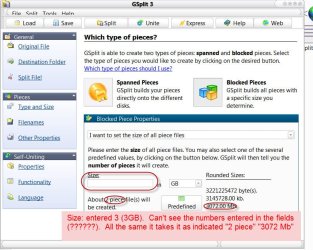
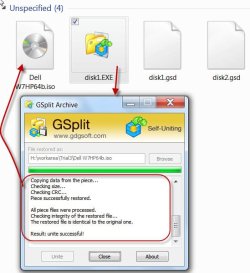
GSplit - File Splitter - Split Any File - Split Text and Log Files

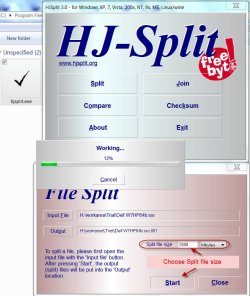
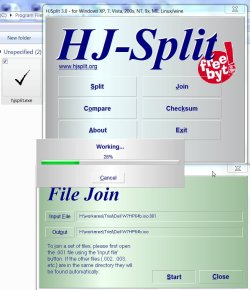
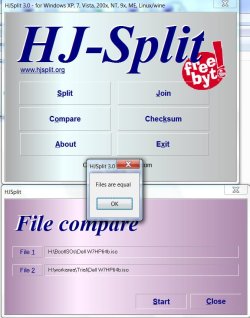
HJSplit: free file splitting software for Windows, Linux and other platforms

I used a 5.72GB Win7 DELL ISO.

GSplit takes less than 2-3 minutes to split and less than 2 minutes to join.

Spanning to discs directly possible (but I haven't tried) Problems: Read the notes in the screenshot.

HJ-Split takes about 39 minutes to split and about 5 minutes to join. ( Of course I made the mistake of specifying the wrong split size. Poor vision/mathematics.I took the full size as 5.22GB So it split into 3.)

The trial captured:

GSplit3:

a17-03-2013 14-21-42.jpg

b17-03-2013 14-27-07.jpg

c17-03-2013 14-34-44.jpg

HJ_Split:

a17-03-2013 10-44-38.jpg

b17-03-2013 11-25-50.jpg

c17-03-2013 11-45-22.jpg
 

My Computer My Computer

At a glance

Windows 7 Home Premium 32 bit
OS
Windows 7 Home Premium 32 bit
Back
Top