Solved Colors and graphics distorted afer using PowerPoint 2010

Damian Adelle

Lord of The Idiots
Member
Local time
1:14 PM
Messages
68
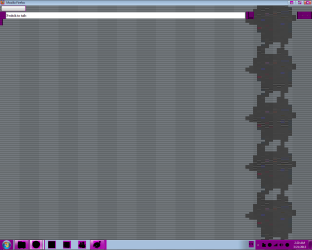
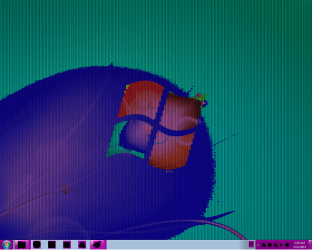
Hello fellas, just today I was working on a presentation on PowerPoint 2010, and out of nowhere my screen starts changing colors just like when you change a theme, and not just the colors but also the graphics and all the fonts are now all messed up. I included a couple of pics. I tried the next:

- First I tried to change theme, change color depth and restart, and checked the cables to no luck
- I used an option on TuneUp Utilites that says it repairs the icons cache and display
- Next, I used the PC without the video card which uses DVI to VGA adapter
- I used another monitor, it's exactly the same. I even linked the two monitors on dual display but both displays are equally messed up
- I reinstalled the video drivers, I even used Driver Genius just to be sure they are the right ones

As you can see, my monitors, video card and cables are just fine. The BIOS and the Windows start screens colors and graphics are fine. I tried everything I know, so I humbly request your assistance, any kind of help is greatly appreciated.
 

Attachments
  • WER1.png
    WER1.png
    129 KB · Views: 8
  • WER2.png
    WER2.png
    19.2 KB · Views: 8

My Computer My Computer

Computer type
PC/Desktop
Computer Manufacturer/Model Number
Custom Build
OS
Windows 7 Ultimate 64bit
CPU
AMD Phenom X4 9850
Motherboard
Gigabyte Technology GA-MA74GM-S2 (Socket M2)
Memory
4.00GB Crucial Dual-Channel DDR2 @ 401MHz (5-5-5-18)
Graphics Card(s)
ATI Radeon 2100 (Gigabyte)
Sound Card
Realtek High Definition Audio
Monitor(s) Displays
LM742 on ATI Radeon 2100
Screen Resolution
1280x1024 pixels
Hard Drives
WDC WD15EARS-00Z5B1 ATA Device, 1.5 TB, 2 partitions: - 500 GB (aprox.) Where Windows 7 resides, - 1 TB (aprox.) Storage
PSU
Ultra X4 ATX 600W
Case
ST ATX Mid-Tower Case
Cooling
Ultra Carbon X3
Keyboard
Logitech K360
Mouse
Logitech MX10
Internet Speed
802.11n USB Wireless LAN Card
Antivirus
AVG Internet Security 2014
Browser
Firefox Mozilla
Other Info
I use a graphic tablet, a XBOX360 Wired Controller, a external CD/DVD Driver, and my entire system is connected to a 6 slots Protected Power-surge
Wow.. that looks like some very very bad corruption..
I'm about to leave, but I have enough time to ask if you could please open an elevated command prompt.

My Programs, search for CMD, right click > open as administrator.

And Execute SFC.EXE /SCANNOW for starters. Let us know if it found any corruptions, and upload the log please.
 

My Computer My Computer

Computer type
PC/Desktop
OS
Windows 7 professional X64
CPU
AMD A10-5800K OC@ 4.4Ghz.
Motherboard
Gigabyte F2A85X-UP4
Memory
8GB Kingston HyperX Blu 1333mhz
Graphics Card(s)
XFX HD7870 2GB Core Edition
Monitor(s) Displays
Acer AL2216W
Screen Resolution
1680x1050
Hard Drives
Seagate Barracuda 500gb 7200rpm
Seagate Barracuda 1.5TB 7200rpm
PSU
Cooler Master Silent Pro M 850W
Case
Thermaltake Commander MS-I
Cooling
Cooler Master N520
Mouse
Logitech M504
Internet Speed
10Mbps
Thanks Erick for your reply!, I executed the Checker, it went 100% complete and it gave me this message: "Windows resource protection did not find any integrity violations". Regardless, I kinda isolated the [SR] tagged entries in the CBS.log, as I read that there I would find the System File Checker related messages, I'm including it though I'm not sure if those entries have anything to do with this problem. Any next step I should follow, I appreciate the guidance.
 

My Computer My Computer

Computer type
PC/Desktop
Computer Manufacturer/Model Number
Custom Build
OS
Windows 7 Ultimate 64bit
CPU
AMD Phenom X4 9850
Motherboard
Gigabyte Technology GA-MA74GM-S2 (Socket M2)
Memory
4.00GB Crucial Dual-Channel DDR2 @ 401MHz (5-5-5-18)
Graphics Card(s)
ATI Radeon 2100 (Gigabyte)
Sound Card
Realtek High Definition Audio
Monitor(s) Displays
LM742 on ATI Radeon 2100
Screen Resolution
1280x1024 pixels
Hard Drives
WDC WD15EARS-00Z5B1 ATA Device, 1.5 TB, 2 partitions: - 500 GB (aprox.) Where Windows 7 resides, - 1 TB (aprox.) Storage
PSU
Ultra X4 ATX 600W
Case
ST ATX Mid-Tower Case
Cooling
Ultra Carbon X3
Keyboard
Logitech K360
Mouse
Logitech MX10
Internet Speed
802.11n USB Wireless LAN Card
Antivirus
AVG Internet Security 2014
Browser
Firefox Mozilla
Other Info
I use a graphic tablet, a XBOX360 Wired Controller, a external CD/DVD Driver, and my entire system is connected to a 6 slots Protected Power-surge
You can try the following:

Open up a CMD Prompt and type in it :
net stop uxsms

Then opne up another Command prompt and enter:

net start uxsms

Or you can go to your sevices and stop The DWM service and then restart it. After this restart you PC.
 

My Computer My Computer

Computer type
PC/Desktop
Computer Manufacturer/Model Number
Custom Build
OS
Win 10 Pro 64
CPU
Intel Core i7 960 @3.20 GHz
Motherboard
MSI MS7522
Memory
24.0 GB DDR3
Graphics Card(s)
EVGA GTX 750Ti
Monitor(s) Displays
LG E2341 23 Inch
Screen Resolution
1920x1080
Hard Drives
1TB Western Dgital 1002FAEX-00Y9A0
1TB Hitachi HDS721010CLA322
PSU
700 Watt
Case
Haf 912
Cooling
Fans
Keyboard
Logitech MK710
Mouse
Logitech M705
Internet Speed
Cable
Antivirus
AIS 2015 .10.0.2225
Browser
Firefox 49
Other Info
MalwareBytes Anti-Rootkit utility
Did you try what I posted?
 

My Computer My Computer

Computer type
PC/Desktop
Computer Manufacturer/Model Number
Custom Build
OS
Win 10 Pro 64
CPU
Intel Core i7 960 @3.20 GHz
Motherboard
MSI MS7522
Memory
24.0 GB DDR3
Graphics Card(s)
EVGA GTX 750Ti
Monitor(s) Displays
LG E2341 23 Inch
Screen Resolution
1920x1080
Hard Drives
1TB Western Dgital 1002FAEX-00Y9A0
1TB Hitachi HDS721010CLA322
PSU
700 Watt
Case
Haf 912
Cooling
Fans
Keyboard
Logitech MK710
Mouse
Logitech M705
Internet Speed
Cable
Antivirus
AIS 2015 .10.0.2225
Browser
Firefox 49
Other Info
MalwareBytes Anti-Rootkit utility
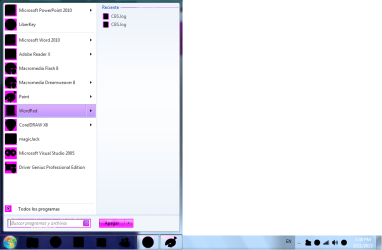
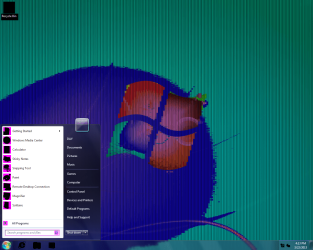
Hey Gary, I did restart the manager, through Cmd Prompt and also from service.msc, but it's the same, it's worth note that I was using the original Windows theme, without Aero effects. It's odd though, some things look normal, and icons and some text looks all messed up, just like these caps if that is of some help. Thanks again.
 

Attachments

  • WER3.png
    WER3.png
    31.2 KB · Views: 6
  • WER4.png
    WER4.png
    31.8 KB · Views: 7

My Computer My Computer

Computer type
PC/Desktop
Computer Manufacturer/Model Number
Custom Build
OS
Windows 7 Ultimate 64bit
CPU
AMD Phenom X4 9850
Motherboard
Gigabyte Technology GA-MA74GM-S2 (Socket M2)
Memory
4.00GB Crucial Dual-Channel DDR2 @ 401MHz (5-5-5-18)
Graphics Card(s)
ATI Radeon 2100 (Gigabyte)
Sound Card
Realtek High Definition Audio
Monitor(s) Displays
LM742 on ATI Radeon 2100
Screen Resolution
1280x1024 pixels
Hard Drives
WDC WD15EARS-00Z5B1 ATA Device, 1.5 TB, 2 partitions: - 500 GB (aprox.) Where Windows 7 resides, - 1 TB (aprox.) Storage
PSU
Ultra X4 ATX 600W
Case
ST ATX Mid-Tower Case
Cooling
Ultra Carbon X3
Keyboard
Logitech K360
Mouse
Logitech MX10
Internet Speed
802.11n USB Wireless LAN Card
Antivirus
AVG Internet Security 2014
Browser
Firefox Mozilla
Other Info
I use a graphic tablet, a XBOX360 Wired Controller, a external CD/DVD Driver, and my entire system is connected to a 6 slots Protected Power-surge
Try using Aero JUst RC on the destop and choose a Windows Aero theme
 

My Computer My Computer

Computer type
PC/Desktop
Computer Manufacturer/Model Number
Custom Build
OS
Win 10 Pro 64
CPU
Intel Core i7 960 @3.20 GHz
Motherboard
MSI MS7522
Memory
24.0 GB DDR3
Graphics Card(s)
EVGA GTX 750Ti
Monitor(s) Displays
LG E2341 23 Inch
Screen Resolution
1920x1080
Hard Drives
1TB Western Dgital 1002FAEX-00Y9A0
1TB Hitachi HDS721010CLA322
PSU
700 Watt
Case
Haf 912
Cooling
Fans
Keyboard
Logitech MK710
Mouse
Logitech M705
Internet Speed
Cable
Antivirus
AIS 2015 .10.0.2225
Browser
Firefox 49
Other Info
MalwareBytes Anti-Rootkit utility
Excuse me Gary, RC?
 

My Computer My Computer

Computer type
PC/Desktop
Computer Manufacturer/Model Number
Custom Build
OS
Windows 7 Ultimate 64bit
CPU
AMD Phenom X4 9850
Motherboard
Gigabyte Technology GA-MA74GM-S2 (Socket M2)
Memory
4.00GB Crucial Dual-Channel DDR2 @ 401MHz (5-5-5-18)
Graphics Card(s)
ATI Radeon 2100 (Gigabyte)
Sound Card
Realtek High Definition Audio
Monitor(s) Displays
LM742 on ATI Radeon 2100
Screen Resolution
1280x1024 pixels
Hard Drives
WDC WD15EARS-00Z5B1 ATA Device, 1.5 TB, 2 partitions: - 500 GB (aprox.) Where Windows 7 resides, - 1 TB (aprox.) Storage
PSU
Ultra X4 ATX 600W
Case
ST ATX Mid-Tower Case
Cooling
Ultra Carbon X3
Keyboard
Logitech K360
Mouse
Logitech MX10
Internet Speed
802.11n USB Wireless LAN Card
Antivirus
AVG Internet Security 2014
Browser
Firefox Mozilla
Other Info
I use a graphic tablet, a XBOX360 Wired Controller, a external CD/DVD Driver, and my entire system is connected to a 6 slots Protected Power-surge

My Computer My Computer

Computer type
PC/Desktop
Computer Manufacturer/Model Number
Custom Build
OS
Win 10 Pro 64
CPU
Intel Core i7 960 @3.20 GHz
Motherboard
MSI MS7522
Memory
24.0 GB DDR3
Graphics Card(s)
EVGA GTX 750Ti
Monitor(s) Displays
LG E2341 23 Inch
Screen Resolution
1920x1080
Hard Drives
1TB Western Dgital 1002FAEX-00Y9A0
1TB Hitachi HDS721010CLA322
PSU
700 Watt
Case
Haf 912
Cooling
Fans
Keyboard
Logitech MK710
Mouse
Logitech M705
Internet Speed
Cable
Antivirus
AIS 2015 .10.0.2225
Browser
Firefox 49
Other Info
MalwareBytes Anti-Rootkit utility
I guess that did not Help???
 

My Computer My Computer

Computer type
PC/Desktop
Computer Manufacturer/Model Number
Custom Build
OS
Win 10 Pro 64
CPU
Intel Core i7 960 @3.20 GHz
Motherboard
MSI MS7522
Memory
24.0 GB DDR3
Graphics Card(s)
EVGA GTX 750Ti
Monitor(s) Displays
LG E2341 23 Inch
Screen Resolution
1920x1080
Hard Drives
1TB Western Dgital 1002FAEX-00Y9A0
1TB Hitachi HDS721010CLA322
PSU
700 Watt
Case
Haf 912
Cooling
Fans
Keyboard
Logitech MK710
Mouse
Logitech M705
Internet Speed
Cable
Antivirus
AIS 2015 .10.0.2225
Browser
Firefox 49
Other Info
MalwareBytes Anti-Rootkit utility
Oh, sorry bout' that, in fact, I already did it, as you can see on the previous caps, it's the regular windows 7 theme, I changed back from the original windows, but it's just the same.
 

My Computer My Computer

Computer type
PC/Desktop
Computer Manufacturer/Model Number
Custom Build
OS
Windows 7 Ultimate 64bit
CPU
AMD Phenom X4 9850
Motherboard
Gigabyte Technology GA-MA74GM-S2 (Socket M2)
Memory
4.00GB Crucial Dual-Channel DDR2 @ 401MHz (5-5-5-18)
Graphics Card(s)
ATI Radeon 2100 (Gigabyte)
Sound Card
Realtek High Definition Audio
Monitor(s) Displays
LM742 on ATI Radeon 2100
Screen Resolution
1280x1024 pixels
Hard Drives
WDC WD15EARS-00Z5B1 ATA Device, 1.5 TB, 2 partitions: - 500 GB (aprox.) Where Windows 7 resides, - 1 TB (aprox.) Storage
PSU
Ultra X4 ATX 600W
Case
ST ATX Mid-Tower Case
Cooling
Ultra Carbon X3
Keyboard
Logitech K360
Mouse
Logitech MX10
Internet Speed
802.11n USB Wireless LAN Card
Antivirus
AVG Internet Security 2014
Browser
Firefox Mozilla
Other Info
I use a graphic tablet, a XBOX360 Wired Controller, a external CD/DVD Driver, and my entire system is connected to a 6 slots Protected Power-surge
For giggles shut off your PC for about 10 minutes.
 

My Computer My Computer

Computer type
PC/Desktop
Computer Manufacturer/Model Number
Custom Build
OS
Win 10 Pro 64
CPU
Intel Core i7 960 @3.20 GHz
Motherboard
MSI MS7522
Memory
24.0 GB DDR3
Graphics Card(s)
EVGA GTX 750Ti
Monitor(s) Displays
LG E2341 23 Inch
Screen Resolution
1920x1080
Hard Drives
1TB Western Dgital 1002FAEX-00Y9A0
1TB Hitachi HDS721010CLA322
PSU
700 Watt
Case
Haf 912
Cooling
Fans
Keyboard
Logitech MK710
Mouse
Logitech M705
Internet Speed
Cable
Antivirus
AIS 2015 .10.0.2225
Browser
Firefox 49
Other Info
MalwareBytes Anti-Rootkit utility
Just to be sure, I cleaned everything inside the case, the mobo, checked if there where any blown capacitors (very unlikely because I bought it 6 or 7 months ago to replace the original that came with this OptiPlex), restarted the CMOS and the defaults on mobo, I got the video card off and used an option on the BIOS called Primary Video which says: "This field determines which video controller will become the primary video controller when 2 controllers are available in the System. This selection matters only if there are 2 video controllers present". There are 2 options, Auto (the one I have been using), and Onboard (says:"Use the integrated video controller"). But I haven't had any luck, maybe I'll have to reinstall Win 7 and format?
 

My Computer My Computer

Computer type
PC/Desktop
Computer Manufacturer/Model Number
Custom Build
OS
Windows 7 Ultimate 64bit
CPU
AMD Phenom X4 9850
Motherboard
Gigabyte Technology GA-MA74GM-S2 (Socket M2)
Memory
4.00GB Crucial Dual-Channel DDR2 @ 401MHz (5-5-5-18)
Graphics Card(s)
ATI Radeon 2100 (Gigabyte)
Sound Card
Realtek High Definition Audio
Monitor(s) Displays
LM742 on ATI Radeon 2100
Screen Resolution
1280x1024 pixels
Hard Drives
WDC WD15EARS-00Z5B1 ATA Device, 1.5 TB, 2 partitions: - 500 GB (aprox.) Where Windows 7 resides, - 1 TB (aprox.) Storage
PSU
Ultra X4 ATX 600W
Case
ST ATX Mid-Tower Case
Cooling
Ultra Carbon X3
Keyboard
Logitech K360
Mouse
Logitech MX10
Internet Speed
802.11n USB Wireless LAN Card
Antivirus
AVG Internet Security 2014
Browser
Firefox Mozilla
Other Info
I use a graphic tablet, a XBOX360 Wired Controller, a external CD/DVD Driver, and my entire system is connected to a 6 slots Protected Power-surge
Repair Install

You can try the above, if you follow the instructions you will not lose any programs.
 

My Computer My Computer

Computer type
PC/Desktop
Computer Manufacturer/Model Number
Custom Build
OS
Win 10 Pro 64
CPU
Intel Core i7 960 @3.20 GHz
Motherboard
MSI MS7522
Memory
24.0 GB DDR3
Graphics Card(s)
EVGA GTX 750Ti
Monitor(s) Displays
LG E2341 23 Inch
Screen Resolution
1920x1080
Hard Drives
1TB Western Dgital 1002FAEX-00Y9A0
1TB Hitachi HDS721010CLA322
PSU
700 Watt
Case
Haf 912
Cooling
Fans
Keyboard
Logitech MK710
Mouse
Logitech M705
Internet Speed
Cable
Antivirus
AIS 2015 .10.0.2225
Browser
Firefox 49
Other Info
MalwareBytes Anti-Rootkit utility
Thanks Gary, I will try this and if something is out of place, I will do the full-reinstall for now.
 

My Computer My Computer

Computer type
PC/Desktop
Computer Manufacturer/Model Number
Custom Build
OS
Windows 7 Ultimate 64bit
CPU
AMD Phenom X4 9850
Motherboard
Gigabyte Technology GA-MA74GM-S2 (Socket M2)
Memory
4.00GB Crucial Dual-Channel DDR2 @ 401MHz (5-5-5-18)
Graphics Card(s)
ATI Radeon 2100 (Gigabyte)
Sound Card
Realtek High Definition Audio
Monitor(s) Displays
LM742 on ATI Radeon 2100
Screen Resolution
1280x1024 pixels
Hard Drives
WDC WD15EARS-00Z5B1 ATA Device, 1.5 TB, 2 partitions: - 500 GB (aprox.) Where Windows 7 resides, - 1 TB (aprox.) Storage
PSU
Ultra X4 ATX 600W
Case
ST ATX Mid-Tower Case
Cooling
Ultra Carbon X3
Keyboard
Logitech K360
Mouse
Logitech MX10
Internet Speed
802.11n USB Wireless LAN Card
Antivirus
AVG Internet Security 2014
Browser
Firefox Mozilla
Other Info
I use a graphic tablet, a XBOX360 Wired Controller, a external CD/DVD Driver, and my entire system is connected to a 6 slots Protected Power-surge
Hey, thanks again for the help. I did a full-clean reinstall of Windows 7, but even that didn't help. I reinstalled the video card drivers but it's just the same. So I assume this is from hardware?
 

Attachments

  • WN7.png
    WN7.png
    143.2 KB · Views: 4

My Computer My Computer

Computer type
PC/Desktop
Computer Manufacturer/Model Number
Custom Build
OS
Windows 7 Ultimate 64bit
CPU
AMD Phenom X4 9850
Motherboard
Gigabyte Technology GA-MA74GM-S2 (Socket M2)
Memory
4.00GB Crucial Dual-Channel DDR2 @ 401MHz (5-5-5-18)
Graphics Card(s)
ATI Radeon 2100 (Gigabyte)
Sound Card
Realtek High Definition Audio
Monitor(s) Displays
LM742 on ATI Radeon 2100
Screen Resolution
1280x1024 pixels
Hard Drives
WDC WD15EARS-00Z5B1 ATA Device, 1.5 TB, 2 partitions: - 500 GB (aprox.) Where Windows 7 resides, - 1 TB (aprox.) Storage
PSU
Ultra X4 ATX 600W
Case
ST ATX Mid-Tower Case
Cooling
Ultra Carbon X3
Keyboard
Logitech K360
Mouse
Logitech MX10
Internet Speed
802.11n USB Wireless LAN Card
Antivirus
AVG Internet Security 2014
Browser
Firefox Mozilla
Other Info
I use a graphic tablet, a XBOX360 Wired Controller, a external CD/DVD Driver, and my entire system is connected to a 6 slots Protected Power-surge
Might as well be, have you tried to use another graphics card or the integrated graphics in the motherboard?
 

My Computer My Computer

Computer type
PC/Desktop
OS
Windows 7 professional X64
CPU
AMD A10-5800K OC@ 4.4Ghz.
Motherboard
Gigabyte F2A85X-UP4
Memory
8GB Kingston HyperX Blu 1333mhz
Graphics Card(s)
XFX HD7870 2GB Core Edition
Monitor(s) Displays
Acer AL2216W
Screen Resolution
1680x1050
Hard Drives
Seagate Barracuda 500gb 7200rpm
Seagate Barracuda 1.5TB 7200rpm
PSU
Cooler Master Silent Pro M 850W
Case
Thermaltake Commander MS-I
Cooling
Cooler Master N520
Mouse
Logitech M504
Internet Speed
10Mbps
Yeah, didn't had any luck, the video card was one of the first things I checked out, I still can't understand what's wrong here :S
Just to be sure, I cleaned everything inside the case, the mobo, checked if there where any blown capacitors (very unlikely because I bought it 6 or 7 months ago to replace the original that came with this OptiPlex), restarted the CMOS and the defaults on mobo, I got the video card off and used an option on the BIOS called Primary Video which says: "This field determines which video controller will become the primary video controller when 2 controllers are available in the System. This selection matters only if there are 2 video controllers present". There are 2 options, Auto (the one I have been using), and Onboard (says:"Use the integrated video controller"). But I haven't had any luck, maybe I'll have to reinstall Win 7 and format?
 

My Computer My Computer

Computer type
PC/Desktop
Computer Manufacturer/Model Number
Custom Build
OS
Windows 7 Ultimate 64bit
CPU
AMD Phenom X4 9850
Motherboard
Gigabyte Technology GA-MA74GM-S2 (Socket M2)
Memory
4.00GB Crucial Dual-Channel DDR2 @ 401MHz (5-5-5-18)
Graphics Card(s)
ATI Radeon 2100 (Gigabyte)
Sound Card
Realtek High Definition Audio
Monitor(s) Displays
LM742 on ATI Radeon 2100
Screen Resolution
1280x1024 pixels
Hard Drives
WDC WD15EARS-00Z5B1 ATA Device, 1.5 TB, 2 partitions: - 500 GB (aprox.) Where Windows 7 resides, - 1 TB (aprox.) Storage
PSU
Ultra X4 ATX 600W
Case
ST ATX Mid-Tower Case
Cooling
Ultra Carbon X3
Keyboard
Logitech K360
Mouse
Logitech MX10
Internet Speed
802.11n USB Wireless LAN Card
Antivirus
AVG Internet Security 2014
Browser
Firefox Mozilla
Other Info
I use a graphic tablet, a XBOX360 Wired Controller, a external CD/DVD Driver, and my entire system is connected to a 6 slots Protected Power-surge
Just as a longshot.. what about your monitor? Have you tried using another one? Or resetting yours to fabric settings?
 

My Computer My Computer

Computer type
PC/Desktop
OS
Windows 7 professional X64
CPU
AMD A10-5800K OC@ 4.4Ghz.
Motherboard
Gigabyte F2A85X-UP4
Memory
8GB Kingston HyperX Blu 1333mhz
Graphics Card(s)
XFX HD7870 2GB Core Edition
Monitor(s) Displays
Acer AL2216W
Screen Resolution
1680x1050
Hard Drives
Seagate Barracuda 500gb 7200rpm
Seagate Barracuda 1.5TB 7200rpm
PSU
Cooler Master Silent Pro M 850W
Case
Thermaltake Commander MS-I
Cooling
Cooler Master N520
Mouse
Logitech M504
Internet Speed
10Mbps
I did my friend, one of the first things I tried. In fact, I'm using this same monitor with that PC and with the one I'm using right now. Perhaps I should upload pics of the mobo?, maybe there's something around I didn't saw, I'm not very skilled at electronics.

- First I tried to change theme, change color depth and restart, and checked the cables to no luck
- I used an option on TuneUp Utilites that says it repairs the icons cache and display
- Next, I used the PC without the video card which uses DVI to VGA adapter
- I used another monitor, it's exactly the same. I even linked the two monitors on dual display but both displays are equally messed up
- I reinstalled the video drivers, I even used Driver Genius just to be sure they are the right ones

As you can see, my monitors, video card and cables are just fine. The BIOS and the Windows start screens colors and graphics are fine.
 

My Computer My Computer

Computer type
PC/Desktop
Computer Manufacturer/Model Number
Custom Build
OS
Windows 7 Ultimate 64bit
CPU
AMD Phenom X4 9850
Motherboard
Gigabyte Technology GA-MA74GM-S2 (Socket M2)
Memory
4.00GB Crucial Dual-Channel DDR2 @ 401MHz (5-5-5-18)
Graphics Card(s)
ATI Radeon 2100 (Gigabyte)
Sound Card
Realtek High Definition Audio
Monitor(s) Displays
LM742 on ATI Radeon 2100
Screen Resolution
1280x1024 pixels
Hard Drives
WDC WD15EARS-00Z5B1 ATA Device, 1.5 TB, 2 partitions: - 500 GB (aprox.) Where Windows 7 resides, - 1 TB (aprox.) Storage
PSU
Ultra X4 ATX 600W
Case
ST ATX Mid-Tower Case
Cooling
Ultra Carbon X3
Keyboard
Logitech K360
Mouse
Logitech MX10
Internet Speed
802.11n USB Wireless LAN Card
Antivirus
AVG Internet Security 2014
Browser
Firefox Mozilla
Other Info
I use a graphic tablet, a XBOX360 Wired Controller, a external CD/DVD Driver, and my entire system is connected to a 6 slots Protected Power-surge
Back
Top