Photos have a red cast

shessel

New member
Local time
11:50 AM
Messages
21
HELP please. Have Windows 7 Ultimate with Photoshop CS5 & Epson R3000 printer. Everything had been working swell, but now all of my photos have a red cast and people look sunburned. Photos look good when imported from camera and in Bridge thumbnails, but in Windows Photo Gallery or Photoshop everything turns red, and that's how photos print too. There seems to be plenty of discussion about this on web sites, but I can't find anyone with the step-by-step solution. If you know the fix, I would be thrilled. Thank you, Steve
 
Last edited by a moderator:

My Computer My Computer

At a glance

windows 7 ultimate 32 bitdual processor
Computer type
PC/Desktop
Computer Manufacturer/Model Number
dell
OS
windows 7 ultimate 32 bit
CPU
dual processor
Antivirus
McAfee
Browser
Firefox
Hi Shessel Welcome to Windows 7 Forum This does seem to be a common problem with many given solutions given on the web try the one below and see if it helps any ?

How to Remove a Color Cast - Tutorials
 

My Computer My Computer

At a glance

windows 7 home 64bitINTEL-CORE I716GB
Computer Manufacturer/Model Number
W530-3630QM1
OS
windows 7 home 64bit
CPU
INTEL-CORE I7
Memory
16GB
Hard Drives
750GB
Browser
Chrome
That magenta cast to your photos is caused by the digi camera sensor. Most camera will produce either a magenta cast or green. Thats why its a common issue on the web.
I will make an assumption and say these pictures are jpegs and not raw files. If you only shoot in jpeg, imo photoshop is a bit overkill.
To get rid of the cast there are numerous ways, open up the pic in photoshop camera raw and use auto develop settings. Have a special look at the white balance sliders and adjust the tint slider(shift to green ) bit by bit.
If the pics were raw you could have great fun learning how to post process a digital image!
If you cant open the image in acr, then you can do an adjustment layer and adjust the colour channel accordingly.
Also try adobe website for adobe tv they can provide some good tutorials, far better than my explanation.
 

My Computer My Computer

At a glance

win 7 home premium 64 bitintel I5 3470 3.2ghz12gbasus radeon 5450 512mb
Computer type
PC/Desktop
Computer Manufacturer/Model Number
gigabyte z77-d3sh
OS
win 7 home premium 64 bit
CPU
intel I5 3470 3.2ghz
Motherboard
gigabyte z77-d3sh
Memory
12gb
Graphics Card(s)
asus radeon 5450 512mb
Sound Card
no
Monitor(s) Displays
viewsonic
Screen Resolution
1920*1080
Hard Drives
Crucial m4 sata 3 SSD
PSU
0cz
Case
corair carbide 200
Cooling
corsair h60
Keyboard
wireless logitech
Internet Speed
60 mbs
King, thank you for the tip. I am shooting in jpeg and this has never been a problem before; any idea why it started now?
Thank you, Steve
 

My Computer My Computer

At a glance

windows 7 ultimate 32 bitdual processor
Computer type
PC/Desktop
Computer Manufacturer/Model Number
dell
OS
windows 7 ultimate 32 bit
CPU
dual processor
Antivirus
McAfee
Browser
Firefox
HELP please. Have Windows 7 Ultimate with Photoshop CS5 & Epson R3000 printer. Everything had been working swell, but now all of my photos have a red cast and people look sunburned. Photos look good when imported from camera and in Bridge thumbnails, but in Windows Photo Gallery or Photoshop everything turns red, and that's how photos print too.
How about posting just one sample picture which you say "looks good when imported from camera". I'd like to download it myself and see if it looks good in each of the various image viewer products I have, including Photoshop CS6.

You're suggesting that the original JPG looks good and somehow changes color when you open it in Photoshop? With what viewing software are you looking at the newly imported JPG's with? What camera are you using? What transfer software are you using to import the JPG's from camera to PC?

Posting one sample would be helpful.
 

My Computer My Computer

At a glance

Windows 7 Pro x64 (1), Win7 Pro X64 (2)i5-3350p 3.1Ghz/6MB-cache (1); E8400 3.0Ghz/6...8GB PC3-12800 DDR3 (1); 4GB PC3-10600 DDR3 (2)ATI HD7750 (1), (see TV cards); ATI R7 250 (2)
Computer type
PC/Desktop
Computer Manufacturer/Model Number
Home-built, two systems (1) and (2)
OS
Windows 7 Pro x64 (1), Win7 Pro X64 (2)
CPU
i5-3350p 3.1Ghz/6MB-cache (1); E8400 3.0Ghz/6MB-cache (2)
Motherboard
ASUS P8Z77-V Pro (1); ASUS P5Q3 (2)
Memory
8GB PC3-12800 DDR3 (1); 4GB PC3-10600 DDR3 (2)
Graphics Card(s)
ATI HD7750 (1), (see TV cards); ATI R7 250 (2)
Sound Card
Realtek ALC892 HD Audio (1); Realtek ALC1200 HD Audio (2)
Monitor(s) Displays
Eizo HD2441W LCD, Eizo S2433W (1); Eizo 24" S2433W (2)
Screen Resolution
1920x1200, 1920x1200 (1); 1920x1200 (2)
Hard Drives
(1) 1TB SATA-II (7200RPM), 2x2TB SATA-III (7200RPM), 250GB SATA-III (10000RPM) for OS; 2x2TB external USB 3.0

(2) 320GB SATA-II (7200RPM), 750GB SATA-II (7200RPM), 150GB SATA-II (10000RPM) for OS; 2TB external USB 3.0
PSU
Nesteq ECS-6001 600W (1); Nesteq ECS-5001 500W (2)
Case
Acousti-Case 360 (1) and (2)
Cooling
Noctua NH-U12P SE2 for CPU, 2x120mm case fans (1) and (2)
Keyboard
IBM PS/2 (1) and (2)
Mouse
Logitech MX Revolution wireless (1); Microsoft wired (2)
Internet Speed
100mbps down / 10mbps up
Antivirus
Microsoft Security Essentials; Malwarebyte Anti-Malware Pro
Browser
Firefox
Other Info
Ceton InfiniTV 4-tuner cablecard-enabled TV card as well as Hauppauge HVR-2250 OTA/ATSC 2-tuner TV card in (1), running under Win7 WMC
Things like that can also be affected by your monitor colour settings, photo manipulation programs usually have a utility to adjust accordingly. I would be interested to know what these look like if you print one ?
 

My Computer My Computer

At a glance

Windows 7 home premium x64AMD FX-4100 AM3+ 3.6GHz 12MB Black EditionCrsair vengeance 12Gb DDR3 1600MHz CL9Asus GTX 560 1GB
Computer Manufacturer/Model Number
DIY
OS
Windows 7 home premium x64
CPU
AMD FX-4100 AM3+ 3.6GHz 12MB Black Edition
Motherboard
Asus M5A97 Pro
Memory
Crsair vengeance 12Gb DDR3 1600MHz CL9
Graphics Card(s)
Asus GTX 560 1GB
Sound Card
Realtek onboard
Monitor(s) Displays
Hanns G 1680x1050 native
Hard Drives
OCZ 128Gb Petrol ssd
2x500 Gb Samsung
PSU
OCZ StealthXstream II 500W
Internet Speed
8Mb or better
Things like that can also be affected by your monitor colour settings, photo manipulation programs usually have a utility to adjust accordingly. I would be interested to know what these look like if you print one ?
OP stated they print poorly as well.

Echoing dsperber, a sample would be good.
Upload the actual image, not a snip.

This is the preferred, best way to upload an image to a post.
http://www.sevenforums.com/tutorials/9733-screenshots-files-upload-post-seven-forums.html#post93869
You may also upload a photo without using the Snipping tool.
 

My Computer My Computer

At a glance

Windows 7 Ultimate X64 SP1Intel i5-2550K, Differing ~4.4-4.8GHz No buil...16GB G.Skill Sniper 1866MHz @ 2133MHz 2x8GBASUS GTX650TIB-DC2OC-2GD5, (650TI Boost)
Computer type
PC/Desktop
Computer Manufacturer/Model Number
Home Built Desktop By DataTech
OS
Windows 7 Ultimate X64 SP1
CPU
Intel i5-2550K, Differing ~4.4-4.8GHz No built in GPU
Motherboard
ASUS P8Z68-V PRO/GEN3
Memory
16GB G.Skill Sniper 1866MHz @ 2133MHz 2x8GB
Graphics Card(s)
ASUS GTX650TIB-DC2OC-2GD5, (650TI Boost)
Sound Card
Onboard Realtek 5-1
Monitor(s) Displays
Samsung P2570HD
Screen Resolution
1920x1080
Hard Drives
Samsung 840 Pro 256GB SSD for OS, 500GB Seagate Constellation (Enterprise drive) for Data
PSU
Corsair HX650W
Case
Inwin Dragon Rider
Cooling
Hyper 212 EVO w/two Noctua fans, push-pull, @1300 RPM
Keyboard
E-Z Eyes, bright yellow keys with large characters
Mouse
steelseries SENSEI Laser Pro Gaming
Internet Speed
48-51Mbs Mbs down, 11 Mbs up Xfinity Cable
Antivirus
Norton Internet Security 2013
Browser
IE 10, Opera, Pale Moon if needed
Other Info
4 case fans, LG BluRay-RE, ASUS DVD-RW, Mr. Fusion power supply, 1.21 gigawatts.
They look good in thumbnail size because of the size, you cant detect the cast until print or full size. I had this problem using at first using a canon 40d imported into lightroom. Inexperience made me wonder like you what the problem was.
What are the images like full screen after importing in bridge?
Have they had any adjustments to them on import, likewise with PS. You may have accidentally added an import adjustment. Or are you using one of adobes camera profiles what you didnt once use?
Check the settings in camera, EG if its a canon dslr on the menu goto picture style and use a preset or create your own and zero all settings.
Clear preferences in PS or even uninstall and reinstall, BUT make sure you have all serial numbers if its an upgrade. Do not uninstall unless you have the serial numbers of all versions.
Although the same principles apply using PS and LR(both adobe)whereas camera raw is concerned,i cant get my head round PS, but if you can get the image to open in ACR, you will see the white balance sliders, adjust the tint and see what happens.

Let us know how you get on
 

My Computer My Computer

At a glance

win 7 home premium 64 bitintel I5 3470 3.2ghz12gbasus radeon 5450 512mb
Computer type
PC/Desktop
Computer Manufacturer/Model Number
gigabyte z77-d3sh
OS
win 7 home premium 64 bit
CPU
intel I5 3470 3.2ghz
Motherboard
gigabyte z77-d3sh
Memory
12gb
Graphics Card(s)
asus radeon 5450 512mb
Sound Card
no
Monitor(s) Displays
viewsonic
Screen Resolution
1920*1080
Hard Drives
Crucial m4 sata 3 SSD
PSU
0cz
Case
corair carbide 200
Cooling
corsair h60
Keyboard
wireless logitech
Internet Speed
60 mbs
Hi there
there are loads of possible reasons why this might be happening

You might need to check any or all of these

1) Inks -- one of the colours might not be functioning 100% correctly -- try the "utilities" to clean the jets.
2) Colour calibration of monitor -- your monitor might be out so the picture you see on the screen doesn't print the same as on the photo.
3) Quality of paper --yes this can make a difference.
4) Printing - do you let Photoshop or the printer do colour adjustment -- often it's best on the CHEAPER printers to let the printer apply the colour corrections rather than photoshop
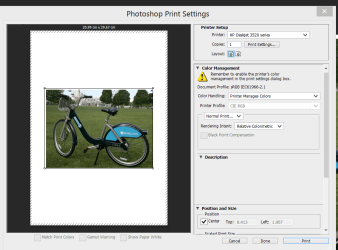
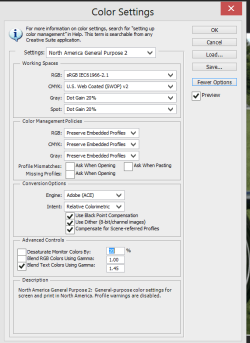
5) Have you set all the photoshop colour options correctly.(Set via edit==>Colour settings (CS6)
There's a HUGE range of possibilities -- You'll just have to try and experiment. There's too many options to attempt to fix this without having a copy of the file so I can see what it looks like on a decent monitor.

Cheers
jimbo
 

Attachments

  • photoshop1.png
    photoshop1.png
    65.7 KB · Views: 13
  • photoshop2.png
    photoshop2.png
    20.7 KB · Views: 14

My Computer My Computer

At a glance

Linux CENTOS 7 / various Windows OS'es and se...Intel i7 Intel i58GB, 16GBOn Motherboard
Computer type
PC/Desktop
Computer Manufacturer/Model Number
Custom built, several laptops HP/ASUS
OS
Linux CENTOS 7 / various Windows OS'es and servers
CPU
Intel i7 Intel i5
Memory
8GB, 16GB
Graphics Card(s)
On Motherboard
Sound Card
Realtek HD audio
Monitor(s) Displays
Apple Cinema display, Samsung LCD
Screen Resolution
1920 X 1080
Hard Drives
4 X 1TB SATA
Mouse
Toshiba wireless laser
Internet Speed
> 20MB up
I am shooting in jpeg and this has never been a problem before; any idea why it started now?
Can't help you unless you upload an actual sample of one of these JPG's which you say exhibits the symptom, so that at least several of us can examine the JPG in our own environment for ourselves.

As was explained, attach the true original untouched JPG file itself to your post just as you got it out of the camera... not a screenshot of it as displayed on your monitor in some application (although we understand it is when displayed by some application or when being printed that you say the color shift occurs). Also, no re-size or manipulation. Just the true original JPG, so that we can work with it ourselves.

Thanks. We'll be glad to help and try to explain what you're seeing, but we need that sample from you.
 

My Computer My Computer

At a glance

Windows 7 Pro x64 (1), Win7 Pro X64 (2)i5-3350p 3.1Ghz/6MB-cache (1); E8400 3.0Ghz/6...8GB PC3-12800 DDR3 (1); 4GB PC3-10600 DDR3 (2)ATI HD7750 (1), (see TV cards); ATI R7 250 (2)
Computer type
PC/Desktop
Computer Manufacturer/Model Number
Home-built, two systems (1) and (2)
OS
Windows 7 Pro x64 (1), Win7 Pro X64 (2)
CPU
i5-3350p 3.1Ghz/6MB-cache (1); E8400 3.0Ghz/6MB-cache (2)
Motherboard
ASUS P8Z77-V Pro (1); ASUS P5Q3 (2)
Memory
8GB PC3-12800 DDR3 (1); 4GB PC3-10600 DDR3 (2)
Graphics Card(s)
ATI HD7750 (1), (see TV cards); ATI R7 250 (2)
Sound Card
Realtek ALC892 HD Audio (1); Realtek ALC1200 HD Audio (2)
Monitor(s) Displays
Eizo HD2441W LCD, Eizo S2433W (1); Eizo 24" S2433W (2)
Screen Resolution
1920x1200, 1920x1200 (1); 1920x1200 (2)
Hard Drives
(1) 1TB SATA-II (7200RPM), 2x2TB SATA-III (7200RPM), 250GB SATA-III (10000RPM) for OS; 2x2TB external USB 3.0

(2) 320GB SATA-II (7200RPM), 750GB SATA-II (7200RPM), 150GB SATA-II (10000RPM) for OS; 2TB external USB 3.0
PSU
Nesteq ECS-6001 600W (1); Nesteq ECS-5001 500W (2)
Case
Acousti-Case 360 (1) and (2)
Cooling
Noctua NH-U12P SE2 for CPU, 2x120mm case fans (1) and (2)
Keyboard
IBM PS/2 (1) and (2)
Mouse
Logitech MX Revolution wireless (1); Microsoft wired (2)
Internet Speed
100mbps down / 10mbps up
Antivirus
Microsoft Security Essentials; Malwarebyte Anti-Malware Pro
Browser
Firefox
Other Info
Ceton InfiniTV 4-tuner cablecard-enabled TV card as well as Hauppauge HVR-2250 OTA/ATSC 2-tuner TV card in (1), running under Win7 WMC
Photos have RED cast - Your worst nightmare.

Adobe Community: Printing magenta/red with CS5 forums.adobe.com/thread/677627?start=120&tstart=0
Hello: please take a look at this Adobe threat, started 2 yrs ago and still active. This is the problem I have and it is STILL unresolved, and from my web searches, there are a rather large number of unhappy folks still searching for a cure for this issue ... still no solution from Adobe either. The jpegs. come out of my Nikon D3 just fine, load into Photoshop just fine (color "normal"), as soon as Photoshop loads the screen blips, then all (ALL) pic in the file are overlaid with a magenta cast. This is not a color cast issue for just the adjustment of one picture, it is the entire picture series in a file; like a red virus. I have tried reinstalling CS5 and Epson drivers with no luck; this issue simply renders use of Photoshop and any printer a red mess. I have Windows 7/32 and Epson R3000 printer. I will attempt to attach a sample photo:.
 

Attachments

  • Crystal Red.jpg
    Crystal Red.jpg
    187.6 KB · Views: 25

My Computer My Computer

At a glance

windows 7 ultimate 32 bitdual processor
Computer type
PC/Desktop
Computer Manufacturer/Model Number
dell
OS
windows 7 ultimate 32 bit
CPU
dual processor
Antivirus
McAfee
Browser
Firefox
A fault with the color management profile can cause problems. Photoshop is color managed.
Type color management in the search orb - add SRGB if it it isn't already there and set it as default with use my settings ticked. See if this makes a difference. You can always change this back.
Ideally you should have a calibrated color profile for your monitor. Sometimes the manufacturers profile are wrong (yes crazy isn't it). Without a hardware colorimeter I think this software is pretty good and way better that the inbuilt Windows calibration-
Calibrize
 

My Computer My Computer

At a glance

Windows 7x64 Home Premium SP1Intel i7 2600kG.Skill Ripjaws (DDR3-1600) 2x4GBNvidia GeForce GTS 450; Intel HD Graphics 300...
Computer type
PC/Desktop
Computer Manufacturer/Model Number
Own build
OS
Windows 7x64 Home Premium SP1
CPU
Intel i7 2600k
Motherboard
ASUS P8Z68 Deluxe
Memory
G.Skill Ripjaws (DDR3-1600) 2x4GB
Graphics Card(s)
Nvidia GeForce GTS 450; Intel HD Graphics 3000(GT2+)
Monitor(s) Displays
Dell Ultrasharp IPS panel U2311H, Samsung SyncMaster P2350
Screen Resolution
1920x1080
Hard Drives
Samsung 850 Pro SSD 256GB, Samsung SSD 840 120GB, Seagates 1TB Barracuda ST31000528AS x2
PSU
Seasonic M12II 520W
Case
Lian Li Lancool PC-K60
Cooling
Case: 1x120mm, 3x140mm CPU: Hyper 212+
Keyboard
Logitech MK520 (wireless)
Mouse
Logitech MK520
Internet Speed
6-7 Mbps
Antivirus
Norton Security Premium, Malwarebytes on 2 (MSE on 3rd PC)
Browser
FireFox
Other Info
Audio: Logitech Z523 2.1
  • Like
Reactions: Arc
This is the problem I have and it is STILL unresolved, and from my web searches, there are a rather large number of unhappy folks still searching for a cure for this issue ... still no solution from Adobe either. The jpegs. come out of my Nikon D3 just fine, load into Photoshop just fine (color "normal"), as soon as Photoshop loads the screen blips, then all (ALL) pic in the file are overlaid with a magenta cast.
For the last time, I request that you upload the actual JPG's you are showing here.

You may be 100% correct in your observation of some problem about something triggering the magenta color change. But lots of us here would like to see it for ourselves, since I for one have NEVER EVER SEEN THIS SYMPTOM with pictures imported from my original D200 from years ago, and my D300 for the past few years. I have NEVER SEEN THIS SYMPTOM, and I've used Photoshop starting from v3 up through v4, v5, v6, CS3, CS5 and now CS6.

This is not to say I won't see it with your particular shots from your D3. But if you persist in NOT letting us try and see if we can duplicate your problem using YOUR ACTUAL JPG's (not screenshots of a Photoshop window as you've done here), it will simply be impossible for anybody to help you out.

Please... post the actual JPG's you are showing in that PS screenshot, and let us see for ourselves whether or not we duplicate your symptom or not.

Please.
 

My Computer My Computer

At a glance

Windows 7 Pro x64 (1), Win7 Pro X64 (2)i5-3350p 3.1Ghz/6MB-cache (1); E8400 3.0Ghz/6...8GB PC3-12800 DDR3 (1); 4GB PC3-10600 DDR3 (2)ATI HD7750 (1), (see TV cards); ATI R7 250 (2)
Computer type
PC/Desktop
Computer Manufacturer/Model Number
Home-built, two systems (1) and (2)
OS
Windows 7 Pro x64 (1), Win7 Pro X64 (2)
CPU
i5-3350p 3.1Ghz/6MB-cache (1); E8400 3.0Ghz/6MB-cache (2)
Motherboard
ASUS P8Z77-V Pro (1); ASUS P5Q3 (2)
Memory
8GB PC3-12800 DDR3 (1); 4GB PC3-10600 DDR3 (2)
Graphics Card(s)
ATI HD7750 (1), (see TV cards); ATI R7 250 (2)
Sound Card
Realtek ALC892 HD Audio (1); Realtek ALC1200 HD Audio (2)
Monitor(s) Displays
Eizo HD2441W LCD, Eizo S2433W (1); Eizo 24" S2433W (2)
Screen Resolution
1920x1200, 1920x1200 (1); 1920x1200 (2)
Hard Drives
(1) 1TB SATA-II (7200RPM), 2x2TB SATA-III (7200RPM), 250GB SATA-III (10000RPM) for OS; 2x2TB external USB 3.0

(2) 320GB SATA-II (7200RPM), 750GB SATA-II (7200RPM), 150GB SATA-II (10000RPM) for OS; 2TB external USB 3.0
PSU
Nesteq ECS-6001 600W (1); Nesteq ECS-5001 500W (2)
Case
Acousti-Case 360 (1) and (2)
Cooling
Noctua NH-U12P SE2 for CPU, 2x120mm case fans (1) and (2)
Keyboard
IBM PS/2 (1) and (2)
Mouse
Logitech MX Revolution wireless (1); Microsoft wired (2)
Internet Speed
100mbps down / 10mbps up
Antivirus
Microsoft Security Essentials; Malwarebyte Anti-Malware Pro
Browser
Firefox
Other Info
Ceton InfiniTV 4-tuner cablecard-enabled TV card as well as Hauppauge HVR-2250 OTA/ATSC 2-tuner TV card in (1), running under Win7 WMC
dsperber ... yes, working on the camera upload. I am learning how to do this, so don't give-up just yet if it is not what is needed; I'll try again. I appreciate your assistance. Steve
 

My Computer My Computer

At a glance

windows 7 ultimate 32 bitdual processor
Computer type
PC/Desktop
Computer Manufacturer/Model Number
dell
OS
windows 7 ultimate 32 bit
CPU
dual processor
Antivirus
McAfee
Browser
Firefox
Photos have red cast

mjf & dsperber:

I do have a Colormunlki photo and I have calibrated my monitors. Attached is a copy of the same (Crystal -red) photo, but directly from my camera via Windows 7> Pictures, prior to uploading to CS5. I hope this is what you want, but if not, can I please have a bit more instruction on how to provide a required photo. Thank you again, Steve
 

Attachments

  • _DSC1331.JPG
    _DSC1331.JPG
    152.9 KB · Views: 18

My Computer My Computer

At a glance

windows 7 ultimate 32 bitdual processor
Computer type
PC/Desktop
Computer Manufacturer/Model Number
dell
OS
windows 7 ultimate 32 bit
CPU
dual processor
Antivirus
McAfee
Browser
Firefox
Download the trial version of lightroom and see what happens in there, and then you can edit in PS and see what happens again.
Join elements village forum, very helpful and friendly(not saying anyone here isnt), but it is a more photographic forum then this one.
The magenta is worse than i thought, i assumed it was similar to my own issue whereas it just had a slight tinge to it.
Those in the bridge screenshot are bad.
 

My Computer My Computer

At a glance

win 7 home premium 64 bitintel I5 3470 3.2ghz12gbasus radeon 5450 512mb
Computer type
PC/Desktop
Computer Manufacturer/Model Number
gigabyte z77-d3sh
OS
win 7 home premium 64 bit
CPU
intel I5 3470 3.2ghz
Motherboard
gigabyte z77-d3sh
Memory
12gb
Graphics Card(s)
asus radeon 5450 512mb
Sound Card
no
Monitor(s) Displays
viewsonic
Screen Resolution
1920*1080
Hard Drives
Crucial m4 sata 3 SSD
PSU
0cz
Case
corair carbide 200
Cooling
corsair h60
Keyboard
wireless logitech
Internet Speed
60 mbs
Photos have RED cast

Hi King...:
Good suggestions on the Elements site and Lightroom, I will do both.
If you back-up in this thread you will see an Adobe thread address for what is being reported about this issue on the Adobe Photoshop Forum; for the past 2 yrs. According to the Adobe Form, Lightroom is not a solution either. Adobe technicians are speculating this is caused by conflicting ICC codes. This might be a good "guess" on their part, but they are not providing a real working solution ... yet. The only response I've had from Adobe is, "this could be caused by many things, post your question on our Forum". Gerrrrrrrrrr!
Thank you, Steve
 

My Computer My Computer

At a glance

windows 7 ultimate 32 bitdual processor
Computer type
PC/Desktop
Computer Manufacturer/Model Number
dell
OS
windows 7 ultimate 32 bit
CPU
dual processor
Antivirus
McAfee
Browser
Firefox
I know where you are coming from, Im surprised adobe aint found a solution. There is a guy on elements forum who works/admins on the adobe sites, he is quite knowledgeable.
 

My Computer My Computer

At a glance

win 7 home premium 64 bitintel I5 3470 3.2ghz12gbasus radeon 5450 512mb
Computer type
PC/Desktop
Computer Manufacturer/Model Number
gigabyte z77-d3sh
OS
win 7 home premium 64 bit
CPU
intel I5 3470 3.2ghz
Motherboard
gigabyte z77-d3sh
Memory
12gb
Graphics Card(s)
asus radeon 5450 512mb
Sound Card
no
Monitor(s) Displays
viewsonic
Screen Resolution
1920*1080
Hard Drives
Crucial m4 sata 3 SSD
PSU
0cz
Case
corair carbide 200
Cooling
corsair h60
Keyboard
wireless logitech
Internet Speed
60 mbs
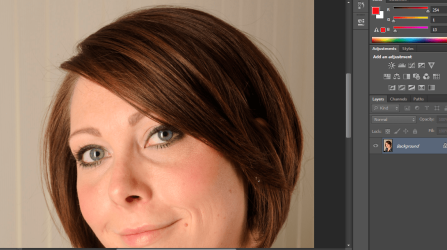
i have opened it in CS6 and dont see any red hues.

looks fine.png
 

My Computer My Computer

At a glance

Microsoft Windows 7 Home Premium 64-bit 7600IIx4 amd athelon 635 processor2x2gbati radeon HD 5450
Computer Manufacturer/Model Number
Hewlett packard/p6512uk
OS
Microsoft Windows 7 Home Premium 64-bit 7600
CPU
IIx4 amd athelon 635 processor
Motherboard
FOXCONN 2AA9
Memory
2x2gb
Graphics Card(s)
ati radeon HD 5450
Sound Card
(1) Realtek High Definition Audio (2) AMD High Definition
Monitor(s) Displays
samsung lcd tv 32"
Screen Resolution
1360x 768
Hard Drives
(1) WDC WD10 01FAES-60Z2A0 SATA Disk Device (2) Maxtor OneTouch USB Device (3) ST310003 33AS USB Device (4) WD My Book 1111 USB Device
PSU
?
Cooling
air!
Keyboard
wireless hp
Mouse
wireless Hp,optical
Internet Speed
1.10mb/s
Antivirus
MSE
Browser
Firefox
That _DSC1331.JPG you uploaded was exactly what I wanted.

I have now opened the file in both Photoshop 6 (quite old), as well as Photoshop CS6 (latest). The results were identical in both cases: NO MAGENTA COLOR SHIFT.

Of course my monitor is an Eizo S2433W (24" LCD at 1920x1200 resolution), with ATI HD4850 video card, and I am NOT using any special ICC color profile. I have not "calibrated" the monitor and it is under the control of the Eizo "Screenmanager Pro" software. It is running PURE DEFAULT, as far as color.

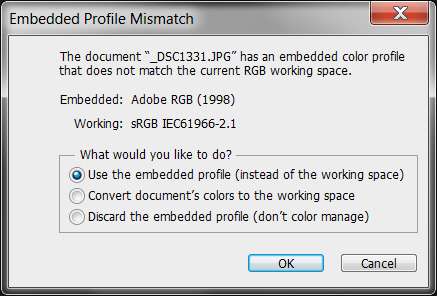
Note that when I did open your JPG (in both 6 and CS6) I was advised that your JPG reflects the Adobe RGB 1998 color profile (obviously how your Nikon D3 is set up), whereas my own "working space" setup in Photoshop is sRGB. This article provides a very good comparison of the two.

Here are my own CS6 color settings:

photoshopcs604colorsett.jpg


Anyway, the fact that your JPG color differs from my Photoshop setup simply produced the message warning about this, asking me what I wanted to do about it.

photoshopcs600colorerro.jpg


Just to see what the effective difference was, I opened your JPG three times... each time selecting a different one of the three choices offered. Note that in NONE of them did the MAGENTA COLOR SHIFT occur. Hopefully the colors of the results shown below appear properly on your monitor.

(1) use the embedded color profile of Adobe RGB 1998

photoshopcs601useembedd.jpg


(2) convert the colors from your Adobe RGB 1998 to my "working space" sRGB colors:

photoshopcs602convertco.jpg


(3) discard the embedded color profile of Adobe RGB 1998 and do not color manage at all (I'm not sure exactly what that means or does, but it's obvious that the color saturation drops off a bit and the result looks "paler", i.e. "less colorful"):

photoshopcs603discardem.jpg


Once again, the results using CS6 were the same as using 6: NO MAGENTA COLOR SHIFT on my PC.

Did you have your own monitor "calibrated" using calibration software and colorimeter hardware? What CRT or LCD is your monitor? What video card and driver in your PC? Are you using an ICC color profile with your monitor?

 

My Computer My Computer

At a glance

Windows 7 Pro x64 (1), Win7 Pro X64 (2)i5-3350p 3.1Ghz/6MB-cache (1); E8400 3.0Ghz/6...8GB PC3-12800 DDR3 (1); 4GB PC3-10600 DDR3 (2)ATI HD7750 (1), (see TV cards); ATI R7 250 (2)
Computer type
PC/Desktop
Computer Manufacturer/Model Number
Home-built, two systems (1) and (2)
OS
Windows 7 Pro x64 (1), Win7 Pro X64 (2)
CPU
i5-3350p 3.1Ghz/6MB-cache (1); E8400 3.0Ghz/6MB-cache (2)
Motherboard
ASUS P8Z77-V Pro (1); ASUS P5Q3 (2)
Memory
8GB PC3-12800 DDR3 (1); 4GB PC3-10600 DDR3 (2)
Graphics Card(s)
ATI HD7750 (1), (see TV cards); ATI R7 250 (2)
Sound Card
Realtek ALC892 HD Audio (1); Realtek ALC1200 HD Audio (2)
Monitor(s) Displays
Eizo HD2441W LCD, Eizo S2433W (1); Eizo 24" S2433W (2)
Screen Resolution
1920x1200, 1920x1200 (1); 1920x1200 (2)
Hard Drives
(1) 1TB SATA-II (7200RPM), 2x2TB SATA-III (7200RPM), 250GB SATA-III (10000RPM) for OS; 2x2TB external USB 3.0

(2) 320GB SATA-II (7200RPM), 750GB SATA-II (7200RPM), 150GB SATA-II (10000RPM) for OS; 2TB external USB 3.0
PSU
Nesteq ECS-6001 600W (1); Nesteq ECS-5001 500W (2)
Case
Acousti-Case 360 (1) and (2)
Cooling
Noctua NH-U12P SE2 for CPU, 2x120mm case fans (1) and (2)
Keyboard
IBM PS/2 (1) and (2)
Mouse
Logitech MX Revolution wireless (1); Microsoft wired (2)
Internet Speed
100mbps down / 10mbps up
Antivirus
Microsoft Security Essentials; Malwarebyte Anti-Malware Pro
Browser
Firefox
Other Info
Ceton InfiniTV 4-tuner cablecard-enabled TV card as well as Hauppauge HVR-2250 OTA/ATSC 2-tuner TV card in (1), running under Win7 WMC
Back
Top