New laptop periods of high heat

Datman

New member
Member
VIP
Local time
5:34 PM
Messages
158
New laptop periods of high heat (solved)

I just bought a remanufactured Dell D630 laptop with W7 home 64.

I’m using this computer solely for audio recording and it seems to run fine on W7. I choose this computer because my audio interface is an Echo Mona and requires a pcmcia slot, no brand new computers have it and adapters have a high rate of failure.

When I’m recording I only have Vegas 9.0, Echo sound panel and Speed fan for temp monitoring running. Most of the time the CPU anywhere from 5 to 18% and a 46c temp. About every 10-15 min the CPU usage jumps up as high as 60% and temps as high as 80c in a min or 2 it drops back down to the mid 40s.

I turned off the wifi and nothing else is running. W7 must be doing something for a short period of time causing these jumps in CPU usage. I used to have some links to things you can turn of in XP that are not needed for audio recording.

Does anyone have any suggestions on how to set up W7 for audio recording?

I never monitored the temps in my laptops before but have determined that laptops can run 20 30 deg hotter than a desktop. My desktops run BD rebuilder and all cores are maxed at 100% and never gets above 60c.
 
Last edited:

My Computer My Computer

At a glance

Window 7 home x64AMD FX-8150 Zambezi 3.6GHz Socket AM3+G.SKILL Ripjaws X Series 8GB (2 x 4GBSAPPHIRE 100328L Radeon HD 6770 1GB GDDR5
OS
Window 7 home x64
CPU
AMD FX-8150 Zambezi 3.6GHz Socket AM3+
Motherboard
GIGABYTE GA-970A-UD3 AM3
Memory
G.SKILL Ripjaws X Series 8GB (2 x 4GB
Graphics Card(s)
SAPPHIRE 100328L Radeon HD 6770 1GB GDDR5
Sound Card
Asus xonar hdav 1.3 deluxe
Hard Drives
Seagate Barracuda ST31000524AS 1TB 7200 RPM SATA 6.0Gb/s
Case
Rosewill CHALLENGER Black Gaming ATX Mid Tower
Cooling
CORSAIR Hydro Series H60
Is it sitting on a flat surface?
If you're not moving it much, I suggest you invest in a laptop stand.
I use one of these:
NotePal ErgoStand Basic - Cooler Master
Which is amazing, I can play intense games and not experience any issues, whereas previously it would overheat even just being idle on a flat surface. I don't even use the fan component, just having it elevated with the mesh backing gives great airflow.
 

My Computer My Computer

At a glance

Windows 7 Professional 32bit
OS
Windows 7 Professional 32bit
Please change your print to white.
 

My Computer My Computer

At a glance

Windows 10 Pro x64Intel Core i7 6700KGSkill TridentZ RGB 16GB 3600 16-16-16-36EVGA GTX 980 Ti SC x2
Computer type
PC/Desktop
Computer Manufacturer/Model Number
Skylake Special #666
OS
Windows 10 Pro x64
CPU
Intel Core i7 6700K
Motherboard
Asus Sabertooth Z170 Mark 1
Memory
GSkill TridentZ RGB 16GB 3600 16-16-16-36
Graphics Card(s)
EVGA GTX 980 Ti SC x2
Sound Card
Realtek High Definition
Monitor(s) Displays
AOC G2460PG
Screen Resolution
1920 x 1080 144Hz
Hard Drives
Samsung 860 Pro 256GB, Seagate Barracuda 4TB x2
PSU
EVGA 1000 P2, EVGA White Custom Braided Cables
Case
Corsair Vengeance C70 Gunmetal Black
Cooling
Corsair H100i v2, Corsair ML120 x2, Thermal Grizzly Kryonaut
Keyboard
Logitech G910 Orion Spectrum
Mouse
Logitech G700s
Internet Speed
Verizon Fios Quantum Gateway 75/75
Antivirus
Windows Defender, Malwarebytes Free 3.8.3
Browser
Chrome
Other Info
Corsair SP120 x4, LG Blu-ray Drive, Durabrand HT-395 100 Watt Dolby Digital Amp, Corsair H2100 Wireless 7.1 Headset
+1 to the cooler pad.
Given the laptop has just been reburbished I would hope inlet/outlet air slots are clean.
You don't appear to be doing CPU intensive tasks. I'm not a Speed Fan user but I wonder if it is performing some fan control??
You could try disabling speedfan and try some these popular temp monitoring problems:
Core Temp
Download Real Temp 3.70 | techPowerUp
http://openhardwaremonitor.org/
Then see if you observe the same temperature cycling.

I like Open Hardware Monitor since it monitors more system parameters.
 

My Computer My Computer

At a glance

Windows 7x64 Home Premium SP1Intel i7 2600kG.Skill Ripjaws (DDR3-1600) 2x4GBNvidia GeForce GTS 450; Intel HD Graphics 300...
Computer type
PC/Desktop
Computer Manufacturer/Model Number
Own build
OS
Windows 7x64 Home Premium SP1
CPU
Intel i7 2600k
Motherboard
ASUS P8Z68 Deluxe
Memory
G.Skill Ripjaws (DDR3-1600) 2x4GB
Graphics Card(s)
Nvidia GeForce GTS 450; Intel HD Graphics 3000(GT2+)
Monitor(s) Displays
Dell Ultrasharp IPS panel U2311H, Samsung SyncMaster P2350
Screen Resolution
1920x1080
Hard Drives
Samsung 850 Pro SSD 256GB, Samsung SSD 840 120GB, Seagates 1TB Barracuda ST31000528AS x2
PSU
Seasonic M12II 520W
Case
Lian Li Lancool PC-K60
Cooling
Case: 1x120mm, 3x140mm CPU: Hyper 212+
Keyboard
Logitech MK520 (wireless)
Mouse
Logitech MK520
Internet Speed
6-7 Mbps
Antivirus
Norton Security Premium, Malwarebytes on 2 (MSE on 3rd PC)
Browser
FireFox
Other Info
Audio: Logitech Z523 2.1
Thanks mjf yea speed fan is a free app that can be used to control fan speed but I just used if for hardware monitoring. I will try your links later.

Google is my friend again. I found this link and it helped. http://www.focusrite.com/answerbase/en/article.php?id=1071

After setting it up this way the CPU never goes above 10% but generally is less 2% heat is constant around 49-50 this is recording 2 channels at 24bit/96 kHz.
 

My Computer My Computer

At a glance

Window 7 home x64AMD FX-8150 Zambezi 3.6GHz Socket AM3+G.SKILL Ripjaws X Series 8GB (2 x 4GBSAPPHIRE 100328L Radeon HD 6770 1GB GDDR5
OS
Window 7 home x64
CPU
AMD FX-8150 Zambezi 3.6GHz Socket AM3+
Motherboard
GIGABYTE GA-970A-UD3 AM3
Memory
G.SKILL Ripjaws X Series 8GB (2 x 4GB
Graphics Card(s)
SAPPHIRE 100328L Radeon HD 6770 1GB GDDR5
Sound Card
Asus xonar hdav 1.3 deluxe
Hard Drives
Seagate Barracuda ST31000524AS 1TB 7200 RPM SATA 6.0Gb/s
Case
Rosewill CHALLENGER Black Gaming ATX Mid Tower
Cooling
CORSAIR Hydro Series H60
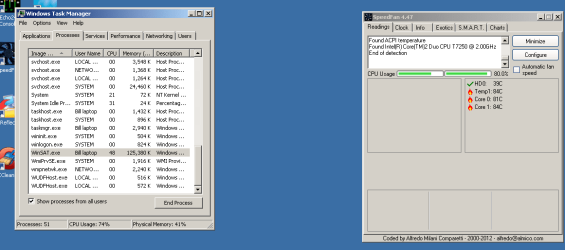
As always I spoke to soon. About 45 minutes into a needle drop both cores jumped to 100% and the temps got into the 80s I got a screenshot. I stopped recording and closed everything.
WinSat.exe was 49 % I closed it and the CPU dropped to near 0% instantly. I don’t know it’s purpose but if it puts that much stress I hope I don’t need it.
 

Attachments

  • high heat.png
    high heat.png
    17.6 KB · Views: 14

My Computer My Computer

At a glance

Window 7 home x64AMD FX-8150 Zambezi 3.6GHz Socket AM3+G.SKILL Ripjaws X Series 8GB (2 x 4GBSAPPHIRE 100328L Radeon HD 6770 1GB GDDR5
OS
Window 7 home x64
CPU
AMD FX-8150 Zambezi 3.6GHz Socket AM3+
Motherboard
GIGABYTE GA-970A-UD3 AM3
Memory
G.SKILL Ripjaws X Series 8GB (2 x 4GB
Graphics Card(s)
SAPPHIRE 100328L Radeon HD 6770 1GB GDDR5
Sound Card
Asus xonar hdav 1.3 deluxe
Hard Drives
Seagate Barracuda ST31000524AS 1TB 7200 RPM SATA 6.0Gb/s
Case
Rosewill CHALLENGER Black Gaming ATX Mid Tower
Cooling
CORSAIR Hydro Series H60
Hi Datman,

'Winsat.exe' is a 'System Assessment Tool' in Windows and it runs a series of tests to rate your computer on a scale ranging from 1 to 5. It rates several subsets of your computer system including processor, memory, primary hard disk and graphics. If 'Winsat.exe' continues to consume majority of the system resources, you may 'disable' this task and change its 'triggers'.

To 'disable' a task that takes up high resources, you may follow these steps:
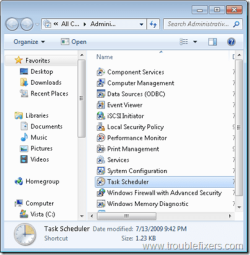
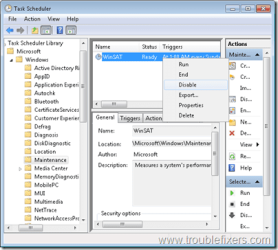
- Open 'Control Panel' > 'Administrative Tools' > Double click 'Task Scheduler' > Browse to Microsoft\Windows\Maintenance; and 'Disable WinSAT'
- Right click and 'disable WinSAT' task in 'task scheduler'
- You may also change its triggers; you may find the following 'web article' useful: Change an Existing Task
You may also refer to the images attached.

Hope this helps.


Attachments

  • 1.png
    1.png
    31.1 KB · Views: 3
  • 2.png
    2.png
    23.5 KB · Views: 4

My Computer My Computer

At a glance

Windows 7 64bit
OS
Windows 7 64bit
  • Like
Reactions: mjf
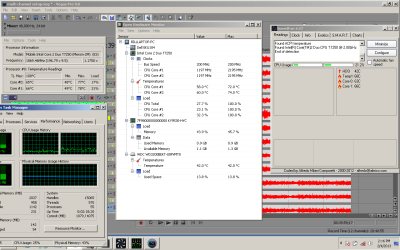
Thanks Saurabh A that's good to know. It looked as if it remained disabled after I closed it in task manager.

mjf I find it interesting how all 3 programs have different numbers. There must be a +/- 5deg error in any of them.

If I can get it to stay in the low 50s I will be happy.
 

Attachments

  • high heat2.png
    high heat2.png
    39.7 KB · Views: 8

My Computer My Computer

At a glance

Window 7 home x64AMD FX-8150 Zambezi 3.6GHz Socket AM3+G.SKILL Ripjaws X Series 8GB (2 x 4GBSAPPHIRE 100328L Radeon HD 6770 1GB GDDR5
OS
Window 7 home x64
CPU
AMD FX-8150 Zambezi 3.6GHz Socket AM3+
Motherboard
GIGABYTE GA-970A-UD3 AM3
Memory
G.SKILL Ripjaws X Series 8GB (2 x 4GB
Graphics Card(s)
SAPPHIRE 100328L Radeon HD 6770 1GB GDDR5
Sound Card
Asus xonar hdav 1.3 deluxe
Hard Drives
Seagate Barracuda ST31000524AS 1TB 7200 RPM SATA 6.0Gb/s
Case
Rosewill CHALLENGER Black Gaming ATX Mid Tower
Cooling
CORSAIR Hydro Series H60
Hope I'm not speaking to soon again but it looks like I got it. I'm doing a mock multi channel session. 12 channels at 24bit 48 kHz. Mid 60s and rarely above 25% CPU usage. I'm 55 minutes into it. i think I can go like this till I run out of HDD space.
I have a box I built with a fan and exhaust ports for club recording that will bring it down into the 50s.
I greatly appreciate everyone’s responses.
 

Attachments

  • high heat2.png
    high heat2.png
    41.1 KB · Views: 9

My Computer My Computer

At a glance

Window 7 home x64AMD FX-8150 Zambezi 3.6GHz Socket AM3+G.SKILL Ripjaws X Series 8GB (2 x 4GBSAPPHIRE 100328L Radeon HD 6770 1GB GDDR5
OS
Window 7 home x64
CPU
AMD FX-8150 Zambezi 3.6GHz Socket AM3+
Motherboard
GIGABYTE GA-970A-UD3 AM3
Memory
G.SKILL Ripjaws X Series 8GB (2 x 4GB
Graphics Card(s)
SAPPHIRE 100328L Radeon HD 6770 1GB GDDR5
Sound Card
Asus xonar hdav 1.3 deluxe
Hard Drives
Seagate Barracuda ST31000524AS 1TB 7200 RPM SATA 6.0Gb/s
Case
Rosewill CHALLENGER Black Gaming ATX Mid Tower
Cooling
CORSAIR Hydro Series H60
Hi Datman,

Glad that 'Winsat.exe' stays disabled; and the applications are now resulting into a nominal 'CPU usage' and an acceptable 'temperature' level. Thank you for confirming.

Do reply if you have any further questions; would be glad to assist.
 

My Computer My Computer

At a glance

Windows 7 64bit
OS
Windows 7 64bit
+1 to the cooler pad.
Given the laptop has just been reburbished I would hope inlet/outlet air slots are clean.
.


You should never assume anything! Just for the heck I took a can of air and sure enough there was a lot of dust. It’s running even cooler.
 

My Computer My Computer

At a glance

Window 7 home x64AMD FX-8150 Zambezi 3.6GHz Socket AM3+G.SKILL Ripjaws X Series 8GB (2 x 4GBSAPPHIRE 100328L Radeon HD 6770 1GB GDDR5
OS
Window 7 home x64
CPU
AMD FX-8150 Zambezi 3.6GHz Socket AM3+
Motherboard
GIGABYTE GA-970A-UD3 AM3
Memory
G.SKILL Ripjaws X Series 8GB (2 x 4GB
Graphics Card(s)
SAPPHIRE 100328L Radeon HD 6770 1GB GDDR5
Sound Card
Asus xonar hdav 1.3 deluxe
Hard Drives
Seagate Barracuda ST31000524AS 1TB 7200 RPM SATA 6.0Gb/s
Case
Rosewill CHALLENGER Black Gaming ATX Mid Tower
Cooling
CORSAIR Hydro Series H60
+1 to the cooler pad.
Given the laptop has just been reburbished I would hope inlet/outlet air slots are clean.
.


You should never assume anything! Just for the heck I took a can of air and sure enough there was a lot of dust. It’s running even cooler.
That's pretty poor. You'd expect a good clean out at the very least. Anyway hopefully you have the problem under control.
 

My Computer My Computer

At a glance

Windows 7x64 Home Premium SP1Intel i7 2600kG.Skill Ripjaws (DDR3-1600) 2x4GBNvidia GeForce GTS 450; Intel HD Graphics 300...
Computer type
PC/Desktop
Computer Manufacturer/Model Number
Own build
OS
Windows 7x64 Home Premium SP1
CPU
Intel i7 2600k
Motherboard
ASUS P8Z68 Deluxe
Memory
G.Skill Ripjaws (DDR3-1600) 2x4GB
Graphics Card(s)
Nvidia GeForce GTS 450; Intel HD Graphics 3000(GT2+)
Monitor(s) Displays
Dell Ultrasharp IPS panel U2311H, Samsung SyncMaster P2350
Screen Resolution
1920x1080
Hard Drives
Samsung 850 Pro SSD 256GB, Samsung SSD 840 120GB, Seagates 1TB Barracuda ST31000528AS x2
PSU
Seasonic M12II 520W
Case
Lian Li Lancool PC-K60
Cooling
Case: 1x120mm, 3x140mm CPU: Hyper 212+
Keyboard
Logitech MK520 (wireless)
Mouse
Logitech MK520
Internet Speed
6-7 Mbps
Antivirus
Norton Security Premium, Malwarebytes on 2 (MSE on 3rd PC)
Browser
FireFox
Other Info
Audio: Logitech Z523 2.1
Is it sitting on a flat surface?
If you're not moving it much, I suggest you invest in a laptop stand.
I use one of these:
NotePal ErgoStand Basic - Cooler Master
Which is amazing, I can play intense games and not experience any issues, whereas previously it would overheat even just being idle on a flat surface. I don't even use the fan component, just having it elevated with the mesh backing gives great airflow.

I just wanted to post an update about this. I did get one of these stands and because of where I place my laptop being able to tilt it up worked great but as far as cooling it did nothing.
 

My Computer My Computer

At a glance

Window 7 home x64AMD FX-8150 Zambezi 3.6GHz Socket AM3+G.SKILL Ripjaws X Series 8GB (2 x 4GBSAPPHIRE 100328L Radeon HD 6770 1GB GDDR5
OS
Window 7 home x64
CPU
AMD FX-8150 Zambezi 3.6GHz Socket AM3+
Motherboard
GIGABYTE GA-970A-UD3 AM3
Memory
G.SKILL Ripjaws X Series 8GB (2 x 4GB
Graphics Card(s)
SAPPHIRE 100328L Radeon HD 6770 1GB GDDR5
Sound Card
Asus xonar hdav 1.3 deluxe
Hard Drives
Seagate Barracuda ST31000524AS 1TB 7200 RPM SATA 6.0Gb/s
Case
Rosewill CHALLENGER Black Gaming ATX Mid Tower
Cooling
CORSAIR Hydro Series H60
This isn't going to help much!
Unless you really need portability forget laptops that could be glued to your desk (IMO).
Still I'd be going back to the supplier of your laptop and ask for an explanation. It may be that the lap top needs an even better clean and the CPU reseated with new thermal compound.
 

My Computer My Computer

At a glance

Windows 7x64 Home Premium SP1Intel i7 2600kG.Skill Ripjaws (DDR3-1600) 2x4GBNvidia GeForce GTS 450; Intel HD Graphics 300...
Computer type
PC/Desktop
Computer Manufacturer/Model Number
Own build
OS
Windows 7x64 Home Premium SP1
CPU
Intel i7 2600k
Motherboard
ASUS P8Z68 Deluxe
Memory
G.Skill Ripjaws (DDR3-1600) 2x4GB
Graphics Card(s)
Nvidia GeForce GTS 450; Intel HD Graphics 3000(GT2+)
Monitor(s) Displays
Dell Ultrasharp IPS panel U2311H, Samsung SyncMaster P2350
Screen Resolution
1920x1080
Hard Drives
Samsung 850 Pro SSD 256GB, Samsung SSD 840 120GB, Seagates 1TB Barracuda ST31000528AS x2
PSU
Seasonic M12II 520W
Case
Lian Li Lancool PC-K60
Cooling
Case: 1x120mm, 3x140mm CPU: Hyper 212+
Keyboard
Logitech MK520 (wireless)
Mouse
Logitech MK520
Internet Speed
6-7 Mbps
Antivirus
Norton Security Premium, Malwarebytes on 2 (MSE on 3rd PC)
Browser
FireFox
Other Info
Audio: Logitech Z523 2.1
Is it sitting on a flat surface?
If you're not moving it much, I suggest you invest in a laptop stand.
I use one of these:
NotePal ErgoStand Basic - Cooler Master
Which is amazing, I can play intense games and not experience any issues, whereas previously it would overheat even just being idle on a flat surface. I don't even use the fan component, just having it elevated with the mesh backing gives great airflow.

I just wanted to post an update about this. I did get one of these stands and because of where I place my laptop being able to tilt it up worked great but as far as cooling it did nothing.
Is your laptop running too hot? If not, you will not need a cooling pad (IMO). Those help for laptops that run too hot.
 

My Computer My Computer

At a glance

Windows 7 Professional x64 Service Pack 1AMD Athlon X4 6456GB DDR3 1066Sapphire Radeon HD 5670 512MB GDDR5
Computer type
PC/Desktop
Computer Manufacturer/Model Number
HP Pavilion P7-1010
OS
Windows 7 Professional x64 Service Pack 1
CPU
AMD Athlon X4 645
Motherboard
Foxxcon N-Alvorix RS880
Memory
6GB DDR3 1066
Graphics Card(s)
Sapphire Radeon HD 5670 512MB GDDR5
Sound Card
Realtek Integrated Audio
Monitor(s) Displays
HP 2011x
Screen Resolution
1600x900
Hard Drives
1. Crucial M4 128GB SSD
2. 1TB Seagate Barracuda 7200.12 RPM
3. 1TB Western Digital Caviar Green 5400RPM
PSU
Seasonic S12 II Bronze 380 Watt
Case
HP OEM
Cooling
Coolermaster Heatsink, AVC Case Fan
Keyboard
HP OEM- Made by Chicony
Mouse
HP OEM- Made by Logitech
Internet Speed
20MBit Down/4 Up
Antivirus
Microsoft Security Essentials
Browser
Internet Explorer 10
This isn't going to help much!
Unless you really need portability forget laptops that could be glued to your desk (IMO).
Still I'd be going back to the supplier of your laptop and ask for an explanation. It may be that the lap top needs an even better clean and the CPU reseated with new thermal compound.

actually I think the laptop is fine I was being overly concerned.
 

My Computer My Computer

At a glance

Window 7 home x64AMD FX-8150 Zambezi 3.6GHz Socket AM3+G.SKILL Ripjaws X Series 8GB (2 x 4GBSAPPHIRE 100328L Radeon HD 6770 1GB GDDR5
OS
Window 7 home x64
CPU
AMD FX-8150 Zambezi 3.6GHz Socket AM3+
Motherboard
GIGABYTE GA-970A-UD3 AM3
Memory
G.SKILL Ripjaws X Series 8GB (2 x 4GB
Graphics Card(s)
SAPPHIRE 100328L Radeon HD 6770 1GB GDDR5
Sound Card
Asus xonar hdav 1.3 deluxe
Hard Drives
Seagate Barracuda ST31000524AS 1TB 7200 RPM SATA 6.0Gb/s
Case
Rosewill CHALLENGER Black Gaming ATX Mid Tower
Cooling
CORSAIR Hydro Series H60
Back
Top