
Solved PCI-E x16 Graphics Card to Fit a PCI-E slot.

Prof Kerfuffle

Windows 7 user
Guru
Local time
12:18 AM
Messages
489
Location
4th planet from the sun
Hi,

I was wondering if anyone here has tried this, I have a spare monitor and wondering what you think about doing this. I have an OLD ATI Graphics card (fits PCIE of course) and I know it will work but wondering if it's worth the effort. My 560ti has only a 2 monitor capability and just 1 other PCIE x1 slot is free just above the card. :)

So anyone here tried this? (I know this works if you do it right.)

(N.B. I have read the websites about how to do this, I am looking for personal, first hand experience.)
 

My Computer My Computer

At a glance

Windows 7 Professional (x64/SP1) /Linux Mint 16Intel i5-3570k 3.40 GHz @ 4.6 GHz8GB (2133MHz) DDR3Asus GTX560 Ti (Nvidia)
Computer type
PC/Desktop
Computer Manufacturer/Model Number
GIGABYTE Rig (Custom)
OS
Windows 7 Professional (x64/SP1) /Linux Mint 16
CPU
Intel i5-3570k 3.40 GHz @ 4.6 GHz
Motherboard
GIGABYTE Z77X-D3H
Memory
8GB (2133MHz) DDR3
Graphics Card(s)
Asus GTX560 Ti (Nvidia)
Monitor(s) Displays
HP 23", Acer 19" and a Dell 17"
Screen Resolution
1080p, 1440x900 and 1280x1024
Hard Drives
Sandisk Extreme 120GB (SSD), WD 2TB green and 4 other HDDs
PSU
Antec 620w High Current Gamer
Case
Corsair Obsidian 600D
Cooling
CPU - Antec KÜHLER H₂O 920
Keyboard
Steelseries 6Gv2
Mouse
Roccat LUA
Internet Speed
4 - 6mb/s
Antivirus
ESET NOD32
Browser
Chrome/Firefox
Other Info
Intel Gigabit CT (PCIE NIC) and Thinkpad T61p,
Haven't tried it.

I'm confused, though. Are you trying to fit a PCI-E X16 card in an X1 slot? I don't think it's possible.

You can certainly try an X1 card in an X16 slot. I've never seen an X1 graphics card, although I know that they exist.

(I've got an X1 soundcard running in a slot that is X16 mechanical, X4 electrically.)
 

My Computer My Computer

At a glance

Windows 7 Pro X64 SP1Intel Core I7-3930k16 GB Gskill DDR3-2133eVGA GTX680
Computer Manufacturer/Model Number
homegrown
OS
Windows 7 Pro X64 SP1
CPU
Intel Core I7-3930k
Motherboard
Asus P9X79 Pro
Memory
16 GB Gskill DDR3-2133
Graphics Card(s)
eVGA GTX680
Sound Card
Creative X-Fi Titanium
Monitor(s) Displays
As PA246Q
Screen Resolution
1920 X 1200
Hard Drives
Corsair Force GT, 120 GB
WDC 1.5TB Caviar Black
PSU
PCP&C Silencer 750 Crossfire
Case
Silverstone FT02
Cooling
Noctua NH-D14
Keyboard
cheap Logitech USB
Mouse
Microsoft Intellimouse Explorer (old optical) USB
Internet Speed
6Mb cable
Other Info
Pioneer BDR-205
Samsung SH-203B
Monsoon 5.1 speakers
Haven't tried it.

I'm confused, though. Are you trying to fit a PCI-E X16 card in an X1 slot? I don't think it's possible.

You can certainly try an X1 card in an X16 slot. I've never seen an X1 graphics card, although I know that they exist.

(I've got an X1 soundcard running in a slot that is X16 mechanical, X4 electrically.)

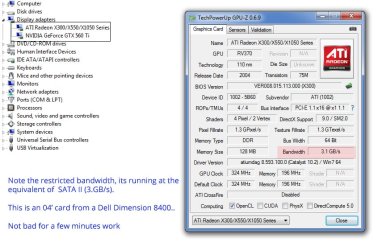
Thanks for the reply, I went and did it and yes I can confirm it works like a treat.

You have two options, extend the slot or trim the graphics card. I trimmed the card as it isn't a big deal if it ruins the card. Physically the slots appear to be the same from an X1 to an X16 (of course with more connectors). What you have to do is count 7 pins after the gap. Cut it on the 8th pin, remove all the other pins and file it down. There you go, that really is it and its stable no crashes except one but I reset my PCIE clock and its fine.

I wouldn't recommend it on most circumstances as it ruins the card and holds a risk of shorting the board or the component itself. Only try when you're certain it works, I ran it on the Dell for a few hours before my main rig. Also keep in mind fans may need extra power or at least to be soldered to the pins again, I was lucky and had no need because mine runs fine with a heatsink alone.
 

Attachments

  • PCIE x1 Card Mod.jpg
    PCIE x1 Card Mod.jpg
    107.4 KB · Views: 15

My Computer My Computer

At a glance

Windows 7 Professional (x64/SP1) /Linux Mint 16Intel i5-3570k 3.40 GHz @ 4.6 GHz8GB (2133MHz) DDR3Asus GTX560 Ti (Nvidia)
Computer type
PC/Desktop
Computer Manufacturer/Model Number
GIGABYTE Rig (Custom)
OS
Windows 7 Professional (x64/SP1) /Linux Mint 16
CPU
Intel i5-3570k 3.40 GHz @ 4.6 GHz
Motherboard
GIGABYTE Z77X-D3H
Memory
8GB (2133MHz) DDR3
Graphics Card(s)
Asus GTX560 Ti (Nvidia)
Monitor(s) Displays
HP 23", Acer 19" and a Dell 17"
Screen Resolution
1080p, 1440x900 and 1280x1024
Hard Drives
Sandisk Extreme 120GB (SSD), WD 2TB green and 4 other HDDs
PSU
Antec 620w High Current Gamer
Case
Corsair Obsidian 600D
Cooling
CPU - Antec KÜHLER H₂O 920
Keyboard
Steelseries 6Gv2
Mouse
Roccat LUA
Internet Speed
4 - 6mb/s
Antivirus
ESET NOD32
Browser
Chrome/Firefox
Other Info
Intel Gigabit CT (PCIE NIC) and Thinkpad T61p,
Haven't tried it.

I'm confused, though. Are you trying to fit a PCI-E X16 card in an X1 slot? I don't think it's possible.

You can certainly try an X1 card in an X16 slot. I've never seen an X1 graphics card, although I know that they exist.

(I've got an X1 soundcard running in a slot that is X16 mechanical, X4 electrically.)

Thanks for the reply, I went and did it and yes I can confirm it works like a treat.

You have two options, extend the slot or trim the graphics card. I trimmed the card as it isn't a big deal if it ruins the card. Physically the slots appear to be the same from an X1 to an X16 (of course with more connectors). What you have to do is count 7 pins after the gap. Cut it on the 8th pin, remove all the other pins and file it down. There you go, that really is it and its stable no crashes except one but I reset my PCIE clock and its fine.

I wouldn't recommend it on most circumstances as it ruins the card and holds a risk of shorting the board or the component itself. Only try when you're certain it works, I ran it on the Dell for a few hours before my main rig. Also keep in mind fans may need extra power or at least to be soldered to the pins again, I was lucky and had no need because mine runs fine with a heatsink alone.

When I said that it was impossible, I wasn't including the option of doing major surgery on the card.

In my ignorance (I have no idea about PCI-E pinouts), I'm astonished that it worked.
 

My Computer My Computer

At a glance

Windows 7 Pro X64 SP1Intel Core I7-3930k16 GB Gskill DDR3-2133eVGA GTX680
Computer Manufacturer/Model Number
homegrown
OS
Windows 7 Pro X64 SP1
CPU
Intel Core I7-3930k
Motherboard
Asus P9X79 Pro
Memory
16 GB Gskill DDR3-2133
Graphics Card(s)
eVGA GTX680
Sound Card
Creative X-Fi Titanium
Monitor(s) Displays
As PA246Q
Screen Resolution
1920 X 1200
Hard Drives
Corsair Force GT, 120 GB
WDC 1.5TB Caviar Black
PSU
PCP&C Silencer 750 Crossfire
Case
Silverstone FT02
Cooling
Noctua NH-D14
Keyboard
cheap Logitech USB
Mouse
Microsoft Intellimouse Explorer (old optical) USB
Internet Speed
6Mb cable
Other Info
Pioneer BDR-205
Samsung SH-203B
Monsoon 5.1 speakers
"When I said that it was impossible, I wasn't including the option of doing major surgery on the card.

In my ignorance (I have no idea about PCI-E pinouts), I'm astonished that it worked."

Well, at the risk of breaking the card that is the only major draw back if it has been done properly. (Pushing aside that the resale value is £0, the card looks odd and massive performance reduction)

It was worth it, the card was lying around. It would of been more effort that the cards worth to sell it really, as it's old.
 

My Computer My Computer

At a glance

Windows 7 Professional (x64/SP1) /Linux Mint 16Intel i5-3570k 3.40 GHz @ 4.6 GHz8GB (2133MHz) DDR3Asus GTX560 Ti (Nvidia)
Computer type
PC/Desktop
Computer Manufacturer/Model Number
GIGABYTE Rig (Custom)
OS
Windows 7 Professional (x64/SP1) /Linux Mint 16
CPU
Intel i5-3570k 3.40 GHz @ 4.6 GHz
Motherboard
GIGABYTE Z77X-D3H
Memory
8GB (2133MHz) DDR3
Graphics Card(s)
Asus GTX560 Ti (Nvidia)
Monitor(s) Displays
HP 23", Acer 19" and a Dell 17"
Screen Resolution
1080p, 1440x900 and 1280x1024
Hard Drives
Sandisk Extreme 120GB (SSD), WD 2TB green and 4 other HDDs
PSU
Antec 620w High Current Gamer
Case
Corsair Obsidian 600D
Cooling
CPU - Antec KÜHLER H₂O 920
Keyboard
Steelseries 6Gv2
Mouse
Roccat LUA
Internet Speed
4 - 6mb/s
Antivirus
ESET NOD32
Browser
Chrome/Firefox
Other Info
Intel Gigabit CT (PCIE NIC) and Thinkpad T61p,
Some PCI Express x1 slots have their back removed by the manufacture, not always common, that allows longer cards to be placed in them.

https://en.wikipedia.org/wiki/PCI_Express
...

The PCIe link between two devices can consist of anywhere from 1 to 32 lanes. In a multi-lane link, the packet data is striped across lanes, and peak data-throughput scales with the overall link width. The lane count is automatically negotiated during device initialization, and can be restricted by either endpoint. For example, a single-lane PCIe (×1) card can be inserted into a multi-lane slot (×4, ×8, etc.), and the initialization cycle auto-negotiates the highest mutually supported lane count. The link can dynamically down-configure the link to use fewer lanes....

....

A PCIe card fits into a slot of its physical size or larger (maximum ×16), but may not fit into a smaller PCIe slot (e.g.,a ×16 card in a ×8 slot). Some slots use open-ended sockets to permit physically longer cards and negotiate the best available electrical connection. The number of lanes actually connected to a slot may also be less than the number supported by the physical slot size.
 

My Computer My Computer

At a glance

Windows 10 Pro (x64)Intel Core i7-3930K (3.2GHz - 4.5GHz)4x Samsung 4GB PC3-12800 DDR3 (16GB 1600MHz)Nvidia Geforce GTX 690
Computer type
PC/Desktop
Computer Manufacturer/Model Number
Alienware Aurora ALX R4
OS
Windows 10 Pro (x64)
CPU
Intel Core i7-3930K (3.2GHz - 4.5GHz)
Motherboard
Alienware Aurora-R4 x79
Memory
4x Samsung 4GB PC3-12800 DDR3 (16GB 1600MHz)
Graphics Card(s)
Nvidia Geforce GTX 690
Sound Card
SteelSeries Siberia Elite
Monitor(s) Displays
Dell UltraSharp U3011
Screen Resolution
2560x1600
Hard Drives
Samsung 850 Pro 256 GB, Seagate 1TB Desktop Hybrid HDD, 2x Western Digital 4TB Green HDD
PSU
875W Some Dell PSU <.<
Case
Alienware Aurora ALX
Cooling
Custom Liquid Cooling (EK CPU & GPU blocks) dual EK 480RAD
Keyboard
Logitech G710+ Mechanical
Mouse
Logitech G700s
Internet Speed
Verizon Fios (50 mbps average)
Other Info
Server: Intel NUC D54250WYK: i5-4250U, 16GB, 256 GB mSATA, Windows Server 2012 R2
Back
Top