
SecureClient over Mobile Broadband problem

stanl

New member
I've got a problem with Sierra Wireless AirCard 880E ExpressCard modem and CheckPoint's SecureClient.

SecureClient can connect to my company's firewall via laptop's built-in wireless card. However, when I insert the AirCard and get connected to the Internet (I can browse), SecureClient can't get through. I can perform "update site" though. The diagnostics shows "Tunnel test failure (-122)".

I've spotted some difference in properties of wireless connection and broadband one. The wireless contains "Check Point SecuRemote" item listed in "This connection uses the following items", while mobile broadband does not (see attached images AirCard.jpg
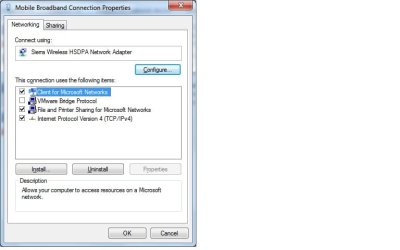
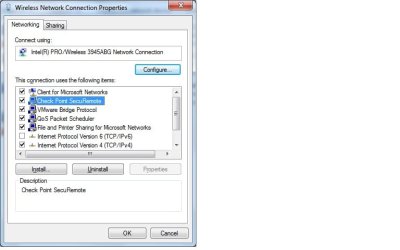
Wireless.jpg).

So far this is the only direction I would explore. Any ideas?
 

My Computer

Computer Manufacturer/Model Number
DELL 630C
OS
Windows 7
CPU
2400
Memory
4Gb
SecureClient can connect to my company's firewall via laptop's built-in wireless card. However, when I insert the AirCard and get connected to the Internet (I can browse), SecureClient can't get through.
Hi! stanl, and welcome to Windows Seven Forums.

Using two or more nics with a single computer, or with multiple networks, creates problems. The network DHCP server recognizes each computer client by its MAC address (associated with the nic hardware) so when you change from one card to another, the network believes this is a different computer. The computer may still be trying to connect via the settings used by the first card, it doesn't distinguish between the two cards. The final result is mass confusion.

To sort it all out, you need the equivalent of different profiles for the different cards and or networks. You can try creating a new network connection using the AirCard, allowing the network DHCP server to create a new identity associated with the AirCard. You can try to manually create the settings for the second card to use when connected. For more ideas I would suggest you google "connecting to multiple networks".

Hope this gets you started!

Robert
 

My Computer

OS
...
Robert,

My problem does not seem to stem from having more than one NIC.
I can connect to my CheckPoint firewall when I have any combination of Wi-Fi and /or ethernet active.

My problem is certainly with my cellular modem, more specifically between Windows 7 and the modem. The same combination (modem software + SecuRemote) are working just fine in XP.

I've spotted some interesting detail - when I look into connection properties in XP I can see that Check Point SecuRemote is bound to every connection (ethernet, wireless, cellular). However, in Win7, SecuRemote is not bound to the cellular.

It also behaves differently with regard to ability to bridge connections. In XP I can see this option for every connection, while in Win7 for cellular it is missing.

I assume that in Win7 some kind of device capability is missing making cellular "invisible" to bridges and CheckPoint.
 

My Computer

Computer Manufacturer/Model Number
DELL 630C
OS
Windows 7
CPU
2400
Memory
4Gb
Robert,

My problem does not seem to stem from having more than one NIC.
I can connect to my CheckPoint firewall when I have any combination of Wi-Fi and /or ethernet active.

My problem is certainly with my cellular modem, more specifically between Windows 7 and the modem. The same combination (modem software + SecuRemote) are working just fine in XP.

I've spotted some interesting detail - when I look into connection properties in XP I can see that Check Point SecuRemote is bound to every connection (ethernet, wireless, cellular). However, in Win7, SecuRemote is not bound to the cellular.

It also behaves differently with regard to ability to bridge connections. In XP I can see this option for every connection, while in Win7 for cellular it is missing.

I assume that in Win7 some kind of device capability is missing making cellular "invisible" to bridges and CheckPoint.
Hi stanl;

Yes I believe your assessment is correct. I found this quote:

Sierra Wireless Watcher™ connection manager software, device drivers, and Software Developer Kits are also being upgraded to support Windows 7 for all devices that do not support Windows 7 mobile broadband (which provides access through the View Available Networks menu).
at this web site: CalAmp+Collaborates+with+Sierra+Wireless+to+Integrate+3G+Cellular+Connectivity+in+New+Wireless+Meter+Reading+Communication+Platform%3c%2fbr%3e

so it would seem you will need to check with Sierra Wireless for updates for Windows 7?

I also noticed the 880E was "optimized for Europe" and the 881E "for North America".

CalAmp+Collaborates+with+Sierra+Wireless+to+Integrate+3G+Cellular+Connectivity+in+New+Wireless+Meter+Reading+Communication+Platform%3c%2fbr%3e

The version of Windows 7 I am using, the RC build 7100, although a delight for me, is still in its testing mode. I am awaiting the release of the retail version in October and hope many current issues will have been solved. Sierra Wireless seems to be actively updating software and drivers for Windows 7 so hopefully, it will only be a short time until your AirCard can be used with 7.

Happy surfing!

Robert
 

My Computer

OS
...
I Installed Setup-10.2.302.33178-RC1.full.uncompressed from Vodafone, Mobile Broadband software. It happens to work splendid with the embedded Siemens Aircard SIMslot in the Fujitsu Stylistics Q550.
 

My Computer

Computer Manufacturer/Model Number
HP
OS
Windows 7 Pro 32
CPU
multiple
Motherboard
multiple
Memory
multiplemultiple
Graphics Card(s)
multiple
Sound Card
multiple
Monitor(s) Displays
multiple
Hard Drives
multiple
Back
Top