Solved How to make sure WIN7x64 creates MBR format during install?

Stewox

New member
Member
Local time
6:54 AM
Messages
59
Hi

ASUS P9X79

I used a combination of research and guides onlince, particularly the tomshardware guide as well as others

PLEASE - DESPERATE - ASUS P9X79 - Windows 7 HELP - Motherboards - Motherboards

Sean's Windows 7 Install & Optimization Guide for SSDs & HDDs

ASUS Official X79 Motherboards Support Thread - Page 23 - [H]ard|Forum


I used UEFI ISO converter to make UEFI bootable DVD, The ISO does NOT have the "extract wim, move, rename bootx64.efi" modification which was in some guides used to force win7 to use GPT, I want to use UEFI boot with MBR, if that's possible, i don't see a problem? The tomshardware guide just doesn't touch this point but that doesn't make it impossible as from other research I've done.

Those guides are old and do not know the existance of this new fixed ISOs.

They also said it's not goot to use DVD + USB for AHCI/RAID RST F6 inject, but I already burned the DVD so I was just going to risk trying with the USB driver inject.


INTEL RSTe F6: http://downloadcenter.intel.com/Det...wnldID=22502&lang=eng&wapkw=rst+enterprise+f6

ASUS did not have F6 drivers on their site, or maybe they were in package but they weren't named properly.


Progression:

- SATA > RAID MODE did not work for me since all of the drivers have been flagged as incompatible and forcing it didn't work, I set it back to AHCI and the C600 AHCI was available as compatible so I applied that.
(lol now I think i forgot to check the F6 drivers in RAID mode, however not sure what was what in asus-sata-drivers)
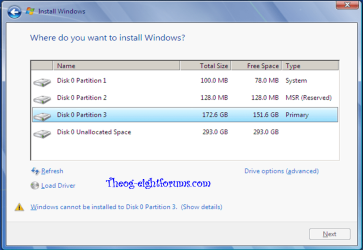
- Now the installer makes 3 partitions, which doesn't feel like it's using MBR imo, i looked guides on GPT and that was the image, one ESP partition, one Reserved, and the one Main OS parittion.

But the problem is I have passed the CMD option now, i forgot if it is available again, since from CMD you can convert to MBR:

Using a Command Line


  1. At a command prompt, type: diskpart, and then press ENTER.
  2. At the diskpart prompt, type: list disk, and then press ENTER.
  3. Record the disk number of the disk that you want to convert to an MBR disk.
  4. At the diskpart prompt, type: select disk n, and then press ENTER.
  5. At the diskpart prompt, type: convert mbr, and then press ENTER.


EDIT: however yes, this is what I've recalled now, i've seen on wikipedia that the ESP parition is made because of EFI boot enabled and it has both MBR and GPT, so it's not because of GPT, but still nowhere to check prior install is a pain in the ass.

I just want to be sure or should i just go with it an check after install , if it's not possible then I will it will just take a bit more time which is fine with me since this is the world of PCs and I'm totally okay with that but the point is to save time if possible.
 

My Computer My Computer

Computer type
PC/Desktop
Computer Manufacturer/Model Number
Myself
OS
Windows 7 x64 Ultimate
CPU
Intel Core i7 3820
Motherboard
Asus P9X79
Memory
16GB DDR3 Corsair Vengeance 2133Mhz
Graphics Card(s)
Sapphire ATI Radeon 5850
Sound Card
Asus Xonar D1
Monitor(s) Displays
Asus VG278HE
Screen Resolution
1080p
Hard Drives
WD5000AAKS
WD1002FAEX
SSD128GB840PRO
PSU
Enermax AWT 620W Liberty DXX
Case
CM Storm Trooper
Cooling
Air
Keyboard
Sidewinder X4
Mouse
Sidewinder X8
Internet Speed
10/1
Antivirus
NOD32 v4
Browser
FF
Emm what about UEFI & MBR ?


First most important thing is now I need to find a way to disable/remove GPT support from win7 ISO in order to force MBR at install. I suspect this is simply one of those microsoft's non-configurable default bullshit.

The ESP partition as wikipedia says can be on a MBR disk as it has it's own MBR adress right ?

Secondly I need to check if I installed , I don't know what's the correct way the tomshardware guide did not provide any pictures so I hope someone here can judge:

As I said, i used the USB stick for F6 RSTe Inject,


I'll get straight to work, but it'll take some time on my own.

All the SATA IRSTe RAID AHCI inject crap can be fixed by simply removing msahci from iso an replacing with the proper driver before install.

EDIT: on the other hand I don't really know everything yet, but I have researched wildly as I have setup my system, I usually dig deep into it and find new solutions along the way.

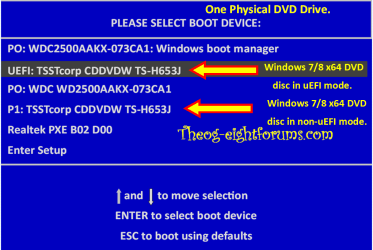
So the only thing I really don't know, is, if i use legacy mode for boot in order to have MBR in the usual way, does the EFS partition get made and if the OS has benefits for UEFI like the fast boots (okay that's just win8) and other stuff???? This is the actual question! Thanks

I don't need any guides anymore i got it now, i just need to know these facts and I have to say that major stuff like that is totally not covered ANYWHERE on the web, if I found the missing stuff I needed I wouldn't lose 2 days now with this.
 

My Computer My Computer

Computer type
PC/Desktop
Computer Manufacturer/Model Number
Myself
OS
Windows 7 x64 Ultimate
CPU
Intel Core i7 3820
Motherboard
Asus P9X79
Memory
16GB DDR3 Corsair Vengeance 2133Mhz
Graphics Card(s)
Sapphire ATI Radeon 5850
Sound Card
Asus Xonar D1
Monitor(s) Displays
Asus VG278HE
Screen Resolution
1080p
Hard Drives
WD5000AAKS
WD1002FAEX
SSD128GB840PRO
PSU
Enermax AWT 620W Liberty DXX
Case
CM Storm Trooper
Cooling
Air
Keyboard
Sidewinder X4
Mouse
Sidewinder X8
Internet Speed
10/1
Antivirus
NOD32 v4
Browser
FF
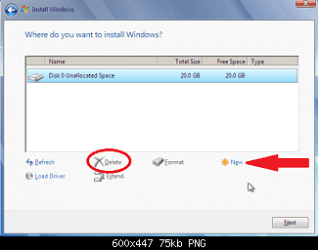
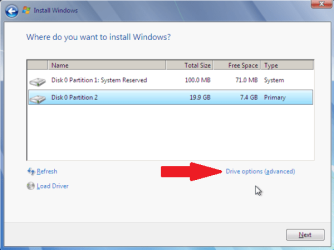
Secondly I need to check if I installed , I don't know what's the correct way the tomshardware guide did not provide any pictures so I hope someone here can judge:

partition_09.png

For Legacy mode & MBR:
partition_08.png

For UEFI mode & GPT:
Windows 8 Downgrade-012 SB.PNG
 

My Computer My Computer

OS
ME/XP/Vista/Win7
Theog, sorry i havent finished that statement since I was talking about IRST F6 inject but I had problems uploading to imgur with IE10 (since I have just installed the OS minutes ago)

So I didn't cusomtize anything yet in expectation I will have to redo the OS install.

I used my local host, should work, tell me if picture doesn't display.

Remember, this is not enterprise hardware so not sure why it's SCSI labeled, but i used RSTe drivers because guiders suggested enterprise versions are better than normal so that's why it may show like it's SCSI if it really is or not I have no idea right now, not sure what this means for perofrmance yet, thanks for all replies since It would be really bad to waste time benchmarking just to find I have to redo all the OS install anyway.

ssdahciirstef6inject.jpg
 

My Computer My Computer

Computer type
PC/Desktop
Computer Manufacturer/Model Number
Myself
OS
Windows 7 x64 Ultimate
CPU
Intel Core i7 3820
Motherboard
Asus P9X79
Memory
16GB DDR3 Corsair Vengeance 2133Mhz
Graphics Card(s)
Sapphire ATI Radeon 5850
Sound Card
Asus Xonar D1
Monitor(s) Displays
Asus VG278HE
Screen Resolution
1080p
Hard Drives
WD5000AAKS
WD1002FAEX
SSD128GB840PRO
PSU
Enermax AWT 620W Liberty DXX
Case
CM Storm Trooper
Cooling
Air
Keyboard
Sidewinder X4
Mouse
Sidewinder X8
Internet Speed
10/1
Antivirus
NOD32 v4
Browser
FF
Why are you having to inject drivers? Win7 should have all SATA drivers in the installer. Is the HD not being displayed when you reach the Drive Selection page during install?

The rest of the drivers should come in after install on Windows Updates after enabling Automatically deliver drivers via Windows Update (Step 3) and running all rounds of Important and Optional Updates. Only then do you need to import any drivers still missing in Device Manager.

May I ask why you need an MBR disk and EFI won't work for you? Most users who Bypass UEFI to Install WIn7 are doing so because they have intractable problems installing in UEFI mode.
 
You cannot install in UEFI to an MBR disk, it requires GPT formatted HD.

To install normally to an MBR disk Bypass UEFI to Install WIn7

I wish this quote was on top of the freaking (/$$/"/#/$&T% search engines and guides.

These are those moments I would gladly use some really bad language in a post like this.
 

My Computer My Computer

Computer type
PC/Desktop
Computer Manufacturer/Model Number
Myself
OS
Windows 7 x64 Ultimate
CPU
Intel Core i7 3820
Motherboard
Asus P9X79
Memory
16GB DDR3 Corsair Vengeance 2133Mhz
Graphics Card(s)
Sapphire ATI Radeon 5850
Sound Card
Asus Xonar D1
Monitor(s) Displays
Asus VG278HE
Screen Resolution
1080p
Hard Drives
WD5000AAKS
WD1002FAEX
SSD128GB840PRO
PSU
Enermax AWT 620W Liberty DXX
Case
CM Storm Trooper
Cooling
Air
Keyboard
Sidewinder X4
Mouse
Sidewinder X8
Internet Speed
10/1
Antivirus
NOD32 v4
Browser
FF
Why are you having to inject drivers? Win7 should have all SATA drivers in the installer. Is the HD not being displayed when you reach the Drive Selection page during install?

The rest of the drivers should come in after install on Windows Updates after enabling Automatically deliver drivers via Windows Update (Step 3) and running all rounds of Important and Optional Updates. Only then do you need to import any drivers still missing in Device Manager.

May I ask why you need an MBR disk and EFI won't work for you? Most users who Bypass UEFI to Install WIn7 are doing so because they have intractable problems installing in UEFI mode.


Well I had no problems installing in UEFI mode as we can see.

The driver inject is to avoid MSAHCI being forced by Win7. IRST drivers are said to be much better for SSD performance. I actually don't want any auto-updating from microsoft DVD or Update, I disable those things, remove them from device manager and delete from DriverStore, I don't see a better solution than this. I like to do stuff manually to have FULL control over my system, nothing done behind my back, yes I'm definitely not your ordinary steam user.

Sorry that I may sound a bit angry now but that's because, not a big tragic event, I know this things take time and great effort to make them work right, so I'm not angry about losting time having to reinstall OS, it's just the darn internet didn't make that CLEAR before what you can and can't do.

So UEFI it self doesn't allow MBR in UEFI mode? That's another story then.

But as soon as I finish writting this post it's all fine, I don't grow a grudge.

Since way before I started this I knew lost of work is ahead, mainly research.
 

My Computer My Computer

Computer type
PC/Desktop
Computer Manufacturer/Model Number
Myself
OS
Windows 7 x64 Ultimate
CPU
Intel Core i7 3820
Motherboard
Asus P9X79
Memory
16GB DDR3 Corsair Vengeance 2133Mhz
Graphics Card(s)
Sapphire ATI Radeon 5850
Sound Card
Asus Xonar D1
Monitor(s) Displays
Asus VG278HE
Screen Resolution
1080p
Hard Drives
WD5000AAKS
WD1002FAEX
SSD128GB840PRO
PSU
Enermax AWT 620W Liberty DXX
Case
CM Storm Trooper
Cooling
Air
Keyboard
Sidewinder X4
Mouse
Sidewinder X8
Internet Speed
10/1
Antivirus
NOD32 v4
Browser
FF
If you don't keep your system updated with vital Performance and Security Updates then you don't even have Win7. This is XPired thinking, no longer necessary in a perfectly balanced OS.

Besides this OS is driver-automated and complete. In Win8 the user doesn't even interact with drivers, which is an improvement developed in Win7.

It would be the exact same situation as turning off all of the electronics in a (Win7) Lexus so it performed more like a (XP) Dodge Dart.

These comparisons are not personal but based on helping with tens of thousands of installs of Win7 over four years here at the top tech forum on the web.
 
What do i need to do to get rid of GPT now on this disk ?

Will it do it automatically once I start installing again in non-uefi mode ?

or i have to convert it via the procedure that i also mentioned
 

My Computer My Computer

Computer type
PC/Desktop
Computer Manufacturer/Model Number
Myself
OS
Windows 7 x64 Ultimate
CPU
Intel Core i7 3820
Motherboard
Asus P9X79
Memory
16GB DDR3 Corsair Vengeance 2133Mhz
Graphics Card(s)
Sapphire ATI Radeon 5850
Sound Card
Asus Xonar D1
Monitor(s) Displays
Asus VG278HE
Screen Resolution
1080p
Hard Drives
WD5000AAKS
WD1002FAEX
SSD128GB840PRO
PSU
Enermax AWT 620W Liberty DXX
Case
CM Storm Trooper
Cooling
Air
Keyboard
Sidewinder X4
Mouse
Sidewinder X8
Internet Speed
10/1
Antivirus
NOD32 v4
Browser
FF
Okay just need to solve the IRST AHCI thing and I'm ready to go, thanks! It looks like it worked but im going to do a benchmark now and post results just to be sure, as far as I can see I don't have the remove-safely icon for the SSD so that means it should work.

I have Asus P9X79 and Samsung 840 120GB Pro if i haven't mentioned that yet.

The Uefi Bios has CSM option and inside I have 3 options, one of them is Boot from Storage Disk which has quite a lot of options,


  • Both, UEFI driver first
  • Both, OpROM first
  • OpROM only
  • Uefi only
  • Ignore
I did researched all that before, so I know how to bypass yes. Too bad the latest bios doesn't have ignore option for Boot from PCI device, that's kind of stupid, i'll contact ASUS.

EDIT: I noticed the second page now, i heard about the Intel cache stuff but at guides stayed away from that as I didn't want any RAID or whatever, just want to have OS on the SSD and a few programs, all other stuff on HDDs.

I'll see how long it takes for legacy to boot, but right now it boots so fast I have trouble hitting DEL in time lol :D (having tons of papers around me, but I took hours to just browse through all settings having that big simile of how good this stuff is, POST Delay: Wait until ESC > thank you!)
 

My Computer My Computer

Computer type
PC/Desktop
Computer Manufacturer/Model Number
Myself
OS
Windows 7 x64 Ultimate
CPU
Intel Core i7 3820
Motherboard
Asus P9X79
Memory
16GB DDR3 Corsair Vengeance 2133Mhz
Graphics Card(s)
Sapphire ATI Radeon 5850
Sound Card
Asus Xonar D1
Monitor(s) Displays
Asus VG278HE
Screen Resolution
1080p
Hard Drives
WD5000AAKS
WD1002FAEX
SSD128GB840PRO
PSU
Enermax AWT 620W Liberty DXX
Case
CM Storm Trooper
Cooling
Air
Keyboard
Sidewinder X4
Mouse
Sidewinder X8
Internet Speed
10/1
Antivirus
NOD32 v4
Browser
FF
I will also install IRSTe full package from ASUS drivers to see what happens to the system after F6 inject.
 

My Computer My Computer

Computer type
PC/Desktop
Computer Manufacturer/Model Number
Myself
OS
Windows 7 x64 Ultimate
CPU
Intel Core i7 3820
Motherboard
Asus P9X79
Memory
16GB DDR3 Corsair Vengeance 2133Mhz
Graphics Card(s)
Sapphire ATI Radeon 5850
Sound Card
Asus Xonar D1
Monitor(s) Displays
Asus VG278HE
Screen Resolution
1080p
Hard Drives
WD5000AAKS
WD1002FAEX
SSD128GB840PRO
PSU
Enermax AWT 620W Liberty DXX
Case
CM Storm Trooper
Cooling
Air
Keyboard
Sidewinder X4
Mouse
Sidewinder X8
Internet Speed
10/1
Antivirus
NOD32 v4
Browser
FF
Stewox

You might want to update the firmware on your SSD as well.
 

My Computer My Computer

Computer Manufacturer/Model Number
Custom Built
OS
Windows 7 Ultimate 32-Bit & Windows 7 Ultimate 64-Bit
CPU
Intel Core i7 CPU 950 @ 3.07GHz
Motherboard
ASUS P6T DELUXE V2
Memory
OCZ 6GB (3 x 2GB) 240-Pin DDR3 SDRAM DDR3 1600 OCZ3X1600R2
Graphics Card(s)
ATI Radeon HD 5700 Series
Sound Card
OnBoard
Hard Drives
WD6400AACS-00M3B0 (640GB SATA )
PSU
CORSAIR 850w
Case
NZXT LEXA
Cooling
Intel Stock Heatsink Fan
Keyboard
Microsoft Wireless Laser Keyboard 7000
Mouse
Microsoft Wireless Laser Mouse 7000
Found what I SHOULD supposed to find way back when I started:

intel - Will Windows 8 install on MBR? - Super User

EFI System Partition is only supported on GPT disk

Probably the most stupidest thing ever. What on earth were they thinking GPT/UEFI support is nowhere near polished.

When I installed win7 today, i had that gut feeling that things are just going too good to be true.
 

My Computer My Computer

Computer type
PC/Desktop
Computer Manufacturer/Model Number
Myself
OS
Windows 7 x64 Ultimate
CPU
Intel Core i7 3820
Motherboard
Asus P9X79
Memory
16GB DDR3 Corsair Vengeance 2133Mhz
Graphics Card(s)
Sapphire ATI Radeon 5850
Sound Card
Asus Xonar D1
Monitor(s) Displays
Asus VG278HE
Screen Resolution
1080p
Hard Drives
WD5000AAKS
WD1002FAEX
SSD128GB840PRO
PSU
Enermax AWT 620W Liberty DXX
Case
CM Storm Trooper
Cooling
Air
Keyboard
Sidewinder X4
Mouse
Sidewinder X8
Internet Speed
10/1
Antivirus
NOD32 v4
Browser
FF
Stewox

You might want to update the firmware on your SSD as well.


Thanks, a month of research went into this build so I got so much ahead of my self that I burned the SSD update ISO on spare CD (i have a pack CDs specifically for stuff like that) but then the update didn't proceed because it was already updated :geek:


Anyways I was more active on these forums if you can see my thread that didn't get much in time so I went on my own, Setting up Win7 on Asus P9X79 - techPowerUp! Forums, you'll probably notice I'm not beginner, but I admit defeat today by the, the the the, whatever, I got a bit optimistic with UEFI+MBR ... which backfired on me.
 

My Computer My Computer

Computer type
PC/Desktop
Computer Manufacturer/Model Number
Myself
OS
Windows 7 x64 Ultimate
CPU
Intel Core i7 3820
Motherboard
Asus P9X79
Memory
16GB DDR3 Corsair Vengeance 2133Mhz
Graphics Card(s)
Sapphire ATI Radeon 5850
Sound Card
Asus Xonar D1
Monitor(s) Displays
Asus VG278HE
Screen Resolution
1080p
Hard Drives
WD5000AAKS
WD1002FAEX
SSD128GB840PRO
PSU
Enermax AWT 620W Liberty DXX
Case
CM Storm Trooper
Cooling
Air
Keyboard
Sidewinder X4
Mouse
Sidewinder X8
Internet Speed
10/1
Antivirus
NOD32 v4
Browser
FF
Back
Top