Stop Excel 2010 from appending .txt to file with existing extension

stones710

New member
Local time
9:23 AM
Messages
3
I think this problem may have to do with Windows 7 vs Windows XP. With Excel 2010 running under XP this does not happen.

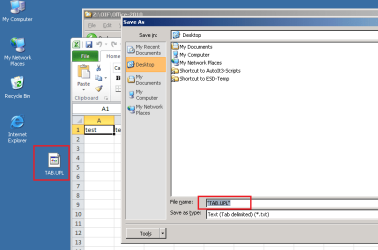
Under Win 7 running Excel 2010, when saving a spreadsheet as a tab delimited text file (.txt). Excel 2010 appends the .txt file extension to a file that already has an existing file extension. For my work I must save excel files as xxxxxxx.upl but excel always saves the files as xxxxxxx.upl.txt. This only occurs under Win 7, not XP which is why I think it is an OS issue.

How can I fix this? I am guessing it is a registry fix, but I don't have any ideas of how to fix it. Thanks in advance for any suggestions!

If I add double quotes around the file name I want, like "xxxxxx.upl" the file will save as a tab delimited text file and Excel will then identify the file type as a UPL file.

What I want:

B5JwqxEifVhtAAAAAElFTkSuQmCC


What I get without the "xxxx.upl" file name:

E9eWzf+IRA4AAAAASUVORK5CYII=
 

Attachments

  • UPL file example.png
    UPL file example.png
    4.5 KB · Views: 112

My Computer My Computer

At a glance

windows 7 64 biti7
Computer type
PC/Desktop
Computer Manufacturer/Model Number
custom
OS
windows 7 64 bit
CPU
i7
Yep, that option is called "Hide extensions for known file types".
Likely, on your XP system it is turned ON (checked) and on your win 7 machine is it turned OFF (unchecked).
But that would work for all known file types, not just the one specified.

Tutorial File Extensions - Hide or Show
 

My Computer My Computer

At a glance

Windows 8.1 ; Windows 7 x86 (Dec2008-Jan2013)
Computer type
PC/Desktop
OS
Windows 8.1 ; Windows 7 x86 (Dec2008-Jan2013)
Other Info
"The scale icon at the top right of a post or tutorial is how you can give rep to the member."
Neutron,
Thanks for the reply. I checked the settings and in both XP and Win 7 the "Hide extensions for known file types" is unchecked for both but the .txt is not appended in the XP (xyz.upl), but it is appended in Win 7 (xyz.upl.txt). In each case I select "Text (Tab delimited) (*.txt)" as the "Save as type:" under the "File name:" field. The file association table also shows the .upl file is to be opened with Notepad. Perhaps I need to try a notepad clone to see if that makes a difference.
 

My Computer My Computer

At a glance

windows 7 64 biti7
Computer type
PC/Desktop
Computer Manufacturer/Model Number
custom
OS
windows 7 64 bit
CPU
i7
Okay. I get it now. Yes, that is an OS feature. I remember similar issue was discussed sometime ago on this forum.
How OS handles and "sees" files has been modified since Windows XP.

I am not aware of any easy solutions.

I only can think of ugly 3rd party combo solution:
To setup 3rd party program to monitor a specific folder. When any txt file is saved into this specific folder then it will be renamed into upl file.
 

My Computer My Computer

At a glance

Windows 8.1 ; Windows 7 x86 (Dec2008-Jan2013)
Computer type
PC/Desktop
OS
Windows 8.1 ; Windows 7 x86 (Dec2008-Jan2013)
Other Info
"The scale icon at the top right of a post or tutorial is how you can give rep to the member."
I would suggest scripting the insertion of the quotes and the file name. The script file attached to the post might do what you want. Ironically, you must manually remove the ".txt" part of the file name :-)


You will need AutoIt3 to make use of the script. You can read more about how to use the attached file below the second video in this post:
http://www.sevenforums.com/general-...ear-after-explorer-restart-2.html#post1841812


The script file attached to the post:
waits for the Save As window (with Tab delimited text) to appear
gets the title of the most recently active Excel window
inserts the name of the file with quotes
waits for you to click on the Save button
...if the file already exists...
......the script handles the warning to overwrite the file
the script also handles the warning that you get about feature loss
then the script loops back to wait for the next Save As window.


In the video below, the script is slowed down to let you see the windows that it handles. I start the script a second time using the speed that you would probably use. You can leave the script running as long as you wish. It just waits around for the applicable Save As window to appear.

Personally, I would not compile the script. Just run it as a text file. If the script does not handle a window as expected, then exit the script and complete the task manually. Restart the script.

You might want to watch this at 720p and in the full screen mode.
 

Attachments

My Computer My Computer

At a glance

W7 Pro SP1 64biti78GBIntel HD Graphics
Computer type
Laptop
Computer Manufacturer/Model Number
Employer provided Dell Latitude
OS
W7 Pro SP1 64bit
CPU
i7
Memory
8GB
Graphics Card(s)
Intel HD Graphics
Hard Drives
crappy SSD
Antivirus
Employer mandated Symantec Endpoint Protection
Browser
Pale Moon 64bit, IE11 64bit & Chrome 64bit
Hi there
I think you just have to save the file in the format you want excel drop down as save as file type - and then after closing the file simply rename it with windows explorer -- seems simple to me or have I mis-understood something.

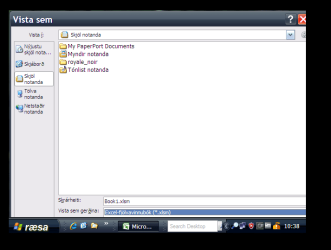
Here's Excel running in an XP Virtual machine -- From what I see the EXCEL program appends the file type depending on values entered from the drop down on file type. I don't see any change in W7 to the way it was working in XP.

Cheers
jimbo
 

Attachments

  • a.png
    a.png
    13.7 KB · Views: 8

My Computer My Computer

At a glance

Linux CENTOS 7 / various Windows OS'es and se...Intel i7 Intel i58GB, 16GBOn Motherboard
Computer type
PC/Desktop
Computer Manufacturer/Model Number
Custom built, several laptops HP/ASUS
OS
Linux CENTOS 7 / various Windows OS'es and servers
CPU
Intel i7 Intel i5
Memory
8GB, 16GB
Graphics Card(s)
On Motherboard
Sound Card
Realtek HD audio
Monitor(s) Displays
Apple Cinema display, Samsung LCD
Screen Resolution
1920 X 1080
Hard Drives
4 X 1TB SATA
Mouse
Toshiba wireless laser
Internet Speed
> 20MB up
Jimbo45,

Please try these steps in XP with Office 2010:

1) Create a text file on your desktop
2) use notepad to put in one word
3) press tab and enter a second word
4) save the file
5) rename the file TAB.UPL
6) drag and drop it into excel 2010
7) now do a File > Save As

Two things will be different:
The field named File name: will already have the file name
The txt file extension will NOT be appended to the existing file name.
The saved file will be TAB.UPL (as desired).

Now try those same steps using Office 2010 on W7.
The field named File name: will be empty???
The txt file extension WILL be appended to any file name that you type in
(unless you wrap the file name in quotation marks)
The saved file will be TAB.UPL.TXT

On a bad day, I have to enter more than 100 such file names with quotation marks.
On a good day, I only have to do this a couple of dozen times :-)
This is one W7 annoyance that I could live without at work.

Here is Office 2010 on XP:
XP-Office-2010.PNG
 

My Computer My Computer

At a glance

W7 Pro SP1 64biti78GBIntel HD Graphics
Computer type
Laptop
Computer Manufacturer/Model Number
Employer provided Dell Latitude
OS
W7 Pro SP1 64bit
CPU
i7
Memory
8GB
Graphics Card(s)
Intel HD Graphics
Hard Drives
crappy SSD
Antivirus
Employer mandated Symantec Endpoint Protection
Browser
Pale Moon 64bit, IE11 64bit & Chrome 64bit
...How can I fix this? I am guessing it is a registry fix, but I don't have any ideas of how to fix it. Thanks in advance for any suggestions!....
I've watched Excel via Process Monitor during a file save operation and I could not find any place in the registry where it gets the info for what it offers as a file extension. I had hoped to add entries that would duplicate the tab delimited option and use the extension letters that I need... but no joy. Maybe someone else can ferret out where that info comes from.
 

My Computer My Computer

At a glance

W7 Pro SP1 64biti78GBIntel HD Graphics
Computer type
Laptop
Computer Manufacturer/Model Number
Employer provided Dell Latitude
OS
W7 Pro SP1 64bit
CPU
i7
Memory
8GB
Graphics Card(s)
Intel HD Graphics
Hard Drives
crappy SSD
Antivirus
Employer mandated Symantec Endpoint Protection
Browser
Pale Moon 64bit, IE11 64bit & Chrome 64bit
@stones710,
Did you find a solution that worked for you?
 

My Computer My Computer

At a glance

W7 Pro SP1 64biti78GBIntel HD Graphics
Computer type
Laptop
Computer Manufacturer/Model Number
Employer provided Dell Latitude
OS
W7 Pro SP1 64bit
CPU
i7
Memory
8GB
Graphics Card(s)
Intel HD Graphics
Hard Drives
crappy SSD
Antivirus
Employer mandated Symantec Endpoint Protection
Browser
Pale Moon 64bit, IE11 64bit & Chrome 64bit
All the OP has to do is select Save As then change the file type to cvs. The drop-down on the right will list the file types allowed.
 

Attachments

  • Excel - Save As.JPG
    Excel - Save As.JPG
    69.1 KB · Views: 4

My Computer My Computer

At a glance

Windows 7 Pro-x64i7-2600 3.4GHz - 3.8GHz Turbo8Gb - 2x4GB, Muskin 991770 PC3-1333Integrated Intel HD 2000
Computer type
PC/Desktop
Computer Manufacturer/Model Number
Built 2/11/2011
OS
Windows 7 Pro-x64
CPU
i7-2600 3.4GHz - 3.8GHz Turbo
Motherboard
Intel DH67BL-B3
Memory
8Gb - 2x4GB, Muskin 991770 PC3-1333
Graphics Card(s)
Integrated Intel HD 2000
Sound Card
Integrated Intel 10.1 HD, RealTek ALC892
Monitor(s) Displays
Asus LCD VH222H, Haier HL24XSL2a
Screen Resolution
1920x1080, 1920x1080
Hard Drives
Crucial SSD C300-128Gb,
Western Digital WD5002AALX - 500Gb,
Western Digital WD7501AALS - 750Gb
PSU
Seasonic 650W 80+ Gold Modular
Case
Rosewill Defender
Cooling
Stock CPU, Four 120mm case fans, PCH fan added
Keyboard
Logitech EX100 Y-RBH94 Wireless
Mouse
Logitech EX100 M-RCE95 Wireless
Internet Speed
3.0/1.5 Mbs
Antivirus
Microsoft Security Essentials
Browser
Microsoft Internet Explorer 11
Other Info
Antec Veris Premier-Multimedia IR Station,
Cyber Accoustics-3602 Speakers,
AFT XM-5U Card Reader,
Hauppauge TV-HVR-2250,
Sony LX300 USB Turntable
All the OP has to do is select Save As then change the file type to cvs. The drop-down on the right will list the file types allowed.
Maybe I have failed to grasp the OP's problem, but the types of files allowed is not the issue.

The issue is how a tab delimited file is named once saved and the W7 annoyance of not leaving the file name in the save as dialog box as detailed in post #7. This was not a problem in XP. I had to re-write several scripts just to handle this inexplicable OS change. This "tiny" change cost the company that I work for many man-hours of labor. And it is not just a problem in Office; it happens in other apps that call the OS's file handling APIs.

With XP, you could start with a file names TAB.UPL and end with a file named TAB.UPL.

With W7, that same file becomes TAB.UPL.CSV unless you jump thru some annoying extra hoops.
 

My Computer My Computer

At a glance

W7 Pro SP1 64biti78GBIntel HD Graphics
Computer type
Laptop
Computer Manufacturer/Model Number
Employer provided Dell Latitude
OS
W7 Pro SP1 64bit
CPU
i7
Memory
8GB
Graphics Card(s)
Intel HD Graphics
Hard Drives
crappy SSD
Antivirus
Employer mandated Symantec Endpoint Protection
Browser
Pale Moon 64bit, IE11 64bit & Chrome 64bit
I missed the "tab" delimited part any way. A work around would be to rename the file(s) afterward. Standardization does have it's hard knocks. :(
 

My Computer My Computer

At a glance

Windows 7 Pro-x64i7-2600 3.4GHz - 3.8GHz Turbo8Gb - 2x4GB, Muskin 991770 PC3-1333Integrated Intel HD 2000
Computer type
PC/Desktop
Computer Manufacturer/Model Number
Built 2/11/2011
OS
Windows 7 Pro-x64
CPU
i7-2600 3.4GHz - 3.8GHz Turbo
Motherboard
Intel DH67BL-B3
Memory
8Gb - 2x4GB, Muskin 991770 PC3-1333
Graphics Card(s)
Integrated Intel HD 2000
Sound Card
Integrated Intel 10.1 HD, RealTek ALC892
Monitor(s) Displays
Asus LCD VH222H, Haier HL24XSL2a
Screen Resolution
1920x1080, 1920x1080
Hard Drives
Crucial SSD C300-128Gb,
Western Digital WD5002AALX - 500Gb,
Western Digital WD7501AALS - 750Gb
PSU
Seasonic 650W 80+ Gold Modular
Case
Rosewill Defender
Cooling
Stock CPU, Four 120mm case fans, PCH fan added
Keyboard
Logitech EX100 Y-RBH94 Wireless
Mouse
Logitech EX100 M-RCE95 Wireless
Internet Speed
3.0/1.5 Mbs
Antivirus
Microsoft Security Essentials
Browser
Microsoft Internet Explorer 11
Other Info
Antec Veris Premier-Multimedia IR Station,
Cyber Accoustics-3602 Speakers,
AFT XM-5U Card Reader,
Hauppauge TV-HVR-2250,
Sony LX300 USB Turntable

My Computer My Computer

At a glance

W7 Pro SP1 64biti78GBIntel HD Graphics
Computer type
Laptop
Computer Manufacturer/Model Number
Employer provided Dell Latitude
OS
W7 Pro SP1 64bit
CPU
i7
Memory
8GB
Graphics Card(s)
Intel HD Graphics
Hard Drives
crappy SSD
Antivirus
Employer mandated Symantec Endpoint Protection
Browser
Pale Moon 64bit, IE11 64bit & Chrome 64bit
Wow! That brought back some terrible memories. I recall writing in Fortran and using CSV in punched card format. :o

While not official, it did have somewhat of a standard. It allowed the programmer to parse a string for the data in a free-form record. It worked well at the time and still does. What I never heard of, until looking it up, is UPL files. Software companies come up with file types all the time to help keep their programs proprietary. I still don't see any reason to expect Microsoft to follow every software manufacturer's whim. I don't see anyone ripping Adobe because Reader doesn't recognize MS Word files. Get over it and move on.
 

My Computer My Computer

At a glance

Windows 7 Pro-x64i7-2600 3.4GHz - 3.8GHz Turbo8Gb - 2x4GB, Muskin 991770 PC3-1333Integrated Intel HD 2000
Computer type
PC/Desktop
Computer Manufacturer/Model Number
Built 2/11/2011
OS
Windows 7 Pro-x64
CPU
i7-2600 3.4GHz - 3.8GHz Turbo
Motherboard
Intel DH67BL-B3
Memory
8Gb - 2x4GB, Muskin 991770 PC3-1333
Graphics Card(s)
Integrated Intel HD 2000
Sound Card
Integrated Intel 10.1 HD, RealTek ALC892
Monitor(s) Displays
Asus LCD VH222H, Haier HL24XSL2a
Screen Resolution
1920x1080, 1920x1080
Hard Drives
Crucial SSD C300-128Gb,
Western Digital WD5002AALX - 500Gb,
Western Digital WD7501AALS - 750Gb
PSU
Seasonic 650W 80+ Gold Modular
Case
Rosewill Defender
Cooling
Stock CPU, Four 120mm case fans, PCH fan added
Keyboard
Logitech EX100 Y-RBH94 Wireless
Mouse
Logitech EX100 M-RCE95 Wireless
Internet Speed
3.0/1.5 Mbs
Antivirus
Microsoft Security Essentials
Browser
Microsoft Internet Explorer 11
Other Info
Antec Veris Premier-Multimedia IR Station,
Cyber Accoustics-3602 Speakers,
AFT XM-5U Card Reader,
Hauppauge TV-HVR-2250,
Sony LX300 USB Turntable
Hello and thanks to everyone who has posted a response to this problem. I have been away for a while so I want to apologize for my late respose to you. UsernameIssues has hit the nail on the head with posts #7 and #11; I couldn't have said it more clearly, thanks for you help. I thought there might be a way to fix this in the registry, but haven't been able to figure it out yet. I have the same problem where I have to constantly manually edit the tab delimited text files to remove the automated appending ot the .txt extension. Since MS has a way to force this to be appended to the file name, there must be a way to "undo" what they did to keep it from happening. I will continue to look....
 

My Computer My Computer

At a glance

windows 7 64 biti7
Computer type
PC/Desktop
Computer Manufacturer/Model Number
custom
OS
windows 7 64 bit
CPU
i7
Post #5 is how I solve this annoyance each work day. Let me know if you opt to try it.
 

My Computer My Computer

At a glance

W7 Pro SP1 64biti78GBIntel HD Graphics
Computer type
Laptop
Computer Manufacturer/Model Number
Employer provided Dell Latitude
OS
W7 Pro SP1 64bit
CPU
i7
Memory
8GB
Graphics Card(s)
Intel HD Graphics
Hard Drives
crappy SSD
Antivirus
Employer mandated Symantec Endpoint Protection
Browser
Pale Moon 64bit, IE11 64bit & Chrome 64bit
Wow! That brought back some terrible memories. I recall writing in Fortran and using CSV in punched card format. :o

While not official, it did have somewhat of a standard. It allowed the programmer to parse a string for the data in a free-form record. It worked well at the time and still does. What I never heard of, until looking it up, is UPL files. Software companies come up with file types all the time to help keep their programs proprietary. I still don't see any reason to expect Microsoft to follow every software manufacturer's whim. I don't see anyone ripping Adobe because Reader doesn't recognize MS Word files. Get over it and move on.
FORTRAN and punch cards - we hail from the same era.

The file in the OP is not really in a non standard format, it just uses a nonstandard file extension. I'm not so concerned about the CSV file format variations as much as I am the seemingly arbitrary decision to change the way the "File > Save As" dialog box works in W7 (this impacts most apps, not just Office ones):

Why remove the file name? Thus forcing the user to type it in again. In my case, my scripts had been using the existing file name (which was there in XP) and only changing a few characters to represent the changes to the file.

And why append an unwanted file extension? Forcing user to use quotes to get their way or to rename the file via a file explorer/manager/app.

I'm certainly not expecting MS to change W7 to suit me... but if someone had a good explanation as to why these changes took place in the OS, then maybe they would not bug me so :-)
 

My Computer My Computer

At a glance

W7 Pro SP1 64biti78GBIntel HD Graphics
Computer type
Laptop
Computer Manufacturer/Model Number
Employer provided Dell Latitude
OS
W7 Pro SP1 64bit
CPU
i7
Memory
8GB
Graphics Card(s)
Intel HD Graphics
Hard Drives
crappy SSD
Antivirus
Employer mandated Symantec Endpoint Protection
Browser
Pale Moon 64bit, IE11 64bit & Chrome 64bit
Back
Top