Booting with two separate harddisk taking longer duration

Ashin5

Banned
Local time
11:42 PM
Messages
44
Hi, I have Windows 7 Ultimate X64 version ,and i have been using only one 250 gb Seagate harddisk,i just attached another seagate 500 gb harddisk two days before.Since then i'm noticing one thing.During booting the windows logo used to appear first followed by a black screen which used to hold on for atmost 1 or 1 and half seconds & then followed by the welcome screen prompting for administrative password.After having finished typing password & hitting enter the Desktop used to appear within 1 or 1 and half second.. this was the way how my system used to boot up & desktop used to appear,but now,since from the attachment of the second harddisk as i mentioned above i've noticed that during booting the above mentioned black screen are hanging on longer than previous(i.e. the welcome screen is slower to appear than the earlier case) and also the welcome screen is holding for longer duration after i am done with typing the administrative password(i.e. the Desktop is also slower to appear).....

now i want to know whether my system is ok & should this happen what i am experiencing now or is there somthing to fix up??
Let me tell you that i have my Windows 7 installed in my previous 250gb harddisk & i just attached the 500gb harddisk & then logically connected it with the remaining one.

Looking for your advice

Thanks in advance
 

My Computer My Computer

Computer Manufacturer/Model Number
Gigabyte Technology Co., Ltd./ G31M-S2L
OS
Windows 7 Ultimate 64 bit
CPU
Intel Core 2 Duo E7300 @ 2.66GHz,Wolfdale 45nm Technology
Motherboard
Gigabyte Technology Co., Ltd. G31M-S2L
Memory
4.00 GB Dual-Channel DDR2 @ 400MHz
Graphics Card(s)
700B (1024x768@85Hz) 1024MB Nvidia GeForce 210
Monitor(s) Displays
LG 17" display monitor
Screen Resolution
1024 x 768
Hard Drives
250GB Seagate ST250DM000-1BD141 ATA Device (SATA)
Cooling
1 cpu fan
Keyboard
PS/2 compatible Keyboard
Mouse
PS/2 compatible Mouse
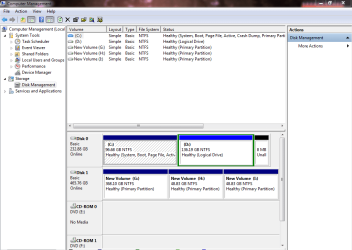
An screen shot of the expanded view of your disk management screen may help figure out what is going on.
 

My Computer My Computer

Computer type
PC/Desktop
Computer Manufacturer/Model Number
Home Built
OS
Windows 10 Education 64 bit
CPU
AMD Phenom II X4 980 Black Edition Deneb 3.7GHz
Motherboard
Asus M4N68T-M V2 µATX Motherboard
Memory
8GB 4GBx2 Kingston PC10600 DDR3 1333 Memory
Graphics Card(s)
Zotac NVIDIA Geforce GT640 2 Gig DDR3 PCIe
Sound Card
VIA VT1708s High Definition Audio 8-channel Onboard
Monitor(s) Displays
22" LG E2242 1080p and 2 19" I-INC AG191D
Screen Resolution
1280x1024 - 1920x1080 - 1280x1024
Hard Drives
Crucial M100 256 GB SSD and 500 GB WD Blue SATA
PSU
Thermaltake TR 620
Case
Power Up Black ATX Mid-Tower Case
Cooling
Stock heatsink and fan
Keyboard
Logitech Wireless K350 Wave
Mouse
Logitech Wireless M570 Trackman Wheel
Internet Speed
80 Mbps Down 30 Mbps Up
Antivirus
Windows Defender
Browser
Internet Explorer 11
Other Info
HP DVD1040e Lightscribe - External USB2
Also, let alpha know if there was anything on that 500g. Did you have an OS on it that was not wiped?
 

My Computer My Computer

Computer Manufacturer/Model Number
8 home-builds from the 80's into 2004
OS
W7 Home Premium 32bit
Here's a little tutorial that I posted earlier on this forum which helped the thread starter to speed up Windows 7 bootup:

Go to Start :orb: -- Type 'services.msc' -- Hit Enter -- Now find "Superfetch" and make sure it is set to automatic and is running.

Install the following Microsoft hotfixes:

1. An update that improves the startup performance of Windows 7 and of Windows Server 2008 R2 is available
2. The Windows 7 startup process is slow when you create many restore points
3. The startup process is delayed on a computer that has a large hard disk installed and is running Windows 7 or Windows Server 2008 R2

If the above updates were already there, then no problem, proceed ahead.

Go here: Windows Software Development Kit (SDK) for Windows 8 and download the SDK. This SDK meant for Windows 8 works flawlessly with Windows 7 so don't you worry!

Now run the setup, choose install location and when you're asked to select the components to install, choose ONLY "Windows Performance Toolkit" and click Install.

Once installation completes, you HAVE to restart the system.

Now after rebooting, click Start :orb: , type 'cmd', right click 'cmd' in the results and click 'Run as administrator'.

Now enter the following command:

Code:
xbootmgr -trace boot -prepSystem -verboseReadyBoot
and hit Enter. System will be restarted 6 times. Do NOT use the computer till the entire process finishes. Don't click anything (don't click Finish or Cancel in the white box after every reboot).

Once all reboots are done, see if there's a change in the startup time (there will be :) ).

Hope this helped. Also don't forget to disable unnecessary startup items and services using msconfig utility.
 
An screen shot of the expanded view of your disk management screen may help figure out what is going on.

I am giving the screen shot of the disk management screen as you said..

And let me tell you that i had no OS installed previously on the 500 gb hdd.. it is actually a replacement of my previous 500gb seagate hdd that i submitted to the seagate service center for repairment & they just replaced that hdd with this one.

I just brought it home & attached it with the motherboard & then logically connected it & did 3 partitions.Actually I wished to have (400gb,50gb & 50gb) but they ended up (368gb,48.8gb & 48.8 gb) & they are all empty now.That's all..

Looking for your help..
Thanks in advance
 

Attachments

  • Capture.PNG
    Capture.PNG
    29.4 KB · Views: 5
Last edited:

My Computer My Computer

Computer Manufacturer/Model Number
Gigabyte Technology Co., Ltd./ G31M-S2L
OS
Windows 7 Ultimate 64 bit
CPU
Intel Core 2 Duo E7300 @ 2.66GHz,Wolfdale 45nm Technology
Motherboard
Gigabyte Technology Co., Ltd. G31M-S2L
Memory
4.00 GB Dual-Channel DDR2 @ 400MHz
Graphics Card(s)
700B (1024x768@85Hz) 1024MB Nvidia GeForce 210
Monitor(s) Displays
LG 17" display monitor
Screen Resolution
1024 x 768
Hard Drives
250GB Seagate ST250DM000-1BD141 ATA Device (SATA)
Cooling
1 cpu fan
Keyboard
PS/2 compatible Keyboard
Mouse
PS/2 compatible Mouse
Ok, I just wanted to make sure it didn't end up being a dynamic disk with a partition linked to the other drive. I'll have to do some more thinking and get back to you. I do notice that you are missing your System Reserved partition on your OS drive? Did you remove that and if so why?
 

My Computer My Computer

Computer type
PC/Desktop
Computer Manufacturer/Model Number
Home Built
OS
Windows 10 Education 64 bit
CPU
AMD Phenom II X4 980 Black Edition Deneb 3.7GHz
Motherboard
Asus M4N68T-M V2 µATX Motherboard
Memory
8GB 4GBx2 Kingston PC10600 DDR3 1333 Memory
Graphics Card(s)
Zotac NVIDIA Geforce GT640 2 Gig DDR3 PCIe
Sound Card
VIA VT1708s High Definition Audio 8-channel Onboard
Monitor(s) Displays
22" LG E2242 1080p and 2 19" I-INC AG191D
Screen Resolution
1280x1024 - 1920x1080 - 1280x1024
Hard Drives
Crucial M100 256 GB SSD and 500 GB WD Blue SATA
PSU
Thermaltake TR 620
Case
Power Up Black ATX Mid-Tower Case
Cooling
Stock heatsink and fan
Keyboard
Logitech Wireless K350 Wave
Mouse
Logitech Wireless M570 Trackman Wheel
Internet Speed
80 Mbps Down 30 Mbps Up
Antivirus
Windows Defender
Browser
Internet Explorer 11
Other Info
HP DVD1040e Lightscribe - External USB2
no no.. i have never removed any system reserved partition.

One thing i want to tell you that previously i used to have dual booting os comprising Windows7 & Fedora15(in only 20gb disk space for mere educational purpose,with some basic features) on the 250 gb hdd.. but i had some problems with my graphic card & needed to do a reinstallation of windows7. Eventually I did a reinstallation & that did solve the problem for me but it also arose another a new one.The boot menu was lost in the process & i was left with a pc that had only Windows7 but the reserved space is still remaining there which i can not access.. if you notice in the attached image then you see that Disk 0 is showing 232.88gb which has Win7 installed on it & the rest 20 gb is absent..this is the reason behind that.. but with the Disk 1 there is no such issue as it is replacement given from seagate service center.

I dont know whether this has anything to do with my current issue or not but as nothing should be kept secret from the doctor so i told it to you. :) :)

Looking for your help
Thanks in advance
 

My Computer My Computer

Computer Manufacturer/Model Number
Gigabyte Technology Co., Ltd./ G31M-S2L
OS
Windows 7 Ultimate 64 bit
CPU
Intel Core 2 Duo E7300 @ 2.66GHz,Wolfdale 45nm Technology
Motherboard
Gigabyte Technology Co., Ltd. G31M-S2L
Memory
4.00 GB Dual-Channel DDR2 @ 400MHz
Graphics Card(s)
700B (1024x768@85Hz) 1024MB Nvidia GeForce 210
Monitor(s) Displays
LG 17" display monitor
Screen Resolution
1024 x 768
Hard Drives
250GB Seagate ST250DM000-1BD141 ATA Device (SATA)
Cooling
1 cpu fan
Keyboard
PS/2 compatible Keyboard
Mouse
PS/2 compatible Mouse
Normally there would be a 100 MB System Reserved partition as the first partition on the boot drive. At one point you should have had a grub boot loader that was installed by your Linux OS. Reinstalling Windows 7 wiped it out, which is why you lost the ability to boot to Linux. I'm not sure why the system reserved didn't get put back. If it was me, I think I would reinstall Windows 7. I would delete all the partitions on drive 0 and then repartition during the install. Backup any files on that drive before you do it though as everything on that drive will be erased.
http://www.sevenforums.com/tutorials/1649-clean-install-windows-7-a.html?filter
 

My Computer My Computer

Computer type
PC/Desktop
Computer Manufacturer/Model Number
Home Built
OS
Windows 10 Education 64 bit
CPU
AMD Phenom II X4 980 Black Edition Deneb 3.7GHz
Motherboard
Asus M4N68T-M V2 µATX Motherboard
Memory
8GB 4GBx2 Kingston PC10600 DDR3 1333 Memory
Graphics Card(s)
Zotac NVIDIA Geforce GT640 2 Gig DDR3 PCIe
Sound Card
VIA VT1708s High Definition Audio 8-channel Onboard
Monitor(s) Displays
22" LG E2242 1080p and 2 19" I-INC AG191D
Screen Resolution
1280x1024 - 1920x1080 - 1280x1024
Hard Drives
Crucial M100 256 GB SSD and 500 GB WD Blue SATA
PSU
Thermaltake TR 620
Case
Power Up Black ATX Mid-Tower Case
Cooling
Stock heatsink and fan
Keyboard
Logitech Wireless K350 Wave
Mouse
Logitech Wireless M570 Trackman Wheel
Internet Speed
80 Mbps Down 30 Mbps Up
Antivirus
Windows Defender
Browser
Internet Explorer 11
Other Info
HP DVD1040e Lightscribe - External USB2
Back
Top