Network access to a Thecus NAS error: 0x80070035

renren

New member
Member
VIP
Local time
6:08 AM
Messages
110
Im trying to connect a recently 'upgrade repaired' 64bit ULT to my Thecus NAS but windows throws an error
Code:
"Windows cannot access \\NAS

Check the spelling of the name otherwise, there might be a problem with your network, to try to identify and resolve network problems, click diagnose

details

Error codeL 0x80070035
The network path was not found"


I have tried:

HOSTS
Direct IP in Win-explorer
Netbios Name in Win-explorer
How To: Repair And Reset Windows Vista TCP/IP Winsock Catalog Corruption | TomsTricks.Com


Notes:

My pc has network access and internet access
I can see the icon for it in the "Network" page
All PCs are in the same Netbios and homegroup
All the other PC's can access the NAS

Anymore information please ask ahead =]!
 

My Computer My Computer

Computer type
PC/Desktop
OS
Windws 7 ultimate 64bit
CPU
Q9400 @3.2Ghz
Motherboard
EP45 UD3
Memory
Kingston HyperX 1066
Graphics Card(s)
GTX 295
Monitor(s) Displays
24"
Hard Drives
320GB seagate sata
PSU
750 Watt
Cooling
Air
Antivirus
Vipre
Hello renren,

Did you create an Account in your NAS similar to your Windows UserName and Password?

Any Security program installed? Have you tried disabling your Windows Firewall temporarily?
 

My Computer My Computer

Computer Manufacturer/Model Number
Lenovo Desktop/Samsung Laptop
OS
Win7 & Win8 64bit
CPU
Intel i5
Internet Speed
Charter-20 Mbps
Antivirus
Avast
Browser
FF, IE9 and Chrome
Yes i do have an account for the NAS, however i just use the "guest" with no p/w.

I have VIPRE security suite

Windows firewall is already disabled

I did a full network reboot and now i can type it in windows explorer, i dont really understand what happened.

Also if i leave my PC long enough it loses the ability to access the LAN, even quicker if i use VPN/openVPN. It cant see local PC's or the internet, it cant toggle (if its enabled it disables, but then cant go back to enabled)
 

My Computer My Computer

Computer type
PC/Desktop
OS
Windws 7 ultimate 64bit
CPU
Q9400 @3.2Ghz
Motherboard
EP45 UD3
Memory
Kingston HyperX 1066
Graphics Card(s)
GTX 295
Monitor(s) Displays
24"
Hard Drives
320GB seagate sata
PSU
750 Watt
Cooling
Air
Antivirus
Vipre
It's better if you create an Identical User Account on your NAS and computer rather than using the Guest Account with no password.

From your Vipre Security Suite, make sure that allow Apps/Programs.
How to unblock (allow) an application with VIPRE
 

My Computer My Computer

Computer Manufacturer/Model Number
Lenovo Desktop/Samsung Laptop
OS
Win7 & Win8 64bit
CPU
Intel i5
Internet Speed
Charter-20 Mbps
Antivirus
Avast
Browser
FF, IE9 and Chrome

My Computer My Computer

Computer type
PC/Desktop
OS
Windws 7 ultimate 64bit
CPU
Q9400 @3.2Ghz
Motherboard
EP45 UD3
Memory
Kingston HyperX 1066
Graphics Card(s)
GTX 295
Monitor(s) Displays
24"
Hard Drives
320GB seagate sata
PSU
750 Watt
Cooling
Air
Antivirus
Vipre

My Computer My Computer

Computer Manufacturer/Model Number
Lenovo Desktop/Samsung Laptop
OS
Win7 & Win8 64bit
CPU
Intel i5
Internet Speed
Charter-20 Mbps
Antivirus
Avast
Browser
FF, IE9 and Chrome
One is using VIPRE its fine, the other isusing norton and its fine as well. It just seems to be my PC that is having connectivity issues. The constant breaking after long periods of usage and connectivity to the NAS.

Ive followed other guides such as putting all the Windows7 pcs to homegroups and such, but everything keeps breaking.

Could you detail how i can get the logs to show you the issue?
 

My Computer My Computer

Computer type
PC/Desktop
OS
Windws 7 ultimate 64bit
CPU
Q9400 @3.2Ghz
Motherboard
EP45 UD3
Memory
Kingston HyperX 1066
Graphics Card(s)
GTX 295
Monitor(s) Displays
24"
Hard Drives
320GB seagate sata
PSU
750 Watt
Cooling
Air
Antivirus
Vipre
Here is something which may help with diagnostic!
Event viewer log

Edit:

Also i cant access the NAS until i log in to it via the address bar. Trying via the icon in network throws the error.
 

Attachments

Last edited:

My Computer My Computer

Computer type
PC/Desktop
OS
Windws 7 ultimate 64bit
CPU
Q9400 @3.2Ghz
Motherboard
EP45 UD3
Memory
Kingston HyperX 1066
Graphics Card(s)
GTX 295
Monitor(s) Displays
24"
Hard Drives
320GB seagate sata
PSU
750 Watt
Cooling
Air
Antivirus
Vipre
Just to confirm, only one PC is having this issue, correct?
Also i cant access the NAS until i log in to it via the address bar. Trying via the icon in network throws the error.
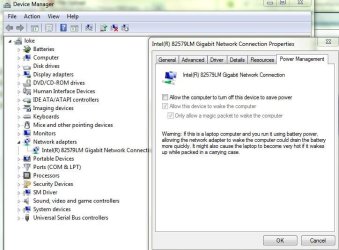
You may try disabling the Power Management mode of the affected network adapter, here's an image to give you a clue.

Also, try to disable the Firewall feature of your Security Suite just to test it out.
 

Attachments

  • Power Management - disabled.JPG
    Power Management - disabled.JPG
    64.6 KB · Views: 6

My Computer My Computer

Computer Manufacturer/Model Number
Lenovo Desktop/Samsung Laptop
OS
Win7 & Win8 64bit
CPU
Intel i5
Internet Speed
Charter-20 Mbps
Antivirus
Avast
Browser
FF, IE9 and Chrome
Only one computer has this issue.

Ive disabled the whole suite and it still wont let me in.

It shows up on the left bar's network group and in the network location, though i can access the NAS via the address bar, only then can i go through the other routes.

Should i disable it then do a reboot to check connectivity?

EDIT: ive done what i mentioned above but its still having issues.
 

My Computer My Computer

Computer type
PC/Desktop
OS
Windws 7 ultimate 64bit
CPU
Q9400 @3.2Ghz
Motherboard
EP45 UD3
Memory
Kingston HyperX 1066
Graphics Card(s)
GTX 295
Monitor(s) Displays
24"
Hard Drives
320GB seagate sata
PSU
750 Watt
Cooling
Air
Antivirus
Vipre
You might want to check if you have the latest driver for your network adapter.
 

My Computer My Computer

Computer Manufacturer/Model Number
Lenovo Desktop/Samsung Laptop
OS
Win7 & Win8 64bit
CPU
Intel i5
Internet Speed
Charter-20 Mbps
Antivirus
Avast
Browser
FF, IE9 and Chrome
Just to confirm, only one PC is having this issue, correct?
Also i cant access the NAS until i log in to it via the address bar. Trying via the icon in network throws the error.
You may try disabling the Power Management mode of the affected network adapter, here's an image to give you a clue.

Also, try to disable the Firewall feature of your Security Suite just to test it out.

You might want to check if you have the latest driver for your network adapter.


I used the Z77 ASrock Extreme 4

At the vendors site ASRock > Products > Motherboard > Z77 Extreme4 > Download it issued version ver:14.8.4.1

To check if i had the latest i went to Broadcom

Broadcom License Agreement | Broadcom

Apparently my mobo used the k57 on its board. and hence i installed the 15-4-0-9

Anything else can you suggest?
 

My Computer My Computer

Computer type
PC/Desktop
OS
Windws 7 ultimate 64bit
CPU
Q9400 @3.2Ghz
Motherboard
EP45 UD3
Memory
Kingston HyperX 1066
Graphics Card(s)
GTX 295
Monitor(s) Displays
24"
Hard Drives
320GB seagate sata
PSU
750 Watt
Cooling
Air
Antivirus
Vipre
Have you rebooted the NAS? Try accessing the name of the NAS or IP Address when you click on Start orb then type \\NAS Name or \\NAS IP Address.
 

My Computer My Computer

Computer Manufacturer/Model Number
Lenovo Desktop/Samsung Laptop
OS
Win7 & Win8 64bit
CPU
Intel i5
Internet Speed
Charter-20 Mbps
Antivirus
Avast
Browser
FF, IE9 and Chrome
Have you rebooted the NAS? Try accessing the name of the NAS or IP Address when you click on Start orb then type \\NAS Name or \\NAS IP Address.


Yeah like i said when i do that (entering the nas via address bar) i can actually access the nas from network afterwards.
 

My Computer My Computer

Computer type
PC/Desktop
OS
Windws 7 ultimate 64bit
CPU
Q9400 @3.2Ghz
Motherboard
EP45 UD3
Memory
Kingston HyperX 1066
Graphics Card(s)
GTX 295
Monitor(s) Displays
24"
Hard Drives
320GB seagate sata
PSU
750 Watt
Cooling
Air
Antivirus
Vipre

My Computer My Computer

Computer type
PC/Desktop
Computer Manufacturer/Model Number
Home built
OS
Windows 7 Ult, Windows 8.1 Pro,
CPU
Q9650-4.275GHz, E8600 4.5GHz, E6750-3.8GHz
Motherboard
Evga 780i FTW
Memory
G.Skill PC2 9600 1200Mhz 5 5 5 15 2T
Graphics Card(s)
GTX480
Sound Card
Asus Xonar D2
Monitor(s) Displays
HannsG
Screen Resolution
1680X1050
Hard Drives
GSkill Phoenix Pro 120GB SSD
PSU
ThermalTake Toughpower 1000Watt modular
Case
ThermalTake XaserV
Cooling
Xigmatek S1283
Keyboard
Logitech G15
Mouse
Logitech G9
Internet Speed
T1
To get into NAS boxes you might want to consider adjusting the lanman server settings on the Win7 Ult. machine. These settings are famous for getting people into old servers and NAS boxes.

This link shows you which adjustments to make. > Solved W2K3 Server can access W8 W8 computer cant see W2K server

Control Panel - Administrative Tools - Local Security Policy

Local Policies - Security Options

Network security: LAN Manager authentication level
Set to Send LM & NTLM responses only

Set the Minimum session security for NTLM SSP
Disable Require 128-bit encryption

Reboot all machines after making the adjustment.

I followed this and it didnt work.

Im not sure what to do now, connecting to the NAS N7700 PRO at first boot isnt working and if i leave downloads on over night the PC becomes unable to connect to the network and i cant toggle the state of the LAN adapters.

Should i try for a fresh repair install?
 

My Computer My Computer

Computer type
PC/Desktop
OS
Windws 7 ultimate 64bit
CPU
Q9400 @3.2Ghz
Motherboard
EP45 UD3
Memory
Kingston HyperX 1066
Graphics Card(s)
GTX 295
Monitor(s) Displays
24"
Hard Drives
320GB seagate sata
PSU
750 Watt
Cooling
Air
Antivirus
Vipre
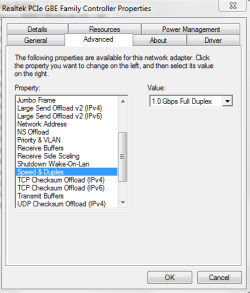
Try disabling the power saving mode of your network adapter and also change the Speed and Duplex (by default it's on Auto Negotiation) from your computer's Device Manager. See 2 images attached.
 

Attachments

  • Power Management mode - disable.PNG
    Power Management mode - disable.PNG
    13 KB · Views: 1
  • Speed and Duplex.PNG
    Speed and Duplex.PNG
    12.5 KB · Views: 1

My Computer My Computer

Computer Manufacturer/Model Number
Lenovo Desktop/Samsung Laptop
OS
Win7 & Win8 64bit
CPU
Intel i5
Internet Speed
Charter-20 Mbps
Antivirus
Avast
Browser
FF, IE9 and Chrome
Try disabling the power saving mode of your network adapter and also change the Speed and Duplex (by default it's on Auto Negotiation) from your computer's Device Manager. See 2 images attached.


I found something strange my available values only go up to 100 Full Duplex but my network is 1Gb (im sure)

I will check the cables and such and get back to you soon
 

My Computer My Computer

Computer type
PC/Desktop
OS
Windws 7 ultimate 64bit
CPU
Q9400 @3.2Ghz
Motherboard
EP45 UD3
Memory
Kingston HyperX 1066
Graphics Card(s)
GTX 295
Monitor(s) Displays
24"
Hard Drives
320GB seagate sata
PSU
750 Watt
Cooling
Air
Antivirus
Vipre
You may also set to 100 full duplex if that's all your NIC can handle, but for a faster transfer rate you should consider getting a gig NIC.
 

My Computer My Computer

Computer Manufacturer/Model Number
Lenovo Desktop/Samsung Laptop
OS
Win7 & Win8 64bit
CPU
Intel i5
Internet Speed
Charter-20 Mbps
Antivirus
Avast
Browser
FF, IE9 and Chrome
You may also set to 100 full duplex if that's all your NIC can handle, but for a faster transfer rate you should consider getting a gig NIC.

Im pretty sure im looking at the properties of the onboard NIC, also if look at TaskManager>Networking it says its linkspeed is 1Gbps
 

My Computer My Computer

Computer type
PC/Desktop
OS
Windws 7 ultimate 64bit
CPU
Q9400 @3.2Ghz
Motherboard
EP45 UD3
Memory
Kingston HyperX 1066
Graphics Card(s)
GTX 295
Monitor(s) Displays
24"
Hard Drives
320GB seagate sata
PSU
750 Watt
Cooling
Air
Antivirus
Vipre
Back
Top