- Local time
- 2:04 AM
- Messages
- 143
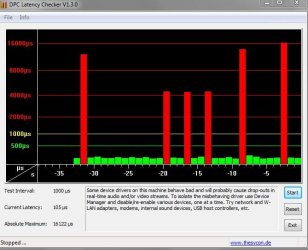
Audio is crackling when internet is connected wired or wifi,tried numorous fixes but
nothing works.Here is my mon latency test result,seems like NDIS 6.20 driver might be the culprit
but what to do,i can't find it anywhere on the laptop.
Maybe someone can suss out this test result.Thanks in advance.
CONCLUSION
_________________________________________________________________________________________________________
Your system appears to be having trouble handling real-time audio and other tasks. You are likely to experience buffer underruns appearing as drop outs, clicks or pops. One or more DPC routines that belong to a driver running in your system appear to be executing for too long. At least one detected problem appears to be network related. In case you are using a WLAN adapter, try disabling it to get better results. One problem may be related to power management, disable CPU throttling settings in Control Panel and BIOS setup. Check for BIOS updates.
LatencyMon has been analyzing your system for 0:00:28 (h:mm:ss) on all processors.
_________________________________________________________________________________________________________
SYSTEM INFORMATION
_________________________________________________________________________________________________________
Computer name: NEIL-PC
OS version: Windows 7 Service Pack 1, 6.1, build: 7601 (x64)
Hardware: 300E4A/300E5A/300E7A/3430EA/3530EA, SAMSUNG ELECTRONICS CO., LTD.
CPU: GenuineIntel Intel(R) Core(TM) i5-2430M CPU @ 2.40GHz
Logical processors: 4
Processor groups: 1
RAM: 8105 MB total
_________________________________________________________________________________________________________
CPU SPEED
_________________________________________________________________________________________________________
Reported CPU speed: 2394.0 MHz
Measured CPU speed: 1900.0 MHz (approx.)
Note: reported execution times may be calculated based on a fixed reported CPU speed. Disable variable speed settings like Intel Speed Step and AMD Cool N Quiet in the BIOS setup for more accurate results.
_________________________________________________________________________________________________________
MEASURED INTERRUPT TO USER PROCESS LATENCIES
_________________________________________________________________________________________________________
The interrupt to process latency reflects the measured interval that a usermode process needed to respond to a hardware request from the moment the interrupt service routine started execution. This includes the scheduling and execution of a DPC routine, the signaling of an event and the waking up of a usermode thread from an idle wait state in response to that event.
Highest measured interrupt to process latency (µs): 3749.862090
Average measured interrupt to process latency (µs): 10.237516
Highest measured interrupt to DPC latency (µs): 3604.041247
Average measured interrupt to DPC latency (µs): 1.269820
_________________________________________________________________________________________________________
MEASURED SMI, IPI AND CPU STALLS
_________________________________________________________________________________________________________
The SMI, IPI and CPU stalls value represents the highest measured interval that a CPU did not respond while having its maskable interrupts disabled.
Highest measured SMI or CPU stall (µs) 9.835423
_________________________________________________________________________________________________________
REPORTED ISRs
_________________________________________________________________________________________________________
Interrupt service routines are routines installed by the OS and device drivers that execute in response to a hardware interrupt signal.
Highest ISR routine execution time (µs): 23.218045
Driver with highest ISR routine execution time: ACPI.sys - ACPI Driver for NT, Microsoft Corporation
Highest reported total ISR routine time (%): 0.040293
Driver with highest ISR total time: hal.dll - Hardware Abstraction Layer DLL, Microsoft Corporation
Total time spent in ISRs (%) 0.046199
ISR count (execution time <250 µs): 29362
ISR count (execution time 250-500 µs): 0
ISR count (execution time 500-999 µs): 0
ISR count (execution time 1000-1999 µs): 0
ISR count (execution time 2000-3999 µs): 0
ISR count (execution time >=4000 µs): 0
_________________________________________________________________________________________________________
REPORTED DPCs
_________________________________________________________________________________________________________
DPC routines are part of the interrupt servicing dispatch mechanism and disable the possibility for a process to utilize the CPU while it is interrupted until the DPC has finished execution.
Highest DPC routine execution time (µs): 19233.533835
Driver with highest DPC routine execution time: ndis.sys - NDIS 6.20 driver, Microsoft Corporation
Highest reported total DPC routine time (%): 0.114629
Driver with highest DPC total execution time: rspLLL64.sys - Resplendence Latency Monitoring and Auxiliary Kernel Library, Resplendence Software Projects Sp.
Total time spent in DPCs (%) 0.425937
DPC count (execution time <250 µs): 171658
DPC count (execution time 250-500 µs): 0
DPC count (execution time 500-999 µs): 0
DPC count (execution time 1000-1999 µs): 0
DPC count (execution time 2000-3999 µs): 2
DPC count (execution time >=4000 µs): 0
_________________________________________________________________________________________________________
REPORTED HARD PAGEFAULTS
_________________________________________________________________________________________________________
Hard pagefaults are events that get triggered by making use of virtual memory that is not resident in RAM but backed by a memory mapped file on disk. The process of resolving the hard pagefault requires reading in the memory from disk while the process is interrupted and blocked from execution.
NOTE: some processes were hit by hard pagefaults. If these were programs producing audio, they are likely to interrupt the audio stream resulting in dropouts, clicks and pops. Check the Processes tab to see which programs were hit.
Process with highest pagefault count: smartsetting.exe
Total number of hard pagefaults 14
Hard pagefault count of hardest hit process: 13
Highest hard pagefault resolution time (µs): 67258.209273
Total time spent in hard pagefaults (%): 0.266172
Number of processes hit: 2
_________________________________________________________________________________________________________
PER CPU DATA
_________________________________________________________________________________________________________
CPU 0 Interrupt cycle time (s): 0.803325
CPU 0 ISR highest execution time (µs): 23.218045
CPU 0 ISR total execution time (s): 0.052555
CPU 0 ISR count: 29362
CPU 0 DPC highest execution time (µs): 19233.533835
CPU 0 DPC total execution time (s): 0.474472
CPU 0 DPC count: 169330
_________________________________________________________________________________________________________
CPU 1 Interrupt cycle time (s): 0.769379
CPU 1 ISR highest execution time (µs): 0.0
CPU 1 ISR total execution time (s): 0.0
CPU 1 ISR count: 0
CPU 1 DPC highest execution time (µs): 24.362155
CPU 1 DPC total execution time (s): 0.001224
CPU 1 DPC count: 308
_________________________________________________________________________________________________________
CPU 2 Interrupt cycle time (s): 0.250907
CPU 2 ISR highest execution time (µs): 0.0
CPU 2 ISR total execution time (s): 0.0
CPU 2 ISR count: 0
CPU 2 DPC highest execution time (µs): 36.830827
CPU 2 DPC total execution time (s): 0.008833
CPU 2 DPC count: 2023
_________________________________________________________________________________________________________
CPU 3 Interrupt cycle time (s): 0.365361
CPU 3 ISR highest execution time (µs): 0.0
CPU 3 ISR total execution time (s): 0.0
CPU 3 ISR count: 0
CPU 3 DPC highest execution time (µs): 0.0
CPU 3 DPC total execution time (s): 0.0
CPU 3 DPC count: 0
_________________________________________________________________________________________________________
nothing works.Here is my mon latency test result,seems like NDIS 6.20 driver might be the culprit
but what to do,i can't find it anywhere on the laptop.
Maybe someone can suss out this test result.Thanks in advance.
CONCLUSION
_________________________________________________________________________________________________________
Your system appears to be having trouble handling real-time audio and other tasks. You are likely to experience buffer underruns appearing as drop outs, clicks or pops. One or more DPC routines that belong to a driver running in your system appear to be executing for too long. At least one detected problem appears to be network related. In case you are using a WLAN adapter, try disabling it to get better results. One problem may be related to power management, disable CPU throttling settings in Control Panel and BIOS setup. Check for BIOS updates.
LatencyMon has been analyzing your system for 0:00:28 (h:mm:ss) on all processors.
_________________________________________________________________________________________________________
SYSTEM INFORMATION
_________________________________________________________________________________________________________
Computer name: NEIL-PC
OS version: Windows 7 Service Pack 1, 6.1, build: 7601 (x64)
Hardware: 300E4A/300E5A/300E7A/3430EA/3530EA, SAMSUNG ELECTRONICS CO., LTD.
CPU: GenuineIntel Intel(R) Core(TM) i5-2430M CPU @ 2.40GHz
Logical processors: 4
Processor groups: 1
RAM: 8105 MB total
_________________________________________________________________________________________________________
CPU SPEED
_________________________________________________________________________________________________________
Reported CPU speed: 2394.0 MHz
Measured CPU speed: 1900.0 MHz (approx.)
Note: reported execution times may be calculated based on a fixed reported CPU speed. Disable variable speed settings like Intel Speed Step and AMD Cool N Quiet in the BIOS setup for more accurate results.
_________________________________________________________________________________________________________
MEASURED INTERRUPT TO USER PROCESS LATENCIES
_________________________________________________________________________________________________________
The interrupt to process latency reflects the measured interval that a usermode process needed to respond to a hardware request from the moment the interrupt service routine started execution. This includes the scheduling and execution of a DPC routine, the signaling of an event and the waking up of a usermode thread from an idle wait state in response to that event.
Highest measured interrupt to process latency (µs): 3749.862090
Average measured interrupt to process latency (µs): 10.237516
Highest measured interrupt to DPC latency (µs): 3604.041247
Average measured interrupt to DPC latency (µs): 1.269820
_________________________________________________________________________________________________________
MEASURED SMI, IPI AND CPU STALLS
_________________________________________________________________________________________________________
The SMI, IPI and CPU stalls value represents the highest measured interval that a CPU did not respond while having its maskable interrupts disabled.
Highest measured SMI or CPU stall (µs) 9.835423
_________________________________________________________________________________________________________
REPORTED ISRs
_________________________________________________________________________________________________________
Interrupt service routines are routines installed by the OS and device drivers that execute in response to a hardware interrupt signal.
Highest ISR routine execution time (µs): 23.218045
Driver with highest ISR routine execution time: ACPI.sys - ACPI Driver for NT, Microsoft Corporation
Highest reported total ISR routine time (%): 0.040293
Driver with highest ISR total time: hal.dll - Hardware Abstraction Layer DLL, Microsoft Corporation
Total time spent in ISRs (%) 0.046199
ISR count (execution time <250 µs): 29362
ISR count (execution time 250-500 µs): 0
ISR count (execution time 500-999 µs): 0
ISR count (execution time 1000-1999 µs): 0
ISR count (execution time 2000-3999 µs): 0
ISR count (execution time >=4000 µs): 0
_________________________________________________________________________________________________________
REPORTED DPCs
_________________________________________________________________________________________________________
DPC routines are part of the interrupt servicing dispatch mechanism and disable the possibility for a process to utilize the CPU while it is interrupted until the DPC has finished execution.
Highest DPC routine execution time (µs): 19233.533835
Driver with highest DPC routine execution time: ndis.sys - NDIS 6.20 driver, Microsoft Corporation
Highest reported total DPC routine time (%): 0.114629
Driver with highest DPC total execution time: rspLLL64.sys - Resplendence Latency Monitoring and Auxiliary Kernel Library, Resplendence Software Projects Sp.
Total time spent in DPCs (%) 0.425937
DPC count (execution time <250 µs): 171658
DPC count (execution time 250-500 µs): 0
DPC count (execution time 500-999 µs): 0
DPC count (execution time 1000-1999 µs): 0
DPC count (execution time 2000-3999 µs): 2
DPC count (execution time >=4000 µs): 0
_________________________________________________________________________________________________________
REPORTED HARD PAGEFAULTS
_________________________________________________________________________________________________________
Hard pagefaults are events that get triggered by making use of virtual memory that is not resident in RAM but backed by a memory mapped file on disk. The process of resolving the hard pagefault requires reading in the memory from disk while the process is interrupted and blocked from execution.
NOTE: some processes were hit by hard pagefaults. If these were programs producing audio, they are likely to interrupt the audio stream resulting in dropouts, clicks and pops. Check the Processes tab to see which programs were hit.
Process with highest pagefault count: smartsetting.exe
Total number of hard pagefaults 14
Hard pagefault count of hardest hit process: 13
Highest hard pagefault resolution time (µs): 67258.209273
Total time spent in hard pagefaults (%): 0.266172
Number of processes hit: 2
_________________________________________________________________________________________________________
PER CPU DATA
_________________________________________________________________________________________________________
CPU 0 Interrupt cycle time (s): 0.803325
CPU 0 ISR highest execution time (µs): 23.218045
CPU 0 ISR total execution time (s): 0.052555
CPU 0 ISR count: 29362
CPU 0 DPC highest execution time (µs): 19233.533835
CPU 0 DPC total execution time (s): 0.474472
CPU 0 DPC count: 169330
_________________________________________________________________________________________________________
CPU 1 Interrupt cycle time (s): 0.769379
CPU 1 ISR highest execution time (µs): 0.0
CPU 1 ISR total execution time (s): 0.0
CPU 1 ISR count: 0
CPU 1 DPC highest execution time (µs): 24.362155
CPU 1 DPC total execution time (s): 0.001224
CPU 1 DPC count: 308
_________________________________________________________________________________________________________
CPU 2 Interrupt cycle time (s): 0.250907
CPU 2 ISR highest execution time (µs): 0.0
CPU 2 ISR total execution time (s): 0.0
CPU 2 ISR count: 0
CPU 2 DPC highest execution time (µs): 36.830827
CPU 2 DPC total execution time (s): 0.008833
CPU 2 DPC count: 2023
_________________________________________________________________________________________________________
CPU 3 Interrupt cycle time (s): 0.365361
CPU 3 ISR highest execution time (µs): 0.0
CPU 3 ISR total execution time (s): 0.0
CPU 3 ISR count: 0
CPU 3 DPC highest execution time (µs): 0.0
CPU 3 DPC total execution time (s): 0.0
CPU 3 DPC count: 0
_________________________________________________________________________________________________________
My Computer
- Computer type
- Laptop
- Computer Manufacturer/Model Number
- Samsung NP300E5A-A02DX
- OS
- Windows 7 home premium 64bit sp1
- CPU
- Intel Core i5
- Motherboard
- Manufacturer SAMSUNG ELECTRONICS CO., LTD
- Memory
- 8gb
- Graphics Card(s)
- Intel HD Graphics Family HD 3000
- Sound Card
- Realtek High Definition Audio
- Monitor(s) Displays
- Generic PnP Monitor on Intel HD Graphics Family
- Screen Resolution
- 1920x1080 pixels
- Hard Drives
- SAMSUNG HM641JI
- Keyboard
- Logitech K400 wireless
- Mouse
- Logitech M570 trackball wireless
- Internet Speed
- 75MB DL 16MB UL (Cooking with Gas)
- Antivirus
- Avast IS and MBAM Pro
- Browser
- Firefox