Random mouse and keyboard strokes

My Computer My Computer

Computer type
PC/Desktop
Computer Manufacturer/Model Number
Own build (new) Desk1 / Asus ROG Win 7 / Desk2 1st build
OS
Desk1 7 Home Prem / Desk2 10 Pro / Main lap Asus ROG 10 Pro 2 laptop Toshiba 7 Pro Asus P2520 7 & 10
CPU
Desk1 i5 3750K / Laptop i7 GTX 860M / Desk2 i5 2500
Motherboard
Desk1 Asus P877-V / Desk2 Gigabyte H67 UD3H / Laptop ?
Memory
Desk1 8GB (1866) / Desk2 16GB (1333) / Laptop 8Gb DDR3
Graphics Card(s)
Desk 1& 2NVidia GTX 650 & Laptops on board Intel
Sound Card
Desk 1 & 2 -XONAR DG Realtek High Def audio Laptop
Monitor(s) Displays
Desk 1 Benq HD 2450 / Desk2 Philips 24" / Laptop 17.5"
Screen Resolution
1920x1080 D1 & D2 & Laptop 1
Hard Drives
Desk1 Samsung 120GB 830 SSD
Asus ROG 256GB 850 Pro SSD
Desk2 Samsung 840 256 SSD
Toshiba 120GB EVO
PSU
Desk 1 Corsair HX 1050/ Laptop ? / Desk 2 Corsair HX 650
Case
Desk 1 Cooler HAF XM ? Toshiba laptop / Desk2 Coolermaster
Cooling
Fans on all Desk1 -2 Desk2 - all Coolermasters 5 Laptop ?
Keyboard
Desk 1 MS Sidewinder X6 Desk 2 MS Sidewinder X 4
Mouse
Desk 1&2 - Gigabyte MS 900 gamer - laptop - Logitec wireless
Internet Speed
ADSL2+
Other Info
One other Desktop (tester) and spare Toshba laptop both with SSD's
Running Kaspersky 2016 ISS on all machines config'd identically
Logitec audio stereo systems on each machine (x3)
Canon MG5250MFC
Router/modem TP-Link running WPA2SK

My Computer My Computer

Computer type
PC/Desktop
Computer Manufacturer/Model Number
Own build (new) Desk1 / Asus ROG Win 7 / Desk2 1st build
OS
Desk1 7 Home Prem / Desk2 10 Pro / Main lap Asus ROG 10 Pro 2 laptop Toshiba 7 Pro Asus P2520 7 & 10
CPU
Desk1 i5 3750K / Laptop i7 GTX 860M / Desk2 i5 2500
Motherboard
Desk1 Asus P877-V / Desk2 Gigabyte H67 UD3H / Laptop ?
Memory
Desk1 8GB (1866) / Desk2 16GB (1333) / Laptop 8Gb DDR3
Graphics Card(s)
Desk 1& 2NVidia GTX 650 & Laptops on board Intel
Sound Card
Desk 1 & 2 -XONAR DG Realtek High Def audio Laptop
Monitor(s) Displays
Desk 1 Benq HD 2450 / Desk2 Philips 24" / Laptop 17.5"
Screen Resolution
1920x1080 D1 & D2 & Laptop 1
Hard Drives
Desk1 Samsung 120GB 830 SSD
Asus ROG 256GB 850 Pro SSD
Desk2 Samsung 840 256 SSD
Toshiba 120GB EVO
PSU
Desk 1 Corsair HX 1050/ Laptop ? / Desk 2 Corsair HX 650
Case
Desk 1 Cooler HAF XM ? Toshiba laptop / Desk2 Coolermaster
Cooling
Fans on all Desk1 -2 Desk2 - all Coolermasters 5 Laptop ?
Keyboard
Desk 1 MS Sidewinder X6 Desk 2 MS Sidewinder X 4
Mouse
Desk 1&2 - Gigabyte MS 900 gamer - laptop - Logitec wireless
Internet Speed
ADSL2+
Other Info
One other Desktop (tester) and spare Toshba laptop both with SSD's
Running Kaspersky 2016 ISS on all machines config'd identically
Logitec audio stereo systems on each machine (x3)
Canon MG5250MFC
Router/modem TP-Link running WPA2SK
Scanning my SSD with TDSSKiller took 1 second. I took a video of it and stepped thru the frames. It did indeed scan the 450+ files that it usually does. :-)
 

My Computer My Computer

Computer type
Laptop
Computer Manufacturer/Model Number
Employer provided Dell Latitude
OS
W7 Pro SP1 64bit
CPU
i7
Memory
8GB
Graphics Card(s)
Intel HD Graphics
Hard Drives
crappy SSD
Antivirus
Employer mandated Symantec Endpoint Protection
Browser
Pale Moon 64bit, IE11 64bit & Chrome 64bit
Scanning my SSD with TDSSKiller took 1 second. I took a video of it and stepped thru the frames. It did indeed scan the 450+ files that it usually does. :-)
Yeah well so anyway it didn't come up with anything so perhaps Bob can try one or two of the other linked ones I sent :rolleyes:
 

My Computer My Computer

Computer type
PC/Desktop
Computer Manufacturer/Model Number
Own build (new) Desk1 / Asus ROG Win 7 / Desk2 1st build
OS
Desk1 7 Home Prem / Desk2 10 Pro / Main lap Asus ROG 10 Pro 2 laptop Toshiba 7 Pro Asus P2520 7 & 10
CPU
Desk1 i5 3750K / Laptop i7 GTX 860M / Desk2 i5 2500
Motherboard
Desk1 Asus P877-V / Desk2 Gigabyte H67 UD3H / Laptop ?
Memory
Desk1 8GB (1866) / Desk2 16GB (1333) / Laptop 8Gb DDR3
Graphics Card(s)
Desk 1& 2NVidia GTX 650 & Laptops on board Intel
Sound Card
Desk 1 & 2 -XONAR DG Realtek High Def audio Laptop
Monitor(s) Displays
Desk 1 Benq HD 2450 / Desk2 Philips 24" / Laptop 17.5"
Screen Resolution
1920x1080 D1 & D2 & Laptop 1
Hard Drives
Desk1 Samsung 120GB 830 SSD
Asus ROG 256GB 850 Pro SSD
Desk2 Samsung 840 256 SSD
Toshiba 120GB EVO
PSU
Desk 1 Corsair HX 1050/ Laptop ? / Desk 2 Corsair HX 650
Case
Desk 1 Cooler HAF XM ? Toshiba laptop / Desk2 Coolermaster
Cooling
Fans on all Desk1 -2 Desk2 - all Coolermasters 5 Laptop ?
Keyboard
Desk 1 MS Sidewinder X6 Desk 2 MS Sidewinder X 4
Mouse
Desk 1&2 - Gigabyte MS 900 gamer - laptop - Logitec wireless
Internet Speed
ADSL2+
Other Info
One other Desktop (tester) and spare Toshba laptop both with SSD's
Running Kaspersky 2016 ISS on all machines config'd identically
Logitec audio stereo systems on each machine (x3)
Canon MG5250MFC
Router/modem TP-Link running WPA2SK
I'm guessing that it is all hardware related, especially since the stuff that played back looked like a recorded macro.

I would like to see if heating up the mobo causes things to go wacky.
 

My Computer My Computer

Computer type
Laptop
Computer Manufacturer/Model Number
Employer provided Dell Latitude
OS
W7 Pro SP1 64bit
CPU
i7
Memory
8GB
Graphics Card(s)
Intel HD Graphics
Hard Drives
crappy SSD
Antivirus
Employer mandated Symantec Endpoint Protection
Browser
Pale Moon 64bit, IE11 64bit & Chrome 64bit
I'm going completely out on a limb here, but maybe try running something like Memtest86 to see if you have any RAM issues? I've personally never had the pleasure of having bad RAM, but I've heard of downright arcane things happening when you have faulty RAM.
 

My Computer My Computer

Computer type
PC/Desktop
Computer Manufacturer/Model Number
N/A (custom-built)
OS
Windows 7 Ultimate x64 SP1
CPU
Intel Core i7 2700K @ 3.5GHz (TurboBoost disabled)
Motherboard
ASUS P8Z68-V/GEN3
Memory
16GB (4x4GB) Kingston HyperX DDR3 1600MHz @ 1333MHz
Graphics Card(s)
Nvidia EVGA GeForce GTX 1060 6GB
Sound Card
Realtek High Definition Audio (motherboard integrated)
Monitor(s) Displays
NEC Multisync EX231W
Screen Resolution
1920x1080 @ 60Hz via DVI-D
Hard Drives
2x Western Digital 1TB SATA3 Caviar Black Internal HDD // 1x WD 500GB USB 3.0 "My Passport Essential" External HDD // 1x WD 1TB USB 3.0 "My Passport Essential" External HDD // 2x WD 2TB USB 3.0 "My Passport Essential" External HDD
PSU
Corsair Professional Series Gold AX850
Case
Antec 300
Cooling
Air-cooling
Keyboard
Steelseries 6Gv2
Mouse
Steelseries Sensei RAW Glossy, Logitech M500
Internet Speed
DSL (AT&T)
Antivirus
Microsoft Security Essentials
Browser
Pale Moon, Mozilla Firefox 12, Opera 12, Chromium, IE9
Other Info
Virtual Machines (VirtualBox):
* Japanese Windows XP Professional SP3
* Japanese Windows 7 Professional SP1
I am looking at something completely different. You say you updated the BIOS. If this problem began just about that time I might suspect that as a cause.

First, try resetting BIOS defaults. Be sure to make note of all your current settings, but I would only change the essential settings afterward: AHCI, etc. Absolutely no overclocking settings.

If that changes nothing I would perform a CLRTC procedure. This will make the BIOS re-enumerate all the hardware.

You can do this concurrently with the keylogger checks, which are still a real concern.
 

My Computer My Computer

Computer type
PC/Desktop
Computer Manufacturer/Model Number
Home Built - Jan 2013
OS
Windows 7 64 Bit Home Premium SP1
CPU
i7-3820
Motherboard
Asus P9X79-PRO - Bios 4608
Memory
GSkill F3-14900CL9Q - 16GB
Graphics Card(s)
EVGA GeForce GTX660 - Driver 352.86
Sound Card
On board Realtek ALC898
Monitor(s) Displays
Acer S271HL
Screen Resolution
1920 x 1080
Hard Drives
#1- Samsung 840 Pro Series
#2- Western Digital WD1002FAEX Sata3 Black
#3- Western Digital WD1002FAEX Sata3 Black
PSU
Corsair CMPSU-850TX-V2 - 850 watt (by Seasonic)
Case
Corsair Obsidian 550D
Cooling
Standard 3 120mm case fans, Cooler Master Hyper 212 EVO
Keyboard
MS KC-0405
Mouse
Intellimouse 5-button
Internet Speed
56 Mbits/Sec (on a good day)
Antivirus
Avast & Malwarebytes
Browser
Firefox
Other Info
Asus DVD - DRW-24B1ST 24X
Bob have a look at these and try one all much of a muchness Best Free Rootkit Scanner and Remover
Will do.

I'm guessing that it is all hardware related, especially since the stuff that played back looked like a recorded macro.

I would like to see if heating up the mobo causes things to go wacky.
Pretty much what I was thinking. My old keyboard broke and I bought a new one (same brand, different keyboard), and it was soon after this that the problems started. I also flashed the BIOS at around the same time though.

I'm going completely out on a limb here, but maybe try running something like Memtest86 to see if you have any RAM issues? I've personally never had the pleasure of having bad RAM, but I've heard of downright arcane things happening when you have faulty RAM.
I can test this, but not just yet. The computer was working perfectly fine with all 16Gb of RAM before, so I have no reason to suspect bad RAM at this time.

I am looking at something completely different. You say you updated the BIOS. If this problem began just about that time I might suspect that as a cause.

First, try resetting BIOS defaults. Be sure to make note of all your current settings, but I would only change the essential settings afterward: AHCI, etc. Absolutely no overclocking settings.

If that changes nothing I would perform a CLRTC procedure. This will make the BIOS re-enumerate all the hardware.

You can do this concurrently with the keylogger checks, which are still a real concern.
I flashed the BIOS again with the latest update (which reset all settings to default), and it had no effect on any of the problems. I have also then reset the BIOS again (not flashed, just default), with no effect.
I have no idea what a CLRTC procedure is, and I'm not sure what you mean by changing AHCI settings. I did change the HDD controller from AHCI to IDE, and it had no effect.

I concur to reset the BIOS to defaults, and would wipe the HD before reinstall with Diskpart Clean Command to clear boot code and get the cleanest slate.

When scanning for malware it's best to use your AV, Malwarebytes and SUPERAntiSpyware - Downloads. Even if you delete invaders from Brower Add-ons they may keep spying from registry unless rooted out.
I would rather skip having to do a clean install again, but I can give it a shot. I'll wait a little bit first if you don't mind. For the record, I have 5 drives. 2 SSDs (128Gb houses OS, 60Gb old OS drive which is now a software drive, 2 320Gb WD drives I use in striped RAID, and a 1Tb drive I use for data). If/when I do a clean install, I will use diskpart to clean/wipe all the drives except the 1Tb backup drive.

========================

I ran a full scan with SuperAntiSpyware today, came up clean. Running a full Malwarebytes scan at the moment as well. At this point I'm leaning towards it being a SUPER weird hardware/BIOS problem. Might it be a good idea to try flashing back to an older BIOS? The one I was using before I flashed it was working pretty well (though it had some weird issue, which was why I flashed it in the first place; stability I think).

I forgot to add: a rootkit would screw with the MBR right? I only had it break once after I fixed the issue with the second SSD, but I have absolutely no idea if it's related, and it hasn't come back yet.

Also: perhaps it would be useful to use another keyboard and mouse in the computer after a clean install to see if I can rule out that?

 

My Computer My Computer

Computer Manufacturer/Model Number
Hera
OS
Windows 7 Ultimate x64, Mint 9
CPU
Intel i5-2500k
Motherboard
ASUS P8P67 Pro
Memory
2x 4Gb Corsair VENGEANCE DDR3-1600
Graphics Card(s)
NVidia GeForce N260GTX Twin Frozr
Sound Card
Realtek HD OnBoard Audio
Monitor(s) Displays
ASUS 24" Monitor
Screen Resolution
1920x1080
Hard Drives
G.SKILL Phoenix Series 60GB SATA II MLC Internal Solid State Drive (SSD)
SAMSUNG Spinpoint F3R 1TB 7200 RPM 32MB Cache SATA II
PSU
Cooler Master Real Power Pro 750W
Case
Cooler Master Haf 932
Cooling
Fans
Keyboard
Razer Tarantula
Mouse
Razer Lachesis
Internet Speed
not fast enough
We solve most install problems here by wiping the HD with Diskpart Clean command which zeroes out the Boot sector. It seems to help with other issues too. It can even causes issues from another HD. Have you unplugged all other HD's to see if issue persists?

Otherwise it could be a program or Update you've installed so I'd start by testing just the bare install without updates, then add Updates testing between each round, then add Programs testing between each one. If you want to test now with programs already installed, establish a Clean Boot as shown in Troubleshooting Steps for Windows 7.

I'd also check the logs, System Resources, hardware from those same steps which will normally turn up something.
 
Well so far the typing issue has not returned.

As for the other issues, it persisted even after I did the reinstall.

I unplugged all hard drives except my OS SSD, reinstalled Windows, and the power off problem persisted. That's partially why I think it's a BIOS/hardware problem. I can repeat the process if you like, but the only thing I didn't do the first time was zero the drive (didn't think about it, I just reformatted).

MalwareBytes full scan also came up clean.

What would I be looking for in the logs? Event viewer is showing a few things, but I don't really know what to look for.

Edit: The audio driver decided to install now, so I guess it found the card.
 

My Computer My Computer

Computer Manufacturer/Model Number
Hera
OS
Windows 7 Ultimate x64, Mint 9
CPU
Intel i5-2500k
Motherboard
ASUS P8P67 Pro
Memory
2x 4Gb Corsair VENGEANCE DDR3-1600
Graphics Card(s)
NVidia GeForce N260GTX Twin Frozr
Sound Card
Realtek HD OnBoard Audio
Monitor(s) Displays
ASUS 24" Monitor
Screen Resolution
1920x1080
Hard Drives
G.SKILL Phoenix Series 60GB SATA II MLC Internal Solid State Drive (SSD)
SAMSUNG Spinpoint F3R 1TB 7200 RPM 32MB Cache SATA II
PSU
Cooler Master Real Power Pro 750W
Case
Cooler Master Haf 932
Cooling
Fans
Keyboard
Razer Tarantula
Mouse
Razer Lachesis
Internet Speed
not fast enough
Make sure you run all rounds of IMportant and Optional Updates after enabling Automatically deliver drivers via Windows Update (Step 3).

Other tips here to get a perfect Clean Reinstall - Factory OEM Windows 7 also apply to retail.
Yes, the first thing I did after installing windows was installing the LAN driver so I could apply all 144 updates that I had. The clean install tutorial is pretty much exactly what I did as well.

The only drivers that it cannot install at this point are 2 USB controllers and and unidentified device.
 

My Computer My Computer

Computer Manufacturer/Model Number
Hera
OS
Windows 7 Ultimate x64, Mint 9
CPU
Intel i5-2500k
Motherboard
ASUS P8P67 Pro
Memory
2x 4Gb Corsair VENGEANCE DDR3-1600
Graphics Card(s)
NVidia GeForce N260GTX Twin Frozr
Sound Card
Realtek HD OnBoard Audio
Monitor(s) Displays
ASUS 24" Monitor
Screen Resolution
1920x1080
Hard Drives
G.SKILL Phoenix Series 60GB SATA II MLC Internal Solid State Drive (SSD)
SAMSUNG Spinpoint F3R 1TB 7200 RPM 32MB Cache SATA II
PSU
Cooler Master Real Power Pro 750W
Case
Cooler Master Haf 932
Cooling
Fans
Keyboard
Razer Tarantula
Mouse
Razer Lachesis
Internet Speed
not fast enough
The CLRTC Procedure can be done completely independent of everything else you are doing. It will have no effect on the OS other than the default settings changes.

CLRTC Procedure

  • Note all your current BIOS settings
  • Shut down the computer > remove the power cord.
  • Remove the 3v motherboard battery.
  • Move the CLRTC jumper from pins 1-2 to 2-3.
  • Touch a metal part of the case and Press and Hold the reset button for approx. 30 seconds to discharge all power from the board.
  • Put the CLRTC jumper back on pins 1-2.
  • Replace the 3v battery > replace the power cord > boot.
  • Immediately go back into BIOS and reset all your preferred settings. If the CLRTC worked you will need to reset the date and time.
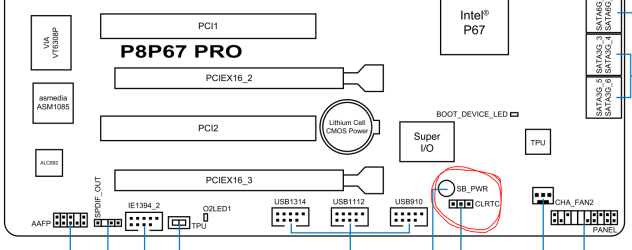
And here is where you find the CLRTC jumper on your motherboard:

Capture.PNG
 

My Computer My Computer

Computer type
PC/Desktop
Computer Manufacturer/Model Number
Home Built - Jan 2013
OS
Windows 7 64 Bit Home Premium SP1
CPU
i7-3820
Motherboard
Asus P9X79-PRO - Bios 4608
Memory
GSkill F3-14900CL9Q - 16GB
Graphics Card(s)
EVGA GeForce GTX660 - Driver 352.86
Sound Card
On board Realtek ALC898
Monitor(s) Displays
Acer S271HL
Screen Resolution
1920 x 1080
Hard Drives
#1- Samsung 840 Pro Series
#2- Western Digital WD1002FAEX Sata3 Black
#3- Western Digital WD1002FAEX Sata3 Black
PSU
Corsair CMPSU-850TX-V2 - 850 watt (by Seasonic)
Case
Corsair Obsidian 550D
Cooling
Standard 3 120mm case fans, Cooler Master Hyper 212 EVO
Keyboard
MS KC-0405
Mouse
Intellimouse 5-button
Internet Speed
56 Mbits/Sec (on a good day)
Antivirus
Avast & Malwarebytes
Browser
Firefox
Other Info
Asus DVD - DRW-24B1ST 24X
The CLRTC Procedure can be done completely independent of everything else you are doing. It will have no effect on the OS other than the default settings changes.

CLRTC Procedure

  • Note all your current BIOS settings
  • Shut down the computer > remove the power cord.
  • Remove the 3v motherboard battery.
  • Move the CLRTC jumper from pins 1-2 to 2-3.
  • Touch a metal part of the case and Press and Hold the reset button for approx. 30 seconds to discharge all power from the board.
  • Put the CLRTC jumper back on pins 1-2.
  • Replace the 3v battery > replace the power cord > boot.
  • Immediately go back into BIOS and reset all your preferred settings. If the CLRTC worked you will need to reset the date and time.
And here is where you find the CLRTC jumper on your motherboard:

View attachment 263018
OH that's what that's called. Yea, give me 5 minutes and I will let you know.
Probably going to have to pop out the video card though, that thing is in the way of everything.
 

My Computer My Computer

Computer Manufacturer/Model Number
Hera
OS
Windows 7 Ultimate x64, Mint 9
CPU
Intel i5-2500k
Motherboard
ASUS P8P67 Pro
Memory
2x 4Gb Corsair VENGEANCE DDR3-1600
Graphics Card(s)
NVidia GeForce N260GTX Twin Frozr
Sound Card
Realtek HD OnBoard Audio
Monitor(s) Displays
ASUS 24" Monitor
Screen Resolution
1920x1080
Hard Drives
G.SKILL Phoenix Series 60GB SATA II MLC Internal Solid State Drive (SSD)
SAMSUNG Spinpoint F3R 1TB 7200 RPM 32MB Cache SATA II
PSU
Cooler Master Real Power Pro 750W
Case
Cooler Master Haf 932
Cooling
Fans
Keyboard
Razer Tarantula
Mouse
Razer Lachesis
Internet Speed
not fast enough
Alright so I did the CLRTC reset. It is now taking a REALLY long time to boot into windows. The starting windows screen has been up for over a minute now (normal bootup time was less than 20 seconds from power on to log in screen). Will update this post with how the shutdown goes, but I'm nervous now.

EDIT: I had to run to the store. The computer was STILL loading windows when I got back...
Edit2: When I reset it, it brought up the MBR fail again. Should I just go ahead and try a reinstall or should I fix the MBR first?
 
Last edited:

My Computer My Computer

Computer Manufacturer/Model Number
Hera
OS
Windows 7 Ultimate x64, Mint 9
CPU
Intel i5-2500k
Motherboard
ASUS P8P67 Pro
Memory
2x 4Gb Corsair VENGEANCE DDR3-1600
Graphics Card(s)
NVidia GeForce N260GTX Twin Frozr
Sound Card
Realtek HD OnBoard Audio
Monitor(s) Displays
ASUS 24" Monitor
Screen Resolution
1920x1080
Hard Drives
G.SKILL Phoenix Series 60GB SATA II MLC Internal Solid State Drive (SSD)
SAMSUNG Spinpoint F3R 1TB 7200 RPM 32MB Cache SATA II
PSU
Cooler Master Real Power Pro 750W
Case
Cooler Master Haf 932
Cooling
Fans
Keyboard
Razer Tarantula
Mouse
Razer Lachesis
Internet Speed
not fast enough
As that's an EFI BIOS were you perchance installed in Legacy Mode using Bypass UEFI to Install WIn7. If so resetting to defaults likely disabled Legacy BIOS. Check also the SATA mode to make sure it isn't different than setting at install.

If not you'll need to install to UEFI (Unified Extensible Firmware Interface) - Install Windows 7 with - Windows 7 Forums.
I'm not really sure why I would need to bypass the UEFI BIOS to install Windows. It has worked fine every other time I have installed windows with this motherboard (which was a few times), and I didn't do anything different this time.

SATA was set to AHCI just like when I installed it, and swapping to IDE allowed it to boot up normally.

I don't have an ISO file for windows atm, though I do have the bootable USB disk I already have been using (which has worked just fine in the past).
 

My Computer My Computer

Computer Manufacturer/Model Number
Hera
OS
Windows 7 Ultimate x64, Mint 9
CPU
Intel i5-2500k
Motherboard
ASUS P8P67 Pro
Memory
2x 4Gb Corsair VENGEANCE DDR3-1600
Graphics Card(s)
NVidia GeForce N260GTX Twin Frozr
Sound Card
Realtek HD OnBoard Audio
Monitor(s) Displays
ASUS 24" Monitor
Screen Resolution
1920x1080
Hard Drives
G.SKILL Phoenix Series 60GB SATA II MLC Internal Solid State Drive (SSD)
SAMSUNG Spinpoint F3R 1TB 7200 RPM 32MB Cache SATA II
PSU
Cooler Master Real Power Pro 750W
Case
Cooler Master Haf 932
Cooling
Fans
Keyboard
Razer Tarantula
Mouse
Razer Lachesis
Internet Speed
not fast enough
I didn't say to bypass UEFI, I only was pointing out that if you did and reset BIOS to defaults it likely wouldn't boot until you enabled legacy mode.

If you installed in AHCI I dont' know why it would start now changing the SATA setting to IDE mode. I'd reinstall in AHCI mode.

I'd use the latest official installer with SP1 and media refresh in Step 1 of Clean Reinstall tutorial, unless that's what you have.
 
I didn't say to bypass UEFI, I only was pointing out that if you did and reset BIOS to defaults it likely wouldn't boot until you enabled legacy mode.

If you installed in AHCI I dont' know why it would start now changing the SATA setting to IDE mode. I'd reinstall in AHCI mode.

I'd use the latest official installer with SP1 and media refresh in Step 1 of Clean Reinstall tutorial, unless that's what you have.
Alright, I may do that. Do you know where I can get an ISO of windows 7 x64 ultimate?

I just shut down my desktop AND IT POWERED OFF! I can't believe I didn't think of the CMOS reset, that used to be the go to for fixing BIOS issues....

Anyways, it's appearing that everything is more or less in working order at this point. I will probably go ahead and do a reinstall with AHCI in the SATA if that's what you suggest (and I forgot to move my user folders over and zero everything).
 

My Computer My Computer

Computer Manufacturer/Model Number
Hera
OS
Windows 7 Ultimate x64, Mint 9
CPU
Intel i5-2500k
Motherboard
ASUS P8P67 Pro
Memory
2x 4Gb Corsair VENGEANCE DDR3-1600
Graphics Card(s)
NVidia GeForce N260GTX Twin Frozr
Sound Card
Realtek HD OnBoard Audio
Monitor(s) Displays
ASUS 24" Monitor
Screen Resolution
1920x1080
Hard Drives
G.SKILL Phoenix Series 60GB SATA II MLC Internal Solid State Drive (SSD)
SAMSUNG Spinpoint F3R 1TB 7200 RPM 32MB Cache SATA II
PSU
Cooler Master Real Power Pro 750W
Case
Cooler Master Haf 932
Cooling
Fans
Keyboard
Razer Tarantula
Mouse
Razer Lachesis
Internet Speed
not fast enough
Back
Top