Bob have a look at these and try one all much of a muchness
Best Free Rootkit Scanner and Remover
Will do.
I'm guessing that it is all hardware related, especially since the stuff that played back looked like a recorded macro.
I would like to see if heating up the mobo causes things to go wacky.
Pretty much what I was thinking. My old keyboard broke and I bought a new one (same brand, different keyboard), and it was soon after this that the problems started. I also flashed the BIOS at around the same time though.
I'm going completely out on a limb here, but maybe try running something like Memtest86 to see if you have any RAM issues? I've personally never had the pleasure of having bad RAM, but I've heard of downright arcane things happening when you have faulty RAM.
I can test this, but not just yet. The computer was working perfectly fine with all 16Gb of RAM before, so I have no reason to suspect bad RAM at this time.
I am looking at something completely different. You say you updated the BIOS. If this problem began just about that time I might suspect that as a cause.
First, try resetting BIOS defaults. Be sure to make note of all your current settings, but I would only change the essential settings afterward: AHCI, etc. Absolutely no overclocking settings.
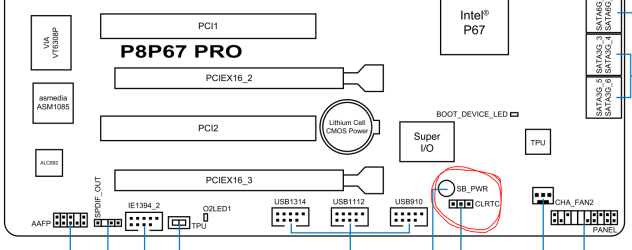
If that changes nothing I would perform a CLRTC procedure. This will make the BIOS re-enumerate all the hardware.
You can do this concurrently with the keylogger checks, which are still a real concern.
I flashed the BIOS again with the latest update (which reset all settings to default), and it had no effect on any of the problems. I have also then reset the BIOS again (not flashed, just default), with no effect.
I have no idea what a CLRTC procedure is, and I'm not sure what you mean by changing AHCI settings. I did change the HDD controller from AHCI to IDE, and it had no effect.
I concur to reset the BIOS to defaults, and would wipe the HD before reinstall with
Diskpart Clean Command to clear boot code and get the cleanest slate.
When scanning for malware it's best to use your AV,
Malwarebytes and
SUPERAntiSpyware - Downloads. Even if you delete invaders from Brower Add-ons they may keep spying from registry unless rooted out.
I would rather skip having to do a clean install again, but I can give it a shot. I'll wait a little bit first if you don't mind. For the record, I have 5 drives. 2 SSDs (128Gb houses OS, 60Gb old OS drive which is now a software drive, 2 320Gb WD drives I use in striped RAID, and a 1Tb drive I use for data). If/when I do a clean install, I will use diskpart to clean/wipe all the drives except the 1Tb backup drive.
========================
I ran a full scan with SuperAntiSpyware today, came up clean. Running a full Malwarebytes scan at the moment as well. At this point I'm leaning towards it being a SUPER weird hardware/BIOS problem. Might it be a good idea to try flashing back to an older BIOS? The one I was using before I flashed it was working pretty well (though it had some weird issue, which was why I flashed it in the first place; stability I think).
I forgot to add: a rootkit would screw with the MBR right? I only had it break once after I fixed the issue with the second SSD, but I have absolutely no idea if it's related, and it hasn't come back yet.
Also: perhaps it would be useful to use another keyboard and mouse in the computer after a clean install to see if I can rule out that?