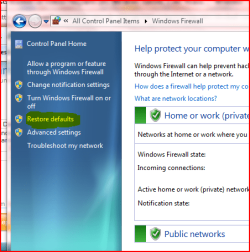
Outgoing Requests Blocked on Various Programs (Inc. Windows Update, Zune, Picasa...)
Hey all. Here's my problems
In Zune Software, I can't login to the marketplace/social
In Twhirl (a twitter client) I can't login to receive my feeds
In Picasa (A Photo Managing Software) I can't login to upload photos to a web album
When I try to sync the time server, it can't connect
When I plug in new hardware, Window's can't connect to find drivers
And Lastly, when using Windows Update, I get an infamous '80072EE2' error
So, in short, SOME of my programs keep having their outgoing requests or connections blocked. My internet works fine. When I play games it connects just fine. When I use and IM client it works fine. But for these programs...not so much.
And the worst thing about it is that it's effecting more programs. Picasa and Twhirl we're working last week shortly after I installed Windows 7
Anyways, I've tried a bunch of stuff already:
Disabling Windows Firewall, Enabling it with the specific programs allowed through, disabling anitvirus in addtion to firewall, switich the firewall programs, telling IE to auto-detect my proxy (I have none), going thru cmd prompt and resetting the proxy (still don't have one), system restoring to when I first installed the beta (when Twhirl and Picasa worked) only to have them stop working
Oh, and I connect to my network wirelessly through a Linksys USB-G receiver, which gets the signal from a Netgear router, which is hooked up to a cable modem
So, to say the least, I'm stumped. And if ANYONE could help me out here, it would be AMAZING. So, thanks in advance for any and all suggestions, help, tips, etc.
_AMuench
 http://windows7forums.com/editpost.php?do=editpost&p=8207
Hey all. Here's my problems
In Zune Software, I can't login to the marketplace/social
In Twhirl (a twitter client) I can't login to receive my feeds
In Picasa (A Photo Managing Software) I can't login to upload photos to a web album
When I try to sync the time server, it can't connect
When I plug in new hardware, Window's can't connect to find drivers
And Lastly, when using Windows Update, I get an infamous '80072EE2' error
So, in short, SOME of my programs keep having their outgoing requests or connections blocked. My internet works fine. When I play games it connects just fine. When I use and IM client it works fine. But for these programs...not so much.
And the worst thing about it is that it's effecting more programs. Picasa and Twhirl we're working last week shortly after I installed Windows 7
Anyways, I've tried a bunch of stuff already:
Disabling Windows Firewall, Enabling it with the specific programs allowed through, disabling anitvirus in addtion to firewall, switich the firewall programs, telling IE to auto-detect my proxy (I have none), going thru cmd prompt and resetting the proxy (still don't have one), system restoring to when I first installed the beta (when Twhirl and Picasa worked) only to have them stop working
Oh, and I connect to my network wirelessly through a Linksys USB-G receiver, which gets the signal from a Netgear router, which is hooked up to a cable modem
So, to say the least, I'm stumped. And if ANYONE could help me out here, it would be AMAZING. So, thanks in advance for any and all suggestions, help, tips, etc.
_AMuench
My Computer
At a glance
Windows 7 Beta; Mandriva Linux 2008.1
- OS
- Windows 7 Beta; Mandriva Linux 2008.1