Five operating system alternatives to Windows 8 and XP

I think that idea is antiquated.....some very large organisation seem to be doing very well indeed.

List of Linux adopters - Wikipedia, the free encyclopedia

All these businesses use special software made just for them... so they can use any OS and also maintain it themselves and likely write their own version of Linux. This may be feasible and useful for Google, or Amazon. but 99% of the businesses rely on off-the shelf applications and even if it is just for interoperability with their environment, who use windows applications.
 

My Computer My Computer

At a glance

W7 Pro 64Intel i3 3220 @ 3.3 GHz2x8GB DDR 3 1600 Kingstononboard
Computer Manufacturer/Model Number
homemade
OS
W7 Pro 64
CPU
Intel i3 3220 @ 3.3 GHz
Motherboard
ASRock H77M
Memory
2x8GB DDR 3 1600 Kingston
Graphics Card(s)
onboard
Sound Card
onboard
Monitor(s) Displays
two 21" LCD
Hard Drives
128 GB Samsung 830
PSU
OCZ400MXSP
Cooling
Stock
Internet Speed
DSL
Whether we like it or not there ISN'T any alternative to Windows and there really isn't likely to be any either.

I disagree....there are several excellent distributions around, and its far easier than it used to be, or is made out to be.

Try LinuxMint14 or Zorin....it has almost everything the home user needs.
And I absolutely agree with you as well. Jimbo you seem to like Windows 8 too much. I have tried 7 or 8 distros in the last few weeks on VM and on the HD booting. Things just work. They even have one click installs. Linux has really grown up and as far as this old Geek is concerned is a viable alternate to Windows 7 ONCE that reaches end of life. If M$ goes the way of Active Desktop 95 Version 2 TIFKAM I will be on Linux running a locked down Windows 7 for compatibility. 7 years time I'll be using my 24 core 6 GHZ CPU with 2 TB of Ram and running VM will be child's play. (Got to get those specs past the wife first but just look back 7 years and see what I mean).
 

My Computer My Computer

At a glance

Windows 7 x64 Ultimate and numerous virtual m...AMD FX-8350 Vishera 32nm Technology @ 4.2 GHz...G Skill 32.0GB Dual-Channel DDR3 @ 1204MHz (1...EVGA GeForce GTX 960 4GB Super SC ACX 2.0+ wi...
Computer type
PC/Desktop
Computer Manufacturer/Model Number
Bluethunder II
OS
Windows 7 x64 Ultimate and numerous virtual machines
CPU
AMD FX-8350 Vishera 32nm Technology @ 4.2 GHz default
Motherboard
ASUSTeK COMPUTER INC. SABERTOOTH 990FX R2.0 (Socket 942)
Memory
G Skill 32.0GB Dual-Channel DDR3 @ 1204MHz (11-13-13-31)
Graphics Card(s)
EVGA GeForce GTX 960 4GB Super SC ACX 2.0+ with Back Plate
Sound Card
Creative X-Fi Titanium HD Audiophile PCIe
Monitor(s) Displays
LG L227WTG x 3
Screen Resolution
1680 x 1050 16:10
Hard Drives
238GB Samsung850 PRO SATA Disk Device (SSD)
1863GB Seagate ST2000DM 001-1CH164 (SATA)
1397GB Seagate ST1500DL 003-9VT16L(SATA)
466GB Western Digital WDC WD50 03AZEX-00K1GA0 (SATA) x 2
932GB Seagate ST310005 28AS SATA Disk Device (SATA)
PSU
Enermax Revolution87+ 1000 Watts Gold Certified Power Supply
Case
Rocketfish Full Tower
Cooling
Cooler Master Hyper 212 EVO Push Pull 120mm Fans
Keyboard
Logitech K740
Mouse
Logitech G100S Laser LED + Logitech Gamepad F310
Internet Speed
500 mbs down and 30mbs up
Antivirus
Malwarebytes Pro & Avast and MSE on certain Virtual Machines
Browser
Firefox (Main) Chrome, Internet Explorer (Back Up)
Other Info
Logitech X 230 2.1 Stereo System and 5.1 Yamaha RX V2090
B&W DM6 Monitor Speakers + Center and Surround Speakers
Using Mouse Without Borders (Google it)
Hi there
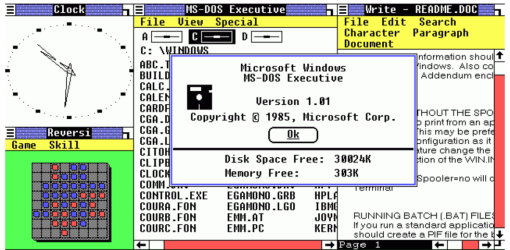
I never said anything about Windows 8 - I merely said that IMO there isn't any alternative in the corporate world - or even as a non technical home user to Windows (other than APPLE). Keep using Windows XP if you like or even THIS version (scr shot enclosed).


Running various Linux distros on a VM is totally different to running REAL HARDWARE. For example have you managed to stream Music / Video content from your Linux VM to some real hardware.

The argument is NOT that Linux doesn't work -- it's about the SUITABILITY for it to REPLACE Windows -- and the mere fact you've used around a dozen different distros just proves the point -- how does a NON TECHNICAL user handle all this -- and for corporates it's on the whole a NON STARTER unless you employ some prohibitively expensive service organisation which pushes up the TCO to make it totally non worth while.

I LIKE Linux -- that's not the point -- we are discussing whether it is SUITABLE to replace windows and the practicality of being able to do it too.

Using the new printer example given above -- the user (remember non technical) has to know a) Which Linux Distro -- it might well have been modded by the initial OEM when the computer was bought, b) possibly the kernel release, c) the latest release level of the distro and possibly a whole slew of other stuff.

It's also possible that the new hardware driver won't be available on the distro the person is using.

Not only that -- having also used all sorts of Linuxes over the years the whole process of obtaining and updating software isn't one I'd recommend for non technical users-- it's easy for someone reasonably technical on this forum to say type sudo and aptget or whatever software distribution your distro uses to obtain and update its software but to avoid errors updating Linux systems the manual does need to be read carefully.

The Windows user doesn't have any of these problems -- in general the Windows drivers are usually (especially nowadays) available BEFORE the hardware hits the market place so it's no problem for the end user. I certainly as a manufacturer wouldn't want to maintin 24 different driver modules for all the most common distros out there.


Cheers
jimbo
 

Attachments

  • windows1.png
    windows1.png
    23.8 KB · Views: 18

My Computer My Computer

At a glance

Linux CENTOS 7 / various Windows OS'es and se...Intel i7 Intel i58GB, 16GBOn Motherboard
Computer type
PC/Desktop
Computer Manufacturer/Model Number
Custom built, several laptops HP/ASUS
OS
Linux CENTOS 7 / various Windows OS'es and servers
CPU
Intel i7 Intel i5
Memory
8GB, 16GB
Graphics Card(s)
On Motherboard
Sound Card
Realtek HD audio
Monitor(s) Displays
Apple Cinema display, Samsung LCD
Screen Resolution
1920 X 1080
Hard Drives
4 X 1TB SATA
Mouse
Toshiba wireless laser
Internet Speed
> 20MB up
Hi there
I never said anything about Windows 8 - I merely said that IMO there isn't any alternative in the corporate world - or even as a non technical home user to Windows (other than APPLE).

Running various Linux distros on a VM is totally different to running REAL HARDWARE. For example have you managed to stream Music / Video content from your Linux VM to some real hardware.

The argument is NOT that Linux doesn't work -- it's about the SUITABILITY for it to REPLACE Windows -- and the mere fact you've had to try around a dozen different distros just proves the point -- how does a NON TECHNICAL user handle all this -- and for corporates it's on the whole a NON STARTER unless you employ some prohibitively expensive service organisation which pushes up the TCO to make it totally non worth while.

I LIKE Linux -- that's not the point -- we are discussing whether it is SUITABLE to replace windows and the practicality of being able to do it too.

Cheers
jimbo
Actually I tried that many as I could. Freedom of choice, choice is a good thing. OK so 45 versions of lettuce but I like Iceberg Lettuce anyhow. I was playing music last night in Mint on a VM. Kept cutting out. Not on the hard drive boot. I know this, when I run Windows 7 or 95 on a VM it does not run the same as actual hardware but gives me the ability to test and try stuff out. If I break it I can start over easily and not hose my system.
I have worked for 2 very large companies and one we were allowed to install anything we liked in our development group providing we had a licence for such. We were even given copies of OS's (Windows 2000 and XP Pro) and a company provided Virus Checker to put on our Home PC's if we wished. Oh happy days. The other machine was pretty much locked down on XP and not so much on Windows 7.
In my book all it would take was for an OEM like Dell Samsung et al to provide Linux instead of 8 at a really cheap cost and Linux would take off. I know this has been done before but things are different this time. My thoughts are that Blue will not fix 8 and we will see 7 back on machines in the stores for Xmas. If not M$ is doomed.
 

My Computer My Computer

At a glance

Windows 7 x64 Ultimate and numerous virtual m...AMD FX-8350 Vishera 32nm Technology @ 4.2 GHz...G Skill 32.0GB Dual-Channel DDR3 @ 1204MHz (1...EVGA GeForce GTX 960 4GB Super SC ACX 2.0+ wi...
Computer type
PC/Desktop
Computer Manufacturer/Model Number
Bluethunder II
OS
Windows 7 x64 Ultimate and numerous virtual machines
CPU
AMD FX-8350 Vishera 32nm Technology @ 4.2 GHz default
Motherboard
ASUSTeK COMPUTER INC. SABERTOOTH 990FX R2.0 (Socket 942)
Memory
G Skill 32.0GB Dual-Channel DDR3 @ 1204MHz (11-13-13-31)
Graphics Card(s)
EVGA GeForce GTX 960 4GB Super SC ACX 2.0+ with Back Plate
Sound Card
Creative X-Fi Titanium HD Audiophile PCIe
Monitor(s) Displays
LG L227WTG x 3
Screen Resolution
1680 x 1050 16:10
Hard Drives
238GB Samsung850 PRO SATA Disk Device (SSD)
1863GB Seagate ST2000DM 001-1CH164 (SATA)
1397GB Seagate ST1500DL 003-9VT16L(SATA)
466GB Western Digital WDC WD50 03AZEX-00K1GA0 (SATA) x 2
932GB Seagate ST310005 28AS SATA Disk Device (SATA)
PSU
Enermax Revolution87+ 1000 Watts Gold Certified Power Supply
Case
Rocketfish Full Tower
Cooling
Cooler Master Hyper 212 EVO Push Pull 120mm Fans
Keyboard
Logitech K740
Mouse
Logitech G100S Laser LED + Logitech Gamepad F310
Internet Speed
500 mbs down and 30mbs up
Antivirus
Malwarebytes Pro & Avast and MSE on certain Virtual Machines
Browser
Firefox (Main) Chrome, Internet Explorer (Back Up)
Other Info
Logitech X 230 2.1 Stereo System and 5.1 Yamaha RX V2090
B&W DM6 Monitor Speakers + Center and Surround Speakers
Using Mouse Without Borders (Google it)
Windows Software Repository?

Unless you are a "techie" Linux is NEVER going to become mainstream -- never mind how good or bad it is there are just TOO MANY different distros, no central software repositories or no central update mechanism -- this would be a total DISASTER for any type of central IT dept. (Servers are another issue -- but you have large corporate suppliers like Red Hat).

A "central IT department" would deploy the same version of Linux to everyone (just like with Windows) thus eliminating the repository/update issues.

It is a simple operation to point workstations at an address on a central server, to retrieve approved/tested updates.
The default repository addresses are just deleted or disabled.
That is how "my" TAFE handles Linux operating systems for the training various courses.

Unless you are referring to W8 Apps, where is the central software repository for Windows software?

Unlike Windows, Linux desktop and server versions are basically interchangeable.
You simply add or remove the appropriate modules (e.g. Apache).

Red Hat's info page specifically mentions servers and workstations.

Not only that -- having also used all sorts of Linuxes over the years the whole process of obtaining and updating software isn't one I'd recommend for non technical users-- it's easy for someone reasonably technical on this forum to say type sudo and aptget or whatever software distribution your distro uses to obtain and update its software but to avoid errors updating Linux systems the manual does need to be read carefully.

That is only true if you want something that isn't in the Package Manager (which is a GUI on all the distros I've tried)

The Windows user doesn't have any of these problems -- in general the Windows drivers are usually (especially nowadays) available BEFORE the hardware hits the market place so it's no problem for the end user.

That might be true if MS didn't screw around with the driver coding/model constantly.

For example, the sound driver for my 2 year old motherboard in W8:
W8DP: working
W8CP: broken
W8RP: broken
W8 Ent: working
 
Last edited:

My Computer My Computer

At a glance

W7 Ultimate SP1, LM19.2 MATE, W10 Home 1703, ...AMD Phenom II x6 1100T, 3.3 GHz12GB DDR3 1333 G-Skill (4GB x 2), G-Skill (2G...NVIDIA GeForce GTX 660
Computer type
PC/Desktop
Computer Manufacturer/Model Number
n/a
OS
W7 Ultimate SP1, LM19.2 MATE, W10 Home 1703, W10 Pro 1703 VM, #All 64 bit
CPU
AMD Phenom II x6 1100T, 3.3 GHz
Motherboard
ASUS M4A88T-M/USB3 (AM3)
Memory
12GB DDR3 1333 G-Skill (4GB x 2), G-Skill (2GB x 2)
Graphics Card(s)
NVIDIA GeForce GTX 660
Sound Card
Realtek?
Monitor(s) Displays
Samsung S23B350
Screen Resolution
1920x1080
Hard Drives
WD Green 2TB (SATA), WD Green 3TB (SATA), WD Blue 4TB (SATA), WD Blue 6TB (SATA)
PSU
Cooler Master
Case
Antec GX300 Tower
Cooling
3x Antec TRICOOL 120mm Fans
Mouse
Wired Optical
Internet Speed
DSL
Antivirus
Avast
Browser
Pale Moon (64 bit)
Other Info
2018-12-27 Upgraded HDDs
2015-12-10 Upgraded case, graphics card, storage
2015-08-15 Upgraded motherboard & RAM
2015-07-15 Upgraded LM17.1 to LM17.2
I like Microsoft and want them to do great in all markets they enter.
Through the years we have all seen some great things coming out of Microsoft. We have also seen some things from Microsoft that really didn't get the job done.
I think this kind of pattern would be in any company that was trying to please so many people and companies located all over the world.
I'm a home user and have never been in any I.T. department. I think I have above average knowledge of the use of a home computer system in some areas and lacking in other areas.
All this being said I don't remember Microsoft ever bringing out a new operating system that moved computing backwards. We have seen operating system that Microsoft put out but were not ready for prime time.
A SP or two and things worked for the home user and many companies.
Because of the quality of Windows 7 Microsoft really couldn't do a lot of improvements to improve sales.
Their next option was change.
Microsoft as well as many others seen the change in the market was going head strong to the new Poke and Go generation. Any company would be foolish not to want to be a big player in this up coming and growing market.
I guessing we can all understand that.
In my opinion Windows 8 was designed from the get go for the new Poke and Go mobile cell phones and tablets ect. market place. I think that is a great idea and I hope
Microsoft does great in this new market. Many PC and Laptop users have also join the Poke and Go crowd but they still use and love their PC's with Windows 7 installed.
Those such people can have it both ways.
At this point what choices does Microsoft have.
If they SP-2 Windows 7 that will slow sales of Windows 8 on PC/Laptops and SP's are free. Therefor no profit.
If they change Windows 8 to much they might loose market share in the Poke and Go people and products. These are billion dollar decisions.

To me the answer is simple; give the customers a choice.

Some will choose to install Windows 8 in the Poke and Go method on every piece of hardware. Mobile or otherwise.
Some will choose to install Windows 8 Poke and Go just on mobile hardware and install Windows 8 to be used in a traditions fashion on PC/Laptops.
That way Microsoft sales of a operating system for PC/Laptop would stay dominant and they could join the growing Poke and Go market at the same time.

Alternative free and paid for operating system have been out for a very long time and Microsoft still had a 90% plus market share. Microsoft must of been doing something right.
I would like to see Microsoft get back to the old way of doing things.
Make great products that people and companies want to buy.
Then we can get back to listing to people bitching about Microsoft is to big and strong and their isn't enough competition. The government should do something ect. ect. ect.
 

My Computer My Computer

At a glance

Windows 10 Pro. 64/ version 1709 Windows 7 Pr...Intel i7-6800K @ 4.3Corsair Platinum 16 gig @2400EVGA GTX 1070 OC
Computer type
PC/Desktop
Computer Manufacturer/Model Number
Home made Desktop
OS
Windows 10 Pro. 64/ version 1709 Windows 7 Pro/64
CPU
Intel i7-6800K @ 4.3
Motherboard
ASUS X-99 Deluxe II
Memory
Corsair Platinum 16 gig @2400
Graphics Card(s)
EVGA GTX 1070 OC
Monitor(s) Displays
Asus 27" LED LCD/VE278Q
Screen Resolution
1920-1080 or 1280-720 HDMI
Hard Drives
INTEL SSD 730-240 Gb Sata 3.0/
PSU
EVGA Platium 1200W
Case
Phanteks Luxe Tempered Glass 8 fans/ one radiator
Cooling
XSPC/ Water Cooled CPU
Keyboard
Das 4 Professional
Mouse
Logitech M705/MX Anywhere 2-S
Internet Speed
100 mbits
Antivirus
Microsoft Security Essentials/ Malwarebytes Premium 3.0/ SAS
Browser
I.E. 11 default/Firefox/ ISP Time Warner Cable/Spectrum
Other Info
LG BluRay Burner/
Sound system-KLipsch-THX/
Icy Dock ssd Hot Swap bays.
most wouldn't know how to use a console for the Bash commands which is a UNIX set unfamiliar to the basic dos commands

I really don't see that as an impediment for the average home user though........for example its safe to say most home users don't get deep into ICALCs from the Windows 7 command prompt.

If they don't in Windows 7, they don't need to in Linux.

And that would precisely the point. If they don't with Windows what happens to someone running an older release and something needs tending to at the console? With the latest releasse over the last couple of years on the other hand you wouldn't be confronted with the need for the console since many Linux apps are now seeing install options rather then the need to download and install manually. But for the most part Linux will likely retain the "Geek's OS" label it received a number of years ago.

Now for you jimbo45 know that a good number of businesses do run Linux on their servers! They only have one Red Hat release going back 10yrs. but they still use the freebie for the network and server side of things while the office machine will either see one of the other Big 3 OS namely Windows, Mac, and Solaris not Open Solaris(freebie) by SUN.

Actually when you get down to the very core of how many OSs look at what? MS came up with Windows while every other OS has one thing in common. They are UNIX based! It's just that with the Fruit company and SUN Microsystems the OS is tied to their brands of hardwares! Linux and Google besides tablet, phone for Google are two other UNIX based OSs.

The one thing most are unaware of is that there are some Linux distros you will find that are not free for home at all! When mentioning the Red Hat distros you won't find Mandriva formerly Mandrake on media free of charge. And businesses tend to support the Red Hat server side of the Linux community there to a degree while the bulk of the distros the typical user tries out are free to download and run. Commercial application like servers for corporations, large companies and home use are two different things entirely.
 

My Computers My Computers

  • At a glance

    W7 Ultimate x64/W10 Pro x64/W11 Pro Triple Bo...AMD Phenom II X4 975 Deneb 3.6ghz - 965 2nd r...Kingston Hyper X DDR3 1600 1.5v 16gb - Hyper ...MSI HD Radeon 5750 1gb - MSI HD Radeon 6450 o...
    Computer type
    PC/Desktop
    Computer Manufacturer/Model Number
    Custom builds = 2
    OS
    W7 Ultimate x64/W10 Pro x64/W11 Pro Triple Boot - Main PC W7 Remote PC Micro ATX W7 Pro x64/W11 Pro
    CPU
    AMD Phenom II X4 975 Deneb 3.6ghz - 965 2nd remote pc
    Motherboard
    Gigabyte GA-790XTA-UD4-Gigabyte GA-880GM-D2H remote pc
    Memory
    Kingston Hyper X DDR3 1600 1.5v 16gb - Hyper X Fury 8gb 2nd
    Graphics Card(s)
    MSI HD Radeon 5750 1gb - MSI HD Radeon 6450 on mini tower
    Sound Card
    Creative Labs X-Fi Xtreme Audio P - Realtek onooard 2nd case
    Monitor(s) Displays
    ASUS VW199T-P 19" HP 2082a Main-HP 2082a 20" remote pc
    Screen Resolution
    Asus 1440x900 - HP 1600x900
    Hard Drives
    WD Black 1TB HD per OS W7, W10, and pending W11 presently on 500gb OS Drive - Pending Triple 1TB HDs for Spanned Storage/backup volume
    Single 2TB external USB enclosure, single 1TB System 7 Host/Boot drive, Pending 8TB external HD for system image b
    PSU
    Corsair 750TX - primary / Corsair CX600 - second
    Case
    Antec 900-2 - SSD compatible / NZXT Vulcan mini tower
    Cooling
    Zalman CNPS9900A
    Keyboard
    AZIO L70 Backlit Letters Gaming - ONN Cordless/USB
    Mouse
    MSI DS200 Programmable, Logitech Cordless
    Internet Speed
    30mbps upgrade - primary hard wired - mini tower usb WiFi
    Antivirus
    GFI VIPRE Internet Security 2014 on W7 2016 beta on W10,
    Browser
    Cyberfox, WaterFox 64bit FF variants, FireFox x64, Pale Moon
    Other Info
    Accomdata fan cooled usb 2.0 PIDE/Sata II, III external enclosure.
    Sambient usb/eSata PATA/Sata II, III external enclosure.
  • At a glance

    W7 Pro x64/W11 ProAMD Deneb 3.6ghz - 965Kingston Hyper X Fury 8gbMSI HD Radeon 6450 DVI Output
    Computer type
    PC/Desktop
    System Manufacturer/Model Number
    CUSTOM ASSEMBLY
    OS
    W7 Pro x64/W11 Pro
    CPU
    AMD Deneb 3.6ghz - 965
    Motherboard
    Gigabyte GA-880GM-D2H remote pc
    Memory
    Kingston Hyper X Fury 8gb
    Graphics Card(s)
    MSI HD Radeon 6450 DVI Output
    Sound Card
    Realtek onooard Creative or Other separate PENDING
    Monitor(s) Displays
    VIZIO 32" LCD TV Separate LCD Pending
    Screen Resolution
    1600x1080
    Hard Drives
    WD 500GB OS Host/Boot WD Green 1TB Storage/Backup
    PSU
    Corsair 600W - THERMALTAKE 600W spare case
    Case
    NZXT Vulcan mini tower
    Cooling
    Twin 120mm Top Fans - 240mm Side Cover
    Keyboard
    ONN Cordless/USB Logitech Cordless
    Mouse
    ONN USB/Cordless - Logitech Cordless
    Internet Speed
    DSL 5G
    Browser
    MS Edge, FireFox, WaterFox x64, FireFox Nightly
    Other Info
    OS Testing-Remote Access to Main TeamViewer
"They only have one Red Hat release going back 10yrs."

I wonder if they have found the need to "reboot the server" yet?

Mandriva server is available free "up to 5 users" but I think the main thing you are paying for is the support.

But then Linux admin's should be at least "RedHat Certified" so they would have a very good idea of what they are doing.


Also
the two major packages for source code are RPM or DEB.
You can build from source code to either package.
Or use a program called Alien to convert between packages.
 

My Computer My Computer

At a glance

Win7 64
OS
Win7 64
Well that's another thing to consider as well. There are IT personal at larger companies on the payroll to maintain the IT dept.s that have to be familiar with Linux from the get go in order to maintain things. Outside support for any distro would be for large scale application where you then see fees imposed.

The media still sees a price however to cover that type of expense while that may be the only way to get a certain flavor like good for 100 users type release over a freebie good for home server application. Prices on the commercial for business type releases which suggests prepackage Linux office apps not found in just your average download and needing to see a separate install but are all ready equipped would be the thing you would tend to see more of.

Those can range from $22 upwards of $140- depending on which flavor of the month. Several commercial distros can be looked over at http://www.linuxcentral.com/catalog/index.php3?cat[]=dist&subcat=a&id=C1Cn5C78jcRC2

Now when going backwards to the home page you then see the featured products like desktop releases including a business desktop release at http://www.linuxcentral.com/catalog/?cat[]=dist&id=C1CKPXTAJAHCA

You will notice that's one of the largeest vendors for finding a distro on cd or dvd there with just over 300 flavors some being dfferent releases for each of the distros they carry. Since most only see the freebies for download they would never realize how far that OS has gone as far as marketing.

Now is the few bucks for a cd just to cover the media and handling/shipping or something more when you see a price drop from $28 down to $10? Then you add the books to learn the OS and tricks to the list of things and sure enough you are still seeing a degree of marketing for a believed to be entirely free? OS.

Now the advantage for the programmers on the other hand is being able to build on existing source codes to modify things according to need as say for a specific application one business would have. That can save the effort and $$$ in having a totally separate software written up for other OSs(Windows, Mac, or ?).
 

My Computers My Computers

  • At a glance

    W7 Ultimate x64/W10 Pro x64/W11 Pro Triple Bo...AMD Phenom II X4 975 Deneb 3.6ghz - 965 2nd r...Kingston Hyper X DDR3 1600 1.5v 16gb - Hyper ...MSI HD Radeon 5750 1gb - MSI HD Radeon 6450 o...
    Computer type
    PC/Desktop
    Computer Manufacturer/Model Number
    Custom builds = 2
    OS
    W7 Ultimate x64/W10 Pro x64/W11 Pro Triple Boot - Main PC W7 Remote PC Micro ATX W7 Pro x64/W11 Pro
    CPU
    AMD Phenom II X4 975 Deneb 3.6ghz - 965 2nd remote pc
    Motherboard
    Gigabyte GA-790XTA-UD4-Gigabyte GA-880GM-D2H remote pc
    Memory
    Kingston Hyper X DDR3 1600 1.5v 16gb - Hyper X Fury 8gb 2nd
    Graphics Card(s)
    MSI HD Radeon 5750 1gb - MSI HD Radeon 6450 on mini tower
    Sound Card
    Creative Labs X-Fi Xtreme Audio P - Realtek onooard 2nd case
    Monitor(s) Displays
    ASUS VW199T-P 19" HP 2082a Main-HP 2082a 20" remote pc
    Screen Resolution
    Asus 1440x900 - HP 1600x900
    Hard Drives
    WD Black 1TB HD per OS W7, W10, and pending W11 presently on 500gb OS Drive - Pending Triple 1TB HDs for Spanned Storage/backup volume
    Single 2TB external USB enclosure, single 1TB System 7 Host/Boot drive, Pending 8TB external HD for system image b
    PSU
    Corsair 750TX - primary / Corsair CX600 - second
    Case
    Antec 900-2 - SSD compatible / NZXT Vulcan mini tower
    Cooling
    Zalman CNPS9900A
    Keyboard
    AZIO L70 Backlit Letters Gaming - ONN Cordless/USB
    Mouse
    MSI DS200 Programmable, Logitech Cordless
    Internet Speed
    30mbps upgrade - primary hard wired - mini tower usb WiFi
    Antivirus
    GFI VIPRE Internet Security 2014 on W7 2016 beta on W10,
    Browser
    Cyberfox, WaterFox 64bit FF variants, FireFox x64, Pale Moon
    Other Info
    Accomdata fan cooled usb 2.0 PIDE/Sata II, III external enclosure.
    Sambient usb/eSata PATA/Sata II, III external enclosure.
  • At a glance

    W7 Pro x64/W11 ProAMD Deneb 3.6ghz - 965Kingston Hyper X Fury 8gbMSI HD Radeon 6450 DVI Output
    Computer type
    PC/Desktop
    System Manufacturer/Model Number
    CUSTOM ASSEMBLY
    OS
    W7 Pro x64/W11 Pro
    CPU
    AMD Deneb 3.6ghz - 965
    Motherboard
    Gigabyte GA-880GM-D2H remote pc
    Memory
    Kingston Hyper X Fury 8gb
    Graphics Card(s)
    MSI HD Radeon 6450 DVI Output
    Sound Card
    Realtek onooard Creative or Other separate PENDING
    Monitor(s) Displays
    VIZIO 32" LCD TV Separate LCD Pending
    Screen Resolution
    1600x1080
    Hard Drives
    WD 500GB OS Host/Boot WD Green 1TB Storage/Backup
    PSU
    Corsair 600W - THERMALTAKE 600W spare case
    Case
    NZXT Vulcan mini tower
    Cooling
    Twin 120mm Top Fans - 240mm Side Cover
    Keyboard
    ONN Cordless/USB Logitech Cordless
    Mouse
    ONN USB/Cordless - Logitech Cordless
    Internet Speed
    DSL 5G
    Browser
    MS Edge, FireFox, WaterFox x64, FireFox Nightly
    Other Info
    OS Testing-Remote Access to Main TeamViewer
my opinion only ... a little off topic for alternatives, but I guess I need to rant ...

I personally agree with all the reasons why Windows 8 is a loser from the perspective of a techie or someone who wants to do real work on a computer. My best guess is that MS wants part of the market share that others in the portable market enjoy.

Because I have much more contact with "the man in the street" than with what I prefer to call real computer users, I see the rationale behind my perceived reason for the MS move toward mobile OSes and desktop versions of the same. Culture as a whole has degraded into a mass interested in social and entertainment aspects of computing only.

How many people do I run into who don't have a smart phone? -- not many
How many of them are chronically texting? -- most of them
How many are addicted to sports, celebrity gossip, YouTube videos, etc.? -- quite a few
How many of them can type or properly communicate in complete sentences in written form? --very few

... and last, but not least ... Which market segment which will jump at the newest smart phone or tablet or newest (usually useless app) without regard to productivity issues? -- the same group

Businesses cannot afford to make continued migrations to unwarranted upgrades just to keep up with the newest technology when the old serves them perfectly well. Likewise, enterprise customeres are more apt to lean on developer support (read MS in this discussion) than the ordinary consumer/user. The result? ... Enterprise represents a smaller potential growth market with a larger expense for support. The (perceived) solution? ... Provide a desktop version of the portable OSes and gradually evolve to a totally cloud based computing environment. Gee! That decreases production and distribution costs. Sound familiar? -- To me it sounds like the next logical step after shipping computers without installation disks.

At the risk of sounding overly cynical, I will always trust large corporations to discover a method for achieving increased profits and ram that business model down the throat of the consumer. Then it is up to the marketers to provide the propaganda to convince the sheeple (not a typo) that it is what they really want.

My rule of thumb is when in doubt about changes (planned obsolescence), follow the money of the impulsive!!

irreverently submitted,
drpepper
 
Last edited:

My Computer My Computer

At a glance

Windows 7 Home Premium SP1 64bitIntel Core i38GB DDR3Intel HD graphics family
Computer type
PC/Desktop
Computer Manufacturer/Model Number
Lenovo 1068AHU B570 (laptop)
OS
Windows 7 Home Premium SP1 64bit
CPU
Intel Core i3
Motherboard
Lenovo Emerald Lake
Memory
8GB DDR3
Graphics Card(s)
Intel HD graphics family
Sound Card
Realtek HD audio
Monitor(s) Displays
ThinkPad Display 1366x768 (15.6")
Hard Drives
WD 320GB WDC WD3200BPVT
Internet Speed
80Kbs maximum -->speed is a misnomer
Other Info
Logitech MK550 wireless mouse/keyboard combo used when at home.
Saving space and not wanting to itemize responses :roflmao:

?).

Night Hawk
The distributions are pre-configured, self installing setups, for to suit preconceived ideas of what a distro maker believes there market to be, or what a user may want.
Some of them provide printed manual with the disc's, and some of these manuals are very good.
Others provide the pre-configured disc's alone, preprinted or burn't disc's for a few dollars, these are usually available as downloads too.
The source(binary) code is freely available in Tar packages.
RedHat started the package management idea, with RPM's, a predefined way of packaging source code with it's dependencies.
Debian (open source, no proprietary code) uses Deb packages.

M$ uses there own package management for the source code, There source code there way only.(proprietary). So theres only one way.

If you want a large number of disc's,,,,,, Debian, 8 DVD's, you could download them free:rolleyes: or just buy the DVD's.

As for books, yes, I have a few, for Linux and for M$.
You always pay for knowledge, either OS or for the apps.

Same for training ie MCP's etc

Even for M$, I've seen the admins call in M$ to sort out quirks in the system..
If your servers are RedHat based then you can always ask RedHat, same with Sun or IBM etc.

And of course, always at a price, just depends on your admin staff's ability.

As for normal users, how many people come to sevenforums looking for advise, how many call a friend(resident geek) or call in the local shop.
A few clicks here and there and your a guru............. same with any software.
 

My Computer My Computer

At a glance

Win7 64
OS
Win7 64
Hi there
I still maintain that for the average business going to Linux isn't really an option -- of course an IT dept can handle the actual computer upgrades / installs but the fact that there are so many different distros makes this not really a viable choice unless you are a large corporate who can afford to pay Red Hat huge amounts of money to maintain the whole kybosh.

What happens if you decide on distribution "X" and after a few years its not available or doesn't work very well any more.

(Note here I'm specifically talking about DESKTOPS and WORKSTATIONS - as servers are a very different ball game -- probably a lot of people at work accessing their applications / data via LANS probably don't realize that they are actually accessing some type of Virtual Server on a remote server farm anyway).

Then if you do employ a service organisation like Red Hat to maintain all this stuff it's likely to cost you just as much as your Windows agreements with Ms anyway plus of course you have the added complexity when hiring staff -- nearly everybody has experience with Windows - how many have experience with Linux apps. The Back end office production software might also need to be totally re-written -- not a cheap task by any manner of means and often can only be done in the Real World if you are either developing a totally new application or re-designing from scratch an existing application - and in a large organisation this can take many years to do.

For Home users the situation is entirely different -- most Linux users I know pride themselves on the number of different distros they've tried and are always switching after a few weeks / months from one to another one for no other reason often than "Im bored with "X" - I'm going to try "Y". Nothing wrong with that if that's your thing but most typical non technical users won't want to be any part of this scenario -- they just want to take the computer home, plug in various peripherals and forget it. I'll bet over 50% of this group probably wouldn't even apply updates if Windows didn't automatically do it for them.

Cheers
jimbo
 

My Computer My Computer

At a glance

Linux CENTOS 7 / various Windows OS'es and se...Intel i7 Intel i58GB, 16GBOn Motherboard
Computer type
PC/Desktop
Computer Manufacturer/Model Number
Custom built, several laptops HP/ASUS
OS
Linux CENTOS 7 / various Windows OS'es and servers
CPU
Intel i7 Intel i5
Memory
8GB, 16GB
Graphics Card(s)
On Motherboard
Sound Card
Realtek HD audio
Monitor(s) Displays
Apple Cinema display, Samsung LCD
Screen Resolution
1920 X 1080
Hard Drives
4 X 1TB SATA
Mouse
Toshiba wireless laser
Internet Speed
> 20MB up
Rolling distros aside, some Linux distros like Linux Mint also encourage complete fresh reinstalls as the preferred form of upgrading. Now, I'm an enthusiast, but even I have some reservations about effectively wiping my system every couple to several months when there's a new version out.
 

My Computer My Computer

At a glance

Windows 7 Ultimate x64 SP1Intel Core i7 2700K @ 3.5GHz (TurboBoost disa...16GB (4x4GB) Kingston HyperX DDR3 1600MHz @ 1...Nvidia EVGA GeForce GTX 1060 6GB
Computer type
PC/Desktop
Computer Manufacturer/Model Number
N/A (custom-built)
OS
Windows 7 Ultimate x64 SP1
CPU
Intel Core i7 2700K @ 3.5GHz (TurboBoost disabled)
Motherboard
ASUS P8Z68-V/GEN3
Memory
16GB (4x4GB) Kingston HyperX DDR3 1600MHz @ 1333MHz
Graphics Card(s)
Nvidia EVGA GeForce GTX 1060 6GB
Sound Card
Realtek High Definition Audio (motherboard integrated)
Monitor(s) Displays
NEC Multisync EX231W
Screen Resolution
1920x1080 @ 60Hz via DVI-D
Hard Drives
2x Western Digital 1TB SATA3 Caviar Black Internal HDD // 1x WD 500GB USB 3.0 "My Passport Essential" External HDD // 1x WD 1TB USB 3.0 "My Passport Essential" External HDD // 2x WD 2TB USB 3.0 "My Passport Essential" External HDD
PSU
Corsair Professional Series Gold AX850
Case
Antec 300
Cooling
Air-cooling
Keyboard
Steelseries 6Gv2
Mouse
Steelseries Sensei RAW Glossy, Logitech M500
Internet Speed
DSL (AT&T)
Antivirus
Microsoft Security Essentials
Browser
Pale Moon, Mozilla Firefox 12, Opera 12, Chromium, IE9
Other Info
Virtual Machines (VirtualBox):
* Japanese Windows XP Professional SP3
* Japanese Windows 7 Professional SP1
I use AutoCad daily, there are no alternatives to it. Windoze it all that it runs on.

Win 7 x64 is going to be my long term OS.
 

My Computer My Computer

At a glance

Windows 7 Professional x64Intel I5 2320 @ 3.0 HHz32 GB DDR3Asus Nvidia 440 GT & Zotac Nvidia 610 GT
Computer type
PC/Desktop
Computer Manufacturer/Model Number
Gateway DX4860
OS
Windows 7 Professional x64
CPU
Intel I5 2320 @ 3.0 HHz
Motherboard
Gateway / Acer
Memory
32 GB DDR3
Graphics Card(s)
Asus Nvidia 440 GT & Zotac Nvidia 610 GT
Sound Card
Realtek HDA
Monitor(s) Displays
(2) Asus VW246H 24" (16:9) & (1) Asus VB198 19" (4:3)
Screen Resolution
5120 Total x 1080
Hard Drives
WD 1.5 TB WD15EARX-22P
PSU
Basiq 650
Case
Gateway Tower
Cooling
(3) Case Fans
Keyboard
1. Saitek Eclipse 2. Focus FK8200
Mouse
Logitech M510
Internet Speed
90 mbps DL / 10 mbps UL (usually 110.5/11.5)
Antivirus
SuperAntiSpyware Pro, MalwareBytes Pro, MSE
Browser
1. Palemoon x64 2. IE 11
Other Info
USB 3.0 Card
Hi there
I still maintain that for the average business going to Linux isn't really an option -- of course an IT dept can handle the actual computer upgrades / installs but the fact that there are so many different distros makes this not really a viable choice unless you are a large corporate who can afford to pay Red Hat huge amounts of money to maintain the whole kybosh.

Cheers
jimbo

jimbo
Distro's????
Why would they worry about distro's?
They can make there own version for there own purpose and practices..
Just depends on how good the admin's are.

As for small business,
Most distro's have config's out of the box.
Most info is in the included manuals, just needs a new way of thinking.
It depends on how good the admins are.
There is help available on the net too.
 

My Computer My Computer

At a glance

Win7 64
OS
Win7 64
Rolling distros aside, some Linux distros like Linux Mint also encourage complete fresh reinstalls as the preferred form of upgrading. Now, I'm an enthusiast, but even I have some reservations about effectively wiping my system every couple to several months when there's a new version out.

It takes time to get used to a different way.
The last Linux I used was Caldera 2.something, years ago, but needed experience with MS$ again, for work.
Strange thing is, once you've played with it, it not so hard to get back into.

Why wipe a system for the new?????
Just upgrade "download on load" the new packages you need.

You need to get out of the M$ way of upgrades, In Linux you upgrade the packages as needed, most of the time, and I mean most,,,,,, you "do not" need to reboot the computer for this.
Just restart a process, or app.

I use AutoCad daily, there are no alternatives to it. Windoze it all that it runs on.

Win 7 x64 is going to be my long term OS.

I've been using win7 for a while now too, is a very good OS.
Just been using with Mint Mate for the last few days.
 

My Computer My Computer

At a glance

Win7 64
OS
Win7 64
Rolling distros aside, some Linux distros like Linux Mint also encourage complete fresh reinstalls as the preferred form of upgrading. Now, I'm an enthusiast, but even I have some reservations about effectively wiping my system every couple to several months when there's a new version out.

Linux Mint is a relatively recently new distro there mostly ubuntu compatible only larger coming with preloaded options to install various things as well as the nicer gui. The Linux Mint Debian isn't ubuntu compatible while ubuntu is a Debian based flavor as well as LM and Knoppix live. The LMDebian release has only seen two releases one being the updated core to the initial one time release where you update the gui and packages as you go along while keeping the same one time install going.

That's quite a bit different then nuking the ubuntu xx.04 to install the xx.10 release 6 months later since ubuntu sees a fast turnover! I think that is why LM is having a good response over ubuntu since you get more out of each install without being hurried to get involved with the next build a few months later!

Hi there
I still maintain that for the average business going to Linux isn't really an option -- of course an IT dept can handle the actual computer upgrades / installs but the fact that there are so many different distros makes this not really a viable choice unless you are a large corporate who can afford to pay Red Hat huge amounts of money to maintain the whole kybosh.

Cheers
jimbo

jimbo
Distro's????
Why would they worry about distro's?
They can make there own version for there own purpose and practices..
Just depends on how good the admin's are.

As for small business,
Most distro's have config's out of the box.
Most info is in the included manuals, just needs a new way of thinking.
It depends on how good the admins are.
There is help available on the net too.

As I was saying before with select iT dept.s for larger companies not small business interests that maintain 100 or more workstations the servers will often see a Red Hat distribution that may be reworked to the particular needs for that one business. Colleges maintain their own Linux based servers as well such as the major universities. You will notice a good number of the US download sites for distros are some of those universities or prestigious colleges. One of the main reasons of course has to do with the curriculums each college or university offers.

And it's not only schools that tend to see a Linux platformed IT dept. while the typical home server wouldn't. Linux is still based on the UNIX platform which has been in use in the business community for too long to say they wouldn't use a Red Hat like Mandriva(previously Mandrake) or Fedora since those are two most commonly seen in use. The flexibility in a non prioritized open source OS is what makes that a viable option for special circumstances where a programmer then steps in to make the necessity modifications.

Now for seeing manuals and distros on optical media the price tags are generally there to cover costs of manufacture not for any profitable venture gains. For consultations that is something totally different being a service provided rather then any item being put out for sale like your local retail store's shelves. But to get some of these releases they are only available by media ordered for a price and not simply found available for download.
 

My Computers My Computers

  • At a glance

    W7 Ultimate x64/W10 Pro x64/W11 Pro Triple Bo...AMD Phenom II X4 975 Deneb 3.6ghz - 965 2nd r...Kingston Hyper X DDR3 1600 1.5v 16gb - Hyper ...MSI HD Radeon 5750 1gb - MSI HD Radeon 6450 o...
    Computer type
    PC/Desktop
    Computer Manufacturer/Model Number
    Custom builds = 2
    OS
    W7 Ultimate x64/W10 Pro x64/W11 Pro Triple Boot - Main PC W7 Remote PC Micro ATX W7 Pro x64/W11 Pro
    CPU
    AMD Phenom II X4 975 Deneb 3.6ghz - 965 2nd remote pc
    Motherboard
    Gigabyte GA-790XTA-UD4-Gigabyte GA-880GM-D2H remote pc
    Memory
    Kingston Hyper X DDR3 1600 1.5v 16gb - Hyper X Fury 8gb 2nd
    Graphics Card(s)
    MSI HD Radeon 5750 1gb - MSI HD Radeon 6450 on mini tower
    Sound Card
    Creative Labs X-Fi Xtreme Audio P - Realtek onooard 2nd case
    Monitor(s) Displays
    ASUS VW199T-P 19" HP 2082a Main-HP 2082a 20" remote pc
    Screen Resolution
    Asus 1440x900 - HP 1600x900
    Hard Drives
    WD Black 1TB HD per OS W7, W10, and pending W11 presently on 500gb OS Drive - Pending Triple 1TB HDs for Spanned Storage/backup volume
    Single 2TB external USB enclosure, single 1TB System 7 Host/Boot drive, Pending 8TB external HD for system image b
    PSU
    Corsair 750TX - primary / Corsair CX600 - second
    Case
    Antec 900-2 - SSD compatible / NZXT Vulcan mini tower
    Cooling
    Zalman CNPS9900A
    Keyboard
    AZIO L70 Backlit Letters Gaming - ONN Cordless/USB
    Mouse
    MSI DS200 Programmable, Logitech Cordless
    Internet Speed
    30mbps upgrade - primary hard wired - mini tower usb WiFi
    Antivirus
    GFI VIPRE Internet Security 2014 on W7 2016 beta on W10,
    Browser
    Cyberfox, WaterFox 64bit FF variants, FireFox x64, Pale Moon
    Other Info
    Accomdata fan cooled usb 2.0 PIDE/Sata II, III external enclosure.
    Sambient usb/eSata PATA/Sata II, III external enclosure.
  • At a glance

    W7 Pro x64/W11 ProAMD Deneb 3.6ghz - 965Kingston Hyper X Fury 8gbMSI HD Radeon 6450 DVI Output
    Computer type
    PC/Desktop
    System Manufacturer/Model Number
    CUSTOM ASSEMBLY
    OS
    W7 Pro x64/W11 Pro
    CPU
    AMD Deneb 3.6ghz - 965
    Motherboard
    Gigabyte GA-880GM-D2H remote pc
    Memory
    Kingston Hyper X Fury 8gb
    Graphics Card(s)
    MSI HD Radeon 6450 DVI Output
    Sound Card
    Realtek onooard Creative or Other separate PENDING
    Monitor(s) Displays
    VIZIO 32" LCD TV Separate LCD Pending
    Screen Resolution
    1600x1080
    Hard Drives
    WD 500GB OS Host/Boot WD Green 1TB Storage/Backup
    PSU
    Corsair 600W - THERMALTAKE 600W spare case
    Case
    NZXT Vulcan mini tower
    Cooling
    Twin 120mm Top Fans - 240mm Side Cover
    Keyboard
    ONN Cordless/USB Logitech Cordless
    Mouse
    ONN USB/Cordless - Logitech Cordless
    Internet Speed
    DSL 5G
    Browser
    MS Edge, FireFox, WaterFox x64, FireFox Nightly
    Other Info
    OS Testing-Remote Access to Main TeamViewer
Fully Customisable Installation

The distributions are pre-configured, self installing setups, for to suit preconceived ideas of what a distro maker believes there market to be, or what a user may want.

Last time I installed Fedora and OpenSUSE, the OS installers provided a fully customisable installation experience.

This ranged from "Terminal only (no Man pages)" to "All items (GUI and software packages) on the install disc".

Obviously, the average Smart Phone, or Tablet user, would have problems taking advantage of this feature.

That's quite a bit different then nuking the ubuntu xx.04 to install the xx.10 release 6 months later since ubuntu sees a fast turnover! I think that is why LM is having a good response over ubuntu since you get more out of each install without being hurried to get involved with the next build a few months later!

Don't overlook the fact that Linux Mint comes with a traditional desktop GUI (not Unity or GNOME3).
 
Last edited:

My Computer My Computer

At a glance

W7 Ultimate SP1, LM19.2 MATE, W10 Home 1703, ...AMD Phenom II x6 1100T, 3.3 GHz12GB DDR3 1333 G-Skill (4GB x 2), G-Skill (2G...NVIDIA GeForce GTX 660
Computer type
PC/Desktop
Computer Manufacturer/Model Number
n/a
OS
W7 Ultimate SP1, LM19.2 MATE, W10 Home 1703, W10 Pro 1703 VM, #All 64 bit
CPU
AMD Phenom II x6 1100T, 3.3 GHz
Motherboard
ASUS M4A88T-M/USB3 (AM3)
Memory
12GB DDR3 1333 G-Skill (4GB x 2), G-Skill (2GB x 2)
Graphics Card(s)
NVIDIA GeForce GTX 660
Sound Card
Realtek?
Monitor(s) Displays
Samsung S23B350
Screen Resolution
1920x1080
Hard Drives
WD Green 2TB (SATA), WD Green 3TB (SATA), WD Blue 4TB (SATA), WD Blue 6TB (SATA)
PSU
Cooler Master
Case
Antec GX300 Tower
Cooling
3x Antec TRICOOL 120mm Fans
Mouse
Wired Optical
Internet Speed
DSL
Antivirus
Avast
Browser
Pale Moon (64 bit)
Other Info
2018-12-27 Upgraded HDDs
2015-12-10 Upgraded case, graphics card, storage
2015-08-15 Upgraded motherboard & RAM
2015-07-15 Upgraded LM17.1 to LM17.2
Whether we like it or not there ISN'T any alternative to Windows and there really isn't likely to be any either.

I disagree....there are several excellent distributions around, and its far easier than it used to be, or is made out to be.

Try LinuxMint14 or Zorin....it has almost everything the home user needs.

If I tried every single distro that people told me to try because it "has *almost* everything the home user needs" or some other line, my hard drive platters would look like this:
wd1.jpg


and while it is possible for a business to develop their own unique distro of linux, now they have to employ a workforce to maintain and debug, and user's application support will be hit-and-miss.
 

My Computer My Computer

At a glance

Windows 8 Pro (32-bit)1.83GHz Intel Core Duo2GB 667MHz DDR2 SDRAM (PC2-5300) (upgrade)ATI Radeon X1600 with 128MB GDDR3 memory
Computer type
PC/Desktop
Computer Manufacturer/Model Number
Apple 17" iMac MA199LL (Early 2006)
OS
Windows 8 Pro (32-bit)
CPU
1.83GHz Intel Core Duo
Memory
2GB 667MHz DDR2 SDRAM (PC2-5300) (upgrade)
Graphics Card(s)
ATI Radeon X1600 with 128MB GDDR3 memory
Monitor(s) Displays
17-inch TFT active-matrix LCD, millions of colors
Screen Resolution
1440 x 900
Hard Drives
Hitachi 320GB HDT721032SLA360 7200RPM SATA II (upgrade)
Keyboard
Microsoft Wired Keyboard 600
Mouse
Microsoft Basic Optical Mouse v2.0
Internet Speed
4 Mbps
Antivirus
Microsoft Security Essentials
Browser
Google Chrome
Other Info
WEI:
Base Score: 3.9 Processor: 4.4 Memory 4.7
Graphics: 3.9 Gaming Graphics: 4.1 Primary HD: 5.9
The distributions are pre-configured, self installing setups, for to suit preconceived ideas of what a distro maker believes there market to be, or what a user may want.

Last time I installed Fedora and OpenSUSE, the OS installers provided a fully customisable installation experience.

This ranged from "Terminal only (no Man pages)" to "All items (GUI and software packages) on the install disc".

Obviously, the average Smart Phone, or Tablet user, would have problems taking advantage of this feature.

That's quite a bit different then nuking the ubuntu xx.04 to install the xx.10 release 6 months later since ubuntu sees a fast turnover! I think that is why LM is having a good response over ubuntu since you get more out of each install without being hurried to get involved with the next build a few months later!

Don't overlook the fact that Linux Mint comes with a traditional desktop GUI (not Unity or GNOME3).

Well that just happens to be another bonus instead of looking at ubuntu LTS and Unity. I didn't care for Unity when that was stuffed into Opera and went back to the 9.64 flavor when having that browser on either. The LMDebian variation however is made to simplify things even further for Linux newbies by including some 200 options to install various programs and utilities rather then downloading them individually and then trying to make sense of any manual installation methods when not finding an automatic install option.

Most who try a distro jump on a live disk first and never fully learn Bash commands and console with that OS. That would like telling a long time Windows XP user who upgraded to Vista and 7 or just to 7 and never having worked with Dos to go backwards in that sense. The LMD is the one time Easy as Pie type release you only need to see the desktop and apps updated without ever having to wipe a drive or partition for the next number version.

Whether we like it or not there ISN'T any alternative to Windows and there really isn't likely to be any either.

I disagree....there are several excellent distributions around, and its far easier than it used to be, or is made out to be.

Try LinuxMint14 or Zorin....it has almost everything the home user needs.

If I tried every single distro that people told me to try because it "has *almost* everything the home user needs" or some other line, my hard drive platters would look like this:
wd1.jpg


and while it is possible for a business to develop their own unique distro of linux, now they have to employ a workforce to maintain and debug, and user's application support will be hit-and-miss.

Gee I ran into someone once who had every distro it seemed installed and being run. Of course he also had a switch box he used when instantly changing to another OS without ever needing to reboot his workstation. Of course he also works for a dictionary company and has to be familiar with every OS not just every distro someone says is good! He must have some serious drive wear in that situation! :eek:
 

My Computers My Computers

  • At a glance

    W7 Ultimate x64/W10 Pro x64/W11 Pro Triple Bo...AMD Phenom II X4 975 Deneb 3.6ghz - 965 2nd r...Kingston Hyper X DDR3 1600 1.5v 16gb - Hyper ...MSI HD Radeon 5750 1gb - MSI HD Radeon 6450 o...
    Computer type
    PC/Desktop
    Computer Manufacturer/Model Number
    Custom builds = 2
    OS
    W7 Ultimate x64/W10 Pro x64/W11 Pro Triple Boot - Main PC W7 Remote PC Micro ATX W7 Pro x64/W11 Pro
    CPU
    AMD Phenom II X4 975 Deneb 3.6ghz - 965 2nd remote pc
    Motherboard
    Gigabyte GA-790XTA-UD4-Gigabyte GA-880GM-D2H remote pc
    Memory
    Kingston Hyper X DDR3 1600 1.5v 16gb - Hyper X Fury 8gb 2nd
    Graphics Card(s)
    MSI HD Radeon 5750 1gb - MSI HD Radeon 6450 on mini tower
    Sound Card
    Creative Labs X-Fi Xtreme Audio P - Realtek onooard 2nd case
    Monitor(s) Displays
    ASUS VW199T-P 19" HP 2082a Main-HP 2082a 20" remote pc
    Screen Resolution
    Asus 1440x900 - HP 1600x900
    Hard Drives
    WD Black 1TB HD per OS W7, W10, and pending W11 presently on 500gb OS Drive - Pending Triple 1TB HDs for Spanned Storage/backup volume
    Single 2TB external USB enclosure, single 1TB System 7 Host/Boot drive, Pending 8TB external HD for system image b
    PSU
    Corsair 750TX - primary / Corsair CX600 - second
    Case
    Antec 900-2 - SSD compatible / NZXT Vulcan mini tower
    Cooling
    Zalman CNPS9900A
    Keyboard
    AZIO L70 Backlit Letters Gaming - ONN Cordless/USB
    Mouse
    MSI DS200 Programmable, Logitech Cordless
    Internet Speed
    30mbps upgrade - primary hard wired - mini tower usb WiFi
    Antivirus
    GFI VIPRE Internet Security 2014 on W7 2016 beta on W10,
    Browser
    Cyberfox, WaterFox 64bit FF variants, FireFox x64, Pale Moon
    Other Info
    Accomdata fan cooled usb 2.0 PIDE/Sata II, III external enclosure.
    Sambient usb/eSata PATA/Sata II, III external enclosure.
  • At a glance

    W7 Pro x64/W11 ProAMD Deneb 3.6ghz - 965Kingston Hyper X Fury 8gbMSI HD Radeon 6450 DVI Output
    Computer type
    PC/Desktop
    System Manufacturer/Model Number
    CUSTOM ASSEMBLY
    OS
    W7 Pro x64/W11 Pro
    CPU
    AMD Deneb 3.6ghz - 965
    Motherboard
    Gigabyte GA-880GM-D2H remote pc
    Memory
    Kingston Hyper X Fury 8gb
    Graphics Card(s)
    MSI HD Radeon 6450 DVI Output
    Sound Card
    Realtek onooard Creative or Other separate PENDING
    Monitor(s) Displays
    VIZIO 32" LCD TV Separate LCD Pending
    Screen Resolution
    1600x1080
    Hard Drives
    WD 500GB OS Host/Boot WD Green 1TB Storage/Backup
    PSU
    Corsair 600W - THERMALTAKE 600W spare case
    Case
    NZXT Vulcan mini tower
    Cooling
    Twin 120mm Top Fans - 240mm Side Cover
    Keyboard
    ONN Cordless/USB Logitech Cordless
    Mouse
    ONN USB/Cordless - Logitech Cordless
    Internet Speed
    DSL 5G
    Browser
    MS Edge, FireFox, WaterFox x64, FireFox Nightly
    Other Info
    OS Testing-Remote Access to Main TeamViewer
Back
Top