Five operating system alternatives to Windows 8 and XP

It takes time to get used to a different way.
The last Linux I used was Caldera 2.something, years ago, but needed experience with MS$ again, for work.
Strange thing is, once you've played with it, it not so hard to get back into.

Why wipe a system for the new?????
Just upgrade "download on load" the new packages you need.

You need to get out of the M$ way of upgrades, In Linux you upgrade the packages as needed, most of the time, and I mean most,,,,,, you "do not" need to reboot the computer for this.
Just restart a process, or app.

I'm not adverse to change, after all I ended up actually liking Aero which is vastly different from the classic Explorer theme! What I was trying to get at is that, unlike Windows, upgrade regiments in Linux appear to be hit-or-miss with problems apparently not being uncommon (at least in Linux Mint) if you go the package upgrade route, and upgrading via fresh reinstalls appears to be more of a partial restore from a partial backup following a literal reinstal rather than an actual in-place upgrade. Both would be substantially more stressing for the average person compared to how easy it is to update Windows or upgrade Windows from one version to another where permitting.

I'm anxiously awaiting the release of Linux Mint 15 so I can try upgrading my Linux Mint 14 KDE VM to see how it goes. Given Mint's preferred upgrade method of fresh installs I'm not expecting to use it in a long-term way, but who knows?
 

My Computer My Computer

At a glance

Windows 7 Ultimate x64 SP1Intel Core i7 2700K @ 3.5GHz (TurboBoost disa...16GB (4x4GB) Kingston HyperX DDR3 1600MHz @ 1...Nvidia EVGA GeForce GTX 1060 6GB
Computer type
PC/Desktop
Computer Manufacturer/Model Number
N/A (custom-built)
OS
Windows 7 Ultimate x64 SP1
CPU
Intel Core i7 2700K @ 3.5GHz (TurboBoost disabled)
Motherboard
ASUS P8Z68-V/GEN3
Memory
16GB (4x4GB) Kingston HyperX DDR3 1600MHz @ 1333MHz
Graphics Card(s)
Nvidia EVGA GeForce GTX 1060 6GB
Sound Card
Realtek High Definition Audio (motherboard integrated)
Monitor(s) Displays
NEC Multisync EX231W
Screen Resolution
1920x1080 @ 60Hz via DVI-D
Hard Drives
2x Western Digital 1TB SATA3 Caviar Black Internal HDD // 1x WD 500GB USB 3.0 "My Passport Essential" External HDD // 1x WD 1TB USB 3.0 "My Passport Essential" External HDD // 2x WD 2TB USB 3.0 "My Passport Essential" External HDD
PSU
Corsair Professional Series Gold AX850
Case
Antec 300
Cooling
Air-cooling
Keyboard
Steelseries 6Gv2
Mouse
Steelseries Sensei RAW Glossy, Logitech M500
Internet Speed
DSL (AT&T)
Antivirus
Microsoft Security Essentials
Browser
Pale Moon, Mozilla Firefox 12, Opera 12, Chromium, IE9
Other Info
Virtual Machines (VirtualBox):
* Japanese Windows XP Professional SP3
* Japanese Windows 7 Professional SP1
King Arthur
I do agree that Linux does need more consistency.
As in appearance/usability to previous versions.
To change so much in such a short time frame doesn't leave much consistency for long time users, especially converting M$ ones.
Mint's idea of wipe OS and start again for an upgrade is ludicrous.

There are LTS(Long Time Support) versions of different Distro's. 3 year
And there are versions (like Night Hawk referred to) that don't change much. ie Debian
Debian upgrades and patches are slower, but super stability, but not the leading, cutting edge.
So there's the price to pay.
You could look at LMDE 201303, is cinnamon or mate, and it's Debian version which means update patches rather than wipe/reloads.
 

My Computer My Computer

At a glance

Win7 64
OS
Win7 64
King Arthur
I do agree that Linux does need more consistency.
As in appearance/usability to previous versions.
To change so much in such a short time frame doesn't leave much consistency for long time users, especially converting M$ ones.
Mint's idea of wipe OS and start again for an upgrade is ludicrous.

There are LTS(Long Time Support) versions of different Distro's. 3 year
And there are versions (like Night Hawk referred to) that don't change much. ie Debian
Debian upgrades and patches are slower, but super stability, but not the leading, cutting edge.
So there's the price to pay.
You could look at LMDE 201303, is cinnamon or mate, and it's Debian version which means update patches rather than wipe/reloads.
How old is XP, around 12 years old? Must be XLTS, Extra Long Time Support...;)

Linux desktop needs applications more than anything else...
 

My Computer My Computer

At a glance

Windows 7 64-bit, Windows 8.1 64-bit, OSX El ...Intel i5-3350P 3.1 GHz16 GBs GSkill SniperRadeon HD 7850
Computer type
PC/Desktop
Computer Manufacturer/Model Number
Custom built at Home
OS
Windows 7 64-bit, Windows 8.1 64-bit, OSX El Capitan, Windows 10 (VMware)
CPU
Intel i5-3350P 3.1 GHz
Motherboard
Gigabyte GA-Z77X-UP5 TH
Memory
16 GBs GSkill Sniper
Graphics Card(s)
Radeon HD 7850
Sound Card
VIA HD Audio
Monitor(s) Displays
Dell U2410 24"
Screen Resolution
1920x1200
Hard Drives
1 x Intel 520 240 GBs
1 x Seagate 1TBs SATA 2.0,
1 x Seagate 1TBs eSATA 2.0
PSU
Thermaltake 850W
Case
Antec P183
Cooling
Noctua NH-D14 Heatsink 2 x 120mm fans, 4 x 120mm case fans
Keyboard
Dell Multimedia keyboard
Mouse
Logitech Trackball
Internet Speed
28.5 Mb/s
How is that any different ...

Mint's idea of wipe OS and start again for an upgrade is ludicrous.

How is that any different to the recommended method of installing Windows (i.e. clean install)?

Arguably it is easier to do a clean install in Linux, because shifting your user folder(s) to another location is much easier.

Linux desktop needs applications more than anything else...

Linux has stacks of programs.

I think what you actually mean, is it needs Windows commercial packages (e.g. Adobe CS, MS Office, AutoCAD, etc.).

If you don't need those specific programs, you can create files using FOSS programs (e.g. AviDemux, GIMP, Libre or Open Office, etc.).
 
Last edited:

My Computer My Computer

At a glance

W7 Ultimate SP1, LM19.2 MATE, W10 Home 1703, ...AMD Phenom II x6 1100T, 3.3 GHz12GB DDR3 1333 G-Skill (4GB x 2), G-Skill (2G...NVIDIA GeForce GTX 660
Computer type
PC/Desktop
Computer Manufacturer/Model Number
n/a
OS
W7 Ultimate SP1, LM19.2 MATE, W10 Home 1703, W10 Pro 1703 VM, #All 64 bit
CPU
AMD Phenom II x6 1100T, 3.3 GHz
Motherboard
ASUS M4A88T-M/USB3 (AM3)
Memory
12GB DDR3 1333 G-Skill (4GB x 2), G-Skill (2GB x 2)
Graphics Card(s)
NVIDIA GeForce GTX 660
Sound Card
Realtek?
Monitor(s) Displays
Samsung S23B350
Screen Resolution
1920x1080
Hard Drives
WD Green 2TB (SATA), WD Green 3TB (SATA), WD Blue 4TB (SATA), WD Blue 6TB (SATA)
PSU
Cooler Master
Case
Antec GX300 Tower
Cooling
3x Antec TRICOOL 120mm Fans
Mouse
Wired Optical
Internet Speed
DSL
Antivirus
Avast
Browser
Pale Moon (64 bit)
Other Info
2018-12-27 Upgraded HDDs
2015-12-10 Upgraded case, graphics card, storage
2015-08-15 Upgraded motherboard & RAM
2015-07-15 Upgraded LM17.1 to LM17.2
Mint's idea of wipe OS and start again for an upgrade is ludicrous.

How is that any different to the recommended method of installing Windows (i.e. clean install)?

Arguably it is easier to do a clean install in Linux, because shifting your user folder(s) to another location is much easier.

While it's not recommended by us enthusiasts, Microsoft officially supports in-place upgrading from one version of Windows to its direct successor, like Windows Vista Business -> Windows 7 Professional. Depending on the user, they may prefer to do an in-place upgrade rather than do a clean install and we are certainly in no place to force them one way or the other.

This is an example where Linux Mint and Microsoft have the tables turned: Linux Mint only officially recognizes clean reinstalls as an upgrade method, and in-place upgrading by way of packages is often frought with errors from what I've read; Microsoft on the other hand endeavors to make in-place upgrades as hassle-free as possible and gives us a choice of in-place upgrading for those that just want to upgrade and clean installing for those of us that want a fresh start.

Of course, other distros like Arch and Debian are on rolling releases and distros like Ubuntu officially support in-place package upgrades rather than a fresh install, so this might only neccesarily apply to Linux Mint. However, while this may only apply to Linux Mint it's still worthy of debate as Linux Mint is quickly becoming (or has become?) one of the most popular Linux distros.
 

My Computer My Computer

At a glance

Windows 7 Ultimate x64 SP1Intel Core i7 2700K @ 3.5GHz (TurboBoost disa...16GB (4x4GB) Kingston HyperX DDR3 1600MHz @ 1...Nvidia EVGA GeForce GTX 1060 6GB
Computer type
PC/Desktop
Computer Manufacturer/Model Number
N/A (custom-built)
OS
Windows 7 Ultimate x64 SP1
CPU
Intel Core i7 2700K @ 3.5GHz (TurboBoost disabled)
Motherboard
ASUS P8Z68-V/GEN3
Memory
16GB (4x4GB) Kingston HyperX DDR3 1600MHz @ 1333MHz
Graphics Card(s)
Nvidia EVGA GeForce GTX 1060 6GB
Sound Card
Realtek High Definition Audio (motherboard integrated)
Monitor(s) Displays
NEC Multisync EX231W
Screen Resolution
1920x1080 @ 60Hz via DVI-D
Hard Drives
2x Western Digital 1TB SATA3 Caviar Black Internal HDD // 1x WD 500GB USB 3.0 "My Passport Essential" External HDD // 1x WD 1TB USB 3.0 "My Passport Essential" External HDD // 2x WD 2TB USB 3.0 "My Passport Essential" External HDD
PSU
Corsair Professional Series Gold AX850
Case
Antec 300
Cooling
Air-cooling
Keyboard
Steelseries 6Gv2
Mouse
Steelseries Sensei RAW Glossy, Logitech M500
Internet Speed
DSL (AT&T)
Antivirus
Microsoft Security Essentials
Browser
Pale Moon, Mozilla Firefox 12, Opera 12, Chromium, IE9
Other Info
Virtual Machines (VirtualBox):
* Japanese Windows XP Professional SP3
* Japanese Windows 7 Professional SP1
True, but ...

Linux installers install the software packages during the OS installation (by default).
On my PC, Linux Mint MATE installed faster, than W7 (14min vs 20min) and that included all of the packages I wanted (with 2 exceptions).

Installing Windows is the quick and easy part. :)
After you have installed Windows, you then need to spend several hours installing:

  • Office
  • Adobe CS
  • Media players
  • AV program
  • A decent archive handler
  • An Internet browser
  • A PDF reader
  • An improved text editor
  • etc.
A quick scan of my Start Menu indicates, that almost every program I use, had to be installed after I had finished installing Windows.

If you do an upgrade install, you don't have to install the software, but apparently it takes a much longer time to install Windows (hours?). :eek:

A number of Windows problems reported on SevenForums, seem to be related to upgrade installs.
 

My Computer My Computer

At a glance

W7 Ultimate SP1, LM19.2 MATE, W10 Home 1703, ...AMD Phenom II x6 1100T, 3.3 GHz12GB DDR3 1333 G-Skill (4GB x 2), G-Skill (2G...NVIDIA GeForce GTX 660
Computer type
PC/Desktop
Computer Manufacturer/Model Number
n/a
OS
W7 Ultimate SP1, LM19.2 MATE, W10 Home 1703, W10 Pro 1703 VM, #All 64 bit
CPU
AMD Phenom II x6 1100T, 3.3 GHz
Motherboard
ASUS M4A88T-M/USB3 (AM3)
Memory
12GB DDR3 1333 G-Skill (4GB x 2), G-Skill (2GB x 2)
Graphics Card(s)
NVIDIA GeForce GTX 660
Sound Card
Realtek?
Monitor(s) Displays
Samsung S23B350
Screen Resolution
1920x1080
Hard Drives
WD Green 2TB (SATA), WD Green 3TB (SATA), WD Blue 4TB (SATA), WD Blue 6TB (SATA)
PSU
Cooler Master
Case
Antec GX300 Tower
Cooling
3x Antec TRICOOL 120mm Fans
Mouse
Wired Optical
Internet Speed
DSL
Antivirus
Avast
Browser
Pale Moon (64 bit)
Other Info
2018-12-27 Upgraded HDDs
2015-12-10 Upgraded case, graphics card, storage
2015-08-15 Upgraded motherboard & RAM
2015-07-15 Upgraded LM17.1 to LM17.2
While I understand what you're trying to say, I think it's unfair and irrelevant to compare what software is installed by default in Windows and Linux. I still needed to install such things like Chromium on my Linux Mint 14 KDE installs since it only came with Firefox, which makes the point moot depending on the user's needs. To make the point even more irrelevant, distros like Arch specifically come with nothing but the bare minimum to get things up and running, you have to install all the software you want individually from the ground up.

I'd also like to argue that what does take "several hours" to accomplish isn't installing programs you use, but rather installing all the updates Windows will have after installing. I got a fresh copy of Windows XP Mode running on this computer a couple months ago and it literally took forever for it to grab all the updates. After the updates were installed, whatever followed was a breeze by comparison.

Regarding upgrade install times, I sadly don't have any reasonable idea as to how long they would take. The last time I actually did an in-place upgrade was ~15 years ago back in the days of Win9x!

As for problematic in-place upgrades, we all know they'll be a potential problem if we do in-place upgrades. There's just too many variables and factors that can potentially screw up during the process. The point here though isn't that in-place upgrades can be problematic, it's that in-place upgrades are an officially supported choice in addition to fresh installing. Indeed, a fresh install is always better from the POV of a computer's health, but the choice is there should one want to take it. :)
 

My Computer My Computer

At a glance

Windows 7 Ultimate x64 SP1Intel Core i7 2700K @ 3.5GHz (TurboBoost disa...16GB (4x4GB) Kingston HyperX DDR3 1600MHz @ 1...Nvidia EVGA GeForce GTX 1060 6GB
Computer type
PC/Desktop
Computer Manufacturer/Model Number
N/A (custom-built)
OS
Windows 7 Ultimate x64 SP1
CPU
Intel Core i7 2700K @ 3.5GHz (TurboBoost disabled)
Motherboard
ASUS P8Z68-V/GEN3
Memory
16GB (4x4GB) Kingston HyperX DDR3 1600MHz @ 1333MHz
Graphics Card(s)
Nvidia EVGA GeForce GTX 1060 6GB
Sound Card
Realtek High Definition Audio (motherboard integrated)
Monitor(s) Displays
NEC Multisync EX231W
Screen Resolution
1920x1080 @ 60Hz via DVI-D
Hard Drives
2x Western Digital 1TB SATA3 Caviar Black Internal HDD // 1x WD 500GB USB 3.0 "My Passport Essential" External HDD // 1x WD 1TB USB 3.0 "My Passport Essential" External HDD // 2x WD 2TB USB 3.0 "My Passport Essential" External HDD
PSU
Corsair Professional Series Gold AX850
Case
Antec 300
Cooling
Air-cooling
Keyboard
Steelseries 6Gv2
Mouse
Steelseries Sensei RAW Glossy, Logitech M500
Internet Speed
DSL (AT&T)
Antivirus
Microsoft Security Essentials
Browser
Pale Moon, Mozilla Firefox 12, Opera 12, Chromium, IE9
Other Info
Virtual Machines (VirtualBox):
* Japanese Windows XP Professional SP3
* Japanese Windows 7 Professional SP1
I think with all the Linux versions the article should have been called "987 alternatives to windows..." :-)

I admit I never had the time and need to deal with Linux. But when I hear what it takes to select one distribution and deal with the updates etc. I understand why windows rules the world. with MS I at least only have one version to chose from and don't have to learn or research specifics. And an IT department or a normal person doesn't have time to 'try out till they fid the right version of Linux" or over install over "hit and miss updates". if you value your time at all, it is cheaper to purchase one Windows version for $100 or $200 and use it for 5-6 years and call it a day. IT departments or OEM likely only pay $50 for volume licenses.

And I'm not even talking about most people's need to exchange documents, requiring software other people use, like Office, CAD etc. I also don't mention driver support (or lack thereof) requiring even more time or buying new hardware.

There probably is a reason why an OS that supposedly is free, more stable, more secure, faster than Windows still is not used by almost no one.

Sure I've never used Linux so I can't know what I'm talking about. I realize it had more merit years ago when MS had OS like Millennium Edition etc. but XP, and W7 really took the stable/fast argument away from Linux. Security of Linux is even worse and if there was a virus or leak you would have no guarantee it ever got fixed. MS at least attempts to make it secure and plug holes. It isn't that all the programmers at MS are just too stupid to make a secure OS, it is that no serious virus programmer would want to deal with all the different versions of Linux used by so few people. it is like the ugly kid at school that is best protected from STDs.

No offense to anyone who uses Linux and is wiling to deal with it. To each his own and I really would wish there was a viable alternative. but the way Linux is made it is destined to be a hobbyist OS for people who like it for what it is.
 

My Computer My Computer

At a glance

W7 Pro 64Intel i3 3220 @ 3.3 GHz2x8GB DDR 3 1600 Kingstononboard
Computer Manufacturer/Model Number
homemade
OS
W7 Pro 64
CPU
Intel i3 3220 @ 3.3 GHz
Motherboard
ASRock H77M
Memory
2x8GB DDR 3 1600 Kingston
Graphics Card(s)
onboard
Sound Card
onboard
Monitor(s) Displays
two 21" LCD
Hard Drives
128 GB Samsung 830
PSU
OCZ400MXSP
Cooling
Stock
Internet Speed
DSL
Linux installers install the software packages during the OS installation (by default).
On my PC, Linux Mint MATE installed faster, than W7 (14min vs 20min) and that included all of the packages I wanted (with 2 exceptions).

Installing Windows is the quick and easy part. :)
After you have installed Windows, you then need to spend several hours installing:

  • Office
  • Adobe CS
  • Media players
  • AV program
  • A decent archive handler
  • An Internet browser
  • A PDF reader
  • An improved text editor
  • etc.
A quick scan of my Start Menu indicates, that almost every program I use, had to be installed after I had finished installing Windows.

If you do an upgrade install, you don't have to install the software, but apparently it takes a much longer time to install Windows (hours?). :eek:

A number of Windows problems reported on SevenForums, seem to be related to upgrade installs.

When you look at any 7 install loaded with a good number of softwares and go to perform anupgrade to repair type install using the upgrade option you go from the typical 20minutes by optical or flash drive install to roughly 80 minutes or so or 1hr. 20min. as the approximate average time. While the programs and personal folders are generally left intact there are some things that will need a reinstall besides one or two programs that might get stuffed during the upgrade process.

The first is the redetected hardwares where the device drivers have then been made inactive and need to be replaced. If you are repairing the existing Windows installation due to a registry problem following a bad install of something you likely will need to see that installed fresh again or dumped entirely. Often the fresh registry however will prevent the bad install of something like an update since the garbage in the previous registry was cleaned up.

But then there are times when the registry is too far gone and so is the rest of the existing Windows installation where you need to wipe everything to start over fresh to avoid the problems that some came here needing help with. It can be a win or lose situation performing the upgrade over method just to save all that time going for MS and other updates once you have a fresh copy of Windows and most of the programs back on following the dozen restarts with the MS updates! :eek:

Now as for Linux there are so many "flavors of the month" mainly aimed at the desktop not commercial interests however that one will look nice only to see that replaced with the next number in less then 6 months at times. The smaller popular distros rather then the long time server types tend to see a faster turnover.

The main difference between ubuntu and Debian for example while ubuntu is a Debian based distro to begin with is the changes compatibility wise separating it from Debian projects. What was done with Linux Mint was to come out with a "One Time Only" type distro namely Linux Mint Debian preloaded with scores of Linux apps and the options you simply click on once the LMD desktop is up and running. Some might call it the XP of the open source community since it saw only one updated build that did require a full clean install but only needs it that one time since the apps are what you then need to change if not update as you go along.
 

My Computers My Computers

  • At a glance

    W7 Ultimate x64/W10 Pro x64/W11 Pro Triple Bo...AMD Phenom II X4 975 Deneb 3.6ghz - 965 2nd r...Kingston Hyper X DDR3 1600 1.5v 16gb - Hyper ...MSI HD Radeon 5750 1gb - MSI HD Radeon 6450 o...
    Computer type
    PC/Desktop
    Computer Manufacturer/Model Number
    Custom builds = 2
    OS
    W7 Ultimate x64/W10 Pro x64/W11 Pro Triple Boot - Main PC W7 Remote PC Micro ATX W7 Pro x64/W11 Pro
    CPU
    AMD Phenom II X4 975 Deneb 3.6ghz - 965 2nd remote pc
    Motherboard
    Gigabyte GA-790XTA-UD4-Gigabyte GA-880GM-D2H remote pc
    Memory
    Kingston Hyper X DDR3 1600 1.5v 16gb - Hyper X Fury 8gb 2nd
    Graphics Card(s)
    MSI HD Radeon 5750 1gb - MSI HD Radeon 6450 on mini tower
    Sound Card
    Creative Labs X-Fi Xtreme Audio P - Realtek onooard 2nd case
    Monitor(s) Displays
    ASUS VW199T-P 19" HP 2082a Main-HP 2082a 20" remote pc
    Screen Resolution
    Asus 1440x900 - HP 1600x900
    Hard Drives
    WD Black 1TB HD per OS W7, W10, and pending W11 presently on 500gb OS Drive - Pending Triple 1TB HDs for Spanned Storage/backup volume
    Single 2TB external USB enclosure, single 1TB System 7 Host/Boot drive, Pending 8TB external HD for system image b
    PSU
    Corsair 750TX - primary / Corsair CX600 - second
    Case
    Antec 900-2 - SSD compatible / NZXT Vulcan mini tower
    Cooling
    Zalman CNPS9900A
    Keyboard
    AZIO L70 Backlit Letters Gaming - ONN Cordless/USB
    Mouse
    MSI DS200 Programmable, Logitech Cordless
    Internet Speed
    30mbps upgrade - primary hard wired - mini tower usb WiFi
    Antivirus
    GFI VIPRE Internet Security 2014 on W7 2016 beta on W10,
    Browser
    Cyberfox, WaterFox 64bit FF variants, FireFox x64, Pale Moon
    Other Info
    Accomdata fan cooled usb 2.0 PIDE/Sata II, III external enclosure.
    Sambient usb/eSata PATA/Sata II, III external enclosure.
  • At a glance

    W7 Pro x64/W11 ProAMD Deneb 3.6ghz - 965Kingston Hyper X Fury 8gbMSI HD Radeon 6450 DVI Output
    Computer type
    PC/Desktop
    System Manufacturer/Model Number
    CUSTOM ASSEMBLY
    OS
    W7 Pro x64/W11 Pro
    CPU
    AMD Deneb 3.6ghz - 965
    Motherboard
    Gigabyte GA-880GM-D2H remote pc
    Memory
    Kingston Hyper X Fury 8gb
    Graphics Card(s)
    MSI HD Radeon 6450 DVI Output
    Sound Card
    Realtek onooard Creative or Other separate PENDING
    Monitor(s) Displays
    VIZIO 32" LCD TV Separate LCD Pending
    Screen Resolution
    1600x1080
    Hard Drives
    WD 500GB OS Host/Boot WD Green 1TB Storage/Backup
    PSU
    Corsair 600W - THERMALTAKE 600W spare case
    Case
    NZXT Vulcan mini tower
    Cooling
    Twin 120mm Top Fans - 240mm Side Cover
    Keyboard
    ONN Cordless/USB Logitech Cordless
    Mouse
    ONN USB/Cordless - Logitech Cordless
    Internet Speed
    DSL 5G
    Browser
    MS Edge, FireFox, WaterFox x64, FireFox Nightly
    Other Info
    OS Testing-Remote Access to Main TeamViewer
Hi there
Took me around 30 mins to install W7 Enterprise from scratch together most of the software Nighthawk lists in the previous post -- and in fact some of that time was used in hunting down serial numbers for Photoshop and Office (I know I should have stored the serial numbers with the install disks !!!). That also included all the updates too.

Almost ANY version of Linux would take me considerably longer than that -- often if I can't connect directly to a LAN it's touch and go whether the Wireless adapter will work -- so getting Internet is not always easy either.

Usually Windows just works OOB -- or at least the basic functions - and W7 finds most drivers easily enough provided you don't have really obscure hardware (and whatever the detractors of W8 say hardware detection on that platform is even better).

Linux isn't in any realistic consideration remotely useable as a DESKTOP business tool -- Servers are a different consideration of course.

Some individual organisations might have done it but it won't be true for most businesses. And I would suspect that even for the businesses who HAVE switched that if they are 100% honest with their costs they haven't really saved anything like the amount they thought they would have by switching to Linux. Ms gives quite reasonable volume discount licenses to businesses don't forget and provides considerable service too when required. Linux is often "Roll your Own" unless you pay a considerable amount of money for service contracts to people like Red Hat.

However even the long term outlook for Red Hat (RHT) isn't that rosy --it's quite a long way off its 52 week high - actually fairly near the 52 week low. MSFT is actually moving the OTHER way -- even on yesterdays DOWN day on the markets it showed a modest rise.

Here's the chart for RHT for yesterday.

Cheers
jimbo
 

Attachments

  • rht.png
    rht.png
    30.2 KB · Views: 6

My Computer My Computer

At a glance

Linux CENTOS 7 / various Windows OS'es and se...Intel i7 Intel i58GB, 16GBOn Motherboard
Computer type
PC/Desktop
Computer Manufacturer/Model Number
Custom built, several laptops HP/ASUS
OS
Linux CENTOS 7 / various Windows OS'es and servers
CPU
Intel i7 Intel i5
Memory
8GB, 16GB
Graphics Card(s)
On Motherboard
Sound Card
Realtek HD audio
Monitor(s) Displays
Apple Cinema display, Samsung LCD
Screen Resolution
1920 X 1080
Hard Drives
4 X 1TB SATA
Mouse
Toshiba wireless laser
Internet Speed
> 20MB up
Maybe the speed is relevant to how used to the OS you are...

ps
posted this booted from mint usb stick while loading mint on another partition.
 

My Computer My Computer

At a glance

Win7 64
OS
Win7 64
Linux has stacks of programs.

I think what you actually mean, is it needs Windows commercial packages (e.g. Adobe CS, MS Office, AutoCAD, etc.).

If you don't need those specific programs, you can create files using FOSS programs (e.g. AviDemux, GIMP, Libre or Open Office, etc.).
Yes, that is what I meant...

While Linux has stack of programs, the majority of them are not needed for most people who install Linux, other than the FOSS programs. Most of the FOSS programs will also run on Windows and there's no incentive for Windows users to switch OS, if they don't want to spend money on commercial packages. At the time when one can get a Windows box for 300-400 bucks, the hardware cost is pretty much even between Linux and Windows.

For business desktop, where commercial packages with support, central management, widely available support personnel, etc., available, there's even less incentive to switch.

I am not against FOSS programs and do use Audacity and AviDemux on Windows 7.
 

My Computer My Computer

At a glance

Windows 7 64-bit, Windows 8.1 64-bit, OSX El ...Intel i5-3350P 3.1 GHz16 GBs GSkill SniperRadeon HD 7850
Computer type
PC/Desktop
Computer Manufacturer/Model Number
Custom built at Home
OS
Windows 7 64-bit, Windows 8.1 64-bit, OSX El Capitan, Windows 10 (VMware)
CPU
Intel i5-3350P 3.1 GHz
Motherboard
Gigabyte GA-Z77X-UP5 TH
Memory
16 GBs GSkill Sniper
Graphics Card(s)
Radeon HD 7850
Sound Card
VIA HD Audio
Monitor(s) Displays
Dell U2410 24"
Screen Resolution
1920x1200
Hard Drives
1 x Intel 520 240 GBs
1 x Seagate 1TBs SATA 2.0,
1 x Seagate 1TBs eSATA 2.0
PSU
Thermaltake 850W
Case
Antec P183
Cooling
Noctua NH-D14 Heatsink 2 x 120mm fans, 4 x 120mm case fans
Keyboard
Dell Multimedia keyboard
Mouse
Logitech Trackball
Internet Speed
28.5 Mb/s
Pretty much all of my programs are FOSS.
MS Office and VMware Workstation are the only exceptions I can think.

Took me around 30 mins to install W7 Enterprise from scratch together most of the software Nighthawk lists in the previous post -- and in fact some of that time was used in hunting down serial numbers for Photoshop and Office (I know I should have stored the serial numbers with the install disks !!!). That also included all the updates too.

Looking at your system specs, I assume that you must have a RAID setup.

On my PC , it takes at least:

  • 1 to 5 minutes (each) for the hardware drivers
  • 30 minutes to install SP1 (from a DVD) and probably that long again for all the updates since SP1
  • 5 -10 minutes to install an AV program + updates
  • 15 minutes to install Office 2007 (from an ISO)
  • 1 to 5 minutes (each) for the other 55+ programs
That doesn't include the time spent:

  • Rebooting
  • Configuring the Windows GUI and Services
  • Setting up the programs themselves (e.g. configuring Firefox, GIMP, MS Office, etc.)
  • Disabling the unnecessary services that programs like to install
I also create at least 2 backup HDD images after installing:

  • Windows + SP1 + updates
  • The programs
It's so much quicker to re-image my PC, than it is to reinstall Windows by itself. :)

It took at least 15 minutes to install Adobe CS6 on my friend's $3K gaming laptop, which has a 512GB SSD and super expensive i7 CPU. :shock:

Almost ANY version of Linux would take me considerably longer than that --

I don't see how (unless you include the time required to download the Linux distro ISO).

Given the time required to install Windows + Updates + Office installs on your PC, Linux Mint would install in under 10 minutes including all programs (obviously not MS Office or Photoshop).
 
Last edited:

My Computer My Computer

At a glance

W7 Ultimate SP1, LM19.2 MATE, W10 Home 1703, ...AMD Phenom II x6 1100T, 3.3 GHz12GB DDR3 1333 G-Skill (4GB x 2), G-Skill (2G...NVIDIA GeForce GTX 660
Computer type
PC/Desktop
Computer Manufacturer/Model Number
n/a
OS
W7 Ultimate SP1, LM19.2 MATE, W10 Home 1703, W10 Pro 1703 VM, #All 64 bit
CPU
AMD Phenom II x6 1100T, 3.3 GHz
Motherboard
ASUS M4A88T-M/USB3 (AM3)
Memory
12GB DDR3 1333 G-Skill (4GB x 2), G-Skill (2GB x 2)
Graphics Card(s)
NVIDIA GeForce GTX 660
Sound Card
Realtek?
Monitor(s) Displays
Samsung S23B350
Screen Resolution
1920x1080
Hard Drives
WD Green 2TB (SATA), WD Green 3TB (SATA), WD Blue 4TB (SATA), WD Blue 6TB (SATA)
PSU
Cooler Master
Case
Antec GX300 Tower
Cooling
3x Antec TRICOOL 120mm Fans
Mouse
Wired Optical
Internet Speed
DSL
Antivirus
Avast
Browser
Pale Moon (64 bit)
Other Info
2018-12-27 Upgraded HDDs
2015-12-10 Upgraded case, graphics card, storage
2015-08-15 Upgraded motherboard & RAM
2015-07-15 Upgraded LM17.1 to LM17.2
The licensing cost for VMware, MS Windows, and Office must be some pretty penny; the FOSS running on a cheap Windows box would probably cost less than running Linux, etc., for most people.

Installing Windows 7 really doesn't take that long on a newer system with SSD drive and slip-streamed OS, applications on a USB3.0 stick. For that matter, I even use USB 2.0 sticks for the Linux based rescue disks and they load a lot faster than from CD/DVD. I really don't use much the CD/DVD drives...
 
Last edited:

My Computer My Computer

At a glance

Windows 7 64-bit, Windows 8.1 64-bit, OSX El ...Intel i5-3350P 3.1 GHz16 GBs GSkill SniperRadeon HD 7850
Computer type
PC/Desktop
Computer Manufacturer/Model Number
Custom built at Home
OS
Windows 7 64-bit, Windows 8.1 64-bit, OSX El Capitan, Windows 10 (VMware)
CPU
Intel i5-3350P 3.1 GHz
Motherboard
Gigabyte GA-Z77X-UP5 TH
Memory
16 GBs GSkill Sniper
Graphics Card(s)
Radeon HD 7850
Sound Card
VIA HD Audio
Monitor(s) Displays
Dell U2410 24"
Screen Resolution
1920x1200
Hard Drives
1 x Intel 520 240 GBs
1 x Seagate 1TBs SATA 2.0,
1 x Seagate 1TBs eSATA 2.0
PSU
Thermaltake 850W
Case
Antec P183
Cooling
Noctua NH-D14 Heatsink 2 x 120mm fans, 4 x 120mm case fans
Keyboard
Dell Multimedia keyboard
Mouse
Logitech Trackball
Internet Speed
28.5 Mb/s
Here I make up data recovery sticks using 2.0 flash drives while the 3.0 flash drives are still fetching the $100 for 16gb 3.0 and I order a 32gb 2.0 for now less then half of that price by the same brand? Plus the usb hub and other older machines are what? 2.0 only! I go with the capacity and still see a 4gb root on it separate from the large data partition first on the drive so Windows can find it!

Between dvd(original 7 media) and usb keys being 2.0 still as I was saying due to the high prices I still seem to average the 20min. norm for the first completed installing Windows first desktop load. Others go by the first restart as soon as the setup files have finished unpacking to the drive for a 12min. time which isn't a completed 7 install there just the copy process while the installation still has to continue on until it finishes.

Now the initial sweep for MS drivers is delayed while the first driver sets go on for board, video, sound, tv tuner card, immediately following activation. Then goes the initial update sweep from MS before then putting SP1 on. Times are about 5-10min. or so for drver installs and reboots required, plan another 15 for the MS updates and another pair of restarts, and then you have a good 20min. for SP1. In between all that somewhere I also install the full stand alone distribution unpacked for DX9c since that is required for a few old game titles.

If I get down to installing "everything" literally from scratch which includes all additional desktop shortcuts created and dragged into new addon toolbars that will take over a day! So within the first 3-5hrs. depending on what I am gearing for all at once or in a day so all the basics av and other programs are done in about 3-4hrs. time. Even that a good list of programs and utilities compiled over time.

With Linux on the other hand the Linux Mint Debian distro is a lot better then the regular Linix Mint releases since it will install to a flash drive with ease while the regular LM Mate and Cinnamon releases failed! Those seem to lack the options needed for some reason while they are smaller in size then the 200+ preloaded apps in the LMDebain release

Convenience of operation between both OSs using 7 as the example for Windows places places both Linux Mint and 7 close when compared as to finding your way around to get to things like the Control center and administrator in Linux and the Control Panel in Windows as well as display settings and Personalization once you have already tried out a few ubuntu releases for example not being a first time look at any distro which would be confusing somewhat on the other hand.

Geek's OS label still applies to an extent with Linux until getting familar with how to manually install programs on the other OS there. There is no double click on set.exe single executable file in the same manner as Windows works. Instead you have to download "each piece" of the pie with any Linux app if not compiled into a self contained packaged with installer included making it the Geek's OS there.

The "New, Latest and Brightest" as well as the more recent flavors have helped in simplifying things while still not being the ideal "User Friendly" OS for the novice user! Things have been made easier for the "New to Linux" crowd over the years while the OS still lacks in many ways for the simple fact of being headed in too many directions all at the same time! You might find that simply being "too many flavors to choose from" in that sense!
 

My Computers My Computers

  • At a glance

    W7 Ultimate x64/W10 Pro x64/W11 Pro Triple Bo...AMD Phenom II X4 975 Deneb 3.6ghz - 965 2nd r...Kingston Hyper X DDR3 1600 1.5v 16gb - Hyper ...MSI HD Radeon 5750 1gb - MSI HD Radeon 6450 o...
    Computer type
    PC/Desktop
    Computer Manufacturer/Model Number
    Custom builds = 2
    OS
    W7 Ultimate x64/W10 Pro x64/W11 Pro Triple Boot - Main PC W7 Remote PC Micro ATX W7 Pro x64/W11 Pro
    CPU
    AMD Phenom II X4 975 Deneb 3.6ghz - 965 2nd remote pc
    Motherboard
    Gigabyte GA-790XTA-UD4-Gigabyte GA-880GM-D2H remote pc
    Memory
    Kingston Hyper X DDR3 1600 1.5v 16gb - Hyper X Fury 8gb 2nd
    Graphics Card(s)
    MSI HD Radeon 5750 1gb - MSI HD Radeon 6450 on mini tower
    Sound Card
    Creative Labs X-Fi Xtreme Audio P - Realtek onooard 2nd case
    Monitor(s) Displays
    ASUS VW199T-P 19" HP 2082a Main-HP 2082a 20" remote pc
    Screen Resolution
    Asus 1440x900 - HP 1600x900
    Hard Drives
    WD Black 1TB HD per OS W7, W10, and pending W11 presently on 500gb OS Drive - Pending Triple 1TB HDs for Spanned Storage/backup volume
    Single 2TB external USB enclosure, single 1TB System 7 Host/Boot drive, Pending 8TB external HD for system image b
    PSU
    Corsair 750TX - primary / Corsair CX600 - second
    Case
    Antec 900-2 - SSD compatible / NZXT Vulcan mini tower
    Cooling
    Zalman CNPS9900A
    Keyboard
    AZIO L70 Backlit Letters Gaming - ONN Cordless/USB
    Mouse
    MSI DS200 Programmable, Logitech Cordless
    Internet Speed
    30mbps upgrade - primary hard wired - mini tower usb WiFi
    Antivirus
    GFI VIPRE Internet Security 2014 on W7 2016 beta on W10,
    Browser
    Cyberfox, WaterFox 64bit FF variants, FireFox x64, Pale Moon
    Other Info
    Accomdata fan cooled usb 2.0 PIDE/Sata II, III external enclosure.
    Sambient usb/eSata PATA/Sata II, III external enclosure.
  • At a glance

    W7 Pro x64/W11 ProAMD Deneb 3.6ghz - 965Kingston Hyper X Fury 8gbMSI HD Radeon 6450 DVI Output
    Computer type
    PC/Desktop
    System Manufacturer/Model Number
    CUSTOM ASSEMBLY
    OS
    W7 Pro x64/W11 Pro
    CPU
    AMD Deneb 3.6ghz - 965
    Motherboard
    Gigabyte GA-880GM-D2H remote pc
    Memory
    Kingston Hyper X Fury 8gb
    Graphics Card(s)
    MSI HD Radeon 6450 DVI Output
    Sound Card
    Realtek onooard Creative or Other separate PENDING
    Monitor(s) Displays
    VIZIO 32" LCD TV Separate LCD Pending
    Screen Resolution
    1600x1080
    Hard Drives
    WD 500GB OS Host/Boot WD Green 1TB Storage/Backup
    PSU
    Corsair 600W - THERMALTAKE 600W spare case
    Case
    NZXT Vulcan mini tower
    Cooling
    Twin 120mm Top Fans - 240mm Side Cover
    Keyboard
    ONN Cordless/USB Logitech Cordless
    Mouse
    ONN USB/Cordless - Logitech Cordless
    Internet Speed
    DSL 5G
    Browser
    MS Edge, FireFox, WaterFox x64, FireFox Nightly
    Other Info
    OS Testing-Remote Access to Main TeamViewer
To install Linux Mint Debian on a flash drive, one would need the ISO and Universal USB Installer or UUI. Any reason why the two cannot be integrated into a single Windows executable that runs UUI, the user select the USB drive, and off it goes? After all, the UUI is just a little over 1MBs...

The UUI installed Linux Mint quickly on my Voyager 64GBs USB 3.0 stick, but wouldn't let me create greater than 4GBs persistent partition. Unfortunately, it wouldn't boot in my system. I was just curious, but don't have time to find the reason for not booting...

The 64GBs USB 3.0 was around 80 bucks...
 

My Computer My Computer

At a glance

Windows 7 64-bit, Windows 8.1 64-bit, OSX El ...Intel i5-3350P 3.1 GHz16 GBs GSkill SniperRadeon HD 7850
Computer type
PC/Desktop
Computer Manufacturer/Model Number
Custom built at Home
OS
Windows 7 64-bit, Windows 8.1 64-bit, OSX El Capitan, Windows 10 (VMware)
CPU
Intel i5-3350P 3.1 GHz
Motherboard
Gigabyte GA-Z77X-UP5 TH
Memory
16 GBs GSkill Sniper
Graphics Card(s)
Radeon HD 7850
Sound Card
VIA HD Audio
Monitor(s) Displays
Dell U2410 24"
Screen Resolution
1920x1200
Hard Drives
1 x Intel 520 240 GBs
1 x Seagate 1TBs SATA 2.0,
1 x Seagate 1TBs eSATA 2.0
PSU
Thermaltake 850W
Case
Antec P183
Cooling
Noctua NH-D14 Heatsink 2 x 120mm fans, 4 x 120mm case fans
Keyboard
Dell Multimedia keyboard
Mouse
Logitech Trackball
Internet Speed
28.5 Mb/s
To install Linux Mint Debian on a flash drive, one would need the ISO and Universal USB Installer or UUI. Any reason why the two cannot be integrated into a single Windows executable that runs UUI, the user select the USB drive, and off it goes? After all, the UUI is just a little over 1MBs...

The UUI installed Linux Mint quickly on my Voyager 64GBs USB 3.0 stick, but wouldn't let me create greater than 4GBs persistent partition. Unfortunately, it wouldn't boot in my system. I was just curious, but don't have time to find the reason for not booting...

The 64GBs USB 3.0 was around 80 bucks...
We made a bad investment - I bought an expensive fast USB3 stick too. And it is not all that good for running a Linux distro (I run Fedora right now from that stick).

A much better solution is to run from an external SSD. I bought a 60GB SSD for $59.95 plus a few bucks for the USB3 enclosure and I run Mint Mate, Zorin (and Windows 8) from there under VMware Player (free). Works beautifully and very fast with the added advantage that you can run it side by side with the host OS and need not reboot all the time. Plus, you can run those systems on any machine that have VMware Player installed (a 3 minute affair).

If you want to try it, here is some tutorial material I put together.

http://www.sevenforums.com/tutorials/276540-portable-os-carry-your-os-external-drive.html

And here is a whole series of tutorials I made regarding Mint Mate. If you double click on it in Chrome, you can read and control it in your browser. Else just download it (2 PDF pages).

https://skydrive.live.com/?cid=475a0a48ca6d4035&provision=1&ref=3&wa=wsignin1.0&sa=412485191#cid=475A0A48CA6D4035&id=475A0A48CA6D4035%211856
 

My Computer My Computer

At a glance

Vista, Windows7, Mint Mate, Zorin, Windows 8from 1.6GHz Duo to i7
Computer Manufacturer/Model Number
HP, Dell, Gateway, Toshiba - 4 laptops and 2 desktops
OS
Vista, Windows7, Mint Mate, Zorin, Windows 8
CPU
from 1.6GHz Duo to i7
Monitor(s) Displays
2x HP w2207
Hard Drives
5x HDD, 7x SSD, 12x Externals
Keyboard
with trackball - no mices
Mouse
Trackball mice
Internet Speed
DSL 6000
The licensing cost for VMware, MS Windows, and Office must be some pretty penny; the FOSS running on a cheap Windows box would probably cost less than running Linux, etc., for most people.

Depends on whether you qualify for a discount (e.g. student) or not (~$300 to >$1000 depending on software versions).

Installing Windows 7 really doesn't take that long on a newer system with SSD drive and slip-streamed OS, applications on a USB3.0 stick. For that matter, I even use USB 2.0 sticks for the Linux based rescue disks and they load a lot faster than from CD/DVD. I really don't use much the CD/DVD drives...

Last time I tried to create a slipstreamed W7 +SP1 install disc, using RT7Lite, the installer failed during the final stage.

That seems to depends on the brand and model.
I installed Ubuntu 10 on a SanDisk USB stick, thinking it would be more convenient than the Live CD.
The Live CD version was faster. The USB version got to the splash screen faster, but then it spent literally 5 minutes doing nothing. :confused:

The USB version could be easily updated though.

Here I make up data recovery sticks using 2.0 flash drives while the 3.0 flash drives are still fetching the $100 for 16gb 3.0 and I order a 32gb 2.0 for now less then half of that price by the same brand? Plus the usb hub and other older machines are what? 2.0 only! I go with the capacity and still see a 4gb root on it separate from the large data partition first on the drive so Windows can find it!

Ouch!
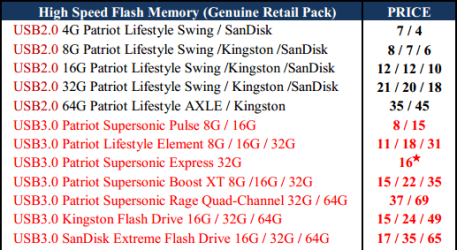
My supplier has USB 3 Flash sticks for ~$1/GB.
USB Prices (MSY 12-04-03).png
Between dvd(original 7 media) and usb keys being 2.0 still as I was saying due to the high prices I still seem to average the 20min. norm for the first completed installing Windows first desktop load. Others go by the first restart as soon as the setup files have finished unpacking to the drive for a 12min. time which isn't a completed 7 install there just the copy process while the installation still has to continue on until it finishes.

I use your "frame of reference".
It's installed, when you can open the desktop and start doing stuff (i.e. customising, installing, updating, etc.).

Now the initial sweep for MS drivers is delayed while the first driver sets go on for board, video, sound, tv tuner card, immediately following activation. Then goes the initial update sweep from MS before then putting SP1 on. Times are about 5-10min. or so for drver installs and reboots required, plan another 15 for the MS updates and another pair of restarts, and then you have a good 20min. for SP1. In between all that somewhere I also install the full stand alone distribution unpacked for DX9c since that is required for a few old game titles.

If I get down to installing "everything" literally from scratch which includes all additional desktop shortcuts created and dragged into new addon toolbars that will take over a day! So within the first 3-5hrs. depending on what I am gearing for all at once or in a day so all the basics av and other programs are done in about 3-4hrs. time. Even that a good list of programs and utilities compiled over time.

Agreed.

With Linux on the other hand the Linux Mint Debian distro is a lot better then the regular Linix Mint releases since it will install to a flash drive with ease while the regular LM Mate and Cinnamon releases failed! Those seem to lack the options needed for some reason while they are smaller in size then the 200+ preloaded apps in the LMDebain release

Installation or Live?
I read that Linux Mint uses a different system to Ubuntu for their Live versions (boot? or unpack?).

I managed to create a Live version of my physical install (requires my user name and password).
I haven't been able to figure out how to create a generic version (i.e. I can just modify the user name and password, but I can't create a "superuser, no password" version).

Geek's OS label still applies to an extent with Linux until getting familar with how to manually install programs on the other OS there. There is no double click on set.exe single executable file in the same manner as Windows works. Instead you have to download "each piece" of the pie with any Linux app if not compiled into a self contained packaged with installer included making it the Geek's OS there.

Agreed. :)

Manual software installation is a:

  • "No-no" for basic users
  • "PITA" for intermediate users (like me)
  • "Doddle" for expert users ("Command Line Jockeys")
The "New, Latest and Brightest" as well as the more recent flavors have helped in simplifying things while still not being the ideal "User Friendly" OS for the novice user! Things have been made easier for the "New to Linux" crowd over the years while the OS still lacks in many ways for the simple fact of being headed in too many directions all at the same time! You might find that simply being "too many flavors to choose from" in that sense!

Whilst some choice is good, too much choice is bad.
I have read articles that indicate, that customers start to become alienated, if the number of choices exceeds a certain value.
Obviously that value depends on the product/service involved.

Arguably, the fact that Linux is free means that "Market Forces" don't apply (e.g. Vista vs W7).
An awful Linux distro has as much chance of success, as an excellent Linux distro.
 
Last edited:

My Computer My Computer

At a glance

W7 Ultimate SP1, LM19.2 MATE, W10 Home 1703, ...AMD Phenom II x6 1100T, 3.3 GHz12GB DDR3 1333 G-Skill (4GB x 2), G-Skill (2G...NVIDIA GeForce GTX 660
Computer type
PC/Desktop
Computer Manufacturer/Model Number
n/a
OS
W7 Ultimate SP1, LM19.2 MATE, W10 Home 1703, W10 Pro 1703 VM, #All 64 bit
CPU
AMD Phenom II x6 1100T, 3.3 GHz
Motherboard
ASUS M4A88T-M/USB3 (AM3)
Memory
12GB DDR3 1333 G-Skill (4GB x 2), G-Skill (2GB x 2)
Graphics Card(s)
NVIDIA GeForce GTX 660
Sound Card
Realtek?
Monitor(s) Displays
Samsung S23B350
Screen Resolution
1920x1080
Hard Drives
WD Green 2TB (SATA), WD Green 3TB (SATA), WD Blue 4TB (SATA), WD Blue 6TB (SATA)
PSU
Cooler Master
Case
Antec GX300 Tower
Cooling
3x Antec TRICOOL 120mm Fans
Mouse
Wired Optical
Internet Speed
DSL
Antivirus
Avast
Browser
Pale Moon (64 bit)
Other Info
2018-12-27 Upgraded HDDs
2015-12-10 Upgraded case, graphics card, storage
2015-08-15 Upgraded motherboard & RAM
2015-07-15 Upgraded LM17.1 to LM17.2
To install Linux Mint Debian on a flash drive, one would need the ISO and Universal USB Installer or UUI. Any reason why the two cannot be integrated into a single Windows executable that runs UUI, the user select the USB drive, and off it goes? After all, the UUI is just a little over 1MBs...

The UUI installed Linux Mint quickly on my Voyager 64GBs USB 3.0 stick, but wouldn't let me create greater than 4GBs persistent partition. Unfortunately, it wouldn't boot in my system. I was just curious, but don't have time to find the reason for not booting...

The 64GBs USB 3.0 was around 80 bucks...

The regular LMint seems to serve best live rather then custom installing it. As for the Debian release that does not require any usb installer! From any live source like a dvd you simply partition and format the flash drive as you go along assigning the second root partition as the mount point "/" and making sure you select the flash drive itself not any partition to see Grub installed. The release has been quite reliable and is carried on a 32gb Kingston in a key chainer holder for two flash drives.

As for flash drive prices I shop around for a specific size by a select brand to see what comes up and 64gb models by the better brands tend to run over $100! based on 2012 prices however! Upon looking at newegg now for a 64gb 2.0 drive they have it listed now for $40 which is less then what I had paid out for the 32gb model found elsewhere showing 2.0 prices have dropped sharply! A kingston HyperX(preferred here but usually much higher priced then Data Traveler series) fetches $90 for a 64gb 3.0 model.

Now for a custom install to the second OS drive(internal) here the LMD second release(updated build from Sept. 2011 original) went right on without fuss. I took about 110gb off the top of the drive and created a second main volume for system images there to have a dedicated spot freeing up the second storage drive to be used to back up the first.

The end result as a slightly faster 15min. working install and then going in and selecting to install from the long list of app options. Personal selection is something you can't measure time on while figure I had several selected and installed within an hour's time. What each install option does is actually download the actual app for you and then proceeds to install them in one slightly longer process then the separate download by user and then clicking the setup. Some downloads while not any larger still tend to take a bit longer then others while the method makes installing several things go easier being a plus seen there.

Now for the RT7 Lite there's one biggie problem you apparently ran into. If you bought 7 when first out or at least prior to the SP1 release slipsteaming the service pack in poses another problem of not being able to activate Windows! The same goes for downloading from Digital Rivers any iso with SP1 included. You have to have a post SP1 key to start with if not having any paid MSDN or TechNet subscription where a key per download is provided. So that left seeing SP1 wrapped up with all those updates out! :(:cry:

By the way the 32gb flash found at buy.com for $50 was about $70 at newegg apparently seeing a large mark down can be seen at http://www.newegg.com/Product/Product.aspx?Item=9SIA1050NV7947

Other DT model have the push out type slider button while these flip out to plug in. The small 2gb version isn't too reliable however while the other larger 4gb, 8gb, and 16gb have worked out each time.
 
Last edited:

My Computers My Computers

  • At a glance

    W7 Ultimate x64/W10 Pro x64/W11 Pro Triple Bo...AMD Phenom II X4 975 Deneb 3.6ghz - 965 2nd r...Kingston Hyper X DDR3 1600 1.5v 16gb - Hyper ...MSI HD Radeon 5750 1gb - MSI HD Radeon 6450 o...
    Computer type
    PC/Desktop
    Computer Manufacturer/Model Number
    Custom builds = 2
    OS
    W7 Ultimate x64/W10 Pro x64/W11 Pro Triple Boot - Main PC W7 Remote PC Micro ATX W7 Pro x64/W11 Pro
    CPU
    AMD Phenom II X4 975 Deneb 3.6ghz - 965 2nd remote pc
    Motherboard
    Gigabyte GA-790XTA-UD4-Gigabyte GA-880GM-D2H remote pc
    Memory
    Kingston Hyper X DDR3 1600 1.5v 16gb - Hyper X Fury 8gb 2nd
    Graphics Card(s)
    MSI HD Radeon 5750 1gb - MSI HD Radeon 6450 on mini tower
    Sound Card
    Creative Labs X-Fi Xtreme Audio P - Realtek onooard 2nd case
    Monitor(s) Displays
    ASUS VW199T-P 19" HP 2082a Main-HP 2082a 20" remote pc
    Screen Resolution
    Asus 1440x900 - HP 1600x900
    Hard Drives
    WD Black 1TB HD per OS W7, W10, and pending W11 presently on 500gb OS Drive - Pending Triple 1TB HDs for Spanned Storage/backup volume
    Single 2TB external USB enclosure, single 1TB System 7 Host/Boot drive, Pending 8TB external HD for system image b
    PSU
    Corsair 750TX - primary / Corsair CX600 - second
    Case
    Antec 900-2 - SSD compatible / NZXT Vulcan mini tower
    Cooling
    Zalman CNPS9900A
    Keyboard
    AZIO L70 Backlit Letters Gaming - ONN Cordless/USB
    Mouse
    MSI DS200 Programmable, Logitech Cordless
    Internet Speed
    30mbps upgrade - primary hard wired - mini tower usb WiFi
    Antivirus
    GFI VIPRE Internet Security 2014 on W7 2016 beta on W10,
    Browser
    Cyberfox, WaterFox 64bit FF variants, FireFox x64, Pale Moon
    Other Info
    Accomdata fan cooled usb 2.0 PIDE/Sata II, III external enclosure.
    Sambient usb/eSata PATA/Sata II, III external enclosure.
  • At a glance

    W7 Pro x64/W11 ProAMD Deneb 3.6ghz - 965Kingston Hyper X Fury 8gbMSI HD Radeon 6450 DVI Output
    Computer type
    PC/Desktop
    System Manufacturer/Model Number
    CUSTOM ASSEMBLY
    OS
    W7 Pro x64/W11 Pro
    CPU
    AMD Deneb 3.6ghz - 965
    Motherboard
    Gigabyte GA-880GM-D2H remote pc
    Memory
    Kingston Hyper X Fury 8gb
    Graphics Card(s)
    MSI HD Radeon 6450 DVI Output
    Sound Card
    Realtek onooard Creative or Other separate PENDING
    Monitor(s) Displays
    VIZIO 32" LCD TV Separate LCD Pending
    Screen Resolution
    1600x1080
    Hard Drives
    WD 500GB OS Host/Boot WD Green 1TB Storage/Backup
    PSU
    Corsair 600W - THERMALTAKE 600W spare case
    Case
    NZXT Vulcan mini tower
    Cooling
    Twin 120mm Top Fans - 240mm Side Cover
    Keyboard
    ONN Cordless/USB Logitech Cordless
    Mouse
    ONN USB/Cordless - Logitech Cordless
    Internet Speed
    DSL 5G
    Browser
    MS Edge, FireFox, WaterFox x64, FireFox Nightly
    Other Info
    OS Testing-Remote Access to Main TeamViewer
Wow. At this point you can use my lacrimal to glaze a ham.
 

My Computer My Computer

At a glance

Windows 8 Pro (32-bit)1.83GHz Intel Core Duo2GB 667MHz DDR2 SDRAM (PC2-5300) (upgrade)ATI Radeon X1600 with 128MB GDDR3 memory
Computer type
PC/Desktop
Computer Manufacturer/Model Number
Apple 17" iMac MA199LL (Early 2006)
OS
Windows 8 Pro (32-bit)
CPU
1.83GHz Intel Core Duo
Memory
2GB 667MHz DDR2 SDRAM (PC2-5300) (upgrade)
Graphics Card(s)
ATI Radeon X1600 with 128MB GDDR3 memory
Monitor(s) Displays
17-inch TFT active-matrix LCD, millions of colors
Screen Resolution
1440 x 900
Hard Drives
Hitachi 320GB HDT721032SLA360 7200RPM SATA II (upgrade)
Keyboard
Microsoft Wired Keyboard 600
Mouse
Microsoft Basic Optical Mouse v2.0
Internet Speed
4 Mbps
Antivirus
Microsoft Security Essentials
Browser
Google Chrome
Other Info
WEI:
Base Score: 3.9 Processor: 4.4 Memory 4.7
Graphics: 3.9 Gaming Graphics: 4.1 Primary HD: 5.9
Back
Top