Windows Boot Manager - Delete a Listed Operating System

How to Delete an Operating System Listed in Windows Boot Manager


   Information
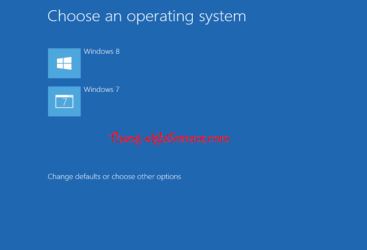
This will show you how to delete a non-default operating system in Vista, Windows 7, or Windows 8 from the list in Windows Boot Manager or Startup Options (Windows 8) that allows you to select a OS to run at startup.

You must be logged in as an administrator to be able to do the steps in this tutorial.


EXAMPLE: Windows Boot Manager or "Startup Options" (Windows 8)
NOTE: This is the boot screen where you select what operating system that you would like to start. By default, you have 30 seconds to choose another operating system before the default operating system will start automatically.
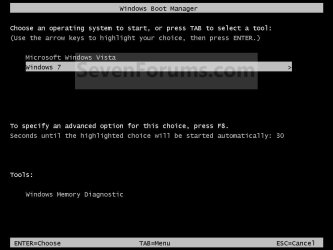
Boot_Manager.jpg Startup_Options.jpg


OPTION ONE

Through System Configuration


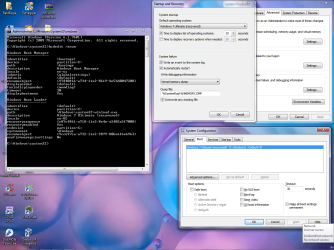
1. Press the Windows + R keys to open the Run dialog, type msconfig, and press Enter.

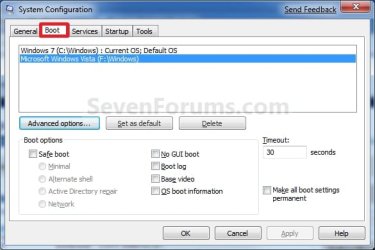
2. Click/tap on the Boot tab. (see screenshot below)
Boot.jpg
3. Select the operating system you want to delete that is not set as the Default OS, and click/tap on Delete. (see screenshot above)
NOTE: If the OS you want to delete from the list is the Default OS, then you will need to change the default operating system to another listed OS first.

4. Check the Make all boot settings permanent box, and click/tap on OK. (see screenshot below step 2)

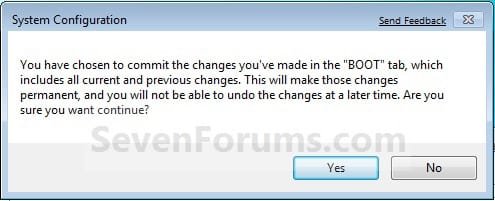
5. Click/tap on Yes to confirm. (see screenshot below)
Confirm.jpg
6. Click/tap on the Restart button. (see screenshot below)
WARNING: This will restart the computer immediately. Make sure you save and close anything open that you do not want to lose first.
Restart.jpg


OPTION TWO

Using the bcdedit Command


1. Open an elevated command prompt or a command prompt at boot.
NOTE: If you have a RAID setup or a PCI-E SSD as your boot drive and want to open a command prompt at boot, then you may need to use the Load Drivers option in the System Recovery Options screen to load it's drivers first before Windows will see the boot drive to be able to use the bcdedit command on it.

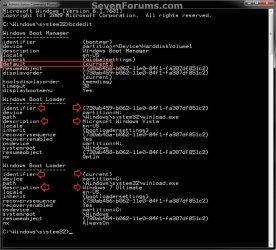
2. In the elevated command prompt, type bcdedit and press enter. (see screenshot below)
NOTE: This will let you see what OS is the default to start under the Windows Boot Manager section, and to see the description (name) and identifier of the operating system(s) listed in Windows Boot Manager are under the Windows Boot Loader section(s). For example, Microsoft Windows Vista (description) as {730ab458-b062-11e0-84f1-fa307df851c2} (identifier).
CMD-1.jpg
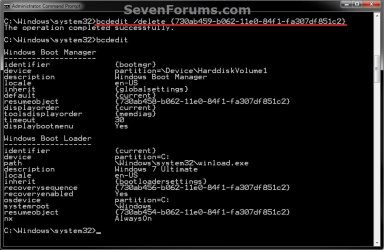
3. In the elevated command prompt, type the command below for a listed OS that you want to delete, and press Enter. (see screenshot below)
NOTE: If the OS you want to delete from the list is the Default OS, then you will need to change the default operating system to another listed OS first.
bcdedit /delete {identifier}

For example: If I wanted to delete Microsoft Windows Vista (description) as {730ab458-b062-11e0-84f1-fa307df851c2} (identifier), I would type this below and press Enter.

bcdedit /delete {730ab459-b062-11e0-84f1-fa307df851c2}
CMD-2.jpg
4. In the elevated command prompt, type bcdedit and press enter. (see screenshot below step 3)
NOTE: This will let you see and verify that the OS has been deleted.

5. When finished, close the elevated command prompt.


OPTION THREE

Using the "EasyBCD" Program


   Note
Note provided by Ray.

If you use EasyBCD in Windows 8, EasyBCD will use the Windows 7 Boot Loader.

If you would like to use the Windows 8 Boot Loader, refresh Windows 8.

After doing a refresh, you will be using the Windows 8 Boot Loader. Refresh will also delete the EasyBCD program.


1. Download and install a free version of the EasyBCD program, then run it.
NOTE: You can click on the "Download" button at the bottom to download the free version. Registration is not required to download.

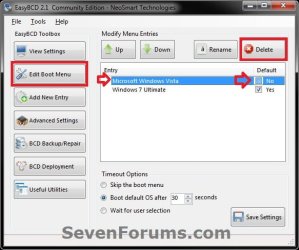
2. Click on the Edit Boot Menu button, select the OS (ex: Microsoft Windows Vista) that you want to delete, and click on the Delete button. (see screenshot below)
NOTE: If the OS you want to delete from the list is the Default OS, then you will need to change the default operating system to another listed OS first.
EasyBCD-1.jpg
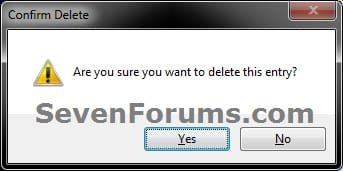
3. Click/tap on Yes to confirm deletion. (see screenshot below)
EasyBCD-2.jpg
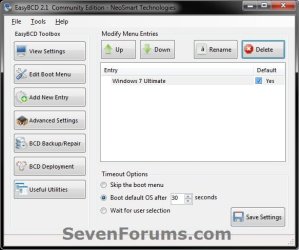
4. The OS (ex: Microsoft Windows Vista) is now deleted. (see screenshot below)
EasyBCD-3.jpg
5. When finished, close EasyBCD.


That's it,
Shawn


Last edited:
Hi Shawn

If you use EasyBCD in Windows 8, EasyBCD will use the Windows 7 Boot Loader.

If you would like to use the Windows 8 Boot Loader, do a
Refresh Windows 8
After doing a refresh, you will be using the Windows 8 Boot Loader.

2 HD boot 001.PNG

Refresh will also delete EasyBCD.

2 HD boot 002.PNG

Ray
 

My Computer

OS
ME/XP/Vista/Win7

My Computer

Computer type
PC/Desktop
Computer Manufacturer/Model Number
Self built custom
OS
64-bit Windows 11 Pro for Workstations
CPU
Intel i7-8700K OC'd to 5 GHz
Motherboard
ASUS ROG Maximus XI Formula Z390
Memory
64 GB (4x16GB) G.SKILL TridentZ RGB DDR4 3600 MHz
Graphics Card(s)
ASUS ROG-STRIX-GTX1080TI-O11G-GAMING
Sound Card
Integrated
Monitor(s) Displays
2 x Samsung Odyssey G7 27"
Screen Resolution
2560x1440
Hard Drives
1TB Samsung 990 PRO M.2,
4TB Samsung 990 PRO PRO M.2,
TerraMaster F8 SSD Plus NAS
PSU
Seasonic Prime Titanium 850W
Case
Thermaltake Core P3
Cooling
Corsair Hydro H115i
Keyboard
Logitech wireless K800
Mouse
Logitech MX Master 4
Internet Speed
2 Gb/s Download and 100 Mb/s Upload
Antivirus
Malwarebyte Anti-Malware Premium
Browser
Google Chrome
Other Info
Logitech Z625 speaker system,
Logitech BRIO 4K Pro webcam,
HP Color LaserJet Pro MFP M477fdn,
APC SMART-UPS RT 1000 XL - SURT1000XLI,
Galaxy S23 Plus phone
Latest 2.2

Lattest 2.2.PNG

I have only used EasyBCD to add a OS.
 
Last edited:

My Computer

OS
ME/XP/Vista/Win7
Thank you Ray. I added a note for this. :)
 

My Computer

Computer type
PC/Desktop
Computer Manufacturer/Model Number
Self built custom
OS
64-bit Windows 11 Pro for Workstations
CPU
Intel i7-8700K OC'd to 5 GHz
Motherboard
ASUS ROG Maximus XI Formula Z390
Memory
64 GB (4x16GB) G.SKILL TridentZ RGB DDR4 3600 MHz
Graphics Card(s)
ASUS ROG-STRIX-GTX1080TI-O11G-GAMING
Sound Card
Integrated
Monitor(s) Displays
2 x Samsung Odyssey G7 27"
Screen Resolution
2560x1440
Hard Drives
1TB Samsung 990 PRO M.2,
4TB Samsung 990 PRO PRO M.2,
TerraMaster F8 SSD Plus NAS
PSU
Seasonic Prime Titanium 850W
Case
Thermaltake Core P3
Cooling
Corsair Hydro H115i
Keyboard
Logitech wireless K800
Mouse
Logitech MX Master 4
Internet Speed
2 Gb/s Download and 100 Mb/s Upload
Antivirus
Malwarebyte Anti-Malware Premium
Browser
Google Chrome
Other Info
Logitech Z625 speaker system,
Logitech BRIO 4K Pro webcam,
HP Color LaserJet Pro MFP M477fdn,
APC SMART-UPS RT 1000 XL - SURT1000XLI,
Galaxy S23 Plus phone
Thanks

Thank you, Brink

Saved me a lot of aggravation and a trip to the PC store

Carl
 

My Computer

OS
Win 7 Home Premium 64 bit
You're most welcome Carl, and welcome to Seven Forums. I'm glad that it could help. :)
 

My Computer

Computer type
PC/Desktop
Computer Manufacturer/Model Number
Self built custom
OS
64-bit Windows 11 Pro for Workstations
CPU
Intel i7-8700K OC'd to 5 GHz
Motherboard
ASUS ROG Maximus XI Formula Z390
Memory
64 GB (4x16GB) G.SKILL TridentZ RGB DDR4 3600 MHz
Graphics Card(s)
ASUS ROG-STRIX-GTX1080TI-O11G-GAMING
Sound Card
Integrated
Monitor(s) Displays
2 x Samsung Odyssey G7 27"
Screen Resolution
2560x1440
Hard Drives
1TB Samsung 990 PRO M.2,
4TB Samsung 990 PRO PRO M.2,
TerraMaster F8 SSD Plus NAS
PSU
Seasonic Prime Titanium 850W
Case
Thermaltake Core P3
Cooling
Corsair Hydro H115i
Keyboard
Logitech wireless K800
Mouse
Logitech MX Master 4
Internet Speed
2 Gb/s Download and 100 Mb/s Upload
Antivirus
Malwarebyte Anti-Malware Premium
Browser
Google Chrome
Other Info
Logitech Z625 speaker system,
Logitech BRIO 4K Pro webcam,
HP Color LaserJet Pro MFP M477fdn,
APC SMART-UPS RT 1000 XL - SURT1000XLI,
Galaxy S23 Plus phone
its showing
"ready Driver Plus"
along with windows 8

... but i cant find an option to remove...Ready Driver plus...

either from 'msconfig' or easybcd
 

My Computer

OS
Windows 8 Pro x64
CPU
Intel Core 2 duo E7500 @ 2.93ghz
Motherboard
dq45cb Intel
Memory
4096 MB @800 mhz
Hard Drives
WD cavier blue...250gigs
Internet Speed
100 mbps
Hello Vinaytrex, and welcome to Seven Forums.

Ready Driver Plus is a program that will need to be uninstalled to remove this entry instead.

Hope this helps, :)
Shawn
 

My Computer

Computer type
PC/Desktop
Computer Manufacturer/Model Number
Self built custom
OS
64-bit Windows 11 Pro for Workstations
CPU
Intel i7-8700K OC'd to 5 GHz
Motherboard
ASUS ROG Maximus XI Formula Z390
Memory
64 GB (4x16GB) G.SKILL TridentZ RGB DDR4 3600 MHz
Graphics Card(s)
ASUS ROG-STRIX-GTX1080TI-O11G-GAMING
Sound Card
Integrated
Monitor(s) Displays
2 x Samsung Odyssey G7 27"
Screen Resolution
2560x1440
Hard Drives
1TB Samsung 990 PRO M.2,
4TB Samsung 990 PRO PRO M.2,
TerraMaster F8 SSD Plus NAS
PSU
Seasonic Prime Titanium 850W
Case
Thermaltake Core P3
Cooling
Corsair Hydro H115i
Keyboard
Logitech wireless K800
Mouse
Logitech MX Master 4
Internet Speed
2 Gb/s Download and 100 Mb/s Upload
Antivirus
Malwarebyte Anti-Malware Premium
Browser
Google Chrome
Other Info
Logitech Z625 speaker system,
Logitech BRIO 4K Pro webcam,
HP Color LaserJet Pro MFP M477fdn,
APC SMART-UPS RT 1000 XL - SURT1000XLI,
Galaxy S23 Plus phone
You're most welcome John, and welcome to Seven Forums. :)
 

My Computer

Computer type
PC/Desktop
Computer Manufacturer/Model Number
Self built custom
OS
64-bit Windows 11 Pro for Workstations
CPU
Intel i7-8700K OC'd to 5 GHz
Motherboard
ASUS ROG Maximus XI Formula Z390
Memory
64 GB (4x16GB) G.SKILL TridentZ RGB DDR4 3600 MHz
Graphics Card(s)
ASUS ROG-STRIX-GTX1080TI-O11G-GAMING
Sound Card
Integrated
Monitor(s) Displays
2 x Samsung Odyssey G7 27"
Screen Resolution
2560x1440
Hard Drives
1TB Samsung 990 PRO M.2,
4TB Samsung 990 PRO PRO M.2,
TerraMaster F8 SSD Plus NAS
PSU
Seasonic Prime Titanium 850W
Case
Thermaltake Core P3
Cooling
Corsair Hydro H115i
Keyboard
Logitech wireless K800
Mouse
Logitech MX Master 4
Internet Speed
2 Gb/s Download and 100 Mb/s Upload
Antivirus
Malwarebyte Anti-Malware Premium
Browser
Google Chrome
Other Info
Logitech Z625 speaker system,
Logitech BRIO 4K Pro webcam,
HP Color LaserJet Pro MFP M477fdn,
APC SMART-UPS RT 1000 XL - SURT1000XLI,
Galaxy S23 Plus phone
i have a bizzare problem .
to make it short . i had/have dual boot system . xp sp3 32bit was initally instaled and later upgraded ram so needed a 64bit os so i installed win 7 ulitmate 64bit as a dual boot on seperate partition. later after few days i wanted to remove xp 32 bit and replace it with xp 64bit. as i love it more then 7 somehow. so i downloaded a program Wintoflash and it crached my system and i could not log onto my system. long story short i played all sort of bootrec bcdedit etc commands .. things were more complicated that i could load windows xp and not 7 and two or my data partitions were not shown . so had to do mbr recovery . ..

now situations is that i can access/login to either windows xp sp3 32bit or win7 64bit .. but my boot menu shows 4 entries . two of them are functional and two are non functional . as mentioned earlier i couldnt load win 7 so i downloaded easybcd played with it and i had no optical drive so i used the easybcd feature which lets us list an iso in the boot entries and boot from it . i added a windows 7 recovery environment iso to it ..
and among the 4 entries this is one ..

the dysfucntional entry is for windows 7 ..

as shown all the entries below in pic .
264395d1366192431-stuck-reboot-loop-img_20130417_003103.jpg


this is the result of selecting the dysfunctional window 7 entry

264396d1366192431-stuck-reboot-loop-img_20130417_003134.jpg


and these are the situations in windows xp startup and recovery tab and the boot.ini file and the easybcd (shown in pic uploaded below )

and these are the situations in windows 7 startup and recovery tab


now as it is obvious from above posts that 4 entries are shown in the boot list and windows 7 bootloader shows only 1 inside windows . who the hell is injecting those entries ? i know that neo one is injected by me using easybcd in xp but as u see in above pics from xp its not shown there now so how is it still lingering here ?

here is the test form easybcd that i just got from it in windows 7
There is one entry in the Windows bootloader.
Default: Windows 7 Ultimate (recovered)
Timeout: 30 seconds
Boot Drive: C:\

Entry #1
Name: Windows 7 Ultimate (recovered)
BCD ID: {default}
Drive: C:\
Bootloader Path: \Windows\system32\winload.exe
 

Attachments

  • win7 bcdedit.png
    win7 bcdedit.png
    839.2 KB · Views: 725
  • startup and recovery from xp and easybcd on xp.JPG
    startup and recovery from xp and easybcd on xp.JPG
    162.5 KB · Views: 559
Last edited by a moderator:

My Computer

Computer type
PC/Desktop
Computer Manufacturer/Model Number
Dell Optiplex 755
OS
Windows 7 Ultimate x64 SP1 Dual Boot with Windows Serve 2012 R2
CPU
E6550
Motherboard
Q35
Memory
8GB
Graphics Card(s)
ATI Radeon 2400 Pro
Sound Card
Intel HD Audio Stereo
Monitor(s) Displays
1
Screen Resolution
1280 x 1024
Hard Drives
250GB SATAIII
PSU
Stock 280 Watt
Case
Stock Desktop Case
Cooling
Stock
Keyboard
Microsoft Ergonomic keyboard usb
Mouse
Microsoft Mouse
Internet Speed
1Mbps Down/ 256 Kbps up
Antivirus
None
Browser
Opera
When I do a Bcdedit the results are identical to yours with the exception that I am using Win 7 Pro.
 

My Computer

Computer type
PC/Desktop
Computer Manufacturer/Model Number
Custom Build
OS
Win 10 Pro 64
CPU
Intel Core i7 960 @3.20 GHz
Motherboard
MSI MS7522
Memory
24.0 GB DDR3
Graphics Card(s)
EVGA GTX 750Ti
Monitor(s) Displays
LG E2341 23 Inch
Screen Resolution
1920x1080
Hard Drives
1TB Western Dgital 1002FAEX-00Y9A0
1TB Hitachi HDS721010CLA322
PSU
700 Watt
Case
Haf 912
Cooling
Fans
Keyboard
Logitech MK710
Mouse
Logitech M705
Internet Speed
Cable
Antivirus
AIS 2015 .10.0.2225
Browser
Firefox 49
Other Info
MalwareBytes Anti-Rootkit utility
When I do a Bcdedit the results are identical to yours with the exception that I am using Win 7 Pro.

I solved it.
So are you asking for help or telling me something. If u are also having the same issue as I had then just search for my last reply in another thread that will solve it. I m on cell phone so can't copy paste that solution here


Edit
Here is the solution

What I did is that i installed easybcd on Win7 and went to bcd backup repair tab checked reset bcd configuration clicked performance action. Then I. Add new entry tab I added xp and 7.now all is well.


Except that windows 7 is very slow to boot now.
 

My Computer

Computer type
PC/Desktop
Computer Manufacturer/Model Number
Dell Optiplex 755
OS
Windows 7 Ultimate x64 SP1 Dual Boot with Windows Serve 2012 R2
CPU
E6550
Motherboard
Q35
Memory
8GB
Graphics Card(s)
ATI Radeon 2400 Pro
Sound Card
Intel HD Audio Stereo
Monitor(s) Displays
1
Screen Resolution
1280 x 1024
Hard Drives
250GB SATAIII
PSU
Stock 280 Watt
Case
Stock Desktop Case
Cooling
Stock
Keyboard
Microsoft Ergonomic keyboard usb
Mouse
Microsoft Mouse
Internet Speed
1Mbps Down/ 256 Kbps up
Antivirus
None
Browser
Opera
Dual Boot

Great tutorial.. I am much obliged to all posters
 

My Computer

Computer type
PC/Desktop
Computer Manufacturer/Model Number
Compaq Presario
OS
Windows 7 64 bit
HI THANK YOU FOR THIS INFORMATION
 

My Computer

Computer type
Laptop
Computer Manufacturer/Model Number
dell,HP
OS
windows 8 64bit
Motherboard
HP
Thank you so much for this good tip. It solved my problem. I was so confused first when I found that after some updates in my win7, two OS's appeared when I start the computer. I didn't know whether it is due to the updates or not. But after reading all the comments and suggestions, I found that that unwanted OS can be removed and that's not due to the updates but the remains of the previous window. Thank you once again !!!!
 

My Computer

Computer type
Laptop
Computer Manufacturer/Model Number
HP
OS
Windows 7 Ultimate x32
Hi Brink,

Thanks for your help...

Worked by using OPTION ONE Through System Configuration
 

My Computer

Computer type
PC/Desktop
Computer Manufacturer/Model Number
Lenovo
OS
64 bit
Thanks for your help

Hi Blink,

Thanks again. On my situation Option One worked.

I'm using windows 10 64 bit.
 

My Computer

Computer type
PC/Desktop
Computer Manufacturer/Model Number
Lenovo
OS
64 bit
I'm glad it could help nowbo, and welcome to Seven Forums. :)
 

My Computer

Computer type
PC/Desktop
Computer Manufacturer/Model Number
Self built custom
OS
64-bit Windows 11 Pro for Workstations
CPU
Intel i7-8700K OC'd to 5 GHz
Motherboard
ASUS ROG Maximus XI Formula Z390
Memory
64 GB (4x16GB) G.SKILL TridentZ RGB DDR4 3600 MHz
Graphics Card(s)
ASUS ROG-STRIX-GTX1080TI-O11G-GAMING
Sound Card
Integrated
Monitor(s) Displays
2 x Samsung Odyssey G7 27"
Screen Resolution
2560x1440
Hard Drives
1TB Samsung 990 PRO M.2,
4TB Samsung 990 PRO PRO M.2,
TerraMaster F8 SSD Plus NAS
PSU
Seasonic Prime Titanium 850W
Case
Thermaltake Core P3
Cooling
Corsair Hydro H115i
Keyboard
Logitech wireless K800
Mouse
Logitech MX Master 4
Internet Speed
2 Gb/s Download and 100 Mb/s Upload
Antivirus
Malwarebyte Anti-Malware Premium
Browser
Google Chrome
Other Info
Logitech Z625 speaker system,
Logitech BRIO 4K Pro webcam,
HP Color LaserJet Pro MFP M477fdn,
APC SMART-UPS RT 1000 XL - SURT1000XLI,
Galaxy S23 Plus phone
:)Thanks sir thanks a lot My problem was solved error msg Windows turbo gets removed by your tips.
Thanks again !😃:)
 

My Computer

Computer type
PC/Desktop
Computer Manufacturer/Model Number
Custom build including frontech , zebronic , AOC , etc
OS
Windows 10 earlier but currently windows 7 Ultimate x64 32-bit because earlier motherboards gets fau
CPU
Intel
Motherboard
Mercury
Memory
Simmtronics
Graphics Card(s)
No
Hard Drives
Seagate
Antivirus
Quick Heal
Browser
Google Chrome
Back
Top