
Paritions and Volumes post clean install

rundwald

New member
Member
VIP
Local time
9:50 PM
Messages
394
Location
UK, Hampshire
Perhaps I have misunderstood a comment I read somewhere, that a clean install removes partitions.

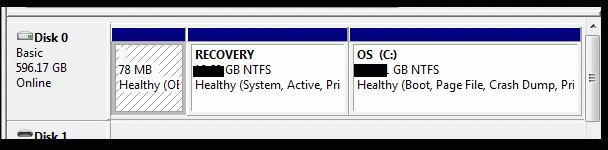
Sorting out troubles, the subject of another thread, a repairer effected a clean installation. Now, on viewing disk management (see att), it would seem the partitions are still there and sized much or identically as before, but not as they were before visible with a drive letter.

Are the partitions actually there still and accurate, and how do I gain access to the recovery partition, should i need? Please.
 

Attachments
  • comp ma screen.gif
    comp ma screen.gif
    11.2 KB · Views: 15

My Computer My Computer

Computer type
PC/Desktop
Computer Manufacturer/Model Number
Dell Inspiron 560MT
OS
Home Premium 64 bit
CPU
2.9 gigahertz Intel Core2 Duo 64 kilobyte primary memory cac
Motherboard
Board: Dell Inc. 0K83V0 A00 Serial Number: ..CN750939CP069B
Memory
4096 Megabytes Usable Installed Memory Slot 'DIMM0' has 102
Graphics Card(s)
ATI Radeon HD 4300/4500 Series
Sound Card
High Definition Audio Device NVIDIA High Definition Audio (
Monitor(s) Displays
DELL ST2210 [Monitor] (21.7"vis, s/n P479R01Q0VCU, January 2
Screen Resolution
1920x1080
Hard Drives
628.58 Gigabytes Usable Hard Drive Capacity
554.78 Gigabytes Hard Drive Free Space
Keyboard
Std Dell UK
Mouse
KEYBOARD, 105, UNITED KINGDOM, KWE9C0
Internet Speed
~8000 kbps
Antivirus
Avast Free
Browser
Chrome
Other Info
Office 2007: Photo Editing; Serif PhotoPlus X7
Disappointing as no reply. :(
 

My Computer My Computer

Computer type
PC/Desktop
Computer Manufacturer/Model Number
Dell Inspiron 560MT
OS
Home Premium 64 bit
CPU
2.9 gigahertz Intel Core2 Duo 64 kilobyte primary memory cac
Motherboard
Board: Dell Inc. 0K83V0 A00 Serial Number: ..CN750939CP069B
Memory
4096 Megabytes Usable Installed Memory Slot 'DIMM0' has 102
Graphics Card(s)
ATI Radeon HD 4300/4500 Series
Sound Card
High Definition Audio Device NVIDIA High Definition Audio (
Monitor(s) Displays
DELL ST2210 [Monitor] (21.7"vis, s/n P479R01Q0VCU, January 2
Screen Resolution
1920x1080
Hard Drives
628.58 Gigabytes Usable Hard Drive Capacity
554.78 Gigabytes Hard Drive Free Space
Keyboard
Std Dell UK
Mouse
KEYBOARD, 105, UNITED KINGDOM, KWE9C0
Internet Speed
~8000 kbps
Antivirus
Avast Free
Browser
Chrome
Other Info
Office 2007: Photo Editing; Serif PhotoPlus X7

My Computer My Computer

Computer type
PC/Desktop
Computer Manufacturer/Model Number
Dell / Lenovo g550
OS
Windows 7 Ultimate 64-bit
CPU
Intel Core 2 Duo E6550 @2.33GHz
Motherboard
foxconn g33m02
Memory
4GB DDR"
Graphics Card(s)
NVIDIA GeForce 8600 GS
Hard Drives
HDD 1 = 150GB
HDD 2 = 1.5TB
PSU
450W
Cooling
Stock fan
Internet Speed
12Mb
Antivirus
AVG Internet Security
Perhaps I have misunderstood a comment I read somewhere, that a clean install removes partitions.

Sorting out troubles, the subject of another thread, a repairer effected a clean installation. Now, on viewing disk management (see att), it would seem the partitions are still there and sized much or identically as before, but not as they were before visible with a drive letter.

Are the partitions actually there still and accurate, and how do I gain access to the recovery partition, should i need? Please.
You want to get rid of RECOVERY partition? If not.... what's the problem?
 

My Computer My Computer

Computer type
Laptop
Computer Manufacturer/Model Number
ACER ASPIRE 5742G
OS
Microsoft Windows 7 Home Premium 64-bits 7601 Multiprocessor Free Service Pack 1
CPU
Intel(R) Core(TM) i3 CPU M 370 @ 2.40GHz
Motherboard
Acer Aspire 5742G
Memory
4,00 GB
Graphics Card(s)
ATI Mobility Radeon HD 5400 Series
Sound Card
(1) AMD High Definition Audio Device (2) Realtek High Defi
Screen Resolution
1366 x 768 x 32 bits (4294967296 colors) @ 60 Hz
Hard Drives
WDC WD5000BEVT-22ZAT0

My Computer My Computer

Computer type
Laptop
Computer Manufacturer/Model Number
ACER ASPIRE 5742G
OS
Microsoft Windows 7 Home Premium 64-bits 7601 Multiprocessor Free Service Pack 1
CPU
Intel(R) Core(TM) i3 CPU M 370 @ 2.40GHz
Motherboard
Acer Aspire 5742G
Memory
4,00 GB
Graphics Card(s)
ATI Mobility Radeon HD 5400 Series
Sound Card
(1) AMD High Definition Audio Device (2) Realtek High Defi
Screen Resolution
1366 x 768 x 32 bits (4294967296 colors) @ 60 Hz
Hard Drives
WDC WD5000BEVT-22ZAT0
When your doing a clean install you will have to formatt all partitions. If you want the partitions to be gone and just one you will need to delete them and and make one.

http://www.sevenforums.com/tutorials/1649-clean-install-windows-7-a.html
Not completely correct. Don't format all partitions, but DELETE all partitions. Even better do the diskpart clean command ("clean all" is not needed) ... it deletes the mbr as well

It's hard to know what exactly he wants. If he wants all the partitions to remain there just format them. But if he doesn't delete them, and just create one.
 

My Computer My Computer

Computer type
PC/Desktop
Computer Manufacturer/Model Number
Dell / Lenovo g550
OS
Windows 7 Ultimate 64-bit
CPU
Intel Core 2 Duo E6550 @2.33GHz
Motherboard
foxconn g33m02
Memory
4GB DDR"
Graphics Card(s)
NVIDIA GeForce 8600 GS
Hard Drives
HDD 1 = 150GB
HDD 2 = 1.5TB
PSU
450W
Cooling
Stock fan
Internet Speed
12Mb
Antivirus
AVG Internet Security
It explains how to decide which partitions to keep in the Note to Dell Owners at end of Clean Reinstall - Factory OEM Windows 7 so if you'd folllowed the tutorial you wouldn't have these questions.

With Dell the OEM Diagnostics partition is the small one at the front of HD. You should try running Diagnostics from boot first to see if it runs (and test your hardware) and if so leave that partition. However there's no reason to keep the Recovery partition since it will not run after a Clean Reinstall. So you should delete at least it and C during install, keeping only the OEM partition if in fact Diagnostics runs.
 
I'll have to really mull over all those comments!:o:) The thing is that Recovery used to be visible alng with other drives upon selecting My computer
 

My Computer My Computer

Computer type
PC/Desktop
Computer Manufacturer/Model Number
Dell Inspiron 560MT
OS
Home Premium 64 bit
CPU
2.9 gigahertz Intel Core2 Duo 64 kilobyte primary memory cac
Motherboard
Board: Dell Inc. 0K83V0 A00 Serial Number: ..CN750939CP069B
Memory
4096 Megabytes Usable Installed Memory Slot 'DIMM0' has 102
Graphics Card(s)
ATI Radeon HD 4300/4500 Series
Sound Card
High Definition Audio Device NVIDIA High Definition Audio (
Monitor(s) Displays
DELL ST2210 [Monitor] (21.7"vis, s/n P479R01Q0VCU, January 2
Screen Resolution
1920x1080
Hard Drives
628.58 Gigabytes Usable Hard Drive Capacity
554.78 Gigabytes Hard Drive Free Space
Keyboard
Std Dell UK
Mouse
KEYBOARD, 105, UNITED KINGDOM, KWE9C0
Internet Speed
~8000 kbps
Antivirus
Avast Free
Browser
Chrome
Other Info
Office 2007: Photo Editing; Serif PhotoPlus X7
Since Dell uses F8 on modern PC's to run Recovery, it is cut out after a reinstall since the F8 menu is also reinstalled with the OS and doesn't include the Dell Recovery link loaded at factory.

Therefore Recovery is wasted space and useless yet your boot files have somehow landed there so I'd follow the steps this time in Clean Reinstall - Factory OEM Windows 7 and do it over so you can get a perfect install.


I just told you that Dell Recovery won't run after Clean Reinstall so it can be deleted and should have been during reinstall.

Since you've likely ignored all the other Best Practices in a Clean Reinstall - Factory OEM Windows 7
I'd suggest you do it over so you can get a perfect install.

If not you can delete the Recovery partition now and resize C into its space using Partition Wizard bootable CD Resize Partition - Video Help.
@greg the RECOVERY partition is active and has the bootmgr and bootmenu now!
 

My Computer My Computer

Computer type
Laptop
Computer Manufacturer/Model Number
ACER ASPIRE 5742G
OS
Microsoft Windows 7 Home Premium 64-bits 7601 Multiprocessor Free Service Pack 1
CPU
Intel(R) Core(TM) i3 CPU M 370 @ 2.40GHz
Motherboard
Acer Aspire 5742G
Memory
4,00 GB
Graphics Card(s)
ATI Mobility Radeon HD 5400 Series
Sound Card
(1) AMD High Definition Audio Device (2) Realtek High Defi
Screen Resolution
1366 x 768 x 32 bits (4294967296 colors) @ 60 Hz
Hard Drives
WDC WD5000BEVT-22ZAT0
I realize that which is why I suggested he do it over, especially since C is currently being booted from Recovery which is now a useless partition.

Do a booted Clean Install Windows 7 and during Steps 7/8 delete all but the small OEM partition, create new partition in the space and format to install.

Read over the steps this time carefully in Clean Reinstall - Factory OEM Windows 7 so similar mistakes are not made, and you get a perfect install this time.

If for some reason you must keep the current install, you can mark C Active in Disk Mgmt, reboot into Win7 installer or System Repair Disk to run Startup Repair - Run up to 3 Separate Times until the System Active flags are both on C. You can then delete Recovery using Partition Wizard bootable CD to Resize C Partition into the space - Video Help.
 
Actually all the work was done by the repairer, not me. Just to make sure! I do not need either Recovery files or partition, which can be deleted? Provided, that is, I can get to them!:confused:
 

My Computer My Computer

Computer type
PC/Desktop
Computer Manufacturer/Model Number
Dell Inspiron 560MT
OS
Home Premium 64 bit
CPU
2.9 gigahertz Intel Core2 Duo 64 kilobyte primary memory cac
Motherboard
Board: Dell Inc. 0K83V0 A00 Serial Number: ..CN750939CP069B
Memory
4096 Megabytes Usable Installed Memory Slot 'DIMM0' has 102
Graphics Card(s)
ATI Radeon HD 4300/4500 Series
Sound Card
High Definition Audio Device NVIDIA High Definition Audio (
Monitor(s) Displays
DELL ST2210 [Monitor] (21.7"vis, s/n P479R01Q0VCU, January 2
Screen Resolution
1920x1080
Hard Drives
628.58 Gigabytes Usable Hard Drive Capacity
554.78 Gigabytes Hard Drive Free Space
Keyboard
Std Dell UK
Mouse
KEYBOARD, 105, UNITED KINGDOM, KWE9C0
Internet Speed
~8000 kbps
Antivirus
Avast Free
Browser
Chrome
Other Info
Office 2007: Photo Editing; Serif PhotoPlus X7
The Recovery partition in a Dell will only function after a Clean Reinstall if you recreate it's link on the F8 Advanced Boot Tools menu: Dell Recovery Partition - restoring F8 link

You can check now if your tech did that (which I doubt since it's very advanced) by rebooting to tap the F8 Advanced Boot Options to see if there is a Dell Recovery listing on the Repair My Computer menu: Dell Windows 7 PC Restore

If not then the Recovery partition is deadweight which you can recover, however you must first move the System boot files out of it since they landed there during reinstall. I gave you the exact steps to do this in my previous post, including how to resize C into the space once you delete it. But only do this after you move the System boot files there per the steps I gave you, and C is confirmed to have the System Active flags.
 
Back
Top