Solved Windows 7 "System Reserved 100MB conflict"!!!

gladio

New member
Local time
6:35 AM
Messages
16
Hi, so first of all i'm going to tell you that i have two hard drives one is WD Caviar Black 1TB (primary) which is partitioned in two "Local Disks" 150GB for the OS and 781GB for games and other stuff and the secondary hard drive is WD Caviar Blue 500GB which i had partitioned also in two local disks but after of using for a long time it seemed that it was in its end but after searching online i found that it had some "soft bad sectors" and those can be fixed by doing a "Low Level Format", so i downloaded "Active Kill-Disk" to do it so i did it successfuly and after it finished i didn't get again the "local disks" in My Computer but in Disk Management yes but this time like a "Unallocated space 460GB" and i went into the Windows 7 format process to format it and make a new partition so the process of "paritions" in the windows 7 setup was like this:

Disk 0 Partition 1: Unallocated space 100mb (instead of "System Reserved 100mb) and i don't know why
Disk 0 Partition 2: Local Disk C: Operating System (150GB)
Disk 0 Partition 3: Local Disk D: DATA (781GB)
Disk 1 Partition 1: Unallocated space 460GB

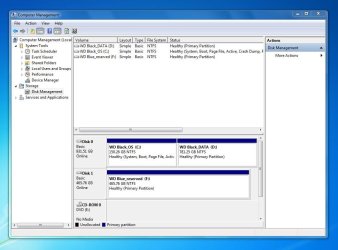
And when i saw the Disk 0 Partition 1 named to "Unallocated space 100mb" i was a bit frustated because always it was "System Reserved 100mb" and not Unallocated ! BTW, when i right click on Disk 1 partition 1 unallocated space 460 gb to create a new partition i just leaved as it is (460GB) and after creating it as a partition i got a new "System Reserved 100mb partition" above the 460GB and what i did i just removed again the partition to make it unallocated and after that i removed the Unallocated space 100mb in the top and Partition 2 to make a new partition with the normal "system reserved 100mb" and after that to make new partition with the 460GB to not get 2 system reserved partitions but when i removed (Disk 0 Partition 1 and Disk 0 Partition 2 and created it again to 150GB) i didn't get again any system reserved partition so i selected that partition even i didn't get a system reserved partition and i continued to install Windows 7 on it and after it finished and got desktop i went to Disk Management and Unallocated space 460GB i maked it a new volume partition but now it seems that "System Reserved 100mb partition" is in the Disk 1 instead of Disk 0 and this is going to afraid me because if i do a clean install in the future the System Reserved 100mb will still be in Disk 1 instead of Disk 0 which is inormal so please for the God sake tell me what to do to get the normal partitions inclunding the System Reserved partition so for the next clean install of windows to have to do only with Partition 2: Local Disk C 150GB without touching others partitions.

So thank you so much for your effort and sorry for my poor english :)

Here is also the the screenshot of Disk Management:

(click on image for full size)

25667372.jpg
 
Last edited by a moderator:

My Computer My Computer

Computer Manufacturer/Model Number
ASRock-G41C-S
OS
Windows 7 Ultimate X64
CPU
Intel(R) Core(2) Duo CPU E7300 2.66GHz
Motherboard
Intel G41 Express Chipset
Memory
A-DATA 4GB DDR3 1066MHz
Graphics Card(s)
ATI Radeon HD 4670 1GB GDDR3
Bump please!
 

My Computer My Computer

Computer Manufacturer/Model Number
ASRock-G41C-S
OS
Windows 7 Ultimate X64
CPU
Intel(R) Core(2) Duo CPU E7300 2.66GHz
Motherboard
Intel G41 Express Chipset
Memory
A-DATA 4GB DDR3 1066MHz
Graphics Card(s)
ATI Radeon HD 4670 1GB GDDR3

My Computer My Computer

Computer Manufacturer/Model Number
ASRock-G41C-S
OS
Windows 7 Ultimate X64
CPU
Intel(R) Core(2) Duo CPU E7300 2.66GHz
Motherboard
Intel G41 Express Chipset
Memory
A-DATA 4GB DDR3 1066MHz
Graphics Card(s)
ATI Radeon HD 4670 1GB GDDR3

My Computer My Computer

Computer type
PC/Desktop
Computer Manufacturer/Model Number
Skylake Special #666
OS
Windows 10 Pro x64
CPU
Intel Core i7 6700K
Motherboard
Asus Sabertooth Z170 Mark 1
Memory
GSkill TridentZ RGB 16GB 3600 16-16-16-36
Graphics Card(s)
EVGA GTX 980 Ti SC x2
Sound Card
Realtek High Definition
Monitor(s) Displays
AOC G2460PG
Screen Resolution
1920 x 1080 144Hz
Hard Drives
Samsung 860 Pro 256GB, Seagate Barracuda 4TB x2
PSU
EVGA 1000 P2, EVGA White Custom Braided Cables
Case
Corsair Vengeance C70 Gunmetal Black
Cooling
Corsair H100i v2, Corsair ML120 x2, Thermal Grizzly Kryonaut
Keyboard
Logitech G910 Orion Spectrum
Mouse
Logitech G700s
Internet Speed
Verizon Fios Quantum Gateway 75/75
Antivirus
Windows Defender, Malwarebytes Free 3.8.3
Browser
Chrome
Other Info
Corsair SP120 x4, LG Blu-ray Drive, Durabrand HT-395 100 Watt Dolby Digital Amp, Corsair H2100 Wireless 7.1 Headset
In the future unplug all other HD's during install. Boot the Win7 installer and follow the steps for Clean Install Windows 7 deleting all partitions during Steps 7/8 and creating new as you wish. it will then create SysReserved for you.

To keep what you have now you need to move the System boot files to C which are now on Disk1 as signified by the System flag. To do this as Brian says above mark C Active in Disk Mgmt, then power down to unplug Disk1, boot into Win7 DVD or System Repair Disk to run Startup Repair up to 3 separate times with reboots until Win7 boots and C holds the System Active flags.

You can then plug back in Disk1 making sure Disk0 remains first HD to boot in BIOS setup, mark System Reserved Inactive Partition - Mark as Inactive - Windows 7 Forums

Then delete System Reserved in Disk mgmt or using Diskpart "Delete Partition Override" command: DiskPart Command-Line Options
 
Hey thanks both for the replays i did it as AddRAM said so i made Local Disk C active in Disk Management i unpluged Disk 1 and i ran Startup Repair successfuly and now i'm planning to plug in the Disk 1 and to format it but now in Disk Management it doesn't show the "System Reserved partition" at all so is this ok or not because i don't want to continue on the next step if i did something wrong. In the link below you can see screenshot of Disk Management:

ImageShack® - Online Photo and Video Hosting
 

My Computer My Computer

Computer Manufacturer/Model Number
ASRock-G41C-S
OS
Windows 7 Ultimate X64
CPU
Intel(R) Core(2) Duo CPU E7300 2.66GHz
Motherboard
Intel G41 Express Chipset
Memory
A-DATA 4GB DDR3 1066MHz
Graphics Card(s)
ATI Radeon HD 4670 1GB GDDR3
That's because System Reserved is on the other HD which you unplugged, it was booting Win7 on C.

Now when you plug back in the other HD, make sure C HD remains the first HD to boot in BIOS setup Boot Priority. Mark System Reserved Inactive and then delete it as I gave you above. It's too small a space to bother recovering but if so here's How to extend partition easily with Partition Wizard - video help.
 
Sorry for the slow response because i was a bit bussy but i did what you said but now in Disk Management the System Reserved partition it showing as a "Unallocated space 100mb" so if i delete also 465GB partition named "Western Digital BLUE" in the Windows 7 clean install process will it create a new system reserved partition like before or not ? :)

Screenshot: ImageShack® - Online Photo and Video Hosting
 

My Computer My Computer

Computer Manufacturer/Model Number
ASRock-G41C-S
OS
Windows 7 Ultimate X64
CPU
Intel(R) Core(2) Duo CPU E7300 2.66GHz
Motherboard
Intel G41 Express Chipset
Memory
A-DATA 4GB DDR3 1066MHz
Graphics Card(s)
ATI Radeon HD 4670 1GB GDDR3
A 100MB system reserved partition is only created by the Windows installer, not by deleting partitions.

When you delete the 465GB partition you will get 465GB plus 100MB of unallocated space.

But the whole operation would be easier by just reformatting the whole disk.
 

My Computer My Computer

Computer Manufacturer/Model Number
HP, Dell, Gateway, Toshiba - 4 laptops and 2 desktops
OS
Vista, Windows7, Mint Mate, Zorin, Windows 8
CPU
from 1.6GHz Duo to i7
Monitor(s) Displays
2x HP w2207
Hard Drives
5x HDD, 7x SSD, 12x Externals
Keyboard
with trackball - no mices
Mouse
Trackball mice
Internet Speed
DSL 6000
I also answered that question in my last post:

It's too small a space to bother recovering but if so here's How to extend partition easily with Partition Wizard - video help.

We can't see if the data partition has data since you didn't show the size used on disk columns, but if there's no data you can just delete and recreate the partition as suggested. if there's data I'd just leave it be or resize the data partition to the left using the link I posted above.
 
Thank you so much sir for your help and effort finally i managed to fix it :)

EDIT: Also thanks to all who replied to this thread :)
 

My Computer My Computer

Computer Manufacturer/Model Number
ASRock-G41C-S
OS
Windows 7 Ultimate X64
CPU
Intel(R) Core(2) Duo CPU E7300 2.66GHz
Motherboard
Intel G41 Express Chipset
Memory
A-DATA 4GB DDR3 1066MHz
Graphics Card(s)
ATI Radeon HD 4670 1GB GDDR3
Post a shot of disk management here for us, glad you got it done.

Much easier for us to look at pics uploaded directly to the site, and easy to do.

http://www.sevenforums.com/tutorials/9733-screenshots-files-upload-post-seven-forums.html

To answer your question, by running startup repair on disc 0 all your boot files are now on C and you don`t need a system reserved partition.

Format disc1 like I told you, if you haven`t already.

And Good Job !! :D
 

My Computer My Computer

Computer type
PC/Desktop
Computer Manufacturer/Model Number
Skylake Special #666
OS
Windows 10 Pro x64
CPU
Intel Core i7 6700K
Motherboard
Asus Sabertooth Z170 Mark 1
Memory
GSkill TridentZ RGB 16GB 3600 16-16-16-36
Graphics Card(s)
EVGA GTX 980 Ti SC x2
Sound Card
Realtek High Definition
Monitor(s) Displays
AOC G2460PG
Screen Resolution
1920 x 1080 144Hz
Hard Drives
Samsung 860 Pro 256GB, Seagate Barracuda 4TB x2
PSU
EVGA 1000 P2, EVGA White Custom Braided Cables
Case
Corsair Vengeance C70 Gunmetal Black
Cooling
Corsair H100i v2, Corsair ML120 x2, Thermal Grizzly Kryonaut
Keyboard
Logitech G910 Orion Spectrum
Mouse
Logitech G700s
Internet Speed
Verizon Fios Quantum Gateway 75/75
Antivirus
Windows Defender, Malwarebytes Free 3.8.3
Browser
Chrome
Other Info
Corsair SP120 x4, LG Blu-ray Drive, Durabrand HT-395 100 Watt Dolby Digital Amp, Corsair H2100 Wireless 7.1 Headset
Thank you!.JPG

Thank you again, i am really happy with your fast support, GOD BLESS YOU :)
 

My Computer My Computer

Computer Manufacturer/Model Number
ASRock-G41C-S
OS
Windows 7 Ultimate X64
CPU
Intel(R) Core(2) Duo CPU E7300 2.66GHz
Motherboard
Intel G41 Express Chipset
Memory
A-DATA 4GB DDR3 1066MHz
Graphics Card(s)
ATI Radeon HD 4670 1GB GDDR3
Back
Top