GeForce GTX 470 directx driver errors

DirtRider

Just Looking
Guru
VIP
Local time
11:31 PM
Messages
603
I hope I can find some help here as this is really getting to me now. Every time I play Battlefield 3 on the first game I will always have this directx driver error with out fail. After I have recovered from the first one by stopping that processed in the task manager and restarting the game it will run fine thereafter.

This is the error that I am getting

70998080.jpg


Here are my card settings

Settings01_Apr_28_16_10.jpg
 

My Computer

Computer Manufacturer/Model Number
Proline
OS
Windows 7 Pro 64 bit
CPU
Intel(R) Core(TM) i7 CPU 870 @ 2.93GHz
Motherboard
H55-G43(MS-7638)
Memory
4GB
Graphics Card(s)
NVIDIA GeForce GTX 470
Sound Card
Onboard
Monitor(s) Displays
Proline LCD 19 inch
Screen Resolution
1280 x 1024
Hard Drives
2 x SATA 250 Gig 1 x External 2TB
PSU
RX 730 SS
Case
Proline
Cooling
Standard
Keyboard
PS2
Mouse
PS2
Internet Speed
To embarrassed to tell lol
DirtRider, if you are overclocking anything that can cause that. Try a clean driver install for your vid card. Also reinstall DX. I would also Right click BF3 in origin my games and click repair install.
 

My Computer

Computer type
PC/Desktop
Computer Manufacturer/Model Number
Dude Build
OS
Windows 10 Pro X64
CPU
Intel(R) Core(TM) i5-3570K CPU OC@ 4.5GHZ Turbo
Motherboard
MSI Z77A-G45 Gaming
Memory
8.00 GB DDR3 1600Mhz
Graphics Card(s)
MSI Gaming X GTX 1070
Sound Card
Realtek High Definition
Monitor(s) Displays
Dell S23O9W, HP L1710
Screen Resolution
DELL-1920 x 1080 HP-1280 x1024
Hard Drives
Crucial m4 256 SSD, WD 7200RPM 500GB WD 1TB
PSU
Seasonic X650 GOLD
Case
Zalman Z12
Cooling
Antec Kuhler 920
Keyboard
Logitech
Mouse
MSI DS100 Interceptor
Internet Speed
50 down and 5 up
Antivirus
MSE
Browser
Chrome, IE 11
Other Info
Logitech X-620 Speakers
I have not been over clocking up until today when it was suggested that I try and increase the voltage a slight bit. I have loaded new drivers and done the repair in BF but maybe I should try that again. I have not tried installing DX again and will also give that a go.
 

My Computer

Computer Manufacturer/Model Number
Proline
OS
Windows 7 Pro 64 bit
CPU
Intel(R) Core(TM) i7 CPU 870 @ 2.93GHz
Motherboard
H55-G43(MS-7638)
Memory
4GB
Graphics Card(s)
NVIDIA GeForce GTX 470
Sound Card
Onboard
Monitor(s) Displays
Proline LCD 19 inch
Screen Resolution
1280 x 1024
Hard Drives
2 x SATA 250 Gig 1 x External 2TB
PSU
RX 730 SS
Case
Proline
Cooling
Standard
Keyboard
PS2
Mouse
PS2
Internet Speed
To embarrassed to tell lol
I have not been over clocking up until today when it was suggested that I try and increase the voltage a slight bit. I have loaded new drivers and done the repair in BF but maybe I should try that again. I have not tried installing DX again and will also give that a go.

Okay, good luck. What program are you using to increase your voltage? I ask that because sometimes if your using afterburner or precision, re-installing that helps too.
 

My Computer

Computer type
PC/Desktop
Computer Manufacturer/Model Number
Dude Build
OS
Windows 10 Pro X64
CPU
Intel(R) Core(TM) i5-3570K CPU OC@ 4.5GHZ Turbo
Motherboard
MSI Z77A-G45 Gaming
Memory
8.00 GB DDR3 1600Mhz
Graphics Card(s)
MSI Gaming X GTX 1070
Sound Card
Realtek High Definition
Monitor(s) Displays
Dell S23O9W, HP L1710
Screen Resolution
DELL-1920 x 1080 HP-1280 x1024
Hard Drives
Crucial m4 256 SSD, WD 7200RPM 500GB WD 1TB
PSU
Seasonic X650 GOLD
Case
Zalman Z12
Cooling
Antec Kuhler 920
Keyboard
Logitech
Mouse
MSI DS100 Interceptor
Internet Speed
50 down and 5 up
Antivirus
MSE
Browser
Chrome, IE 11
Other Info
Logitech X-620 Speakers
I am using Nvidia Inspector as in my screen shot above. I have also noticed that a new driver seems to now be out for my card again so I am now installing that as well
 

My Computer

Computer Manufacturer/Model Number
Proline
OS
Windows 7 Pro 64 bit
CPU
Intel(R) Core(TM) i7 CPU 870 @ 2.93GHz
Motherboard
H55-G43(MS-7638)
Memory
4GB
Graphics Card(s)
NVIDIA GeForce GTX 470
Sound Card
Onboard
Monitor(s) Displays
Proline LCD 19 inch
Screen Resolution
1280 x 1024
Hard Drives
2 x SATA 250 Gig 1 x External 2TB
PSU
RX 730 SS
Case
Proline
Cooling
Standard
Keyboard
PS2
Mouse
PS2
Internet Speed
To embarrassed to tell lol
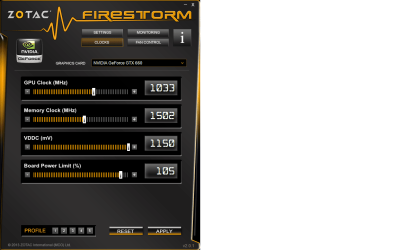
Hope that works. Something else you can try.. I use Firestorm. Enable voltage control. I increase the vddc to the far right and set the board power limit to 105

firestorm.png
 

My Computer

Computer type
PC/Desktop
Computer Manufacturer/Model Number
Dude Build
OS
Windows 10 Pro X64
CPU
Intel(R) Core(TM) i5-3570K CPU OC@ 4.5GHZ Turbo
Motherboard
MSI Z77A-G45 Gaming
Memory
8.00 GB DDR3 1600Mhz
Graphics Card(s)
MSI Gaming X GTX 1070
Sound Card
Realtek High Definition
Monitor(s) Displays
Dell S23O9W, HP L1710
Screen Resolution
DELL-1920 x 1080 HP-1280 x1024
Hard Drives
Crucial m4 256 SSD, WD 7200RPM 500GB WD 1TB
PSU
Seasonic X650 GOLD
Case
Zalman Z12
Cooling
Antec Kuhler 920
Keyboard
Logitech
Mouse
MSI DS100 Interceptor
Internet Speed
50 down and 5 up
Antivirus
MSE
Browser
Chrome, IE 11
Other Info
Logitech X-620 Speakers
update video drivers, reinstall game, reinstall DX
 

My Computer

Computer type
PC/Desktop
Computer Manufacturer/Model Number
Custom Build
OS
Windows 7 Professional x64
CPU
AMD FX 4300 @ 4.2 GHZ
Motherboard
MSI 970A-G43
Memory
G.SKILL Ripjaws X Series 8GB
Graphics Card(s)
PNY GTX 560 Ti OC
Sound Card
Realtek ALC892
Monitor(s) Displays
20" Hanns-G HL203
Screen Resolution
1600x900
Hard Drives
WD Caviar Black 500GB 7200RPM
PSU
Corsair CX500M
Case
Athena Power- Black Widow
Cooling
Cooler Master GeminII S524
Keyboard
Logitech K360 LE
Mouse
Rocketfish Nano
Internet Speed
60Mbps Down 8Mbps Up
Other Info
Dell Studio 1458 Laptop Setup:

Windows 7 Home Premium~
Intel Core i5 560M @3.2GHZ~
6GB DDR3 RAM~
ATI Mobility Radeon 540v 512MB~
Intel 330 Sata III 120GB SSD~
Illuminated Keyboard
update video drivers, reinstall game, reinstall DX

How do you reinstall DX as I found a download at MS but it was just an audio file and a presentation :p
 

My Computer

Computer Manufacturer/Model Number
Proline
OS
Windows 7 Pro 64 bit
CPU
Intel(R) Core(TM) i7 CPU 870 @ 2.93GHz
Motherboard
H55-G43(MS-7638)
Memory
4GB
Graphics Card(s)
NVIDIA GeForce GTX 470
Sound Card
Onboard
Monitor(s) Displays
Proline LCD 19 inch
Screen Resolution
1280 x 1024
Hard Drives
2 x SATA 250 Gig 1 x External 2TB
PSU
RX 730 SS
Case
Proline
Cooling
Standard
Keyboard
PS2
Mouse
PS2
Internet Speed
To embarrassed to tell lol
DirtRider, go here
 

My Computer

Computer type
PC/Desktop
Computer Manufacturer/Model Number
Dude Build
OS
Windows 10 Pro X64
CPU
Intel(R) Core(TM) i5-3570K CPU OC@ 4.5GHZ Turbo
Motherboard
MSI Z77A-G45 Gaming
Memory
8.00 GB DDR3 1600Mhz
Graphics Card(s)
MSI Gaming X GTX 1070
Sound Card
Realtek High Definition
Monitor(s) Displays
Dell S23O9W, HP L1710
Screen Resolution
DELL-1920 x 1080 HP-1280 x1024
Hard Drives
Crucial m4 256 SSD, WD 7200RPM 500GB WD 1TB
PSU
Seasonic X650 GOLD
Case
Zalman Z12
Cooling
Antec Kuhler 920
Keyboard
Logitech
Mouse
MSI DS100 Interceptor
Internet Speed
50 down and 5 up
Antivirus
MSE
Browser
Chrome, IE 11
Other Info
Logitech X-620 Speakers
Thank but it looks like a newer version had already been installed and no installation was required. So now I am at a loss as I have done everything suggested here.
 

My Computer

Computer Manufacturer/Model Number
Proline
OS
Windows 7 Pro 64 bit
CPU
Intel(R) Core(TM) i7 CPU 870 @ 2.93GHz
Motherboard
H55-G43(MS-7638)
Memory
4GB
Graphics Card(s)
NVIDIA GeForce GTX 470
Sound Card
Onboard
Monitor(s) Displays
Proline LCD 19 inch
Screen Resolution
1280 x 1024
Hard Drives
2 x SATA 250 Gig 1 x External 2TB
PSU
RX 730 SS
Case
Proline
Cooling
Standard
Keyboard
PS2
Mouse
PS2
Internet Speed
To embarrassed to tell lol
DirtRider, maybe a clean re-install of origin? If that doesn't work a repair/clean windows install might work. that is always a last resort, but worth a try.
 

My Computer

Computer type
PC/Desktop
Computer Manufacturer/Model Number
Dude Build
OS
Windows 10 Pro X64
CPU
Intel(R) Core(TM) i5-3570K CPU OC@ 4.5GHZ Turbo
Motherboard
MSI Z77A-G45 Gaming
Memory
8.00 GB DDR3 1600Mhz
Graphics Card(s)
MSI Gaming X GTX 1070
Sound Card
Realtek High Definition
Monitor(s) Displays
Dell S23O9W, HP L1710
Screen Resolution
DELL-1920 x 1080 HP-1280 x1024
Hard Drives
Crucial m4 256 SSD, WD 7200RPM 500GB WD 1TB
PSU
Seasonic X650 GOLD
Case
Zalman Z12
Cooling
Antec Kuhler 920
Keyboard
Logitech
Mouse
MSI DS100 Interceptor
Internet Speed
50 down and 5 up
Antivirus
MSE
Browser
Chrome, IE 11
Other Info
Logitech X-620 Speakers
update video drivers, reinstall game, reinstall DX

How do you reinstall DX as I found a download at MS but it was just an audio file and a presentation :p

DirtRider, go here

update video drivers, reinstall game, reinstall DX

Hi DirtTider,

Maybe I'm missing something but you've not told us if you tried any of the above suggestions. If not, I really suggest you try those first, then let us know what happened. From there hopefully get the issue resolved.

First run the runtime DX files Dude linked to, then update your video drivers to the latest (newest) version. Also make sure the game has the latest patches.

Also, is this the only game giving you trouble. If so, do you have the latest patch.

Additionally, where did you get the game?

Please let us know the answers to these questions.

Thanks.
 

My Computer

Computer type
PC/Desktop
Computer Manufacturer/Model Number
Custom built by me.
OS
Windows 10 Pro
CPU
Intel Core i7-4770K (3.5Ghz)
Motherboard
Gigabyte G1 Sniper 5 (F10 Bios)
Memory
32 gig Corsair Dominator Platinum (4x8Gig)
Graphics Card(s)
Sapphire Tri-X R9 Fury
Sound Card
Soundblaster ZXR
Monitor(s) Displays
NEC PA242W 24" LCD Monitor
Screen Resolution
1920 x 1200
Hard Drives
Primary - Samsung 850 Pro (512gig), Samsung 840 Pro (256gig), 2TB WD Caviar Black.
PSU
EVGA Supernova 1000 G2
Case
Cooler Master HAF X
Cooling
Corsair H100i with Corsair Air Series SP120 Quiet Fans
Keyboard
Logitech Wireless Wave
Mouse
Logitech Performance MX
Internet Speed
High Speed Cable
Antivirus
Norton Security
Browser
IE11
Other Info
Memory Timings - 1866MHz @ 9-9-9-27-1T @ 1.5 volts
It was kind of curious that the errors says 580 and you run a 470, so I would reinstall all those things, after cleaning out the old video driver of course.

I am quite annoyed at Steam games always trying to install Direct-X when first run, how can it not see I have it going and highest tier to boot; sloppy programming....

Try Guru3d.com if u need to monkey with driver versions and such.

I wouldn't go tweaking voltage if you already are getting near the temps ceiling at max loads with out it, either, but if you must I would jack the fan speed and add another case fan if you intend to make a full time go of it. [For anyone thinking of doing this, in general, BETTER COOLING!]
 

My Computer

Computer type
PC/Desktop
Computer Manufacturer/Model Number
Self Built Custom
OS
Windows 7 Ultimate Retail Box (64-bit installed) + Service Pack 1
CPU
AMD FX-8350 CPU v1.15 (or 1.0F) BIOS was required!
Motherboard
MSI 890FXA-GD70
Memory
8G CAS-7 G-Skill DDR3 @1333 (2 fours) [mobo nonOC max rec'd]
Graphics Card(s)
Radeon HD 7950 [3 gigs of GDDR5] MSI Twin Frozr model
Sound Card
Realtek High Definition Audio (onboard mobo, ALC-889 chip)
Monitor(s) Displays
2 WS LED Monitors: One LG One Viewsonic
Screen Resolution
1920 by 1080
Hard Drives
SSD for OS: Samsung 840 Pro
SSD for VM and utilities: Adata SX900
7200 RPM SATA HDs for the rest: Hitachi and Seagate
PSU
Corsair TX850 - 850W max, in service since August 2010.
Case
Thermaltake Armor A90
Cooling
Thermaltake Spin Q CPU Cooler, in service since August 2010
Keyboard
Logitech G11
Mouse
Logitech M310 Wireless
Internet Speed
100 Megabit broadband supposedly upgraded from 50 (Cable)
Antivirus
Bitdefender Internet Security 2014 suite
Browser
Pale Moon 64-bit main, also IceDragon, Opera, and Maxthon.
Other Info
CompTIA A+ certified (220-800 series) in July 2013.
I have tried all the suggestion here and it is still an issue. This only started for me when they released End Game. This error will only happen to me once and after that it works. When I say once that is after I have turned on the PC and gone into the game and started to play my first game. If I don't turn off the PC it will not happen again during the time the PC remains on.
 

My Computer

Computer Manufacturer/Model Number
Proline
OS
Windows 7 Pro 64 bit
CPU
Intel(R) Core(TM) i7 CPU 870 @ 2.93GHz
Motherboard
H55-G43(MS-7638)
Memory
4GB
Graphics Card(s)
NVIDIA GeForce GTX 470
Sound Card
Onboard
Monitor(s) Displays
Proline LCD 19 inch
Screen Resolution
1280 x 1024
Hard Drives
2 x SATA 250 Gig 1 x External 2TB
PSU
RX 730 SS
Case
Proline
Cooling
Standard
Keyboard
PS2
Mouse
PS2
Internet Speed
To embarrassed to tell lol
Well I'm at a loss on this one, guess the only thing I can advise is do not turn off your PC ;).

I really wish I could help but games can be funny on different pc's.
 

My Computer

Computer type
PC/Desktop
Computer Manufacturer/Model Number
Dude Build
OS
Windows 10 Pro X64
CPU
Intel(R) Core(TM) i5-3570K CPU OC@ 4.5GHZ Turbo
Motherboard
MSI Z77A-G45 Gaming
Memory
8.00 GB DDR3 1600Mhz
Graphics Card(s)
MSI Gaming X GTX 1070
Sound Card
Realtek High Definition
Monitor(s) Displays
Dell S23O9W, HP L1710
Screen Resolution
DELL-1920 x 1080 HP-1280 x1024
Hard Drives
Crucial m4 256 SSD, WD 7200RPM 500GB WD 1TB
PSU
Seasonic X650 GOLD
Case
Zalman Z12
Cooling
Antec Kuhler 920
Keyboard
Logitech
Mouse
MSI DS100 Interceptor
Internet Speed
50 down and 5 up
Antivirus
MSE
Browser
Chrome, IE 11
Other Info
Logitech X-620 Speakers
I'm not suggesting that you install or use the software mentioned in this video...

...but I am suggesting that the concept is a valid one (get rid of all aspects of the NVIDIA driver)

You might ask x BlueRobot if it is safe to use Driver Sweeper for this issue. I've seen him suggest it in other posts. Driver Sweeper had some issues a few years back.
 

My Computer

Computer type
Laptop
Computer Manufacturer/Model Number
Employer provided Dell Latitude
OS
W7 Pro SP1 64bit
CPU
i7
Memory
8GB
Graphics Card(s)
Intel HD Graphics
Hard Drives
crappy SSD
Antivirus
Employer mandated Symantec Endpoint Protection
Browser
Pale Moon 64bit, IE11 64bit & Chrome 64bit
Thanks for this info UsernameIssues. Well today was the first time in ages that I have not had this issue so maybe all the tweaks I did yesterday fixed it. I will see how it goes for the next few days before I try the above
 

My Computer

Computer Manufacturer/Model Number
Proline
OS
Windows 7 Pro 64 bit
CPU
Intel(R) Core(TM) i7 CPU 870 @ 2.93GHz
Motherboard
H55-G43(MS-7638)
Memory
4GB
Graphics Card(s)
NVIDIA GeForce GTX 470
Sound Card
Onboard
Monitor(s) Displays
Proline LCD 19 inch
Screen Resolution
1280 x 1024
Hard Drives
2 x SATA 250 Gig 1 x External 2TB
PSU
RX 730 SS
Case
Proline
Cooling
Standard
Keyboard
PS2
Mouse
PS2
Internet Speed
To embarrassed to tell lol
I have tried all the suggestion here and it is still an issue. This only started for me when they released End Game. This error will only happen to me once and after that it works. When I say once that is after I have turned on the PC and gone into the game and started to play my first game. If I don't turn off the PC it will not happen again during the time the PC remains on.

Well that is a weird one. Not sure what to make of it - could be OS, it could be driver.

Thanks for this info UsernameIssues. Well today was the first time in ages that I have not had this issue so maybe all the tweaks I did yesterday fixed it. I will see how it goes for the next few days before I try the above

Hope it continues to work.

Peace :cool:
 

My Computer

Computer type
PC/Desktop
Computer Manufacturer/Model Number
Custom built by me.
OS
Windows 10 Pro
CPU
Intel Core i7-4770K (3.5Ghz)
Motherboard
Gigabyte G1 Sniper 5 (F10 Bios)
Memory
32 gig Corsair Dominator Platinum (4x8Gig)
Graphics Card(s)
Sapphire Tri-X R9 Fury
Sound Card
Soundblaster ZXR
Monitor(s) Displays
NEC PA242W 24" LCD Monitor
Screen Resolution
1920 x 1200
Hard Drives
Primary - Samsung 850 Pro (512gig), Samsung 840 Pro (256gig), 2TB WD Caviar Black.
PSU
EVGA Supernova 1000 G2
Case
Cooler Master HAF X
Cooling
Corsair H100i with Corsair Air Series SP120 Quiet Fans
Keyboard
Logitech Wireless Wave
Mouse
Logitech Performance MX
Internet Speed
High Speed Cable
Antivirus
Norton Security
Browser
IE11
Other Info
Memory Timings - 1866MHz @ 9-9-9-27-1T @ 1.5 volts
Noticed In First Post

System error window mentions GTX580. System specs say GTX480. I don't know if this could be a problem.
 

My Computer

Computer Manufacturer/Model Number
BGC (Bob's Garage Crew)
OS
win 7 X64 Ultimate SP1
CPU
I3770K
Motherboard
Asus P8Z77-V Deluxe
Memory
G Skill F3-14900CL9-4GBXL x 4
Graphics Card(s)
NVIDIA GeForce GTX670 + Intel 4000
Sound Card
Realtek HD 5.1 (MOB)
Monitor(s) Displays
Asus VW224T (1)
Screen Resolution
1920 x 1080
Hard Drives
SATA Corsair Force GT 2.5" 180GB (System) Sata 3
OCZ Vertex3 120GB
OCZ Vertex 2 120GB 2.5" SATA II
ST31000524AS 1000.2GB
WD15EARS (External)
PSU
CoolerMaster 1000 Watt
Case
CoolerMaster HAF X
Cooling
CPU -- CoolerMaster 520N
Keyboard
MS Wireless 3000 V2
Mouse
MS Wireless 3000 V2
Internet Speed
Cable
Antivirus
Norton Internet Security
Browser
IE9
Other Info
AMI Bios 1805
OC'd 3%
Well the great news is so far I have not had this issue come up again, thanks to you all for the suggestions on this
 

My Computer

Computer Manufacturer/Model Number
Proline
OS
Windows 7 Pro 64 bit
CPU
Intel(R) Core(TM) i7 CPU 870 @ 2.93GHz
Motherboard
H55-G43(MS-7638)
Memory
4GB
Graphics Card(s)
NVIDIA GeForce GTX 470
Sound Card
Onboard
Monitor(s) Displays
Proline LCD 19 inch
Screen Resolution
1280 x 1024
Hard Drives
2 x SATA 250 Gig 1 x External 2TB
PSU
RX 730 SS
Case
Proline
Cooling
Standard
Keyboard
PS2
Mouse
PS2
Internet Speed
To embarrassed to tell lol
Back
Top