
Solved First shutdown trace: NetTcpPortSharing, SMSvcHost.exe(2064) stand out

TrunkMonkey

New member
Power User
Local time
11:43 PM
Messages
94
As most do I started this journey getting really annoyed as my shutdown and/or boot time kept creeping upward. I used to have a Commodore 128 (actually it lives on!) so I realize that 2 min may not be such a tragedy, but what I do know is that this machine used to shutdown much more quickly with basically the same software and hardware. So.... here's a link to the .zip and there's two screenshots of the services and driver delays graphs. These are just stabs in the dark but seem to standout a little. Hopefully some folks here can glean even more info out of the data.

My SevenForums dropbox folder

Also driver delays looked odd as it's basically 2 drivers causing ALL the problems. This is more likely a root cause. Thanks in advance. Really fascinating software I look forward to continuing a deeper dive into the data. And putting it to use!
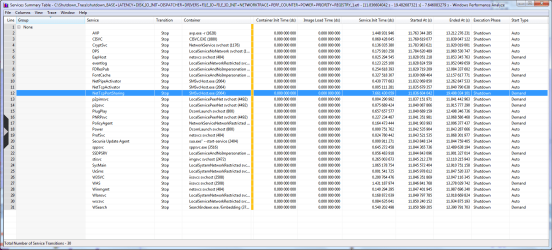

services.PNG

Driver delays.PNG
 
Last edited:

My Computer My Computer

At a glance

Windows 7 Professional 64 bitAMD Phenom II X6 1055T 2.8 GHz (3.51 over clo...Corsair 8 GB CMX4GX3M2A1600C9R (1333 mHz)Saphire Radeon 5830HD + Hauppauge WinTV-HVR-2...
Computer type
PC/Desktop
Computer Manufacturer/Model Number
Custom build
OS
Windows 7 Professional 64 bit
CPU
AMD Phenom II X6 1055T 2.8 GHz (3.51 over clocked)
Motherboard
Asus M4A87TD-EVO
Memory
Corsair 8 GB CMX4GX3M2A1600C9R (1333 mHz)
Graphics Card(s)
Saphire Radeon 5830HD + Hauppauge WinTV-HVR-2250 Dual Tuner
Sound Card
VIA VT1818 High Definition Audio 8-Channel, AMD Radeon HDMI
Monitor(s) Displays
23" Samsung SyncMaster PX2370 + 47" LG 47LH90 LED HDTV
Screen Resolution
1920x1080p
Hard Drives
Western Digital --> WD10EARS-00Y5B1 1 TB 5200 rpm (Backup)
Seagate --> ST2000DM001-1CH164 2 TB 7200 rpm (Media) Mirrored to
Seagate --> ST2000DM001-1CH164 2 TB 7200 rpm
BUSlink --> "USB2.0 Disk-On-The-Go/Lite" 18 GB mini HDD (Bootable Win 7 Insta
PSU
850 WATT OCZ --> OCZ850GXSSLI RTL
Case
Cool Master Scout --> SGC-2000-KKN1-GP RT
Cooling
CM 140mm front & top, 120mm rear & 2x side, stock CPU fan
Keyboard
Razer Lycosa Mirror, Logitech MX3200 wireless
Mouse
Logitech G9x, Logitech MX3200 wireless
Internet Speed
10 Mbps
Antivirus
Microsoft Security Essentials
Browser
Chrome & Internet Explorer 11
Other Info
Custom rig self build.
Recently upgraded for part time Media Center DVR duties.
I'm downloading the file now - it's slow from dropbox for some reason, but I should have it shortly. Getting lots of random disconnects today, and only to dropbox.

Not sure if that's my ISP, or dropbox.
 

My Computer My Computer

At a glance

Windows 10 Pro x64Intel Core i7 4790K @ 4.5GHz32GB DDR3Nvidia GeForce GTX970
Computer type
PC/Desktop
Computer Manufacturer/Model Number
Custom
OS
Windows 10 Pro x64
CPU
Intel Core i7 4790K @ 4.5GHz
Motherboard
Asus Maximus Hero VII
Memory
32GB DDR3
Graphics Card(s)
Nvidia GeForce GTX970
Sound Card
Realtek HD Audio
Screen Resolution
1920x1200
Hard Drives
1x Samsung 250GB SSD
4x WD RE 2TB (RAIDZ)
PSU
Corsair AX760i
Case
Fractal Design Define R4
Cooling
Noctua NH-D15
No disconnects, but the speed has really been all over the place.
 

My Computer My Computer

At a glance

Windows 7 Professional 64 bitAMD Phenom II X6 1055T 2.8 GHz (3.51 over clo...Corsair 8 GB CMX4GX3M2A1600C9R (1333 mHz)Saphire Radeon 5830HD + Hauppauge WinTV-HVR-2...
Computer type
PC/Desktop
Computer Manufacturer/Model Number
Custom build
OS
Windows 7 Professional 64 bit
CPU
AMD Phenom II X6 1055T 2.8 GHz (3.51 over clocked)
Motherboard
Asus M4A87TD-EVO
Memory
Corsair 8 GB CMX4GX3M2A1600C9R (1333 mHz)
Graphics Card(s)
Saphire Radeon 5830HD + Hauppauge WinTV-HVR-2250 Dual Tuner
Sound Card
VIA VT1818 High Definition Audio 8-Channel, AMD Radeon HDMI
Monitor(s) Displays
23" Samsung SyncMaster PX2370 + 47" LG 47LH90 LED HDTV
Screen Resolution
1920x1080p
Hard Drives
Western Digital --> WD10EARS-00Y5B1 1 TB 5200 rpm (Backup)
Seagate --> ST2000DM001-1CH164 2 TB 7200 rpm (Media) Mirrored to
Seagate --> ST2000DM001-1CH164 2 TB 7200 rpm
BUSlink --> "USB2.0 Disk-On-The-Go/Lite" 18 GB mini HDD (Bootable Win 7 Insta
PSU
850 WATT OCZ --> OCZ850GXSSLI RTL
Case
Cool Master Scout --> SGC-2000-KKN1-GP RT
Cooling
CM 140mm front & top, 120mm rear & 2x side, stock CPU fan
Keyboard
Razer Lycosa Mirror, Logitech MX3200 wireless
Mouse
Logitech G9x, Logitech MX3200 wireless
Internet Speed
10 Mbps
Antivirus
Microsoft Security Essentials
Browser
Chrome & Internet Explorer 11
Other Info
Custom rig self build.
Recently upgraded for part time Media Center DVR duties.
I grabbed it from RDP elsewhere and put it on my skydrive, and downloaded it. I'm looking at it now, finally. DropBox is being throttled (as usual) by my ISP, as skydrive works fine (and others aren't having issues with DropBox on other ISPs that I contacted tonight).
 

My Computer My Computer

At a glance

Windows 10 Pro x64Intel Core i7 4790K @ 4.5GHz32GB DDR3Nvidia GeForce GTX970
Computer type
PC/Desktop
Computer Manufacturer/Model Number
Custom
OS
Windows 10 Pro x64
CPU
Intel Core i7 4790K @ 4.5GHz
Motherboard
Asus Maximus Hero VII
Memory
32GB DDR3
Graphics Card(s)
Nvidia GeForce GTX970
Sound Card
Realtek HD Audio
Screen Resolution
1920x1200
Hard Drives
1x Samsung 250GB SSD
4x WD RE 2TB (RAIDZ)
PSU
Corsair AX760i
Case
Fractal Design Define R4
Cooling
Noctua NH-D15
Well, for starters something is taking a long time in the Network Policy Service (NPS) service during shutdown - I'll debug it in a bit, but it's almost 5 seconds of shutdown time just for that one thread in the dllhost that is spawned to interact with the NPS service. If you're not using it, disabling it might be a good choice (there's a lot of network activity and processes here, so I can't say for certain if what you're running it needs the service or not, but if so, that's part of your problem).

There's another 5 seconds (or so) in thread 4876 inside svchost 1052, and that wait time appears to superfetch-related. Given it's the sysmain svchost, it's not abnormal to see caching happening here, but the delays are hard to pin down as they go back to waiter threads and filesystem calls, which may also not be abnormal with antivirus installed, lots of disk activity due to shutdown, etc.
 

My Computer My Computer

At a glance

Windows 10 Pro x64Intel Core i7 4790K @ 4.5GHz32GB DDR3Nvidia GeForce GTX970
Computer type
PC/Desktop
Computer Manufacturer/Model Number
Custom
OS
Windows 10 Pro x64
CPU
Intel Core i7 4790K @ 4.5GHz
Motherboard
Asus Maximus Hero VII
Memory
32GB DDR3
Graphics Card(s)
Nvidia GeForce GTX970
Sound Card
Realtek HD Audio
Screen Resolution
1920x1200
Hard Drives
1x Samsung 250GB SSD
4x WD RE 2TB (RAIDZ)
PSU
Corsair AX760i
Case
Fractal Design Define R4
Cooling
Noctua NH-D15
NPS.PNG

I don't seem to have that listing?! I did notice Netlogon was disabled and after reading the description I maybe shouldn't have?

This would be a good time to admit to some shady Services.msc activities. A noob with an itchy clicker finger.


Yes I see Superfetch in the events log often, causing problem.

Kaspersky can be a little intense sometimes resource wise. I did turn off the shutdown privacy cleaner, part of their Tools offerings. I had it on for a while and it (shutdown) never seemed to recover but that could just be coincidence.
 
Last edited:

My Computer My Computer

At a glance

Windows 7 Professional 64 bitAMD Phenom II X6 1055T 2.8 GHz (3.51 over clo...Corsair 8 GB CMX4GX3M2A1600C9R (1333 mHz)Saphire Radeon 5830HD + Hauppauge WinTV-HVR-2...
Computer type
PC/Desktop
Computer Manufacturer/Model Number
Custom build
OS
Windows 7 Professional 64 bit
CPU
AMD Phenom II X6 1055T 2.8 GHz (3.51 over clocked)
Motherboard
Asus M4A87TD-EVO
Memory
Corsair 8 GB CMX4GX3M2A1600C9R (1333 mHz)
Graphics Card(s)
Saphire Radeon 5830HD + Hauppauge WinTV-HVR-2250 Dual Tuner
Sound Card
VIA VT1818 High Definition Audio 8-Channel, AMD Radeon HDMI
Monitor(s) Displays
23" Samsung SyncMaster PX2370 + 47" LG 47LH90 LED HDTV
Screen Resolution
1920x1080p
Hard Drives
Western Digital --> WD10EARS-00Y5B1 1 TB 5200 rpm (Backup)
Seagate --> ST2000DM001-1CH164 2 TB 7200 rpm (Media) Mirrored to
Seagate --> ST2000DM001-1CH164 2 TB 7200 rpm
BUSlink --> "USB2.0 Disk-On-The-Go/Lite" 18 GB mini HDD (Bootable Win 7 Insta
PSU
850 WATT OCZ --> OCZ850GXSSLI RTL
Case
Cool Master Scout --> SGC-2000-KKN1-GP RT
Cooling
CM 140mm front & top, 120mm rear & 2x side, stock CPU fan
Keyboard
Razer Lycosa Mirror, Logitech MX3200 wireless
Mouse
Logitech G9x, Logitech MX3200 wireless
Internet Speed
10 Mbps
Antivirus
Microsoft Security Essentials
Browser
Chrome & Internet Explorer 11
Other Info
Custom rig self build.
Recently upgraded for part time Media Center DVR duties.

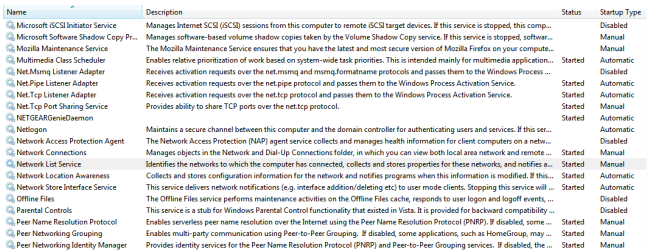
Are you needing the NetTCP Port Sharing Service? It's not totally abnormal for NPS to be missing, but NTCPSharing is not normal, so I'm assuming you had reason to turn it on?
 

My Computer My Computer

At a glance

Windows 10 Pro x64Intel Core i7 4790K @ 4.5GHz32GB DDR3Nvidia GeForce GTX970
Computer type
PC/Desktop
Computer Manufacturer/Model Number
Custom
OS
Windows 10 Pro x64
CPU
Intel Core i7 4790K @ 4.5GHz
Motherboard
Asus Maximus Hero VII
Memory
32GB DDR3
Graphics Card(s)
Nvidia GeForce GTX970
Sound Card
Realtek HD Audio
Screen Resolution
1920x1200
Hard Drives
1x Samsung 250GB SSD
4x WD RE 2TB (RAIDZ)
PSU
Corsair AX760i
Case
Fractal Design Define R4
Cooling
Noctua NH-D15
You would think so right? I sometimes like what I read and make a decision. Lessons learned. Is there a way to reset all services through windows 7? Maybe I need a clean slate as far as sys services go.

I will disable.

EDIT: just noticed it's a manual start up on that, so how did it get going? I just restarted a few minutes ago.

I use 2 Android apps to control WMC and other media players. Could that require NTPC Sharing? Sounds familiar that I may have made that decision on a whim.
 

My Computer My Computer

At a glance

Windows 7 Professional 64 bitAMD Phenom II X6 1055T 2.8 GHz (3.51 over clo...Corsair 8 GB CMX4GX3M2A1600C9R (1333 mHz)Saphire Radeon 5830HD + Hauppauge WinTV-HVR-2...
Computer type
PC/Desktop
Computer Manufacturer/Model Number
Custom build
OS
Windows 7 Professional 64 bit
CPU
AMD Phenom II X6 1055T 2.8 GHz (3.51 over clocked)
Motherboard
Asus M4A87TD-EVO
Memory
Corsair 8 GB CMX4GX3M2A1600C9R (1333 mHz)
Graphics Card(s)
Saphire Radeon 5830HD + Hauppauge WinTV-HVR-2250 Dual Tuner
Sound Card
VIA VT1818 High Definition Audio 8-Channel, AMD Radeon HDMI
Monitor(s) Displays
23" Samsung SyncMaster PX2370 + 47" LG 47LH90 LED HDTV
Screen Resolution
1920x1080p
Hard Drives
Western Digital --> WD10EARS-00Y5B1 1 TB 5200 rpm (Backup)
Seagate --> ST2000DM001-1CH164 2 TB 7200 rpm (Media) Mirrored to
Seagate --> ST2000DM001-1CH164 2 TB 7200 rpm
BUSlink --> "USB2.0 Disk-On-The-Go/Lite" 18 GB mini HDD (Bootable Win 7 Insta
PSU
850 WATT OCZ --> OCZ850GXSSLI RTL
Case
Cool Master Scout --> SGC-2000-KKN1-GP RT
Cooling
CM 140mm front & top, 120mm rear & 2x side, stock CPU fan
Keyboard
Razer Lycosa Mirror, Logitech MX3200 wireless
Mouse
Logitech G9x, Logitech MX3200 wireless
Internet Speed
10 Mbps
Antivirus
Microsoft Security Essentials
Browser
Chrome & Internet Explorer 11
Other Info
Custom rig self build.
Recently upgraded for part time Media Center DVR duties.
It does appear AVP is slowing down shutdown of services (in general) for almost 12 seconds from when winlogon gets the shutdown notification, so that's a problem. Then, there are the other issues I've found so far:

  • Network shutdown takes a while, and NetGear Genie is apparently part of the problem (it makes an inordinate number of diskIO requests during shutdown, during the 0-9 seconds window from notification, and that cannot be helping as A/V unloads and superfetch is flushing it's cache
  • Note as part of this delay, there's a delay in audiodg.exe hashing out the driver for "\Device\HarddiskVolume2\Windows\System32\ViaKaraokeApo.dll", which delays playing the shutdown sound, which actually delays shutdown for a little over 1.5 seconds or so. Not critical, but probably a crap driver.
  • After almost 9 seconds, Winlogon can finally unload the user and is likely to have placed you at the logonui screen (rather than the desktop). Windows Update stops here, approximately .67 seconds, then the rest of the services are allowed to stop. If we exclude the IIS services (why are these here???), AVP, and NetTCP port sharing, it's just over a second to stop services.
  • However, if we add back IIS, AVP, and the NetTCP Port Sharing, it's an additional 6.57 seconds AFTER THAT to shut down (which gives the ultimate time of around 20 seconds).
I'd update your driver set in general, but especially your network drivers. Second, remove any unnecessary pieces of networking software (like that NetGear Genie package, at the very least - I'd even attack IIS and your antivirus too and see if something else can accomplish what that is doing), and look at disabling services like NetTCP Port Sharing, NetPipe and NetTCPActivator, PolicyAgent, and things like Secunia.

Only once you've gotten things stable (even if that means removing certain things) can you consider putting things back (carefully, and with thorough perf traces to gauge impact) to get back to a state you might need.

The thing you have to remember is, if you really *do* need all that stuff you have installed, you might have to accept slower shutdown times (although this bad seems excessive, it's not totally uncommon).
 

My Computer My Computer

At a glance

Windows 10 Pro x64Intel Core i7 4790K @ 4.5GHz32GB DDR3Nvidia GeForce GTX970
Computer type
PC/Desktop
Computer Manufacturer/Model Number
Custom
OS
Windows 10 Pro x64
CPU
Intel Core i7 4790K @ 4.5GHz
Motherboard
Asus Maximus Hero VII
Memory
32GB DDR3
Graphics Card(s)
Nvidia GeForce GTX970
Sound Card
Realtek HD Audio
Screen Resolution
1920x1200
Hard Drives
1x Samsung 250GB SSD
4x WD RE 2TB (RAIDZ)
PSU
Corsair AX760i
Case
Fractal Design Define R4
Cooling
Noctua NH-D15
Other tid bits which may or may not be relevant:

Circular Kernel Context Logger errors in events often. I recall following someone's advice and changed the way the log was saved, as they said it was a file size issue causing the alarms.

These two are now off (dependents). They are time hogs for sure and I'm wondering what they are doing.

tcp.PNG
 

My Computer My Computer

At a glance

Windows 7 Professional 64 bitAMD Phenom II X6 1055T 2.8 GHz (3.51 over clo...Corsair 8 GB CMX4GX3M2A1600C9R (1333 mHz)Saphire Radeon 5830HD + Hauppauge WinTV-HVR-2...
Computer type
PC/Desktop
Computer Manufacturer/Model Number
Custom build
OS
Windows 7 Professional 64 bit
CPU
AMD Phenom II X6 1055T 2.8 GHz (3.51 over clocked)
Motherboard
Asus M4A87TD-EVO
Memory
Corsair 8 GB CMX4GX3M2A1600C9R (1333 mHz)
Graphics Card(s)
Saphire Radeon 5830HD + Hauppauge WinTV-HVR-2250 Dual Tuner
Sound Card
VIA VT1818 High Definition Audio 8-Channel, AMD Radeon HDMI
Monitor(s) Displays
23" Samsung SyncMaster PX2370 + 47" LG 47LH90 LED HDTV
Screen Resolution
1920x1080p
Hard Drives
Western Digital --> WD10EARS-00Y5B1 1 TB 5200 rpm (Backup)
Seagate --> ST2000DM001-1CH164 2 TB 7200 rpm (Media) Mirrored to
Seagate --> ST2000DM001-1CH164 2 TB 7200 rpm
BUSlink --> "USB2.0 Disk-On-The-Go/Lite" 18 GB mini HDD (Bootable Win 7 Insta
PSU
850 WATT OCZ --> OCZ850GXSSLI RTL
Case
Cool Master Scout --> SGC-2000-KKN1-GP RT
Cooling
CM 140mm front & top, 120mm rear & 2x side, stock CPU fan
Keyboard
Razer Lycosa Mirror, Logitech MX3200 wireless
Mouse
Logitech G9x, Logitech MX3200 wireless
Internet Speed
10 Mbps
Antivirus
Microsoft Security Essentials
Browser
Chrome & Internet Explorer 11
Other Info
Custom rig self build.
Recently upgraded for part time Media Center DVR duties.
They're there for apps (only - Windows itself doesn't use them). If a dev needs to use them to do network port activation and sharing, then they need to be enabled. Your interesting tidbits with the android apps might be using them, possibly. Would be interested in seeing if what you're using still works after messing with them.
 

My Computer My Computer

At a glance

Windows 10 Pro x64Intel Core i7 4790K @ 4.5GHz32GB DDR3Nvidia GeForce GTX970
Computer type
PC/Desktop
Computer Manufacturer/Model Number
Custom
OS
Windows 10 Pro x64
CPU
Intel Core i7 4790K @ 4.5GHz
Motherboard
Asus Maximus Hero VII
Memory
32GB DDR3
Graphics Card(s)
Nvidia GeForce GTX970
Sound Card
Realtek HD Audio
Screen Resolution
1920x1200
Hard Drives
1x Samsung 250GB SSD
4x WD RE 2TB (RAIDZ)
PSU
Corsair AX760i
Case
Fractal Design Define R4
Cooling
Noctua NH-D15
It does appear AVP is slowing down shutdown of services (in general) for almost 12 seconds from when winlogon gets the shutdown notification, so that's a problem. Then, there are the other issues I've found so far:

  • Network shutdown takes a while, and NetGear Genie is apparently part of the problem (it makes an inordinate number of diskIO requests during shutdown, during the 0-9 seconds window from notification, and that cannot be helping as A/V unloads and superfetch is flushing it's cache
  • Note as part of this delay, there's a delay in audiodg.exe hashing out the driver for "\Device\HarddiskVolume2\Windows\System32\ViaKaraokeApo.dll", which delays playing the shutdown sound, which actually delays shutdown for a little over 1.5 seconds or so. Not critical, but probably a crap driver.
  • After almost 9 seconds, Winlogon can finally unload the user and is likely to have placed you at the logonui screen (rather than the desktop). Windows Update stops here, approximately .67 seconds, then the rest of the services are allowed to stop. If we exclude the IIS services (why are these here???), AVP, and NetTCP port sharing, it's just over a second to stop services.
  • However, if we add back IIS, AVP, and the NetTCP Port Sharing, it's an additional 6.57 seconds AFTER THAT to shut down (which gives the ultimate time of around 20 seconds).
I'd update your driver set in general, but especially your network drivers. Second, remove any unnecessary pieces of networking software (like that NetGear Genie package, at the very least - I'd even attack IIS and your antivirus too and see if something else can accomplish what that is doing), and look at disabling services like NetTCP Port Sharing, NetPipe and NetTCPActivator, PolicyAgent, and things like Secunia.

Only once you've gotten things stable (even if that means removing certain things) can you consider putting things back (carefully, and with thorough perf traces to gauge impact) to get back to a state you might need.

The thing you have to remember is, if you really *do* need all that stuff you have installed, you might have to accept slower shutdown times (although this bad seems excessive, it's not totally uncommon).

Pretty certain this is all my doing since it's happened without changes to the basic hardware/software config on the PC

Any ideas for things to check on AVP? It's a rather strange interface for settings, and things seem kinda vague to me, but I'm getting used to it.

Netgenie was a recent addition, and also a startup for GA311 PCI adapter was in the mix until just a few hours ago. It seemed redundant (net usage graph and info box) so I updated it and there's no more tray icon, must have been a change to the software. I could do without the Genie for sure. In fact I don't think I've looked at it :)

Note as part of this delay, there's a delay in audiodg.exe hashing out the driver for "\Device\HarddiskVolume2\Windows\System32\ViaKaraokeApo.dll", which delays playing the shutdown sound, which actually delays shutdown for a little over 1.5 seconds or so. Not critical, but probably a crap driver.
Yep it's crap alright. My logon sound plays about 20 seconds after I'm logged in and using the PC. I never get to hear the logoff sound and yes I'm relegated to the logon screen almost immediately and most of shut down delay happens there. What are my other options for the VIA chipset? Or maybe a clean install of the latest version?

Which one is PolicyAgent?

Recommend doing away with Secunia or modifying settings? I had no idea it was doing anything unless I ran a scan! I don't use it often.

Another random memory is that I merged an entire stock set of Win7 services from blackviper. This was several weeks back and my weak attempt to shore up the mess I made in win services. Thoughts on a major Services reset? Does that exist? Sounds too easy.
 

My Computer My Computer

At a glance

Windows 7 Professional 64 bitAMD Phenom II X6 1055T 2.8 GHz (3.51 over clo...Corsair 8 GB CMX4GX3M2A1600C9R (1333 mHz)Saphire Radeon 5830HD + Hauppauge WinTV-HVR-2...
Computer type
PC/Desktop
Computer Manufacturer/Model Number
Custom build
OS
Windows 7 Professional 64 bit
CPU
AMD Phenom II X6 1055T 2.8 GHz (3.51 over clocked)
Motherboard
Asus M4A87TD-EVO
Memory
Corsair 8 GB CMX4GX3M2A1600C9R (1333 mHz)
Graphics Card(s)
Saphire Radeon 5830HD + Hauppauge WinTV-HVR-2250 Dual Tuner
Sound Card
VIA VT1818 High Definition Audio 8-Channel, AMD Radeon HDMI
Monitor(s) Displays
23" Samsung SyncMaster PX2370 + 47" LG 47LH90 LED HDTV
Screen Resolution
1920x1080p
Hard Drives
Western Digital --> WD10EARS-00Y5B1 1 TB 5200 rpm (Backup)
Seagate --> ST2000DM001-1CH164 2 TB 7200 rpm (Media) Mirrored to
Seagate --> ST2000DM001-1CH164 2 TB 7200 rpm
BUSlink --> "USB2.0 Disk-On-The-Go/Lite" 18 GB mini HDD (Bootable Win 7 Insta
PSU
850 WATT OCZ --> OCZ850GXSSLI RTL
Case
Cool Master Scout --> SGC-2000-KKN1-GP RT
Cooling
CM 140mm front & top, 120mm rear & 2x side, stock CPU fan
Keyboard
Razer Lycosa Mirror, Logitech MX3200 wireless
Mouse
Logitech G9x, Logitech MX3200 wireless
Internet Speed
10 Mbps
Antivirus
Microsoft Security Essentials
Browser
Chrome & Internet Explorer 11
Other Info
Custom rig self build.
Recently upgraded for part time Media Center DVR duties.
It does appear AVP is slowing down shutdown of services (in general) for almost 12 seconds from when winlogon gets the shutdown notification, so that's a problem. Then, there are the other issues I've found so far:

  • Network shutdown takes a while, and NetGear Genie is apparently part of the problem (it makes an inordinate number of diskIO requests during shutdown, during the 0-9 seconds window from notification, and that cannot be helping as A/V unloads and superfetch is flushing it's cache
  • Note as part of this delay, there's a delay in audiodg.exe hashing out the driver for "\Device\HarddiskVolume2\Windows\System32\ViaKaraokeApo.dll", which delays playing the shutdown sound, which actually delays shutdown for a little over 1.5 seconds or so. Not critical, but probably a crap driver.
  • After almost 9 seconds, Winlogon can finally unload the user and is likely to have placed you at the logonui screen (rather than the desktop). Windows Update stops here, approximately .67 seconds, then the rest of the services are allowed to stop. If we exclude the IIS services (why are these here???), AVP, and NetTCP port sharing, it's just over a second to stop services.
  • However, if we add back IIS, AVP, and the NetTCP Port Sharing, it's an additional 6.57 seconds AFTER THAT to shut down (which gives the ultimate time of around 20 seconds).
I'd update your driver set in general, but especially your network drivers. Second, remove any unnecessary pieces of networking software (like that NetGear Genie package, at the very least - I'd even attack IIS and your antivirus too and see if something else can accomplish what that is doing), and look at disabling services like NetTCP Port Sharing, NetPipe and NetTCPActivator, PolicyAgent, and things like Secunia.

Only once you've gotten things stable (even if that means removing certain things) can you consider putting things back (carefully, and with thorough perf traces to gauge impact) to get back to a state you might need.

The thing you have to remember is, if you really *do* need all that stuff you have installed, you might have to accept slower shutdown times (although this bad seems excessive, it's not totally uncommon).

They're there for apps (only - Windows itself doesn't use them). If a dev needs to use them to do network port activation and sharing, then they need to be enabled. Your interesting tidbits with the android apps might be using them, possibly. Would be interested in seeing if what you're using still works after messing with them.

They talk to TCP for emulation of any kind of button, computer or keyboard, and UDP for the mouse. Not sure if they are responsible for starting those manual services. One is a WMC plugin called "emote" and nothing boots at start up, and the other is WinRemote which doesn't start up at boot. Interesting fact Kaspersky HATES WinRemote, but I couldn't find anything definitive on Google about incidences. I finally figured out how to exclude it but AVP probably deleted that .exe at least 20 times. It's in the Play Store and a lot of people have paid money for it. But ya never know when something might get jacked. AVP never found a virus but considered it a critical vulnerability. Shoot, maybe it knew more than I thought and it has been compromised... nope not going down that path :confused: of paranoia. No signs of any other system performance issues.

Hey thanks for the insight and I'll get back to the thread soon with results.
 
Last edited:

My Computer My Computer

At a glance

Windows 7 Professional 64 bitAMD Phenom II X6 1055T 2.8 GHz (3.51 over clo...Corsair 8 GB CMX4GX3M2A1600C9R (1333 mHz)Saphire Radeon 5830HD + Hauppauge WinTV-HVR-2...
Computer type
PC/Desktop
Computer Manufacturer/Model Number
Custom build
OS
Windows 7 Professional 64 bit
CPU
AMD Phenom II X6 1055T 2.8 GHz (3.51 over clocked)
Motherboard
Asus M4A87TD-EVO
Memory
Corsair 8 GB CMX4GX3M2A1600C9R (1333 mHz)
Graphics Card(s)
Saphire Radeon 5830HD + Hauppauge WinTV-HVR-2250 Dual Tuner
Sound Card
VIA VT1818 High Definition Audio 8-Channel, AMD Radeon HDMI
Monitor(s) Displays
23" Samsung SyncMaster PX2370 + 47" LG 47LH90 LED HDTV
Screen Resolution
1920x1080p
Hard Drives
Western Digital --> WD10EARS-00Y5B1 1 TB 5200 rpm (Backup)
Seagate --> ST2000DM001-1CH164 2 TB 7200 rpm (Media) Mirrored to
Seagate --> ST2000DM001-1CH164 2 TB 7200 rpm
BUSlink --> "USB2.0 Disk-On-The-Go/Lite" 18 GB mini HDD (Bootable Win 7 Insta
PSU
850 WATT OCZ --> OCZ850GXSSLI RTL
Case
Cool Master Scout --> SGC-2000-KKN1-GP RT
Cooling
CM 140mm front & top, 120mm rear & 2x side, stock CPU fan
Keyboard
Razer Lycosa Mirror, Logitech MX3200 wireless
Mouse
Logitech G9x, Logitech MX3200 wireless
Internet Speed
10 Mbps
Antivirus
Microsoft Security Essentials
Browser
Chrome & Internet Explorer 11
Other Info
Custom rig self build.
Recently upgraded for part time Media Center DVR duties.
I just did a reboot at 131 seconds, so definite improvement after a thorough service review using blackviper's site. My windows service settings now match his "safe" set of listings. Apparently "TWEAKED" would have issues with WMC and this machine is a part time HTPC. But I think it helped and several I was able to just trash. I also removed VIA software, and did a big CClean. Just reset all AVP settings to OEM, and now I'm going to try another trace to compare those specific numbers. I think netgear genie will be sacrificed first though. Firmware and drivers for both router and adapter are current. More soon...
 

My Computer My Computer

At a glance

Windows 7 Professional 64 bitAMD Phenom II X6 1055T 2.8 GHz (3.51 over clo...Corsair 8 GB CMX4GX3M2A1600C9R (1333 mHz)Saphire Radeon 5830HD + Hauppauge WinTV-HVR-2...
Computer type
PC/Desktop
Computer Manufacturer/Model Number
Custom build
OS
Windows 7 Professional 64 bit
CPU
AMD Phenom II X6 1055T 2.8 GHz (3.51 over clocked)
Motherboard
Asus M4A87TD-EVO
Memory
Corsair 8 GB CMX4GX3M2A1600C9R (1333 mHz)
Graphics Card(s)
Saphire Radeon 5830HD + Hauppauge WinTV-HVR-2250 Dual Tuner
Sound Card
VIA VT1818 High Definition Audio 8-Channel, AMD Radeon HDMI
Monitor(s) Displays
23" Samsung SyncMaster PX2370 + 47" LG 47LH90 LED HDTV
Screen Resolution
1920x1080p
Hard Drives
Western Digital --> WD10EARS-00Y5B1 1 TB 5200 rpm (Backup)
Seagate --> ST2000DM001-1CH164 2 TB 7200 rpm (Media) Mirrored to
Seagate --> ST2000DM001-1CH164 2 TB 7200 rpm
BUSlink --> "USB2.0 Disk-On-The-Go/Lite" 18 GB mini HDD (Bootable Win 7 Insta
PSU
850 WATT OCZ --> OCZ850GXSSLI RTL
Case
Cool Master Scout --> SGC-2000-KKN1-GP RT
Cooling
CM 140mm front & top, 120mm rear & 2x side, stock CPU fan
Keyboard
Razer Lycosa Mirror, Logitech MX3200 wireless
Mouse
Logitech G9x, Logitech MX3200 wireless
Internet Speed
10 Mbps
Antivirus
Microsoft Security Essentials
Browser
Chrome & Internet Explorer 11
Other Info
Custom rig self build.
Recently upgraded for part time Media Center DVR duties.
Good to hear :)
 

My Computer My Computer

At a glance

Windows 10 Pro x64Intel Core i7 4790K @ 4.5GHz32GB DDR3Nvidia GeForce GTX970
Computer type
PC/Desktop
Computer Manufacturer/Model Number
Custom
OS
Windows 10 Pro x64
CPU
Intel Core i7 4790K @ 4.5GHz
Motherboard
Asus Maximus Hero VII
Memory
32GB DDR3
Graphics Card(s)
Nvidia GeForce GTX970
Sound Card
Realtek HD Audio
Screen Resolution
1920x1200
Hard Drives
1x Samsung 250GB SSD
4x WD RE 2TB (RAIDZ)
PSU
Corsair AX760i
Case
Fractal Design Define R4
Cooling
Noctua NH-D15
https://www.dropbox.com/s/96vib4j9h...CE+PERF_COUNTER+POWER+PRIORITY+REGISTRY_1.zip

Ok here is the same trace after hours and hours of digging and tweaking and researching. I'd be curious for your analysis on what the biggest improvements/changes were according to the Performance Kit data.

I was using a simple .vbs timer for desktop-to-desktop reboot times, and before I came here and started this journey I was seeing around 165 sec. The last one I did was 64 sec which is very nice.

Thanks.
 

My Computer My Computer

At a glance

Windows 7 Professional 64 bitAMD Phenom II X6 1055T 2.8 GHz (3.51 over clo...Corsair 8 GB CMX4GX3M2A1600C9R (1333 mHz)Saphire Radeon 5830HD + Hauppauge WinTV-HVR-2...
Computer type
PC/Desktop
Computer Manufacturer/Model Number
Custom build
OS
Windows 7 Professional 64 bit
CPU
AMD Phenom II X6 1055T 2.8 GHz (3.51 over clocked)
Motherboard
Asus M4A87TD-EVO
Memory
Corsair 8 GB CMX4GX3M2A1600C9R (1333 mHz)
Graphics Card(s)
Saphire Radeon 5830HD + Hauppauge WinTV-HVR-2250 Dual Tuner
Sound Card
VIA VT1818 High Definition Audio 8-Channel, AMD Radeon HDMI
Monitor(s) Displays
23" Samsung SyncMaster PX2370 + 47" LG 47LH90 LED HDTV
Screen Resolution
1920x1080p
Hard Drives
Western Digital --> WD10EARS-00Y5B1 1 TB 5200 rpm (Backup)
Seagate --> ST2000DM001-1CH164 2 TB 7200 rpm (Media) Mirrored to
Seagate --> ST2000DM001-1CH164 2 TB 7200 rpm
BUSlink --> "USB2.0 Disk-On-The-Go/Lite" 18 GB mini HDD (Bootable Win 7 Insta
PSU
850 WATT OCZ --> OCZ850GXSSLI RTL
Case
Cool Master Scout --> SGC-2000-KKN1-GP RT
Cooling
CM 140mm front & top, 120mm rear & 2x side, stock CPU fan
Keyboard
Razer Lycosa Mirror, Logitech MX3200 wireless
Mouse
Logitech G9x, Logitech MX3200 wireless
Internet Speed
10 Mbps
Antivirus
Microsoft Security Essentials
Browser
Chrome & Internet Explorer 11
Other Info
Custom rig self build.
Recently upgraded for part time Media Center DVR duties.
Wipe pagefile on shutdown was the biggest issue after all this. shaved about 15 seconds. I wonder when/how it got flipped on again?!
 

My Computer My Computer

At a glance

Windows 7 Professional 64 bitAMD Phenom II X6 1055T 2.8 GHz (3.51 over clo...Corsair 8 GB CMX4GX3M2A1600C9R (1333 mHz)Saphire Radeon 5830HD + Hauppauge WinTV-HVR-2...
Computer type
PC/Desktop
Computer Manufacturer/Model Number
Custom build
OS
Windows 7 Professional 64 bit
CPU
AMD Phenom II X6 1055T 2.8 GHz (3.51 over clocked)
Motherboard
Asus M4A87TD-EVO
Memory
Corsair 8 GB CMX4GX3M2A1600C9R (1333 mHz)
Graphics Card(s)
Saphire Radeon 5830HD + Hauppauge WinTV-HVR-2250 Dual Tuner
Sound Card
VIA VT1818 High Definition Audio 8-Channel, AMD Radeon HDMI
Monitor(s) Displays
23" Samsung SyncMaster PX2370 + 47" LG 47LH90 LED HDTV
Screen Resolution
1920x1080p
Hard Drives
Western Digital --> WD10EARS-00Y5B1 1 TB 5200 rpm (Backup)
Seagate --> ST2000DM001-1CH164 2 TB 7200 rpm (Media) Mirrored to
Seagate --> ST2000DM001-1CH164 2 TB 7200 rpm
BUSlink --> "USB2.0 Disk-On-The-Go/Lite" 18 GB mini HDD (Bootable Win 7 Insta
PSU
850 WATT OCZ --> OCZ850GXSSLI RTL
Case
Cool Master Scout --> SGC-2000-KKN1-GP RT
Cooling
CM 140mm front & top, 120mm rear & 2x side, stock CPU fan
Keyboard
Razer Lycosa Mirror, Logitech MX3200 wireless
Mouse
Logitech G9x, Logitech MX3200 wireless
Internet Speed
10 Mbps
Antivirus
Microsoft Security Essentials
Browser
Chrome & Internet Explorer 11
Other Info
Custom rig self build.
Recently upgraded for part time Media Center DVR duties.
Back
Top