
Solved Need driver for Dragonpro PS2 pad to PC convert cable and help with it

Squerol

New member
Local time
6:49 PM
Messages
12
Welcome everybody. I have a problem. I have bought Sony DualShock 2 controller and pc adapter, exactly that - SBDRAGON GAMES ACCESSORIES
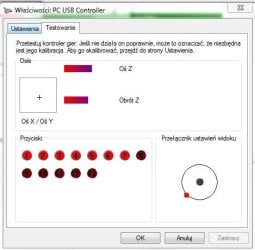
When I connect everything, the gamepad appears in control panel as PC USB Controller, but it isn't working properly. Only analogs are working, other buttons don't react, and buttons from 1 to 7 are triggered all-time, please to look at attached picture.
a2wwft.jpg

That's the state when I don't touch anny button. I don't know what to do - it's possible to solve that problem? Maybe there is a sort of driver for that adapter ? I haven't got any CD with product, Dragonpro products site hasn't got any drivers too. I tried drivers from other adapters, but they didn't work. Is there a way to do something with that? Maybe adapter isn't compatible with Win 7 Home Premium 64 or with laptops? (shops are telling that is compatible with everything, maybe it isn't a truth ?).
Sorry for English, I'm from Poland.
Thanks for any help, Squerol.
http://www.sbdragon.com/PS3/ps3_08110501.html
 

Attachments
  • Przechwytywanie.JPG
    Przechwytywanie.JPG
    33.9 KB · Views: 5

My Computer My Computer

At a glance

7 Home Premium SP1 64 bit2 GB
Computer type
Laptop
Computer Manufacturer/Model Number
HP Compaq Presario CQ62
OS
7 Home Premium SP1 64 bit
Memory
2 GB
Try it in another usb port and see if that helps
 

My Computer My Computer

At a glance

Windows 10 Pro X64Intel(R) Core(TM) i5-3570K CPU OC@ 4.5GHZ Turbo8.00 GB DDR3 1600MhzMSI Gaming X GTX 1070
Computer type
PC/Desktop
Computer Manufacturer/Model Number
Dude Build
OS
Windows 10 Pro X64
CPU
Intel(R) Core(TM) i5-3570K CPU OC@ 4.5GHZ Turbo
Motherboard
MSI Z77A-G45 Gaming
Memory
8.00 GB DDR3 1600Mhz
Graphics Card(s)
MSI Gaming X GTX 1070
Sound Card
Realtek High Definition
Monitor(s) Displays
Dell S23O9W, HP L1710
Screen Resolution
DELL-1920 x 1080 HP-1280 x1024
Hard Drives
Crucial m4 256 SSD, WD 7200RPM 500GB WD 1TB
PSU
Seasonic X650 GOLD
Case
Zalman Z12
Cooling
Antec Kuhler 920
Keyboard
Logitech
Mouse
MSI DS100 Interceptor
Internet Speed
50 down and 5 up
Antivirus
MSE
Browser
Chrome, IE 11
Other Info
Logitech X-620 Speakers
Nope, tried in every hole - same effect.
 

My Computer My Computer

At a glance

7 Home Premium SP1 64 bit2 GB
Computer type
Laptop
Computer Manufacturer/Model Number
HP Compaq Presario CQ62
OS
7 Home Premium SP1 64 bit
Memory
2 GB
I cant read Polish but does either tab have a calibrate option, or is that what your pic shows?
 

My Computer My Computer

At a glance

Windows 10 Pro X64Intel(R) Core(TM) i5-3570K CPU OC@ 4.5GHZ Turbo8.00 GB DDR3 1600MhzMSI Gaming X GTX 1070
Computer type
PC/Desktop
Computer Manufacturer/Model Number
Dude Build
OS
Windows 10 Pro X64
CPU
Intel(R) Core(TM) i5-3570K CPU OC@ 4.5GHZ Turbo
Motherboard
MSI Z77A-G45 Gaming
Memory
8.00 GB DDR3 1600Mhz
Graphics Card(s)
MSI Gaming X GTX 1070
Sound Card
Realtek High Definition
Monitor(s) Displays
Dell S23O9W, HP L1710
Screen Resolution
DELL-1920 x 1080 HP-1280 x1024
Hard Drives
Crucial m4 256 SSD, WD 7200RPM 500GB WD 1TB
PSU
Seasonic X650 GOLD
Case
Zalman Z12
Cooling
Antec Kuhler 920
Keyboard
Logitech
Mouse
MSI DS100 Interceptor
Internet Speed
50 down and 5 up
Antivirus
MSE
Browser
Chrome, IE 11
Other Info
Logitech X-620 Speakers
On the picture, "Ustawienia" means "Settings", "Testowanie" means "Testing". Yes,I have Calibration in Settings tab, but it doesn't solve problems with not working buttons/D-Pad, still only analogs are working properly.
 

My Computer My Computer

At a glance

7 Home Premium SP1 64 bit2 GB
Computer type
Laptop
Computer Manufacturer/Model Number
HP Compaq Presario CQ62
OS
7 Home Premium SP1 64 bit
Memory
2 GB
I have discovered that, when I plug Adapter only (without PS2 pad connected to it), it's in control panel as PC USB Controller. But when I plug to it PS2 Pad, it's situation from my first post in this thread. I checked Identify of adapter :
USB\VID_054C&PID_0268&REV_0100
USB\VID_054C&PID_0268
Maybe somemone can help with that ?
 

My Computer My Computer

At a glance

7 Home Premium SP1 64 bit2 GB
Computer type
Laptop
Computer Manufacturer/Model Number
HP Compaq Presario CQ62
OS
7 Home Premium SP1 64 bit
Memory
2 GB
Maybe this one will work. Make a system restore prior to trying.

:ar: Use Motionjoy
 
Last edited:

My Computer My Computer

At a glance

Windows 10 Pro X64Intel(R) Core(TM) i5-3570K CPU OC@ 4.5GHZ Turbo8.00 GB DDR3 1600MhzMSI Gaming X GTX 1070
Computer type
PC/Desktop
Computer Manufacturer/Model Number
Dude Build
OS
Windows 10 Pro X64
CPU
Intel(R) Core(TM) i5-3570K CPU OC@ 4.5GHZ Turbo
Motherboard
MSI Z77A-G45 Gaming
Memory
8.00 GB DDR3 1600Mhz
Graphics Card(s)
MSI Gaming X GTX 1070
Sound Card
Realtek High Definition
Monitor(s) Displays
Dell S23O9W, HP L1710
Screen Resolution
DELL-1920 x 1080 HP-1280 x1024
Hard Drives
Crucial m4 256 SSD, WD 7200RPM 500GB WD 1TB
PSU
Seasonic X650 GOLD
Case
Zalman Z12
Cooling
Antec Kuhler 920
Keyboard
Logitech
Mouse
MSI DS100 Interceptor
Internet Speed
50 down and 5 up
Antivirus
MSE
Browser
Chrome, IE 11
Other Info
Logitech X-620 Speakers
I tried that program before, but i tried that one more time. Do that with instructions, but the situation is the same - seven buttons triggered, only analogs are working, Tried with other options (PS2, PS3, XBOX360) - same effect (diffirience is that, sometimes pad fully doesn't work and that I can test vibrations - suprise is, that vibration test works !) I don't know too why I can't disable analog button on my PS2 Pad (when I press Analog Button, red lamp light off on a second, buttons in control panel are not triggered on second too, and after second the analog light lights again and everything is the same as at picture, I can disable analog on the moment only, it's enabled all-time). Gamepad is still not working. Thanks for trying to helping, but I don't know what to do to solve that problem...
 

My Computer My Computer

At a glance

7 Home Premium SP1 64 bit2 GB
Computer type
Laptop
Computer Manufacturer/Model Number
HP Compaq Presario CQ62
OS
7 Home Premium SP1 64 bit
Memory
2 GB
Sorry, I didn't remembered that analog on PS2 is automatically turned ON
 

My Computer My Computer

At a glance

7 Home Premium SP1 64 bit2 GB
Computer type
Laptop
Computer Manufacturer/Model Number
HP Compaq Presario CQ62
OS
7 Home Premium SP1 64 bit
Memory
2 GB
Yeah, this seems to be a tricky one. I asked for help from a fellow member is is an expert at fixing these things. Will update you when I hear something.
 

My Computer My Computer

At a glance

Windows 10 Pro X64Intel(R) Core(TM) i5-3570K CPU OC@ 4.5GHZ Turbo8.00 GB DDR3 1600MhzMSI Gaming X GTX 1070
Computer type
PC/Desktop
Computer Manufacturer/Model Number
Dude Build
OS
Windows 10 Pro X64
CPU
Intel(R) Core(TM) i5-3570K CPU OC@ 4.5GHZ Turbo
Motherboard
MSI Z77A-G45 Gaming
Memory
8.00 GB DDR3 1600Mhz
Graphics Card(s)
MSI Gaming X GTX 1070
Sound Card
Realtek High Definition
Monitor(s) Displays
Dell S23O9W, HP L1710
Screen Resolution
DELL-1920 x 1080 HP-1280 x1024
Hard Drives
Crucial m4 256 SSD, WD 7200RPM 500GB WD 1TB
PSU
Seasonic X650 GOLD
Case
Zalman Z12
Cooling
Antec Kuhler 920
Keyboard
Logitech
Mouse
MSI DS100 Interceptor
Internet Speed
50 down and 5 up
Antivirus
MSE
Browser
Chrome, IE 11
Other Info
Logitech X-620 Speakers
Yeah, You guys are only hope. Thanks
 

My Computer My Computer

At a glance

7 Home Premium SP1 64 bit2 GB
Computer type
Laptop
Computer Manufacturer/Model Number
HP Compaq Presario CQ62
OS
7 Home Premium SP1 64 bit
Memory
2 GB
Hi Squerol, Welcome to the forums, When you power on the controller do you press the button "analouge mode" and does the red light come on ? Is there any interference on the 2.4Ghz wireless side ?
Have a look here How to use PS3 Controller on Windows 7 this may help :)
 

My Computer My Computer

At a glance

win 7 ultimate32bit, Win8.1pro wmc 32bitamd phenom x4 9600corsair twinxs 2x2gb2x nvidia 1gb 8500gt
Computer type
PC/Desktop
Computer Manufacturer/Model Number
self build
OS
win 7 ultimate32bit, Win8.1pro wmc 32bit
CPU
amd phenom x4 9600
Motherboard
asus m2n32-sli deluxe
Memory
corsair twinxs 2x2gb
Graphics Card(s)
2x nvidia 1gb 8500gt
Sound Card
onboard
Monitor(s) Displays
23" PB Viseo 233d
Screen Resolution
1920x1080
Hard Drives
maxtor sata 500gb
maxtor sata 320gb
fujitsu sata200gb
PSU
oryxx tornado 750w
Case
thermaltake xaser lll
Cooling
artic freezer64 pro + 7 case fans
The analog red light lights always - it's turned ON when I plug controller in.
I have DualShock 2 with Dragonpro USB adapter v2. Main problem is, that 7 buttons are triggered and all buttons don't work. Analogs seems only working good. I saw that my adapter is converting PS2 pad to PS3 console too. Tried with MotionJoy two times and no progress (same situation).
a2wwft.jpg
 

My Computer My Computer

At a glance

7 Home Premium SP1 64 bit2 GB
Computer type
Laptop
Computer Manufacturer/Model Number
HP Compaq Presario CQ62
OS
7 Home Premium SP1 64 bit
Memory
2 GB

My Computer My Computer

At a glance

win 7 ultimate32bit, Win8.1pro wmc 32bitamd phenom x4 9600corsair twinxs 2x2gb2x nvidia 1gb 8500gt
Computer type
PC/Desktop
Computer Manufacturer/Model Number
self build
OS
win 7 ultimate32bit, Win8.1pro wmc 32bit
CPU
amd phenom x4 9600
Motherboard
asus m2n32-sli deluxe
Memory
corsair twinxs 2x2gb
Graphics Card(s)
2x nvidia 1gb 8500gt
Sound Card
onboard
Monitor(s) Displays
23" PB Viseo 233d
Screen Resolution
1920x1080
Hard Drives
maxtor sata 500gb
maxtor sata 320gb
fujitsu sata200gb
PSU
oryxx tornado 750w
Case
thermaltake xaser lll
Cooling
artic freezer64 pro + 7 case fans

My Computer My Computer

At a glance

win 7 ultimate32bit, Win8.1pro wmc 32bitamd phenom x4 9600corsair twinxs 2x2gb2x nvidia 1gb 8500gt
Computer type
PC/Desktop
Computer Manufacturer/Model Number
self build
OS
win 7 ultimate32bit, Win8.1pro wmc 32bit
CPU
amd phenom x4 9600
Motherboard
asus m2n32-sli deluxe
Memory
corsair twinxs 2x2gb
Graphics Card(s)
2x nvidia 1gb 8500gt
Sound Card
onboard
Monitor(s) Displays
23" PB Viseo 233d
Screen Resolution
1920x1080
Hard Drives
maxtor sata 500gb
maxtor sata 320gb
fujitsu sata200gb
PSU
oryxx tornado 750w
Case
thermaltake xaser lll
Cooling
artic freezer64 pro + 7 case fans
I've tried X360 emu mode, same effect, only diffirience is that vibrations test works. I've deleted program, cleared PC with CCleaner, and installed once more. About that Chinese drivers, I don't know how to install that. When I'm trying to install drivers from Device Menager panel, I'm chosing directory of new drivers. When I choose directory, there is coming message, that "your drivers are actuall and don't need to be upgraded". How to install that drivers ?
 

My Computer My Computer

At a glance

7 Home Premium SP1 64 bit2 GB
Computer type
Laptop
Computer Manufacturer/Model Number
HP Compaq Presario CQ62
OS
7 Home Premium SP1 64 bit
Memory
2 GB
I've tried X360 emu mode, same effect, only diffirience is that vibrations test works. I've deleted program, cleared PC with CCleaner, and installed once more. About that Chinese drivers, I don't know how to install that. When I'm trying to install drivers from Device Menager panel, I'm chosing directory of new drivers. When I choose directory, there is coming message, that "your drivers are actuall and don't need to be upgraded". How to install that drivers ?

Hi Squerol, The windows update is telling you that you already have the best driver installed :( Are you absolutely certain that the dualshock is actually in working condition ? :)
 

My Computer My Computer

At a glance

win 7 ultimate32bit, Win8.1pro wmc 32bitamd phenom x4 9600corsair twinxs 2x2gb2x nvidia 1gb 8500gt
Computer type
PC/Desktop
Computer Manufacturer/Model Number
self build
OS
win 7 ultimate32bit, Win8.1pro wmc 32bit
CPU
amd phenom x4 9600
Motherboard
asus m2n32-sli deluxe
Memory
corsair twinxs 2x2gb
Graphics Card(s)
2x nvidia 1gb 8500gt
Sound Card
onboard
Monitor(s) Displays
23" PB Viseo 233d
Screen Resolution
1920x1080
Hard Drives
maxtor sata 500gb
maxtor sata 320gb
fujitsu sata200gb
PSU
oryxx tornado 750w
Case
thermaltake xaser lll
Cooling
artic freezer64 pro + 7 case fans
I've managed to install that Chinese Driver, but after installing that controller completely didn't work. After unistalling that Asian driver controller comes to original state - as at picture, I need to test controller on PS2 console and adapter on other PCs at future time. It's possible to be broken, as I see, but f**k damn, all is fabric new!
PS
And to disable that driver signature it is good to use Ready Driver Plus - http://www.citadelindustries.net/rdp.php
 

My Computer My Computer

At a glance

7 Home Premium SP1 64 bit2 GB
Computer type
Laptop
Computer Manufacturer/Model Number
HP Compaq Presario CQ62
OS
7 Home Premium SP1 64 bit
Memory
2 GB
Hey guys! I checked my Dual Schock 2 on PS2 and it was.... completly broken. Suprisingly, the adapter is fully working (checked on other controller, I can reccomend that converter - it's functional, cheap, tough and have Force Feedback effect !!!). Anyway, thank you for accurate suggestions and trying to help. See ya!
 

My Computer My Computer

At a glance

7 Home Premium SP1 64 bit2 GB
Computer type
Laptop
Computer Manufacturer/Model Number
HP Compaq Presario CQ62
OS
7 Home Premium SP1 64 bit
Memory
2 GB
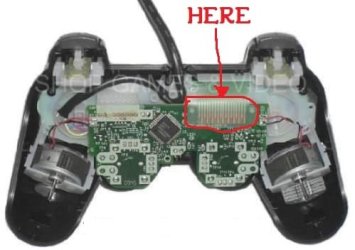
Hello, It's me again. I have decided to open DualShock2, and here, that freakin tape (see picture) wasn't connected to controller "mainboard" and some rubber "pushuper" wasn't glued to back pad cover and because of that tape wasn't forced to "mainboard". I connected it correctly and controller fully works! It's f***ing damn, that shops sells not fully assembled items. By dismounting controller byself guaranty was gone... Thank You for helping! See ya! And, for converters from PS2 to PS3/PC it is best to use Motioninjoy DualShock 3 emulator. It have X360 controller profile, usefull in new games and force feedback function. I recommend v6.0003 with LOCAL FILES http://www.hardcoreware.net/how-to-use-a-ps3-controller-in-windows-8/
 

Attachments

  • tape.jpg
    tape.jpg
    22.6 KB · Views: 2

My Computer My Computer

At a glance

7 Home Premium SP1 64 bit2 GB
Computer type
Laptop
Computer Manufacturer/Model Number
HP Compaq Presario CQ62
OS
7 Home Premium SP1 64 bit
Memory
2 GB
Back
Top