Solved Internet Connection Sharing cmd window pops up at startup

Wdingdong

New member
Local time
9:41 AM
Messages
11
Every time I start my PC, this Internet Connection Sharing cmd window pops up. It displays some commands and halts. Then I need to close it. It never used to happen earlier, but since a couple of week its happening continuously.

Following window appears on the startup and displays some command automatically.
k71yo0mkx
tttt.png


Any idea what's happening?
k71yo0mkx
 

My Computer My Computer

At a glance

Windows 7 32 bit
Computer type
PC/Desktop
OS
Windows 7 32 bit
Do you use ICS? if not I would just remove the startup entry. If you need the OCS service running you will need to be enabled in "control Panel" - Administrative tools" - "Services". It would appear that the service has been disabled and a batch file is asking it to start. Please can you post screenshots of the startup section in msconfig (just type "msconfig" into the start menu).
 

My Computer My Computer

At a glance

Windows 7 Ultimate x64Intel Core2 Quad Q8300 2.5GhzKingston HyperX 4x1GB DDR2 1066MhzAsus/Nvidia 9500GT 1GB
Computer type
PC/Desktop
Computer Manufacturer/Model Number
Self Build
OS
Windows 7 Ultimate x64
CPU
Intel Core2 Quad Q8300 2.5Ghz
Motherboard
Asus P5QD Turbo
Memory
Kingston HyperX 4x1GB DDR2 1066Mhz
Graphics Card(s)
Asus/Nvidia 9500GT 1GB
Sound Card
On-Board HD
Monitor(s) Displays
22" Widescreen TFT
Screen Resolution
1920x1080
Hard Drives
2x 320Gb Seagate SATAII RAID 0
2x 80Gb Seagate SATAII RAID 0
1x 1tb hybrid (8gb ssd)
PSU
650w
Case
ATX
Cooling
140mm front, 120mm Rear, 80mm Chipset + stock CPU and GPU
Keyboard
Plastic one
Mouse
Plastic one
Internet Speed
4Mbps
Other Info
Laptop: HP Elitebook 2560p
i5 @2.7Ghz 4GB DDR3
No, I don't use ICS. Also, it is disabled in the Control Panel->Administrative Tools->Services.
Here's the image of msconfig->Startup

rrrr.png
 

My Computer My Computer

At a glance

Windows 7 32 bit
Computer type
PC/Desktop
OS
Windows 7 32 bit
Please check this

In Windows 7 the location of your personal startup folder is:


%appdata%\Microsoft\Windows\Start Menu\Programs\Startup
For all users, you will find the startup folder in:

C:\ProgramData\Microsoft\Windows\Start Menu\Programs\Startup
What is in those folders?
 

My Computer My Computer

At a glance

Microsoft Windows 7 Home Premium 64-bits 7601...Intel(R) Core(TM) i3 CPU M 370 @ 2.40GHz4,00 GBATI Mobility Radeon HD 5400 Series
Computer type
Laptop
Computer Manufacturer/Model Number
ACER ASPIRE 5742G
OS
Microsoft Windows 7 Home Premium 64-bits 7601 Multiprocessor Free Service Pack 1
CPU
Intel(R) Core(TM) i3 CPU M 370 @ 2.40GHz
Motherboard
Acer Aspire 5742G
Memory
4,00 GB
Graphics Card(s)
ATI Mobility Radeon HD 5400 Series
Sound Card
(1) AMD High Definition Audio Device (2) Realtek High Defi
Screen Resolution
1366 x 768 x 32 bits (4294967296 colors) @ 60 Hz
Hard Drives
WDC WD5000BEVT-22ZAT0
In the first Startup folder there's only OneNote and in the second one there's WinZip. I found nothing about ICS or cmd.
 

My Computer My Computer

At a glance

Windows 7 32 bit
Computer type
PC/Desktop
OS
Windows 7 32 bit
In the first Startup folder there's only OneNote and in the second one there's WinZip. I found nothing about ICS or cmd.
Does it also show the cmd window if you logon as another user? Create a temporary test account in case no other account has been setup yet.
 

My Computer My Computer

At a glance

Microsoft Windows 7 Home Premium 64-bits 7601...Intel(R) Core(TM) i3 CPU M 370 @ 2.40GHz4,00 GBATI Mobility Radeon HD 5400 Series
Computer type
Laptop
Computer Manufacturer/Model Number
ACER ASPIRE 5742G
OS
Microsoft Windows 7 Home Premium 64-bits 7601 Multiprocessor Free Service Pack 1
CPU
Intel(R) Core(TM) i3 CPU M 370 @ 2.40GHz
Motherboard
Acer Aspire 5742G
Memory
4,00 GB
Graphics Card(s)
ATI Mobility Radeon HD 5400 Series
Sound Card
(1) AMD High Definition Audio Device (2) Realtek High Defi
Screen Resolution
1366 x 768 x 32 bits (4294967296 colors) @ 60 Hz
Hard Drives
WDC WD5000BEVT-22ZAT0
Yes, the same cmd window appears when I login with a different account.
 

My Computer My Computer

At a glance

Windows 7 32 bit
Computer type
PC/Desktop
OS
Windows 7 32 bit
@Moderators, Can you move this thread to networking section please? I might get some help there.

Edit: Thanks, that was quick.
 

My Computer My Computer

At a glance

Windows 7 32 bit
Computer type
PC/Desktop
OS
Windows 7 32 bit

My Computer My Computer

At a glance

Microsoft Windows 7 Home Premium 64-bits 7601...Intel(R) Core(TM) i3 CPU M 370 @ 2.40GHz4,00 GBATI Mobility Radeon HD 5400 Series
Computer type
Laptop
Computer Manufacturer/Model Number
ACER ASPIRE 5742G
OS
Microsoft Windows 7 Home Premium 64-bits 7601 Multiprocessor Free Service Pack 1
CPU
Intel(R) Core(TM) i3 CPU M 370 @ 2.40GHz
Motherboard
Acer Aspire 5742G
Memory
4,00 GB
Graphics Card(s)
ATI Mobility Radeon HD 5400 Series
Sound Card
(1) AMD High Definition Audio Device (2) Realtek High Defi
Screen Resolution
1366 x 768 x 32 bits (4294967296 colors) @ 60 Hz
Hard Drives
WDC WD5000BEVT-22ZAT0
Post both attached files in 1 folder
rename findf.txt to findf.cmd (I couldn't upload cmd files).
Now rightclick findf.cmd -> run as admin
A file called FilesFound_C.txt will be created in same folder. Script runs a long time!! Post FilesFound_C.txt please. It will contain all txt,vbs,cmd,bat files on C:\ with text "116.255.163.41" in it
 

Attachments

My Computer My Computer

At a glance

Microsoft Windows 7 Home Premium 64-bits 7601...Intel(R) Core(TM) i3 CPU M 370 @ 2.40GHz4,00 GBATI Mobility Radeon HD 5400 Series
Computer type
Laptop
Computer Manufacturer/Model Number
ACER ASPIRE 5742G
OS
Microsoft Windows 7 Home Premium 64-bits 7601 Multiprocessor Free Service Pack 1
CPU
Intel(R) Core(TM) i3 CPU M 370 @ 2.40GHz
Motherboard
Acer Aspire 5742G
Memory
4,00 GB
Graphics Card(s)
ATI Mobility Radeon HD 5400 Series
Sound Card
(1) AMD High Definition Audio Device (2) Realtek High Defi
Screen Resolution
1366 x 768 x 32 bits (4294967296 colors) @ 60 Hz
Hard Drives
WDC WD5000BEVT-22ZAT0
Every time I start my PC, this Internet Connection Sharing cmd window pops up. It displays some commands and halts. Then I need to close it. It never used to happen earlier, but since a couple of week its happening continuously.

Following window appears on the startup and displays some command automatically.
k71yo0mkx
tttt.png


Any idea what's happening?
k71yo0mkx

Try this:

Open an elevated command prompt then Type netsh winsock reset then click ok. Restart machine.

You should also have the option of using system restore to take your system back to a point in time before the problem occurred. :)

http://www.sevenforums.com/tutorials/700-system-restore.html
 
Last edited:

My Computer My Computer

At a glance

Windows 7 Ult, Windows 8.1 Pro,Q9650-4.275GHz, E8600 4.5GHz, E6750-3.8GHzG.Skill PC2 9600 1200Mhz 5 5 5 15 2TGTX480
Computer type
PC/Desktop
Computer Manufacturer/Model Number
Home built
OS
Windows 7 Ult, Windows 8.1 Pro,
CPU
Q9650-4.275GHz, E8600 4.5GHz, E6750-3.8GHz
Motherboard
Evga 780i FTW
Memory
G.Skill PC2 9600 1200Mhz 5 5 5 15 2T
Graphics Card(s)
GTX480
Sound Card
Asus Xonar D2
Monitor(s) Displays
HannsG
Screen Resolution
1680X1050
Hard Drives
GSkill Phoenix Pro 120GB SSD
PSU
ThermalTake Toughpower 1000Watt modular
Case
ThermalTake XaserV
Cooling
Xigmatek S1283
Keyboard
Logitech G15
Mouse
Logitech G9
Internet Speed
T1
Every time I start my PC, this Internet Connection Sharing cmd window pops up. It displays some commands and halts. Then I need to close it. It never used to happen earlier, but since a couple of week its happening continuously.

Following window appears on the startup and displays some command automatically.
k71yo0mkx
tttt.png


Any idea what's happening?
k71yo0mkx
As Sub Styler mentioned:
It looks like some file is attempting to stat the Internet Connection Sharing service.

Since you have that service disabled, it displays the first line that you see in the cmd prompt screenshot. We will not know what the next few lines attempt to do until you locate the file like Kaktussoft suggested.

After those "Access is Denied" lines, the file attempts to open an FTP session with a server that seems to be located in China to download a file named 1.exe to your computer. That is the scary part that I've not seen anyone mention.

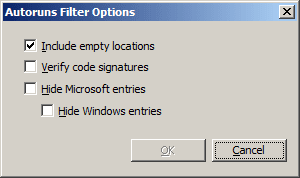
Once you locate the file, you might try Autoruns to see what is launching it. Maybe it is a scheduled task or maybe the file is started another way. If you set the filters in Autoruns to look like this...
autoruns.png
...then you might be amazed at how many places there are to start a file from.

(Use Options > Filter Options... to get to the screen shown above.)
 

My Computer My Computer

At a glance

W7 Pro SP1 64biti78GBIntel HD Graphics
Computer type
Laptop
Computer Manufacturer/Model Number
Employer provided Dell Latitude
OS
W7 Pro SP1 64bit
CPU
i7
Memory
8GB
Graphics Card(s)
Intel HD Graphics
Hard Drives
crappy SSD
Antivirus
Employer mandated Symantec Endpoint Protection
Browser
Pale Moon 64bit, IE11 64bit & Chrome 64bit
Yes, I just re-read the OP. I had not actually got very far through the log before starting a diagnosis. Certainly looks like a malware issue!

I couldnt actually connect to the server though. Got a few unsafe port errors and timeouts on port 21
 

My Computer My Computer

At a glance

Windows 7 Ultimate x64Intel Core2 Quad Q8300 2.5GhzKingston HyperX 4x1GB DDR2 1066MhzAsus/Nvidia 9500GT 1GB
Computer type
PC/Desktop
Computer Manufacturer/Model Number
Self Build
OS
Windows 7 Ultimate x64
CPU
Intel Core2 Quad Q8300 2.5Ghz
Motherboard
Asus P5QD Turbo
Memory
Kingston HyperX 4x1GB DDR2 1066Mhz
Graphics Card(s)
Asus/Nvidia 9500GT 1GB
Sound Card
On-Board HD
Monitor(s) Displays
22" Widescreen TFT
Screen Resolution
1920x1080
Hard Drives
2x 320Gb Seagate SATAII RAID 0
2x 80Gb Seagate SATAII RAID 0
1x 1tb hybrid (8gb ssd)
PSU
650w
Case
ATX
Cooling
140mm front, 120mm Rear, 80mm Chipset + stock CPU and GPU
Keyboard
Plastic one
Mouse
Plastic one
Internet Speed
4Mbps
Other Info
Laptop: HP Elitebook 2560p
i5 @2.7Ghz 4GB DDR3
Yes, I just re-read the OP. I had not actually got very far through the log before starting a diagnosis. Certainly looks like a malware issue!

I couldnt actually connect to the server though. Got a few unsafe port errors and timeouts on port 21
I should have mentioned that I am NOT encouraging people to go searching for more info on this, but (before I posted in this thread) I did manage to locate a security related website that linked the IP shown in the OP to a URL. The security website called the URL unsafe.

That unsafe URL now resolves to a new IP address. I was able to FTP to that new IP, but I could not authenticate.

Again, don't try this at home (or at work :-)
 

My Computer My Computer

At a glance

W7 Pro SP1 64biti78GBIntel HD Graphics
Computer type
Laptop
Computer Manufacturer/Model Number
Employer provided Dell Latitude
OS
W7 Pro SP1 64bit
CPU
i7
Memory
8GB
Graphics Card(s)
Intel HD Graphics
Hard Drives
crappy SSD
Antivirus
Employer mandated Symantec Endpoint Protection
Browser
Pale Moon 64bit, IE11 64bit & Chrome 64bit
I should have mentioned that I am NOT encouraging people to go searching for more info on this, but (before I posted in this thread) I did manage to locate a security related website that linked the IP shown in the OP to a URL. The security website called the URL unsafe.

That unsafe URL now resolves to a new IP address. I was able to FTP to that new IP, but I could not authenticate.

Again, don't try this at home (or at work :-)

Lol I didn't sam spade it :)

un and pwd appear to be 123 123
 

My Computer My Computer

At a glance

Windows 7 Ultimate x64Intel Core2 Quad Q8300 2.5GhzKingston HyperX 4x1GB DDR2 1066MhzAsus/Nvidia 9500GT 1GB
Computer type
PC/Desktop
Computer Manufacturer/Model Number
Self Build
OS
Windows 7 Ultimate x64
CPU
Intel Core2 Quad Q8300 2.5Ghz
Motherboard
Asus P5QD Turbo
Memory
Kingston HyperX 4x1GB DDR2 1066Mhz
Graphics Card(s)
Asus/Nvidia 9500GT 1GB
Sound Card
On-Board HD
Monitor(s) Displays
22" Widescreen TFT
Screen Resolution
1920x1080
Hard Drives
2x 320Gb Seagate SATAII RAID 0
2x 80Gb Seagate SATAII RAID 0
1x 1tb hybrid (8gb ssd)
PSU
650w
Case
ATX
Cooling
140mm front, 120mm Rear, 80mm Chipset + stock CPU and GPU
Keyboard
Plastic one
Mouse
Plastic one
Internet Speed
4Mbps
Other Info
Laptop: HP Elitebook 2560p
i5 @2.7Ghz 4GB DDR3
Kaktussoft said:
Same problem in clean startup? Revert to normal boot after testing!
Hey, I did the clean startup like you said and the cmd window didnt appear!:D I think some startup program is attempting to do that.

Kaktussoft said:
A file called FilesFound_C.txt will be created in same folder. Script runs a long time!! Post FilesFound_C.txt please. It will contain all txt,vbs,cmd,bat files on C:\ with text "116.255.163.41" in it
I followed your steps. I've attached the FileFound_C.txt.

chev65 said:
Open an elevated command prompt then Type netsh winsock reset then click ok. Restart machine.
Hey, I tried that but it didn't work.

"chev65 said:
You should also have the option of using system restore to take your system back to a point in time before the problem occurred. :)

System Restore
I didn't do that because I would lose programs I've installed recently.

@UsernameIssues: I'll tell you what exactly happened(I don't know how I forgot to mention this).
Everything was fine and then suddenly lot of system profiles appeared automatically with weird name(random nos., $system,etc). I immediately deleted all those profiles. And after this incident this cmd started appearing. Did someone hack my PC?

Thanks everyone for your help:D
 

Attachments

My Computer My Computer

At a glance

Windows 7 32 bit
Computer type
PC/Desktop
OS
Windows 7 32 bit
The warning not to go searching for more info was meant more for non-forum members that find this thread via search engines. My hope is that forum members already know not to do that.

I (perhaps foolishly) searched for more info using a frozen VM that is the only computer on its isolated subnet. The VM is behind 3 NATs, each with different levels of security turned on. And I used two levels of web proxy services to render the web pages. Each proxy service is setup to filter out certain types of junk. In other words, I just wanted to see the text on the websites. I did not want the websites sending me malware.

I did try 123 and 123 but that did not work. There is a lot more that I could say about this malware because so much of what it seems to be doing does not make much sense. But we don't want to document "how to build a better bot" in these forums.

If this file is malware, it is pretty clumsy. There is a chance that this is not malware per se. There is a chance that it is a joke that was placed on the OP's computer for "fun".

@OP,
What antivirus tool are you using?
 

My Computer My Computer

At a glance

W7 Pro SP1 64biti78GBIntel HD Graphics
Computer type
Laptop
Computer Manufacturer/Model Number
Employer provided Dell Latitude
OS
W7 Pro SP1 64bit
CPU
i7
Memory
8GB
Graphics Card(s)
Intel HD Graphics
Hard Drives
crappy SSD
Antivirus
Employer mandated Symantec Endpoint Protection
Browser
Pale Moon 64bit, IE11 64bit & Chrome 64bit
~~~
Did someone hack my PC?
~~~
I see from the file that you attached that you have Norton Antivirus. Which Norton product do you have?

Do you have more than one antivirus tool installed?

Has ESET6 ever been installed on this computer? It can make user profiles with random names. I am not talking about ESET's online scanner.

Hopefully Kaktussoft will stop by soon to help you with the file you attached.
 

My Computer My Computer

At a glance

W7 Pro SP1 64biti78GBIntel HD Graphics
Computer type
Laptop
Computer Manufacturer/Model Number
Employer provided Dell Latitude
OS
W7 Pro SP1 64bit
CPU
i7
Memory
8GB
Graphics Card(s)
Intel HD Graphics
Hard Drives
crappy SSD
Antivirus
Employer mandated Symantec Endpoint Protection
Browser
Pale Moon 64bit, IE11 64bit & Chrome 64bit
Kaktussoft said:
Same problem in clean startup? Revert to normal boot after testing!
Hey, I did the clean startup like you said and the cmd window didnt appear!:D I think some startup program is attempting to do that.

Kaktussoft said:
A file called FilesFound_C.txt will be created in same folder. Script runs a long time!! Post FilesFound_C.txt please. It will contain all txt,vbs,cmd,bat files on C:\ with text "116.255.163.41" in it
I followed your steps. I've attached the FileFound_C.txt.

chev65 said:
Open an elevated command prompt then Type netsh winsock reset then click ok. Restart machine.
Hey, I tried that but it didn't work.

"chev65 said:
You should also have the option of using system restore to take your system back to a point in time before the problem occurred. :)

System Restore
I didn't do that because I would lose programs I've installed recently.

@UsernameIssues: I'll tell you what exactly happened(I don't know how I forgot to mention this).
Everything was fine and then suddenly lot of system profiles appeared automatically with weird name(random nos., $system,etc). I immediately deleted all those profiles. And after this incident this cmd started appearing. Did someone hack my PC?

Thanks everyone for your help:D
As you can see in output file.... I want C:\Windows\System32\cmd.txt (5/4/2013 8:19:26 PM 59) and C:\Program Files\Symantec\Norton Utilities 16\sMonitor\PCTProcess.txt (5/16/2013 10:39:43 PM 7,558)

post both files

Also search whole registry (using regedit) for strings PCTProcess.txt and cmd.txt. Found it?
 

My Computer My Computer

At a glance

Microsoft Windows 7 Home Premium 64-bits 7601...Intel(R) Core(TM) i3 CPU M 370 @ 2.40GHz4,00 GBATI Mobility Radeon HD 5400 Series
Computer type
Laptop
Computer Manufacturer/Model Number
ACER ASPIRE 5742G
OS
Microsoft Windows 7 Home Premium 64-bits 7601 Multiprocessor Free Service Pack 1
CPU
Intel(R) Core(TM) i3 CPU M 370 @ 2.40GHz
Motherboard
Acer Aspire 5742G
Memory
4,00 GB
Graphics Card(s)
ATI Mobility Radeon HD 5400 Series
Sound Card
(1) AMD High Definition Audio Device (2) Realtek High Defi
Screen Resolution
1366 x 768 x 32 bits (4294967296 colors) @ 60 Hz
Hard Drives
WDC WD5000BEVT-22ZAT0
Logoff on logon again. cmd popup appears? If so disable Norton Utilities 16. logoff and logon again. cmd popup appears?
 

My Computer My Computer

At a glance

Microsoft Windows 7 Home Premium 64-bits 7601...Intel(R) Core(TM) i3 CPU M 370 @ 2.40GHz4,00 GBATI Mobility Radeon HD 5400 Series
Computer type
Laptop
Computer Manufacturer/Model Number
ACER ASPIRE 5742G
OS
Microsoft Windows 7 Home Premium 64-bits 7601 Multiprocessor Free Service Pack 1
CPU
Intel(R) Core(TM) i3 CPU M 370 @ 2.40GHz
Motherboard
Acer Aspire 5742G
Memory
4,00 GB
Graphics Card(s)
ATI Mobility Radeon HD 5400 Series
Sound Card
(1) AMD High Definition Audio Device (2) Realtek High Defi
Screen Resolution
1366 x 768 x 32 bits (4294967296 colors) @ 60 Hz
Hard Drives
WDC WD5000BEVT-22ZAT0
Back
Top