Solved How to use the OEM reserved from another drive?

adriansam

New member
Member
Local time
5:39 PM
Messages
69
Location
Tanza, Cavite
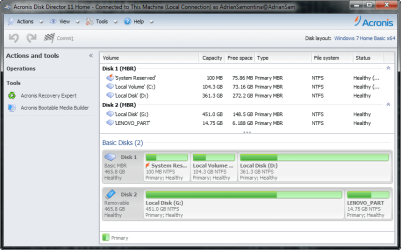
268466d1368816327-how-use-oem-reserved-another-drive-2013-05-18_024410.png

The Disk 2 is the HDD of my laptop before

This disk has bad sectors, cannot install windows, but can be use for storage
thats why I ask TECHNICIAN to make this HDD to External HDD (They call it "ENCLOSURE")

The Problem is the DRIVERS, PREINSTALLED SOFTWARE, etc is on the "LENOVO_PART" DISK
What should I do to use it?
Will this RECOVERY work if I burn it into a DVD?
This is what I want to happen How to use the pre-boot service partition to recover your software
but how can i do this if the recovery is on another drive?
PLEASE HELP ME.
 

Attachments

  • 2013-05-18_024410.png
    2013-05-18_024410.png
    48.7 KB · Views: 32
Last edited:

My Computer My Computer

At a glance

Microsoft Windows 7 Ultimate 64-bitIntel(R) Core(TM) i3 CPU M 370 @ 2.40GHz465.76 GBIntel(R) HD Graphics
Computer type
Laptop
Computer Manufacturer/Model Number
Lenovo
OS
Microsoft Windows 7 Ultimate 64-bit
CPU
Intel(R) Core(TM) i3 CPU M 370 @ 2.40GHz
Motherboard
LENOVO Base Board Product Name
Memory
465.76 GB
Graphics Card(s)
Intel(R) HD Graphics
Sound Card
(1) High Definition Audio Device (2) High Definition Audio
Hard Drives
(1) ST9500325AS
If a disk has bad sectors it is faulty! Internal or outside in enclosure... still bad sectors and faulty!
 

My Computer My Computer

At a glance

Microsoft Windows 7 Home Premium 64-bits 7601...Intel(R) Core(TM) i3 CPU M 370 @ 2.40GHz4,00 GBATI Mobility Radeon HD 5400 Series
Computer type
Laptop
Computer Manufacturer/Model Number
ACER ASPIRE 5742G
OS
Microsoft Windows 7 Home Premium 64-bits 7601 Multiprocessor Free Service Pack 1
CPU
Intel(R) Core(TM) i3 CPU M 370 @ 2.40GHz
Motherboard
Acer Aspire 5742G
Memory
4,00 GB
Graphics Card(s)
ATI Mobility Radeon HD 5400 Series
Sound Card
(1) AMD High Definition Audio Device (2) Realtek High Defi
Screen Resolution
1366 x 768 x 32 bits (4294967296 colors) @ 60 Hz
Hard Drives
WDC WD5000BEVT-22ZAT0
Is windows running fine now?
Is win7 activated?
Check device manager for "other devices". Correct "display adapter" installed?

Do you really need the stupid bloatware from recovery partition?

Not an answer to your question, but I need to know it. I can give you a better answer later
 

My Computer My Computer

At a glance

Microsoft Windows 7 Home Premium 64-bits 7601...Intel(R) Core(TM) i3 CPU M 370 @ 2.40GHz4,00 GBATI Mobility Radeon HD 5400 Series
Computer type
Laptop
Computer Manufacturer/Model Number
ACER ASPIRE 5742G
OS
Microsoft Windows 7 Home Premium 64-bits 7601 Multiprocessor Free Service Pack 1
CPU
Intel(R) Core(TM) i3 CPU M 370 @ 2.40GHz
Motherboard
Acer Aspire 5742G
Memory
4,00 GB
Graphics Card(s)
ATI Mobility Radeon HD 5400 Series
Sound Card
(1) AMD High Definition Audio Device (2) Realtek High Defi
Screen Resolution
1366 x 768 x 32 bits (4294967296 colors) @ 60 Hz
Hard Drives
WDC WD5000BEVT-22ZAT0
Why did the techinician not clone old HDD to the new HDD?
 

My Computer My Computer

At a glance

ME/XP/Vista/Win7
OS
ME/XP/Vista/Win7
Is windows running fine now?
Is win7 activated?
Check device manager for "other devices". Correct "display adapter" installed?

Do you really need the stupid bloatware from recovery partition?

Not an answer to your question, but I need to know it. I can give you a better answer later

My windows is fine but my prevoius OS was better than this because when starting UP
Instead of "Welcome" theres a message before it "Please Wait"
and when I open a program It will hang for few seconds.
I dont know if this cause by new HDD or Drivers.
My windows is activated, GENUINE.
 

My Computer My Computer

At a glance

Microsoft Windows 7 Ultimate 64-bitIntel(R) Core(TM) i3 CPU M 370 @ 2.40GHz465.76 GBIntel(R) HD Graphics
Computer type
Laptop
Computer Manufacturer/Model Number
Lenovo
OS
Microsoft Windows 7 Ultimate 64-bit
CPU
Intel(R) Core(TM) i3 CPU M 370 @ 2.40GHz
Motherboard
LENOVO Base Board Product Name
Memory
465.76 GB
Graphics Card(s)
Intel(R) HD Graphics
Sound Card
(1) High Definition Audio Device (2) High Definition Audio
Hard Drives
(1) ST9500325AS
Why did the techinician not clone old HDD to the new HDD?

He said that IT TAKES TOO MUCH TIME
my HDD is about 400GB and we are not sure if the files are good maybe it has viruses that can corrupt thw new HDD
 

My Computer My Computer

At a glance

Microsoft Windows 7 Ultimate 64-bitIntel(R) Core(TM) i3 CPU M 370 @ 2.40GHz465.76 GBIntel(R) HD Graphics
Computer type
Laptop
Computer Manufacturer/Model Number
Lenovo
OS
Microsoft Windows 7 Ultimate 64-bit
CPU
Intel(R) Core(TM) i3 CPU M 370 @ 2.40GHz
Motherboard
LENOVO Base Board Product Name
Memory
465.76 GB
Graphics Card(s)
Intel(R) HD Graphics
Sound Card
(1) High Definition Audio Device (2) High Definition Audio
Hard Drives
(1) ST9500325AS
Do you have backups of all important data? So you really want a "factory restore"?
 

My Computer My Computer

At a glance

Microsoft Windows 7 Home Premium 64-bits 7601...Intel(R) Core(TM) i3 CPU M 370 @ 2.40GHz4,00 GBATI Mobility Radeon HD 5400 Series
Computer type
Laptop
Computer Manufacturer/Model Number
ACER ASPIRE 5742G
OS
Microsoft Windows 7 Home Premium 64-bits 7601 Multiprocessor Free Service Pack 1
CPU
Intel(R) Core(TM) i3 CPU M 370 @ 2.40GHz
Motherboard
Acer Aspire 5742G
Memory
4,00 GB
Graphics Card(s)
ATI Mobility Radeon HD 5400 Series
Sound Card
(1) AMD High Definition Audio Device (2) Realtek High Defi
Screen Resolution
1366 x 768 x 32 bits (4294967296 colors) @ 60 Hz
Hard Drives
WDC WD5000BEVT-22ZAT0
Did you make the Lenovo Recovery DVD's?

Lenovo said:
Before the Recovery Process


Note:
» If you are using this recovery disc set to restore the contents of your hard disk drive to a factory-installed Windows 7 installation (including the Windows 7 operating system, applications, and drivers), go to Performing the recovery process for Windows 7 section below.

If your computer is preinstalled with the Windows 8 Pro (64-bit) operating system and you want to convert your operating system to the Windows 7 operating system using this recovery disc set, do the following before you start the recovery process:
1.Repeatedly press and release the F1 key when turning on the computer. When you hear multiple beeps or see a logo screen, release the F1 key. The Setup Utility program opens.
2.From the Setup Utility program main menu, select Exit or Restart, and then select OS Optimized Defaults > Disabled.
3.Select Yes and press Enter in the window displayed to confirm your selection.
4.Do one of the following: » If you are using a ThinkPad or Lenovo V,B,K, or E series notebook computer, press F9, select Yes on the Setup Confirmation Window to confirm, and press Enter.
» If you are using a ThinkCentre or ThinkStation desktop computer, continue with Performing the recovery process for Windows 7.

5.Press F10 to save your changes and exit the Setup Utility program.
6.Continue with Performing the recovery process for Windows 7 below.


Performing the recovery process for Windows 7


Notes:
» You must have an internal or external DVD drive to use the recovery discs.
» During the recovery process, all data on the hard disk drive will be deleted. Copy any important data or personal files that you want to keep onto removable media or a network drive before you start the recovery process.

To restore your computer to the original factory configuration using the recovery disc set, do the following:
1.Make the CD/DVD drive the first startup device in the startup sequence using the following procedure:
» Repeatedly press and release the F1 key when turning on the computer. When you hear multiple beeps or see a logo screen, release the F1 key. The Setup Utility program opens.
» Use the arrow keys to select Startup. Depending on your computer model, select Primary Boot Sequence, Boot, or Startup Sequence.
» Select the CD/DVD drive as the first boot device by following the instructions and the help messages on the screen.

2.Insert the Applications and Drivers Recovery Disc into the DVD drive.
3.Press F10 to save the Setup Utility configuration changes. The computer restarts and the recovery program opens. Follow the instructions on the screen to begin the recovery process.
4.Select your language and click Next.
5.Read the license. If you agree to the terms and conditions, select I agree to these terms and conditions and then click Next. If you do not agree to the terms and conditions, follow the instructions on the screen.
6. Click Yes or Next in the displayed window to continue the recovery process.
7. If you have a secondary Applications and Drivers Recovery Disc, insert it into the DVD drive when prompted and then click Yes or OK to continue the recovery process.
8.Insert the Operating System Recovery Disc when prompted and then click Yes or OK to continue the recovery process.
9. If you have a Supplemental Recovery Disc, insert it when prompted and click Yes. If you do not have a Supplemental Recovery Disc, click No. » Note: Not all recovery disc sets come with a Supplemental Recovery Disc.

10.When all of the data has been copied from the last disc in the set and processed, you will be prompted to restart the computer. Click Yes to restart the computer. » Note: The rest of the recovery process is fully automated and no action is required by you. The computer will restart into the Microsoft Windows desktop several timesand you might experience periods when no activity is apparent on the screen for several minutes at a time. This is normal.

11. When the recovery process is complete, the Set Up Windows screen is displayed. Follow the instructions on the screen to complete the Windows setup.
12.After you have completed the Windows setup, you might want to restore the original startup sequence. Start the Setup Utility program and then use the arrow keys to select Startup. Depending on your computer model, select Primary Boot Sequence, Boot, or Startup Sequence. Then restore the original startup sequence. Press F10 to save and exit the Setup Utility program.

Note:
» After restoring a hard disk drive to the factory default settings, you might need to reinstall some device drivers.

 

My Computer My Computer

At a glance

ME/XP/Vista/Win7
OS
ME/XP/Vista/Win7
Do you have backups of all important data? So you really want a "factory restore"?
Exactly, but I dont know how to do it because the Recovery Files is on the External HDD


Did you make the Lenovo Recovery DVD's?
Unfortunately, No because I dont know how to do it
The OEM Drive is not visible when you are running windows Its only visible when you are going to install OS
But through Acronis I can see the files inside this drive but cannot use
 

My Computer My Computer

At a glance

Microsoft Windows 7 Ultimate 64-bitIntel(R) Core(TM) i3 CPU M 370 @ 2.40GHz465.76 GBIntel(R) HD Graphics
Computer type
Laptop
Computer Manufacturer/Model Number
Lenovo
OS
Microsoft Windows 7 Ultimate 64-bit
CPU
Intel(R) Core(TM) i3 CPU M 370 @ 2.40GHz
Motherboard
LENOVO Base Board Product Name
Memory
465.76 GB
Graphics Card(s)
Intel(R) HD Graphics
Sound Card
(1) High Definition Audio Device (2) High Definition Audio
Hard Drives
(1) ST9500325AS
Do you have backups of all important data? So you really want a "factory restore"?
Exactly, but I dont know how to do it because the Recovery Files is on the External HDD


Did you make the Lenovo Recovery DVD's?
Unfortunately, No because I dont know how to do it
The OEM Drive is not visible when you are running windows Its only visible when you are going to install OS
But through Acronis I can see the files inside this drive but cannot use
Did you make backup of EVERYTHING of new disk already?
Assign a drive letter to LENOVO_PART using disk management. In this exmaple I use Y as drive letter http://www.sevenforums.com/tutorials/82994-drive-letter-add-change-remove-windows-7-a.html

In http://www.sevenforums.com/tutorials/783-elevated-command-prompt.html
Code:
dir/s y:\  >c:\dir.txt
dir/s/ah  y:\  >>c:\dir.txt
Post file c:\dir.txt. You may delete that file afterwards
 

My Computer My Computer

At a glance

Microsoft Windows 7 Home Premium 64-bits 7601...Intel(R) Core(TM) i3 CPU M 370 @ 2.40GHz4,00 GBATI Mobility Radeon HD 5400 Series
Computer type
Laptop
Computer Manufacturer/Model Number
ACER ASPIRE 5742G
OS
Microsoft Windows 7 Home Premium 64-bits 7601 Multiprocessor Free Service Pack 1
CPU
Intel(R) Core(TM) i3 CPU M 370 @ 2.40GHz
Motherboard
Acer Aspire 5742G
Memory
4,00 GB
Graphics Card(s)
ATI Mobility Radeon HD 5400 Series
Sound Card
(1) AMD High Definition Audio Device (2) Realtek High Defi
Screen Resolution
1366 x 768 x 32 bits (4294967296 colors) @ 60 Hz
Hard Drives
WDC WD5000BEVT-22ZAT0
Do you have backups of all important data? So you really want a "factory restore"?
Exactly, but I dont know how to do it because the Recovery Files is on the External HDD


Did you make the Lenovo Recovery DVD's?
Unfortunately, No because I dont know how to do it
The OEM Drive is not visible when you are running windows Its only visible when you are going to install OS
But through Acronis I can see the files inside this drive but cannot use
Did you make backup of EVERYTHING of new disk already?
Assign a drive letter to LENOVO_PART using disk management. In this exmaple I use Y as drive letter http://www.sevenforums.com/tutorials/82994-drive-letter-add-change-remove-windows-7-a.html

In http://www.sevenforums.com/tutorials/783-elevated-command-prompt.html
Code:
dir/s y:\  >c:\dir.txt
dir/s/ah  y:\  >>c:\dir.txt
Post file c:\dir.txt. You may delete that file afterwards

I already assign a letter to this drive before
when I try to copy the files from LENOVO_PART not all files have been copied
and the letter will gone after few minutes
 

My Computer My Computer

At a glance

Microsoft Windows 7 Ultimate 64-bitIntel(R) Core(TM) i3 CPU M 370 @ 2.40GHz465.76 GBIntel(R) HD Graphics
Computer type
Laptop
Computer Manufacturer/Model Number
Lenovo
OS
Microsoft Windows 7 Ultimate 64-bit
CPU
Intel(R) Core(TM) i3 CPU M 370 @ 2.40GHz
Motherboard
LENOVO Base Board Product Name
Memory
465.76 GB
Graphics Card(s)
Intel(R) HD Graphics
Sound Card
(1) High Definition Audio Device (2) High Definition Audio
Hard Drives
(1) ST9500325AS
Exactly, but I dont know how to do it because the Recovery Files is on the External HDD


Unfortunately, No because I dont know how to do it
The OEM Drive is not visible when you are running windows Its only visible when you are going to install OS
But through Acronis I can see the files inside this drive but cannot use
Did you make backup of EVERYTHING of new disk already?
Assign a drive letter to LENOVO_PART using disk management. In this exmaple I use Y as drive letter http://www.sevenforums.com/tutorials/82994-drive-letter-add-change-remove-windows-7-a.html

In http://www.sevenforums.com/tutorials/783-elevated-command-prompt.html
Code:
dir/s y:\  >c:\dir.txt
dir/s/ah  y:\  >>c:\dir.txt
Post file c:\dir.txt. You may delete that file afterwards

I already assign a letter to this drive before
when I try to copy the files from LENOVO_PART not all files have been copied
and the letter will gone after few minutes
drive letter gone after few minutes.... strange.
I didn't ask you to copy. Just give the file/folder listing please
 

My Computer My Computer

At a glance

Microsoft Windows 7 Home Premium 64-bits 7601...Intel(R) Core(TM) i3 CPU M 370 @ 2.40GHz4,00 GBATI Mobility Radeon HD 5400 Series
Computer type
Laptop
Computer Manufacturer/Model Number
ACER ASPIRE 5742G
OS
Microsoft Windows 7 Home Premium 64-bits 7601 Multiprocessor Free Service Pack 1
CPU
Intel(R) Core(TM) i3 CPU M 370 @ 2.40GHz
Motherboard
Acer Aspire 5742G
Memory
4,00 GB
Graphics Card(s)
ATI Mobility Radeon HD 5400 Series
Sound Card
(1) AMD High Definition Audio Device (2) Realtek High Defi
Screen Resolution
1366 x 768 x 32 bits (4294967296 colors) @ 60 Hz
Hard Drives
WDC WD5000BEVT-22ZAT0
Why not simple clone external disk to internal disk? And do the factory recovery from NEW disk afterwards. Be sure to make a good clone!
 

My Computer My Computer

At a glance

Microsoft Windows 7 Home Premium 64-bits 7601...Intel(R) Core(TM) i3 CPU M 370 @ 2.40GHz4,00 GBATI Mobility Radeon HD 5400 Series
Computer type
Laptop
Computer Manufacturer/Model Number
ACER ASPIRE 5742G
OS
Microsoft Windows 7 Home Premium 64-bits 7601 Multiprocessor Free Service Pack 1
CPU
Intel(R) Core(TM) i3 CPU M 370 @ 2.40GHz
Motherboard
Acer Aspire 5742G
Memory
4,00 GB
Graphics Card(s)
ATI Mobility Radeon HD 5400 Series
Sound Card
(1) AMD High Definition Audio Device (2) Realtek High Defi
Screen Resolution
1366 x 768 x 32 bits (4294967296 colors) @ 60 Hz
Hard Drives
WDC WD5000BEVT-22ZAT0
Why not simple clone external disk to internal disk? And do the factory recovery from NEW disk afterwards. Be sure to make a good clone!

What program will I use?Acronis?

To be honest, i havent tried this kind of recovery but I want to know it.
 

My Computer My Computer

At a glance

Microsoft Windows 7 Ultimate 64-bitIntel(R) Core(TM) i3 CPU M 370 @ 2.40GHz465.76 GBIntel(R) HD Graphics
Computer type
Laptop
Computer Manufacturer/Model Number
Lenovo
OS
Microsoft Windows 7 Ultimate 64-bit
CPU
Intel(R) Core(TM) i3 CPU M 370 @ 2.40GHz
Motherboard
LENOVO Base Board Product Name
Memory
465.76 GB
Graphics Card(s)
Intel(R) HD Graphics
Sound Card
(1) High Definition Audio Device (2) High Definition Audio
Hard Drives
(1) ST9500325AS
Why not simple clone external disk to internal disk? And do the factory recovery from NEW disk afterwards. Be sure to make a good clone!

What program will I use?Acronis?

To be honest, i havent tried this kind of recovery but I want to know it.
First make a backup image of NEW disk! http://www.sevenforums.com/tutorials/73828-imaging-free-macrium.html

You can clone with that software as well. Clone with winpe version, also listed on the tutorial.

But I thought the old disk was faulty???????!!!
 

My Computer My Computer

At a glance

Microsoft Windows 7 Home Premium 64-bits 7601...Intel(R) Core(TM) i3 CPU M 370 @ 2.40GHz4,00 GBATI Mobility Radeon HD 5400 Series
Computer type
Laptop
Computer Manufacturer/Model Number
ACER ASPIRE 5742G
OS
Microsoft Windows 7 Home Premium 64-bits 7601 Multiprocessor Free Service Pack 1
CPU
Intel(R) Core(TM) i3 CPU M 370 @ 2.40GHz
Motherboard
Acer Aspire 5742G
Memory
4,00 GB
Graphics Card(s)
ATI Mobility Radeon HD 5400 Series
Sound Card
(1) AMD High Definition Audio Device (2) Realtek High Defi
Screen Resolution
1366 x 768 x 32 bits (4294967296 colors) @ 60 Hz
Hard Drives
WDC WD5000BEVT-22ZAT0
why not simple clone external disk to internal disk? And do the factory recovery from new disk afterwards. Be sure to make a good clone!

what program will i use?acronis?

To be honest, i havent tried this kind of recovery but i want to know it.
first make a backup image of new disk! http://www.sevenforums.com/tutorials/73828-imaging-free-macrium.html

you can clone with that software as well. Clone with winpe version, also listed on the tutorial.

But i thought the old disk was faulty???????!!!

thanks for the help,
 

My Computer My Computer

At a glance

Microsoft Windows 7 Ultimate 64-bitIntel(R) Core(TM) i3 CPU M 370 @ 2.40GHz465.76 GBIntel(R) HD Graphics
Computer type
Laptop
Computer Manufacturer/Model Number
Lenovo
OS
Microsoft Windows 7 Ultimate 64-bit
CPU
Intel(R) Core(TM) i3 CPU M 370 @ 2.40GHz
Motherboard
LENOVO Base Board Product Name
Memory
465.76 GB
Graphics Card(s)
Intel(R) HD Graphics
Sound Card
(1) High Definition Audio Device (2) High Definition Audio
Hard Drives
(1) ST9500325AS
Back
Top