Laptop automatically starts-up, even though I don't want it to

@mach04 : I've tried the command. It doesn't show any device.
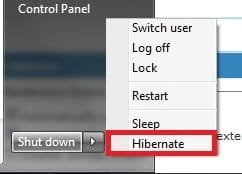
@Kaktussoft : Only hibernate, I don't even leave the laptop in sleep mode over night.
@taraskyn : I don't have any device linked to the laptop besides a wireless mouse.
Pull out network cable and test again. Most other replies in this thread are referring to sleep mode (not hibernate). Same problem after normal shutdown I assume?

  • Does computer boot after simple key press? (power on on key press)
  • Does computer boot after simple mouse click?
  • Wake-On-Lan? Simply detach the network cable to test
  • BIOS timer set to power on on that time?
 

My Computer My Computer

At a glance

Microsoft Windows 7 Home Premium 64-bits 7601...Intel(R) Core(TM) i3 CPU M 370 @ 2.40GHz4,00 GBATI Mobility Radeon HD 5400 Series
Computer type
Laptop
Computer Manufacturer/Model Number
ACER ASPIRE 5742G
OS
Microsoft Windows 7 Home Premium 64-bits 7601 Multiprocessor Free Service Pack 1
CPU
Intel(R) Core(TM) i3 CPU M 370 @ 2.40GHz
Motherboard
Acer Aspire 5742G
Memory
4,00 GB
Graphics Card(s)
ATI Mobility Radeon HD 5400 Series
Sound Card
(1) AMD High Definition Audio Device (2) Realtek High Defi
Screen Resolution
1366 x 768 x 32 bits (4294967296 colors) @ 60 Hz
Hard Drives
WDC WD5000BEVT-22ZAT0

My Computer My Computer

At a glance

Microsoft Windows 7 Home Premium 64-bits 7601...Intel(R) Core(TM) i3 CPU M 370 @ 2.40GHz4,00 GBATI Mobility Radeon HD 5400 Series
Computer type
Laptop
Computer Manufacturer/Model Number
ACER ASPIRE 5742G
OS
Microsoft Windows 7 Home Premium 64-bits 7601 Multiprocessor Free Service Pack 1
CPU
Intel(R) Core(TM) i3 CPU M 370 @ 2.40GHz
Motherboard
Acer Aspire 5742G
Memory
4,00 GB
Graphics Card(s)
ATI Mobility Radeon HD 5400 Series
Sound Card
(1) AMD High Definition Audio Device (2) Realtek High Defi
Screen Resolution
1366 x 768 x 32 bits (4294967296 colors) @ 60 Hz
Hard Drives
WDC WD5000BEVT-22ZAT0

My Computer My Computer

At a glance

Windows 7 Home Premium x64, Windows 8 Proi5-2430M8 GbnVidia GeForce 610M
Computer type
Laptop
Computer Manufacturer/Model Number
Acer Aspire 5750G
OS
Windows 7 Home Premium x64, Windows 8 Pro
CPU
i5-2430M
Motherboard
Acer JE50_HR
Memory
8 Gb
Graphics Card(s)
nVidia GeForce 610M
Sound Card
Realtek High Definition Audio
Antivirus
Avast
Browser
Chrome
Sorry again for responding so late!

@Kaktussoft : As I stated before, I have no option in the BIOS regarding power management, see the post on page 2. Also, I've tried disconnecting the network cable and it still powers on. Can the fact that I leave the Wi-Fi always on have something to do with the problem? I leave it on because, when it's powered, I make my laptop a hotspot using Connectify.

@mach04 : My laptop doesn't have that option. You can see it in the screenshot.
 

Attachments

  • rapid wake.jpg
    rapid wake.jpg
    48.2 KB · Views: 3

My Computer My Computer

At a glance

Microsoft Windows 7 Ultimate 64-bitIntel(R) Core(TM) i5 CPU 3230M @ 2.53GHz8,00 GB DDR3@1600MhznVidia GT730M
Computer type
Laptop
Computer Manufacturer/Model Number
Acer
OS
Microsoft Windows 7 Ultimate 64-bit
CPU
Intel(R) Core(TM) i5 CPU 3230M @ 2.53GHz
Motherboard
Sony Corporation Base Board VAIO
Memory
8,00 GB DDR3@1600Mhz
Graphics Card(s)
nVidia GT730M
Screen Resolution
1920 x 1080
it automatically starts-up at about 11:30 - 11:40 (AM) in the morning
Really every day at same time? Only after hibernate.... not after normal shutdown?
 

My Computer My Computer

At a glance

Microsoft Windows 7 Home Premium 64-bits 7601...Intel(R) Core(TM) i3 CPU M 370 @ 2.40GHz4,00 GBATI Mobility Radeon HD 5400 Series
Computer type
Laptop
Computer Manufacturer/Model Number
ACER ASPIRE 5742G
OS
Microsoft Windows 7 Home Premium 64-bits 7601 Multiprocessor Free Service Pack 1
CPU
Intel(R) Core(TM) i3 CPU M 370 @ 2.40GHz
Motherboard
Acer Aspire 5742G
Memory
4,00 GB
Graphics Card(s)
ATI Mobility Radeon HD 5400 Series
Sound Card
(1) AMD High Definition Audio Device (2) Realtek High Defi
Screen Resolution
1366 x 768 x 32 bits (4294967296 colors) @ 60 Hz
Hard Drives
WDC WD5000BEVT-22ZAT0
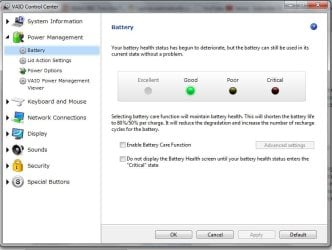
Have a more look in that VAIO control center, look at the settings of each to see if it is set to do a certain task while the laptop is in hibernate or sleep.
Is it possible to deactivate the whole VAIO control center without causing any trouble for your laptop performance? In this way you can determine if this is the culprit.
 

My Computer My Computer

At a glance

Windows 7 Home Premium x64, Windows 8 Proi5-2430M8 GbnVidia GeForce 610M
Computer type
Laptop
Computer Manufacturer/Model Number
Acer Aspire 5750G
OS
Windows 7 Home Premium x64, Windows 8 Pro
CPU
i5-2430M
Motherboard
Acer JE50_HR
Memory
8 Gb
Graphics Card(s)
nVidia GeForce 610M
Sound Card
Realtek High Definition Audio
Antivirus
Avast
Browser
Chrome
@Kaktussoft : Yes, everyday after I leave it in hibernate mode. It doesn't turn on after shut down, only after hibernate. And yes, at the same time, around 11:30-12:00. I can attach an Event Viewer log, if it helps you determine the cause...
@mach04 : I've looked in the VAIO Control Center and VAIO Care. There's nothing related to the problem.
 

My Computer My Computer

At a glance

Microsoft Windows 7 Ultimate 64-bitIntel(R) Core(TM) i5 CPU 3230M @ 2.53GHz8,00 GB DDR3@1600MhznVidia GT730M
Computer type
Laptop
Computer Manufacturer/Model Number
Acer
OS
Microsoft Windows 7 Ultimate 64-bit
CPU
Intel(R) Core(TM) i5 CPU 3230M @ 2.53GHz
Motherboard
Sony Corporation Base Board VAIO
Memory
8,00 GB DDR3@1600Mhz
Graphics Card(s)
nVidia GT730M
Screen Resolution
1920 x 1080
@Kaktussoft : Yes, everyday after I leave it in hibernate mode. It doesn't turn on after shut down, only after hibernate. And yes, at the same time, around 11:30-12:00. I can attach an Event Viewer log, if it helps you determine the cause...
@mach04 : I've looked in the VAIO Control Center and VAIO Care. There's nothing related to the problem.
hibernate saves everything from memory to harddisk after that it powers off. On power on it detects it and loads the hibernation file to memory.

If system is in power off state.... no one knows if it was shutdwon normally or using hibernation. So what happens is close to impossible! Are you sure you mean hibernation? Or are you talking about sleep mode?
 

My Computer My Computer

At a glance

Microsoft Windows 7 Home Premium 64-bits 7601...Intel(R) Core(TM) i3 CPU M 370 @ 2.40GHz4,00 GBATI Mobility Radeon HD 5400 Series
Computer type
Laptop
Computer Manufacturer/Model Number
ACER ASPIRE 5742G
OS
Microsoft Windows 7 Home Premium 64-bits 7601 Multiprocessor Free Service Pack 1
CPU
Intel(R) Core(TM) i3 CPU M 370 @ 2.40GHz
Motherboard
Acer Aspire 5742G
Memory
4,00 GB
Graphics Card(s)
ATI Mobility Radeon HD 5400 Series
Sound Card
(1) AMD High Definition Audio Device (2) Realtek High Defi
Screen Resolution
1366 x 768 x 32 bits (4294967296 colors) @ 60 Hz
Hard Drives
WDC WD5000BEVT-22ZAT0
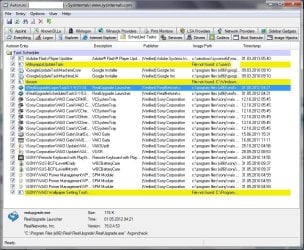
Try to run this Autoruns program, no need to install it just execute it, which reads the programs running on your pc.
Press Escape and go to Options --> Filter options, and tick on all three options that are shown. In this way all the Microsoft programs will not be displayed. Then go to File--> Run as administrator and wait until the scan is finished. Click on the tab "Scheduled tasks" and you'll see the tasks which are set to run is given, if there is anything you don't recognize then search for its setting and see if that is the one causing your pc to wake up.
Autoruns for Windows
 

My Computer My Computer

At a glance

Windows 7 Home Premium x64, Windows 8 Proi5-2430M8 GbnVidia GeForce 610M
Computer type
Laptop
Computer Manufacturer/Model Number
Acer Aspire 5750G
OS
Windows 7 Home Premium x64, Windows 8 Pro
CPU
i5-2430M
Motherboard
Acer JE50_HR
Memory
8 Gb
Graphics Card(s)
nVidia GeForce 610M
Sound Card
Realtek High Definition Audio
Antivirus
Avast
Browser
Chrome
It would have to be sleep since as Kaktussoft says Hibernate does fully power down after writing open work from RAM to HD.

However if you have Feeds scheduled for 11:20 and the PC wakes up at around that time then it seems the likely suspect. Just disable Feeds in Scheduler. I would disable anything else you don't absolutely know you want. Ask if in question.

I would also turn back on Automatic Windows Updates which assure you have the latest Drivers, Performance and Security updates that are critical to your System. Problems with Updates are one in a million.

I would also enable Hibernate in Power Options>Choose Plan Settings>Advanced>Sleep>Hibernate. It works perfectly on all of my installs set between 45-90 minutes after sleep has run during a period during which you might actually come back to use the PC.

But Hibernate starts up twice as fast as Shut Down so that alone makes it worthwhile, besides the fact it saves your work so you can walk away for an hour or a week without second thought.
 
@Kaktussoft : I'm absolutely sure that I'm talking about hibernate mode (the one under sleep mode).
@mach04 : I've tried your solution and I attached a screenshot with the result. As you can see, most of them are VAIO-related.
@gregrocker : 1) It isn't sleep mode.
2) The feed doesn't appear in the Task Scheduler anymore.
3) The automatic updates are off, but I still update my Windows, so it is up-to-date.
4) This whole problem is revolving around the hibernate mode problem... When I shut down, the laptop doesn't turn on, but when it's in hibernate mode, it does. (if you find it useful, on battery is set to 60 min, and plugged is set to 360 min)
And 5) That's why I hibernate rather than shutting down.
 

Attachments

  • w7 4.jpg
    w7 4.jpg
    6.6 KB · Views: 14
  • w7 3.jpg
    w7 3.jpg
    153.6 KB · Views: 6

My Computer My Computer

At a glance

Microsoft Windows 7 Ultimate 64-bitIntel(R) Core(TM) i5 CPU 3230M @ 2.53GHz8,00 GB DDR3@1600MhznVidia GT730M
Computer type
Laptop
Computer Manufacturer/Model Number
Acer
OS
Microsoft Windows 7 Ultimate 64-bit
CPU
Intel(R) Core(TM) i5 CPU 3230M @ 2.53GHz
Motherboard
Sony Corporation Base Board VAIO
Memory
8,00 GB DDR3@1600Mhz
Graphics Card(s)
nVidia GT730M
Screen Resolution
1920 x 1080
I would establish a Clean Boot which provides the best performance and least problems: Troubleshooting Steps for Windows 7.

There's no reason all of that crap needs to be starting up with Win7, mostly to spy on you while pretending to check for updates. A program like Real can see if it needs updating when you run it. Turn off Real Updater in its preferences. It is pernicious spyware.

In addition the Sony bloatware appears to all start with Windows which is a worst practice because the factory preinstalled Win7 is the worst possible install you can run. That's why tech enthusiasts choose to Clean Reinstall - Factory OEM Windows 7 to enjoy WIn7's native performance without a bunch of crap larded onto it. At the minimum I'd Clean Up Factory Bloatware.

Would we let a bunch of overweight freeloaders we don't know ride around in our car 24/7 in case one of them might need to go some place a month later?
 
Last edited:
There are a lot of VAIO related programs running, and it might be the reason that you are facing this wake up with your pc. One other thing you can do is right click on each and choose Jump to entry and deactivate them one by one and see if the wake up still persists.
There are a set of rules under the conditions tab that might be causing this wake up, you might want to change them.
As gregrocker said you don't need all these bloatware programs to start up with windows, as windows itself has all those settings needed to give a good performance, and it might even give you a faster start up.
 

My Computer My Computer

At a glance

Windows 7 Home Premium x64, Windows 8 Proi5-2430M8 GbnVidia GeForce 610M
Computer type
Laptop
Computer Manufacturer/Model Number
Acer Aspire 5750G
OS
Windows 7 Home Premium x64, Windows 8 Pro
CPU
i5-2430M
Motherboard
Acer JE50_HR
Memory
8 Gb
Graphics Card(s)
nVidia GeForce 610M
Sound Card
Realtek High Definition Audio
Antivirus
Avast
Browser
Chrome
The problem is not performance or whether the programs start or not, but the laptop started turning on all of the sudden, without me changing any settings regarding VAIO programs. That is the issue.
 

My Computer My Computer

At a glance

Microsoft Windows 7 Ultimate 64-bitIntel(R) Core(TM) i5 CPU 3230M @ 2.53GHz8,00 GB DDR3@1600MhznVidia GT730M
Computer type
Laptop
Computer Manufacturer/Model Number
Acer
OS
Microsoft Windows 7 Ultimate 64-bit
CPU
Intel(R) Core(TM) i5 CPU 3230M @ 2.53GHz
Motherboard
Sony Corporation Base Board VAIO
Memory
8,00 GB DDR3@1600Mhz
Graphics Card(s)
nVidia GT730M
Screen Resolution
1920 x 1080
This does not happen with a normal Win7 install. It is either hardware-related or has a buggy install we see most commonly with the factory preinstall. But I'm not going to argue with you the differences between having the best possible Win7 install or the worst possible one that you have. Which you want is your decision.

You can go over your Win7 install to look for clues using Troubleshooting Steps for Windows 7
 
Back
Top