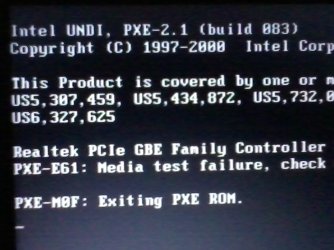
help!! New clean install win7 home basic cant boot to windows

joplin10

New member
Local time
5:32 AM
Messages
5
good day to all master i have problem about my laptop when i format in clean install win 7 it cant continue to open windows.if i remove the cd-dvd it fails the pxe rom exiting in leave on screen.its continue show this in screen.i hope somebody help about this thankz.
 

My Computer My Computer

Computer type
Laptop
Computer Manufacturer/Model Number
samsung np300E5A
OS
windows 7 home basic
CPU
intel (R) core (TM) i5-2450M [email protected] ghz
Memory
4gb
Antivirus
mse
Browser
chrome
i get my cd in samsung the genuine os .yes i finish the clean install the problem is when its time to restart recomend for installation of drivers its fail to open the windows after i remove the cd from dvd rom.but if continue insert the cd its open the windows. i attach my screenshot error.:cry::cry::cry::cry:
 

Attachments

  • 2013-06-20 11.36.32.jpg
    2013-06-20 11.36.32.jpg
    142.4 KB · Views: 0

My Computer My Computer

Computer type
Laptop
Computer Manufacturer/Model Number
samsung np300E5A
OS
windows 7 home basic
CPU
intel (R) core (TM) i5-2450M [email protected] ghz
Memory
4gb
Antivirus
mse
Browser
chrome
Insert the install DVD. Boot from it. If it says "press any key to boot from DVD" ... don't press any key! What happens after about 10 seconds?
 

My Computer My Computer

Computer type
Laptop
Computer Manufacturer/Model Number
ACER ASPIRE 5742G
OS
Microsoft Windows 7 Home Premium 64-bits 7601 Multiprocessor Free Service Pack 1
CPU
Intel(R) Core(TM) i3 CPU M 370 @ 2.40GHz
Motherboard
Acer Aspire 5742G
Memory
4,00 GB
Graphics Card(s)
ATI Mobility Radeon HD 5400 Series
Sound Card
(1) AMD High Definition Audio Device (2) Realtek High Defi
Screen Resolution
1366 x 768 x 32 bits (4294967296 colors) @ 60 Hz
Hard Drives
WDC WD5000BEVT-22ZAT0
if i remove the cd-dvd it fails the pxe rom exiting in leave on screen.


Set pxe rom to last boot device in the BIOS.
 

My Computer My Computer

OS
ME/XP/Vista/Win7
You should have the HD set first to boot, then when you need to boot the DVD use the one-time BIOS Boot Menu key shown on first screen.

I don't believe Samsung provides a Win7 reinstallation DVD, but instead you may have Factory Recovery DVD. Can you say for sure? What does it say on the disk exactly? Did you buy Win7 from Samsung?

If the licensed OS which came with the PC and is printed on the COA sticker on bottom with a readable Product Key is Home basic, then download Home Premium from Step 1 of Clean Reinstall - Factory OEM Windows 7, run the eicfg removal tool to unlock all versions, burn an all-versions installer to DVD or write to flash stick using the tool provided. Then choose your licensed version during Clean Install, do a Custom Install deleting all partitions using Drive Options in Step 7 of Clean Install Windows 7
 
Insert the install DVD. Boot from it. If it says "press any key to boot from DVD" ... don't press any key! What happens after about 10 seconds?
it continue to start windows normally if i remove the cd and restart it fail to start the screen continue flashing pxe rom error
 

My Computer My Computer

Computer type
Laptop
Computer Manufacturer/Model Number
samsung np300E5A
OS
windows 7 home basic
CPU
intel (R) core (TM) i5-2450M [email protected] ghz
Memory
4gb
Antivirus
mse
Browser
chrome
You should have the HD set first to boot, then when you need to boot the DVD use the one-time BIOS Boot Menu key shown on first screen.

I don't believe Samsung provides a Win7 reinstallation DVD, but instead you may have Factory Recovery DVD. Can you say for sure? What does it say on the disk exactly? Did you buy Win7 from Samsung?

If the licensed OS which came with the PC and is printed on the COA sticker on bottom with a readable Product Key is Home basic, then download Home Premium from Step 1 of Clean Reinstall - Factory OEM Windows 7, run the eicfg removal tool to unlock all versions, burn an all-versions installer to DVD or write to flash stick using the tool provided. Then choose your licensed version during Clean Install, do a Custom Install deleting all partitions using Drive Options in Step 7 of Clean Install Windows 7
im sorry its a system recovery media dvd only one problem sir the bios cant appear even i tick f2 the only show is pxe exiting rom error. its possible to change bios or upgrade or any appz to flash or boot?by the way i will test this feedback later thanks.
 

My Computer My Computer

Computer type
Laptop
Computer Manufacturer/Model Number
samsung np300E5A
OS
windows 7 home basic
CPU
intel (R) core (TM) i5-2450M [email protected] ghz
Memory
4gb
Antivirus
mse
Browser
chrome
If it's Samsung Recovery then that is not a Clean Reinstall you refer to in your title.

Sometimes Recovery Disks will run correctly when you first wipe the HD with Diskpart Clean Command
after accessing DISKPART At PC Startup. You can also use DBAN, or Partition Wizard Wipe Disk - Video Help.

I would do the superior Clean Reinstall - Factory OEM Windows 7 which is a much better install. Just follow the steps in the tutorial, ask back any questions as you go. Be sure to read and understand how drivers are handled in Win7 as it is not at all like XP.
 
Insert the install DVD. Boot from it. If it says "press any key to boot from DVD" ... don't press any key! What happens after about 10 seconds?
it continue to start windows normally if i remove the cd and restart it fail to start the screen continue flashing pxe rom error
http://downloadcenter.samsung.com/content/UM/201211/20121123102451698/Win8_Manual_eng.pdf page 74 how to enter BIOS. Page 79: what is boot priority order?

Where you ever been able to boot from harddisk before? Did you ever change boot priority order?
 

My Computer My Computer

Computer type
Laptop
Computer Manufacturer/Model Number
ACER ASPIRE 5742G
OS
Microsoft Windows 7 Home Premium 64-bits 7601 Multiprocessor Free Service Pack 1
CPU
Intel(R) Core(TM) i3 CPU M 370 @ 2.40GHz
Motherboard
Acer Aspire 5742G
Memory
4,00 GB
Graphics Card(s)
ATI Mobility Radeon HD 5400 Series
Sound Card
(1) AMD High Definition Audio Device (2) Realtek High Defi
Screen Resolution
1366 x 768 x 32 bits (4294967296 colors) @ 60 Hz
Hard Drives
WDC WD5000BEVT-22ZAT0

My Computer My Computer

Computer type
Laptop
Computer Manufacturer/Model Number
ACER ASPIRE 5742G
OS
Microsoft Windows 7 Home Premium 64-bits 7601 Multiprocessor Free Service Pack 1
CPU
Intel(R) Core(TM) i3 CPU M 370 @ 2.40GHz
Motherboard
Acer Aspire 5742G
Memory
4,00 GB
Graphics Card(s)
ATI Mobility Radeon HD 5400 Series
Sound Card
(1) AMD High Definition Audio Device (2) Realtek High Defi
Screen Resolution
1366 x 768 x 32 bits (4294967296 colors) @ 60 Hz
Hard Drives
WDC WD5000BEVT-22ZAT0
im sorry guys for late reply to all of you thanks to all who gave an opinion and tips as of now im not done to my lappy but part by part i can move on i will give the result soon thanks again....
 

My Computer My Computer

Computer type
Laptop
Computer Manufacturer/Model Number
samsung np300E5A
OS
windows 7 home basic
CPU
intel (R) core (TM) i5-2450M [email protected] ghz
Memory
4gb
Antivirus
mse
Browser
chrome
Looks like your bios is not finding an OS on its first boot device.
Remove all external storage devices including USB drives, connected usb flash drives are the biggest culprits in non boot errors after installation of an OS.

set your boot devices and priorities to default settings which is internal HDD.

I had a similar issue with trying to use a pci-e to sata controller, are you using the onboard controller or a PCI-e?
 

My Computer My Computer

OS
windows 7 home premium
Did you do #4 and #11?
 

My Computer My Computer

Computer type
Laptop
Computer Manufacturer/Model Number
ACER ASPIRE 5742G
OS
Microsoft Windows 7 Home Premium 64-bits 7601 Multiprocessor Free Service Pack 1
CPU
Intel(R) Core(TM) i3 CPU M 370 @ 2.40GHz
Motherboard
Acer Aspire 5742G
Memory
4,00 GB
Graphics Card(s)
ATI Mobility Radeon HD 5400 Series
Sound Card
(1) AMD High Definition Audio Device (2) Realtek High Defi
Screen Resolution
1366 x 768 x 32 bits (4294967296 colors) @ 60 Hz
Hard Drives
WDC WD5000BEVT-22ZAT0
Back
Top