Driver Verifier - Enable and Disable

How to Enable or Disable Driver Verifier in Windows 7

Contents


   Information
Driver Verifier runs in the background, "testing" drivers for bugs. If it finds one, a Blue Screen of Death (BSOD) will result; the corresponding dump file will hopefully show the faulty driver.


OPTION ONE

To Enable Driver Verifier
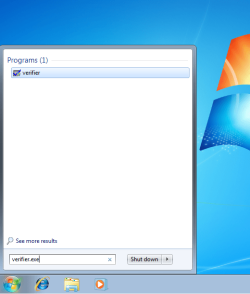
1. Start typing verifier.exe into the start menu, and open Verifier.

snip1.PNG

2. Select "Create custom settings (for code developers)", and hit Next.

snip2.PNG

3. Make sure Standard settings, Force pending I/O requests, and IRP Logging are selected, and hit Next.

snip3.PNG

4. Select "Select driver names From a list", and hit Next.
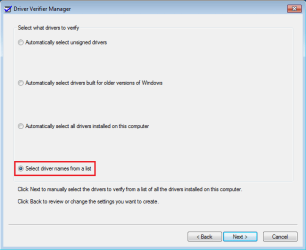
snip4.PNG

5. Click on "Provider" at the top to sort the list by manufacturer; select all drivers not provided by Microsoft Corporation.
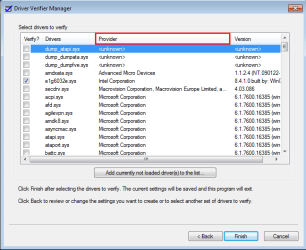
snip5.PNG

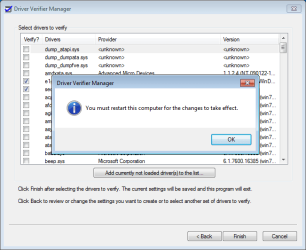
6. Press Next, and OK to the resulting window.
snip6.PNG

After a reboot, driver verifier should be enabled. Use your computer as you normally would, although expect frequent BSODs if there are driver issues. If the system doesn't crash after 24 hours, disable driver verifier.


OPTION TWO

To Disable Driver Verifier

1. Start typing verifier.exe into the start menu, and open Verifier.

snip1.PNG

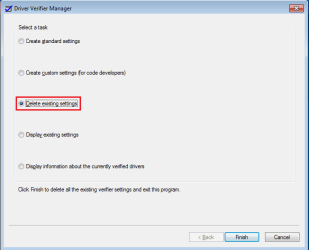
2. Select "Delete existing settings"
snip7.PNG

If you cannot get into Windows to turn off Verifier, try using Safe Mode.
 
Last edited by a moderator:
Hello Jonathan,

Should this be run in Safe Mode?


You can enable Driver Verifier from Safe Mode, but it will not actually run in Safe Mode. Thus, if Driver Verifier is preventing system bootup, you can boot into Safe Mode and disable it. To actually test the drivers, reboot into Normal Mode.
 

My Computer

Computer Manufacturer/Model Number
Custom
OS
Windows 7 Professional x64
CPU
Intel i7 2600K OC'd @ 4620 MHz
Motherboard
Asus P8Z68-V Pro
Memory
16GB GSkill Sniper 2133 Mhz (4x4GB)
Graphics Card(s)
EVGA GeForce GTX 480 SuperClocked+
Sound Card
Realtek High Definition Audio
Monitor(s) Displays
2x Acer S273HLbmii 27"
Screen Resolution
2 x 1920x1080
Hard Drives
64GB Crucial M4 SSD

Storage: Hitachi 1TB 5400RPM, Samsung 1.5TB 5400RPM
PSU
Corsair HW Series 750w (modular)
Case
Cooler Master HAF 932 Advanced Blue Edition
Cooling
CM Hyper 212+ CPU cooler, 3x 230mm + 1x 140mm case fans
Keyboard
Logitech MK320 (wireless)
Mouse
Logitech MK320 (wireless)
Internet Speed
30 Mb/s : 2 Mb/s
Hello Jonathan,

Should this be run in Safe Mode?


You can enable Driver Verifier from Safe Mode, but it will not actually run in Safe Mode. Thus, if Driver Verifier is preventing system bootup, you can boot into Safe Mode and disable it. To actually test the drivers, reboot into Normal Mode.

I did hear someone say that it's meant to be run on safe mode. Thanks for clarifying things up Jonathan.
 

My Computer

OS
Win7 Ultimate x64 SP1 / WCP x64 / Ubuntu 11 x64
You might consider to add any driver with 'dump' as a prefix to Option one #5, for example; dump_dumpfve.sys and dump_iastor.sys. these should be unchecked also.
They are drivers created to provide disk access during crash dump file generation.
 

My Computer

Computer type
PC/Desktop
Computer Manufacturer/Model Number
76~2.0
OS
Windows 7 Ult x64 - SP1/ Windows 8 Pro x64
CPU
Intel Core i5-3570K 4.6GHz
Motherboard
Gigabyte GA-Z77X UD3H, f18
Memory
8GB (2X4GB) DDR3 1600 Corsair Vengeance CL8 1.5v
Graphics Card(s)
Sapphire HD 7770 Vapor-X OC 1GB DDR5
Sound Card
Onboard VIA VT2021
Monitor(s) Displays
22" LCD Dell
Screen Resolution
1680x1050
Hard Drives
Samsung 840Pro 128GB SSD,
Seagate Barracuda 500GB SATA2 7200rpm 32MB cache, Seagate Barracuda 1TB SATA2 7200rpm 32MB cache,
PSU
Corsair HX650W
Case
Cooler Master Storm Scout
Cooling
Corsair H80 2x12cm Noctua NF P12 , 2x14cm case fans
Keyboard
Logitech Wave
Mouse
CM Sentinel
Internet Speed
Dismal
Antivirus
Avast
Browser
Opera Next
Other Info
Haswell laptop: HP Envy 17t-j, i7-4700MQ, GeForce 740M 2GB DDR3, 17.3" Full HD 1920x1080, 16GB RAM, Samsung 840 Pro 128GB, 1TB Hitachi 7200 HDD,
Desktop: eSATA ports,
External eSATA Seagate 500GB SATA2 7200rpm,
External WD USB 500GB
You might consider to add any driver with 'dump' as a prefix to Option one #5, for example; dump_dumpfve.sys and dump_iastor.sys. these should be unchecked also.
They are drivers created to provide disk access during crash dump file generation.
Wow thanks for the info, I tought I wasnt doing anything wrong.
 

My Computer

Computer Manufacturer/Model Number
HP Pavilion a6532f
OS
Windows 7 Home Premium SP1 32 bit
CPU
AMD Athlon 64 X2 Dual Core 5200+ @ 2.71 GHz
Motherboard
MCP61PM-HM (Nettle3)
Memory
2GB DDR2 RAM @ 3** MHz (2 Sticks of 1 GB each, SAMSUNG)
Graphics Card(s)
ECS Nvidia GeForce 9800 GT Green Edition 1GB DDR3
Sound Card
Integrated Realtek ALC888S Audio
Monitor(s) Displays
HP w2007
Screen Resolution
1680*1050
Hard Drives
SAMSUNG 500 GB SATA 7200 rpm
PSU
CoolerMaster eXtreme Power Plus 600W
Case
Mid Size ATX
Cooling
Default rear(back) fan pulling air out.
Keyboard
Genius random(cheap) USB keyboard
Mouse
Microsoft random(cheap) USB Mouse
Internet Speed
2 MBPS / ASDL
i've followed all the steps given but i think i ticked dump_dumpfve.sys and dump_iastor.sys.Is it matter?Now i running it for 5 hours already.So should i restart the process?
 

My Computer

Computer type
Laptop
Computer Manufacturer/Model Number
Acer
OS
Windows 7 Home Premium 64bit
CPU
Intel(R) Core(TM) i5-3210M CPU @ 2.50GHz
Motherboard
Acer VA40_HC
Memory
6.00 GB
Graphics Card(s)
(1) Intel(R) HD Graphics 4000 (2) NVIDIA GeForce GT 630M
Sound Card
(1) Realtek High Definition Audio (2) Intel(R) Display Aud
No, I would leave it running.

If Driver Verifier generates a BSOD and blames dump_dumpfve.sys and/or dump_iastor.sys, then disable them and let it run again.
These two drivers aren't blamed very often, but there isn't any necessity to stress them so they don't need to be included in the testing.
 

My Computer

Computer type
PC/Desktop
Computer Manufacturer/Model Number
76~2.0
OS
Windows 7 Ult x64 - SP1/ Windows 8 Pro x64
CPU
Intel Core i5-3570K 4.6GHz
Motherboard
Gigabyte GA-Z77X UD3H, f18
Memory
8GB (2X4GB) DDR3 1600 Corsair Vengeance CL8 1.5v
Graphics Card(s)
Sapphire HD 7770 Vapor-X OC 1GB DDR5
Sound Card
Onboard VIA VT2021
Monitor(s) Displays
22" LCD Dell
Screen Resolution
1680x1050
Hard Drives
Samsung 840Pro 128GB SSD,
Seagate Barracuda 500GB SATA2 7200rpm 32MB cache, Seagate Barracuda 1TB SATA2 7200rpm 32MB cache,
PSU
Corsair HX650W
Case
Cooler Master Storm Scout
Cooling
Corsair H80 2x12cm Noctua NF P12 , 2x14cm case fans
Keyboard
Logitech Wave
Mouse
CM Sentinel
Internet Speed
Dismal
Antivirus
Avast
Browser
Opera Next
Other Info
Haswell laptop: HP Envy 17t-j, i7-4700MQ, GeForce 740M 2GB DDR3, 17.3" Full HD 1920x1080, 16GB RAM, Samsung 840 Pro 128GB, 1TB Hitachi 7200 HDD,
Desktop: eSATA ports,
External eSATA Seagate 500GB SATA2 7200rpm,
External WD USB 500GB
This didn't work for me. I applied all settings as described, it said I needed to restart so I told it "OK" and nothing happened. I manually restarted, and it just booted up normally without any special screen or status report for the verification. i tried it again but nothing happened.

What should I do to try and force this to work?
 

My Computer

OS
Windows 7 Ultimate x64
This didn't work for me. I applied all settings as described, it said I needed to restart so I told it "OK" and nothing happened. I manually restarted, and it just booted up normally without any special screen or status report for the verification... I'm having BSODs though so that could be it.

What should I do to try and force this to work?
It's probably working, it just doesn't show anything.

Open a command prompt and enter verifier /query.

This didn't work for me. I applied all settings as described, it said I needed to restart so I told it "OK" and nothing happened. I manually restarted, and it just booted up normally without any special screen or status report for the verification. i tried it again but nothing happened.

What should I do to try and force this to work?

Have a look at the authors response to a previous question like yours.
 

My Computer

Computer type
PC/Desktop
Computer Manufacturer/Model Number
Self Built
OS
Win 10 Pro x64
CPU
Intel I5-2500K @3.3GHz
Motherboard
Asrock P67 Extreme4
Memory
16GB G.Skill Ripjaws X (4x4GB)
Graphics Card(s)
EVGA GeForce 750 Ti SC 2GB
Sound Card
ASUS Xonar DG 5.1 Channels 24-bit 96KHz PCI Interface Sound
Monitor(s) Displays
auria eq2367
Screen Resolution
1920 x 1080
Hard Drives
250GB Samsung 850 EVO SSD
1TB WD Blue
1TB Hitachi
PSU
SeaSonic X 650W 80 Plus Gold
Case
Corsair Obsidian 750D
Cooling
Corsair H60, Three 140mm case fans
Keyboard
Logitech Wireless Keyboard K520
Mouse
Logitech Wireless Mouse M310
Internet Speed
Wave Broadband ~ 100 dn 5 up
Antivirus
Windows Defender, Malwarebytes Premium
Browser
Edge, IE11, Chrome
Other Info
Laptop specs: HP g7-1365dx /
CPU: AMD A6-3420M APU with Radeon(tm) HD Graphics /
RAM: Crucial 8Gb (2x4Gb) /
SSD: Crucial M4-CT128M4SSD2 ATA Device/ FW 000F /
GFX: AMD Radeon HD 6520G /
OS: Windows 10 Pro x64
i did this and my computer would lock up everytime i started it up windows would briefly start then log off and lock....why is this?
 

My Computer

OS
vista 64bit
I tried to use this and that was impossible because my pc crashed with brief flash of bscreen before Windows even started to load. Had to do recovery in there start screen to get normally in Windows. So this verifier-program seem to be quite hazardous to use.
 

My Computer

Computer type
PC/Desktop
Computer Manufacturer/Model Number
Own build
OS
Windows 7 Pro 64bit
CPU
i2700K
Motherboard
ASRock Z77 Extreme4
Memory
GSkill DDR3 2133Mhz 8Gb(2x4Gb)
Graphics Card(s)
Asus GTX670 DCII
Hard Drives
OCZ Vertex 4 60Gb
Kingston V300 120Gb
2x Samsung F3 1Tb
Antivirus
FSecure
Browser
Firefox
I tried to use this and that was impossible because my pc crashed with brief flash of bscreen before Windows even started to load. Had to do recovery in there start screen to get normally in Windows. So this verifier-program seem to be quite hazardous to use.

Same thing happened to me. Do you know what might be causing this?
 

My Computer

Computer type
PC/Desktop
OS
Windows 7 64bit
hey i just followed your instructions which are very goodbtw :)
what will this do? will it test all the drivers i have selected for problem or what?
 

My Computer

Computer type
PC/Desktop
Computer Manufacturer/Model Number
Custom Build
OS
64 bit windows 7 home professional SP1
CPU
intel i5 3570k 3.4ghz quad core
Motherboard
ASUS P8-Z77-V LX
Memory
DDR3 16GB 1600MHZ
Graphics Card(s)
ASUS AMD R9 270X OC
Sound Card
SB Audigy
Monitor(s) Displays
Novatech
Screen Resolution
1920 - 1080 60HZ
Hard Drives
3 X 500G
seagate momentus xt 750
PSU
850w
Case
novatech
Cooling
1 blue led outtake + 1 blue led Intake 1 cpu 1 gpu 1 psu
Keyboard
aula
Mouse
Mad Cats ( R.A.T 3 )
Internet Speed
300 mbps
Antivirus
Avast
Browser
Firefox
I tried to use this and that was impossible because my pc crashed before Windows even started to load. Had to Go into safe mode to disable Verifier.exe for my PC to boot into windows Any help please..:(
 

My Computer

Computer type
PC/Desktop
Computer Manufacturer/Model Number
acer
OS
Windows 7 Ultimate 32 bit
CPU
Intel(R) Core(TM)2 Quad CPU
Motherboard
M3802 MOTHERBOARD G43T-AM 2.0 AM3
Memory
Total Virtual Memory 6.00 GB
Antivirus
Eset Smart Security
Browser
IE 11
I tried to use this and that was impossible because my pc crashed before Windows even started to load. Had to Go into safe mode to disable Verifier.exe for my PC to boot into windows Any help please..:(

That's the whole idea: any bad driver will instantly crash your system and generate a minidump file with crash information, if you enabled minidump files to be written to your Windows folder before using verifier. To switch verifier off, simply boot in Safe Mode open verifier again and disable it.
 

My Computer

Computer type
PC/Desktop
Computer Manufacturer/Model Number
Custom build 01/06/2012, rebuilt 10/24/2014
OS
Microsoft Windows 7 Professional 64-Bit 7601 Multiprocessor Free Service Pack 1
CPU
Intel(R) Core(TM) i7-3930K CPU @ 3.20 Stepping 6 Revision C1
Motherboard
ASUSTeK COMPUTER INC. P9X79 BIOS 4608
Memory
Kingston KHX1600C9D3K4/16GX 16 GB DDR3 9-9-9-27
Graphics Card(s)
AMD FirePro V4900 (FireGL V)
Sound Card
(1) AMD High Definition Audio Device (2) Realtek High Defini
Monitor(s) Displays
HP LP2475w
Screen Resolution
1920 x 1200
Hard Drives
(1) ATA SAMSUNG HD204UI SCSI Disk Device
(2) ATA SAMSUNG SSD 830 SCSI Disk Device
PSU
CORSAIR HX650W
Case
fractal design DEFINE R4
Cooling
Noctua NH-D14 SE2011 and 2 x NF-A14 PWM
Keyboard
FILCO Majestouch 2 Ninja
Antivirus
Microsoft Security Essentials
Browser
IE11
Other Info
TP-LINK 150Mbps-Wireless-N-PCI-Adapter TL-WN751ND
Ran the verifier and had to restart manually. Upon restart Windows didn't start normally and had to perform a Repair and then a System Restore. Any ideas? :shock:
 

My Computer

Computer type
PC/Desktop
Computer Manufacturer/Model Number
Custom Build
OS
windows 7 Home Premium 64 bit
CPU
Intel i3-4130
Motherboard
Gigabyte GA-Z87X-UD4H
Memory
Corsair Vengeance 8GB 1600
Graphics Card(s)
onboard
Hard Drives
WD800JD
Browser
Firefox 28.0
In the end, in my case, it was bad memory...
 

My Computer

Computer type
PC/Desktop
Computer Manufacturer/Model Number
Custom build 01/06/2012, rebuilt 10/24/2014
OS
Microsoft Windows 7 Professional 64-Bit 7601 Multiprocessor Free Service Pack 1
CPU
Intel(R) Core(TM) i7-3930K CPU @ 3.20 Stepping 6 Revision C1
Motherboard
ASUSTeK COMPUTER INC. P9X79 BIOS 4608
Memory
Kingston KHX1600C9D3K4/16GX 16 GB DDR3 9-9-9-27
Graphics Card(s)
AMD FirePro V4900 (FireGL V)
Sound Card
(1) AMD High Definition Audio Device (2) Realtek High Defini
Monitor(s) Displays
HP LP2475w
Screen Resolution
1920 x 1200
Hard Drives
(1) ATA SAMSUNG HD204UI SCSI Disk Device
(2) ATA SAMSUNG SSD 830 SCSI Disk Device
PSU
CORSAIR HX650W
Case
fractal design DEFINE R4
Cooling
Noctua NH-D14 SE2011 and 2 x NF-A14 PWM
Keyboard
FILCO Majestouch 2 Ninja
Antivirus
Microsoft Security Essentials
Browser
IE11
Other Info
TP-LINK 150Mbps-Wireless-N-PCI-Adapter TL-WN751ND
I put off the memory test since it's new but there's still the possibility it may be bad. I'll run MEMTEST to check. Thanx for the info.
 

My Computer

Computer type
PC/Desktop
Computer Manufacturer/Model Number
Custom Build
OS
windows 7 Home Premium 64 bit
CPU
Intel i3-4130
Motherboard
Gigabyte GA-Z87X-UD4H
Memory
Corsair Vengeance 8GB 1600
Graphics Card(s)
onboard
Hard Drives
WD800JD
Browser
Firefox 28.0
Hi, I followed the instructions but the computer was unable to restart normally.
I started in Safe Mode and changed the settings back
Not sure where to go from here any advice appreciated
a copy of the Whocrashed report as follows

Crash dump directory: C:\Windows\Minidump

Crash dumps are enabled on your computer.

On Fri 08/08/2014 09:40:31 GMT your computer crashed
crash dump file: C:\Windows\Minidump\080814-16754-01.dmp
This was probably caused by the following module: netbt.sys (netbt+0x24D30)
Bugcheck code: 0xC9 (0xC, 0xFFFFFFFF8891B380, 0xFFFFFFFF9D6B8F68, 0x0)
Error: DRIVER_VERIFIER_IOMANAGER_VIOLATION
file path: C:\Windows\system32\drivers\netbt.sys
product: Microsoft? Windows? Operating System
company: Microsoft Corporation
description: MBT Transport driver
Bug check description: This is the bug check code for all Driver Verifier
This appears to be a typical software driver bug and is not likely to be caused by a hardware problem.
The crash took place in a standard Microsoft module. Your system configuration may be incorrect. Possibly this problem is caused by another driver on your system that cannot be identified at this time.


My Computer

Computer type
PC/Desktop
Computer Manufacturer/Model Number
HP
OS
windows 7 x32 ultimate
Memory
2048MB RAM
Antivirus
Avast!
Browser
Firefox
Hello Mike, and welcome to Seven Forums.

See if you may be able to do a system restore (in safe mode or at boot) using a restore point dated before this happened to hopefully undo and fix it for you.

Hope this helps for now, :)
Shawn
 

My Computer

Computer type
PC/Desktop
Computer Manufacturer/Model Number
Self built custom
OS
64-bit Windows 11 Pro for Workstations
CPU
Intel i7-8700K OC'd to 5 GHz
Motherboard
ASUS ROG Maximus XI Formula Z390
Memory
64 GB (4x16GB) G.SKILL TridentZ RGB DDR4 3600 MHz
Graphics Card(s)
ASUS ROG-STRIX-GTX1080TI-O11G-GAMING
Sound Card
Integrated
Monitor(s) Displays
2 x Samsung Odyssey G7 27"
Screen Resolution
2560x1440
Hard Drives
1TB Samsung 990 PRO M.2,
4TB Samsung 990 PRO PRO M.2,
TerraMaster F8 SSD Plus NAS
PSU
Seasonic Prime Titanium 850W
Case
Thermaltake Core P3
Cooling
Corsair Hydro H115i
Keyboard
Logitech wireless K800
Mouse
Logitech MX Master 4
Internet Speed
2 Gb/s Download and 100 Mb/s Upload
Antivirus
Malwarebyte Anti-Malware Premium
Browser
Google Chrome
Other Info
Logitech Z625 speaker system,
Logitech BRIO 4K Pro webcam,
HP Color LaserJet Pro MFP M477fdn,
APC SMART-UPS RT 1000 XL - SURT1000XLI,
Galaxy S23 Plus phone
Hi Brink, thanks for your response, I am still working on the problem ( when I do not need the computer )
My next move was to decrease the amount of drivers selected to just the first 10 and the result was the same
Next time I shall limit it to the first 5:geek:

Iam also checking/updating drivers
 

My Computer

Computer type
PC/Desktop
Computer Manufacturer/Model Number
HP
OS
windows 7 x32 ultimate
Memory
2048MB RAM
Antivirus
Avast!
Browser
Firefox
Back
Top