Solved Laptop Switches to lower resolution automatically

estXcrew

New member
Member
Local time
7:02 AM
Messages
81
Here I Am again.. Never thought I'd visit this forum this often that often asking for help..
Im actually writing this on the problematic laptop, and i cant hit the buttons correctly, so sorry for any mistakes.

Here we go, An Amilo Fujitsu Siemens Si 3655 laptop (about 5 years old) (windows 7 professional upgrade from vista several years ago, 64bit) Switches to a smaller resolution automatically while in use (there are black bars on the right [about 1/5 size of the screen] and a small one on the bottom) on the screen, a restart fixes them, sometimes it takes a few tries to get it right. I HAVE Reinstalled the Intel Graphics Family Controller 4 Drivers or whatever the hell they are called, it asked for a restart and booted back into the small screen right away :rolleyes: I checked the Intel Media Graphics Control panel for a fix, it doesn't have any bigger resolution available, and when right clicking and checking the display settings it's already on the biggest settings (1024 x 768 ) Whitch i think is the full resolution but i still have black bars.. If I maximize a window it only scales up to the black bars..

I have bolded the important stuff incase u don't have time to check the full story.
Great thanks.. estXcrew
 
Last edited:

My Computer My Computer

Computer type
PC/Desktop
Computer Manufacturer/Model Number
Ordi
OS
Windows 7 Home Premium SP1, 64 bit
CPU
Athlon 2 x2 250
Motherboard
ECS A740GM-M
Memory
4GB DDR2
Graphics Card(s)
nVida Geforce GT-440
Sound Card
onboard
Monitor(s) Displays
21'' Philips @ 1080p, 19,5''' Samsung @ 1440x900
Hard Drives
500GB SAMSUNG HD502HJ (SATA)
PSU
400w thermaltake
Cooling
Stock CPU fan, one fan on the back
Keyboard
A keyboard
Mouse
A mouse
Internet Speed
7 down 1 up
Antivirus
KIS 2014
Browser
Chrome
Does it do this when hooked up to an external monitor? or just the laptop screen?

Can you take a screenshot of the screen to see what the laptop is actually trying to display? (1024x768 should fill the screen, but if the screen is the issue, the screenshot will be the right amount of pixels, and the screen is not displaying it properly...)
 

My Computer My Computer

Computer type
Laptop
Computer Manufacturer/Model Number
ASUS G60-RBBX05
OS
Win7 Home Premium 64x
CPU
Intel Core 2 Duo P7450 / 2.13 GHz (2.29 with Extreme Turbo)
Memory
4 GB PC-6400 Hyundai (2X2) at 800Mhz
Graphics Card(s)
NVIDIA GeForce GTX 260M 1GB DDR3 VRAM
Monitor(s) Displays
16" LED Backlit
Screen Resolution
1366 x 768 on laptop 1600x1050 max res on 22" external mon
Hard Drives
OCZ Agility 3 60GB SSD / 320 GB - Serial ATA-150 - 7200 rpm
PSU
6-cell Lithium ion { lasts 1.5 hours }
Case
ASUS G60 Laptop
Keyboard
Chicklet type back-lit (white light) keyboard
Mouse
Logitech G9 Laser Mouse 3200dpi and 1000 reports per minute
Internet Speed
Comcast 8.60mb/s up - 3.11mb/s down
Antivirus
MSE
Browser
Firefox
Other Info
General mid-budget gaming Comp. Low batterylife - High FrameRates - currently overheating problems :(

2nd Rig: Case: Rosewill BLACKHAWK Gaming ATX Mid Tower Computer Case

Mobo: GIGABYTE GA-990FXA-UD3
CPU: AMD FX-6200 Zambezi 3.8GHz (4.1GHz Turbo)
Heatsink: COOLER MASTER V8 CPU Cooler
RAM: Patriot Viper 3 8GB (2 x 4GB) 240-Pin DDR3 SDRAM 1866 (PC3 15000)
GPU: SAPPHIRE Radeon HD 6850 1GB 2
It can't ´, My mouse will only travel until the black bars and the screenshot only is taken of the part that actually has stuff going on.

And it's the laptop's screen, not an external monitor.

Edit: I was browsing Windows' Support and someone else was told to uninstall KIS.. Really? I have paid version of KIS so i don't think i will... o.o
This is what i visually see:
Taken with phone: http://postimg.org/image/f3c5x8kfz/

My computer only sees the part that the window is in.
 
Last edited:

My Computer My Computer

Computer type
PC/Desktop
Computer Manufacturer/Model Number
Ordi
OS
Windows 7 Home Premium SP1, 64 bit
CPU
Athlon 2 x2 250
Motherboard
ECS A740GM-M
Memory
4GB DDR2
Graphics Card(s)
nVida Geforce GT-440
Sound Card
onboard
Monitor(s) Displays
21'' Philips @ 1080p, 19,5''' Samsung @ 1440x900
Hard Drives
500GB SAMSUNG HD502HJ (SATA)
PSU
400w thermaltake
Cooling
Stock CPU fan, one fan on the back
Keyboard
A keyboard
Mouse
A mouse
Internet Speed
7 down 1 up
Antivirus
KIS 2014
Browser
Chrome
It can't ´, My mouse will only travel until the black bars and the screenshot only is taken of the part that actually has stuff going on.

I was expecting the screenshot to only capture the display and not show the bars. I was wondering if it would capture the screenshot as being the full amount of pixels@ 1024X768. can you confirm the size of the screenshot is 1024x768? (save the screenshot and look in properties for the pixel size)

And it's the laptop's screen, not an external monitor.

Can you try hooking it up to an external monitor to see if the problem exists regardless of monitor? from what you have said, to me it seems most likely to be a problem with the laptop display.

I want to confirm or rule that out first if possible.


Edit: thanks for the picture from camera. looks like it could be an issue with scaling as it is anchored in top left corner, but does not fill to right edge or bottom.
 

My Computer My Computer

Computer type
Laptop
Computer Manufacturer/Model Number
ASUS G60-RBBX05
OS
Win7 Home Premium 64x
CPU
Intel Core 2 Duo P7450 / 2.13 GHz (2.29 with Extreme Turbo)
Memory
4 GB PC-6400 Hyundai (2X2) at 800Mhz
Graphics Card(s)
NVIDIA GeForce GTX 260M 1GB DDR3 VRAM
Monitor(s) Displays
16" LED Backlit
Screen Resolution
1366 x 768 on laptop 1600x1050 max res on 22" external mon
Hard Drives
OCZ Agility 3 60GB SSD / 320 GB - Serial ATA-150 - 7200 rpm
PSU
6-cell Lithium ion { lasts 1.5 hours }
Case
ASUS G60 Laptop
Keyboard
Chicklet type back-lit (white light) keyboard
Mouse
Logitech G9 Laser Mouse 3200dpi and 1000 reports per minute
Internet Speed
Comcast 8.60mb/s up - 3.11mb/s down
Antivirus
MSE
Browser
Firefox
Other Info
General mid-budget gaming Comp. Low batterylife - High FrameRates - currently overheating problems :(

2nd Rig: Case: Rosewill BLACKHAWK Gaming ATX Mid Tower Computer Case

Mobo: GIGABYTE GA-990FXA-UD3
CPU: AMD FX-6200 Zambezi 3.8GHz (4.1GHz Turbo)
Heatsink: COOLER MASTER V8 CPU Cooler
RAM: Patriot Viper 3 8GB (2 x 4GB) 240-Pin DDR3 SDRAM 1866 (PC3 15000)
GPU: SAPPHIRE Radeon HD 6850 1GB 2
Heh Sorry, here is the PrintScreen: http://i.imgur.com/CyBcEqh.png

My Bad, My fail reading ::)

Im afraid i Can't do that right now, I'll get home tomorrow so I'll be able to hook the laptop up to my 21 Inch monitor.. I got a VGA Monitor here too (the big kind XD) but i dont have a cable to get it hooked up.
 

My Computer My Computer

Computer type
PC/Desktop
Computer Manufacturer/Model Number
Ordi
OS
Windows 7 Home Premium SP1, 64 bit
CPU
Athlon 2 x2 250
Motherboard
ECS A740GM-M
Memory
4GB DDR2
Graphics Card(s)
nVida Geforce GT-440
Sound Card
onboard
Monitor(s) Displays
21'' Philips @ 1080p, 19,5''' Samsung @ 1440x900
Hard Drives
500GB SAMSUNG HD502HJ (SATA)
PSU
400w thermaltake
Cooling
Stock CPU fan, one fan on the back
Keyboard
A keyboard
Mouse
A mouse
Internet Speed
7 down 1 up
Antivirus
KIS 2014
Browser
Chrome
Edit: thanks for the picture from camera. looks like it could be an issue with scaling as it is anchored in top left corner, but does not fill to right edge or bottom.

Uh, how do i fix that?
 
Last edited:

My Computer My Computer

Computer type
PC/Desktop
Computer Manufacturer/Model Number
Ordi
OS
Windows 7 Home Premium SP1, 64 bit
CPU
Athlon 2 x2 250
Motherboard
ECS A740GM-M
Memory
4GB DDR2
Graphics Card(s)
nVida Geforce GT-440
Sound Card
onboard
Monitor(s) Displays
21'' Philips @ 1080p, 19,5''' Samsung @ 1440x900
Hard Drives
500GB SAMSUNG HD502HJ (SATA)
PSU
400w thermaltake
Cooling
Stock CPU fan, one fan on the back
Keyboard
A keyboard
Mouse
A mouse
Internet Speed
7 down 1 up
Antivirus
KIS 2014
Browser
Chrome
From this site Review FSC Amilo Si3655 Notebook - NotebookCheck.net Reviews it says your native resolution should be 1280x800... but setting it to a lower resolution should fill the entire screen still...

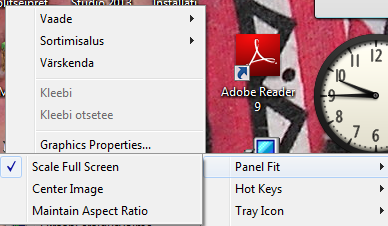
Scaling can be found in the graphics options. Try this:

Right click on the desktop and there should be an option for graphics for Intel.

There should be a section that has an option for scaling. Make sure it is set to Full-screen

Edit: very vague. I wish I had a better explanation... you might not be able to find an option for this...
 

My Computer My Computer

Computer type
Laptop
Computer Manufacturer/Model Number
ASUS G60-RBBX05
OS
Win7 Home Premium 64x
CPU
Intel Core 2 Duo P7450 / 2.13 GHz (2.29 with Extreme Turbo)
Memory
4 GB PC-6400 Hyundai (2X2) at 800Mhz
Graphics Card(s)
NVIDIA GeForce GTX 260M 1GB DDR3 VRAM
Monitor(s) Displays
16" LED Backlit
Screen Resolution
1366 x 768 on laptop 1600x1050 max res on 22" external mon
Hard Drives
OCZ Agility 3 60GB SSD / 320 GB - Serial ATA-150 - 7200 rpm
PSU
6-cell Lithium ion { lasts 1.5 hours }
Case
ASUS G60 Laptop
Keyboard
Chicklet type back-lit (white light) keyboard
Mouse
Logitech G9 Laser Mouse 3200dpi and 1000 reports per minute
Internet Speed
Comcast 8.60mb/s up - 3.11mb/s down
Antivirus
MSE
Browser
Firefox
Other Info
General mid-budget gaming Comp. Low batterylife - High FrameRates - currently overheating problems :(

2nd Rig: Case: Rosewill BLACKHAWK Gaming ATX Mid Tower Computer Case

Mobo: GIGABYTE GA-990FXA-UD3
CPU: AMD FX-6200 Zambezi 3.8GHz (4.1GHz Turbo)
Heatsink: COOLER MASTER V8 CPU Cooler
RAM: Patriot Viper 3 8GB (2 x 4GB) 240-Pin DDR3 SDRAM 1866 (PC3 15000)
GPU: SAPPHIRE Radeon HD 6850 1GB 2
I have three Options In the Menu, I've already checked the "Full Screen" One, But switching to any of them makes no difference.
Also, trying to set to 800x600 resolution results in the same area as before being displayed, but just at a lower resolution.. Weird..?
9sl2W6n.png
 

My Computer My Computer

Computer type
PC/Desktop
Computer Manufacturer/Model Number
Ordi
OS
Windows 7 Home Premium SP1, 64 bit
CPU
Athlon 2 x2 250
Motherboard
ECS A740GM-M
Memory
4GB DDR2
Graphics Card(s)
nVida Geforce GT-440
Sound Card
onboard
Monitor(s) Displays
21'' Philips @ 1080p, 19,5''' Samsung @ 1440x900
Hard Drives
500GB SAMSUNG HD502HJ (SATA)
PSU
400w thermaltake
Cooling
Stock CPU fan, one fan on the back
Keyboard
A keyboard
Mouse
A mouse
Internet Speed
7 down 1 up
Antivirus
KIS 2014
Browser
Chrome
Also, since you have Intel Graphics, I would go through this FAQ here: Graphics — Display Resolutions FAQ

I could copy/paste, but it is probably easier for you to go through this list on their site. Download from them the newest driver for your system and see if it helps.

I wish I could help more, but I do not have a system with integrated intel graphics :(
 

My Computer My Computer

Computer type
Laptop
Computer Manufacturer/Model Number
ASUS G60-RBBX05
OS
Win7 Home Premium 64x
CPU
Intel Core 2 Duo P7450 / 2.13 GHz (2.29 with Extreme Turbo)
Memory
4 GB PC-6400 Hyundai (2X2) at 800Mhz
Graphics Card(s)
NVIDIA GeForce GTX 260M 1GB DDR3 VRAM
Monitor(s) Displays
16" LED Backlit
Screen Resolution
1366 x 768 on laptop 1600x1050 max res on 22" external mon
Hard Drives
OCZ Agility 3 60GB SSD / 320 GB - Serial ATA-150 - 7200 rpm
PSU
6-cell Lithium ion { lasts 1.5 hours }
Case
ASUS G60 Laptop
Keyboard
Chicklet type back-lit (white light) keyboard
Mouse
Logitech G9 Laser Mouse 3200dpi and 1000 reports per minute
Internet Speed
Comcast 8.60mb/s up - 3.11mb/s down
Antivirus
MSE
Browser
Firefox
Other Info
General mid-budget gaming Comp. Low batterylife - High FrameRates - currently overheating problems :(

2nd Rig: Case: Rosewill BLACKHAWK Gaming ATX Mid Tower Computer Case

Mobo: GIGABYTE GA-990FXA-UD3
CPU: AMD FX-6200 Zambezi 3.8GHz (4.1GHz Turbo)
Heatsink: COOLER MASTER V8 CPU Cooler
RAM: Patriot Viper 3 8GB (2 x 4GB) 240-Pin DDR3 SDRAM 1866 (PC3 15000)
GPU: SAPPHIRE Radeon HD 6850 1GB 2
Uhm.. I'll go thought that.. I've got the latest drivers just today anyways trying to fix it.
This is what i get if i try to set it to 1280x800..
2nFLVnO.png
 

My Computer My Computer

Computer type
PC/Desktop
Computer Manufacturer/Model Number
Ordi
OS
Windows 7 Home Premium SP1, 64 bit
CPU
Athlon 2 x2 250
Motherboard
ECS A740GM-M
Memory
4GB DDR2
Graphics Card(s)
nVida Geforce GT-440
Sound Card
onboard
Monitor(s) Displays
21'' Philips @ 1080p, 19,5''' Samsung @ 1440x900
Hard Drives
500GB SAMSUNG HD502HJ (SATA)
PSU
400w thermaltake
Cooling
Stock CPU fan, one fan on the back
Keyboard
A keyboard
Mouse
A mouse
Internet Speed
7 down 1 up
Antivirus
KIS 2014
Browser
Chrome
I have three Options In the Menu, I've already checked the "Full Screen" One, But switching to any of them makes no difference.
Also, trying to set to 800x600 resolution results in the same area as before being displayed, but just at a lower resolution.. Weird..?
9sl2W6n.png


Ok so you did get to Scale: full screen... I think your laptop monitor is the problem, but I don't know for sure. I would try hooking up to another monitor to see if it displays correctly.

does it look the same in safe mode? http://www.sevenforums.com/tutorials/69585-safe-mode.html
 

My Computer My Computer

Computer type
Laptop
Computer Manufacturer/Model Number
ASUS G60-RBBX05
OS
Win7 Home Premium 64x
CPU
Intel Core 2 Duo P7450 / 2.13 GHz (2.29 with Extreme Turbo)
Memory
4 GB PC-6400 Hyundai (2X2) at 800Mhz
Graphics Card(s)
NVIDIA GeForce GTX 260M 1GB DDR3 VRAM
Monitor(s) Displays
16" LED Backlit
Screen Resolution
1366 x 768 on laptop 1600x1050 max res on 22" external mon
Hard Drives
OCZ Agility 3 60GB SSD / 320 GB - Serial ATA-150 - 7200 rpm
PSU
6-cell Lithium ion { lasts 1.5 hours }
Case
ASUS G60 Laptop
Keyboard
Chicklet type back-lit (white light) keyboard
Mouse
Logitech G9 Laser Mouse 3200dpi and 1000 reports per minute
Internet Speed
Comcast 8.60mb/s up - 3.11mb/s down
Antivirus
MSE
Browser
Firefox
Other Info
General mid-budget gaming Comp. Low batterylife - High FrameRates - currently overheating problems :(

2nd Rig: Case: Rosewill BLACKHAWK Gaming ATX Mid Tower Computer Case

Mobo: GIGABYTE GA-990FXA-UD3
CPU: AMD FX-6200 Zambezi 3.8GHz (4.1GHz Turbo)
Heatsink: COOLER MASTER V8 CPU Cooler
RAM: Patriot Viper 3 8GB (2 x 4GB) 240-Pin DDR3 SDRAM 1866 (PC3 15000)
GPU: SAPPHIRE Radeon HD 6850 1GB 2
Umm, the owner of the laptop just told me that a restart usually fixes it, sometimes it takes a few restarts... But it reappears here and there with no warning.. I'll try a restart right now, and see if it still states my resolution 1024x764..

Edit: Nothing has changed with normal restart, doing a safe mode boot right now.,
 

My Computer My Computer

Computer type
PC/Desktop
Computer Manufacturer/Model Number
Ordi
OS
Windows 7 Home Premium SP1, 64 bit
CPU
Athlon 2 x2 250
Motherboard
ECS A740GM-M
Memory
4GB DDR2
Graphics Card(s)
nVida Geforce GT-440
Sound Card
onboard
Monitor(s) Displays
21'' Philips @ 1080p, 19,5''' Samsung @ 1440x900
Hard Drives
500GB SAMSUNG HD502HJ (SATA)
PSU
400w thermaltake
Cooling
Stock CPU fan, one fan on the back
Keyboard
A keyboard
Mouse
A mouse
Internet Speed
7 down 1 up
Antivirus
KIS 2014
Browser
Chrome
Okay, I just booted into safe mode with no problems, then came back to normal mode and my screen was fixed (and my resolution was back to 1280x800), but I'm afraid that the problem still persists, I'll not mark as solved quite yet.. (Im pretty sure it was the magical "restart fix" that i've been telling you about, it comes back after awhile..probably) .. +rep @you ofcourse, if it happens again I'll bump but if it doesnt occur in a while I'll mark as solved.
 

My Computer My Computer

Computer type
PC/Desktop
Computer Manufacturer/Model Number
Ordi
OS
Windows 7 Home Premium SP1, 64 bit
CPU
Athlon 2 x2 250
Motherboard
ECS A740GM-M
Memory
4GB DDR2
Graphics Card(s)
nVida Geforce GT-440
Sound Card
onboard
Monitor(s) Displays
21'' Philips @ 1080p, 19,5''' Samsung @ 1440x900
Hard Drives
500GB SAMSUNG HD502HJ (SATA)
PSU
400w thermaltake
Cooling
Stock CPU fan, one fan on the back
Keyboard
A keyboard
Mouse
A mouse
Internet Speed
7 down 1 up
Antivirus
KIS 2014
Browser
Chrome
Looks like we are clear. Whatever fixed it has taken effect and I haven't experienced the resolution problem for the remaining day today.
 

My Computer My Computer

Computer type
PC/Desktop
Computer Manufacturer/Model Number
Ordi
OS
Windows 7 Home Premium SP1, 64 bit
CPU
Athlon 2 x2 250
Motherboard
ECS A740GM-M
Memory
4GB DDR2
Graphics Card(s)
nVida Geforce GT-440
Sound Card
onboard
Monitor(s) Displays
21'' Philips @ 1080p, 19,5''' Samsung @ 1440x900
Hard Drives
500GB SAMSUNG HD502HJ (SATA)
PSU
400w thermaltake
Cooling
Stock CPU fan, one fan on the back
Keyboard
A keyboard
Mouse
A mouse
Internet Speed
7 down 1 up
Antivirus
KIS 2014
Browser
Chrome
Back
Top