Solved Firefox: bottom of PDF display hidden behind taskbar

frable82

New member
Local time
4:27 AM
Messages
19
I have recently upgraded to Firefox 23, but first saw this issue when I still had v22.

I prefer to have PDF files from a URL display in Firefox using its Acrobat plugin.

However, the very bottom of the displayed file, including the bottom end of the scroll bar, is hidden under the Windows taskbar.

The plugin does not allow for any type of controls to be optionally displayed that might provide clues to this issue, and changing FF's zoom setting does not remedy the hiding issue.

The only thing that does remedy it is changing one or more of FF's toolbar settings, but this has to be done every time a URL with a PDF file is opened!

Mozilla's site has yet to provide me with an answer... can you?

Bob
 

My Computer My Computer

At a glance

Windows 7 Home Premium x641.30 gigahertz AMD E-300 APU with Radeon HD G...2664 Megabytes Usable Installed MemoryAMD Radeon HD 6310 Graphics
Computer type
PC/Desktop
Computer Manufacturer/Model Number
Hewlett-Packard CQ2014 1.02
OS
Windows 7 Home Premium x64
CPU
1.30 gigahertz AMD E-300 APU with Radeon HD Graphics
Motherboard
PEGATRON CORPORATION 2AD3 1.02
Memory
2664 Megabytes Usable Installed Memory
Graphics Card(s)
AMD Radeon HD 6310 Graphics
Sound Card
Realtek High Definition Audio
Monitor(s) Displays
Hitachi CM823F
Screen Resolution
1152 x 864
Hard Drives
WDC WD5000AAKS-60WWPA0 [Hard drive] (500.11 GB) -- drive 0, s/n WD-WMAYU2933783, rev 16.01H16
Keyboard
101-key (standard with system)
Mouse
Logitech M100
Internet Speed
25Mbps Cable
Antivirus
MS Security Essentials
Browser
Firefox v69.0
Hi frable82, welcome to 7F! :)

I stopped using Adobe Reader a while back and switched to NitroReader so I couldn't replicate the problem you're having and I can't recall having your problem while I was using AdobeR.

I looked in about:config and couldn't find anything that may lead to a solution although there are settings for browser.taskbar, and pdfjs., but I would be afraid of suggesting anything without knowing what the settings do for fear of bricking your FF browser. I'll look a little harder.

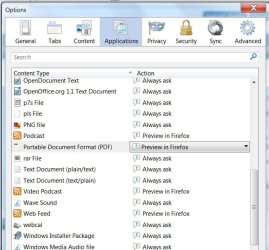
Check in Tools\Options\Applications scroll down to where PDF's are listed and see if yours is set like mine, Preview in FireFox if it's anything different just click anywhere on the listing for PDF's and a drop-down box will open for you to make changes.
ffpdf.jpg

You should be able to back out and check the new setting without re-starting FF, if you don't see any changes then go and re-start and check again.

In the meantime you could try: Troubleshooting Firefox issues using Safe Mode, and if that seems to take too long to hunt down the problem you may want to try: http://www.sevenforums.com/tutorials/2200-taskbar-auto-hide-turn-off.html
 

My Computer My Computer

At a glance

Originally Win 7 Hm Prem x64 Ver 6.1.7600 Bui...Intel i3 530 2.93GHz, 2933MHz 2 Cores 4 Logic...6GB of 1,333MHz DDR3 SDRAM32MB Intel Graphics Media Accelerator HD IGChip
Computer type
PC/Desktop
Computer Manufacturer/Model Number
Gateway DX4831-01e (Mid-Tower Desktop)
OS
Originally Win 7 Hm Prem x64 Ver 6.1.7600 Build 7601-SP1 | Upgraded to Windows 10 December 14, 2019
CPU
Intel i3 530 2.93GHz, 2933MHz 2 Cores 4 Logical Processors
Motherboard
Gateway H57M01 133 megahertz
Memory
6GB of 1,333MHz DDR3 SDRAM
Graphics Card(s)
32MB Intel Graphics Media Accelerator HD IGChip
Sound Card
Realtek High Definition Audio
Monitor(s) Displays
Gateway HX2000 20inch TFT active matrix TN
Screen Resolution
1600 x 900 x 59 hertz
Hard Drives
WDC WD10EADS-00M2B0 [HDD] (1000.20 GB) -- drive 0,
HL-DT-ST DVDRAM GH41N [CD-ROM dr]
Four card readers, and Four USB 2.0
PSU
300watts.
Case
Mid-Tower Desktop
Cooling
Stock from Gateway
Keyboard
Natural Ergonomic Keyboard 4000, see Other Info
Mouse
Orig. Gateway wore out now using Insignia USB wired optical
Internet Speed
Vz FIOS 10ms png 57.64Mbps down 65.53Mbps up Speedtest.org
Antivirus
Zamana Anti-logger with Anti-malware, MSE, Windows Firewall,
Browser
IE11.0.9600.19399-Upd ver11.0.135, Firefox 68.0.1 x64
Other Info
System Specs by Belarc.

BIOS: American Megatrends Inc. P01-A0 11/17/2009

Replaced the MS 'Natural' Standard PS/2 Enhanced 101-102 Keyboard with a new Natural Ergonomic Keyboard 4000 on August 1st 2014.

Canon Pixma MG3222 Printer.

Updated to IE11 on 12102015 | Fios Quantum Router g1100

Additional AV: SpywareBlaster, manual Mbam, SAS
I have recently upgraded to Firefox 23, but first saw this issue when I still had v22.

I prefer to have PDF files from a URL display in Firefox using its Acrobat plugin.

However, the very bottom of the displayed file, including the bottom end of the scroll bar, is hidden under the Windows taskbar.

The plugin does not allow for any type of controls to be optionally displayed that might provide clues to this issue, and changing FF's zoom setting does not remedy the hiding issue.

The only thing that does remedy it is changing one or more of FF's toolbar settings, but this has to be done every time a URL with a PDF file is opened!

Mozilla's site has yet to provide me with an answer... can you?

Bob
I have the exact same problem. I thought it was just typical FF weirdness.
 

My Computer My Computer

At a glance

Win10 Pro 64-bitAMD Ryzen 7 3800X32 GB Kingston DDR4-2666MSI nVidia GT 710 (2GB)
Computer type
PC/Desktop
Computer Manufacturer/Model Number
Self-Built
OS
Win10 Pro 64-bit
CPU
AMD Ryzen 7 3800X
Motherboard
Gigabyte X570 UD
Memory
32 GB Kingston DDR4-2666
Graphics Card(s)
MSI nVidia GT 710 (2GB)
Sound Card
Creative Audigy FX 5.1
Monitor(s) Displays
ViewSonic VG2439Smh 24"
Screen Resolution
1920x1080
Hard Drives
3xWD1TB; 1xSeagate 1TB... all spinning rust
PSU
EVGA 100-W1-0500-KR (500w)
Case
SilverStone PS10 (modified)
Cooling
CPU:AMD Wraith Prism. Case:3x Noctua 120mm
Keyboard
Compaq Professional PS/2
Mouse
Microsoft Basic Optical Mouse 2.0
Internet Speed
Fiber 1Gbit/sec down/up
Antivirus
Avast Free
Browser
FF, Chrome
Other Info
2x LG GH24NSC0 DVD burners, Mackie CR3 monitor speakers
The setting I currently use is "Use Adobe Acrobat (in Firefox)"

"Preview in Firefox"... otherwise known as using the PDF.js javascript mod... does not result in a clear view of the PDF file, unless set to "fit width", but until I or someone convince Mozilla (or Adobe) to address the original issue, it will have to do.
 

My Computer My Computer

At a glance

Windows 7 Home Premium x641.30 gigahertz AMD E-300 APU with Radeon HD G...2664 Megabytes Usable Installed MemoryAMD Radeon HD 6310 Graphics
Computer type
PC/Desktop
Computer Manufacturer/Model Number
Hewlett-Packard CQ2014 1.02
OS
Windows 7 Home Premium x64
CPU
1.30 gigahertz AMD E-300 APU with Radeon HD Graphics
Motherboard
PEGATRON CORPORATION 2AD3 1.02
Memory
2664 Megabytes Usable Installed Memory
Graphics Card(s)
AMD Radeon HD 6310 Graphics
Sound Card
Realtek High Definition Audio
Monitor(s) Displays
Hitachi CM823F
Screen Resolution
1152 x 864
Hard Drives
WDC WD5000AAKS-60WWPA0 [Hard drive] (500.11 GB) -- drive 0, s/n WD-WMAYU2933783, rev 16.01H16
Keyboard
101-key (standard with system)
Mouse
Logitech M100
Internet Speed
25Mbps Cable
Antivirus
MS Security Essentials
Browser
Firefox v69.0
I wonder if this has to do with the way FF22 handles screen resolution??

You might want to
See if this tip will help, rais's tip. Everybody's different and I set mine to -2.0 you just have to experiment to see what suits you.
You may have to also adjust the browser's view settings if you use anything like NoSquint.

Check the other responders at rais's tip and here for more insight: Firefox 22 changed browser screen resolution?

Sources: My post #4 - http://www.sevenforums.com/browsers-mail/297303-weird-there-fix.html#post2464820

http://www.sevenforums.com/browsers-mail/296398-firefox-22-changed-browser-screen-resolution.html
You don't have to stay with whole integers, like 1.0 or 2.0 you can use, 1.4 or 2.6 even go to the minus side like I did with -2.0 or -2.7 .

In my experience positive numbers make the resolution smaller, negative makes it larger.
 

My Computer My Computer

At a glance

Originally Win 7 Hm Prem x64 Ver 6.1.7600 Bui...Intel i3 530 2.93GHz, 2933MHz 2 Cores 4 Logic...6GB of 1,333MHz DDR3 SDRAM32MB Intel Graphics Media Accelerator HD IGChip
Computer type
PC/Desktop
Computer Manufacturer/Model Number
Gateway DX4831-01e (Mid-Tower Desktop)
OS
Originally Win 7 Hm Prem x64 Ver 6.1.7600 Build 7601-SP1 | Upgraded to Windows 10 December 14, 2019
CPU
Intel i3 530 2.93GHz, 2933MHz 2 Cores 4 Logical Processors
Motherboard
Gateway H57M01 133 megahertz
Memory
6GB of 1,333MHz DDR3 SDRAM
Graphics Card(s)
32MB Intel Graphics Media Accelerator HD IGChip
Sound Card
Realtek High Definition Audio
Monitor(s) Displays
Gateway HX2000 20inch TFT active matrix TN
Screen Resolution
1600 x 900 x 59 hertz
Hard Drives
WDC WD10EADS-00M2B0 [HDD] (1000.20 GB) -- drive 0,
HL-DT-ST DVDRAM GH41N [CD-ROM dr]
Four card readers, and Four USB 2.0
PSU
300watts.
Case
Mid-Tower Desktop
Cooling
Stock from Gateway
Keyboard
Natural Ergonomic Keyboard 4000, see Other Info
Mouse
Orig. Gateway wore out now using Insignia USB wired optical
Internet Speed
Vz FIOS 10ms png 57.64Mbps down 65.53Mbps up Speedtest.org
Antivirus
Zamana Anti-logger with Anti-malware, MSE, Windows Firewall,
Browser
IE11.0.9600.19399-Upd ver11.0.135, Firefox 68.0.1 x64
Other Info
System Specs by Belarc.

BIOS: American Megatrends Inc. P01-A0 11/17/2009

Replaced the MS 'Natural' Standard PS/2 Enhanced 101-102 Keyboard with a new Natural Ergonomic Keyboard 4000 on August 1st 2014.

Canon Pixma MG3222 Printer.

Updated to IE11 on 12102015 | Fios Quantum Router g1100

Additional AV: SpywareBlaster, manual Mbam, SAS

My Computer My Computer

At a glance

Windows 10 Home x64INTEL Core i5-750 Quad-Core 3.37GHzHyperX Fury Black Series 8GB (2 x 4GB) 1866MhzEVGA GeForce GTX 750 Superclocked 1GB 128-Bit...
Computer type
PC/Desktop
OS
Windows 10 Home x64
CPU
INTEL Core i5-750 Quad-Core 3.37GHz
Motherboard
ASUS P7P55D
Memory
HyperX Fury Black Series 8GB (2 x 4GB) 1866Mhz
Graphics Card(s)
EVGA GeForce GTX 750 Superclocked 1GB 128-Bit GDDR5
Monitor(s) Displays
LG 32MA68HY 32" IPS
Screen Resolution
1920 x 1080
Hard Drives
Samsung 840 Evo 120GB, SEAGATE 500GB Barracuda® 7200.12, SATA 3 Gb/s, 7200 RPM, 16MB cache
PSU
ANTEC TruePower New TP-550, 80 PLUS, 550W
Case
ANTEC Three Hundred Illusion
Cooling
COOLER MASTER Hyper 212 Plus, 4 x 120mm 1 x 140mm Noctua's
Internet Speed
85 + Mbps
Antivirus
Avast
Browser
Vivaldi
@A Guy: Yes, and it didn't have the same sharpness (except when viewing 1:1) as the others.
 

My Computer My Computer

At a glance

Windows 7 Home Premium x641.30 gigahertz AMD E-300 APU with Radeon HD G...2664 Megabytes Usable Installed MemoryAMD Radeon HD 6310 Graphics
Computer type
PC/Desktop
Computer Manufacturer/Model Number
Hewlett-Packard CQ2014 1.02
OS
Windows 7 Home Premium x64
CPU
1.30 gigahertz AMD E-300 APU with Radeon HD Graphics
Motherboard
PEGATRON CORPORATION 2AD3 1.02
Memory
2664 Megabytes Usable Installed Memory
Graphics Card(s)
AMD Radeon HD 6310 Graphics
Sound Card
Realtek High Definition Audio
Monitor(s) Displays
Hitachi CM823F
Screen Resolution
1152 x 864
Hard Drives
WDC WD5000AAKS-60WWPA0 [Hard drive] (500.11 GB) -- drive 0, s/n WD-WMAYU2933783, rev 16.01H16
Keyboard
101-key (standard with system)
Mouse
Logitech M100
Internet Speed
25Mbps Cable
Antivirus
MS Security Essentials
Browser
Firefox v69.0
Not surprising. I rarely use FF, and choose to save pdf and open in Sumatra. A Guy
 

My Computer My Computer

At a glance

Windows 10 Home x64INTEL Core i5-750 Quad-Core 3.37GHzHyperX Fury Black Series 8GB (2 x 4GB) 1866MhzEVGA GeForce GTX 750 Superclocked 1GB 128-Bit...
Computer type
PC/Desktop
OS
Windows 10 Home x64
CPU
INTEL Core i5-750 Quad-Core 3.37GHz
Motherboard
ASUS P7P55D
Memory
HyperX Fury Black Series 8GB (2 x 4GB) 1866Mhz
Graphics Card(s)
EVGA GeForce GTX 750 Superclocked 1GB 128-Bit GDDR5
Monitor(s) Displays
LG 32MA68HY 32" IPS
Screen Resolution
1920 x 1080
Hard Drives
Samsung 840 Evo 120GB, SEAGATE 500GB Barracuda® 7200.12, SATA 3 Gb/s, 7200 RPM, 16MB cache
PSU
ANTEC TruePower New TP-550, 80 PLUS, 550W
Case
ANTEC Three Hundred Illusion
Cooling
COOLER MASTER Hyper 212 Plus, 4 x 120mm 1 x 140mm Noctua's
Internet Speed
85 + Mbps
Antivirus
Avast
Browser
Vivaldi
Back
Top