Various BSODs when playing video games

Shadowthread

New member
Local time
8:53 PM
Messages
6
Hello,

So recently I've been suffering from various BSODs / comp crashes when playing video games (usually with Path of Exile and Skyrim) and this morning after such crash, when rebooting I got the "Driver trying to corrupt the system has been caught" bsod. Due to driver verifier I know that its one of my drivers, but I have no idea how to isolate that particular driver, so that is what I am asking help for.

I've attached the diagnostic tool archive as instructed in the other thread.
So please, can one of you help me with fixing my system?

Thank you for your time
Cheers, Shadowthread
 

My Computer My Computer

At a glance

Windows 7 64bit
Computer type
PC/Desktop
OS
Windows 7 64bit
Bump

p.s. someone tell if this is not allowed, but I would really like this to be looked into, thanks.
 

My Computer My Computer

At a glance

Windows 7 64bit
Computer type
PC/Desktop
OS
Windows 7 64bit
http://www.sevenforums.com/general-discussion/8-forum-rules-info-please-read.html#post15
2) No useless posts, e.g., thread bumping, useless one liners, junk posting to increase post count, and identical multi-postings in different forums.
And, as we check the threads by unanswered, the thread bumps will minimize the chance to get a quick reply.

Disable driver verifier following the Option two of the tutorial http://www.sevenforums.com/tutorials/101379-driver-verifier-enable-disable.html . Then observe how the computer is behaving. For any further issue, let us know.

Driver Verifier is not to use abruptly other than the suggestion of any debugger. It makes the system laggy, crash prone on purpose. Ifand only if we find it is needed, and suggest you to do so, enable DV. Otherwise not at all.
Code:
....
*******************************************************************************
*                                                                             *
*                        Bugcheck Analysis                                    *
*                                                                             *
*******************************************************************************

Use !analyze -v to get detailed debugging information.

BugCheck C4, {62, fffffa800623c3e8, fffffa800623c210, 1}

*** WARNING: Unable to verify timestamp for atikmpag.sys
*** ERROR: Module load completed but symbols could not be loaded for atikmpag.sys
Probably caused by : atikmpag.sys

Followup: MachineOwner
---------

3: kd> !analyze -v
*******************************************************************************
*                                                                             *
*                        Bugcheck Analysis                                    *
*                                                                             *
*******************************************************************************

DRIVER_VERIFIER_DETECTED_VIOLATION (c4)
A device driver attempting to corrupt the system has been caught.  This is
because the driver was specified in the registry as being suspect (by the
administrator) and the kernel has enabled substantial checking of this driver.
If the driver attempts to corrupt the system, bugchecks 0xC4, 0xC1 and 0xA will
be among the most commonly seen crashes.
Arguments:
Arg1: 0000000000000062, A driver has forgotten to free its pool allocations prior to unloading.
Arg2: fffffa800623c3e8, name of the driver having the issue.
Arg3: fffffa800623c210, verifier internal structure with driver information.
Arg4: 0000000000000001, total # of (paged+nonpaged) allocations that weren't freed.
    Type !verifier 3 drivername.sys for info on the allocations
    that were leaked that caused the bugcheck.

Debugging Details:
------------------


BUGCHECK_STR:  0xc4_62

IMAGE_NAME:  atikmpag.sys

DEBUG_FLR_IMAGE_TIMESTAMP:  5154e9d9

MODULE_NAME: atikmpag

FAULTING_MODULE: fffff88002c00000 atikmpag

VERIFIER_DRIVER_ENTRY: dt nt!_MI_VERIFIER_DRIVER_ENTRY fffffa800623c210
Symbol nt!_MI_VERIFIER_DRIVER_ENTRY not found.

CUSTOMER_CRASH_COUNT:  1

DEFAULT_BUCKET_ID:  WIN7_DRIVER_FAULT

PROCESS_NAME:  System

CURRENT_IRQL:  2

LOCK_ADDRESS:  fffff800030dab80 -- (!locks fffff800030dab80)

Resource @ nt!PiEngineLock (0xfffff800030dab80)    Available

WARNING: SystemResourcesList->Flink chain invalid. Resource may be corrupted, or already deleted.


WARNING: SystemResourcesList->Blink chain invalid. Resource may be corrupted, or already deleted.

1 total locks

PNP_TRIAGE: 
    Lock address  : 0xfffff800030dab80
    Thread Count  : 0
    Thread address: 0x0000000000000000
    Thread wait   : 0x0

LAST_CONTROL_TRANSFER:  from fffff800033644ec to fffff80002ed6c00

STACK_TEXT:  
fffff880`031a8508 fffff800`033644ec : 00000000`000000c4 00000000`00000062 fffffa80`0623c3e8 fffffa80`0623c210 : nt!KeBugCheckEx
fffff880`031a8510 fffff800`0337365a : 00000000`00000001 01535242`00000008 fffff880`02c00000 00000000`00000001 : nt!VerifierBugCheckIfAppropriate+0x3c
fffff880`031a8550 fffff800`02fc9270 : 00000000`00000000 00000000`00000000 fffff880`02fd5180 00000000`00000000 : nt!VfPoolCheckForLeaks+0x4a
fffff880`031a8590 fffff800`0328c7ee : fffffa80`0623c320 00000000`00000000 00000000`00000000 00000000`ffffffff : nt!VfTargetDriversRemove+0x160
fffff880`031a8630 fffff800`032b1243 : 00000000`00000000 00000000`000e0082 00000000`00000000 00000000`00000001 : nt!VfDriverUnloadImage+0x2e
fffff880`031a8660 fffff800`032b16bd : 00000000`00000000 fffffa80`0623c320 00000000`00000000 00000000`00010200 : nt!MiUnloadSystemImage+0x283
fffff880`031a86d0 fffff800`03352c51 : 00000000`00000000 fffff8a0`0083b850 fffffa80`03d2b360 00000000`00000018 : nt!MmUnloadSystemImage+0x4d
fffff880`031a8710 fffff800`02edfe44 : 00000000`00000000 fffff8a0`0083b850 fffffa80`03d2b360 fffffa80`06249fc0 : nt!IopDeleteDriver+0x41
fffff880`031a8740 fffff800`032c4d91 : fffff8a0`0083b850 00000000`00000000 fffff880`031a8848 00000000`00000000 : nt!ObfDereferenceObject+0xd4
fffff880`031a87a0 fffff800`032c61b2 : fffffa80`03d35290 fffffa80`0570c6e0 00000000`00000002 fffffa80`0570da10 : nt!PipCallDriverAddDevice+0x7d1
fffff880`031a8950 fffff800`032c664c : fffff800`030d8500 00000000`00000000 00000000`00000000 00000000`00000000 : nt!PipProcessDevNodeTree+0x2b2
fffff880`031a8bc0 fffff800`02fd97f2 : 00000001`00000003 00000000`00000000 00000000`32706e50 00000000`00000084 : nt!PiProcessStartSystemDevices+0x7c
fffff880`031a8c10 fffff800`02ee0251 : fffff800`02fd94f0 fffff800`031ced01 fffffa80`03d22600 00000000`00000000 : nt!PnpDeviceActionWorker+0x302
fffff880`031a8cb0 fffff800`03174ede : 00000000`00000000 fffffa80`03d22660 00000000`00000080 fffffa80`03d0a040 : nt!ExpWorkerThread+0x111
fffff880`031a8d40 fffff800`02ec7906 : fffff880`02f64180 fffffa80`03d22660 fffff880`02f6efc0 00000000`00000000 : nt!PspSystemThreadStartup+0x5a
fffff880`031a8d80 00000000`00000000 : fffff880`031a9000 fffff880`031a3000 fffff880`031a8470 00000000`00000000 : nt!KiStartSystemThread+0x16


STACK_COMMAND:  kb

FOLLOWUP_NAME:  MachineOwner

FAILURE_BUCKET_ID:  X64_0xc4_62_LEAKED_POOL_IMAGE_atikmpag.sys

BUCKET_ID:  X64_0xc4_62_LEAKED_POOL_IMAGE_atikmpag.sys

Followup: MachineOwner
---------

3: kd> lmvm atikmpag
start             end                 module name
fffff880`02c00000 fffff880`02c94000   atikmpag T (no symbols)           
    Loaded symbol image file: atikmpag.sys
    Image path: atikmpag.sys
    Image name: atikmpag.sys
    Timestamp:        Fri Mar 29 06:39:45 2013 (5154E9D9)
    CheckSum:         00091A60
    ImageSize:        00094000
    Translations:     0000.04b0 0000.04e4 0409.04b0 0409.04e4

 

My Computer My Computer

At a glance

Microsoft Windows 10 Pro Insider Preview 64-bitIntel(R) Core(TM) i3-4130 CPU @ 3.40GHzCorsair Vengence 4GB x2 (8.00GB Dual-Channel ...2047MB GeForce GTS 450 (ZOTAC International)
Computer type
PC/Desktop
Computer Manufacturer/Model Number
Self Assembled
OS
Microsoft Windows 10 Pro Insider Preview 64-bit
CPU
Intel(R) Core(TM) i3-4130 CPU @ 3.40GHz
Motherboard
Gigabyte Technology Co., Ltd. B85M-D3H
Memory
Corsair Vengence 4GB x2 (8.00GB Dual-Channel DDR3 @ 798MHz)
Graphics Card(s)
2047MB GeForce GTS 450 (ZOTAC International)
Sound Card
Onboard (Realtek High Definition Audio)
Monitor(s) Displays
LG Flatron E2040T
Screen Resolution
1600x900
Hard Drives
Western Digital 1 TB
Seagate 500 GB
PSU
Corsair VS550
Case
Cooler Master K380
Cooling
Cooler Master Seidon 120V Plus
Keyboard
Logitech MK260r
Mouse
Logitech MK260r
Internet Speed
PMPL Broadband
Antivirus
Windows Defender + MBAM
Browser
Firefox
Other Info
Dell Studio 15" Laptop
I apologize, did not know that.

I've attached some extra dump files, the most recent BSOD was a "dxgmm1.sys bsod" the other common BSOD messages are BAD_POOL_HEADER & BAD_POOL_CALLER, IRQL less than equal. (whenever i suffer from a blue screen, its usually one of these messages or the bsod screen doesn't specify what caused it.
 

My Computer My Computer

At a glance

Windows 7 64bit
Computer type
PC/Desktop
OS
Windows 7 64bit
Well, it appears that the display driver is behaving like a corrupt one.
The computer thinks that it is driver verifier enabled.
Code:
*******************************************************************************
*                                                                             *
*                        Bugcheck Analysis                                    *
*                                                                             *
*******************************************************************************

[COLOR=Red]DRIVER_VERIFIER_DETECTED_VIOLATION (c4)[/COLOR]
A device driver attempting to corrupt the system has been caught.  This is
because the driver was specified in the registry as being suspect (by the
administrator) and the kernel has enabled substantial checking of this driver.
If the driver attempts to corrupt the system, bugchecks 0xC4, 0xC1 and 0xA will
be among the most commonly seen crashes.
Arguments:
Arg1: 0000000000000062, A driver has forgotten to free its pool allocations prior to unloading.
Arg2: fffffa8005c87fd8, name of the driver having the issue.
Arg3: fffffa8005917aa0, verifier internal structure with driver information.
Arg4: 0000000000000001, total # of (paged+nonpaged) allocations that weren't freed.
    Type !verifier 3 drivername.sys for info on the allocations
    that were leaked that caused the bugcheck.
But it may be the fact that verifier is not actually working there.
Code:
VERIFIER_DRIVER_ENTRY: dt nt!_MI_VERIFIER_DRIVER_ENTRY fffffa8005917aa0
Symbol nt!_MI_VERIFIER_DRIVER_ENTRY not found.

CUSTOMER_CRASH_COUNT:  1

DEFAULT_BUCKET_ID:  WIN7_DRIVER_FAULT
------------------------------------------------------------------------------------
3: kd> !verifier 3 atikmpag.sys
fffff800030a2ac0: Unable to get verifier list.
But, this driver is in use by a very wide range of members, nobody reported such a misbehave earlier. May be it is just an installation corruption.

Uninstall the installed display driver using AMD Catalyst Un-install Utility .

Then install a fresh downloaded copy of the latest version (that one that was in use) again.
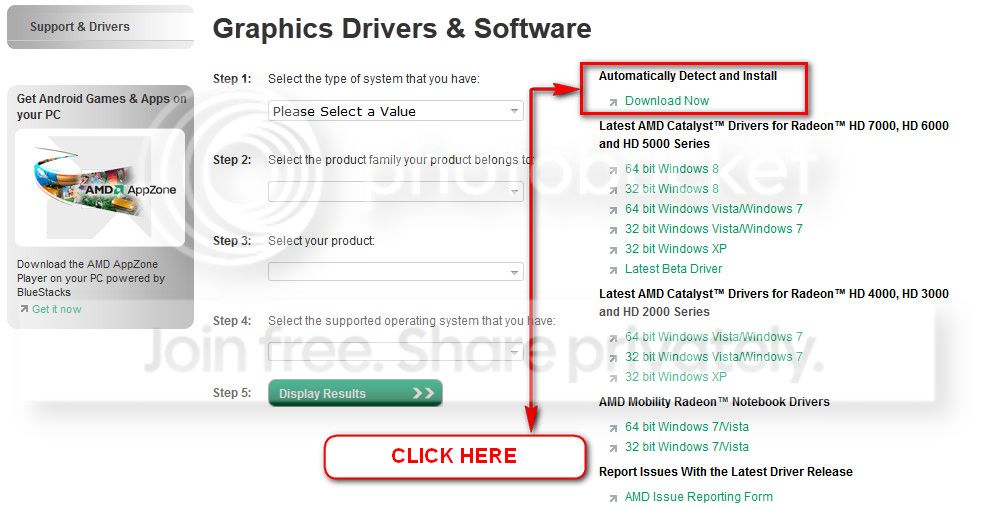
You can get it from the link in our forum, http://www.sevenforums.com/graphic-...alyst-video-driver-windows-7-a.html#post17671, or you may go to AMD Graphics Driver and Software and opt for Automatically Detect and Install the appropriate driver for your card.
ATI_zps0bc28aaa.jpg


During installation, you may opt for advanced installation, and install the display driver only, not the Catalyst Control Center.

As this behavior is not reported earlier, staying to the version. If the same thing continues, we have to think differently.
 

My Computer My Computer

At a glance

Microsoft Windows 10 Pro Insider Preview 64-bitIntel(R) Core(TM) i3-4130 CPU @ 3.40GHzCorsair Vengence 4GB x2 (8.00GB Dual-Channel ...2047MB GeForce GTS 450 (ZOTAC International)
Computer type
PC/Desktop
Computer Manufacturer/Model Number
Self Assembled
OS
Microsoft Windows 10 Pro Insider Preview 64-bit
CPU
Intel(R) Core(TM) i3-4130 CPU @ 3.40GHz
Motherboard
Gigabyte Technology Co., Ltd. B85M-D3H
Memory
Corsair Vengence 4GB x2 (8.00GB Dual-Channel DDR3 @ 798MHz)
Graphics Card(s)
2047MB GeForce GTS 450 (ZOTAC International)
Sound Card
Onboard (Realtek High Definition Audio)
Monitor(s) Displays
LG Flatron E2040T
Screen Resolution
1600x900
Hard Drives
Western Digital 1 TB
Seagate 500 GB
PSU
Corsair VS550
Case
Cooler Master K380
Cooling
Cooler Master Seidon 120V Plus
Keyboard
Logitech MK260r
Mouse
Logitech MK260r
Internet Speed
PMPL Broadband
Antivirus
Windows Defender + MBAM
Browser
Firefox
Other Info
Dell Studio 15" Laptop
For some reason when I run the Uninstall Utility, nothing happens after the UAC confirmation to which I press yes.
 

My Computer My Computer

At a glance

Windows 7 64bit
Computer type
PC/Desktop
OS
Windows 7 64bit
Disable UAC for a few minutes.

The application runs in background. When you double click it, it asks for the confirmation.
View attachment 277340

Now it runs in the background. When the things are uninstalled, it reports you back.
View attachment 277341

So, have another try with UAC disabled.
 

My Computer My Computer

At a glance

Microsoft Windows 10 Pro Insider Preview 64-bitIntel(R) Core(TM) i3-4130 CPU @ 3.40GHzCorsair Vengence 4GB x2 (8.00GB Dual-Channel ...2047MB GeForce GTS 450 (ZOTAC International)
Computer type
PC/Desktop
Computer Manufacturer/Model Number
Self Assembled
OS
Microsoft Windows 10 Pro Insider Preview 64-bit
CPU
Intel(R) Core(TM) i3-4130 CPU @ 3.40GHz
Motherboard
Gigabyte Technology Co., Ltd. B85M-D3H
Memory
Corsair Vengence 4GB x2 (8.00GB Dual-Channel DDR3 @ 798MHz)
Graphics Card(s)
2047MB GeForce GTS 450 (ZOTAC International)
Sound Card
Onboard (Realtek High Definition Audio)
Monitor(s) Displays
LG Flatron E2040T
Screen Resolution
1600x900
Hard Drives
Western Digital 1 TB
Seagate 500 GB
PSU
Corsair VS550
Case
Cooler Master K380
Cooling
Cooler Master Seidon 120V Plus
Keyboard
Logitech MK260r
Mouse
Logitech MK260r
Internet Speed
PMPL Broadband
Antivirus
Windows Defender + MBAM
Browser
Firefox
Other Info
Dell Studio 15" Laptop
I do not get to the situation detailed in the first picture. Like after i double click the uninstall util.exe, absolutely nothing happens. How Do I know that it is running in the first place?
 

My Computer My Computer

At a glance

Windows 7 64bit
Computer type
PC/Desktop
OS
Windows 7 64bit

My Computer My Computer

At a glance

Microsoft Windows 10 Pro Insider Preview 64-bitIntel(R) Core(TM) i3-4130 CPU @ 3.40GHzCorsair Vengence 4GB x2 (8.00GB Dual-Channel ...2047MB GeForce GTS 450 (ZOTAC International)
Computer type
PC/Desktop
Computer Manufacturer/Model Number
Self Assembled
OS
Microsoft Windows 10 Pro Insider Preview 64-bit
CPU
Intel(R) Core(TM) i3-4130 CPU @ 3.40GHz
Motherboard
Gigabyte Technology Co., Ltd. B85M-D3H
Memory
Corsair Vengence 4GB x2 (8.00GB Dual-Channel DDR3 @ 798MHz)
Graphics Card(s)
2047MB GeForce GTS 450 (ZOTAC International)
Sound Card
Onboard (Realtek High Definition Audio)
Monitor(s) Displays
LG Flatron E2040T
Screen Resolution
1600x900
Hard Drives
Western Digital 1 TB
Seagate 500 GB
PSU
Corsair VS550
Case
Cooler Master K380
Cooling
Cooler Master Seidon 120V Plus
Keyboard
Logitech MK260r
Mouse
Logitech MK260r
Internet Speed
PMPL Broadband
Antivirus
Windows Defender + MBAM
Browser
Firefox
Other Info
Dell Studio 15" Laptop
That program results in the exact same situation as the amd's tool. I can't see nothing happening, Ive done everything as instructed but no program pops up, after double clicking driver sweeper.exe -> no more memory usage in task manager, no application, nothing.
 

My Computer My Computer

At a glance

Windows 7 64bit
Computer type
PC/Desktop
OS
Windows 7 64bit
That program results in the exact same situation as the amd's tool. I can't see nothing happening, Ive done everything as instructed but no program pops up, after double clicking driver sweeper.exe -> no more memory usage in task manager, no application, nothing.
That's way odd. Your windows installation is probleming itself that it is not executing the executables.

Try a http://www.sevenforums.com/tutorials/219487-clean-reinstall-factory-oem-windows-7-a.html
 

My Computer My Computer

At a glance

Microsoft Windows 10 Pro Insider Preview 64-bitIntel(R) Core(TM) i3-4130 CPU @ 3.40GHzCorsair Vengence 4GB x2 (8.00GB Dual-Channel ...2047MB GeForce GTS 450 (ZOTAC International)
Computer type
PC/Desktop
Computer Manufacturer/Model Number
Self Assembled
OS
Microsoft Windows 10 Pro Insider Preview 64-bit
CPU
Intel(R) Core(TM) i3-4130 CPU @ 3.40GHz
Motherboard
Gigabyte Technology Co., Ltd. B85M-D3H
Memory
Corsair Vengence 4GB x2 (8.00GB Dual-Channel DDR3 @ 798MHz)
Graphics Card(s)
2047MB GeForce GTS 450 (ZOTAC International)
Sound Card
Onboard (Realtek High Definition Audio)
Monitor(s) Displays
LG Flatron E2040T
Screen Resolution
1600x900
Hard Drives
Western Digital 1 TB
Seagate 500 GB
PSU
Corsair VS550
Case
Cooler Master K380
Cooling
Cooler Master Seidon 120V Plus
Keyboard
Logitech MK260r
Mouse
Logitech MK260r
Internet Speed
PMPL Broadband
Antivirus
Windows Defender + MBAM
Browser
Firefox
Other Info
Dell Studio 15" Laptop
Back
Top