
More Than 3 Out of 4 Enthusiasts Reject Windows 8

Status
Not open for further replies.
Take a sneak peek at this now and again.
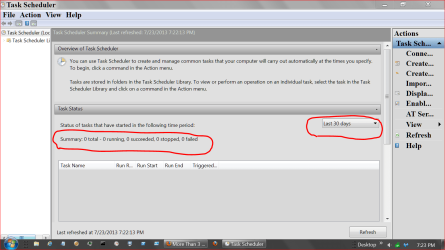
TASK SCHEDULE.PNG
 

My Computer My Computer

At a glance

Windows 10 Pro. 64/ version 1709 Windows 7 Pr...Intel i7-6800K @ 4.3Corsair Platinum 16 gig @2400EVGA GTX 1070 OC
Computer type
PC/Desktop
Computer Manufacturer/Model Number
Home made Desktop
OS
Windows 10 Pro. 64/ version 1709 Windows 7 Pro/64
CPU
Intel i7-6800K @ 4.3
Motherboard
ASUS X-99 Deluxe II
Memory
Corsair Platinum 16 gig @2400
Graphics Card(s)
EVGA GTX 1070 OC
Monitor(s) Displays
Asus 27" LED LCD/VE278Q
Screen Resolution
1920-1080 or 1280-720 HDMI
Hard Drives
INTEL SSD 730-240 Gb Sata 3.0/
PSU
EVGA Platium 1200W
Case
Phanteks Luxe Tempered Glass 8 fans/ one radiator
Cooling
XSPC/ Water Cooled CPU
Keyboard
Das 4 Professional
Mouse
Logitech M705/MX Anywhere 2-S
Internet Speed
100 mbits
Antivirus
Microsoft Security Essentials/ Malwarebytes Premium 3.0/ SAS
Browser
I.E. 11 default/Firefox/ ISP Time Warner Cable/Spectrum
Other Info
LG BluRay Burner/
Sound system-KLipsch-THX/
Icy Dock ssd Hot Swap bays.
I'm not gonna lie. Windows 8 should be aimed more towards tablets and not as an actual desktop OS. Microsoft has been doing a lot of messed up stuff after their release.
 

My Computer My Computer

At a glance

Windows 7 Professional x64 SP1Intel core i3-2120 3.30 ghzPNY Optima 8GB (2 x 4GB) DDR3-1333 MemoryAMD Sapphire Radeon HD 7770 series
Computer type
PC/Desktop
Computer Manufacturer/Model Number
Custom Build
OS
Windows 7 Professional x64 SP1
CPU
Intel core i3-2120 3.30 ghz
Motherboard
Gigabyte GA-H61M-S1 Micro ATX LGA1155 Motherboard
Memory
PNY Optima 8GB (2 x 4GB) DDR3-1333 Memory
Graphics Card(s)
AMD Sapphire Radeon HD 7770 series
Monitor(s) Displays
Generic PnP monitor
Screen Resolution
1024 x 768 "Yeah pretty crappy :/"
Hard Drives
Western Digital Caviar Blue 500GB 3.5" 7200RPM Internal Hard Drive
PSU
Cooler Master eXtreme Power Plus 500W ATX12V Power Supply
Case
Antec Three Hundred ATX Mid Tower Case
Browser
Google Chrome/Firefox
I'm not gonna lie. Windows 8 should be aimed more towards tablets and not as an actual desktop OS. Microsoft has been doing a lot of messed up stuff after their release.
Yep I agree Wings I reckon they should have stuck to tried and trusted methods and developed a system for separate use with those other thingys, and just made 7 a bit more faster.

As it is I think they lost a lot of kudos mucking around like they have and it must be costing a fortune to get things back into shape.

Personally I work in a health dept that has just gone over to 7 from XP and mate a majority of the staff do not know how to use a computer let alone work a system. So in my mind 8 in the Metro format is and always will be an absolute disaster in that using it on the computers as a main stay of data collection and reference especially the line of work I am in just that our workload has become ever greater and more complex. (I might add the main push in my profession is one of electronically recording just about everything now and for the future period.)

Going from XP to 7 has been more challenging even to those who can use the computers than anyone could imagined let alone those who are computer illiterate. So add to that the inability of the workforce to operate a computer let alone the system is nothing short of madness.

This is just one instance where I think that Microsoft haven't or didn't see coming hence the furore there is around the 8 system now, and I am only talking of my work place, there must be more work places so affected. In fact that yours, mine and everyones health for that matter could be put at risk by ever more complicated methods and systems that an average worker cannot use with confidence, efficiency and most scary of all anyone's safety.
 

My Computer My Computer

At a glance

Desk1 7 Home Prem / Desk2 10 Pro / Main lap A...Desk1 i5 3750K / Laptop i7 GTX 860M / Desk2 i...Desk1 8GB (1866) / Desk2 16GB (1333) / Laptop...Desk 1& 2NVidia GTX 650 & Laptops on board Intel
Computer type
PC/Desktop
Computer Manufacturer/Model Number
Own build (new) Desk1 / Asus ROG Win 7 / Desk2 1st build
OS
Desk1 7 Home Prem / Desk2 10 Pro / Main lap Asus ROG 10 Pro 2 laptop Toshiba 7 Pro Asus P2520 7 & 10
CPU
Desk1 i5 3750K / Laptop i7 GTX 860M / Desk2 i5 2500
Motherboard
Desk1 Asus P877-V / Desk2 Gigabyte H67 UD3H / Laptop ?
Memory
Desk1 8GB (1866) / Desk2 16GB (1333) / Laptop 8Gb DDR3
Graphics Card(s)
Desk 1& 2NVidia GTX 650 & Laptops on board Intel
Sound Card
Desk 1 & 2 -XONAR DG Realtek High Def audio Laptop
Monitor(s) Displays
Desk 1 Benq HD 2450 / Desk2 Philips 24" / Laptop 17.5"
Screen Resolution
1920x1080 D1 & D2 & Laptop 1
Hard Drives
Desk1 Samsung 120GB 830 SSD
Asus ROG 256GB 850 Pro SSD
Desk2 Samsung 840 256 SSD
Toshiba 120GB EVO
PSU
Desk 1 Corsair HX 1050/ Laptop ? / Desk 2 Corsair HX 650
Case
Desk 1 Cooler HAF XM ? Toshiba laptop / Desk2 Coolermaster
Cooling
Fans on all Desk1 -2 Desk2 - all Coolermasters 5 Laptop ?
Keyboard
Desk 1 MS Sidewinder X6 Desk 2 MS Sidewinder X 4
Mouse
Desk 1&2 - Gigabyte MS 900 gamer - laptop - Logitec wireless
Internet Speed
ADSL2+
Other Info
One other Desktop (tester) and spare Toshba laptop both with SSD's
Running Kaspersky 2016 ISS on all machines config'd identically
Logitec audio stereo systems on each machine (x3)
Canon MG5250MFC
Router/modem TP-Link running WPA2SK
Right, it is a mess. This dual user interface is like herring with plum pudding. Tastes terrible.
 

My Computer My Computer

At a glance

Vista, Windows7, Mint Mate, Zorin, Windows 8from 1.6GHz Duo to i7
Computer Manufacturer/Model Number
HP, Dell, Gateway, Toshiba - 4 laptops and 2 desktops
OS
Vista, Windows7, Mint Mate, Zorin, Windows 8
CPU
from 1.6GHz Duo to i7
Monitor(s) Displays
2x HP w2207
Hard Drives
5x HDD, 7x SSD, 12x Externals
Keyboard
with trackball - no mices
Mouse
Trackball mice
Internet Speed
DSL 6000
I'm not gonna lie. Windows 8 should be aimed more towards tablets and not as an actual desktop OS. Microsoft has been doing a lot of messed up stuff after their release.
Yep I agree Wings I reckon they should have stuck to tried and trusted methods and developed a system for separate use with those other thingys, and just made 7 a bit more faster.

As it is I think they lost a lot of kudos mucking around like they have and it must be costing a fortune to get things back into shape.

Personally I work in a health dept that has just gone over to 7 from XP and mate a majority of the staff do not know how to use a computer let alone work a system. So in my mind 8 in the Metro format is and always will be an absolute disaster in that using it on the computers as a main stay of data collection and reference especially the line of work I am in just that our workload has become ever greater and more complex. (I might add the main push in my profession is one of electronically recording just about everything now and for the future period.)

Going from XP to 7 has been more challenging even to those who can use the computers than anyone could imagined let alone those who are computer illiterate. So add to that the inability of the workforce to operate a computer let alone the system is nothing short of madness.

This is just one instance where I think that Microsoft haven't or didn't see coming hence the furore there is around the 8 system now, and I am only talking of my work place, there must be more work places so affected. In fact that yours, mine and everyones health for that matter could be put at risk by ever more complicated methods and systems that an average worker cannot use with confidence, efficiency and most scary of all anyone's safety.

Curious. I bought my first Win 7 machine (Lenovo G570 notebook) a little over a year ago while on a trip visiting friends. I didn't fire it up until I got home because I was expecting a really steep learning curve. I was pleasantly surprised. I was up and running and fully functional in minutes. I normally have trouble learning new things but the transition from XP to Win 7 was almost seamless. Of course, these fora helped considerably.

Win 8 is a whole 'nuther story.
 

My Computer My Computer

At a glance

Win 7 Ultimate 64 bitIntel i7-3930KKingston HyperX Genesis 32GB Kit (8x4GB Modul...MSI R7850 Twin Frozr 2GD5/OC Radeon HD 7850 2...
Computer type
PC/Desktop
Computer Manufacturer/Model Number
Custom Build
OS
Win 7 Ultimate 64 bit
CPU
Intel i7-3930K
Motherboard
ASUS P9X79 WS
Memory
Kingston HyperX Genesis 32GB Kit (8x4GB Modules) 1600MHz DDR
Graphics Card(s)
MSI R7850 Twin Frozr 2GD5/OC Radeon HD 7850 2GB 256-bit GDDR
Sound Card
Asus Xonar Essence STX
Monitor(s) Displays
3x Asus VG248QE 24", Vizio 32" TV
Screen Resolution
1920 x 1080, ?
Hard Drives
Samsung 128GB 840 Pro SSD (1),
Samsung 4TB 850 EVO SSDs (4)
Samsung 4TB 850 EVO SSDs (16) external backup drives used in 2.5" hot swap bays in the computer.
PSU
Corsair HX750w
Case
Antec Two Hundred v2 (modified)
Cooling
Cooler Master GeminII S524 120mm (fan replaced with a 140mm)
Keyboard
Logitech G510s
Mouse
Logitech M525 (two in use)
Internet Speed
=< 32Mbps down, 8Mbps up
Antivirus
AVAST!, MBAM, SAS, Spybot S&D (all but MBAM free) Glary Util
Browser
IE11
Other Info
LSI 9211-8i HBA card (8 SATA III ports), 2.5" & 3.5" Hot Swap Bays, HooToo HT-CR001 PCI-E to USB 3.0 Internal Hub + 6 Slot Card Reader, and LG Model CH12LS28 BD-ROM Optical Drive. Also, ScanSnap S1500 ADF duplexing scanner, Canon 9000F flat bed scanner, Corsair SP2500 2.1 speakers, Samsung CLP 415nw laser color printer, Cyberpower PP2200SW UPS
If you want Win7's native perfect performance you'll want to replace the Lenovo Factory Preinstall with a Clean Reinstall - Factory OEM Windows 7.

At the minimum I'd Clean Up Factory Bloatware until you can get around to the reinstall.

Actually, Lenovo's factory install is pretty clean without much actual bloatware which is one reason I did a factory restore recently instead of a clean install (not to mention I didn't have to look for drivers to install). I also wanted to keep Lenovo's Power Plan software because it had the option to keep the battery at a 50% charge level when mostly using AC (which is what I do) to maximize battery life. I also kept the Boot Optimizer that cleans up any crud that creeps in, causing boot speed to go down. That last option actually does work amazingly well. The only bloatware I had to remove was the Lenovo Game console (no games, though; they have to be downloaded). I also removed the software associated with the webcam. Although I have a circle of tape over the webcam to prevent a hacker from ever using it to spy on me, removing the associated software also ensures it can never be used and cleaned things up a bit. That was all. I was amazed when I got the notebook a year ago at how clean Lenovo's installation is. The only complaint I have is the touchpad driver won't let me permanently disable the miserable, misbegotten, no good for nothing, cotton pickin', stinkin', rotten, idiot touchpad or, even better, disable it when a mouse is present. And, yes, it's the latest driver (mutter, mutter, mumble, mumble).
 

My Computer My Computer

At a glance

Win 7 Ultimate 64 bitIntel i7-3930KKingston HyperX Genesis 32GB Kit (8x4GB Modul...MSI R7850 Twin Frozr 2GD5/OC Radeon HD 7850 2...
Computer type
PC/Desktop
Computer Manufacturer/Model Number
Custom Build
OS
Win 7 Ultimate 64 bit
CPU
Intel i7-3930K
Motherboard
ASUS P9X79 WS
Memory
Kingston HyperX Genesis 32GB Kit (8x4GB Modules) 1600MHz DDR
Graphics Card(s)
MSI R7850 Twin Frozr 2GD5/OC Radeon HD 7850 2GB 256-bit GDDR
Sound Card
Asus Xonar Essence STX
Monitor(s) Displays
3x Asus VG248QE 24", Vizio 32" TV
Screen Resolution
1920 x 1080, ?
Hard Drives
Samsung 128GB 840 Pro SSD (1),
Samsung 4TB 850 EVO SSDs (4)
Samsung 4TB 850 EVO SSDs (16) external backup drives used in 2.5" hot swap bays in the computer.
PSU
Corsair HX750w
Case
Antec Two Hundred v2 (modified)
Cooling
Cooler Master GeminII S524 120mm (fan replaced with a 140mm)
Keyboard
Logitech G510s
Mouse
Logitech M525 (two in use)
Internet Speed
=< 32Mbps down, 8Mbps up
Antivirus
AVAST!, MBAM, SAS, Spybot S&D (all but MBAM free) Glary Util
Browser
IE11
Other Info
LSI 9211-8i HBA card (8 SATA III ports), 2.5" & 3.5" Hot Swap Bays, HooToo HT-CR001 PCI-E to USB 3.0 Internal Hub + 6 Slot Card Reader, and LG Model CH12LS28 BD-ROM Optical Drive. Also, ScanSnap S1500 ADF duplexing scanner, Canon 9000F flat bed scanner, Corsair SP2500 2.1 speakers, Samsung CLP 415nw laser color printer, Cyberpower PP2200SW UPS
Drivers stopped being an issue in XP.

Win7 is driver-complete in the installer, quickly updated when you get online to run all rounds of Important and Optional Updates, after enabling Automatically deliver drivers via Windows Update (Step 3).

I've never found an OEM utility that doesn't have a better version built into Win7. If you really, really want one then you can find the Power Manager download here: Power Manager for Windows 7 (32-bit, 64-bit), Vista (32-bit, 64-bit) - Notebook

Well, Lenovo's Power manager utility is definitely better than Win 7's (and that's not saying Win 7's isn't good). Win 7 doesn't have the equivalent of Lenovo's Boot Optimizer. One probably could do what it can manually, but it's tedious and it's so much easier to let the Boot Optimizer do it.

Other than the webcam software (which, technically, isn't bloatware since it is needed to use the webcam) and the Games Console, there just wasn't anything else that needed removing. Doing the factory restore simply was easier and faster than doing a clean install. Basically, other than removing some software, it was as simple as pressing one button.

While, technically, you are correct about Win 7 having or being able to find its own drivers, sometimes they are just generic drivers and some hardware have better, more specific drivers available. Again, with doing the factory restore, I didn't have to worry about it.
 

My Computer My Computer

At a glance

Win 7 Ultimate 64 bitIntel i7-3930KKingston HyperX Genesis 32GB Kit (8x4GB Modul...MSI R7850 Twin Frozr 2GD5/OC Radeon HD 7850 2...
Computer type
PC/Desktop
Computer Manufacturer/Model Number
Custom Build
OS
Win 7 Ultimate 64 bit
CPU
Intel i7-3930K
Motherboard
ASUS P9X79 WS
Memory
Kingston HyperX Genesis 32GB Kit (8x4GB Modules) 1600MHz DDR
Graphics Card(s)
MSI R7850 Twin Frozr 2GD5/OC Radeon HD 7850 2GB 256-bit GDDR
Sound Card
Asus Xonar Essence STX
Monitor(s) Displays
3x Asus VG248QE 24", Vizio 32" TV
Screen Resolution
1920 x 1080, ?
Hard Drives
Samsung 128GB 840 Pro SSD (1),
Samsung 4TB 850 EVO SSDs (4)
Samsung 4TB 850 EVO SSDs (16) external backup drives used in 2.5" hot swap bays in the computer.
PSU
Corsair HX750w
Case
Antec Two Hundred v2 (modified)
Cooling
Cooler Master GeminII S524 120mm (fan replaced with a 140mm)
Keyboard
Logitech G510s
Mouse
Logitech M525 (two in use)
Internet Speed
=< 32Mbps down, 8Mbps up
Antivirus
AVAST!, MBAM, SAS, Spybot S&D (all but MBAM free) Glary Util
Browser
IE11
Other Info
LSI 9211-8i HBA card (8 SATA III ports), 2.5" & 3.5" Hot Swap Bays, HooToo HT-CR001 PCI-E to USB 3.0 Internal Hub + 6 Slot Card Reader, and LG Model CH12LS28 BD-ROM Optical Drive. Also, ScanSnap S1500 ADF duplexing scanner, Canon 9000F flat bed scanner, Corsair SP2500 2.1 speakers, Samsung CLP 415nw laser color printer, Cyberpower PP2200SW UPS
While, technically, you are correct about Win 7 having or being able to find its own drivers, sometimes they are just generic drivers and some hardware have better, more specific drivers available.

Completely agree with this.

While some may prefer the basic provisions of Window's generic drivers, other may want more robust functionality as stated above, or in the example where a gamer much prefers the control panel associated the video card drivers from the GPU vendor over the basic ones Windows provides.

What may be "bloat" to some can be of value to others. It's just a matter of use to the individual.

My two cents.
 

My Computer My Computer

At a glance

Windows 10 ProIntel Core i7-4770K (3.5Ghz)32 gig Corsair Dominator Platinum (4x8Gig)Sapphire Tri-X R9 Fury
Computer type
PC/Desktop
Computer Manufacturer/Model Number
Custom built by me.
OS
Windows 10 Pro
CPU
Intel Core i7-4770K (3.5Ghz)
Motherboard
Gigabyte G1 Sniper 5 (F10 Bios)
Memory
32 gig Corsair Dominator Platinum (4x8Gig)
Graphics Card(s)
Sapphire Tri-X R9 Fury
Sound Card
Soundblaster ZXR
Monitor(s) Displays
NEC PA242W 24" LCD Monitor
Screen Resolution
1920 x 1200
Hard Drives
Primary - Samsung 850 Pro (512gig), Samsung 840 Pro (256gig), 2TB WD Caviar Black.
PSU
EVGA Supernova 1000 G2
Case
Cooler Master HAF X
Cooling
Corsair H100i with Corsair Air Series SP120 Quiet Fans
Keyboard
Logitech Wireless Wave
Mouse
Logitech Performance MX
Internet Speed
High Speed Cable
Antivirus
Norton Security
Browser
IE11
Other Info
Memory Timings - 1866MHz @ 9-9-9-27-1T @ 1.5 volts
I understand gamers often need the full GPU software package, particularly for overclocking.

I'm interested in adding a Special Note for Lenovo Owners in http://www.sevenforums.com/tutorials/219487-clean-reinstall-factory-oem-windows-7-a.html#post1839164 that concisely explain the benefits of keeping this software. Is there anything besides Power Manager and Boot Optimizer, and is there a download for Boot Optimizer?. Any suggested blurbs would be especially appreciated.

I agree that the generic placeholder Standard VGA driver should never be acceptable and have only seen it settled for once in thousands of installs. However we've found OEM chipsets that gave problems which didn't happen with the Windows drivers. Especially for consumers it's proven over time to be best to stick with the Windows Drivers until they prove problematic or in exceptional cases like you've made us aware of here.
 
Take a sneak peek at this now and again.
View attachment 277846

Thanks for that screencap. That's a fast way to check on custom Tasks in the Scheduler.

Curious. I bought my first Win 7 machine (Lenovo G570 notebook) a little over a year ago while on a trip visiting friends. I didn't fire it up until I got home because I was expecting a really steep learning curve. I was pleasantly surprised. I was up and running and fully functional in minutes. I normally have trouble learning new things but the transition from XP to Win 7 was almost seamless. Of course, these fora helped considerably.

Win 8 is a whole 'nuther story.

I was the same when I jumped from XP to 7. I was a little concerned about the transition before buying my 7 PC but once I had it tweeked in, it's been great. MS got it right this time. The search boxes in 7 (Control Pnl, etc) made it much faster and easier for me vs XP and so far, I've not seen any instability, crashes, etc.

Going into my 4th year on the 7 Desktop, it's been error-free.
 

My Computer My Computer

At a glance

Windows 7 Home Premium 64 bitIntel i5 650 Dual Core 3.20 GHz Cache 4MB Thr...Corsair 16GB DDR3 1600MHz 9-9-9-24 P/N: CMZ8G...ZOTAC GeFORCE 9500 ZT-95TEK2M-FSL 1GB GDDR2
Computer type
PC/Desktop
Computer Manufacturer/Model Number
Built at Micro Center Richardson, TX
OS
Windows 7 Home Premium 64 bit
CPU
Intel i5 650 Dual Core 3.20 GHz Cache 4MB Threads: 4
Motherboard
ASUS PRO P7P55D-E
Memory
Corsair 16GB DDR3 1600MHz 9-9-9-24 P/N: CMZ8GX3M2A1600C
Graphics Card(s)
ZOTAC GeFORCE 9500 ZT-95TEK2M-FSL 1GB GDDR2
Sound Card
Mother Bd
Monitor(s) Displays
ASUS V228H 21.5” Diag
Screen Resolution
1440 x 900
Hard Drives
SEAGATE BARRACUDA (2ea) 3.5” INTERNAL 1Tb 16 MB SATA ST1000DM003-9YN162 7200RPM, 64MB, SATA 6Gb/s ** 2 Sata Hot-Swap Racks installed in Tower
PSU
Thermaltake Model TR2 RX 750W
Cooling
2 Tower Fans
Keyboard
Dell Quietkey PS/2 Windows 104 P/N 0463CD
Mouse
Kensington Mechanical Trackball USB Model 64217
Internet Speed
35/35
Antivirus
Norton 360 & MBAM Pro
Browser
IE10
Other Info
Printer: HP DeskJet 3520 USB 2.0 **
Speakers: ALTEC Model VS4621 2.1 28 W/Channel w/Sub-woofer **
IOGEAR HDMI Monitor Switcher Swx3 MODEL GHDSW3 ** Addonics ZDRWESU3 eSata/USB 3.0 external DVD Read/Write DVD Drive** SEAGATE GoFlex USB 2.0 Portable HD 500GB 5400 RPM P/N: 9ZF2A2-570
I understand gamers often need the full GPU software package, particularly for overclocking.

I'm interested in adding a Special Note for Lenovo Owners in http://www.sevenforums.com/tutorials/219487-clean-reinstall-factory-oem-windows-7-a.html#post1839164 that concisely explain the benefits of keeping this software. Is there anything besides Power Manager and Boot Optimizer, and is there a download for Boot Optimizer?. Any suggested blurbs would be especially appreciated.

I agree that the generic placeholder Standard VGA driver should never be acceptable and have only seen it settled for once in thousands of installs. However we've found OEM chipsets that gave problems which didn't happen with the Windows drivers. Especially for consumers it's proven over time to be best to stick with the Windows Drivers until they prove problematic or in exceptional cases like you've made us aware of here.

I never could find out for sure which was the correct download for Boot Optimizer. Boot Optimizer has to be tailored for each Lenovo model because it interacts with Win 7 and various supporting software and drivers so they will together at their best. I found it one heckuvalot easier to just use the factory reinstall. I've own two commercial desktops and three netbooks from three different manufacturers (Gateway, Acer, and Asus) and those all had a large amount of carpware that had to be removed. All Lenovo had that could be classified as crapware was the Lenovo Game Console and McAfee (forgot to mention it earlier). The Game Console was easy to ditch and it didn't take long to find, download, and implement the removal tool for McAfee. The whole process was much simpler than manually clean installing Win 7.

Normally, I would agree a clean install of Win 7 is better but Lenovo (at least the G570) is definitely an exception.
 

My Computer My Computer

At a glance

Win 7 Ultimate 64 bitIntel i7-3930KKingston HyperX Genesis 32GB Kit (8x4GB Modul...MSI R7850 Twin Frozr 2GD5/OC Radeon HD 7850 2...
Computer type
PC/Desktop
Computer Manufacturer/Model Number
Custom Build
OS
Win 7 Ultimate 64 bit
CPU
Intel i7-3930K
Motherboard
ASUS P9X79 WS
Memory
Kingston HyperX Genesis 32GB Kit (8x4GB Modules) 1600MHz DDR
Graphics Card(s)
MSI R7850 Twin Frozr 2GD5/OC Radeon HD 7850 2GB 256-bit GDDR
Sound Card
Asus Xonar Essence STX
Monitor(s) Displays
3x Asus VG248QE 24", Vizio 32" TV
Screen Resolution
1920 x 1080, ?
Hard Drives
Samsung 128GB 840 Pro SSD (1),
Samsung 4TB 850 EVO SSDs (4)
Samsung 4TB 850 EVO SSDs (16) external backup drives used in 2.5" hot swap bays in the computer.
PSU
Corsair HX750w
Case
Antec Two Hundred v2 (modified)
Cooling
Cooler Master GeminII S524 120mm (fan replaced with a 140mm)
Keyboard
Logitech G510s
Mouse
Logitech M525 (two in use)
Internet Speed
=< 32Mbps down, 8Mbps up
Antivirus
AVAST!, MBAM, SAS, Spybot S&D (all but MBAM free) Glary Util
Browser
IE11
Other Info
LSI 9211-8i HBA card (8 SATA III ports), 2.5" & 3.5" Hot Swap Bays, HooToo HT-CR001 PCI-E to USB 3.0 Internal Hub + 6 Slot Card Reader, and LG Model CH12LS28 BD-ROM Optical Drive. Also, ScanSnap S1500 ADF duplexing scanner, Canon 9000F flat bed scanner, Corsair SP2500 2.1 speakers, Samsung CLP 415nw laser color printer, Cyberpower PP2200SW UPS
I'm not gonna lie. Windows 8 should be aimed more towards tablets and not as an actual desktop OS. Microsoft has been doing a lot of messed up stuff after their release.
Yep I agree Wings I reckon they should have stuck to tried and trusted methods and developed a system for separate use with those other thingys, and just made 7 a bit more faster.

As it is I think they lost a lot of kudos mucking around like they have and it must be costing a fortune to get things back into shape.

Personally I work in a health dept that has just gone over to 7 from XP and mate a majority of the staff do not know how to use a computer let alone work a system. So in my mind 8 in the Metro format is and always will be an absolute disaster in that using it on the computers as a main stay of data collection and reference especially the line of work I am in just that our workload has become ever greater and more complex. (I might add the main push in my profession is one of electronically recording just about everything now and for the future period.)

Going from XP to 7 has been more challenging even to those who can use the computers than anyone could imagined let alone those who are computer illiterate. So add to that the inability of the workforce to operate a computer let alone the system is nothing short of madness.

This is just one instance where I think that Microsoft haven't or didn't see coming hence the furore there is around the 8 system now, and I am only talking of my work place, there must be more work places so affected. In fact that yours, mine and everyones health for that matter could be put at risk by ever more complicated methods and systems that an average worker cannot use with confidence, efficiency and most scary of all anyone's safety.

Curious. I bought my first Win 7 machine (Lenovo G570 notebook) a little over a year ago while on a trip visiting friends. I didn't fire it up until I got home because I was expecting a really steep learning curve. I was pleasantly surprised. I was up and running and fully functional in minutes. I normally have trouble learning new things but the transition from XP to Win 7 was almost seamless. Of course, these fora helped considerably.

Win 8 is a whole 'nuther story.
Yep Lady Fitz but I work with folks who either have just used a computer to play simple games or Ebay on or have never switched one on because they have been trained to care for folks with health problems and have no interest in computers - plus I reckon there must be other types of business or work situations where a similar set up is in place.
 

My Computer My Computer

At a glance

Desk1 7 Home Prem / Desk2 10 Pro / Main lap A...Desk1 i5 3750K / Laptop i7 GTX 860M / Desk2 i...Desk1 8GB (1866) / Desk2 16GB (1333) / Laptop...Desk 1& 2NVidia GTX 650 & Laptops on board Intel
Computer type
PC/Desktop
Computer Manufacturer/Model Number
Own build (new) Desk1 / Asus ROG Win 7 / Desk2 1st build
OS
Desk1 7 Home Prem / Desk2 10 Pro / Main lap Asus ROG 10 Pro 2 laptop Toshiba 7 Pro Asus P2520 7 & 10
CPU
Desk1 i5 3750K / Laptop i7 GTX 860M / Desk2 i5 2500
Motherboard
Desk1 Asus P877-V / Desk2 Gigabyte H67 UD3H / Laptop ?
Memory
Desk1 8GB (1866) / Desk2 16GB (1333) / Laptop 8Gb DDR3
Graphics Card(s)
Desk 1& 2NVidia GTX 650 & Laptops on board Intel
Sound Card
Desk 1 & 2 -XONAR DG Realtek High Def audio Laptop
Monitor(s) Displays
Desk 1 Benq HD 2450 / Desk2 Philips 24" / Laptop 17.5"
Screen Resolution
1920x1080 D1 & D2 & Laptop 1
Hard Drives
Desk1 Samsung 120GB 830 SSD
Asus ROG 256GB 850 Pro SSD
Desk2 Samsung 840 256 SSD
Toshiba 120GB EVO
PSU
Desk 1 Corsair HX 1050/ Laptop ? / Desk 2 Corsair HX 650
Case
Desk 1 Cooler HAF XM ? Toshiba laptop / Desk2 Coolermaster
Cooling
Fans on all Desk1 -2 Desk2 - all Coolermasters 5 Laptop ?
Keyboard
Desk 1 MS Sidewinder X6 Desk 2 MS Sidewinder X 4
Mouse
Desk 1&2 - Gigabyte MS 900 gamer - laptop - Logitec wireless
Internet Speed
ADSL2+
Other Info
One other Desktop (tester) and spare Toshba laptop both with SSD's
Running Kaspersky 2016 ISS on all machines config'd identically
Logitec audio stereo systems on each machine (x3)
Canon MG5250MFC
Router/modem TP-Link running WPA2SK
Normally, I would agree a clean install of Win 7 is better but Lenovo (at least the G570) is definitely an exception.

My first thought is that you must go to a re-education camp to be shown endless videos of a Win7 Clean Reinstall's superior performance, however since it's Our Lady I instead added this to Clean Reinstall - Factory OEM Windows 7 pending your approval:

   Note

Special Note for Lenovo Owners

Download for the Power Manager which has a feature that will not let the battery fall below 50% is here: Power Manager for Windows 7 (32-bit, 64-bit), Vista (32-bit, 64-bit) - Notebook

At least for the G570 our colleague Lady Fitzgerald reports that both the Power Manager and Boot Optimizer make keeping the Factory Install worthwhile since it is not that bloated and cleans up easily. Clean Up Factory Bloatware

 
Normally, I would agree a clean install of Win 7 is better but Lenovo (at least the G570) is definitely an exception.

My first thought is that you must go to a re-education camp to be shown endless videos of a Win7 Clean Reinstall's superior performance, however since it's Our Lady I instead added this to Clean Reinstall - Factory OEM Windows 7 pending your approval:

   Note

Special Note for Lenovo Owners

Download for the Power Manager which has a feature that will not let the battery fall below 50% is here: Power Manager for Windows 7 (32-bit, 64-bit), Vista (32-bit, 64-bit) - Notebook

At least for the G570 our colleague Lady Fitzgerald reports that both the Power Manager and Boot Optimizer make keeping the Factory Install worthwhile since it is not that bloated and cleans up easily. Clean Up Factory Bloatware


Looks good to me.
 

My Computer My Computer

At a glance

Win 7 Ultimate 64 bitIntel i7-3930KKingston HyperX Genesis 32GB Kit (8x4GB Modul...MSI R7850 Twin Frozr 2GD5/OC Radeon HD 7850 2...
Computer type
PC/Desktop
Computer Manufacturer/Model Number
Custom Build
OS
Win 7 Ultimate 64 bit
CPU
Intel i7-3930K
Motherboard
ASUS P9X79 WS
Memory
Kingston HyperX Genesis 32GB Kit (8x4GB Modules) 1600MHz DDR
Graphics Card(s)
MSI R7850 Twin Frozr 2GD5/OC Radeon HD 7850 2GB 256-bit GDDR
Sound Card
Asus Xonar Essence STX
Monitor(s) Displays
3x Asus VG248QE 24", Vizio 32" TV
Screen Resolution
1920 x 1080, ?
Hard Drives
Samsung 128GB 840 Pro SSD (1),
Samsung 4TB 850 EVO SSDs (4)
Samsung 4TB 850 EVO SSDs (16) external backup drives used in 2.5" hot swap bays in the computer.
PSU
Corsair HX750w
Case
Antec Two Hundred v2 (modified)
Cooling
Cooler Master GeminII S524 120mm (fan replaced with a 140mm)
Keyboard
Logitech G510s
Mouse
Logitech M525 (two in use)
Internet Speed
=< 32Mbps down, 8Mbps up
Antivirus
AVAST!, MBAM, SAS, Spybot S&D (all but MBAM free) Glary Util
Browser
IE11
Other Info
LSI 9211-8i HBA card (8 SATA III ports), 2.5" & 3.5" Hot Swap Bays, HooToo HT-CR001 PCI-E to USB 3.0 Internal Hub + 6 Slot Card Reader, and LG Model CH12LS28 BD-ROM Optical Drive. Also, ScanSnap S1500 ADF duplexing scanner, Canon 9000F flat bed scanner, Corsair SP2500 2.1 speakers, Samsung CLP 415nw laser color printer, Cyberpower PP2200SW UPS
Well, speaking from my personal experience, this Acer laptop had very little in the way of crapware or bloatware on it when purchased. But then, it is (was) a top-end model aimed at the professional/expert user, not the average content-consumer.

But yes, I did end up doing a clean install anyway.


Wenda.
 

My Computer My Computer

At a glance

Windows 7 Ultimate SP1 32-bit; Windows 7 Home...Intel T6500 Core 2 Duo@2Ghz.3GB DDR2Intel 4500MHD
Computer type
Laptop
Computer Manufacturer/Model Number
Acer AS5735
OS
Windows 7 Ultimate SP1 32-bit; Windows 7 Home Premium 64-bit (VM).
CPU
Intel T6500 Core 2 Duo@2Ghz.
Motherboard
Acer
Memory
3GB DDR2
Graphics Card(s)
Intel 4500MHD
Sound Card
Realtek onboard
Monitor(s) Displays
Built-in, no touch
Screen Resolution
1366x768
Hard Drives
250GB SATA in two equal partitions.
PSU
Stock
Case
Laptop
Cooling
Stock
Keyboard
Full 101-key
Mouse
USB cordless IR
Antivirus
MSE
Browser
IE9, Firefox.
Other Info
A top little machine that hasn't let me down once since the day I removed it from its packaging over four years ago. It's done everything I could want, and more, all without a single issue. 10/10, Acer!!
I believe you can generally clean the so called "crapware" away without too much effort before needing to do a clean install. We need to accept that some users would be very nervous with a "clean install".
Given most OEM PCs will now come with W8 my question is - how easy is it to do a clean install?
 

My Computer My Computer

At a glance

Windows 7x64 Home Premium SP1Intel i7 2600kG.Skill Ripjaws (DDR3-1600) 2x4GBNvidia GeForce GTS 450; Intel HD Graphics 300...
Computer type
PC/Desktop
Computer Manufacturer/Model Number
Own build
OS
Windows 7x64 Home Premium SP1
CPU
Intel i7 2600k
Motherboard
ASUS P8Z68 Deluxe
Memory
G.Skill Ripjaws (DDR3-1600) 2x4GB
Graphics Card(s)
Nvidia GeForce GTS 450; Intel HD Graphics 3000(GT2+)
Monitor(s) Displays
Dell Ultrasharp IPS panel U2311H, Samsung SyncMaster P2350
Screen Resolution
1920x1080
Hard Drives
Samsung 850 Pro SSD 256GB, Samsung SSD 840 120GB, Seagates 1TB Barracuda ST31000528AS x2
PSU
Seasonic M12II 520W
Case
Lian Li Lancool PC-K60
Cooling
Case: 1x120mm, 3x140mm CPU: Hyper 212+
Keyboard
Logitech MK520 (wireless)
Mouse
Logitech MK520
Internet Speed
6-7 Mbps
Antivirus
Norton Security Premium, Malwarebytes on 2 (MSE on 3rd PC)
Browser
FireFox
Other Info
Audio: Logitech Z523 2.1
Well, speaking from my personal experience, this Acer laptop had very little in the way of crapware or bloatware on it when purchased. But then, it is (was) a top-end model aimed at the professional/expert user, not the average content-consumer.

But yes, I did end up doing a clean install anyway.


Wenda.

That Acer may have been clean but the two Acer netbooks and the one Acer desktop I had were practically bursting at the seams with crapware.
 

My Computer My Computer

At a glance

Win 7 Ultimate 64 bitIntel i7-3930KKingston HyperX Genesis 32GB Kit (8x4GB Modul...MSI R7850 Twin Frozr 2GD5/OC Radeon HD 7850 2...
Computer type
PC/Desktop
Computer Manufacturer/Model Number
Custom Build
OS
Win 7 Ultimate 64 bit
CPU
Intel i7-3930K
Motherboard
ASUS P9X79 WS
Memory
Kingston HyperX Genesis 32GB Kit (8x4GB Modules) 1600MHz DDR
Graphics Card(s)
MSI R7850 Twin Frozr 2GD5/OC Radeon HD 7850 2GB 256-bit GDDR
Sound Card
Asus Xonar Essence STX
Monitor(s) Displays
3x Asus VG248QE 24", Vizio 32" TV
Screen Resolution
1920 x 1080, ?
Hard Drives
Samsung 128GB 840 Pro SSD (1),
Samsung 4TB 850 EVO SSDs (4)
Samsung 4TB 850 EVO SSDs (16) external backup drives used in 2.5" hot swap bays in the computer.
PSU
Corsair HX750w
Case
Antec Two Hundred v2 (modified)
Cooling
Cooler Master GeminII S524 120mm (fan replaced with a 140mm)
Keyboard
Logitech G510s
Mouse
Logitech M525 (two in use)
Internet Speed
=< 32Mbps down, 8Mbps up
Antivirus
AVAST!, MBAM, SAS, Spybot S&D (all but MBAM free) Glary Util
Browser
IE11
Other Info
LSI 9211-8i HBA card (8 SATA III ports), 2.5" & 3.5" Hot Swap Bays, HooToo HT-CR001 PCI-E to USB 3.0 Internal Hub + 6 Slot Card Reader, and LG Model CH12LS28 BD-ROM Optical Drive. Also, ScanSnap S1500 ADF duplexing scanner, Canon 9000F flat bed scanner, Corsair SP2500 2.1 speakers, Samsung CLP 415nw laser color printer, Cyberpower PP2200SW UPS
Well, speaking from my personal experience, this Acer laptop had very little in the way of crapware or bloatware on it when purchased. But then, it is (was) a top-end model aimed at the professional/expert user, not the average content-consumer.

But yes, I did end up doing a clean install anyway.

Wenda.

That Acer may have been clean but the two Acer netbooks and the one Acer desktop I had were practically bursting at the seams with crapware.

Speaking of crapware I have to say my Asus Prime notebook with Windows 8 was relatively free of it. I think I wound up removing like two apps which also included MacAfee, which was replaced in favor of Norton Internet Security.
 

My Computer My Computer

At a glance

Windows 10 ProIntel Core i7-4770K (3.5Ghz)32 gig Corsair Dominator Platinum (4x8Gig)Sapphire Tri-X R9 Fury
Computer type
PC/Desktop
Computer Manufacturer/Model Number
Custom built by me.
OS
Windows 10 Pro
CPU
Intel Core i7-4770K (3.5Ghz)
Motherboard
Gigabyte G1 Sniper 5 (F10 Bios)
Memory
32 gig Corsair Dominator Platinum (4x8Gig)
Graphics Card(s)
Sapphire Tri-X R9 Fury
Sound Card
Soundblaster ZXR
Monitor(s) Displays
NEC PA242W 24" LCD Monitor
Screen Resolution
1920 x 1200
Hard Drives
Primary - Samsung 850 Pro (512gig), Samsung 840 Pro (256gig), 2TB WD Caviar Black.
PSU
EVGA Supernova 1000 G2
Case
Cooler Master HAF X
Cooling
Corsair H100i with Corsair Air Series SP120 Quiet Fans
Keyboard
Logitech Wireless Wave
Mouse
Logitech Performance MX
Internet Speed
High Speed Cable
Antivirus
Norton Security
Browser
IE11
Other Info
Memory Timings - 1866MHz @ 9-9-9-27-1T @ 1.5 volts
Status
Not open for further replies.
Back
Top