
Solved Windows error: Unknown Publisher on windows files

BSeanD

New member
Member
VIP
Local time
8:59 PM
Messages
136
Hi guys,

I have a Win7 Pro 64bit machine that is constantly coming up with a UAC box stating it doesn't know the publisher when I run windows programs, for example cleanmgr.exe.
I've attached a screen shot of the error message, sorry don't know how to embed the image.
I only get the UAC with windows files not other programs.
Any idea what's wrong?

On a side note, I discovered this when I found I was not able to do the windows updates on this machine, keeps giving me errors. Thinking they might be related.

Sean
 

Attachments
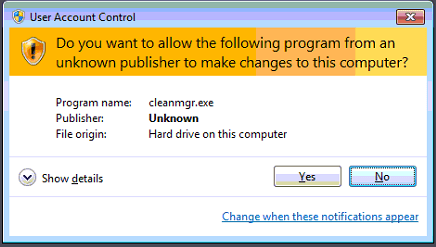
  • error.png
    error.png
    13.4 KB · Views: 19

My Computer My Computer

At a glance

Windows 7
OS
Windows 7
Hello BSeanD,

Do you have administrator access on your machine?
Also, you can change your UAC settings by following option one from this tutorial. But it is highly recommended to keep UAC enabled, as it is a great security feature.


Good luck and keep us posted,
Nommy
 

My Computer My Computer

At a glance

Microsoft Windows 8.1 64-bit ProfessionalIntel(R) Core(TM) i7-4510U CPU @ 2.00GHz8.00 GB (2 x 4.00 GB)AMD Radeon R7 M265
Computer type
Laptop
Computer Manufacturer/Model Number
Dell Inspiron 5547
OS
Microsoft Windows 8.1 64-bit Professional
CPU
Intel(R) Core(TM) i7-4510U CPU @ 2.00GHz
Motherboard
Dell Inc. 08KNCD
Memory
8.00 GB (2 x 4.00 GB)
Graphics Card(s)
AMD Radeon R7 M265
Screen Resolution
1366 x 768 x 4294967296 colors
Hard Drives
(1) 1TB ST1000LM024 HN-M101MBB (2) 2TB Western Digital external hard drive (3) 500GB Packard Bell external hard drive
Mouse
Corsair Vengeance M60
Antivirus
Windows Defender & Malwarebytes
Browser
Firefox, Chromium
Other Info
+ Acer TravelMate 7730G with 32bit Ubuntu 14.04 LTS Trusty Tahr.
Hello BSeanD,

Do you have administrator access on your machine?
Also, you can change your UAC settings by following option one from this tutorial. But it is highly recommended to keep UAC enabled, as it is a great security feature.


Good luck and keep us posted,
Nommy

Hi Nommy,

Thanks for the reply.
Yes I do have administrator rights on the machine both domain and local. I wont be removing the UAC as it is a work machine.

I just don't understand how Windows doesn't recognise its own files.
 

My Computer My Computer

At a glance

Windows 7
OS
Windows 7
As this is the same machine that cannot do updates and is in another state I just can fix it remotely, I need to be onsite. Since that's not going to happen I'm going to have to get someone in to look at it. Hopefully I can get some info to post when they look at it.
 

My Computer My Computer

At a glance

Windows 7
OS
Windows 7
Hello BSeanD,

I do apologize for my late reply, your posts must have slipped under my radar.

Have you tried doing the SFC /SCANNOW command as described in option two of tis tutorial? If not, please do it three up to five times to make sure that it has fixed all possible errors.

If SFC doesn't fix the updating error, you might want to have a look at this tutorial on how to do a repair install of Windows.
Note: You will not lose any data or programs during a repair install, but it is still good to have backups of all important files.


Good luck and keep us posted,
Nommy
 

My Computer My Computer

At a glance

Microsoft Windows 8.1 64-bit ProfessionalIntel(R) Core(TM) i7-4510U CPU @ 2.00GHz8.00 GB (2 x 4.00 GB)AMD Radeon R7 M265
Computer type
Laptop
Computer Manufacturer/Model Number
Dell Inspiron 5547
OS
Microsoft Windows 8.1 64-bit Professional
CPU
Intel(R) Core(TM) i7-4510U CPU @ 2.00GHz
Motherboard
Dell Inc. 08KNCD
Memory
8.00 GB (2 x 4.00 GB)
Graphics Card(s)
AMD Radeon R7 M265
Screen Resolution
1366 x 768 x 4294967296 colors
Hard Drives
(1) 1TB ST1000LM024 HN-M101MBB (2) 2TB Western Digital external hard drive (3) 500GB Packard Bell external hard drive
Mouse
Corsair Vengeance M60
Antivirus
Windows Defender & Malwarebytes
Browser
Firefox, Chromium
Other Info
+ Acer TravelMate 7730G with 32bit Ubuntu 14.04 LTS Trusty Tahr.
As this is the same machine that cannot do updates and is in another state I just can fix it remotely, I need to be onsite. Since that's not going to happen I'm going to have to get someone in to look at it. Hopefully I can get some info to post when they look at it.
Please forgive me for jumping in here but it looks like you are using "Remote Access" software here? That being so you will find that the UAC on the slave machine will always keep doing this. When I use Team Viewer the person at the other end needs to click the OK on the UAC window as it cannot be done remotely. That's what I find happens anyway! It's just another security aid in Win 7!
 

My Computer My Computer

At a glance

Microsoft Windows 7 Home Premium 64-bit 7601 ...Intel(R) Core(TM) i7-3770 CPU @ 3.40GHz8.00 GBIntel(R) HD Graphics 4000
Computer type
PC/Desktop
OS
Microsoft Windows 7 Home Premium 64-bit 7601 Multiprocessor Free Service Pack 1
CPU
Intel(R) Core(TM) i7-3770 CPU @ 3.40GHz
Motherboard
ASUSTeK COMPUTER INC. P8H77-M
Memory
8.00 GB
Graphics Card(s)
Intel(R) HD Graphics 4000
Sound Card
On Board
Monitor(s) Displays
Dell 24"
Screen Resolution
1920 x 1080
Hard Drives
(1) INTEL SSDSC2CT180A3 ATA Device (2) ST500DM002-1BD142 ATA Device (3) WDC WD3200AAKS-75L9A0 ATA Device (4) Generic- Compact Flash USB Device (5) Generic- MS/MS-Pro USB Device (6) Generic- SD/MMC USB Device (7) Generic- SM/xD-Picture USB
PSU
500w Corsair
Case
Cooler Master
Cooling
3 Fans
Keyboard
Logitech MK300
Mouse
Logitech WOM
Internet Speed
75Mb
Antivirus
Norton 360
Browser
Firefox, Opera, IE
As this is the same machine that cannot do updates and is in another state I just can fix it remotely, I need to be onsite. Since that's not going to happen I'm going to have to get someone in to look at it. Hopefully I can get some info to post when they look at it.
Please forgive me for jumping in here but it looks like you are using "Remote Access" software here? That being so you will find that the UAC on the slave machine will always keep doing this. When I use Team Viewer the person at the other end needs to click the OK on the UAC window as it cannot be done remotely. That's what I find happens anyway! It's just another security aid in Win 7!

Hi mitchell65. Thank you for your reply. I too am using Team Viewer but I'm ok with actioning the UAC. My issue here is that windows does not recognise its own program, disk clean etc.
 

My Computer My Computer

At a glance

Windows 7
OS
Windows 7
But does the operator of the machine get the same message regarding the program recognition if they access it direct?
 

My Computer My Computer

At a glance

Microsoft Windows 7 Home Premium 64-bit 7601 ...Intel(R) Core(TM) i7-3770 CPU @ 3.40GHz8.00 GBIntel(R) HD Graphics 4000
Computer type
PC/Desktop
OS
Microsoft Windows 7 Home Premium 64-bit 7601 Multiprocessor Free Service Pack 1
CPU
Intel(R) Core(TM) i7-3770 CPU @ 3.40GHz
Motherboard
ASUSTeK COMPUTER INC. P8H77-M
Memory
8.00 GB
Graphics Card(s)
Intel(R) HD Graphics 4000
Sound Card
On Board
Monitor(s) Displays
Dell 24"
Screen Resolution
1920 x 1080
Hard Drives
(1) INTEL SSDSC2CT180A3 ATA Device (2) ST500DM002-1BD142 ATA Device (3) WDC WD3200AAKS-75L9A0 ATA Device (4) Generic- Compact Flash USB Device (5) Generic- MS/MS-Pro USB Device (6) Generic- SD/MMC USB Device (7) Generic- SM/xD-Picture USB
PSU
500w Corsair
Case
Cooler Master
Cooling
3 Fans
Keyboard
Logitech MK300
Mouse
Logitech WOM
Internet Speed
75Mb
Antivirus
Norton 360
Browser
Firefox, Opera, IE
Just an update. I haven't received this machine yet but will post my findings when I get my hands on it.
 

My Computer My Computer

At a glance

Windows 7
OS
Windows 7
I've finally got my hands on the PC! I'll run a few tests and then get back to you with my results.
 

My Computer My Computer

At a glance

Windows 7
OS
Windows 7
For those of you who are interested here is what I have found.
After finally getting the machine sent to me I have been able to run some tests on it. I think I mentioned earlier I got a tech to have a look at it. He did a number of test with chkdsk being one of them but didn't find any issue.
Once I got it and ran a chkdsk I got a number of errors which have now been corrected. Since then when running things like diskclean I don't get the 'unknown publisher' error. I can also install updates.

Thanks to all of you for your advice and assistance.
 

My Computer My Computer

At a glance

Windows 7
OS
Windows 7
Back
Top