question about RAM, Processor Speed and Video Cards (combination)

ajetrumpet

New member
Local time
11:54 PM
Messages
2
all,

I've been a software developer for many years now and I've never really understood 100% how all of these items play into getting the maximum performance (e.g. - moving extremely fast) out of my development machines. I need to get a Win 7 machine for dev. purposes at this point. Here's what I generally have open at the same time on any development machine (windows) that I use:

10 firefox tabs
Excel (2 instances)
Access (2 instances)
Skype
A screen sharing program (like GoToMeeting / join.me)
1 youtube video

I'm simply amazed at how slowly all of this runs on my current machine that is Vista 64-bit, Pentium dual-core 2.6GHZ, 6GB RAM. My machine is 4-6 years old now so the motherboard could possibly be the issue. Hard drive too.

But my question with all of that said is, what would be someone's advice here for me that needs a development machine of Win 7 simply for the purposes of testing development copies of software? So it has to be bare bones. Nothing more. What kind of absolute minimum specs would you guys say I should look for?

thanks.
 

My Computer My Computer

Computer type
PC/Desktop
OS
Vista 64 bit Home Premium
Hello ajet mate you have just outlined - in my mind anyway the reason - Vista and old processors.

A good source of info is to Google Wikipedia and read through the refs in it for CPU's RAM etc etc

Undoubtedly you will get a flood of info here too but that is my two cents worth:)
PS You could look at some of this.:)

http://www.vistax64.com/tutorials/81176-speed-up-performance-vista.html
 

My Computer My Computer

Computer type
PC/Desktop
Computer Manufacturer/Model Number
Own build (new) Desk1 / Asus ROG Win 7 / Desk2 1st build
OS
Desk1 7 Home Prem / Desk2 10 Pro / Main lap Asus ROG 10 Pro 2 laptop Toshiba 7 Pro Asus P2520 7 & 10
CPU
Desk1 i5 3750K / Laptop i7 GTX 860M / Desk2 i5 2500
Motherboard
Desk1 Asus P877-V / Desk2 Gigabyte H67 UD3H / Laptop ?
Memory
Desk1 8GB (1866) / Desk2 16GB (1333) / Laptop 8Gb DDR3
Graphics Card(s)
Desk 1& 2NVidia GTX 650 & Laptops on board Intel
Sound Card
Desk 1 & 2 -XONAR DG Realtek High Def audio Laptop
Monitor(s) Displays
Desk 1 Benq HD 2450 / Desk2 Philips 24" / Laptop 17.5"
Screen Resolution
1920x1080 D1 & D2 & Laptop 1
Hard Drives
Desk1 Samsung 120GB 830 SSD
Asus ROG 256GB 850 Pro SSD
Desk2 Samsung 840 256 SSD
Toshiba 120GB EVO
PSU
Desk 1 Corsair HX 1050/ Laptop ? / Desk 2 Corsair HX 650
Case
Desk 1 Cooler HAF XM ? Toshiba laptop / Desk2 Coolermaster
Cooling
Fans on all Desk1 -2 Desk2 - all Coolermasters 5 Laptop ?
Keyboard
Desk 1 MS Sidewinder X6 Desk 2 MS Sidewinder X 4
Mouse
Desk 1&2 - Gigabyte MS 900 gamer - laptop - Logitec wireless
Internet Speed
ADSL2+
Other Info
One other Desktop (tester) and spare Toshba laptop both with SSD's
Running Kaspersky 2016 ISS on all machines config'd identically
Logitec audio stereo systems on each machine (x3)
Canon MG5250MFC
Router/modem TP-Link running WPA2SK
Do you have a budget number in mind? Also we need to have a complete list of your current rig's spec's if you want to roll some of it into a new rig?
 

My Computer My Computer

Computer type
PC/Desktop
Computer Manufacturer/Model Number
A blend of brains, brawn and dumb luck.
OS
Windows 7 Ultimate 64
CPU
i7 3770k OC'd 4.6 @ 1.17v, also FX 8120 & i5 miniITX
Motherboard
MSI P67A-GD80 b3
Memory
32 gb G.Skill Sniper DDR3 10-12-12-31 @ 2133
Graphics Card(s)
XFX Radeon 7870 2GB DDR5
Sound Card
Sound Blaster Z Series Card
Monitor(s) Displays
(2) LG LED 23" 1920 x 1080 2ms Monitors via mini d-port
Screen Resolution
1680 X 1050 p
Hard Drives
Samsung 256 gb 830 SSD sata III
(1) 1 tb WD Black
(2) 1 tb Hitachi deskmates/sata II
(2) 1 tb WD green/sata II
(2) 3 tb Seagate Barracuda
(1) 120 gb OCZ Vertex SS
(1) Drobo 5N w/5 Seagate 3tb
PSU
EVGA modular 1000G2 80% gold rating & APC 1200 RS
Case
CoolerMaster Storm Styker
Cooling
7 case fans 140mm & 120mm, NZXT Kraken X60
Keyboard
(2) Logitech Illuminated Keyboards (1) usb (1) wireless
Mouse
Logitech G700 & T-BC21 - nano nx for the laptop
Internet Speed
Basic 120mbps down
Antivirus
Trend Micro Titanium Max Security & Malwarebytes Premium
Browser
Chrome and IE 10
Other Info
5 Noctua case fans + 3 Noctua in p/p on NZXT cooler
Integrated hot swap drive bays for 2.5" Drives
(2) Lite-on dvd/cd/Blu Ray optical 22X
Integrated fan controller and led on/off
HP Officejet Pro 8630 all-n-one
Hot-swappable 3.5" hard drive bay
Netgear Nighthawk router
Asus USB 3 & sata 6 PCIe card
Vantec IDE to sata adptr./Ultra sata adptr
Lenovo L420 i5 lappy with m sata
Drobo 5N advanced NAS
Do you have a budget number in mind? Also we need to have a complete list of your current rig's spec's if you want to roll some of it into a new rig?
Oops Linne I missed that I read it as seven machines :o

But for the info I reckon in here will be the best bet Wiki is ok for the fundamental stuff eh?
 

My Computer My Computer

Computer type
PC/Desktop
Computer Manufacturer/Model Number
Own build (new) Desk1 / Asus ROG Win 7 / Desk2 1st build
OS
Desk1 7 Home Prem / Desk2 10 Pro / Main lap Asus ROG 10 Pro 2 laptop Toshiba 7 Pro Asus P2520 7 & 10
CPU
Desk1 i5 3750K / Laptop i7 GTX 860M / Desk2 i5 2500
Motherboard
Desk1 Asus P877-V / Desk2 Gigabyte H67 UD3H / Laptop ?
Memory
Desk1 8GB (1866) / Desk2 16GB (1333) / Laptop 8Gb DDR3
Graphics Card(s)
Desk 1& 2NVidia GTX 650 & Laptops on board Intel
Sound Card
Desk 1 & 2 -XONAR DG Realtek High Def audio Laptop
Monitor(s) Displays
Desk 1 Benq HD 2450 / Desk2 Philips 24" / Laptop 17.5"
Screen Resolution
1920x1080 D1 & D2 & Laptop 1
Hard Drives
Desk1 Samsung 120GB 830 SSD
Asus ROG 256GB 850 Pro SSD
Desk2 Samsung 840 256 SSD
Toshiba 120GB EVO
PSU
Desk 1 Corsair HX 1050/ Laptop ? / Desk 2 Corsair HX 650
Case
Desk 1 Cooler HAF XM ? Toshiba laptop / Desk2 Coolermaster
Cooling
Fans on all Desk1 -2 Desk2 - all Coolermasters 5 Laptop ?
Keyboard
Desk 1 MS Sidewinder X6 Desk 2 MS Sidewinder X 4
Mouse
Desk 1&2 - Gigabyte MS 900 gamer - laptop - Logitec wireless
Internet Speed
ADSL2+
Other Info
One other Desktop (tester) and spare Toshba laptop both with SSD's
Running Kaspersky 2016 ISS on all machines config'd identically
Logitec audio stereo systems on each machine (x3)
Canon MG5250MFC
Router/modem TP-Link running WPA2SK
Depending on budget, you will be looking at something quad core, 8GB of RAM, and because it is such an important part...an SSD. It's just not feasible to "upgrade" your current machine with new parts and get to where you need to be. You are looking at a new rig.
 

My Computer My Computer

Computer type
PC/Desktop
Computer Manufacturer/Model Number
Custom Built
OS
Windows 7 Professional 64bit SP1
CPU
Intel Core i5-3570K @ 4.5GHz
Motherboard
Asus Sabertooth Z77
Memory
Corsair Vengeance 16GB (4x4) @1866MHz CL 9-9-9-24 1T
Graphics Card(s)
EVGA GTX 750 Ti FTW
Sound Card
Onboard Audio
Monitor(s) Displays
Dell S2309W
Screen Resolution
1920x1080
Hard Drives
Samsung 830 128GB SSD - OS
(4) Seagate 5TB HDD
(1) Seagate 2TB HDD
PSU
Seasonic X750 80+ Gold Full Modular
Case
Antec Eleven Hundred Super Mid Tower
Cooling
Intel Liquid Cooler
Keyboard
Max Nighthawk X8 Mechanical keyboard
Mouse
Mionix Naos 7000
Internet Speed
50 Mbps Down / 10 Mbps Up
Antivirus
Microsoft Security Essentials/Malwarebytes Anti-Malware
Browser
Chrome/Firefox
Other Info
Klipsch ProMedia 2.1's
Asus RT-N66R Wireless Router
Can you post the PC's full specs? Or model? In general pentium processors tend to be weak. Vista isn't a horribly good OS either.

As a general rule, unless otherwise noted, everything you run goes on the CPU. The stronger this component is, the faster stuff runs. This site helps you compare them, as it gives each a number of points depending on how fast it was in doing tasks. I have seen that everything above 800 points runs windows 7 with light tasks. You will likely need more than 1000 to be sure it will not have hiccups with your needs.

RAM is how much space you have to keep open stuff. More than 4 GB is Ok, but beyond 8 GB is needed only if some program asks for so much ram or you have 50 tabs open in 3 different browsers, or stuff like that. Check your RAM usage by opening Resource Monitor (it's called "resmon.exe", you can open it from the searchbox in the Start menu or in the "run..." or by pressing the windows button on the keyboard + R and typing "resmon" in there. It will help you see CPU load too.

Hard drive influences loading times. The faster the hdd, the faster the loading. SSDs are much faster than HDDs.

Graphic card/GPU is the component responsible of operating the screen. Unless needed by a program, you can use the integrated GPU of the CPU and it will be fine. For 3D modelling, gaming or encoding/rendering (with programs that support GPU usage) then you need something stronger.
Most GPUs contain hardware decoders, co-processors that decode HD video content much more efficiently than the CPU, and thus decrease the load on the CPU when watching HD movies.


Still, what is the software you need to run? Can you make some examples?
 

My Computer My Computer

Computer type
PC/Desktop
Computer Manufacturer/Model Number
custom built
OS
Win 7 Pro 64-bit 7601
CPU
AMD Phenom 9650 QuadCore, revision DR-B3
Motherboard
ASUS M4A78
Memory
5 GB yes I run 2x 2GB and 1x 1GB, different brand, spank me.
Graphics Card(s)
NVIDIA GeForce 9800 GT 512 Mb, unknown manufacturer.
Sound Card
Crappy Realtek Integrated Audio
Monitor(s) Displays
Fujitsu Siemens P19-3P
Screen Resolution
1280 x 1024 x 32 bits @ 60 Hz Oh yeah, 4:3 rocks!
Hard Drives
(1) MAXTOR S TM3320613AS SATA Disk Device (2) STM35004 18AS SATA Disk Device (3) TOSHIBA USB 2.5"-HDD
PSU
whatever, around 450w
Case
Scavenged from old company PC, 10+ years old
Cooling
CPU fan, GPU fan, case fan, nothing fancy
Keyboard
Microsoft, PS/2, white.
Mouse
Optical, logitec.
Internet Speed
effective max speeds: 70-ish kB/s down 30-ish kB/s up
Antivirus
Avira, free edition.
Browser
Firefox with FXChrome to make it look like Google Chrome :P
Other Info
Was discarded by previous owner due to "horrible performance".
Was running Win Xp from a IDE drive. Yeah. Was a pain.
SATA II drive and Win7 and it zips away! Yay!
Depending on budget, you will be looking at something quad core, 8GB of RAM, and because it is such an important part...an SSD. It's just not feasible to "upgrade" your current machine with new parts and get to where you need to be. You are looking at a new rig.

Thanks for all the help everyone. All of you guys have given exceptional information for this. I agree with KBrady. What I've got can't be upgraded. But I'm wondering if I can use some of the parts I've got in it and throw it to another machine?

And i do apologize you guys, but this article on SSD means nothing to me: Solid-state drive - Wikipedia, the free encyclopedia. Can someone put that in simple terms? That page can probably be dwindled to one paragraph (as most web content can be anyway, without all the BS included). :)

The budget for me doesn't matter but obviously it has to be as low as possible because the purpose of the new rigs, as I stated, is only for developing software and testing it (most will be in Office, VS (Visual Studio) or some of the good lower-level stuff like Python/Perl). Each machine will serve a specific purpose only. So for instance, here's what I would inevitably like to have in my possession (within the next month):

ALL USED / REFURBISHED MACHINES (is possible)
=> Win XP 32-bit, [Decent Processor, don't really care], 4GB RAM (2 may be OK, cuz it's old).
=> Win 7 64-bit, [I'm guessing i-5 processor or greater?], 6 GB RAM (preferrably 8 but don't know how relevant this is).
=> Win 8 64-bit, [I'm guessing i-5 or i-7 processor], [same RAM specs as Win 7 above]

I'm also going to need a place to store massive amounts of data, with no media. So basically every type of data files that aren't music, video or anything else that takes up too much space. The data would consist of all of the following (and would probably be up to 10GB total in one year's time):

=> Excel files.
=> Access files.
=> PHP framework source files (dir trees) - think 'Wordpress' or CakePHP.
=> JPEG's/JPG's/PNG's/BMP's
=> Text files.
=> And other things that are unmentionable.

With all of that said, would any of you guys care to add more comments to this incredibly interesting thread? :) thanks.

Can you post the PC's full specs? Or model? In general pentium processors tend to be weak. Vista isn't a horribly good OS either.

As a general rule, unless otherwise noted, everything you run goes on the CPU. The stronger this component is, the faster stuff runs. This site helps you compare them, as it gives each a number of points depending on how fast it was in doing tasks. I have seen that everything above 800 points runs windows 7 with light tasks. You will likely need more than 1000 to be sure it will not have hiccups with your needs.

RAM is how much space you have to keep open stuff. More than 4 GB is Ok, but beyond 8 GB is needed only if some program asks for so much ram or you have 50 tabs open in 3 different browsers, or stuff like that. Check your RAM usage by opening Resource Monitor (it's called "resmon.exe", you can open it from the searchbox in the Start menu or in the "run..." or by pressing the windows button on the keyboard + R and typing "resmon" in there. It will help you see CPU load too.

Hard drive influences loading times. The faster the hdd, the faster the loading. SSDs are much faster than HDDs.

Graphic card/GPU is the component responsible of operating the screen. Unless needed by a program, you can use the integrated GPU of the CPU and it will be fine. For 3D modelling, gaming or encoding/rendering (with programs that support GPU usage) then you need something stronger.
Most GPUs contain hardware decoders, co-processors that decode HD video content much more efficiently than the CPU, and thus decrease the load on the CPU when watching HD movies.

Still, what is the software you need to run? Can you make some examples?
I will respond to this later, after we continue this discussion guys. Thank you for the info bobfett. I have plenty to talk about with you as well regarding what you've posted. I'd like to take this one at a time for now. I already posted quite a bit. I'll get back to you soon on what you have posted as well. thanks.
 

My Computer My Computer

Computer type
PC/Desktop
OS
Vista 64 bit Home Premium
I will help to have your current spec's competed. What kind of case and PSU, hard drives, opticals, ram and such? We know your upgrading the mobo and CPU and likely GPU?

Short story on SSD's is YES, it's a must have unless you leave the programs up and machine on 24 hrs/day and even then.
 

My Computer My Computer

Computer type
PC/Desktop
Computer Manufacturer/Model Number
A blend of brains, brawn and dumb luck.
OS
Windows 7 Ultimate 64
CPU
i7 3770k OC'd 4.6 @ 1.17v, also FX 8120 & i5 miniITX
Motherboard
MSI P67A-GD80 b3
Memory
32 gb G.Skill Sniper DDR3 10-12-12-31 @ 2133
Graphics Card(s)
XFX Radeon 7870 2GB DDR5
Sound Card
Sound Blaster Z Series Card
Monitor(s) Displays
(2) LG LED 23" 1920 x 1080 2ms Monitors via mini d-port
Screen Resolution
1680 X 1050 p
Hard Drives
Samsung 256 gb 830 SSD sata III
(1) 1 tb WD Black
(2) 1 tb Hitachi deskmates/sata II
(2) 1 tb WD green/sata II
(2) 3 tb Seagate Barracuda
(1) 120 gb OCZ Vertex SS
(1) Drobo 5N w/5 Seagate 3tb
PSU
EVGA modular 1000G2 80% gold rating & APC 1200 RS
Case
CoolerMaster Storm Styker
Cooling
7 case fans 140mm & 120mm, NZXT Kraken X60
Keyboard
(2) Logitech Illuminated Keyboards (1) usb (1) wireless
Mouse
Logitech G700 & T-BC21 - nano nx for the laptop
Internet Speed
Basic 120mbps down
Antivirus
Trend Micro Titanium Max Security & Malwarebytes Premium
Browser
Chrome and IE 10
Other Info
5 Noctua case fans + 3 Noctua in p/p on NZXT cooler
Integrated hot swap drive bays for 2.5" Drives
(2) Lite-on dvd/cd/Blu Ray optical 22X
Integrated fan controller and led on/off
HP Officejet Pro 8630 all-n-one
Hot-swappable 3.5" hard drive bay
Netgear Nighthawk router
Asus USB 3 & sata 6 PCIe card
Vantec IDE to sata adptr./Ultra sata adptr
Lenovo L420 i5 lappy with m sata
Drobo 5N advanced NAS
I think I can help with the understanding of a SSD.
As you know a hard drive is mechanical with moving parts.
A SSD is electronic with no moving parts. It's kind of like a big fast ram module you can use for storing a operating system and programs just like a hard drive. Except when the power to it is turned off it doesn't clean itself like ram does.
** A electronic Hard Drive that is many times faster than a mechanical hard drive. To me it would be very foolish to build or upgrade a system without using a quality SSD.
You can use a quality mechanical hard drives for storage of data ect.

Caution!!
Once you use a SSD you are hooked for ever.
 

My Computer My Computer

Computer type
PC/Desktop
Computer Manufacturer/Model Number
Home made Desktop
OS
Windows 10 Pro. 64/ version 1709 Windows 7 Pro/64
CPU
Intel i7-6800K @ 4.3
Motherboard
ASUS X-99 Deluxe II
Memory
Corsair Platinum 16 gig @2400
Graphics Card(s)
EVGA GTX 1070 OC
Monitor(s) Displays
Asus 27" LED LCD/VE278Q
Screen Resolution
1920-1080 or 1280-720 HDMI
Hard Drives
INTEL SSD 730-240 Gb Sata 3.0/
PSU
EVGA Platium 1200W
Case
Phanteks Luxe Tempered Glass 8 fans/ one radiator
Cooling
XSPC/ Water Cooled CPU
Keyboard
Das 4 Professional
Mouse
Logitech M705/MX Anywhere 2-S
Internet Speed
100 mbits
Antivirus
Microsoft Security Essentials/ Malwarebytes Premium 3.0/ SAS
Browser
I.E. 11 default/Firefox/ ISP Time Warner Cable/Spectrum
Other Info
LG BluRay Burner/
Sound system-KLipsch-THX/
Icy Dock ssd Hot Swap bays.
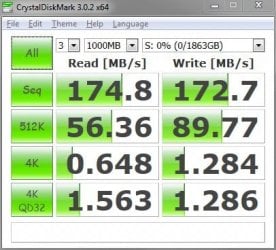
Here is the difference between a modern, very fast hard drive and an SSD:

Seagate Barracuda 7200.14 Results.JPG Samsung 830.JPG

The relevant numbers are the third row.....4K. These are the numbers that deal with startup, programs opening, programs/updates installing, unzipping files, etc. As you can see, the SSD numbers are an order of magnitude faster than a mechanical hard drive. Access times on an SSD are exponentially faster than a hard drive and that results in tangible, real-world performance. An SSD is the single biggest upgrade you can make to a computer...nothing else you can change out will net you the gains an SSD will.
 

My Computer My Computer

Computer type
PC/Desktop
Computer Manufacturer/Model Number
Custom Built
OS
Windows 7 Professional 64bit SP1
CPU
Intel Core i5-3570K @ 4.5GHz
Motherboard
Asus Sabertooth Z77
Memory
Corsair Vengeance 16GB (4x4) @1866MHz CL 9-9-9-24 1T
Graphics Card(s)
EVGA GTX 750 Ti FTW
Sound Card
Onboard Audio
Monitor(s) Displays
Dell S2309W
Screen Resolution
1920x1080
Hard Drives
Samsung 830 128GB SSD - OS
(4) Seagate 5TB HDD
(1) Seagate 2TB HDD
PSU
Seasonic X750 80+ Gold Full Modular
Case
Antec Eleven Hundred Super Mid Tower
Cooling
Intel Liquid Cooler
Keyboard
Max Nighthawk X8 Mechanical keyboard
Mouse
Mionix Naos 7000
Internet Speed
50 Mbps Down / 10 Mbps Up
Antivirus
Microsoft Security Essentials/Malwarebytes Anti-Malware
Browser
Chrome/Firefox
Other Info
Klipsch ProMedia 2.1's
Asus RT-N66R Wireless Router

My Computer My Computer

Computer type
PC/Desktop
Computer Manufacturer/Model Number
Own build (new) Desk1 / Asus ROG Win 7 / Desk2 1st build
OS
Desk1 7 Home Prem / Desk2 10 Pro / Main lap Asus ROG 10 Pro 2 laptop Toshiba 7 Pro Asus P2520 7 & 10
CPU
Desk1 i5 3750K / Laptop i7 GTX 860M / Desk2 i5 2500
Motherboard
Desk1 Asus P877-V / Desk2 Gigabyte H67 UD3H / Laptop ?
Memory
Desk1 8GB (1866) / Desk2 16GB (1333) / Laptop 8Gb DDR3
Graphics Card(s)
Desk 1& 2NVidia GTX 650 & Laptops on board Intel
Sound Card
Desk 1 & 2 -XONAR DG Realtek High Def audio Laptop
Monitor(s) Displays
Desk 1 Benq HD 2450 / Desk2 Philips 24" / Laptop 17.5"
Screen Resolution
1920x1080 D1 & D2 & Laptop 1
Hard Drives
Desk1 Samsung 120GB 830 SSD
Asus ROG 256GB 850 Pro SSD
Desk2 Samsung 840 256 SSD
Toshiba 120GB EVO
PSU
Desk 1 Corsair HX 1050/ Laptop ? / Desk 2 Corsair HX 650
Case
Desk 1 Cooler HAF XM ? Toshiba laptop / Desk2 Coolermaster
Cooling
Fans on all Desk1 -2 Desk2 - all Coolermasters 5 Laptop ?
Keyboard
Desk 1 MS Sidewinder X6 Desk 2 MS Sidewinder X 4
Mouse
Desk 1&2 - Gigabyte MS 900 gamer - laptop - Logitec wireless
Internet Speed
ADSL2+
Other Info
One other Desktop (tester) and spare Toshba laptop both with SSD's
Running Kaspersky 2016 ISS on all machines config'd identically
Logitec audio stereo systems on each machine (x3)
Canon MG5250MFC
Router/modem TP-Link running WPA2SK
With that many apps running you well benefit from a multi core possessor, AMD 6 core are very affordable. Win7 on a ssd drive and a multi TB HHD for data storage. As much RAM as the OS supports, 8 or 16. You really don't need the newest generation GPU, something 2-3 generations old is very affordable. You ever consider running multiple monitors? Two or even three 23" flat screens would be sweet with that many apps running.

A new system well really need a new mobo, case and power supply. Look at the case cooling as a factor in choosing the case.
 

My Computer My Computer

Computer type
PC/Desktop
Computer Manufacturer/Model Number
Custom, Dell and Lenono LT's
OS
Win8/8.1,Win7-U64, Vista U64, uncounted Linux distor's
CPU
AMD and Intell, 9590, 8350, i5 3570k
Motherboard
CFVFZ, GA990FXA, Z77e-itx
Memory
Corsair G Skill
Graphics Card(s)
Crossfired Sapphire HD 7950 Vapor-X, ASUS R9 280X TOP
Sound Card
Realtek ALC889
Monitor(s) Displays
ViewSonic VX2770SMH 27" / ViewSonic VX2433 LCD 24"
Screen Resolution
1080i HD
Hard Drives
Samsung SSD 840 Pro
OCZ Agility 3's
OCZ Vector's
WD's Blue, red, green, Velociraptors
Seagate USB3 & Hybrid's
ASUS Blu-Ray
ASUS DVD
PSU
Corsair AX1200i, Seasonice 850 Gold
Case
Cooler Master HAF 922 & HAF 932, Lian Li Train case.
Cooling
Air, Glacer 240L expanded, custom EK loop with duel D5's
Keyboard
Microsoft SideWinder X4 USB Keyboard / Logitech 250 PS2
Mouse
Logitech G500 / MS wireless 5000
Internet Speed
Best of 5ms / 75+ dn / 12+ up More or less.
Antivirus
MS esentials-MalwareBytes
Browser
Firefox Chromebook
What about a multi-boot machine? With that you can have a single machine that can run any OS, although only one at a time.

If you need all three (or even more) running all at once you could do with a bunch of virtual machines on a single middle-high end PC (maybe even your main rig). But depends from what stuff you are coding, as long as it isn't horribly hardware-related it will be fine. You can also run them one or two at a time in case you don't have a powerhouse PC or use a laptop.

If you are interested I can provide more info/tutorials.

I'm also going to need a place to store massive amounts of data, with no media.
non-program non-system data is the same. Anything will be fine to store and read/play from movies to excel stuff. Even USB hard drives.
In case you weren't in touch with technological advancement, you can get 1 TB hard drives for very good prices nowadays (as top tier are 2 and 3 or more TB). One TB (Terabyte) is 1000-ish GB. So yeah. That's what, 100 years at your rate of data buildup?

I suggest to buy two drives though, and have the same data on both. You know, redundancy in case one fails.
 

My Computer My Computer

Computer type
PC/Desktop
Computer Manufacturer/Model Number
custom built
OS
Win 7 Pro 64-bit 7601
CPU
AMD Phenom 9650 QuadCore, revision DR-B3
Motherboard
ASUS M4A78
Memory
5 GB yes I run 2x 2GB and 1x 1GB, different brand, spank me.
Graphics Card(s)
NVIDIA GeForce 9800 GT 512 Mb, unknown manufacturer.
Sound Card
Crappy Realtek Integrated Audio
Monitor(s) Displays
Fujitsu Siemens P19-3P
Screen Resolution
1280 x 1024 x 32 bits @ 60 Hz Oh yeah, 4:3 rocks!
Hard Drives
(1) MAXTOR S TM3320613AS SATA Disk Device (2) STM35004 18AS SATA Disk Device (3) TOSHIBA USB 2.5"-HDD
PSU
whatever, around 450w
Case
Scavenged from old company PC, 10+ years old
Cooling
CPU fan, GPU fan, case fan, nothing fancy
Keyboard
Microsoft, PS/2, white.
Mouse
Optical, logitec.
Internet Speed
effective max speeds: 70-ish kB/s down 30-ish kB/s up
Antivirus
Avira, free edition.
Browser
Firefox with FXChrome to make it look like Google Chrome :P
Other Info
Was discarded by previous owner due to "horrible performance".
Was running Win Xp from a IDE drive. Yeah. Was a pain.
SATA II drive and Win7 and it zips away! Yay!
I agree with having backups for sure....I think the best value right now are 2TB drives. I've bought a couple and at the time they were only around $10 more(on sale) than 1TB drives. I think the Seagate 2TB drives are currently $15-20 more than the 1TB drives....double the space for a few more bucks. Even if he doesn't need that much space now, you always buy drives with more capacity than you need for obvious reasons. I wish 4TB drives had been out when I got the 2TB drives, I would have saved up and got that instead...
 

My Computer My Computer

Computer type
PC/Desktop
Computer Manufacturer/Model Number
Custom Built
OS
Windows 7 Professional 64bit SP1
CPU
Intel Core i5-3570K @ 4.5GHz
Motherboard
Asus Sabertooth Z77
Memory
Corsair Vengeance 16GB (4x4) @1866MHz CL 9-9-9-24 1T
Graphics Card(s)
EVGA GTX 750 Ti FTW
Sound Card
Onboard Audio
Monitor(s) Displays
Dell S2309W
Screen Resolution
1920x1080
Hard Drives
Samsung 830 128GB SSD - OS
(4) Seagate 5TB HDD
(1) Seagate 2TB HDD
PSU
Seasonic X750 80+ Gold Full Modular
Case
Antec Eleven Hundred Super Mid Tower
Cooling
Intel Liquid Cooler
Keyboard
Max Nighthawk X8 Mechanical keyboard
Mouse
Mionix Naos 7000
Internet Speed
50 Mbps Down / 10 Mbps Up
Antivirus
Microsoft Security Essentials/Malwarebytes Anti-Malware
Browser
Chrome/Firefox
Other Info
Klipsch ProMedia 2.1's
Asus RT-N66R Wireless Router
Back
Top