If anyone know Mad Dog McCree game plz come here to help.

IamLEGEND

New member
Member
VIP
Local time
11:42 PM
Messages
138
hi to everyone.
if anyone know the game, then plz help me, I have this game working properly, and I want to record its gameplay for 5 to 10 minutes. I have some awesome softwares that could record game play in Highest quality, with these software which I have, when I capture Mad dog gameplay, then only video playback and gunshots sound is recorded, gun cross-share and bullets did not shown in the captured video.
so tell me the software which record all screen appearances.
 

My Computer My Computer

At a glance

Windows 7 SP1 Ultimate x64Intel(R) Core(TM) 2 Due cpu E8400 @ 3.0ghz3x2gb DDR3 PC3-10600NVIDIA GeForce 9800 GT
Computer type
PC/Desktop
Computer Manufacturer/Model Number
Acer Veriton S670/G M670/G
OS
Windows 7 SP1 Ultimate x64
CPU
Intel(R) Core(TM) 2 Due cpu E8400 @ 3.0ghz
Motherboard
Acer EQ45M
Memory
3x2gb DDR3 PC3-10600
Graphics Card(s)
NVIDIA GeForce 9800 GT
Sound Card
Digital Audio (S/PDIF) (High Definition Audio Device)
Monitor(s) Displays
Asus VK222H 22" lcd HDMI wide.
Screen Resolution
1680x1050 @ 60 Hz
Hard Drives
2x1TB WD 10EAR
Internet Speed
4mbps
Browser
FireFox v27.01
This is a fairly common problem. Some games just do this. Mad Dog McCree uses full motion video and those types of games are especially prone to this. It's pretty old and was originally a Sega CD and 3DO game as I recall.

Try turning off AA or Anti-Aliasing on your GPU first and see if that helps. I've heard that with some games AA can get in the way of video or screen capture and produce black screens.

If it doesn't you can try turning off hardware acceleration. That might clear it up depending on what is being used to run the video. Click Start on the task bar and select Control Panel, go to Personalization and select Display Settings, then go to Advanced Settings. Once there select Change Settings on the Troubleshooting tab and move the Hardware Acceleration slider to None then click Apply and OK and then restart windows.

You don't have to, but I'd suggest turning it back on if it doesn't work or once you're finished capturing the video you want. It helps some programs run a little smoother and it's best to have it enabled if it's not interfering with something else.

If that doesn't work you should at least be able to capture video in windowed mode. There may be no other option to fix the issue but running in Windowed mode. In my experience it usually works when nothing else does and may be the only fix for the issue you can hope for.
 

My Computer My Computer

At a glance

Windows 7 Home premiumI7 3770 3.4Corsair Vengance ddr3 8gb x2 1600 [@ 2400]AMD 7970 6GB x3 [currently x2 until x3 is act...
Computer type
PC/Desktop
Computer Manufacturer/Model Number
Home built
OS
Windows 7 Home premium
CPU
I7 3770 3.4
Motherboard
Republic of Gamers Maximus V
Memory
Corsair Vengance ddr3 8gb x2 1600 [@ 2400]
Graphics Card(s)
AMD 7970 6GB x3 [currently x2 until x3 is actually useful]
Sound Card
N/A
Monitor(s) Displays
Visio 47" 3D/Acer 27" 3D
Screen Resolution
1920x1080 120mhz Passive 3D
Hard Drives
Samsung 830 series SSD 512gb x2
Seagate 2tb x2
Segate 750 Gb
PSU
1500w
Case
Coolermaster
Cooling
Noctua D14
Keyboard
Logitech g10
Mouse
Naga Razer
Internet Speed
30mb Cable
Antivirus
Like I'd tell.
Browser
Waterfox mostly.
thanks for reply,
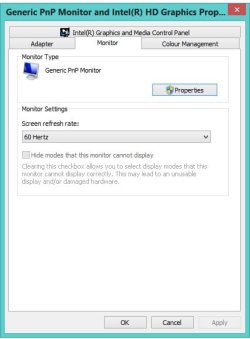
but windows 8 don't have Troubleshoot tab in advance display setting, neither 16 bit high color setting,
any other way to lower graphic hardware acceleration.?
 

My Computer My Computer

At a glance

Windows 7 SP1 Ultimate x64Intel(R) Core(TM) 2 Due cpu E8400 @ 3.0ghz3x2gb DDR3 PC3-10600NVIDIA GeForce 9800 GT
Computer type
PC/Desktop
Computer Manufacturer/Model Number
Acer Veriton S670/G M670/G
OS
Windows 7 SP1 Ultimate x64
CPU
Intel(R) Core(TM) 2 Due cpu E8400 @ 3.0ghz
Motherboard
Acer EQ45M
Memory
3x2gb DDR3 PC3-10600
Graphics Card(s)
NVIDIA GeForce 9800 GT
Sound Card
Digital Audio (S/PDIF) (High Definition Audio Device)
Monitor(s) Displays
Asus VK222H 22" lcd HDMI wide.
Screen Resolution
1680x1050 @ 60 Hz
Hard Drives
2x1TB WD 10EAR
Internet Speed
4mbps
Browser
FireFox v27.01
You should have said you were running Windows 8 to begin with. That's important information we need to help with troubleshooting any problem. What OS you have often makes a big difference in how you go about fixing problems. Also, your system specs say you're running Windows 7.

Go to the start menu by pressing the Windows button on your keyboard. or by moving the mouse to the top right of the screen and clicking the Start button. Go to Control Panel, select Category in the View By drop down menu and go to Appearance and Personalization. Once there click Display, then Change Display Settings, then click Advanced Settings, go to the Monitor Tab. Go to Colors, and change Tru Color (32 bit) to High Color (16 bit) and apply. The screen will go black, and when prompted select Yes. Then click on Advanced settings again in the same window and go to the Troubleshooting tab and select Change Settings. Slide the bar all the way to None and select OK again. The screen will go black again for a moment again. Once it returns close the window and Restart your PC.

Again, this may or may not work, your only option may be to just record in windowed mode. That's often the only fix that works.

In order to run a game in Windowed mode if it does not have a setting in the in game menus, go to the game .exe -Shortcut-, if it doesn't have one make one. Right click on the shortcut and select properties. If you're using a desktop shortcut, you should right click it and select 'Go to File Location' and then right click the file and go to properties from there.

In the 'Shortcut' tab go to the Target box and make sure the .exe address is in quotation marks like so "C:\game.exe". It probably already will have quotes around it, but make sure it does. Once you do that and add " -w" to the link there without the quotes outside of the quotation marks you might have added and you'll get something like this "C:\game.exe" -w. Select Apply and close the window. If that doesn't work, and it should, but if not try typing -windowed instead of just -w in the Target box.

Good luck with your problem.
 
Last edited:

My Computer My Computer

At a glance

Windows 7 Home premiumI7 3770 3.4Corsair Vengance ddr3 8gb x2 1600 [@ 2400]AMD 7970 6GB x3 [currently x2 until x3 is act...
Computer type
PC/Desktop
Computer Manufacturer/Model Number
Home built
OS
Windows 7 Home premium
CPU
I7 3770 3.4
Motherboard
Republic of Gamers Maximus V
Memory
Corsair Vengance ddr3 8gb x2 1600 [@ 2400]
Graphics Card(s)
AMD 7970 6GB x3 [currently x2 until x3 is actually useful]
Sound Card
N/A
Monitor(s) Displays
Visio 47" 3D/Acer 27" 3D
Screen Resolution
1920x1080 120mhz Passive 3D
Hard Drives
Samsung 830 series SSD 512gb x2
Seagate 2tb x2
Segate 750 Gb
PSU
1500w
Case
Coolermaster
Cooling
Noctua D14
Keyboard
Logitech g10
Mouse
Naga Razer
Internet Speed
30mb Cable
Antivirus
Like I'd tell.
Browser
Waterfox mostly.
You should have said you were running Windows 8 to begin with. That's important information we need to help with troubleshooting any problem. What OS you have often makes a big difference in how you go about fixing problems. Also, your system specs say you're running Windows 7.

apologies bro, actually I have 2 pc and 2 web id,
dell laptop/win 8/eightforums account
acer desktop pc/win 7/sevenforums account
but I use sevenforums account for laptop (win8) problem, because sevenforums have big traffic. :)
anyway bro, I already said that there is also not have 16 bit high color setting in win 8 advance graphics, monitor tab. see this.

gfx.jpg

the game is easily turn to windowed mode by pressing F key.
any other suggestion bro,
 

My Computer My Computer

At a glance

Windows 7 SP1 Ultimate x64Intel(R) Core(TM) 2 Due cpu E8400 @ 3.0ghz3x2gb DDR3 PC3-10600NVIDIA GeForce 9800 GT
Computer type
PC/Desktop
Computer Manufacturer/Model Number
Acer Veriton S670/G M670/G
OS
Windows 7 SP1 Ultimate x64
CPU
Intel(R) Core(TM) 2 Due cpu E8400 @ 3.0ghz
Motherboard
Acer EQ45M
Memory
3x2gb DDR3 PC3-10600
Graphics Card(s)
NVIDIA GeForce 9800 GT
Sound Card
Digital Audio (S/PDIF) (High Definition Audio Device)
Monitor(s) Displays
Asus VK222H 22" lcd HDMI wide.
Screen Resolution
1680x1050 @ 60 Hz
Hard Drives
2x1TB WD 10EAR
Internet Speed
4mbps
Browser
FireFox v27.01
What software fails on recording it all?

It's a detail that would be helpful, and it's rather odd to leave out.

Myself:
I have SNAP and FRAPS, full versions. SNAP is Ashampoo's, it's suppose to record everything, FRAPS is the Direct-X recorder that is pretty much the standard app, if paid full version will record sound for as long as you want, file size gets rather enormous quickly so need to convert it down, post.

MDM isn't that like circa '95ish, why would you need that recorded, I wonder and you running through a virtual machine? [I tried a bunch of really old games I bought back then, but not if it required Windows previous to XP, too much hassle.] I still have an old PC with XP 32-bit on it...
 

My Computer My Computer

At a glance

Windows 7 Ultimate Retail Box (64-bit install...AMD FX-8350 CPU v1.15 (or 1.0F) BIOS was requ...8G CAS-7 G-Skill DDR3 @1333 (2 fours) [mobo n...Radeon HD 7950 [3 gigs of GDDR5] MSI Twin Fro...
Computer type
PC/Desktop
Computer Manufacturer/Model Number
Self Built Custom
OS
Windows 7 Ultimate Retail Box (64-bit installed) + Service Pack 1
CPU
AMD FX-8350 CPU v1.15 (or 1.0F) BIOS was required!
Motherboard
MSI 890FXA-GD70
Memory
8G CAS-7 G-Skill DDR3 @1333 (2 fours) [mobo nonOC max rec'd]
Graphics Card(s)
Radeon HD 7950 [3 gigs of GDDR5] MSI Twin Frozr model
Sound Card
Realtek High Definition Audio (onboard mobo, ALC-889 chip)
Monitor(s) Displays
2 WS LED Monitors: One LG One Viewsonic
Screen Resolution
1920 by 1080
Hard Drives
SSD for OS: Samsung 840 Pro
SSD for VM and utilities: Adata SX900
7200 RPM SATA HDs for the rest: Hitachi and Seagate
PSU
Corsair TX850 - 850W max, in service since August 2010.
Case
Thermaltake Armor A90
Cooling
Thermaltake Spin Q CPU Cooler, in service since August 2010
Keyboard
Logitech G11
Mouse
Logitech M310 Wireless
Internet Speed
100 Megabit broadband supposedly upgraded from 50 (Cable)
Antivirus
Bitdefender Internet Security 2014 suite
Browser
Pale Moon 64-bit main, also IceDragon, Opera, and Maxthon.
Other Info
CompTIA A+ certified (220-800 series) in July 2013.
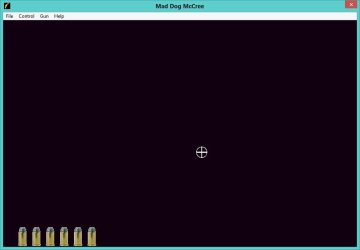
I used Fraps, bandicap, cam studio, blue berry flash back, BSR screen recorder, but there resulting recorded files are not full captured, Fraps did records the video but gun point crosshair and bullets in the left bottom corner is disappeared, in badicap and cam studio only corsshair and bullets appears but video screen is black. like this.

ScreenHunter_02 Jul. 31 14.45.jpg

I think 16 bit high color would done the job, but don't know where to set 16 bit high color and decrease graphic hardware acceleration in windows 8.
 

My Computer My Computer

At a glance

Windows 7 SP1 Ultimate x64Intel(R) Core(TM) 2 Due cpu E8400 @ 3.0ghz3x2gb DDR3 PC3-10600NVIDIA GeForce 9800 GT
Computer type
PC/Desktop
Computer Manufacturer/Model Number
Acer Veriton S670/G M670/G
OS
Windows 7 SP1 Ultimate x64
CPU
Intel(R) Core(TM) 2 Due cpu E8400 @ 3.0ghz
Motherboard
Acer EQ45M
Memory
3x2gb DDR3 PC3-10600
Graphics Card(s)
NVIDIA GeForce 9800 GT
Sound Card
Digital Audio (S/PDIF) (High Definition Audio Device)
Monitor(s) Displays
Asus VK222H 22" lcd HDMI wide.
Screen Resolution
1680x1050 @ 60 Hz
Hard Drives
2x1TB WD 10EAR
Internet Speed
4mbps
Browser
FireFox v27.01
I used Fraps, bandicap, cam studio, blue berry flash back, BSR screen recorder, but there resulting recorded files are not full captured, Fraps did records the video but gun point crosshair and bullets in the left bottom corner is disappeared, in badicap and cam studio only corsshair and bullets appears but video screen is black. like this.

View attachment 278996

I think 16 bit high color would done the job, but don't know where to set 16 bit high color and decrease graphic hardware acceleration in windows 8.

Given this information, I doubt turning it to 16 bit High Color mode would do any good. You're only able to record one or the other because the game is displayed in layers. Essentially this means that it's actually using two windows to display the game. Your recording programs are only recording one or the other.

There is a layer with the video itself, and a layer that shows the game interface. There may not be a way to record both at the same time due to the nature of how the game works. You might be able to if there is a way for you to set up your screencap program to record multiple layers at once. Check your options in the screencap programs and see if there are any options for recording multiple layers. If not, there may be nothing you can do.
 

My Computer My Computer

At a glance

Windows 7 Home premiumI7 3770 3.4Corsair Vengance ddr3 8gb x2 1600 [@ 2400]AMD 7970 6GB x3 [currently x2 until x3 is act...
Computer type
PC/Desktop
Computer Manufacturer/Model Number
Home built
OS
Windows 7 Home premium
CPU
I7 3770 3.4
Motherboard
Republic of Gamers Maximus V
Memory
Corsair Vengance ddr3 8gb x2 1600 [@ 2400]
Graphics Card(s)
AMD 7970 6GB x3 [currently x2 until x3 is actually useful]
Sound Card
N/A
Monitor(s) Displays
Visio 47" 3D/Acer 27" 3D
Screen Resolution
1920x1080 120mhz Passive 3D
Hard Drives
Samsung 830 series SSD 512gb x2
Seagate 2tb x2
Segate 750 Gb
PSU
1500w
Case
Coolermaster
Cooling
Noctua D14
Keyboard
Logitech g10
Mouse
Naga Razer
Internet Speed
30mb Cable
Antivirus
Like I'd tell.
Browser
Waterfox mostly.
it is a simple original mpg video files game. not a very high end thing,
I often capture the latest game videos. like max payne 3, batman arkham city, amazing spiderman. resident evil 6 etc, and recorded successfully. and this game is going sucks..
anyway, I find the layer thingy as you describe.. thanks.
 

My Computer My Computer

At a glance

Windows 7 SP1 Ultimate x64Intel(R) Core(TM) 2 Due cpu E8400 @ 3.0ghz3x2gb DDR3 PC3-10600NVIDIA GeForce 9800 GT
Computer type
PC/Desktop
Computer Manufacturer/Model Number
Acer Veriton S670/G M670/G
OS
Windows 7 SP1 Ultimate x64
CPU
Intel(R) Core(TM) 2 Due cpu E8400 @ 3.0ghz
Motherboard
Acer EQ45M
Memory
3x2gb DDR3 PC3-10600
Graphics Card(s)
NVIDIA GeForce 9800 GT
Sound Card
Digital Audio (S/PDIF) (High Definition Audio Device)
Monitor(s) Displays
Asus VK222H 22" lcd HDMI wide.
Screen Resolution
1680x1050 @ 60 Hz
Hard Drives
2x1TB WD 10EAR
Internet Speed
4mbps
Browser
FireFox v27.01
Back
Top