Solved how to burn a movie(audio_TS,video_TS) into a dvd using nero?

labibsharar

New member
Member
Local time
5:05 PM
Messages
73
how to burn a movie(audio_TS,video_TS) into a dvd using nero?
its an emergency,some freinds are coming over to wath a movie
 

My Computer My Computer

At a glance

Windows 7 Ultimate x648gbnvidia geforce gt 335m and intel r hd graphics
Computer type
Laptop
Computer Manufacturer/Model Number
alienware m11x r2
OS
Windows 7 Ultimate x64
Memory
8gb
Graphics Card(s)
nvidia geforce gt 335m and intel r hd graphics
Browser
google chrome
I have Nero 12, which includes Nero Video 12. The instructions that come with it are pretty good in helping you create and burn a Video.

If you are just going to use Nero Burning ROM or Nero Express, I don't think you can do it.
 

My Computer My Computer

At a glance

Windows 10 64 bitIntel i7 6700K16GB Corsair DominatorIntel CPU Graphics
Computer type
PC/Desktop
Computer Manufacturer/Model Number
My Own Build
OS
Windows 10 64 bit
CPU
Intel i7 6700K
Motherboard
ASUS ROG Maximus VIII Hero
Memory
16GB Corsair Dominator
Graphics Card(s)
Intel CPU Graphics
Sound Card
RealTek
Monitor(s) Displays
27" Dell S2719dgf
Screen Resolution
2560X1440
Hard Drives
1 TB Samsung 850 EVO SSD for Win 10 Pro
500GB Samsung 850 EVO SSD for Win 10 Insider
2 TB drive for backup
PSU
EVGA Supernova 750G2
Case
BeQuiet Silent Base 600
Cooling
Deepcool Captain 120EX
Keyboard
Microsoft Wireless 2000
Mouse
Microsoft wireless
Internet Speed
100 MB/sec (Cable)
Antivirus
Microsoft Defender and Malwarebytes
Browser
Edge/Firefox
Other Info
Cakewalk (Sonar) by BandLab and Studio One 4.1 Pro recording studio software. MOTU 896Mk3 Hybrid recording interface, Frontier Tranzport wireless control unit, Behringer X-Touch Control Surface.
Five USB connected optical drives for CD Audio production using Nero BurningROM
In the DVD section, there should be a "Video" tab where you make a plain DVD Video. As long as you haven't messed around with the settings, you should be able to drag the Video_TS folder and start burning. I don't use any burning software anymore and haven't for a few years so this is just going off memory. If you want to open up Nero and give us some screenshots, we can probably walk you through it. The last Nero version I used was Nero 7 Ultimate.......so it's been awhile.
 

My Computer My Computer

At a glance

Windows 7 Professional 64bit SP1Intel Core i5-3570K @ 4.5GHzCorsair Vengeance 16GB (4x4) @1866MHz CL 9-9-...EVGA GTX 750 Ti FTW
Computer type
PC/Desktop
Computer Manufacturer/Model Number
Custom Built
OS
Windows 7 Professional 64bit SP1
CPU
Intel Core i5-3570K @ 4.5GHz
Motherboard
Asus Sabertooth Z77
Memory
Corsair Vengeance 16GB (4x4) @1866MHz CL 9-9-9-24 1T
Graphics Card(s)
EVGA GTX 750 Ti FTW
Sound Card
Onboard Audio
Monitor(s) Displays
Dell S2309W
Screen Resolution
1920x1080
Hard Drives
Samsung 830 128GB SSD - OS
(4) Seagate 5TB HDD
(1) Seagate 2TB HDD
PSU
Seasonic X750 80+ Gold Full Modular
Case
Antec Eleven Hundred Super Mid Tower
Cooling
Intel Liquid Cooler
Keyboard
Max Nighthawk X8 Mechanical keyboard
Mouse
Mionix Naos 7000
Internet Speed
50 Mbps Down / 10 Mbps Up
Antivirus
Microsoft Security Essentials/Malwarebytes Anti-Malware
Browser
Chrome/Firefox
Other Info
Klipsch ProMedia 2.1's
Asus RT-N66R Wireless Router
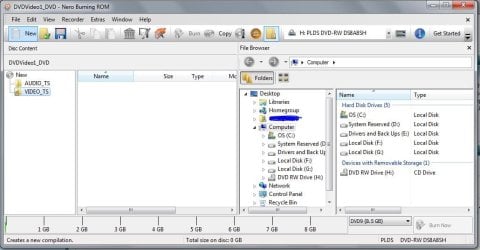
To elaborate kbrady1979's post, you can open Nero Burning ROM and then follow the screenshots below:

1.) Capture.JPG

2.)Capture2.JPG

Then you can drag and drop the files from VIDEO_TS and burn. Nero will automatically configure it to UDF 1.2 DVD standards so you can watch the burned discs on standalone DVD players.
 

My Computer My Computer

At a glance

Windows 7 Professional x64 SP1Intel® Pentium® 4 @ 2.26 GHz, Intel Core i7-2...512MB Dual channel DDR SDRAM @ 400MHz 2.5-3-3...Intel 82865G, Nvidia GeForce 520M Graphics
Computer type
Laptop
Computer Manufacturer/Model Number
Dell Optiplex SX270, Lenovo Z470
OS
Windows 7 Professional x64 SP1
CPU
Intel® Pentium® 4 @ 2.26 GHz, Intel Core i7-2670QM @ 2.20 GH
Motherboard
Dell, Lenovo
Memory
512MB Dual channel DDR SDRAM @ 400MHz 2.5-3-3-7, 8 GB DDR3
Graphics Card(s)
Intel 82865G, Nvidia GeForce 520M Graphics
Sound Card
SoundMax Integrated Audio, Integrated HD Audio
Monitor(s) Displays
LG W1952
Screen Resolution
1440x900, 1366 x 768
Hard Drives
40 GB 2.5" IDE 4200 RPM HDD, 500 GB 5400 RPM Sata 1.5 + 32 GB SSD
PSU
Dell 145 Watt, Lenovo 120 Watt Power Adapter
Case
Optiplex SX270 Small Form Factor, Laptop
Cooling
Dell Proprietary Air Cooling, Stock laptop cooling
Keyboard
Dell SK-8125 USB Keyboard
Mouse
Dell PS/2 2 button ball mouse with wheel scroll
Internet Speed
300 Mbit down / 20 Mbps up Time Warner Cable
Antivirus
MSE, Malwarebytes Scanner
Browser
Internet (Aizawa) Explorer 11
Other Info
Running Windows Server 2012 Datacenter on a virtual machine to run Metro Apps.
To elaborate kbrady1979's post, you can open Nero Burning ROM and then follow the screenshots below:

1.) View attachment 278626

2.)View attachment 278627

Then you can drag and drop the files from VIDEO_TS and burn. Nero will automatically configure it to UDF 1.2 DVD standards so you can watch the burned discs on standalone DVD players.

Thank you! That is exactly what I had in my head, but had no way of showing him what I meant. Great job
 

My Computer My Computer

At a glance

Windows 7 Professional 64bit SP1Intel Core i5-3570K @ 4.5GHzCorsair Vengeance 16GB (4x4) @1866MHz CL 9-9-...EVGA GTX 750 Ti FTW
Computer type
PC/Desktop
Computer Manufacturer/Model Number
Custom Built
OS
Windows 7 Professional 64bit SP1
CPU
Intel Core i5-3570K @ 4.5GHz
Motherboard
Asus Sabertooth Z77
Memory
Corsair Vengeance 16GB (4x4) @1866MHz CL 9-9-9-24 1T
Graphics Card(s)
EVGA GTX 750 Ti FTW
Sound Card
Onboard Audio
Monitor(s) Displays
Dell S2309W
Screen Resolution
1920x1080
Hard Drives
Samsung 830 128GB SSD - OS
(4) Seagate 5TB HDD
(1) Seagate 2TB HDD
PSU
Seasonic X750 80+ Gold Full Modular
Case
Antec Eleven Hundred Super Mid Tower
Cooling
Intel Liquid Cooler
Keyboard
Max Nighthawk X8 Mechanical keyboard
Mouse
Mionix Naos 7000
Internet Speed
50 Mbps Down / 10 Mbps Up
Antivirus
Microsoft Security Essentials/Malwarebytes Anti-Malware
Browser
Chrome/Firefox
Other Info
Klipsch ProMedia 2.1's
Asus RT-N66R Wireless Router
how to burn a movie(audio_TS,video_TS) into a dvd using nero?
its an emergency,some freinds are coming over to wath a movie


Hi there
Why not attack this from another way.

If you have a laptop just play the film with VLC -- it will play TS_ type video, and route the output into the TV via an HDMI cable.

(If your TV has a "PC" type connector -- the old standard type RGB monitor cable -- connect that if you don't have HDMI -- but then connect the PC headphone lead to the TV's AUX or Audio input (analog).

Seems the easiest way rather than messing around with physical DVD's any more. I assume you can copy the TS_ files to your HDD or an external HDD or they already exist on HDD.

Cheers
jimbo
 

My Computer My Computer

At a glance

Linux CENTOS 7 / various Windows OS'es and se...Intel i7 Intel i58GB, 16GBOn Motherboard
Computer type
PC/Desktop
Computer Manufacturer/Model Number
Custom built, several laptops HP/ASUS
OS
Linux CENTOS 7 / various Windows OS'es and servers
CPU
Intel i7 Intel i5
Memory
8GB, 16GB
Graphics Card(s)
On Motherboard
Sound Card
Realtek HD audio
Monitor(s) Displays
Apple Cinema display, Samsung LCD
Screen Resolution
1920 X 1080
Hard Drives
4 X 1TB SATA
Mouse
Toshiba wireless laser
Internet Speed
> 20MB up
Thanks alot everybody...I appriciate it :)
 

My Computer My Computer

At a glance

Windows 7 Ultimate x648gbnvidia geforce gt 335m and intel r hd graphics
Computer type
Laptop
Computer Manufacturer/Model Number
alienware m11x r2
OS
Windows 7 Ultimate x64
Memory
8gb
Graphics Card(s)
nvidia geforce gt 335m and intel r hd graphics
Browser
google chrome
Back
Top