Solved Ram halved by windows

sorry for the wait.

As requested and thanks for the support guys
 

Attachments

  • Capture4.PNG
    Capture4.PNG
    8.5 KB · Views: 0

My Computer

Computer type
PC/Desktop
Computer Manufacturer/Model Number
custom build
OS
windows 7 ultimate X64
CPU
athlon x4 651k
Motherboard
asus f1a55-m le
Memory
8gb ddr 3 1333mhz
Graphics Card(s)
gainward nvidia geforce gt 440 1gb gddr5
Sound Card
soundblaster x-fi xtreme audio
Monitor(s) Displays
22" dgm led 1080p
Screen Resolution
1920x1080
Hard Drives
1TB SATA Seagate
Bingo.
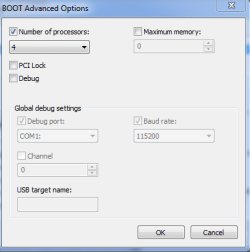
You do not have 4 processors. You have one (1) processor.
Change it to (1) apply/okay out of it and reboot. Make sure the check mark is gone. Look at the picture I posted. #19
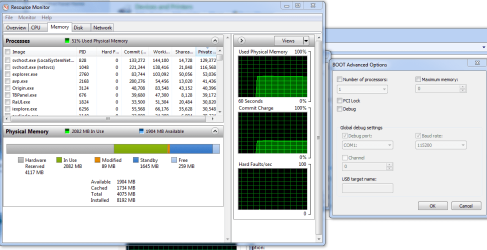
Give us another Resource Monitor of your memory.
 

My Computer

Computer type
PC/Desktop
Computer Manufacturer/Model Number
Home made Desktop
OS
Windows 10 Pro. 64/ version 1709 Windows 7 Pro/64
CPU
Intel i7-6800K @ 4.3
Motherboard
ASUS X-99 Deluxe II
Memory
Corsair Platinum 16 gig @2400
Graphics Card(s)
EVGA GTX 1070 OC
Monitor(s) Displays
Asus 27" LED LCD/VE278Q
Screen Resolution
1920-1080 or 1280-720 HDMI
Hard Drives
INTEL SSD 730-240 Gb Sata 3.0/
PSU
EVGA Platium 1200W
Case
Phanteks Luxe Tempered Glass 8 fans/ one radiator
Cooling
XSPC/ Water Cooled CPU
Keyboard
Das 4 Professional
Mouse
Logitech M705/MX Anywhere 2-S
Internet Speed
100 mbits
Antivirus
Microsoft Security Essentials/ Malwarebytes Premium 3.0/ SAS
Browser
I.E. 11 default/Firefox/ ISP Time Warner Cable/Spectrum
Other Info
LG BluRay Burner/
Sound system-KLipsch-THX/
Icy Dock ssd Hot Swap bays.
that's not the issue at all. if you'll note the memory is already showing as full. I have done several restarts and the memory is still showing full so i'm currently inclined to think that the igfx multi monitor was the culprit as everything else is stable.
 

My Computer

Computer type
PC/Desktop
Computer Manufacturer/Model Number
custom build
OS
windows 7 ultimate X64
CPU
athlon x4 651k
Motherboard
asus f1a55-m le
Memory
8gb ddr 3 1333mhz
Graphics Card(s)
gainward nvidia geforce gt 440 1gb gddr5
Sound Card
soundblaster x-fi xtreme audio
Monitor(s) Displays
22" dgm led 1080p
Screen Resolution
1920x1080
Hard Drives
1TB SATA Seagate
ps I am off for the night now but will recheck again tomorrow and take into account the suggestions given.

many thanks
 

My Computer

Computer type
PC/Desktop
Computer Manufacturer/Model Number
custom build
OS
windows 7 ultimate X64
CPU
athlon x4 651k
Motherboard
asus f1a55-m le
Memory
8gb ddr 3 1333mhz
Graphics Card(s)
gainward nvidia geforce gt 440 1gb gddr5
Sound Card
soundblaster x-fi xtreme audio
Monitor(s) Displays
22" dgm led 1080p
Screen Resolution
1920x1080
Hard Drives
1TB SATA Seagate
Did you or did you not make the changes I recommended in
post #22?
 

My Computer

Computer type
PC/Desktop
Computer Manufacturer/Model Number
Home made Desktop
OS
Windows 10 Pro. 64/ version 1709 Windows 7 Pro/64
CPU
Intel i7-6800K @ 4.3
Motherboard
ASUS X-99 Deluxe II
Memory
Corsair Platinum 16 gig @2400
Graphics Card(s)
EVGA GTX 1070 OC
Monitor(s) Displays
Asus 27" LED LCD/VE278Q
Screen Resolution
1920-1080 or 1280-720 HDMI
Hard Drives
INTEL SSD 730-240 Gb Sata 3.0/
PSU
EVGA Platium 1200W
Case
Phanteks Luxe Tempered Glass 8 fans/ one radiator
Cooling
XSPC/ Water Cooled CPU
Keyboard
Das 4 Professional
Mouse
Logitech M705/MX Anywhere 2-S
Internet Speed
100 mbits
Antivirus
Microsoft Security Essentials/ Malwarebytes Premium 3.0/ SAS
Browser
I.E. 11 default/Firefox/ ISP Time Warner Cable/Spectrum
Other Info
LG BluRay Burner/
Sound system-KLipsch-THX/
Icy Dock ssd Hot Swap bays.
Layback Bear is right, and I sort of mentioned back in 19 that those boxes shouldn't be checked.

And for the record those boot options are mainly for testing/diagnostic purposes. With that box checked all you're basically doing is limiting the processor. And even if it has less cores, you're NOT enhancing anything by checking that box.

I've no idea how this FUD of a tweak is still around but it enhances nothing. You would best be served to uncheck those boxes and leave them alone.

That said that particular box shouldn't have an effect on your memory, thus the problem could be elsewhere. Still I'd uncheck it anyway as it's doing nothing for you.

Your system, your choice.

 

My Computer

Computer type
PC/Desktop
Computer Manufacturer/Model Number
Custom built by me.
OS
Windows 10 Pro
CPU
Intel Core i7-4770K (3.5Ghz)
Motherboard
Gigabyte G1 Sniper 5 (F10 Bios)
Memory
32 gig Corsair Dominator Platinum (4x8Gig)
Graphics Card(s)
Sapphire Tri-X R9 Fury
Sound Card
Soundblaster ZXR
Monitor(s) Displays
NEC PA242W 24" LCD Monitor
Screen Resolution
1920 x 1200
Hard Drives
Primary - Samsung 850 Pro (512gig), Samsung 840 Pro (256gig), 2TB WD Caviar Black.
PSU
EVGA Supernova 1000 G2
Case
Cooler Master HAF X
Cooling
Corsair H100i with Corsair Air Series SP120 Quiet Fans
Keyboard
Logitech Wireless Wave
Mouse
Logitech Performance MX
Internet Speed
High Speed Cable
Antivirus
Norton Security
Browser
IE11
Other Info
Memory Timings - 1866MHz @ 9-9-9-27-1T @ 1.5 volts
I do know that the memory controller is built into the chip.
What I don't know if changing the setting in (number of processors) has a effect on how the processor handles memory with the controller.
Anyway we do agree that it shouldn't be checked.
 

My Computer

Computer type
PC/Desktop
Computer Manufacturer/Model Number
Home made Desktop
OS
Windows 10 Pro. 64/ version 1709 Windows 7 Pro/64
CPU
Intel i7-6800K @ 4.3
Motherboard
ASUS X-99 Deluxe II
Memory
Corsair Platinum 16 gig @2400
Graphics Card(s)
EVGA GTX 1070 OC
Monitor(s) Displays
Asus 27" LED LCD/VE278Q
Screen Resolution
1920-1080 or 1280-720 HDMI
Hard Drives
INTEL SSD 730-240 Gb Sata 3.0/
PSU
EVGA Platium 1200W
Case
Phanteks Luxe Tempered Glass 8 fans/ one radiator
Cooling
XSPC/ Water Cooled CPU
Keyboard
Das 4 Professional
Mouse
Logitech M705/MX Anywhere 2-S
Internet Speed
100 mbits
Antivirus
Microsoft Security Essentials/ Malwarebytes Premium 3.0/ SAS
Browser
I.E. 11 default/Firefox/ ISP Time Warner Cable/Spectrum
Other Info
LG BluRay Burner/
Sound system-KLipsch-THX/
Icy Dock ssd Hot Swap bays.
Well I have a i7-950 processor, which obviously has the memory controller built in as well and messing around the that setting just to see what happens didn't do anything to my memory - meaning my hardware reserved never moved.

That said, it doesn't mean it can't contribute to an already existing problem so... :confused:

At any rate those boxes really don't need to be messed with unless for diagnostic/testing purposes as it provides absolutely nothing performance wise to end users.

Could use someone who has AMD motherboard/processor experience to chime in though. Perhaps there's something I'm not seeing from my Intel side of things.
 

My Computer

Computer type
PC/Desktop
Computer Manufacturer/Model Number
Custom built by me.
OS
Windows 10 Pro
CPU
Intel Core i7-4770K (3.5Ghz)
Motherboard
Gigabyte G1 Sniper 5 (F10 Bios)
Memory
32 gig Corsair Dominator Platinum (4x8Gig)
Graphics Card(s)
Sapphire Tri-X R9 Fury
Sound Card
Soundblaster ZXR
Monitor(s) Displays
NEC PA242W 24" LCD Monitor
Screen Resolution
1920 x 1200
Hard Drives
Primary - Samsung 850 Pro (512gig), Samsung 840 Pro (256gig), 2TB WD Caviar Black.
PSU
EVGA Supernova 1000 G2
Case
Cooler Master HAF X
Cooling
Corsair H100i with Corsair Air Series SP120 Quiet Fans
Keyboard
Logitech Wireless Wave
Mouse
Logitech Performance MX
Internet Speed
High Speed Cable
Antivirus
Norton Security
Browser
IE11
Other Info
Memory Timings - 1866MHz @ 9-9-9-27-1T @ 1.5 volts
have you done the OMFG tests ( the tests where when your done you go omfg i cant believe i didnt.....)

turn pc off unplug

remove your modules wipe em off and plug them back in
try swapping modules
try one at a time in different slots


i cant tell you how many times ive had the same issue when all it was was one did not want to fit into one of the solts properly swapped em and boom every thing was right in the world

please take no offense if this step seems to dumb some times its the dumb shit thats the whole problem lol

GL
 

My Computer

Computer type
PC/Desktop
Computer Manufacturer/Model Number
hp p6653w
OS
Windows 7 home premium x64
CPU
amd athlon II X2 250 3000 mhz
Motherboard
N-Alvorix-RS880-uATX (Alvorix)
Memory
16gb (2x8gb) crucial ballistix sport
Graphics Card(s)
integrated radeon 4200 hd
Sound Card
onboard realtek 5 channel
Monitor(s) Displays
dell 17"
Screen Resolution
prefer 1.62 ratios
Hard Drives
WL 1tb
PSU
cheifmax 450
Case
stock
Cooling
stock
Keyboard
zboard
Mouse
logitech m-100
Internet Speed
1.5mbs dsl
Antivirus
none (yet)
Browser
firefox
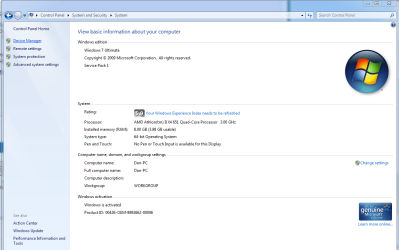
hi folks im back from work. I have unchecked the box and although the computer was letting me use a full 8 gb last night it is nowe back to its 3.98 usable memory. I have sety the bios to optimized defaults and this is what ive got. and yes the omg wtf test have been done and each stick has successfully been tested
 

Attachments

  • Capture5.PNG
    Capture5.PNG
    46.2 KB · Views: 2
  • Capture6.PNG
    Capture6.PNG
    40.5 KB · Views: 3

My Computer

Computer type
PC/Desktop
Computer Manufacturer/Model Number
custom build
OS
windows 7 ultimate X64
CPU
athlon x4 651k
Motherboard
asus f1a55-m le
Memory
8gb ddr 3 1333mhz
Graphics Card(s)
gainward nvidia geforce gt 440 1gb gddr5
Sound Card
soundblaster x-fi xtreme audio
Monitor(s) Displays
22" dgm led 1080p
Screen Resolution
1920x1080
Hard Drives
1TB SATA Seagate
p.s no offense taken, keep the suggestions coming. There's bound to be something I haven't thought of and i'm very grateful for all the input
 

My Computer

Computer type
PC/Desktop
Computer Manufacturer/Model Number
custom build
OS
windows 7 ultimate X64
CPU
athlon x4 651k
Motherboard
asus f1a55-m le
Memory
8gb ddr 3 1333mhz
Graphics Card(s)
gainward nvidia geforce gt 440 1gb gddr5
Sound Card
soundblaster x-fi xtreme audio
Monitor(s) Displays
22" dgm led 1080p
Screen Resolution
1920x1080
Hard Drives
1TB SATA Seagate
Your pictures in post #20 and #30 are completely different.
What was different between those post. Example: Different things plugged into the computer, phone, printer, card reader, ect. Something is changing.
I don't believe you posted back the exact ram you are using. (Exact)
Something else if your motherboard will allow it. You do have your motherboard manual don't you.
**Remove all ram. Install one module of ram where the motherboard manual indicates. Check your hardware ram usage again.
Then remove all ram again and do the same with the other module of ram and compare.

Example; my ram
KHX2000C9AD3T1K3/6GX
Two packages of 3 modules.
 

My Computer

Computer type
PC/Desktop
Computer Manufacturer/Model Number
Home made Desktop
OS
Windows 10 Pro. 64/ version 1709 Windows 7 Pro/64
CPU
Intel i7-6800K @ 4.3
Motherboard
ASUS X-99 Deluxe II
Memory
Corsair Platinum 16 gig @2400
Graphics Card(s)
EVGA GTX 1070 OC
Monitor(s) Displays
Asus 27" LED LCD/VE278Q
Screen Resolution
1920-1080 or 1280-720 HDMI
Hard Drives
INTEL SSD 730-240 Gb Sata 3.0/
PSU
EVGA Platium 1200W
Case
Phanteks Luxe Tempered Glass 8 fans/ one radiator
Cooling
XSPC/ Water Cooled CPU
Keyboard
Das 4 Professional
Mouse
Logitech M705/MX Anywhere 2-S
Internet Speed
100 mbits
Antivirus
Microsoft Security Essentials/ Malwarebytes Premium 3.0/ SAS
Browser
I.E. 11 default/Firefox/ ISP Time Warner Cable/Spectrum
Other Info
LG BluRay Burner/
Sound system-KLipsch-THX/
Icy Dock ssd Hot Swap bays.
hi folks im back from work. I have unchecked the box and although the computer was letting me use a full 8 gb last night it is nowe back to its 3.98 usable memory. I have sety the bios to optimized defaults and this is what ive got. and yes the omg wtf test have been done and each stick has successfully been tested

What did you do here to get it to recognize all 8 gig???


My Computer

Computer type
PC/Desktop
Computer Manufacturer/Model Number
Custom built by me.
OS
Windows 10 Pro
CPU
Intel Core i7-4770K (3.5Ghz)
Motherboard
Gigabyte G1 Sniper 5 (F10 Bios)
Memory
32 gig Corsair Dominator Platinum (4x8Gig)
Graphics Card(s)
Sapphire Tri-X R9 Fury
Sound Card
Soundblaster ZXR
Monitor(s) Displays
NEC PA242W 24" LCD Monitor
Screen Resolution
1920 x 1200
Hard Drives
Primary - Samsung 850 Pro (512gig), Samsung 840 Pro (256gig), 2TB WD Caviar Black.
PSU
EVGA Supernova 1000 G2
Case
Cooler Master HAF X
Cooling
Corsair H100i with Corsair Air Series SP120 Quiet Fans
Keyboard
Logitech Wireless Wave
Mouse
Logitech Performance MX
Internet Speed
High Speed Cable
Antivirus
Norton Security
Browser
IE11
Other Info
Memory Timings - 1866MHz @ 9-9-9-27-1T @ 1.5 volts
thanks layback will get on that once ive had my dinner. as for the question from sygnus. I CHANGED NOTHING, no settings and nothing physical as stated in the original post the computer will just boot with all the ram available. I know that may be hard to belive but its the god honest truth and it baffles me completely
 

My Computer

Computer type
PC/Desktop
Computer Manufacturer/Model Number
custom build
OS
windows 7 ultimate X64
CPU
athlon x4 651k
Motherboard
asus f1a55-m le
Memory
8gb ddr 3 1333mhz
Graphics Card(s)
gainward nvidia geforce gt 440 1gb gddr5
Sound Card
soundblaster x-fi xtreme audio
Monitor(s) Displays
22" dgm led 1080p
Screen Resolution
1920x1080
Hard Drives
1TB SATA Seagate
I'm not doubting you, it's just weird. It's as if the PC is booting with the full 8 available, then something is turning on and eating half of it. We just need to figure out what's being turned on and eating half the RAM. It also seems to be hardware related as that's what the "hardware reserved" memory is for.

I've asked for some help so hopefully someone with more experience will chime in.

Until then.
 

My Computer

Computer type
PC/Desktop
Computer Manufacturer/Model Number
Custom built by me.
OS
Windows 10 Pro
CPU
Intel Core i7-4770K (3.5Ghz)
Motherboard
Gigabyte G1 Sniper 5 (F10 Bios)
Memory
32 gig Corsair Dominator Platinum (4x8Gig)
Graphics Card(s)
Sapphire Tri-X R9 Fury
Sound Card
Soundblaster ZXR
Monitor(s) Displays
NEC PA242W 24" LCD Monitor
Screen Resolution
1920 x 1200
Hard Drives
Primary - Samsung 850 Pro (512gig), Samsung 840 Pro (256gig), 2TB WD Caviar Black.
PSU
EVGA Supernova 1000 G2
Case
Cooler Master HAF X
Cooling
Corsair H100i with Corsair Air Series SP120 Quiet Fans
Keyboard
Logitech Wireless Wave
Mouse
Logitech Performance MX
Internet Speed
High Speed Cable
Antivirus
Norton Security
Browser
IE11
Other Info
Memory Timings - 1866MHz @ 9-9-9-27-1T @ 1.5 volts
I have seen ram that is not seated properly do the exact same thing. That is why I suggested one stick at a time seated properly. That mistake was on my own computer. Made by me.
 

My Computer

Computer type
PC/Desktop
Computer Manufacturer/Model Number
Home made Desktop
OS
Windows 10 Pro. 64/ version 1709 Windows 7 Pro/64
CPU
Intel i7-6800K @ 4.3
Motherboard
ASUS X-99 Deluxe II
Memory
Corsair Platinum 16 gig @2400
Graphics Card(s)
EVGA GTX 1070 OC
Monitor(s) Displays
Asus 27" LED LCD/VE278Q
Screen Resolution
1920-1080 or 1280-720 HDMI
Hard Drives
INTEL SSD 730-240 Gb Sata 3.0/
PSU
EVGA Platium 1200W
Case
Phanteks Luxe Tempered Glass 8 fans/ one radiator
Cooling
XSPC/ Water Cooled CPU
Keyboard
Das 4 Professional
Mouse
Logitech M705/MX Anywhere 2-S
Internet Speed
100 mbits
Antivirus
Microsoft Security Essentials/ Malwarebytes Premium 3.0/ SAS
Browser
I.E. 11 default/Firefox/ ISP Time Warner Cable/Spectrum
Other Info
LG BluRay Burner/
Sound system-KLipsch-THX/
Icy Dock ssd Hot Swap bays.
Hi,

Windows 32-bit version is limited to just 4GB of RAM.

You are using a 64-bit version of windows. If showing 4gb hardware reserved, as it does,
then it could indicate a faulty ram stick.

I would firstly try re-seating the RAM, ensure they are free from dust, and seated properly.

Take memtest. Run for 8 passes and test each stick in a know good slot for an additional 6 passes.

:ar: http://www.sevenforums.com/tutorials/105647-ram-test-memtest86.html
   Tip
Run these tests overnight, pay particular attention to #3 in tutorial


cheers

Dave
 
Last edited:

My Computer

Computer type
PC/Desktop
OS
Windows 7 Professional 64bit
CPU
AMD Athlon (tm) X2 5200+ Dual Core 2712 Mhz
Motherboard
Asus
Memory
4GB
Graphics Card(s)
Nividia GeForce 8600 GTS- DIED 25/7/2013 R.I.P
Sound Card
None
Monitor(s) Displays
22" Yuraku LCD (Dont ask)
Screen Resolution
1280x960
Hard Drives
2TB WD Caviar green
PSU
Windy up type
Case
Scout cm Storm
Cooling
Hair dryer on full cool power ;-)
Keyboard
QWERTY
Mouse
Microsoft Special
Internet Speed
BT Infinity 9.38Mb/s Wheeeeeeeeeeeeeeee!!
Antivirus
MSE
Browser
Internet Explore 10 and Chrome
Other Info
Don't shout...I've got a Hangover!
I've made that mistake before as well. so I have just done what you said, ram info and results as follows

The labels have this EXACT info on, only thing omitted is that they both have PNY TECHNOLOGIES accros the top

stick 1:-
4GB DDR3 DIMM
64C0MHHHJ8G17
F154141 0513
no post when used on its own this time round but have had in the past currently in dimm B1

stick 2:-
4096MB DDR3 DIMM
64C0MHHHJ8G17
FH150961 HOT 4511
posted with no issues currently in dimm A1
 

My Computer

Computer type
PC/Desktop
Computer Manufacturer/Model Number
custom build
OS
windows 7 ultimate X64
CPU
athlon x4 651k
Motherboard
asus f1a55-m le
Memory
8gb ddr 3 1333mhz
Graphics Card(s)
gainward nvidia geforce gt 440 1gb gddr5
Sound Card
soundblaster x-fi xtreme audio
Monitor(s) Displays
22" dgm led 1080p
Screen Resolution
1920x1080
Hard Drives
1TB SATA Seagate
thanks guys, it looks as though one of my sticks may have an intermittent fault, still not sure why its going h/w reserved rather than just not reading at all. Is this normal?
 

My Computer

Computer type
PC/Desktop
Computer Manufacturer/Model Number
custom build
OS
windows 7 ultimate X64
CPU
athlon x4 651k
Motherboard
asus f1a55-m le
Memory
8gb ddr 3 1333mhz
Graphics Card(s)
gainward nvidia geforce gt 440 1gb gddr5
Sound Card
soundblaster x-fi xtreme audio
Monitor(s) Displays
22" dgm led 1080p
Screen Resolution
1920x1080
Hard Drives
1TB SATA Seagate
going to try rma with pny
 

My Computer

Computer type
PC/Desktop
Computer Manufacturer/Model Number
custom build
OS
windows 7 ultimate X64
CPU
athlon x4 651k
Motherboard
asus f1a55-m le
Memory
8gb ddr 3 1333mhz
Graphics Card(s)
gainward nvidia geforce gt 440 1gb gddr5
Sound Card
soundblaster x-fi xtreme audio
Monitor(s) Displays
22" dgm led 1080p
Screen Resolution
1920x1080
Hard Drives
1TB SATA Seagate
Back
Top