
Explorer "list view" wastes space in 7 vs Vista

The111

New member
Member
Local time
7:38 AM
Messages
55
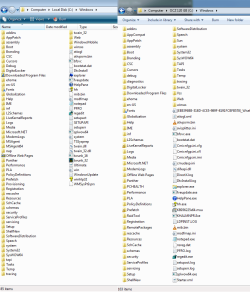
See attached image.

In Vista, with a list view, my 1050px tall display can list 52 items vertically. In 7 it is reduced to 44, because of apparently a larger font and larger gaps in between items. All my settings are default in both cases.

This is nearly a 20% decrease in usable space. Why???
 

Attachments
  • vista_vs_7_explorer.png
    vista_vs_7_explorer.png
    49.3 KB · Views: 295

My Computer My Computer

At a glance

Windows 7 Ultimate x64i7 920 @ 3.8GHz3x 2GB OCZ 1600MHzMSI 4890
Computer type
PC/Desktop
OS
Windows 7 Ultimate x64
CPU
i7 920 @ 3.8GHz
Motherboard
EVGA x58 (E758)
Memory
3x 2GB OCZ 1600MHz
Graphics Card(s)
MSI 4890
Sound Card
bGears b-Enspirer
Monitor(s) Displays
2x Dell 2209WA
Hard Drives
OCZ Vertex 120GB SSD
PSU
Corsair 850W
Case
Antec 1200
Cooling
Megahalems
This is a problem why? To me the version in Windows 7 is a lot more pleasant to look at and read. Having whitespace and separation is not a bad thing.
 

My Computer My Computer

At a glance

Windows 10 Pro (x64)Intel Core i7-3930K (3.2GHz - 4.5GHz)4x Samsung 4GB PC3-12800 DDR3 (16GB 1600MHz)Nvidia Geforce GTX 690
Computer type
PC/Desktop
Computer Manufacturer/Model Number
Alienware Aurora ALX R4
OS
Windows 10 Pro (x64)
CPU
Intel Core i7-3930K (3.2GHz - 4.5GHz)
Motherboard
Alienware Aurora-R4 x79
Memory
4x Samsung 4GB PC3-12800 DDR3 (16GB 1600MHz)
Graphics Card(s)
Nvidia Geforce GTX 690
Sound Card
SteelSeries Siberia Elite
Monitor(s) Displays
Dell UltraSharp U3011
Screen Resolution
2560x1600
Hard Drives
Samsung 850 Pro 256 GB, Seagate 1TB Desktop Hybrid HDD, 2x Western Digital 4TB Green HDD
PSU
875W Some Dell PSU <.<
Case
Alienware Aurora ALX
Cooling
Custom Liquid Cooling (EK CPU & GPU blocks) dual EK 480RAD
Keyboard
Logitech G710+ Mechanical
Mouse
Logitech G700s
Internet Speed
Verizon Fios (50 mbps average)
Other Info
Server: Intel NUC D54250WYK: i5-4250U, 16GB, 256 GB mSATA, Windows Server 2012 R2
See attached image.

In Vista, with a list view, my 1050px tall display can list 52 items vertically. In 7 it is reduced to 44, because of apparently a larger font and larger gaps in between items. All my settings are default in both cases.

This is nearly a 20% decrease in usable space. Why???
Probably because Microsoft thought that "a larger font and larger gaps in between items" would be more pleasing to read, with less eyestrain for the users.

Maybe they got complaints from Vista users, then made changes...

You could also do a search of microsoft.com.
There might be more info there.
 

My Computer My Computer

At a glance

XP_Pro, W7_7201, W7RC.vhd, SciLinux5.3, Fedor...AMD 64x21 gigDunno
Computer Manufacturer/Model Number
Gateway GT5056
OS
XP_Pro, W7_7201, W7RC.vhd, SciLinux5.3, Fedora12, Fedora9_2x, OpenSolaris_09-06
CPU
AMD 64x2
Motherboard
Yes
Memory
1 gig
Graphics Card(s)
Dunno
Sound Card
Realtek something
Monitor(s) Displays
Samsung SyncMaster 940MW w/TV
Screen Resolution
1280x1024
Hard Drives
250 GB WD, USB Seagate Freedesk 1.5 T
Internet Speed
Cable modem
Other Info
1 + 1 = 10b,
7 + 7 = 16o,
a + b = 15h.
My interpretation -

Newer monitors support higher resolutions. It is no longer universally necessary to cram the items together.
 
This is a problem why? To me the version in Windows 7 is a lot more pleasant to look at and read. Having whitespace and separation is not a bad thing.

Obviously it comes down to personal preference. I guess I'm wondering if there is any way to customize this.
 

My Computer My Computer

At a glance

Windows 7 Ultimate x64i7 920 @ 3.8GHz3x 2GB OCZ 1600MHzMSI 4890
Computer type
PC/Desktop
OS
Windows 7 Ultimate x64
CPU
i7 920 @ 3.8GHz
Motherboard
EVGA x58 (E758)
Memory
3x 2GB OCZ 1600MHz
Graphics Card(s)
MSI 4890
Sound Card
bGears b-Enspirer
Monitor(s) Displays
2x Dell 2209WA
Hard Drives
OCZ Vertex 120GB SSD
PSU
Corsair 850W
Case
Antec 1200
Cooling
Megahalems
Yes, there is (or at least may be) a way to customize this. You can try the following:

Right click on some empty space on the desktop, click personalize, select window color, advanced appearance settings, and then go through the various items like menu and message box and see which ones have fonts sizes that can be changed (made larger). I forget which one controls the size of text in windows that you are concerned with but it might be "menu" or "icon" (this one changes more stuff than just icon fonts). Anyway, by enlarging the fonts associated with the right item in that list, you should be able to cause windows to use a larger system font for those lists.

The other solution (suggested in the next post below) is to enlarge text for everything, but that is not an ideal solution, imo, unless you want to globally change everything.
 
Last edited:

My Computer My Computer

At a glance

Windows 7 Ultimate x64 (Retail)i7-Q 7206 GBnVidia GeForce GT 230M (1GB)
Computer Manufacturer/Model Number
HP DV8t quad
OS
Windows 7 Ultimate x64 (Retail)
CPU
i7-Q 720
Motherboard
Motherboard Chipset Intel Ibex Peak-M PM55, Intel Lynnfield
Memory
6 GB
Graphics Card(s)
nVidia GeForce GT 230M (1GB)
Sound Card
IDT High Definition Audio CODEC
Monitor(s) Displays
18.4 inch HP Infinity FHD (Samsung 184HT03-001)
Screen Resolution
1920 x 1080
Hard Drives
Hitachi 500GB 7200 rpm (x2)
Seagate FreeAgent 1.5 TB External USB (x2)
Thermaltake BlacX eSATA/USB 2.0 3.5/2.5 HD dock
Cooling
Zalman NC-2000 notebook cooling pad
Keyboard
laptop
Mouse
Logitech VX Revolution
Other Info
Backup Unit: Lenovo T61p
Obviously it comes down to personal preference. I guess I'm wondering if there is any way to customize this.

Yes you can. Go to cpanel>display>set custom text size

Ken
 
Last edited:

My Computer My Computer

At a glance

Win 8 Release candidate 8400[email protected]4 gigsNvidia 9600M
Computer Manufacturer/Model Number
HP Pavillion dv-7 1005 Tx
OS
Win 8 Release candidate 8400
CPU
[email protected]
Memory
4 gigs
Graphics Card(s)
Nvidia 9600M
Sound Card
HD built-in
Monitor(s) Displays
17" Wxga
Screen Resolution
1440x900
Cooling
none
Internet Speed
45Mb down 5Mb up
Back
Top