Solved upgraded to up to 60Mbs but can not get more than 25Mbs

nuflia

New member
Member
VIP
Local time
11:14 AM
Messages
138
I have upgraded my internet broadband to be 60 Mbs instead of 30 Mbs , but unfortunately my download speed can not go more than 23 Mbs when using wireless, if i connect the supper hub ( VMDG-480) to the computer using Ethernet cable , i am able to get 62 Mbs..
my dell computer has dell wireless 1397 wlan mini-card... i am not sure if it supports N wireless
what is the solution in this case.. should i change my wireless card ...
 

My Computer My Computer

At a glance

Microsoft Windows 7 Home Premium 64-bit 7601 ...Intel(R) Core(TM) i5 CPU M 460 @ 2.53GHz8GB , SODIMM ,CT51264BF1339.M16FATI Mobility Radeon HD 5400 Series
Computer type
Laptop
Computer Manufacturer/Model Number
Dell studio 1558
OS
Microsoft Windows 7 Home Premium 64-bit 7601 Multiprocessor Free Service Pack 1
CPU
Intel(R) Core(TM) i5 CPU M 460 @ 2.53GHz
Motherboard
Dell Inc. 0874P6
Memory
8GB , SODIMM ,CT51264BF1339.M16F
Graphics Card(s)
ATI Mobility Radeon HD 5400 Series
Sound Card
(1) AMD High Definition Audio Device (2) High Definition A
Monitor(s) Displays
VideoController1
Screen Resolution
1366 x 768 x 4294967296 colors
Hard Drives
TOSHIBA MK5076GSX ATA Device, 500GB
PSU
Dell studio 1558 power supply uint
Case
Dell studio 1558
Cooling
GENUINE DELL STUDIO 1558 CPU COOPER HEATSINK with FAN.
Keyboard
dell keyboard
Mouse
optical external drive
Internet Speed
60Mb/s
Antivirus
Norton Internet Security version 20.4.0.40
Browser
Google chrome
I'd look at a pair of homeplugs instead, they give a more reliable connection than wireless by using your electrical ring main. There are plenty here to have a look through. Just plug one into a mains socket by your router and run an ethernet cable between the two, then plug one into a mains socket by your PC and run an ethernet cable between the two and your PC will then have a hardwired connection.
 

My Computer My Computer

At a glance

W7 Pro x64 SP1 | W10 Pro IP x64 | W8.1 Pro x6...i7-4790k @ 4GHz (4.4GHz Boost)16GB DDR3 Kingston HyperX Fury @ 1600MHz CL 9...EVGA GTX 980 Classified
Computer type
PC/Desktop
Computer Manufacturer/Model Number
Custom Build
OS
W7 Pro x64 SP1 | W10 Pro IP x64 | W8.1 Pro x64 VM | Linux Mint VM
CPU
i7-4790k @ 4GHz (4.4GHz Boost)
Motherboard
ASUS Sabertooth Z87 (BIOS Rev 2004)
Memory
16GB DDR3 Kingston HyperX Fury @ 1600MHz CL 9-9-9-27
Graphics Card(s)
EVGA GTX 980 Classified
Sound Card
Realtek Onboard
Monitor(s) Displays
Samsung S27D390
Screen Resolution
1920 x 1080
Hard Drives
240GB Intel 520 Series SSD |
Samsung 850 EVO 120GB SSD |
2TB WD Caviar Black |
2TB WD Caviar Green
PSU
Corsair HX850-80 Gold Modular
Case
Cooler Master Silencio 650
Cooling
Corsair H80i w/2 x Corsair SP120 | 2 x 120mm Noctua NF-S12B
Keyboard
Microsoft Sidewinder X4
Mouse
Gigabyte M6900 optical
Internet Speed
152mb
Antivirus
F-Secure
Browser
Firefox 38.0
Other Info
Backup Rig: Win 7 Pro 64-bit | AMD A10-5800k | ASUS F2A85-V Pro | 8GB Samsung DDR3 @1600MHz | 120GB Toshiba SDD | 2TB Seagate HDD | Cooler Master Silencio 550
Thanks for the reply,
so you mean to say using TP-Link is far better than buying wireless card that supports N wireless..
is using TP-Link giving a good speed as using Ethernet cable..
 

My Computer My Computer

At a glance

Microsoft Windows 7 Home Premium 64-bit 7601 ...Intel(R) Core(TM) i5 CPU M 460 @ 2.53GHz8GB , SODIMM ,CT51264BF1339.M16FATI Mobility Radeon HD 5400 Series
Computer type
Laptop
Computer Manufacturer/Model Number
Dell studio 1558
OS
Microsoft Windows 7 Home Premium 64-bit 7601 Multiprocessor Free Service Pack 1
CPU
Intel(R) Core(TM) i5 CPU M 460 @ 2.53GHz
Motherboard
Dell Inc. 0874P6
Memory
8GB , SODIMM ,CT51264BF1339.M16F
Graphics Card(s)
ATI Mobility Radeon HD 5400 Series
Sound Card
(1) AMD High Definition Audio Device (2) High Definition A
Monitor(s) Displays
VideoController1
Screen Resolution
1366 x 768 x 4294967296 colors
Hard Drives
TOSHIBA MK5076GSX ATA Device, 500GB
PSU
Dell studio 1558 power supply uint
Case
Dell studio 1558
Cooling
GENUINE DELL STUDIO 1558 CPU COOPER HEATSINK with FAN.
Keyboard
dell keyboard
Mouse
optical external drive
Internet Speed
60Mb/s
Antivirus
Norton Internet Security version 20.4.0.40
Browser
Google chrome
I'm not sure if they'll give quite as good performance as a direct ethernet cable but they'll definitely give you a more reliable connection than wireless.
 

My Computer My Computer

At a glance

W7 Pro x64 SP1 | W10 Pro IP x64 | W8.1 Pro x6...i7-4790k @ 4GHz (4.4GHz Boost)16GB DDR3 Kingston HyperX Fury @ 1600MHz CL 9...EVGA GTX 980 Classified
Computer type
PC/Desktop
Computer Manufacturer/Model Number
Custom Build
OS
W7 Pro x64 SP1 | W10 Pro IP x64 | W8.1 Pro x64 VM | Linux Mint VM
CPU
i7-4790k @ 4GHz (4.4GHz Boost)
Motherboard
ASUS Sabertooth Z87 (BIOS Rev 2004)
Memory
16GB DDR3 Kingston HyperX Fury @ 1600MHz CL 9-9-9-27
Graphics Card(s)
EVGA GTX 980 Classified
Sound Card
Realtek Onboard
Monitor(s) Displays
Samsung S27D390
Screen Resolution
1920 x 1080
Hard Drives
240GB Intel 520 Series SSD |
Samsung 850 EVO 120GB SSD |
2TB WD Caviar Black |
2TB WD Caviar Green
PSU
Corsair HX850-80 Gold Modular
Case
Cooler Master Silencio 650
Cooling
Corsair H80i w/2 x Corsair SP120 | 2 x 120mm Noctua NF-S12B
Keyboard
Microsoft Sidewinder X4
Mouse
Gigabyte M6900 optical
Internet Speed
152mb
Antivirus
F-Secure
Browser
Firefox 38.0
Other Info
Backup Rig: Win 7 Pro 64-bit | AMD A10-5800k | ASUS F2A85-V Pro | 8GB Samsung DDR3 @1600MHz | 120GB Toshiba SDD | 2TB Seagate HDD | Cooler Master Silencio 550
I have upgraded my internet broadband to be 60 Mbs instead of 30 Mbs , but unfortunately my download speed can not go more than 23 Mbs when using wireless, if i connect the supper hub ( VMDG-480) to the computer using Ethernet cable , i am able to get 62 Mbs..
my dell computer has dell wireless 1397 wlan mini-card... i am not sure if it supports N wireless
what is the solution in this case.. should i change my wireless card ...

Hi nuflia,

This card doesn't support N mode you might not be able to get 60 Mbps speed with this wireless card.

You should consider upgrading your wireless card on the system. Please check this link below for upgrading your system( assuming its a DELL system):

http://dell.to/18X9D6X

Keep us posted with the results so we can advise you further.
 

My Computer My Computer

At a glance

Winndows 7 32 bit
Computer type
PC/Desktop
OS
Winndows 7 32 bit
Hi
Thanks Sandeep P, and much more thanks to Boozad....
I have just bought Power-line 200 Home Network Adapters from on networks , they are the best solution, it's better than upgrading my wireless card to N-network
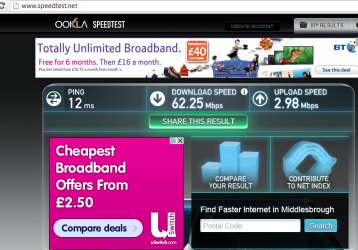
after installing them i tested the speed using speedtest.net and internet-speedtest.net. Now i am able to get around 60Mbs and upload nearly 3Mbs.
i was at PC world this morning and the guy who is in the store advised me to use particularly this type (Power-line 200 Home Network Adapters from on networks) as he has been using them at home and giving him good internet speed and the price was cheap £20...
so even if i upgraded my wireless net work card, i am sure i will not be able to get this speed using power line home adapters...
results for the speed tests attached
 

Attachments

  • speed_test1.PNG
    speed_test1.PNG
    24.5 KB · Views: 2
  • speed_test2.PNG
    speed_test2.PNG
    95.5 KB · Views: 1

My Computer My Computer

At a glance

Microsoft Windows 7 Home Premium 64-bit 7601 ...Intel(R) Core(TM) i5 CPU M 460 @ 2.53GHz8GB , SODIMM ,CT51264BF1339.M16FATI Mobility Radeon HD 5400 Series
Computer type
Laptop
Computer Manufacturer/Model Number
Dell studio 1558
OS
Microsoft Windows 7 Home Premium 64-bit 7601 Multiprocessor Free Service Pack 1
CPU
Intel(R) Core(TM) i5 CPU M 460 @ 2.53GHz
Motherboard
Dell Inc. 0874P6
Memory
8GB , SODIMM ,CT51264BF1339.M16F
Graphics Card(s)
ATI Mobility Radeon HD 5400 Series
Sound Card
(1) AMD High Definition Audio Device (2) High Definition A
Monitor(s) Displays
VideoController1
Screen Resolution
1366 x 768 x 4294967296 colors
Hard Drives
TOSHIBA MK5076GSX ATA Device, 500GB
PSU
Dell studio 1558 power supply uint
Case
Dell studio 1558
Cooling
GENUINE DELL STUDIO 1558 CPU COOPER HEATSINK with FAN.
Keyboard
dell keyboard
Mouse
optical external drive
Internet Speed
60Mb/s
Antivirus
Norton Internet Security version 20.4.0.40
Browser
Google chrome
Glad they worked out well for you mate. Enjoy your new speeds!
 

My Computer My Computer

At a glance

W7 Pro x64 SP1 | W10 Pro IP x64 | W8.1 Pro x6...i7-4790k @ 4GHz (4.4GHz Boost)16GB DDR3 Kingston HyperX Fury @ 1600MHz CL 9...EVGA GTX 980 Classified
Computer type
PC/Desktop
Computer Manufacturer/Model Number
Custom Build
OS
W7 Pro x64 SP1 | W10 Pro IP x64 | W8.1 Pro x64 VM | Linux Mint VM
CPU
i7-4790k @ 4GHz (4.4GHz Boost)
Motherboard
ASUS Sabertooth Z87 (BIOS Rev 2004)
Memory
16GB DDR3 Kingston HyperX Fury @ 1600MHz CL 9-9-9-27
Graphics Card(s)
EVGA GTX 980 Classified
Sound Card
Realtek Onboard
Monitor(s) Displays
Samsung S27D390
Screen Resolution
1920 x 1080
Hard Drives
240GB Intel 520 Series SSD |
Samsung 850 EVO 120GB SSD |
2TB WD Caviar Black |
2TB WD Caviar Green
PSU
Corsair HX850-80 Gold Modular
Case
Cooler Master Silencio 650
Cooling
Corsair H80i w/2 x Corsair SP120 | 2 x 120mm Noctua NF-S12B
Keyboard
Microsoft Sidewinder X4
Mouse
Gigabyte M6900 optical
Internet Speed
152mb
Antivirus
F-Secure
Browser
Firefox 38.0
Other Info
Backup Rig: Win 7 Pro 64-bit | AMD A10-5800k | ASUS F2A85-V Pro | 8GB Samsung DDR3 @1600MHz | 120GB Toshiba SDD | 2TB Seagate HDD | Cooler Master Silencio 550
Thanks mate...
you really pointed me to a very good thing... power line home plug adapter.. they;re very good hardware.. so far i am able to get the same speed as by using Ethernet cable... one thing is ping is different ... no effect reliability much i guess..
 

My Computer My Computer

At a glance

Microsoft Windows 7 Home Premium 64-bit 7601 ...Intel(R) Core(TM) i5 CPU M 460 @ 2.53GHz8GB , SODIMM ,CT51264BF1339.M16FATI Mobility Radeon HD 5400 Series
Computer type
Laptop
Computer Manufacturer/Model Number
Dell studio 1558
OS
Microsoft Windows 7 Home Premium 64-bit 7601 Multiprocessor Free Service Pack 1
CPU
Intel(R) Core(TM) i5 CPU M 460 @ 2.53GHz
Motherboard
Dell Inc. 0874P6
Memory
8GB , SODIMM ,CT51264BF1339.M16F
Graphics Card(s)
ATI Mobility Radeon HD 5400 Series
Sound Card
(1) AMD High Definition Audio Device (2) High Definition A
Monitor(s) Displays
VideoController1
Screen Resolution
1366 x 768 x 4294967296 colors
Hard Drives
TOSHIBA MK5076GSX ATA Device, 500GB
PSU
Dell studio 1558 power supply uint
Case
Dell studio 1558
Cooling
GENUINE DELL STUDIO 1558 CPU COOPER HEATSINK with FAN.
Keyboard
dell keyboard
Mouse
optical external drive
Internet Speed
60Mb/s
Antivirus
Norton Internet Security version 20.4.0.40
Browser
Google chrome
Boozad very interesting. I do have a question on security.

What is the broad cast range when you are using your building wiring.
Example: When sending a command from your PC to the remote printer through the buildings wiring how far does that signal travel out side the wiring. Can someone 100ft away let say pick up that signal.
Otherwise is your wiring inside the building just become a giant transmitting antenna?
 

My Computer My Computer

At a glance

Windows 10 Pro. 64/ version 1709 Windows 7 Pr...Intel i7-6800K @ 4.3Corsair Platinum 16 gig @2400EVGA GTX 1070 OC
Computer type
PC/Desktop
Computer Manufacturer/Model Number
Home made Desktop
OS
Windows 10 Pro. 64/ version 1709 Windows 7 Pro/64
CPU
Intel i7-6800K @ 4.3
Motherboard
ASUS X-99 Deluxe II
Memory
Corsair Platinum 16 gig @2400
Graphics Card(s)
EVGA GTX 1070 OC
Monitor(s) Displays
Asus 27" LED LCD/VE278Q
Screen Resolution
1920-1080 or 1280-720 HDMI
Hard Drives
INTEL SSD 730-240 Gb Sata 3.0/
PSU
EVGA Platium 1200W
Case
Phanteks Luxe Tempered Glass 8 fans/ one radiator
Cooling
XSPC/ Water Cooled CPU
Keyboard
Das 4 Professional
Mouse
Logitech M705/MX Anywhere 2-S
Internet Speed
100 mbits
Antivirus
Microsoft Security Essentials/ Malwarebytes Premium 3.0/ SAS
Browser
I.E. 11 default/Firefox/ ISP Time Warner Cable/Spectrum
Other Info
LG BluRay Burner/
Sound system-KLipsch-THX/
Icy Dock ssd Hot Swap bays.
The signal won't travel outside the wiring, your ring main is a closed loop effectively from your consumer unit to the last plug socket in the ring main. There's no chance of anybody who's not connected directly to your router (or your electricity mains circuit, in which case I'd be worried before sending ethernet signals down it!) getting access to your signal. I'm still a bit confused as to how signal is sent down mains cable as mains usually creates 'noise' across the signal, but it works well and I just take them at that value. I suppose I could look into it and probably will one day.

EDIT: Actually, and I could be wrong here, but I think that homeplugs are paired. For example, I don't think you can plug into one adaptor from your router and draw that signal from two other adaptors simultaneously. I'd have to verify that though.
 

My Computer My Computer

At a glance

W7 Pro x64 SP1 | W10 Pro IP x64 | W8.1 Pro x6...i7-4790k @ 4GHz (4.4GHz Boost)16GB DDR3 Kingston HyperX Fury @ 1600MHz CL 9...EVGA GTX 980 Classified
Computer type
PC/Desktop
Computer Manufacturer/Model Number
Custom Build
OS
W7 Pro x64 SP1 | W10 Pro IP x64 | W8.1 Pro x64 VM | Linux Mint VM
CPU
i7-4790k @ 4GHz (4.4GHz Boost)
Motherboard
ASUS Sabertooth Z87 (BIOS Rev 2004)
Memory
16GB DDR3 Kingston HyperX Fury @ 1600MHz CL 9-9-9-27
Graphics Card(s)
EVGA GTX 980 Classified
Sound Card
Realtek Onboard
Monitor(s) Displays
Samsung S27D390
Screen Resolution
1920 x 1080
Hard Drives
240GB Intel 520 Series SSD |
Samsung 850 EVO 120GB SSD |
2TB WD Caviar Black |
2TB WD Caviar Green
PSU
Corsair HX850-80 Gold Modular
Case
Cooler Master Silencio 650
Cooling
Corsair H80i w/2 x Corsair SP120 | 2 x 120mm Noctua NF-S12B
Keyboard
Microsoft Sidewinder X4
Mouse
Gigabyte M6900 optical
Internet Speed
152mb
Antivirus
F-Secure
Browser
Firefox 38.0
Other Info
Backup Rig: Win 7 Pro 64-bit | AMD A10-5800k | ASUS F2A85-V Pro | 8GB Samsung DDR3 @1600MHz | 120GB Toshiba SDD | 2TB Seagate HDD | Cooler Master Silencio 550
Thanks mate...
you really pointed me to a very good thing... power line home plug adapter.. they;re very good hardware.. so far i am able to get the same speed as by using Ethernet cable... one thing is ping is different ... no effect reliability much i guess..

If your ping is the one in the speedtest.net screenshot mate I'd be very happy with that. 12ms is a very decent ping time.
 

My Computer My Computer

At a glance

W7 Pro x64 SP1 | W10 Pro IP x64 | W8.1 Pro x6...i7-4790k @ 4GHz (4.4GHz Boost)16GB DDR3 Kingston HyperX Fury @ 1600MHz CL 9...EVGA GTX 980 Classified
Computer type
PC/Desktop
Computer Manufacturer/Model Number
Custom Build
OS
W7 Pro x64 SP1 | W10 Pro IP x64 | W8.1 Pro x64 VM | Linux Mint VM
CPU
i7-4790k @ 4GHz (4.4GHz Boost)
Motherboard
ASUS Sabertooth Z87 (BIOS Rev 2004)
Memory
16GB DDR3 Kingston HyperX Fury @ 1600MHz CL 9-9-9-27
Graphics Card(s)
EVGA GTX 980 Classified
Sound Card
Realtek Onboard
Monitor(s) Displays
Samsung S27D390
Screen Resolution
1920 x 1080
Hard Drives
240GB Intel 520 Series SSD |
Samsung 850 EVO 120GB SSD |
2TB WD Caviar Black |
2TB WD Caviar Green
PSU
Corsair HX850-80 Gold Modular
Case
Cooler Master Silencio 650
Cooling
Corsair H80i w/2 x Corsair SP120 | 2 x 120mm Noctua NF-S12B
Keyboard
Microsoft Sidewinder X4
Mouse
Gigabyte M6900 optical
Internet Speed
152mb
Antivirus
F-Secure
Browser
Firefox 38.0
Other Info
Backup Rig: Win 7 Pro 64-bit | AMD A10-5800k | ASUS F2A85-V Pro | 8GB Samsung DDR3 @1600MHz | 120GB Toshiba SDD | 2TB Seagate HDD | Cooler Master Silencio 550
I am also interested in how the power line adapter works... and how the electrical noise in the mains does not effect the signal.. lots to be figured out.. we're lucky it works and gets the burden of running the Ethernet cable away...
 

My Computer My Computer

At a glance

Microsoft Windows 7 Home Premium 64-bit 7601 ...Intel(R) Core(TM) i5 CPU M 460 @ 2.53GHz8GB , SODIMM ,CT51264BF1339.M16FATI Mobility Radeon HD 5400 Series
Computer type
Laptop
Computer Manufacturer/Model Number
Dell studio 1558
OS
Microsoft Windows 7 Home Premium 64-bit 7601 Multiprocessor Free Service Pack 1
CPU
Intel(R) Core(TM) i5 CPU M 460 @ 2.53GHz
Motherboard
Dell Inc. 0874P6
Memory
8GB , SODIMM ,CT51264BF1339.M16F
Graphics Card(s)
ATI Mobility Radeon HD 5400 Series
Sound Card
(1) AMD High Definition Audio Device (2) High Definition A
Monitor(s) Displays
VideoController1
Screen Resolution
1366 x 768 x 4294967296 colors
Hard Drives
TOSHIBA MK5076GSX ATA Device, 500GB
PSU
Dell studio 1558 power supply uint
Case
Dell studio 1558
Cooling
GENUINE DELL STUDIO 1558 CPU COOPER HEATSINK with FAN.
Keyboard
dell keyboard
Mouse
optical external drive
Internet Speed
60Mb/s
Antivirus
Norton Internet Security version 20.4.0.40
Browser
Google chrome
PoE (Power over Ethernet).

Power over Ethernet or PoE describes any of several standardized or ad-hoc systems which pass electrical power along with data on Ethernet cabling. This allows a single cable to provide both data connection and electrical power to devices such as wireless access points or IP cameras. Unlike standards such as Universal Serial Bus which also power devices over the data cables, PoE allows long cable lengths. Power may be carried on the same conductors as the data, or it may be carried on dedicated conductors in the same cable.
There are several common techniques for transmitting power over Ethernet cabling; two of them have been standardized by IEEE 802.3. Since only two of the four pairs are needed for 10BASE-T or 100BASE-TX, power may be transmitted on the unused conductors of a cable. In the IEEE standards, this is referred to as Alternative B. Power may be transmitted on the data conductors by applying a common-mode voltage to each pair. Because Ethernet uses differential signalling, this does not interfere with data transmission. The common mode voltage is easily extracted using the center tap of the standard Ethernet pulse transformer. This is similar to the phantom power technique commonly used for powering audio microphones. In the IEEE standards, this is referred to as Alternative A.
In addition to standardizing existing practice for spare-pair and common-mode data pair power transmission, the IEEE PoE standards provide for signalling between the power source equipment (PSE) and powered device (PD). This signaling allows the presence of a conformant device to be detected by the power source, and allows the device and source to negotiate the amount of power required or available. Up to 25 watts is available for a device, depending on the version of the standard in use.
 

My Computer My Computer

At a glance

W7 Pro x64 SP1 | W10 Pro IP x64 | W8.1 Pro x6...i7-4790k @ 4GHz (4.4GHz Boost)16GB DDR3 Kingston HyperX Fury @ 1600MHz CL 9...EVGA GTX 980 Classified
Computer type
PC/Desktop
Computer Manufacturer/Model Number
Custom Build
OS
W7 Pro x64 SP1 | W10 Pro IP x64 | W8.1 Pro x64 VM | Linux Mint VM
CPU
i7-4790k @ 4GHz (4.4GHz Boost)
Motherboard
ASUS Sabertooth Z87 (BIOS Rev 2004)
Memory
16GB DDR3 Kingston HyperX Fury @ 1600MHz CL 9-9-9-27
Graphics Card(s)
EVGA GTX 980 Classified
Sound Card
Realtek Onboard
Monitor(s) Displays
Samsung S27D390
Screen Resolution
1920 x 1080
Hard Drives
240GB Intel 520 Series SSD |
Samsung 850 EVO 120GB SSD |
2TB WD Caviar Black |
2TB WD Caviar Green
PSU
Corsair HX850-80 Gold Modular
Case
Cooler Master Silencio 650
Cooling
Corsair H80i w/2 x Corsair SP120 | 2 x 120mm Noctua NF-S12B
Keyboard
Microsoft Sidewinder X4
Mouse
Gigabyte M6900 optical
Internet Speed
152mb
Antivirus
F-Secure
Browser
Firefox 38.0
Other Info
Backup Rig: Win 7 Pro 64-bit | AMD A10-5800k | ASUS F2A85-V Pro | 8GB Samsung DDR3 @1600MHz | 120GB Toshiba SDD | 2TB Seagate HDD | Cooler Master Silencio 550
Boozad very interesting. I do have a question on security.

What is the broad cast range when you are using your building wiring.
Example: When sending a command from your PC to the remote printer through the buildings wiring how far does that signal travel out side the wiring. Can someone 100ft away let say pick up that signal.
Otherwise is your wiring inside the building just become a giant transmitting antenna?

some power line adapter has wireless capabilities ,
 

My Computer My Computer

At a glance

Microsoft Windows 7 Home Premium 64-bit 7601 ...Intel(R) Core(TM) i5 CPU M 460 @ 2.53GHz8GB , SODIMM ,CT51264BF1339.M16FATI Mobility Radeon HD 5400 Series
Computer type
Laptop
Computer Manufacturer/Model Number
Dell studio 1558
OS
Microsoft Windows 7 Home Premium 64-bit 7601 Multiprocessor Free Service Pack 1
CPU
Intel(R) Core(TM) i5 CPU M 460 @ 2.53GHz
Motherboard
Dell Inc. 0874P6
Memory
8GB , SODIMM ,CT51264BF1339.M16F
Graphics Card(s)
ATI Mobility Radeon HD 5400 Series
Sound Card
(1) AMD High Definition Audio Device (2) High Definition A
Monitor(s) Displays
VideoController1
Screen Resolution
1366 x 768 x 4294967296 colors
Hard Drives
TOSHIBA MK5076GSX ATA Device, 500GB
PSU
Dell studio 1558 power supply uint
Case
Dell studio 1558
Cooling
GENUINE DELL STUDIO 1558 CPU COOPER HEATSINK with FAN.
Keyboard
dell keyboard
Mouse
optical external drive
Internet Speed
60Mb/s
Antivirus
Norton Internet Security version 20.4.0.40
Browser
Google chrome
Boozad PoE and Power line network is two different things do NOT mix these two thing
 

My Computer My Computer

At a glance

Windows 7 Professional 64bitIntel core i7 950 stock6x2GB corsair @ 1600 MhzNvidia GeForce GTX 460 1GB
Computer type
PC/Desktop
Computer Manufacturer/Model Number
Custom build
OS
Windows 7 Professional 64bit
CPU
Intel core i7 950 stock
Motherboard
AsRock x58 Extreme 3
Memory
6x2GB corsair @ 1600 Mhz
Graphics Card(s)
Nvidia GeForce GTX 460 1GB
Sound Card
Integrated VIA chip
Monitor(s) Displays
BenQ G2420HDB
Screen Resolution
1920x1080
Hard Drives
Corsair Force F60 SSD (C:)
WD black 750GB & Segate Baracuda 1TB (Raid 0)
PSU
Corsair VX 550W
Case
Cooler Master Haf X
Cooling
Corsair H100
Keyboard
Microsoft Sidewinder X4
Mouse
Razer Deathadder
Internet Speed
20 Down 2 Up ADSL Telia
Antivirus
Microsoft security essentials
Browser
Firefox
Boozad PoE and Power line network is two different things do NOT mix these two thing

I don't know, I already said that. Please enlighten us.

But it stands to reason if you can pass power along an ethernet line as the ethernet signal isn't affected by mains power, then you can do the opposite which in a basic way answers the original question.
 

My Computer My Computer

At a glance

W7 Pro x64 SP1 | W10 Pro IP x64 | W8.1 Pro x6...i7-4790k @ 4GHz (4.4GHz Boost)16GB DDR3 Kingston HyperX Fury @ 1600MHz CL 9...EVGA GTX 980 Classified
Computer type
PC/Desktop
Computer Manufacturer/Model Number
Custom Build
OS
W7 Pro x64 SP1 | W10 Pro IP x64 | W8.1 Pro x64 VM | Linux Mint VM
CPU
i7-4790k @ 4GHz (4.4GHz Boost)
Motherboard
ASUS Sabertooth Z87 (BIOS Rev 2004)
Memory
16GB DDR3 Kingston HyperX Fury @ 1600MHz CL 9-9-9-27
Graphics Card(s)
EVGA GTX 980 Classified
Sound Card
Realtek Onboard
Monitor(s) Displays
Samsung S27D390
Screen Resolution
1920 x 1080
Hard Drives
240GB Intel 520 Series SSD |
Samsung 850 EVO 120GB SSD |
2TB WD Caviar Black |
2TB WD Caviar Green
PSU
Corsair HX850-80 Gold Modular
Case
Cooler Master Silencio 650
Cooling
Corsair H80i w/2 x Corsair SP120 | 2 x 120mm Noctua NF-S12B
Keyboard
Microsoft Sidewinder X4
Mouse
Gigabyte M6900 optical
Internet Speed
152mb
Antivirus
F-Secure
Browser
Firefox 38.0
Other Info
Backup Rig: Win 7 Pro 64-bit | AMD A10-5800k | ASUS F2A85-V Pro | 8GB Samsung DDR3 @1600MHz | 120GB Toshiba SDD | 2TB Seagate HDD | Cooler Master Silencio 550
I know this problem has already been solved, but upgrading to a good Wireless N card will allow you to probably get speeds of 60Mbps. I put an Intel dual band N card in my laptop and I get my full speed of 55Mbps wirelessly. It was an Intel card, 2.4 and 5GHz wireless N for $5 and change. Glad you got your issue worked out though.
 

My Computer My Computer

At a glance

Windows 7 Professional 64bit SP1Intel Core i5-3570K @ 4.5GHzCorsair Vengeance 16GB (4x4) @1866MHz CL 9-9-...EVGA GTX 750 Ti FTW
Computer type
PC/Desktop
Computer Manufacturer/Model Number
Custom Built
OS
Windows 7 Professional 64bit SP1
CPU
Intel Core i5-3570K @ 4.5GHz
Motherboard
Asus Sabertooth Z77
Memory
Corsair Vengeance 16GB (4x4) @1866MHz CL 9-9-9-24 1T
Graphics Card(s)
EVGA GTX 750 Ti FTW
Sound Card
Onboard Audio
Monitor(s) Displays
Dell S2309W
Screen Resolution
1920x1080
Hard Drives
Samsung 830 128GB SSD - OS
(4) Seagate 5TB HDD
(1) Seagate 2TB HDD
PSU
Seasonic X750 80+ Gold Full Modular
Case
Antec Eleven Hundred Super Mid Tower
Cooling
Intel Liquid Cooler
Keyboard
Max Nighthawk X8 Mechanical keyboard
Mouse
Mionix Naos 7000
Internet Speed
50 Mbps Down / 10 Mbps Up
Antivirus
Microsoft Security Essentials/Malwarebytes Anti-Malware
Browser
Chrome/Firefox
Other Info
Klipsch ProMedia 2.1's
Asus RT-N66R Wireless Router
Hi
Thanks Sandeep P, and much more thanks to Boozad....
I have just bought Power-line 200 Home Network Adapters from on networks , they are the best solution, it's better than upgrading my wireless card to N-network
after installing them i tested the speed using speedtest.net and internet-speedtest.net. Now i am able to get around 60Mbs and upload nearly 3Mbs.
i was at PC world this morning and the guy who is in the store advised me to use particularly this type (Power-line 200 Home Network Adapters from on networks) as he has been using them at home and giving him good internet speed and the price was cheap £20...
so even if i upgraded my wireless net work card, i am sure i will not be able to get this speed using power line home adapters...
results for the speed tests attached

Hi nuflia,

Its great to hear that these power line adapters worked great for you. I am sure hardwired plugs would provide better speed and reliability than wireless cards.

If you have any queries in future feel free to reply to us.
 

My Computer My Computer

At a glance

Winndows 7 32 bit
Computer type
PC/Desktop
OS
Winndows 7 32 bit
Thanks Sandeep,
so far so good.. just one thing I noticed , the hardwired plugs may get affected by noise.. as if they're plugged in a socket near other socket already used for other devices such as computer power charger ...
 

My Computer My Computer

At a glance

Microsoft Windows 7 Home Premium 64-bit 7601 ...Intel(R) Core(TM) i5 CPU M 460 @ 2.53GHz8GB , SODIMM ,CT51264BF1339.M16FATI Mobility Radeon HD 5400 Series
Computer type
Laptop
Computer Manufacturer/Model Number
Dell studio 1558
OS
Microsoft Windows 7 Home Premium 64-bit 7601 Multiprocessor Free Service Pack 1
CPU
Intel(R) Core(TM) i5 CPU M 460 @ 2.53GHz
Motherboard
Dell Inc. 0874P6
Memory
8GB , SODIMM ,CT51264BF1339.M16F
Graphics Card(s)
ATI Mobility Radeon HD 5400 Series
Sound Card
(1) AMD High Definition Audio Device (2) High Definition A
Monitor(s) Displays
VideoController1
Screen Resolution
1366 x 768 x 4294967296 colors
Hard Drives
TOSHIBA MK5076GSX ATA Device, 500GB
PSU
Dell studio 1558 power supply uint
Case
Dell studio 1558
Cooling
GENUINE DELL STUDIO 1558 CPU COOPER HEATSINK with FAN.
Keyboard
dell keyboard
Mouse
optical external drive
Internet Speed
60Mb/s
Antivirus
Norton Internet Security version 20.4.0.40
Browser
Google chrome
Thanks Sandeep,
so far so good.. just one thing I noticed , the hardwired plugs may get affected by noise.. as if they're plugged in a socket near other socket already used for other devices such as computer power charger ...

Hi nuflia,

Kindly elaborate the issue so we can understand it better. Is the system making abnormal noise when hardwired plugs are connected.

Kindly provide us more information so we can try our best to get this issue resolved to your satisfaction.
 

My Computer My Computer

At a glance

Winndows 7 32 bit
Computer type
PC/Desktop
OS
Winndows 7 32 bit
Back
Top