Windows areo automatically disables itself

Kurisu

New member
Local time
5:17 PM
Messages
6
Hay peeps,

I am having a problem with the windows areo thingy,

when I put my computer to 'sleep' the areo theme changes to basic on wake up and I can not figure out for the life of me how to stop it .

My graphics drivers are fully updated too :) the only way I can get it back is by restarting my computer but there are times where that is not possible.

thanks for reading :)
 

My Computer

OS
Windows 7 Build 7260 (RC)
CPU
QuadCore AMD Phenom X4 9500, 2200 MHz (11 x 200)
Motherboard
Acer F690GVM
Memory
2gb DDR 2
Graphics Card(s)
nVIDIA GeForce 8400
Sound Card
Realtek ALC888/1200 @ ATI SB600
Monitor(s) Displays
LG W2442 24" & ViewSonic VX1945wm-3 19"
Screen Resolution
24" = 1920 x 1080 19" = 1440 x 900
Hard Drives
500gb
Hey Kurisu...

Welcome to the forums.. Please help us help you by completely filling out your system specs?? We really need to know what we are dealing with ...

Thanks
 

My Computer

Computer type
PC/Desktop
Computer Manufacturer/Model Number
LENOVO K450 @3.0GHZ
OS
64-bit Windows 8.1 Pro
CPU
Core(TM) i5 CPU 4330 Haswell @ 3.20GHz
Motherboard
LENOVO
Memory
12.00 GB
Graphics Card(s)
Intel(R) HD Graphics
Sound Card
Intel HD integtrated
Monitor(s) Displays
HP 25' ISP Monitor
Screen Resolution
1900/1020
Hard Drives
(1) ST1000DM003-1CH162 (2) Generic STORAGE DEVICE USB Device (3) Generic STORAGE DEVICE USB Device
Internet Speed
100mb down/10mb up
Hi, I have filled out the required system specs :)

Thank you for your reply
 

My Computer

OS
Windows 7 Build 7260 (RC)
CPU
QuadCore AMD Phenom X4 9500, 2200 MHz (11 x 200)
Motherboard
Acer F690GVM
Memory
2gb DDR 2
Graphics Card(s)
nVIDIA GeForce 8400
Sound Card
Realtek ALC888/1200 @ ATI SB600
Monitor(s) Displays
LG W2442 24" & ViewSonic VX1945wm-3 19"
Screen Resolution
24" = 1920 x 1080 19" = 1440 x 900
Hard Drives
500gb
any luck anybody?
 

My Computer

OS
Windows 7 Build 7260 (RC)
CPU
QuadCore AMD Phenom X4 9500, 2200 MHz (11 x 200)
Motherboard
Acer F690GVM
Memory
2gb DDR 2
Graphics Card(s)
nVIDIA GeForce 8400
Sound Card
Realtek ALC888/1200 @ ATI SB600
Monitor(s) Displays
LG W2442 24" & ViewSonic VX1945wm-3 19"
Screen Resolution
24" = 1920 x 1080 19" = 1440 x 900
Hard Drives
500gb
Hay peeps,

I am having a problem with the windows areo thingy,

when I put my computer to 'sleep' the areo theme changes to basic on wake up and I can not figure out for the life of me how to stop it .

My graphics drivers are fully updated too :) the only way I can get it back is by restarting my computer but there are times where that is not possible.

thanks for reading :)

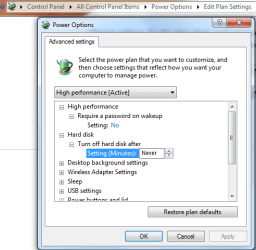
You might take a look at your power plan settings. You can try to turn off sleep for your harddrives or some other devices and see if it helps.
 

Attachments

  • power plan settings.PNG
    power plan settings.PNG
    18.8 KB · Views: 42

My Computer

Computer type
PC/Desktop
Computer Manufacturer/Model Number
Home built
OS
Windows 7 Ult, Windows 8.1 Pro,
CPU
Q9650-4.275GHz, E8600 4.5GHz, E6750-3.8GHz
Motherboard
Evga 780i FTW
Memory
G.Skill PC2 9600 1200Mhz 5 5 5 15 2T
Graphics Card(s)
GTX480
Sound Card
Asus Xonar D2
Monitor(s) Displays
HannsG
Screen Resolution
1680X1050
Hard Drives
GSkill Phoenix Pro 120GB SSD
PSU
ThermalTake Toughpower 1000Watt modular
Case
ThermalTake XaserV
Cooling
Xigmatek S1283
Keyboard
Logitech G15
Mouse
Logitech G9
Internet Speed
T1
hay, I just tried that, set my HDD to Never Sleep in the power settings... put it to sleep... woke it up and its back to basic with no areo :( time for a full restart to get aero back lol

but thank you for your suggestion... I'm up for any more :D
 

My Computer

OS
Windows 7 Build 7260 (RC)
CPU
QuadCore AMD Phenom X4 9500, 2200 MHz (11 x 200)
Motherboard
Acer F690GVM
Memory
2gb DDR 2
Graphics Card(s)
nVIDIA GeForce 8400
Sound Card
Realtek ALC888/1200 @ ATI SB600
Monitor(s) Displays
LG W2442 24" & ViewSonic VX1945wm-3 19"
Screen Resolution
24" = 1920 x 1080 19" = 1440 x 900
Hard Drives
500gb
I think I may know what it is, in my power options I cant set 'require password on wake up' to NO its set to yes and its grayed out, even though I do not have a password on my account.... as when I wake it, I get the logon screen and its after that it goes to basic, but I have no way to bypasing that screen even though IM the only user and I have no password set :S
 

My Computer

OS
Windows 7 Build 7260 (RC)
CPU
QuadCore AMD Phenom X4 9500, 2200 MHz (11 x 200)
Motherboard
Acer F690GVM
Memory
2gb DDR 2
Graphics Card(s)
nVIDIA GeForce 8400
Sound Card
Realtek ALC888/1200 @ ATI SB600
Monitor(s) Displays
LG W2442 24" & ViewSonic VX1945wm-3 19"
Screen Resolution
24" = 1920 x 1080 19" = 1440 x 900
Hard Drives
500gb
Back
Top