
Need to know what is eating my ram..

musiclover7

New member
Power User
Local time
2:53 PM
Messages
210
Location
Stoughton, WI
Have 8gb of ram in the system. I'm running no programs, and 3.5gb of it is in use. Now, if that is being used to improve the speed, cool with me.. if not, then I want to know what is eating it.. I downloaded process explorer, and cannot find anything listed to account for the ram usage. I could probably reboot the machine and watch the number drop, but I am interested in knowing where it went.. Any advice welcome!!
 

My Computer My Computer

At a glance

Windows 7 UltimateAmd 5400+ dual core overclocked to 3.0 ghz8gb 5-5-5-5-15 g-skillNvidia 9800gt 512mb
Computer Manufacturer/Model Number
Custom
OS
Windows 7 Ultimate
CPU
Amd 5400+ dual core overclocked to 3.0 ghz
Motherboard
EVGA 590 sli aM2
Memory
8gb 5-5-5-5-15 g-skill
Graphics Card(s)
Nvidia 9800gt 512mb
Sound Card
M-Audio Delta 2496
Monitor(s) Displays
Acer 22 inch lcd
Screen Resolution
1680 x 1050
Hard Drives
Hmm

4.0 terabytes total..
PSU
650 watts
Case
Antec Sonata II
Cooling
Zallmen Xpu cooler
Keyboard
some rubbish I found in my garage
Mouse
logitech
Internet Speed
caps at about 650kb down, 50kb up . Gigabit local network.
Memory caching - SuperFetch.

Post some screenshots of TaskManager/Processes and TaskManager/Performance to confirm.
 
Having troubles with my keyboard, and screenshot key. It seems it is not working.. Will up the pics when I get this piece resolved..
 

My Computer My Computer

At a glance

Windows 7 UltimateAmd 5400+ dual core overclocked to 3.0 ghz8gb 5-5-5-5-15 g-skillNvidia 9800gt 512mb
Computer Manufacturer/Model Number
Custom
OS
Windows 7 Ultimate
CPU
Amd 5400+ dual core overclocked to 3.0 ghz
Motherboard
EVGA 590 sli aM2
Memory
8gb 5-5-5-5-15 g-skill
Graphics Card(s)
Nvidia 9800gt 512mb
Sound Card
M-Audio Delta 2496
Monitor(s) Displays
Acer 22 inch lcd
Screen Resolution
1680 x 1050
Hard Drives
Hmm

4.0 terabytes total..
PSU
650 watts
Case
Antec Sonata II
Cooling
Zallmen Xpu cooler
Keyboard
some rubbish I found in my garage
Mouse
logitech
Internet Speed
caps at about 650kb down, 50kb up . Gigabit local network.
Having troubles with my keyboard, and screenshot key. It seems it is not working.. Will up the pics when I get this piece resolved..
Start
All Programs
Accessories
Snipping Tool

It is not necessary to use the old school method.
 
Windows Sysinternals
havent try this before, but check this for a start
Process Explorer v11.33 By Mark Russinovich
Ever wondered which program has a particular file or directory open? Now you can find out. Process Explorer shows you information about which handles and DLLs processes have opened or loaded.
The Process Explorer display consists of two sub-windows. The top window always shows a list of the currently active processes, including the names of their owning accounts, whereas the information displayed in the bottom window depends on the mode that Process Explorer is in: if it is in handle mode you'll see the handles that the process selected in the top window has opened; if Process Explorer is in DLL mode you'll see the DLLs and memory-mapped files that the process has loaded. Process Explorer also has a powerful search capability that will quickly show you which processes have particular handles opened or DLLs loaded.
The unique capabilities of Process Explorer make it useful for tracking down DLL-version problems or handle leaks, and provide insight into the way Windows and applications work.
 

My Computer My Computer

At a glance

Windows 7 Professional, Windows XPIntel Dual Core2GBIntel 82945G Express
Computer Manufacturer/Model Number
Intel
OS
Windows 7 Professional, Windows XP
CPU
Intel Dual Core
Motherboard
Intel D945GCNL
Memory
2GB
Graphics Card(s)
Intel 82945G Express
Monitor(s) Displays
HP Pavilion 1859m
Screen Resolution
1366x768
Hard Drives
Samsung 250GB SATA
Maxtor 80GB SATA
Case
High Tower
Cooling
Air
Keyboard
Delux
Mouse
A4Tech
Internet Speed
512kbps downlink and 128kbps uplink :(
Thanks for that.. I rebooted last night, and the problem is no longer occurring.. I will wait to see if it happens again, and get some screen shots up..
 

My Computer My Computer

At a glance

Windows 7 UltimateAmd 5400+ dual core overclocked to 3.0 ghz8gb 5-5-5-5-15 g-skillNvidia 9800gt 512mb
Computer Manufacturer/Model Number
Custom
OS
Windows 7 Ultimate
CPU
Amd 5400+ dual core overclocked to 3.0 ghz
Motherboard
EVGA 590 sli aM2
Memory
8gb 5-5-5-5-15 g-skill
Graphics Card(s)
Nvidia 9800gt 512mb
Sound Card
M-Audio Delta 2496
Monitor(s) Displays
Acer 22 inch lcd
Screen Resolution
1680 x 1050
Hard Drives
Hmm

4.0 terabytes total..
PSU
650 watts
Case
Antec Sonata II
Cooling
Zallmen Xpu cooler
Keyboard
some rubbish I found in my garage
Mouse
logitech
Internet Speed
caps at about 650kb down, 50kb up . Gigabit local network.
Will add.. I did try process explorer, and was unable to find any offending program/programs that were using so much ram..
 

My Computer My Computer

At a glance

Windows 7 UltimateAmd 5400+ dual core overclocked to 3.0 ghz8gb 5-5-5-5-15 g-skillNvidia 9800gt 512mb
Computer Manufacturer/Model Number
Custom
OS
Windows 7 Ultimate
CPU
Amd 5400+ dual core overclocked to 3.0 ghz
Motherboard
EVGA 590 sli aM2
Memory
8gb 5-5-5-5-15 g-skill
Graphics Card(s)
Nvidia 9800gt 512mb
Sound Card
M-Audio Delta 2496
Monitor(s) Displays
Acer 22 inch lcd
Screen Resolution
1680 x 1050
Hard Drives
Hmm

4.0 terabytes total..
PSU
650 watts
Case
Antec Sonata II
Cooling
Zallmen Xpu cooler
Keyboard
some rubbish I found in my garage
Mouse
logitech
Internet Speed
caps at about 650kb down, 50kb up . Gigabit local network.
Memory caching - SuperFetch.

Post some screenshots of TaskManager/Processes and TaskManager/Performance to confirm.

Memory caching - SuperFetch.

Post some screenshots of TaskManager/Processes and TaskManager/Performance to confirm.
 
Thanks for that.. I rebooted last night, and the problem is no longer occurring.. I will wait to see if it happens again, and get some screen shots up..
The "problem" will happen again. Only thing is, it's probably not a problem.

Memory caching - SuperFetch.

Post some screenshots of TaskManager/Processes and TaskManager/Performance to confirm.
 
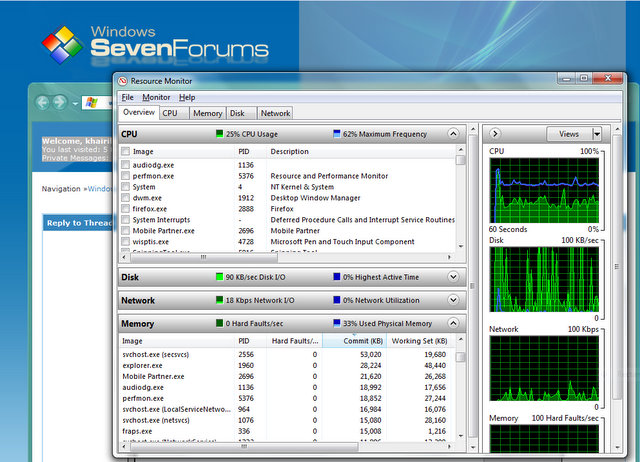
Ever tried the resource monitor?
it shows what u want to know..
start the task manager -> performance tab -> resource monitor
res%20%20mon.jpg
 

My Computer My Computer

At a glance

Windows 7 Enterprise Build 7600 | Windows XP SP2Intel C2D T6400 2MBL2 2.0Ghz | Intel Pentium-...2+1GB DDR2 666 5-5-5-15 | 512+512MB DDR400Intel GMA 4500MHD | ATI Mobility Radeon 7500
Computer Manufacturer/Model Number
Acer Aspire 4925 | IBM ThinkPad T42
OS
Windows 7 Enterprise Build 7600 | Windows XP SP2
CPU
Intel C2D T6400 2MBL2 2.0Ghz | Intel Pentium-M 2MBL2 1.7ghz
Motherboard
Acer Aspire 4935(GM45) | IBM Thinkpad T42
Memory
2+1GB DDR2 666 5-5-5-15 | 512+512MB DDR400
Graphics Card(s)
Intel GMA 4500MHD | ATI Mobility Radeon 7500
Sound Card
Realtek High Definition Audio
Monitor(s) Displays
Intergrated LCD
Screen Resolution
1366x768
Hard Drives
Hitachi SATAII 3.0Gbs 250GB 5400rpm| Samsung IDE 80GB 5400rpm
Cooling
Active-40mm fan | Passive-Heatsink
I have a similar problem where the windows explorer process takes up a huge amount of memory when i leave the computer running overnight. It is a nuisance but is easily sorted out in the space of 30 seconds.

All i do is to kill the explorer.exe process and then start a new one by clicking 'File -> New Task' and typing explorer.exe and i am in business again.

Strange thing is that i do not get the same problem on another computer running the same version of O/S, Antivirus and a few other programs.
 

My Computer My Computer

At a glance

Windows 7 x64 build 7068
OS
Windows 7 x64 build 7068
Back
Top