Solved Repeated attempts to "Eject" my ultrabay HD

1111000110

New member
Local time
9:56 AM
Messages
8
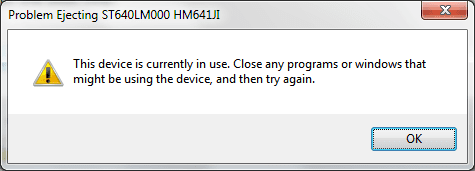
So I keep getting this pop-up (Att 1), saying that I can't eject my HD b/c it's in use by other programs, close any applications, etc, etc. This is occurring frequently often but not in a consistent pattern.

[Edit: I'm not trying to eject the drive, and don't want to - it's my full-time data drive.]

I found the associated entries in Event Viewer (pasted below). Anyone got pointers on how to determine what is kicking this off?


- System

- Provider

[ Name] Microsoft-Windows-UserPnp
[ Guid] {96F4A050-7E31-453C-88BE-9634F4E02139}

EventID 20011

Version 0

Level 4

Task 7006

Opcode 0

Keywords 0x8000000000000000

- TimeCreated

[ SystemTime] 2013-08-03T22:47:42.924435000Z

EventRecordID 314529

Correlation

- Execution

[ ProcessID] 152 [OP: svchost]
[ ThreadID] 7256

Channel System

Computer [OP: removed]

- Security

[ UserID] S-1-5-18


- UserData

- INFO_VETO_EVENT

VetoDevice IDE\[OP: snipped for brevity]\4&28d29191&0&0.1.0

VetoName STORAGE\Volume\[OP: snipped for brevity]

VetoType 6
 

Attachments
  • Untitled.png
    Untitled.png
    6.7 KB · Views: 4
Last edited:

My Computer My Computer

At a glance

Win7 x64Intel(R) Core(TM) i7-2720QM CPU @ 2.2GHz 2.1932 GB
Computer type
Laptop
Computer Manufacturer/Model Number
Lenovo W520
OS
Win7 x64
CPU
Intel(R) Core(TM) i7-2720QM CPU @ 2.2GHz 2.19
Memory
32 GB

My Computer My Computer

At a glance

Windows 10 Pro. 64/ version 1709 Windows 7 Pr...Intel i7-6800K @ 4.3Corsair Platinum 16 gig @2400EVGA GTX 1070 OC
Computer type
PC/Desktop
Computer Manufacturer/Model Number
Home made Desktop
OS
Windows 10 Pro. 64/ version 1709 Windows 7 Pro/64
CPU
Intel i7-6800K @ 4.3
Motherboard
ASUS X-99 Deluxe II
Memory
Corsair Platinum 16 gig @2400
Graphics Card(s)
EVGA GTX 1070 OC
Monitor(s) Displays
Asus 27" LED LCD/VE278Q
Screen Resolution
1920-1080 or 1280-720 HDMI
Hard Drives
INTEL SSD 730-240 Gb Sata 3.0/
PSU
EVGA Platium 1200W
Case
Phanteks Luxe Tempered Glass 8 fans/ one radiator
Cooling
XSPC/ Water Cooled CPU
Keyboard
Das 4 Professional
Mouse
Logitech M705/MX Anywhere 2-S
Internet Speed
100 mbits
Antivirus
Microsoft Security Essentials/ Malwarebytes Premium 3.0/ SAS
Browser
I.E. 11 default/Firefox/ ISP Time Warner Cable/Spectrum
Other Info
LG BluRay Burner/
Sound system-KLipsch-THX/
Icy Dock ssd Hot Swap bays.
Will do the tutorial and respond (sorry, getting late here).

But I'm not trying to eject anything - "something" else is. I'm just getting these annoying pop-up messages while trying to work. Currently, this drive is my D: drive - I replaced my optical drive w/ another laptop drive in a carrier in order to open up more data space (leaving C: for my OS).

Really just looking for some trouble-shooting tips - been stuck after finding the event logs.

What hard drive are you trying to disconnect. I know it can't be B or C.

Also please do this Tutorial.

By Brink.
http://www.sevenforums.com/tutorials/180324-system-info-see-your-system-specs.html
 

My Computer My Computer

At a glance

Win7 x64Intel(R) Core(TM) i7-2720QM CPU @ 2.2GHz 2.1932 GB
Computer type
Laptop
Computer Manufacturer/Model Number
Lenovo W520
OS
Win7 x64
CPU
Intel(R) Core(TM) i7-2720QM CPU @ 2.2GHz 2.19
Memory
32 GB

My Computer My Computer

At a glance

Windows 10 Pro. 64/ version 1709 Windows 7 Pr...Intel i7-6800K @ 4.3Corsair Platinum 16 gig @2400EVGA GTX 1070 OC
Computer type
PC/Desktop
Computer Manufacturer/Model Number
Home made Desktop
OS
Windows 10 Pro. 64/ version 1709 Windows 7 Pro/64
CPU
Intel i7-6800K @ 4.3
Motherboard
ASUS X-99 Deluxe II
Memory
Corsair Platinum 16 gig @2400
Graphics Card(s)
EVGA GTX 1070 OC
Monitor(s) Displays
Asus 27" LED LCD/VE278Q
Screen Resolution
1920-1080 or 1280-720 HDMI
Hard Drives
INTEL SSD 730-240 Gb Sata 3.0/
PSU
EVGA Platium 1200W
Case
Phanteks Luxe Tempered Glass 8 fans/ one radiator
Cooling
XSPC/ Water Cooled CPU
Keyboard
Das 4 Professional
Mouse
Logitech M705/MX Anywhere 2-S
Internet Speed
100 mbits
Antivirus
Microsoft Security Essentials/ Malwarebytes Premium 3.0/ SAS
Browser
I.E. 11 default/Firefox/ ISP Time Warner Cable/Spectrum
Other Info
LG BluRay Burner/
Sound system-KLipsch-THX/
Icy Dock ssd Hot Swap bays.
This might be what you are looking for.

http://www.sevenforums.com/tutorials/126435-notification-area-icons-customize.html

Check out the bottom of the page.

How to Hide or Show System Icons and Notifications in Windows 7
How to Turn System Icons On or Off in Windows 7
How to Enable or Disable Windows 7 Notification System Icons
How to Add or Remove the Notification Area from the Taskbar in Windows 7
How to Create a Notification Area Icons Shortcut in Windows 7
How to Reset and Clean Out Old Windows 7 Notification Area Icons
How to Enable or Disable Changing "Notification Area Icons" Settings in Windows 7
 

My Computer My Computer

At a glance

Windows 10 Pro. 64/ version 1709 Windows 7 Pr...Intel i7-6800K @ 4.3Corsair Platinum 16 gig @2400EVGA GTX 1070 OC
Computer type
PC/Desktop
Computer Manufacturer/Model Number
Home made Desktop
OS
Windows 10 Pro. 64/ version 1709 Windows 7 Pro/64
CPU
Intel i7-6800K @ 4.3
Motherboard
ASUS X-99 Deluxe II
Memory
Corsair Platinum 16 gig @2400
Graphics Card(s)
EVGA GTX 1070 OC
Monitor(s) Displays
Asus 27" LED LCD/VE278Q
Screen Resolution
1920-1080 or 1280-720 HDMI
Hard Drives
INTEL SSD 730-240 Gb Sata 3.0/
PSU
EVGA Platium 1200W
Case
Phanteks Luxe Tempered Glass 8 fans/ one radiator
Cooling
XSPC/ Water Cooled CPU
Keyboard
Das 4 Professional
Mouse
Logitech M705/MX Anywhere 2-S
Internet Speed
100 mbits
Antivirus
Microsoft Security Essentials/ Malwarebytes Premium 3.0/ SAS
Browser
I.E. 11 default/Firefox/ ISP Time Warner Cable/Spectrum
Other Info
LG BluRay Burner/
Sound system-KLipsch-THX/
Icy Dock ssd Hot Swap bays.
Took a look @ the post regarding notifications, I'm not seeing this pop-up in the notification area - it's a pop-up in the middle of the desktop. I'm not sure if that's applicable?
 

My Computer My Computer

At a glance

Win7 x64Intel(R) Core(TM) i7-2720QM CPU @ 2.2GHz 2.1932 GB
Computer type
Laptop
Computer Manufacturer/Model Number
Lenovo W520
OS
Win7 x64
CPU
Intel(R) Core(TM) i7-2720QM CPU @ 2.2GHz 2.19
Memory
32 GB
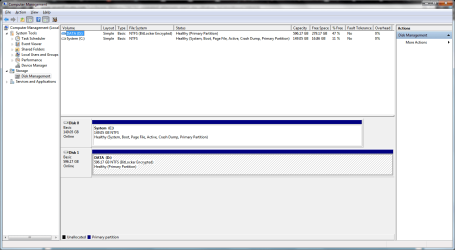
Attaching my Disk Management picture - I'm getting the notification re: drive D. Again, a laptop hard drive that's in a carrier in the optical disk bay (which is being identified as a USB?).
 

Attachments

  • Computer Management.png
    Computer Management.png
    34.2 KB · Views: 4

My Computer My Computer

At a glance

Win7 x64Intel(R) Core(TM) i7-2720QM CPU @ 2.2GHz 2.1932 GB
Computer type
Laptop
Computer Manufacturer/Model Number
Lenovo W520
OS
Win7 x64
CPU
Intel(R) Core(TM) i7-2720QM CPU @ 2.2GHz 2.19
Memory
32 GB

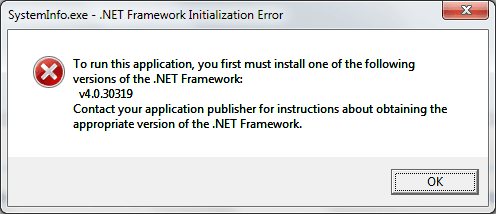
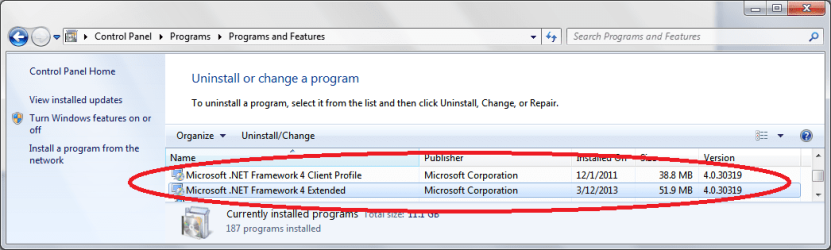
Attachments

  • Untitled1.png
    Untitled1.png
    8.1 KB · Views: 4
  • Untitled2.png
    Untitled2.png
    35.4 KB · Views: 4
Last edited by a moderator:

My Computer My Computer

At a glance

Win7 x64Intel(R) Core(TM) i7-2720QM CPU @ 2.2GHz 2.1932 GB
Computer type
Laptop
Computer Manufacturer/Model Number
Lenovo W520
OS
Win7 x64
CPU
Intel(R) Core(TM) i7-2720QM CPU @ 2.2GHz 2.19
Memory
32 GB
I'm not seeing it listed as USB. On my system DM shows both HD's and it shows the front bay card reader as "Removable Drives". I don't see any USB in my DM view.

Does your system think the drive is removable because it's attached to the PATA connection of the removed optical drive?

Remove or disable the optical drive in devise manager is the first thing I would try. I don't know if that would disable the HD that's now connected to the optical PATA. What model laptop?
 

My Computer My Computer

At a glance

Win8/8.1,Win7-U64, Vista U64, uncounted Linux...AMD and Intell, 9590, 8350, i5 3570kCorsair G SkillCrossfired Sapphire HD 7950 Vapor-X, ASUS R9 ...
Computer type
PC/Desktop
Computer Manufacturer/Model Number
Custom, Dell and Lenono LT's
OS
Win8/8.1,Win7-U64, Vista U64, uncounted Linux distor's
CPU
AMD and Intell, 9590, 8350, i5 3570k
Motherboard
CFVFZ, GA990FXA, Z77e-itx
Memory
Corsair G Skill
Graphics Card(s)
Crossfired Sapphire HD 7950 Vapor-X, ASUS R9 280X TOP
Sound Card
Realtek ALC889
Monitor(s) Displays
ViewSonic VX2770SMH 27" / ViewSonic VX2433 LCD 24"
Screen Resolution
1080i HD
Hard Drives
Samsung SSD 840 Pro
OCZ Agility 3's
OCZ Vector's
WD's Blue, red, green, Velociraptors
Seagate USB3 & Hybrid's
ASUS Blu-Ray
ASUS DVD
PSU
Corsair AX1200i, Seasonice 850 Gold
Case
Cooler Master HAF 922 & HAF 932, Lian Li Train case.
Cooling
Air, Glacer 240L expanded, custom EK loop with duel D5's
Keyboard
Microsoft SideWinder X4 USB Keyboard / Logitech 250 PS2
Mouse
Logitech G500 / MS wireless 5000
Internet Speed
Best of 5ms / 75+ dn / 12+ up More or less.
Antivirus
MS esentials-MalwareBytes
Browser
Firefox Chromebook
Yeah, I have no idea why this is seen as a USB...

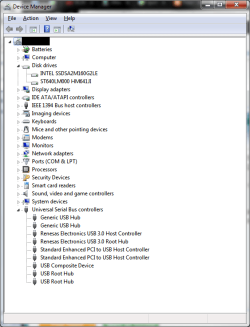
In device manager it's listed under drive not USB (see attached). I'm running a Lenovo W520.

Also, not seeing the Optical Drive (assume it would be under the "drives", and poked around other categories.)

I'm not seeing it listed as USB. On my system DM shows both HD's and it shows the front bay card reader as "Removable Drives". I don't see any USB in my DM view.

Does your system think the drive is removable because it's attached to the PATA connection of the removed optical drive?

Remove or disable the optical drive in devise manager is the first thing I would try. I don't know if that would disable the HD that's now connected to the optical PATA. What model laptop?
 

Attachments

  • Untitled4.png
    Untitled4.png
    23.8 KB · Views: 2
Last edited:

My Computer My Computer

At a glance

Win7 x64Intel(R) Core(TM) i7-2720QM CPU @ 2.2GHz 2.1932 GB
Computer type
Laptop
Computer Manufacturer/Model Number
Lenovo W520
OS
Win7 x64
CPU
Intel(R) Core(TM) i7-2720QM CPU @ 2.2GHz 2.19
Memory
32 GB

My Computer My Computer

At a glance

Win7 x64Intel(R) Core(TM) i7-2720QM CPU @ 2.2GHz 2.1932 GB
Computer type
Laptop
Computer Manufacturer/Model Number
Lenovo W520
OS
Win7 x64
CPU
Intel(R) Core(TM) i7-2720QM CPU @ 2.2GHz 2.19
Memory
32 GB
Your pop up in the desktop must be a Lenovo thing.
 

My Computer My Computer

At a glance

Windows 10 Pro. 64/ version 1709 Windows 7 Pr...Intel i7-6800K @ 4.3Corsair Platinum 16 gig @2400EVGA GTX 1070 OC
Computer type
PC/Desktop
Computer Manufacturer/Model Number
Home made Desktop
OS
Windows 10 Pro. 64/ version 1709 Windows 7 Pro/64
CPU
Intel i7-6800K @ 4.3
Motherboard
ASUS X-99 Deluxe II
Memory
Corsair Platinum 16 gig @2400
Graphics Card(s)
EVGA GTX 1070 OC
Monitor(s) Displays
Asus 27" LED LCD/VE278Q
Screen Resolution
1920-1080 or 1280-720 HDMI
Hard Drives
INTEL SSD 730-240 Gb Sata 3.0/
PSU
EVGA Platium 1200W
Case
Phanteks Luxe Tempered Glass 8 fans/ one radiator
Cooling
XSPC/ Water Cooled CPU
Keyboard
Das 4 Professional
Mouse
Logitech M705/MX Anywhere 2-S
Internet Speed
100 mbits
Antivirus
Microsoft Security Essentials/ Malwarebytes Premium 3.0/ SAS
Browser
I.E. 11 default/Firefox/ ISP Time Warner Cable/Spectrum
Other Info
LG BluRay Burner/
Sound system-KLipsch-THX/
Icy Dock ssd Hot Swap bays.
Your pop up in the desktop must be a Lenovo thing.

Yes your right seems to be a Lenovo problem .. I used to have the same problem until i decided to drop the bloatware and went for a Clean Install .. I think it has more to do with the Lenovo Power Management as it would only try to disable the Drive when not charging
 

My Computer My Computer

At a glance

windows 7 home 64bitINTEL-CORE I716GB
Computer Manufacturer/Model Number
W530-3630QM1
OS
windows 7 home 64bit
CPU
INTEL-CORE I7
Memory
16GB
Hard Drives
750GB
Browser
Chrome

My Computer My Computer

At a glance

Win7 x64Intel(R) Core(TM) i7-2720QM CPU @ 2.2GHz 2.1932 GB
Computer type
Laptop
Computer Manufacturer/Model Number
Lenovo W520
OS
Win7 x64
CPU
Intel(R) Core(TM) i7-2720QM CPU @ 2.2GHz 2.19
Memory
32 GB
Thats good to hear.
Happy computing.
 

My Computer My Computer

At a glance

Windows 10 Pro. 64/ version 1709 Windows 7 Pr...Intel i7-6800K @ 4.3Corsair Platinum 16 gig @2400EVGA GTX 1070 OC
Computer type
PC/Desktop
Computer Manufacturer/Model Number
Home made Desktop
OS
Windows 10 Pro. 64/ version 1709 Windows 7 Pro/64
CPU
Intel i7-6800K @ 4.3
Motherboard
ASUS X-99 Deluxe II
Memory
Corsair Platinum 16 gig @2400
Graphics Card(s)
EVGA GTX 1070 OC
Monitor(s) Displays
Asus 27" LED LCD/VE278Q
Screen Resolution
1920-1080 or 1280-720 HDMI
Hard Drives
INTEL SSD 730-240 Gb Sata 3.0/
PSU
EVGA Platium 1200W
Case
Phanteks Luxe Tempered Glass 8 fans/ one radiator
Cooling
XSPC/ Water Cooled CPU
Keyboard
Das 4 Professional
Mouse
Logitech M705/MX Anywhere 2-S
Internet Speed
100 mbits
Antivirus
Microsoft Security Essentials/ Malwarebytes Premium 3.0/ SAS
Browser
I.E. 11 default/Firefox/ ISP Time Warner Cable/Spectrum
Other Info
LG BluRay Burner/
Sound system-KLipsch-THX/
Icy Dock ssd Hot Swap bays.
Back
Top