Changed Sata settings in BIOS now disk is invalid

Hi Sandeep P

Thanks, two very useful links

Ray.
 

My Computer My Computer

At a glance

ME/XP/Vista/Win7
OS
ME/XP/Vista/Win7
the msata drive came with the laptop, its a dell vostro 3640 it has an i7, 8gb of ram intel hd graphics and nvidia 630m
 

My Computer My Computer

At a glance

windows 7 professional 64 bitintel i78gbnvidia 630m
Computer type
Laptop
Computer Manufacturer/Model Number
Dell
OS
windows 7 professional 64 bit
CPU
intel i7
Memory
8gb
Graphics Card(s)
nvidia 630m
Hard Drives
500gb
it has a daughterboard as well
 

My Computer My Computer

At a glance

windows 7 professional 64 bitintel i78gbnvidia 630m
Computer type
Laptop
Computer Manufacturer/Model Number
Dell
OS
windows 7 professional 64 bit
CPU
intel i7
Memory
8gb
Graphics Card(s)
nvidia 630m
Hard Drives
500gb
IRST was working before the clean install, after the reinstall i haven't been able to turn it back on.
 

My Computer My Computer

At a glance

windows 7 professional 64 bitintel i78gbnvidia 630m
Computer type
Laptop
Computer Manufacturer/Model Number
Dell
OS
windows 7 professional 64 bit
CPU
intel i7
Memory
8gb
Graphics Card(s)
nvidia 630m
Hard Drives
500gb
thanks for all the links, i'm pretty sure i can get IRST working if I follow those instructions. I got this pc in may though so doubt it's full of dust everywhere I look I get instructions on how to clean out my laptop. I've never had issues with any laptop overheating like this.
 

My Computer My Computer

At a glance

windows 7 professional 64 bitintel i78gbnvidia 630m
Computer type
Laptop
Computer Manufacturer/Model Number
Dell
OS
windows 7 professional 64 bit
CPU
intel i7
Memory
8gb
Graphics Card(s)
nvidia 630m
Hard Drives
500gb
Hi Sandeep P

Thanks, two very useful links

Ray.

Hi Ray,

Thanks for your comments it makes all the efforts to post this tutorial worthwhile. Looking forward to contribute more in near future. And, thanks alot for the REP as well.
 

My Computer My Computer

At a glance

Winndows 7 32 bit
Computer type
PC/Desktop
OS
Winndows 7 32 bit
thanks for all the links, i'm pretty sure i can get IRST working if I follow those instructions. I got this pc in may though so doubt it's full of dust everywhere I look I get instructions on how to clean out my laptop. I've never had issues with any laptop overheating like this.

Hi goodjob1,

Thanks for your reply. Please let me know if you have installed the windows with ISRT enabled in BIOS and then installed windows on the SATA drive. Also, did you load the driver for ISRT while installing windows.

Once you follow the tutorial you should be able to get it working as many other users were able to install windows using this method.

You could use a can of compressed air to blow the dust out from the laptop. Check this video which might be useful for you :

http://www.youtube.com/watch?v=5H5JobmW-PQ

Keep us posted with the results so we can advise you further.
 

My Computer My Computer

At a glance

Winndows 7 32 bit
Computer type
PC/Desktop
OS
Winndows 7 32 bit
Thank you's go to goodjob, and Sandeep; goodjob for suppling the needed information, and Sandeep for his wealth of knowledge. Kudos for the both of you.

I also bookmarked those two mSATA links Sandeep.
 

My Computer My Computer

At a glance

Originally Win 7 Hm Prem x64 Ver 6.1.7600 Bui...Intel i3 530 2.93GHz, 2933MHz 2 Cores 4 Logic...6GB of 1,333MHz DDR3 SDRAM32MB Intel Graphics Media Accelerator HD IGChip
Computer type
PC/Desktop
Computer Manufacturer/Model Number
Gateway DX4831-01e (Mid-Tower Desktop)
OS
Originally Win 7 Hm Prem x64 Ver 6.1.7600 Build 7601-SP1 | Upgraded to Windows 10 December 14, 2019
CPU
Intel i3 530 2.93GHz, 2933MHz 2 Cores 4 Logical Processors
Motherboard
Gateway H57M01 133 megahertz
Memory
6GB of 1,333MHz DDR3 SDRAM
Graphics Card(s)
32MB Intel Graphics Media Accelerator HD IGChip
Sound Card
Realtek High Definition Audio
Monitor(s) Displays
Gateway HX2000 20inch TFT active matrix TN
Screen Resolution
1600 x 900 x 59 hertz
Hard Drives
WDC WD10EADS-00M2B0 [HDD] (1000.20 GB) -- drive 0,
HL-DT-ST DVDRAM GH41N [CD-ROM dr]
Four card readers, and Four USB 2.0
PSU
300watts.
Case
Mid-Tower Desktop
Cooling
Stock from Gateway
Keyboard
Natural Ergonomic Keyboard 4000, see Other Info
Mouse
Orig. Gateway wore out now using Insignia USB wired optical
Internet Speed
Vz FIOS 10ms png 57.64Mbps down 65.53Mbps up Speedtest.org
Antivirus
Zamana Anti-logger with Anti-malware, MSE, Windows Firewall,
Browser
IE11.0.9600.19399-Upd ver11.0.135, Firefox 68.0.1 x64
Other Info
System Specs by Belarc.

BIOS: American Megatrends Inc. P01-A0 11/17/2009

Replaced the MS 'Natural' Standard PS/2 Enhanced 101-102 Keyboard with a new Natural Ergonomic Keyboard 4000 on August 1st 2014.

Canon Pixma MG3222 Printer.

Updated to IE11 on 12102015 | Fios Quantum Router g1100

Additional AV: SpywareBlaster, manual Mbam, SAS
Thank you's go to goodjob, and Sandeep; goodjob for suppling the needed information, and Sandeep for his wealth of knowledge. Kudos for the both of you.

I also bookmarked those two mSATA links Sandeep.

Hi Anak,

Thanks for your kind words. I am honored to have this recognition from you.

I am glad that I was able to provide the relevant information in this regards. Hope it helps in resolving the original issue with poster.
 

My Computer My Computer

At a glance

Winndows 7 32 bit
Computer type
PC/Desktop
OS
Winndows 7 32 bit
I reinstalled windows without irst enabled, do i have to do another clean install of windows with irst enabled? I tried to do it that way a few times but I always get a message asking for drivers to locate the disks. I've tired using the driver disk that came with the laptop but I can't ever find the drivers to locate any disks to reinstall.
 

My Computer My Computer

At a glance

windows 7 professional 64 bitintel i78gbnvidia 630m
Computer type
Laptop
Computer Manufacturer/Model Number
Dell
OS
windows 7 professional 64 bit
CPU
intel i7
Memory
8gb
Graphics Card(s)
nvidia 630m
Hard Drives
500gb
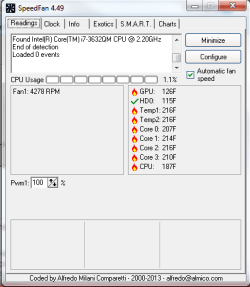
I think this is the root of my problems. The fan is running and i can feel air coming out of the vents.
Untitled.png
 

My Computer My Computer

At a glance

windows 7 professional 64 bitintel i78gbnvidia 630m
Computer type
Laptop
Computer Manufacturer/Model Number
Dell
OS
windows 7 professional 64 bit
CPU
intel i7
Memory
8gb
Graphics Card(s)
nvidia 630m
Hard Drives
500gb
I reinstalled windows without irst enabled, do i have to do another clean install of windows with irst enabled? I tried to do it that way a few times but I always get a message asking for drivers to locate the disks. I've tired using the driver disk that came with the laptop but I can't ever find the drivers to locate any disks to reinstall.
Are you following SandeepP's tutorial?

  • One item that is a little out of sequence is you need to have the IRST drivers either on a CD/DVD or flash drive before you start.
  • Then you go into the IRST application and disable Acceleration and reset to available.
  • Then go into the BIOS and make sure SATA is set to IRST.
  • Step #4 At this point you start the OS installation and when the OS install asks for the drivers you browse to where you have saved them on your CD/DVD/flash, and load the IRST drivers. The link is provided right before step #5.
  • Finish the OS install.
  • Re-enable IRST in the IRST application window.
  • Finish out the rest of the tutorial.


I think this is the root of my problems. The fan is running and i can feel air coming out of the vents.
View attachment 283112
Well, That is a good thing isn't it? :p Sorry, couldn't help myself.

This isn't the exact same model, but should be close. Check this out to remove "fluff".


You could use a can of compressed air to blow out the area and chassis, even the fan itself, but, hold the fan blade while doing this or else you risk the chance of ruining the fan blade bearings.
 

My Computer My Computer

At a glance

Originally Win 7 Hm Prem x64 Ver 6.1.7600 Bui...Intel i3 530 2.93GHz, 2933MHz 2 Cores 4 Logic...6GB of 1,333MHz DDR3 SDRAM32MB Intel Graphics Media Accelerator HD IGChip
Computer type
PC/Desktop
Computer Manufacturer/Model Number
Gateway DX4831-01e (Mid-Tower Desktop)
OS
Originally Win 7 Hm Prem x64 Ver 6.1.7600 Build 7601-SP1 | Upgraded to Windows 10 December 14, 2019
CPU
Intel i3 530 2.93GHz, 2933MHz 2 Cores 4 Logical Processors
Motherboard
Gateway H57M01 133 megahertz
Memory
6GB of 1,333MHz DDR3 SDRAM
Graphics Card(s)
32MB Intel Graphics Media Accelerator HD IGChip
Sound Card
Realtek High Definition Audio
Monitor(s) Displays
Gateway HX2000 20inch TFT active matrix TN
Screen Resolution
1600 x 900 x 59 hertz
Hard Drives
WDC WD10EADS-00M2B0 [HDD] (1000.20 GB) -- drive 0,
HL-DT-ST DVDRAM GH41N [CD-ROM dr]
Four card readers, and Four USB 2.0
PSU
300watts.
Case
Mid-Tower Desktop
Cooling
Stock from Gateway
Keyboard
Natural Ergonomic Keyboard 4000, see Other Info
Mouse
Orig. Gateway wore out now using Insignia USB wired optical
Internet Speed
Vz FIOS 10ms png 57.64Mbps down 65.53Mbps up Speedtest.org
Antivirus
Zamana Anti-logger with Anti-malware, MSE, Windows Firewall,
Browser
IE11.0.9600.19399-Upd ver11.0.135, Firefox 68.0.1 x64
Other Info
System Specs by Belarc.

BIOS: American Megatrends Inc. P01-A0 11/17/2009

Replaced the MS 'Natural' Standard PS/2 Enhanced 101-102 Keyboard with a new Natural Ergonomic Keyboard 4000 on August 1st 2014.

Canon Pixma MG3222 Printer.

Updated to IE11 on 12102015 | Fios Quantum Router g1100

Additional AV: SpywareBlaster, manual Mbam, SAS
I reinstalled windows without irst enabled, do i have to do another clean install of windows with irst enabled? I tried to do it that way a few times but I always get a message asking for drivers to locate the disks. I've tired using the driver disk that came with the laptop but I can't ever find the drivers to locate any disks to reinstall.

Hi goodjob1,

If you have installed the windows without the IRST enabled in the BIOS then you should not be able to use the MSATA drive as cache device. You would need to reinstall windows.

You can download the Intel Drivers for IRST for the system from here.

Regarding Fan kindly follow the video to take out any dust so that Fan can perform properly and ensure no overheating in the system.

Keep us posted with the results so we can advise you further.
 

My Computer My Computer

At a glance

Winndows 7 32 bit
Computer type
PC/Desktop
OS
Winndows 7 32 bit
Back
Top
