
7950 Crossfire Enabled but not (if that makes sense)

Apprentrice5

New member
Member
VIP
Local time
8:05 PM
Messages
109
Location
Wimborne, Dorset (Near Bournemouth)
Hi guys,

I will say before i start i have never used dual graphics cards in my system before.

I recently bought a second XFX 7950 graphics card for my system as it was on sale

I have installed the second card and plugged it in, and its recognized by my system that it is there.

In CCC, and GPU-Z it is saying that crossfire is enabled, but in speccy it is saying it isn't. and when I played Battlefield 3 for not even 5 minutes on ultra using Eyefinity it made my primary GPU to go up to 87 degrees C.

So i would say that it isn't enabled.

Any help would be appreciated :)
 

My Computer My Computer

At a glance

Windows 7 Home Premium 64Bit (Service Pack 1)Intel i5 3570k @ 3.4Ghz - Cooler: Corsair H80iCrucial Ballistix Tactical 8gb 1866MhzXFX HD 7950 3Gb
Computer type
PC/Desktop
Computer Manufacturer/Model Number
Custom Build
OS
Windows 7 Home Premium 64Bit (Service Pack 1)
CPU
Intel i5 3570k @ 3.4Ghz - Cooler: Corsair H80i
Motherboard
Asus P8Z77-V
Memory
Crucial Ballistix Tactical 8gb 1866Mhz
Graphics Card(s)
XFX HD 7950 3Gb
Sound Card
On Board
Monitor(s) Displays
2 X Acer G225HQVbd 21.5"
Screen Resolution
1920 x 1080
Hard Drives
1 x 128Gb Corsair Force
1 x 2Tb Seagate Barracuda
1 x 3Tb Toshiba External (Everything Else)
PSU
Corsair AX860 Fully Modular
Case
CM Haf XB
Cooling
2 x Corsair AF120 2 x BeQuiet Silent wings 80mm
Keyboard
Saitek Cyborg V5
Mouse
Saitek Cyborg R.A.T 3
Internet Speed
50 mb/s Dl 15mb/s UL
Antivirus
MSE
Browser
Firefox
Other Info
Samsung 22xDVD RW
160Gb Hitachi Portable
500Gb Seagate Portable
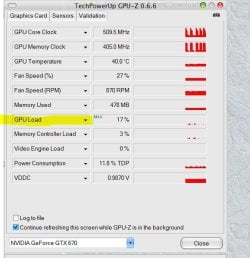
In CCC, and GPU-Z it is saying that crossfire is enabled, but in speccy it is saying it isn't.

I'd trust CCC/GPU-Z over speccy.


To verify, Open GPU-Z and select the second card from the dropdown menu.

Under sensors, look for GPU Load. In the dropdown menu select "Show Highest Reading"

gpuMAX.JPG

Run the game and either quit or alt-Tab and see what the GPU Load is for the 2nd card. If crossfire is not enabled then there will little to no usage shown. If it is enabled then it will show load usage.

To compare, you can run two instances of GPU-Z - one for each card. If the Load is the same or close to for both cards, then it's definitely working.

Or you can also use Afterburner to monitor both cards simultaneously. Once out of the game you can compare the gpu load for each card. Again, if there is little to zero load on the 2nd card - it's not enabled. If it's the same as the primary - it's enabled.


and when I played Battlefield 3 for not even 5 minutes on ultra using Eyefinity it made my primary GPU to go up to 87 degrees C.
Simply adding the second card is enough to make the primary card run hotter as the bottom card disturbs the airflow.

Jumps of 10-20c is not uncommon for dual cards.


Unfortunately one downside to multi cards is the extra heat and noise. You can either manually crank your fans up in CCC or use Afterburner to create a custom fan profile to help keep temps down.

I'd wager it is enabled.
 

My Computer My Computer

At a glance

8 Pro x64i7 3770K 4.6GHz16GB G.Skill Trident X 2666mhzx2 EVGA 780 Ti Superclocked SLI
Computer type
PC/Desktop
Computer Manufacturer/Model Number
Systems by SmartEyeball
OS
8 Pro x64
CPU
i7 3770K 4.6GHz
Motherboard
ASUS P8Z77 WS
Memory
16GB G.Skill Trident X 2666mhz
Graphics Card(s)
x2 EVGA 780 Ti Superclocked SLI
Sound Card
SB X-FI Surround 5.1 PRO USB / ATH-AD900 Headphones
Monitor(s) Displays
x3 Dell U2410 / 58" Samsung
Screen Resolution
5760*1200/ 1920*1200
Hard Drives
2x Intel 520 240GB (RAID 0) * 2x WD Caviar Blacks 2TB (RAID 0) * 2TB WD Caviar Black * Sony Optirac DVD
PSU
Silverstone Strider Evolution 1200W
Case
Thermaltake Level 10 GT Snow Edition
Cooling
Noctua NH-D14
Keyboard
Topre Realforce // Ducky Shine MX Black // Filco Ninja TKL
Mouse
Thermaltake Theron (Highly Recommended) + Razer Imperator
Antivirus
MSE
Browser
IE, FF, WaterFox
Other Info
GT Extreme V2 Sim Racing Cockpit + 40" LCD and K/B Mouse stand ▼
Fanatec CSR Elite Wheel + Clubsport V1 Pedals + CSR shifter/7G-H ▼Saitek X52 Pro ▼ TrackIR 5 Pro
Buttkicker v2 Seat Rumbler with Dedicated 5.1 and Sub Woofer attached to frame ▼
=
Bloody Big Grin
With CrossFire the load is not equally distributed between cards. Normally card 0 runs at 100% and card 1 runs 40-80%. Adding the second card adds heat and blocks airflow. It helps to have a 200mm side fan blow directly on the two cards
 

My Computer My Computer

At a glance

Win8/8.1,Win7-U64, Vista U64, uncounted Linux...AMD and Intell, 9590, 8350, i5 3570kCorsair G SkillCrossfired Sapphire HD 7950 Vapor-X, ASUS R9 ...
Computer type
PC/Desktop
Computer Manufacturer/Model Number
Custom, Dell and Lenono LT's
OS
Win8/8.1,Win7-U64, Vista U64, uncounted Linux distor's
CPU
AMD and Intell, 9590, 8350, i5 3570k
Motherboard
CFVFZ, GA990FXA, Z77e-itx
Memory
Corsair G Skill
Graphics Card(s)
Crossfired Sapphire HD 7950 Vapor-X, ASUS R9 280X TOP
Sound Card
Realtek ALC889
Monitor(s) Displays
ViewSonic VX2770SMH 27" / ViewSonic VX2433 LCD 24"
Screen Resolution
1080i HD
Hard Drives
Samsung SSD 840 Pro
OCZ Agility 3's
OCZ Vector's
WD's Blue, red, green, Velociraptors
Seagate USB3 & Hybrid's
ASUS Blu-Ray
ASUS DVD
PSU
Corsair AX1200i, Seasonice 850 Gold
Case
Cooler Master HAF 922 & HAF 932, Lian Li Train case.
Cooling
Air, Glacer 240L expanded, custom EK loop with duel D5's
Keyboard
Microsoft SideWinder X4 USB Keyboard / Logitech 250 PS2
Mouse
Logitech G500 / MS wireless 5000
Internet Speed
Best of 5ms / 75+ dn / 12+ up More or less.
Antivirus
MS esentials-MalwareBytes
Browser
Firefox Chromebook
Thank you for the detailed response :)

Run the game and either quit or alt-Tab and see what the GPU Load is for the 2nd card. If crossfire is not enabled then there will little to no usage shown. If it is enabled then it will show load usage

Ok, ill try this when i get home this evening, how long would you say is a suitable time to play for to get a good reading?

Unfortunately one downside to multi cards is the extra heat and noise. You can either manually crank your fans up in CCC or use Afterburner to create a custom fan profile to help keep temps down.

Ill just crank the fans up then. Not fussed about the noise while gaming cos i normally use a headset and have it quite loud anyway.


With CrossFire the load is not equally distributed between cards. Normally card 0 runs at 100% and card 1 runs 40-80%. Adding the second card adds heat and blocks airflow. It helps to have a 200mm side fan blow directly on the two cards

Thanks for the reply madcrate. Unfortunately my case does not allow for a fan to be mounted on to the side panel so this is not a viable option, I will however review what i can do to get more airflow over the cards.
 

My Computer My Computer

At a glance

Windows 7 Home Premium 64Bit (Service Pack 1)Intel i5 3570k @ 3.4Ghz - Cooler: Corsair H80iCrucial Ballistix Tactical 8gb 1866MhzXFX HD 7950 3Gb
Computer type
PC/Desktop
Computer Manufacturer/Model Number
Custom Build
OS
Windows 7 Home Premium 64Bit (Service Pack 1)
CPU
Intel i5 3570k @ 3.4Ghz - Cooler: Corsair H80i
Motherboard
Asus P8Z77-V
Memory
Crucial Ballistix Tactical 8gb 1866Mhz
Graphics Card(s)
XFX HD 7950 3Gb
Sound Card
On Board
Monitor(s) Displays
2 X Acer G225HQVbd 21.5"
Screen Resolution
1920 x 1080
Hard Drives
1 x 128Gb Corsair Force
1 x 2Tb Seagate Barracuda
1 x 3Tb Toshiba External (Everything Else)
PSU
Corsair AX860 Fully Modular
Case
CM Haf XB
Cooling
2 x Corsair AF120 2 x BeQuiet Silent wings 80mm
Keyboard
Saitek Cyborg V5
Mouse
Saitek Cyborg R.A.T 3
Internet Speed
50 mb/s Dl 15mb/s UL
Antivirus
MSE
Browser
Firefox
Other Info
Samsung 22xDVD RW
160Gb Hitachi Portable
500Gb Seagate Portable
Ok, ill try this when i get home this evening, how long would you say is a suitable time to play for to get a good reading?

CF will trigger as soon as the cards hit the full 3D clocks. (ie in game, not menu) Less than a minute will be enough to see if the 2nd card is active or not.
 

My Computer My Computer

At a glance

8 Pro x64i7 3770K 4.6GHz16GB G.Skill Trident X 2666mhzx2 EVGA 780 Ti Superclocked SLI
Computer type
PC/Desktop
Computer Manufacturer/Model Number
Systems by SmartEyeball
OS
8 Pro x64
CPU
i7 3770K 4.6GHz
Motherboard
ASUS P8Z77 WS
Memory
16GB G.Skill Trident X 2666mhz
Graphics Card(s)
x2 EVGA 780 Ti Superclocked SLI
Sound Card
SB X-FI Surround 5.1 PRO USB / ATH-AD900 Headphones
Monitor(s) Displays
x3 Dell U2410 / 58" Samsung
Screen Resolution
5760*1200/ 1920*1200
Hard Drives
2x Intel 520 240GB (RAID 0) * 2x WD Caviar Blacks 2TB (RAID 0) * 2TB WD Caviar Black * Sony Optirac DVD
PSU
Silverstone Strider Evolution 1200W
Case
Thermaltake Level 10 GT Snow Edition
Cooling
Noctua NH-D14
Keyboard
Topre Realforce // Ducky Shine MX Black // Filco Ninja TKL
Mouse
Thermaltake Theron (Highly Recommended) + Razer Imperator
Antivirus
MSE
Browser
IE, FF, WaterFox
Other Info
GT Extreme V2 Sim Racing Cockpit + 40" LCD and K/B Mouse stand ▼
Fanatec CSR Elite Wheel + Clubsport V1 Pedals + CSR shifter/7G-H ▼Saitek X52 Pro ▼ TrackIR 5 Pro
Buttkicker v2 Seat Rumbler with Dedicated 5.1 and Sub Woofer attached to frame ▼
=
Bloody Big Grin
Hmmm well I have had some Crossfire issues where my cards have done the same but .....

When I am in Crossfire it Disables itself because card #2 can't keep up with card one

are these the same makes of cards running at the same speeds because in Tandem there not supposed to get that hot

I hate to say but above information is false the main GPU does most of the load but with Crossfire it's about 60% main GPU and 40 % the other GPU which top temps if any should be getting 70c to 80c max

that is normal especially in demanding games if you really want to see if crossfire is working correctly check the CCC if it is still enabled when it isn't or Disabled itself it will tell you straight up

My main GPU by itself under Heavy load reaches 72c max and I am running a single reference card right now and I assume yours has after market cooling so I would assume it is the game settings also it would help to keep V-sync on it helps the temps and stops your GPU's from going crazy because I bet that is what the issue is turn on V-sync
 

My Computer My Computer

At a glance

Windows 10 Home Premium 64bit sp1Intel I7-6700K @ 4.6 Ghz 1.344 volts everyday OC32GB G-Skill TridentZ 3200mhz 16-18-18-38 DDR4Sli Gigabyte Windforce GTX 980 G1
Computer type
PC/Desktop
Computer Manufacturer/Model Number
CoreI7-6700K MrFingerIII Special Builds
OS
Windows 10 Home Premium 64bit sp1
CPU
Intel I7-6700K @ 4.6 Ghz 1.344 volts everyday OC
Motherboard
Asrock Fatality K6 Z170 Socket 1151
Memory
32GB G-Skill TridentZ 3200mhz 16-18-18-38 DDR4
Graphics Card(s)
Sli Gigabyte Windforce GTX 980 G1
Sound Card
AC97 Creative Rage Tactic 3D Headphones Bluetooth
Monitor(s) Displays
27" Asus ROG Swift PG278Q G-Sync 48" Vizio Smart HD TV
Screen Resolution
2560x1440p 27"- 48" Currently Gaming at 2560x1440p Res 2K
Hard Drives
250GB Samsung Evo840SSD Seagate baracuda 500 GB WD Mybook 500Gb 1TB Seagate Barracuda
PSU
HX1050w Corsair Silver 80plus certified crosfire/sli
Case
Enthod Pro Full Tower
Cooling
Corsair H110i GT 280 mm High Performance WaterBlock
Keyboard
Logitech wireless keyboard
Mouse
Logitech wireless mouse
Internet Speed
Cox Cable 100+ mb
Antivirus
WebRoot Spysweeper with Antivirus
Browser
IE-10, Chrome, Opera
Other Info
My Other Rig is a AMD FX8320E @4.6Ghz 16GB Ballistic Sport Ram
Mobo Asrock Fatality 990FX 120GB OCZ SSD 1TB Seagate Barracuda Corsair H75 Cooling PSU Corsair CX750
GPU GTX Gigabyte 970G1

My Computer My Computer

At a glance

Windows 7 Home Premium 64Bit (Service Pack 1)Intel i5 3570k @ 3.4Ghz - Cooler: Corsair H80iCrucial Ballistix Tactical 8gb 1866MhzXFX HD 7950 3Gb
Computer type
PC/Desktop
Computer Manufacturer/Model Number
Custom Build
OS
Windows 7 Home Premium 64Bit (Service Pack 1)
CPU
Intel i5 3570k @ 3.4Ghz - Cooler: Corsair H80i
Motherboard
Asus P8Z77-V
Memory
Crucial Ballistix Tactical 8gb 1866Mhz
Graphics Card(s)
XFX HD 7950 3Gb
Sound Card
On Board
Monitor(s) Displays
2 X Acer G225HQVbd 21.5"
Screen Resolution
1920 x 1080
Hard Drives
1 x 128Gb Corsair Force
1 x 2Tb Seagate Barracuda
1 x 3Tb Toshiba External (Everything Else)
PSU
Corsair AX860 Fully Modular
Case
CM Haf XB
Cooling
2 x Corsair AF120 2 x BeQuiet Silent wings 80mm
Keyboard
Saitek Cyborg V5
Mouse
Saitek Cyborg R.A.T 3
Internet Speed
50 mb/s Dl 15mb/s UL
Antivirus
MSE
Browser
Firefox
Other Info
Samsung 22xDVD RW
160Gb Hitachi Portable
500Gb Seagate Portable
Check the speeds also if the main GPU is clocked higher it will take the speed of the lesser forcing it to downclock take that in mind too
 

My Computer My Computer

At a glance

Windows 10 Home Premium 64bit sp1Intel I7-6700K @ 4.6 Ghz 1.344 volts everyday OC32GB G-Skill TridentZ 3200mhz 16-18-18-38 DDR4Sli Gigabyte Windforce GTX 980 G1
Computer type
PC/Desktop
Computer Manufacturer/Model Number
CoreI7-6700K MrFingerIII Special Builds
OS
Windows 10 Home Premium 64bit sp1
CPU
Intel I7-6700K @ 4.6 Ghz 1.344 volts everyday OC
Motherboard
Asrock Fatality K6 Z170 Socket 1151
Memory
32GB G-Skill TridentZ 3200mhz 16-18-18-38 DDR4
Graphics Card(s)
Sli Gigabyte Windforce GTX 980 G1
Sound Card
AC97 Creative Rage Tactic 3D Headphones Bluetooth
Monitor(s) Displays
27" Asus ROG Swift PG278Q G-Sync 48" Vizio Smart HD TV
Screen Resolution
2560x1440p 27"- 48" Currently Gaming at 2560x1440p Res 2K
Hard Drives
250GB Samsung Evo840SSD Seagate baracuda 500 GB WD Mybook 500Gb 1TB Seagate Barracuda
PSU
HX1050w Corsair Silver 80plus certified crosfire/sli
Case
Enthod Pro Full Tower
Cooling
Corsair H110i GT 280 mm High Performance WaterBlock
Keyboard
Logitech wireless keyboard
Mouse
Logitech wireless mouse
Internet Speed
Cox Cable 100+ mb
Antivirus
WebRoot Spysweeper with Antivirus
Browser
IE-10, Chrome, Opera
Other Info
My Other Rig is a AMD FX8320E @4.6Ghz 16GB Ballistic Sport Ram
Mobo Asrock Fatality 990FX 120GB OCZ SSD 1TB Seagate Barracuda Corsair H75 Cooling PSU Corsair CX750
GPU GTX Gigabyte 970G1
Back
Top